

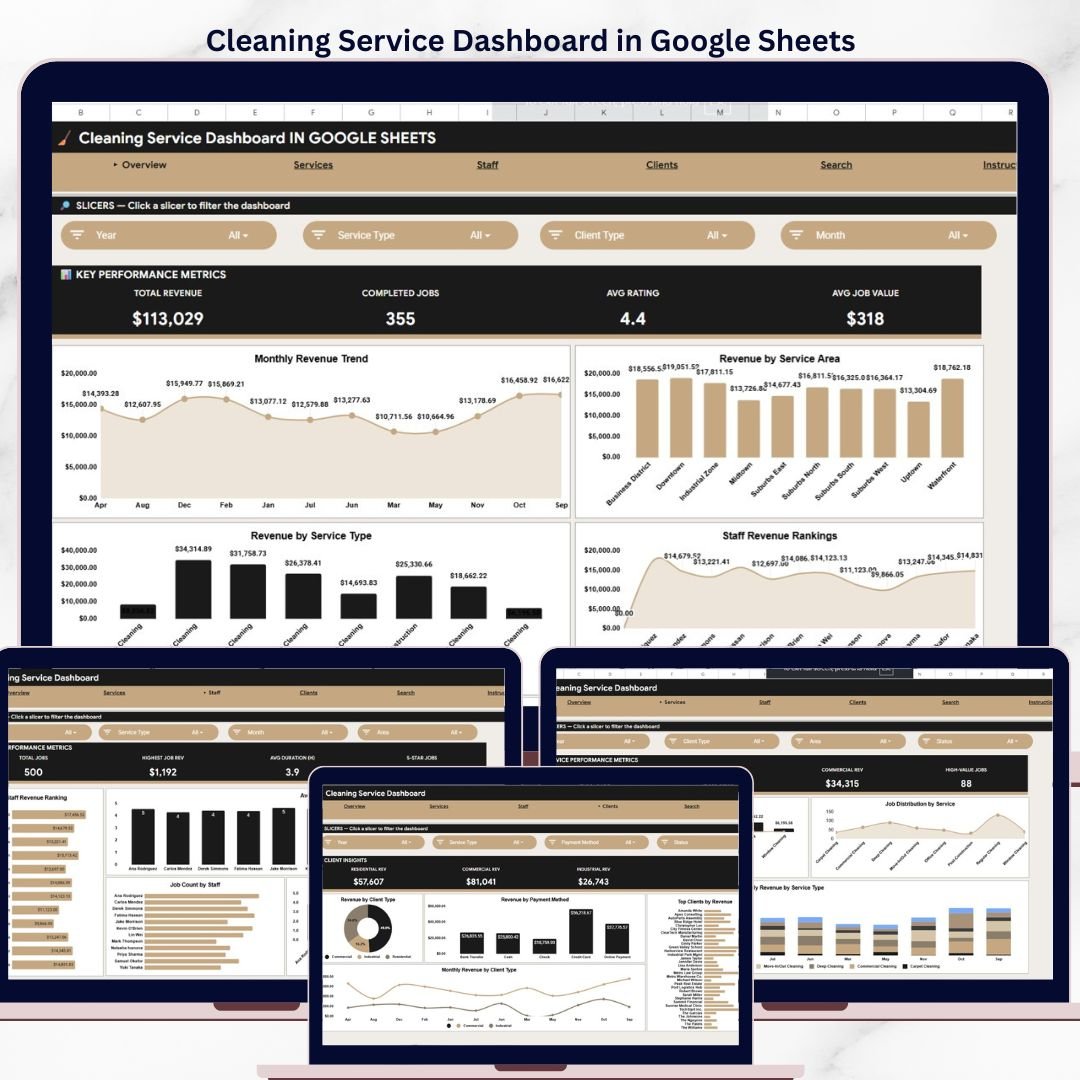

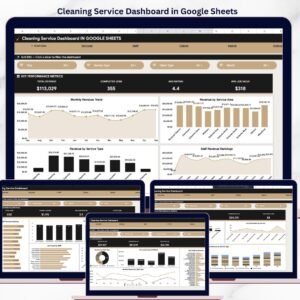
The Cleaning Service Dashboard in Google Sheets tracks 4 KPIs across 6 interactive pages, with 12 pre-built charts, slicers for instant filtering, and a dedicated search sheet for quick job lookups. Setup takes under 10 minutes — just replace the sample data and every chart, card, and filter updates automatically.
🌍 Join 10,000+ customers in 180+ countries using NextGenTemplates to replace paid SaaS tools with one-time-purchase Excel, Google Sheets, Power BI, and HTML templates.
✅ Instant download · One-time payment · No subscription · No per-user fees · Lifetime access
🔑 Key Features of Cleaning Service Dashboard in Google Sheets
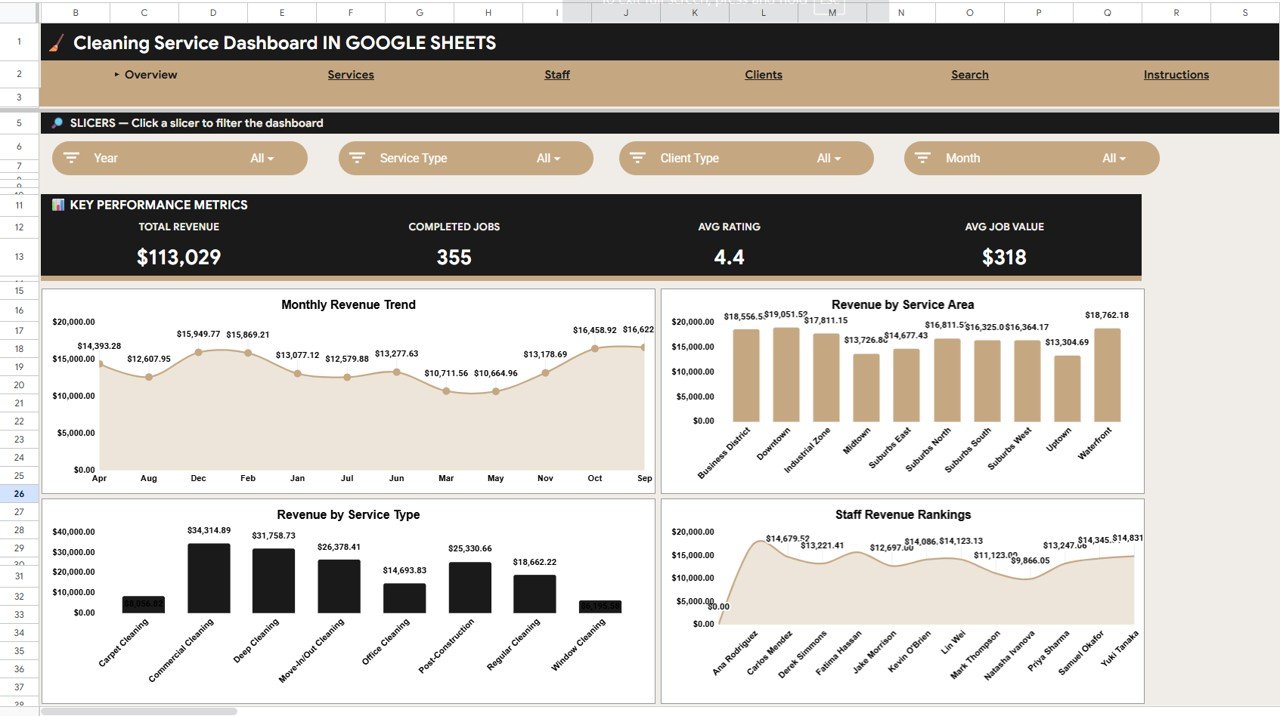
This dashboard delivers a complete analytics solution for cleaning businesses — from solo operators to multi-staff agencies. The Overview page displays 4 KPI cards (Total Revenue, Completed Jobs, Average Rating, Average Job Value) alongside 4 charts covering revenue by month, service area, service type, and staff member. Multiple slicers let you filter the entire dashboard by date range, staff, service area, or job status in one click.
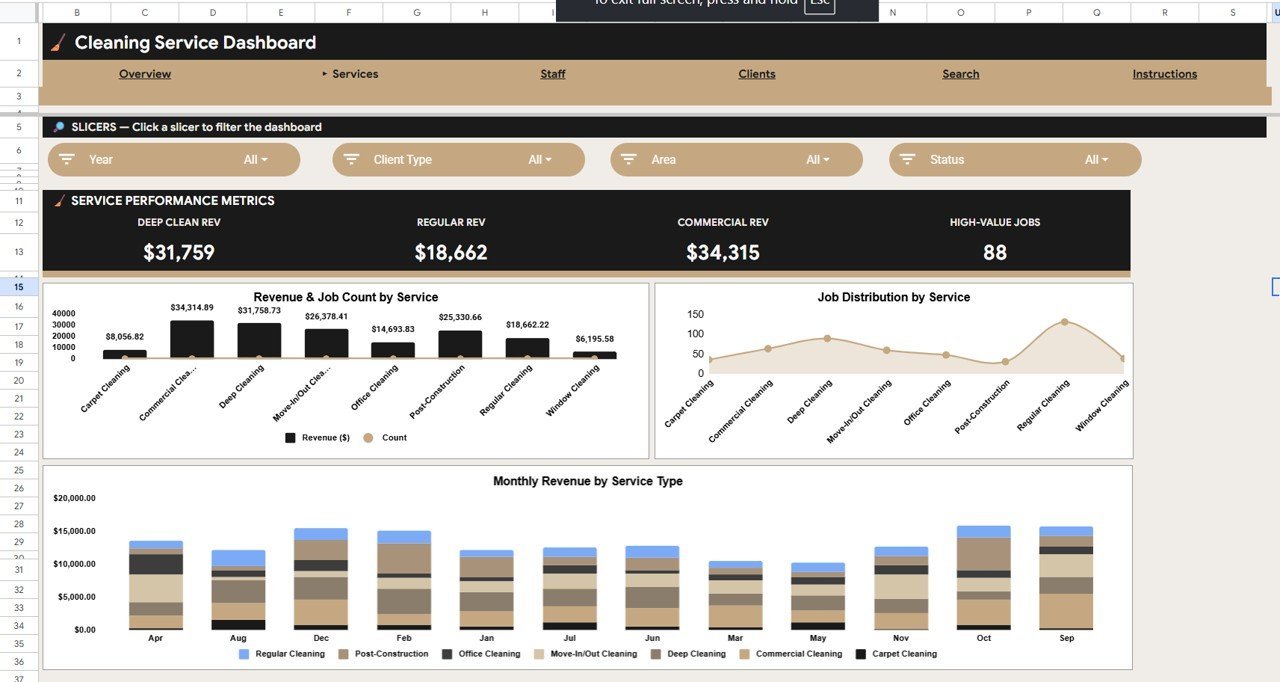
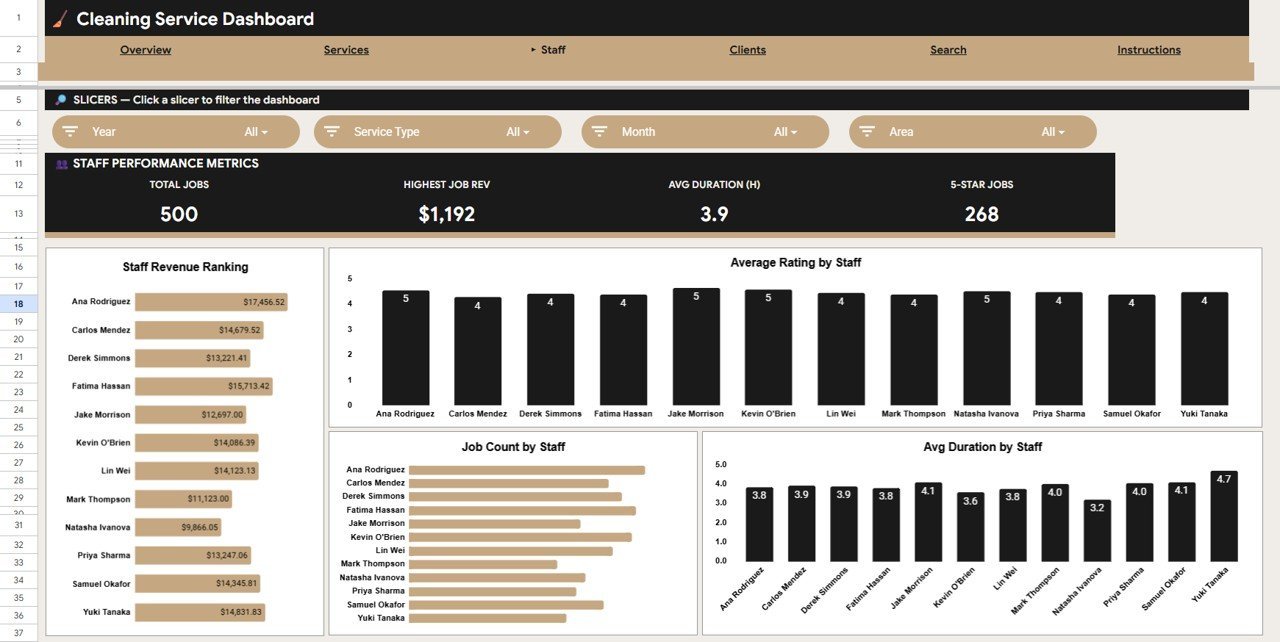
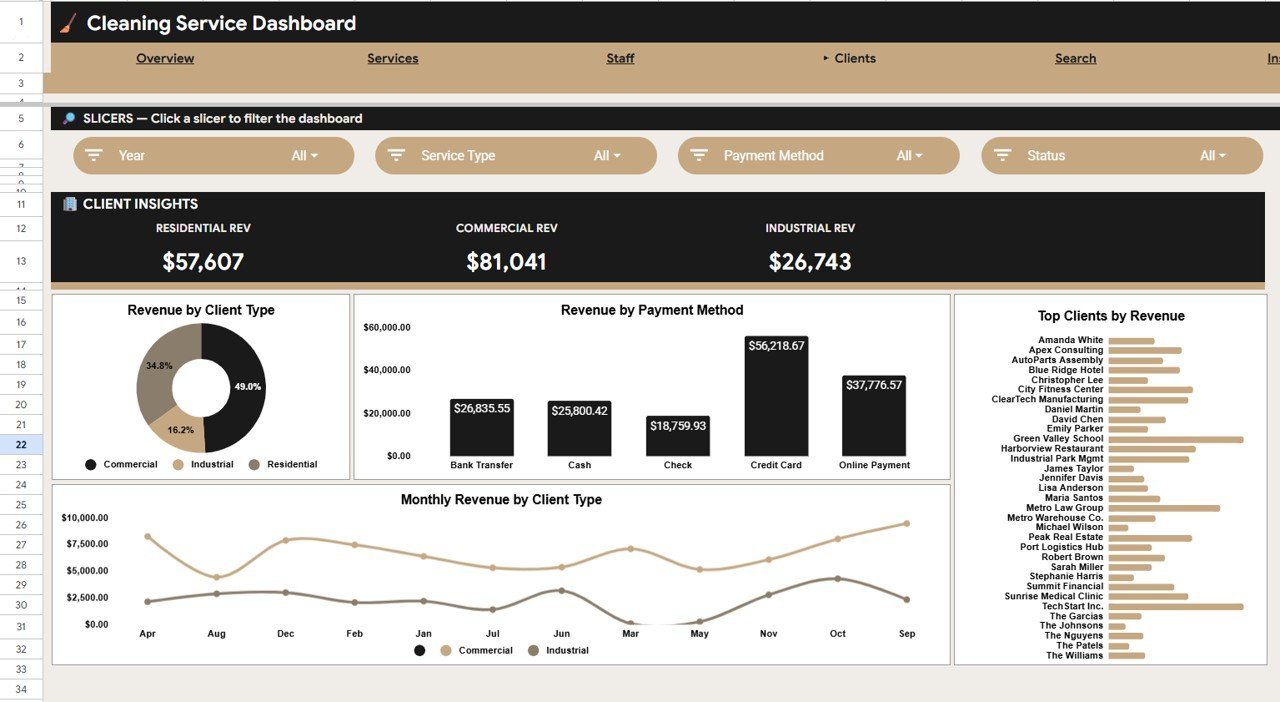
The Services Analysis page breaks down revenue and job count by service type, shows job distribution percentages, and tracks monthly revenue trends per service category. The Staff Analysis page ranks each team member by revenue generated, average customer rating, total jobs completed, and average job duration — giving managers a clear view of top performers. The Clients Analysis page segments revenue by client type, payment method, and identifies top clients by total spend with monthly trends by client category.
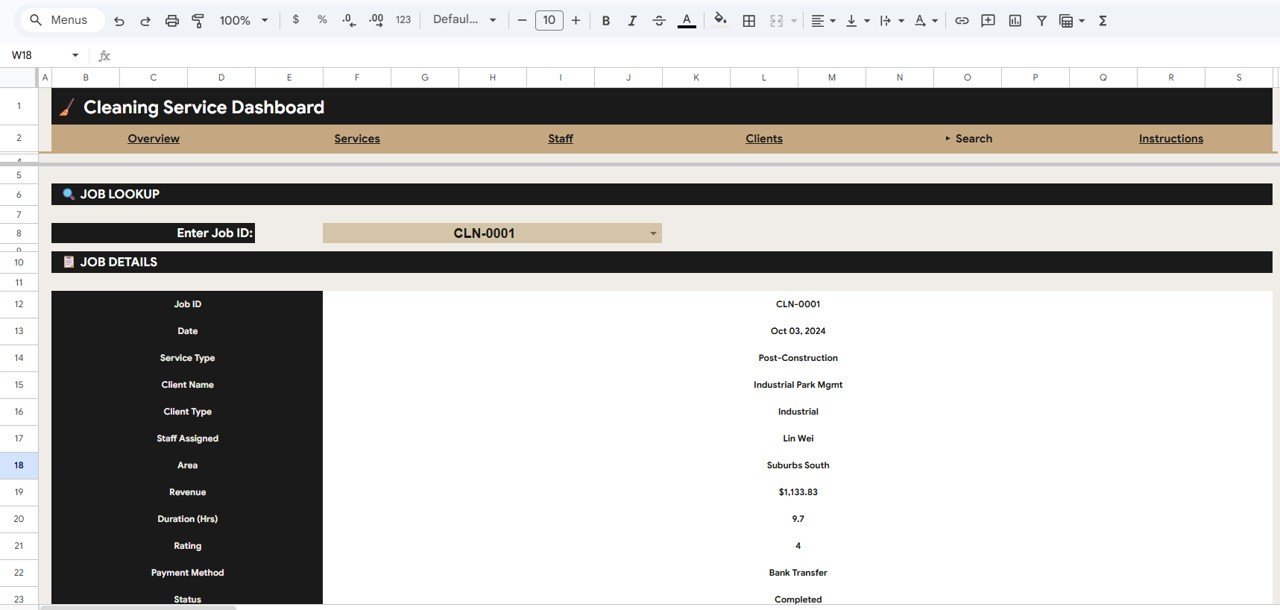
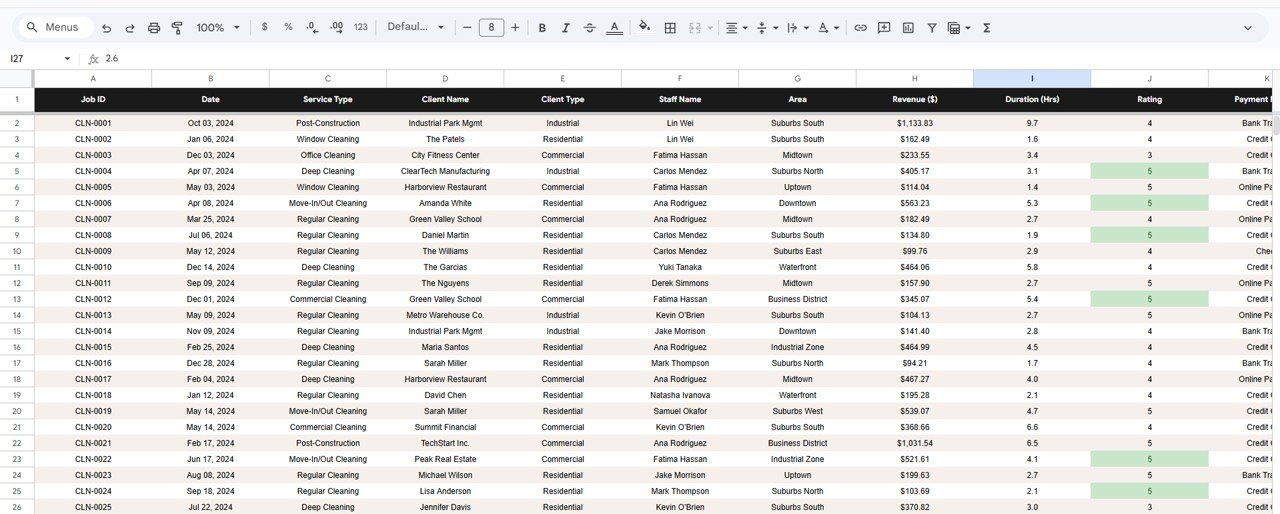
A built-in Search Sheet lets you look up any job by ID and instantly see all details — date, service type, client name, staff assigned, area, revenue, duration, rating, payment method, and status. The Data Sheet stores all raw records in a structured format ready for your own entries. Every page references this single data source, so adding a new row automatically updates all dashboards and charts across the entire template.
Cleaning Service Dashboard in Google Sheets
📦 What’s Inside the Cleaning Service Dashboard
📌 Overview Page – 4 KPI cards (Total Revenue, Completed Jobs, Avg Rating, Avg Job Value) plus charts for Revenue by Month, Revenue by Service Area, Revenue by Service Type, and Revenue by Staff. Slicers enable instant filtering across all visuals.
📌 Services Analysis Page – Revenue and Job Count by Service Type, Job Distribution by Service Type, and Monthly Revenue by Service Type charts to help you identify your most profitable service lines.
Services Analysis Page
📌 Staff Analysis Page – Revenue by Staff, Average Rating by Staff, Job Count by Staff, and Average Duration by Staff charts for complete team performance tracking.
Staff Analysis Page
📌 Clients Analysis Page – Revenue by Client Type, Revenue by Payment Method, Top Clients by Revenue, and Monthly Revenue by Client Type to understand your customer base.
Clients Analysis Page
📌 Search Sheet – Enter or select a Job ID from the dropdown to instantly view complete job details including Date, Service Type, Client Name, Client Type, Staff Assigned, Area, Revenue, Duration, Rating, Payment Method, and Status.
Search Sheet Tab
📌 Data Sheet – The central data repository where you enter all job records. Add your data in the provided format and every dashboard page updates automatically.
Data Sheet Tab
📊 Cleaning Service Dashboard vs. Microsoft Excel Dashboard vs. Jobber — Where This Fits
| Feature | Cleaning Service Dashboard in Google Sheets | Microsoft Excel Dashboard | Jobber (Paid SaaS) |
|---|---|---|---|
| Cost | $9.99 one-time | $14.99–$19.99 one-time | $49–$149 / month |
| Platform | Google Sheets (free, browser-based) | Requires MS Excel license | Web + Mobile app |
| Setup Time | Under 10 minutes | Under 10 minutes | 1–3 hours |
| Real-time Team Collaboration | ✅ Built-in (Google Sheets) | Limited (OneDrive needed) | ✅ Yes |
| Mobile Access | ✅ Google Sheets app (free) | Requires Excel mobile license | ✅ Yes |
| Customizable Fields | ✅ Fully editable formulas and charts | ✅ Fully editable | Limited to plan tier |
| Share with Link | ✅ One-click sharing | Requires OneDrive/SharePoint | Requires team seats ($) |
| Year-1 Cost at 5 Users | $9.99 total | $14.99 + Excel licenses | $588–$1,788 |
| Staff Performance Tracking | ✅ 4 staff metrics | Manual setup | ✅ Advanced reporting |
For cleaning businesses that want revenue tracking, staff analytics, and client insights without paying $49–$149/month, the Cleaning Service Dashboard in Google Sheets sits in the sweet spot.
👥 Who This Template Is For — and Who It’s Not For
✅ This template is built for:
- Independent cleaning service owners tracking 50–500 jobs per month
- Cleaning agency managers who need staff performance visibility
- Operations coordinators monitoring service areas and client types
- Small business owners who want analytics without learning new software
❌ This template is NOT for:
- Enterprise cleaning firms with 100+ staff needing automated job dispatch and GPS routing
- Businesses requiring integrated invoicing, online booking, and CRM in one platform
⚙️ How to Use the Cleaning Service Dashboard
- Open the PDF guide included in your download and click the Google Sheets copy link to create your own editable copy in Google Drive.
- Go to the Data Sheet and replace the sample data with your actual cleaning job records — dates, service types, staff, revenue, and ratings.
- Navigate to the Overview page to see all KPI cards and charts update automatically with your data.
- Use slicers to filter dashboards by date range, staff member, service area, or job status.
- Explore Services, Staff, and Clients Analysis pages for detailed breakdowns of your business performance.
- Use the Search Sheet to look up any individual job by selecting its Job ID from the dropdown.
💼 Real-World Use Cases
Priya runs a 6-person residential cleaning crew in Bangalore. She uses the Cleaning Service Dashboard to track which staff members earn the highest customer ratings and which service areas generate the most revenue — helping her assign the right people to the right jobs without a ₹5,000/month Jobber subscription.
Carlos operates a commercial cleaning company in Miami with 15 active clients. He uses the Clients Analysis page to identify top-spending accounts and spot declining revenue from specific client types. The Payment Method breakdown helps him push clients toward faster-paying methods like digital transfers.
Aisha manages a move-in/move-out cleaning service in London. She uses the Services Analysis page to compare deep clean vs. standard clean profitability per month, then adjusts her pricing and marketing focus toward the higher-margin service lines.
❓ Frequently Asked Questions
What KPIs does the Cleaning Service Dashboard track?
The Cleaning Service Dashboard in Google Sheets tracks 4 key performance indicators: Total Revenue, Completed Jobs, Average Rating, and Average Job Value. All metrics update automatically when you replace the sample data with your own records.
How long does it take to set up the Cleaning Service Dashboard?
Setup takes under 10 minutes. Click the Google Sheets copy link from the PDF guide, paste your cleaning job data into the Data Sheet, and every dashboard page — Overview, Services, Staff, and Clients — updates instantly.Cleaning Service Dashboard in Google Sheets
Can I use this on my phone or tablet?
Yes. The Cleaning Service Dashboard works on any device with the free Google Sheets app. You can view KPIs, filter charts with slicers, and look up individual jobs on mobile or tablet browsers.Cleaning Service Dashboard in Google Sheets
How does this compare to Jobber or ZenMaid?
Jobber starts at $49/month and ZenMaid at $49/month. The Cleaning Service Dashboard in Google Sheets costs $9.99 one-time with no monthly fees. It covers revenue analytics, staff tracking, and client insights — areas where SaaS tools charge premium tiers.Cleaning Service Dashboard in Google Sheets
Can I customize the charts and add new metrics?
Yes, every chart, formula, and layout is fully editable in Google Sheets. You can add new columns to the Data Sheet, create additional charts, or modify existing KPI calculations to match your business needs.Cleaning Service Dashboard in Google Sheets
Does it support multiple staff members?
Yes. The Staff Analysis page tracks revenue, average rating, job count, and average duration per staff member. There is no limit on how many staff entries you can add to the Data Sheet.
Is the data secure in Google Sheets?
Your copy lives in your personal Google Drive with Google’s enterprise-grade security. Only people you explicitly share the file with can access your data. No third-party servers are involved.
👤 About the Author
Built by PK — Microsoft Certified Professional with 15+ years of Excel, Google Sheets, and Power BI experience. Founder of NextGenTemplates, reaching 300K+ subscribers across YouTube channels (@PK-AnExcelExpert, @NextGenTemplates, @NeoTechNavigators). Every template is hand-built and tested before release.
🔗 Explore Related Templates
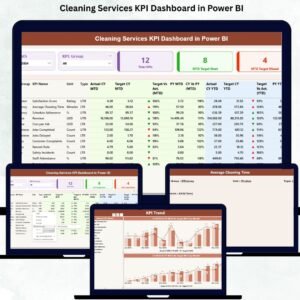
📌 Cleaning Services KPI Dashboard in Power BI — Track cleaning KPIs with advanced Power BI visuals and drill-through filters.
📌 Dry Clean Service Management System V1.0 — A complete VBA-based management system for dry cleaning businesses in Excel.
📌 Facility Cleaning and Sanitization Calendar in Excel — Schedule and track facility cleaning tasks with an interactive Excel calendar.
📌 Browse all Google Sheets Dashboard Templates
📖 Click here to read the Detailed Blog Post
Watch the step-by-step video tutorial:
🎥 Visit our YouTube channel for step-by-step video tutorials
👉 YouTube.com/@NextGenTemplates
Compatibility and Requirements
- Works in Google Sheets with a free Google account and a web browser.
- Open the Google Sheets copy link in the PDF guide to save your own copy, then paste your cleaning job data into the Data Sheet.
- You can view the KPIs and use the slicers on a phone or tablet with the free Google Sheets app.
- New to Sheets? Google’s guide How to use Google Sheets covers the basics.































Reviews
There are no reviews yet.