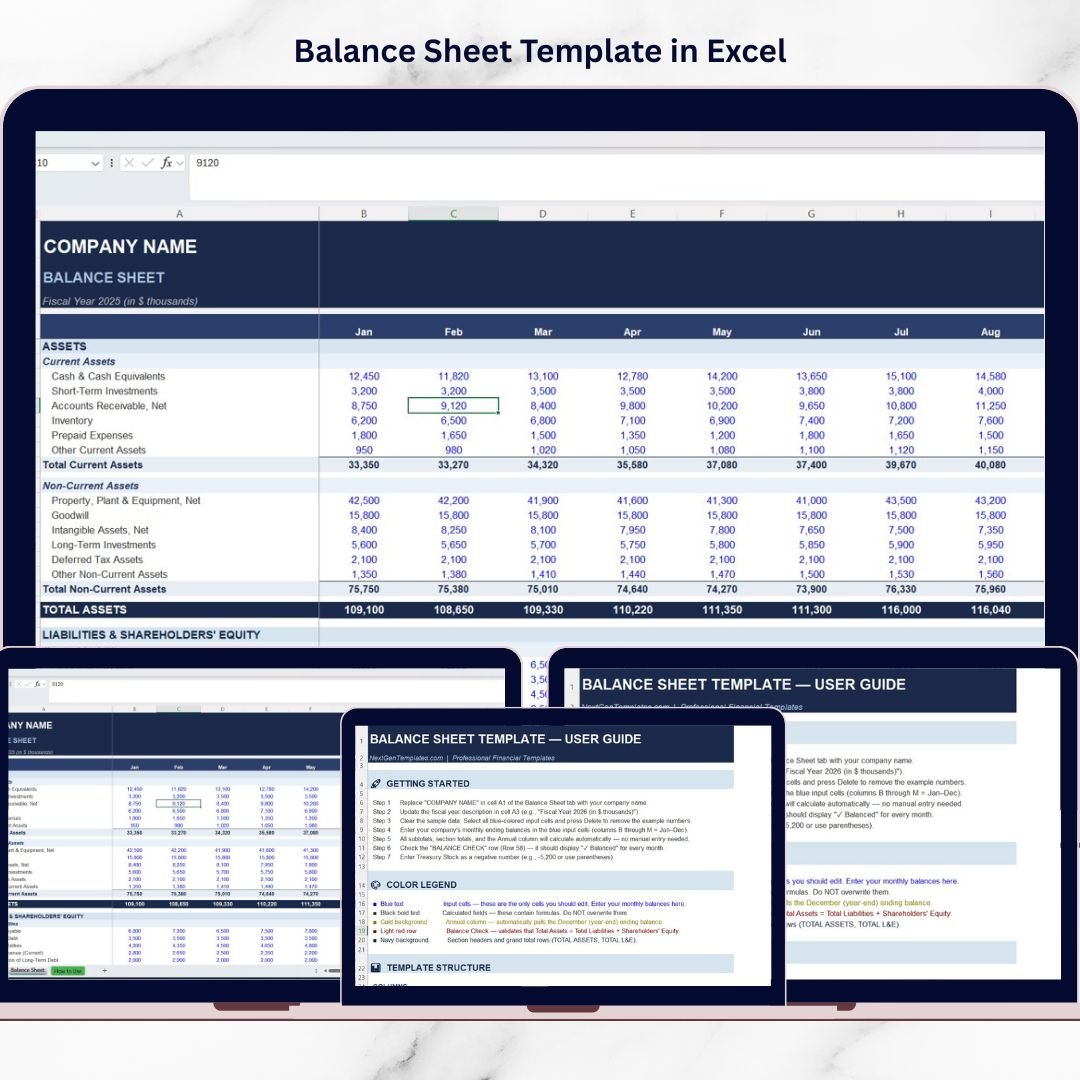

Managing business finances without a clear financial statement can quickly become confusing. Many companies struggle to track their assets, liabilities, and overall financial health when data is scattered across multiple spreadsheets. As a result, financial reporting becomes slow, error-prone, and difficult to analyze.
That’s where the Balance Sheet Template in Excel becomes an essential financial management tool 📊.
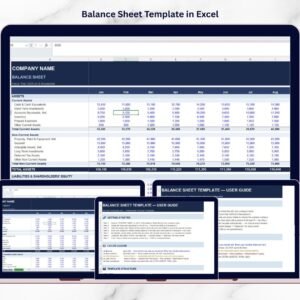
This ready-to-use Excel template helps businesses organize their financial data in a clear and structured format. Instead of manually preparing financial statements every month, this template automatically summarizes assets, liabilities, and shareholders’ equity. With built-in formulas and structured sections, businesses can instantly evaluate their financial position.
Whether you run a small business, manage company accounts, or analyze financial performance, this template provides a simple yet powerful way to maintain accurate financial records.
🚀 Key Feature of Balance Sheet Template in Excel
📊 Monthly Financial Tracking (Jan–Dec) – Record financial values throughout the year and monitor trends easily.
🧮 Automatic Calculations – Built-in Excel formulas instantly calculate totals for assets, liabilities, and equity.
📈 Clear Financial Structure – Organized sections make financial statements easy to read and understand.
⚖️ Balance Check System – Automatically verifies the fundamental accounting equation:
Assets = Liabilities + Shareholders’ Equity
🏦 Complete Asset Management – Track current assets and long-term assets in one place.
💳 Liability Monitoring – Monitor short-term and long-term financial obligations clearly.
💼 Shareholders’ Equity Tracking – Evaluate company ownership value and retained earnings.
🎯 Easy Financial Analysis – Quickly assess liquidity, debt levels, and financial stability.
Because everything is automated, users spend less time calculating numbers and more time analyzing financial insights.
📦 What’s Inside the Balance Sheet Template in Excel?
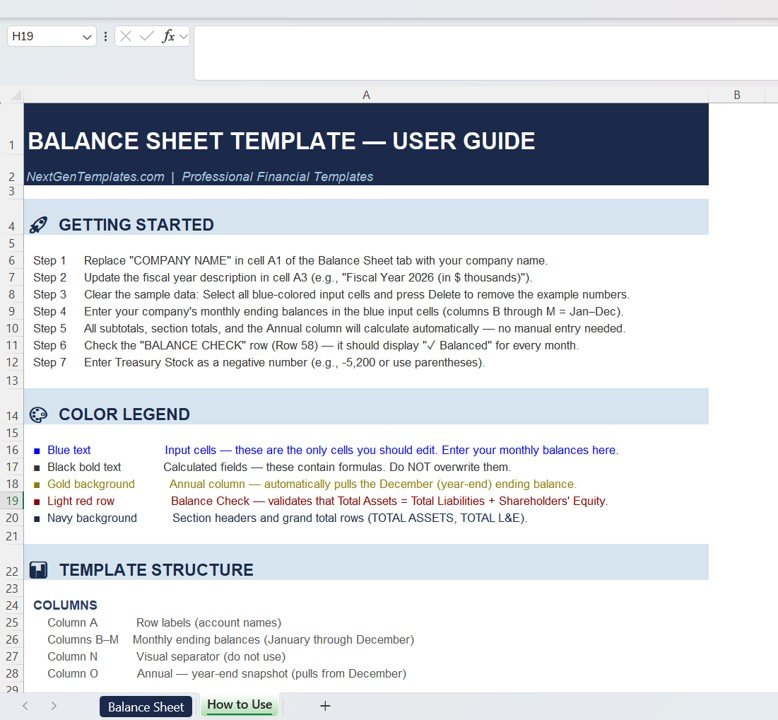
This professional template includes two well-structured worksheets designed for financial reporting.
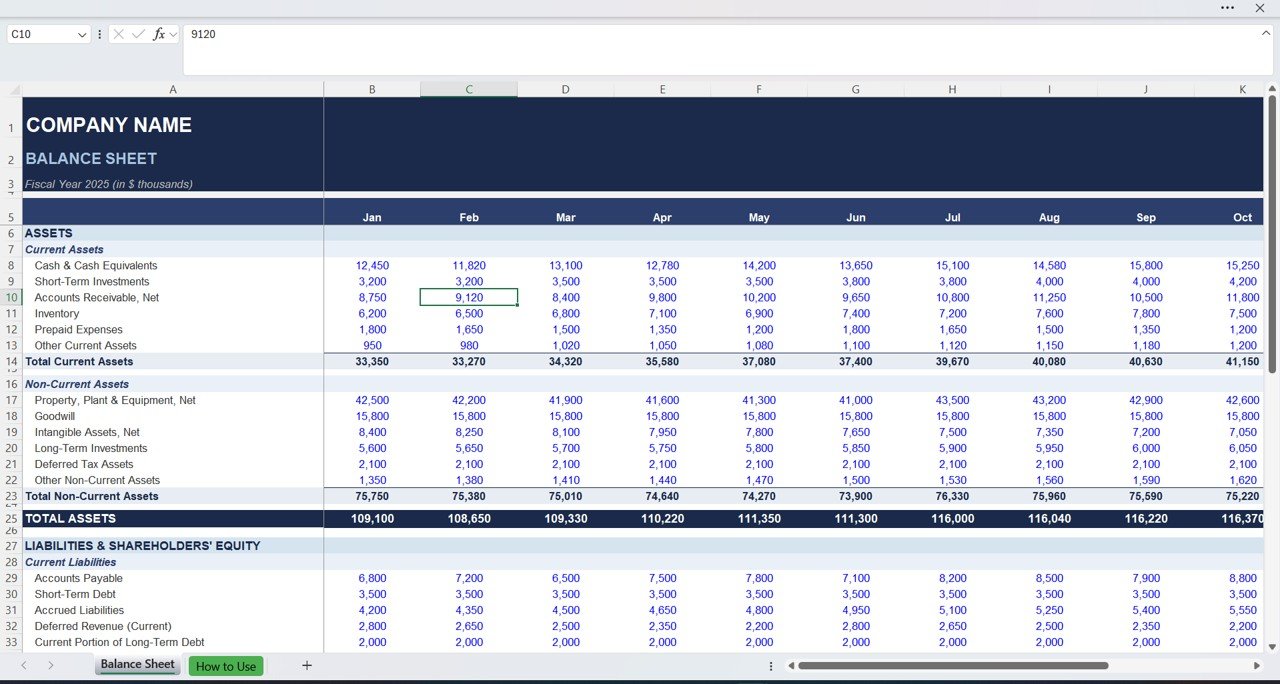
1️⃣ Balance Sheet Worksheet
This is the main financial statement sheet where users enter financial data.
At the top of the sheet, users can enter:
• Company Name
• Fiscal Year
• Reporting format
Below the header section, the template organizes financial data across monthly columns from January to December.
Assets Section
The asset section records everything the company owns.
Current Assets include:
• Cash & Cash Equivalents
• Short-Term Investments
• Accounts Receivable
• Inventory
• Prepaid Expenses
• Other Current Assets
The template automatically calculates Total Current Assets.
Non-Current Assets include:
• Property, Plant & Equipment
• Goodwill
• Intangible Assets
• Long-Term Investments
• Deferred Tax Assets
These values automatically calculate Total Non-Current Assets and then summarize Total Assets.
Liabilities Section
This section records all financial obligations.
Current Liabilities include:
• Accounts Payable
• Short-Term Debt
• Accrued Liabilities
• Deferred Revenue
• Current Portion of Long-Term Debt
The template automatically calculates Total Current Liabilities.
Long-Term Liabilities include:
• Long-Term Loans
• Bonds Payable
• Lease Obligations
These values combine to generate Total Liabilities.
Shareholders’ Equity Section
This section represents the owners’ stake in the company.
Typical accounts include:
• Share Capital
• Retained Earnings
• Treasury Stock
The template automatically calculates Total Shareholders’ Equity.
Balance Verification
One of the most useful features is the automatic balance check formula.
This ensures:
Total Assets = Total Liabilities + Equity
If the equation matches, the balance sheet confirms accuracy automatically.
⚙️ How to Use the Balance Sheet Template in Excel
Using the template is simple and efficient:
1️⃣ Enter your company name and fiscal year
2️⃣ Record monthly financial values for each account
3️⃣ Let the formulas calculate totals automatically
4️⃣ Review the balance check result
5️⃣ Analyze financial trends across months
Because calculations are automated, businesses reduce manual accounting errors significantly.
👥 Who Can Benefit from This Balance Sheet Template?
This Excel template is valuable for many professionals and businesses.
✔ Small Business Owners
✔ Accountants & Bookkeepers
✔ Financial Analysts
✔ Startup Founders
✔ Finance Managers
✔ Students Learning Accounting
✔ Business Consultants
Anyone who needs a simple financial reporting system can use this template effectively.
A structured balance sheet helps answer critical financial questions:
• Does the company have enough liquidity?
• Are liabilities increasing too quickly?
• What is the company’s net worth?
• Are assets growing month-over-month?
By monitoring these metrics regularly, businesses gain better financial control and make smarter strategic decisions.
Moreover, Excel makes customization easy. Companies can modify account categories, add financial metrics, and adjust reporting structures based on their business needs.
In today’s competitive business environment, financial clarity is essential. With this Balance Sheet Template in Excel, you can maintain accurate financial records, track monthly performance, and make confident financial decisions.
Click hare to read the Detailed blog post
Watch the step-by-step video tutorial:
Visit our YouTube channel to learn step-by-step video tutorials
Compatibility and Requirements
- Works in Microsoft Excel desktop (Excel 2016 or later, or Microsoft 365).
- The totals and the balance check are built-in Excel formulas, so you only enter your monthly figures. Microsoft explains how to build charts from your figures in Create a chart from start to finish.
Frequently Asked Questions
How many worksheets does the template have?
Two worksheets. The Balance Sheet worksheet is where you enter your data, with monthly columns from January to December.
Which accounts can I record?
Current assets (cash, short-term investments, accounts receivable, inventory, prepaid expenses, other current assets) and non-current assets (property, plant and equipment, goodwill, intangible assets, long-term investments, deferred tax assets). It also covers current and long-term liabilities, and shareholders’ equity (share capital, retained earnings, treasury stock).
Are the totals calculated automatically?
Yes. The template calculates total current assets, total non-current assets, total assets, total current liabilities, total liabilities and total shareholders’ equity from the figures you enter.
How do I know the balance sheet is correct?
A balance check formula tests that total assets equal total liabilities plus equity. If the two sides match, the sheet confirms it.
Can I change the account categories?
Yes. It is an Excel file, so you can edit account names, add financial metrics and adjust the layout to suit your business.
Is there a Google Sheets version?
Yes. See the Balance Sheet Template in Google Sheets.
Related Finance Templates
- Balance Sheet Template in Google Sheets: the same balance sheet for Google Sheets
- Cash Flow Template in Excel: track cash coming in and going out
- Finance Summary Dashboard in Excel: a dashboard view of your finances
- Weekly Expense Tracker in Excel: a free tracker for weekly spending
- Finance & Accounting Command Center: 8 finance templates in one bundle
Browse all Excel financial tools and Excel trackers.