
AI Research Labs Dashboard research is expanding rapidly across universities, technology companies, government institutions, and innovation labs. Organizations invest significant resources into AI projects to develop advanced algorithms, build intelligent systems, and push the boundaries of machine learning innovation. However, managing multiple research initiatives across departments, research labs, funding sources, and regions can quickly become complex.
Research leaders must monitor project budgets, track research progress, evaluate outcomes, and identify high-priority initiatives. When organizations rely on scattered spreadsheets or manual reporting systems, it becomes difficult to understand how research programs are performing. Decision-makers often struggle to identify which projects require attention, which departments perform best, and how research funding is distributed.
This is where the AI Research Labs Dashboard in Power BI becomes a powerful analytics solution.
The AI Research Labs Dashboard in Power BI is a ready-to-use interactive dashboard that helps organizations monitor research projects, analyze budgets, track high-priority initiatives, and evaluate AI research productivity. Built using Power BI’s advanced data visualization capabilities, this dashboard transforms complex datasets into clear insights using KPI cards, dynamic charts, and interactive filters.
Instead of manually compiling research reports, managers can explore real-time insights across multiple analytical pages. The dashboard allows organizations to evaluate research performance across departments, funding sources, regions, and time periods.
Whether you manage AI research institutes, innovation labs, university research programs, or corporate R&D teams, this dashboard provides a structured system to monitor research operations and make data-driven strategic decisions.
By converting raw research data into meaningful visuals, organizations gain better visibility into research performance, optimize research funding, and accelerate innovation initiatives.
🚀 Key Feature of AI Research Labs Dashboard in Power BI
📊 Interactive Research Analytics Dashboard
Analyze AI research performance using dynamic Power BI visuals and interactive charts.
🎛 Powerful Data Filtering with Slicers
Filter research data instantly by department, research lab, funding source, region, or month.
📈 Research Performance KPI Monitoring
Track important research indicators such as project budgets, high-priority projects, and completion levels.
💰 Research Budget Analysis
Monitor how research funding is distributed across projects, labs, and departments.
⚡ High Priority Project Identification
Quickly identify projects that require urgent attention or strategic focus.
🏢 Department Performance Analysis
Compare research productivity across departments like Machine Learning, NLP, Robotics, and Data Science.
🌍 Regional Research Insights
Analyze research activity across multiple geographic locations and innovation hubs.
📊 Dynamic Visual Charts
Power BI charts update automatically as data changes, ensuring real-time insights.
📅 Monthly Research Trend Analysis
Monitor how research activity and budgets change throughout the year.
🔗 Flexible Data Integration
Connect the dashboard with Excel, databases, or cloud data sources for continuous updates.
📊 What’s Inside the AI Research Labs Dashboard in Power BI
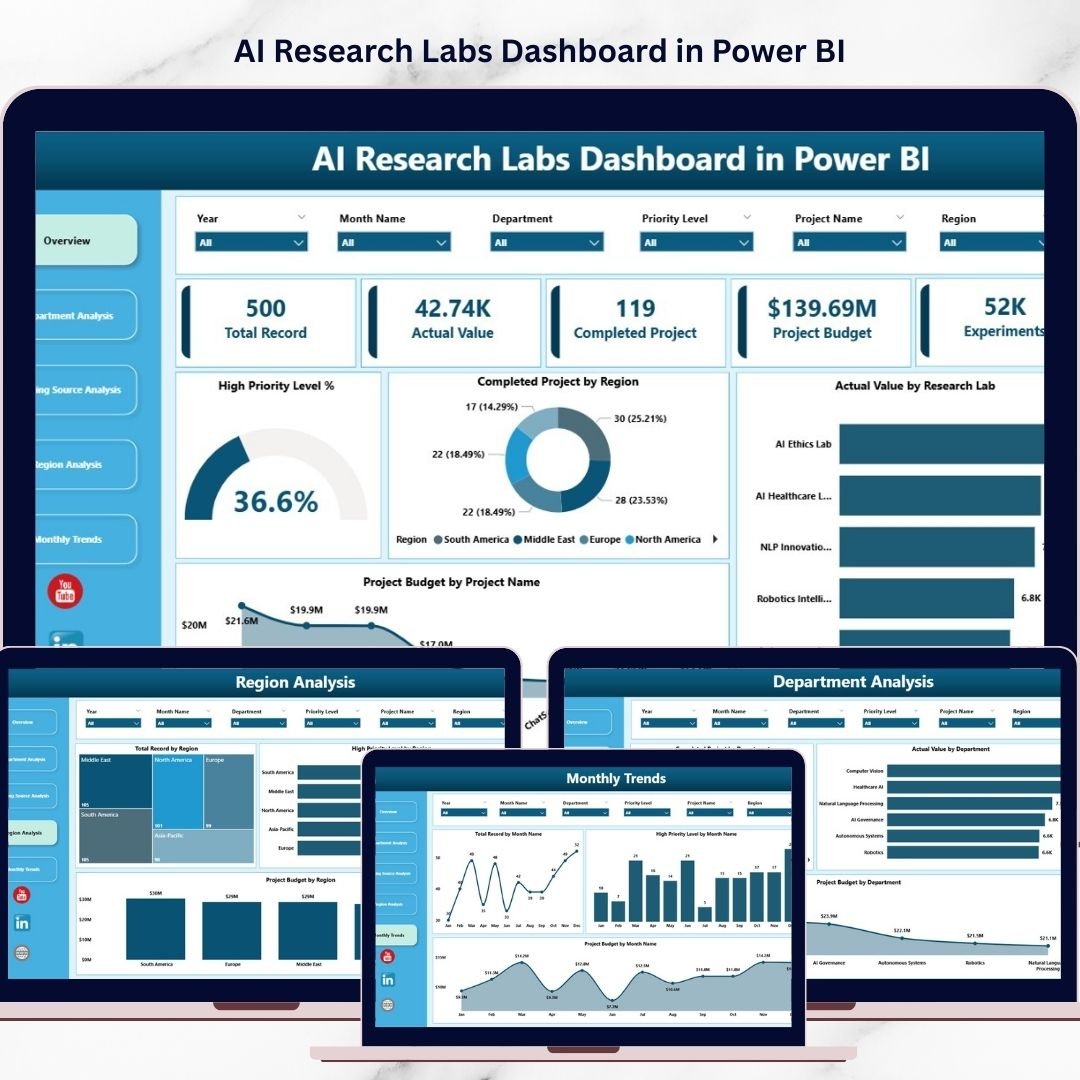
This Power BI dashboard contains five analytical pages designed to analyze AI research activities from multiple perspectives.
🏠 Overview Page – AI Research Performance Snapshot
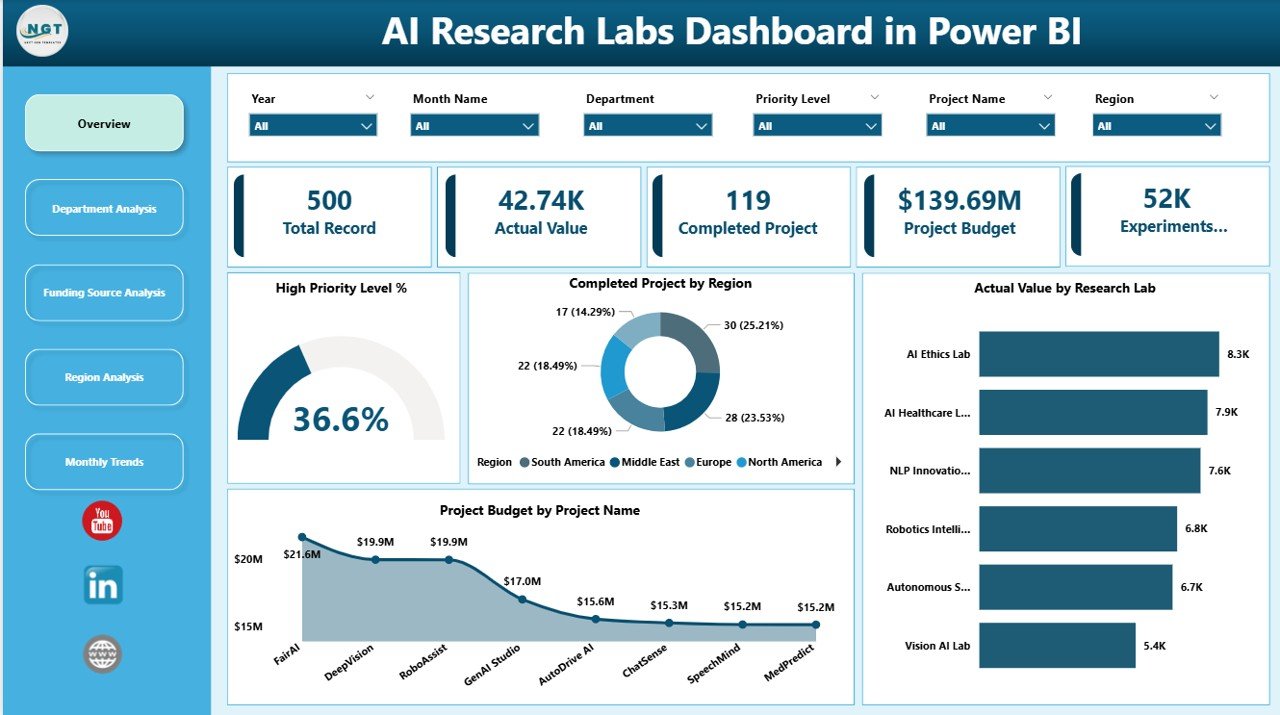
The Overview Page provides a high-level summary of research activities across the organization. It includes important KPI indicators such as:
• High Priority Level %
• Completed Projects by Region
• Actual Value by Research Lab
• Project Budget by Project Name
These KPI cards provide instant visibility into overall research performance.
The page also includes visual charts that help managers compare research output across regions, evaluate project budgets, and identify high-priority initiatives.
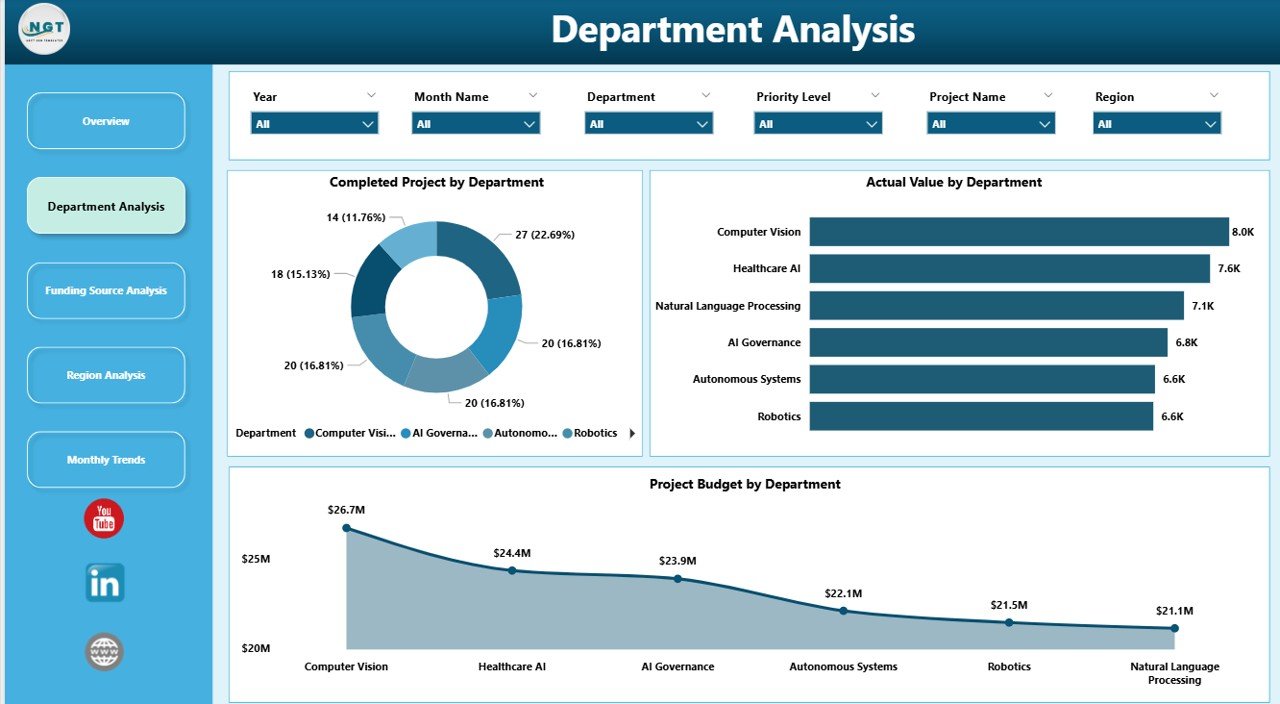
🏢 Department Analysis Page
AI research often involves multiple departments such as machine learning, robotics, computer vision, and data science. This page focuses on department-level research performance.
Charts on this page include:
• Completed Projects by Department
• Actual Value by Department
• Project Budget by Department
This analysis allows research leaders to understand which departments generate the most research outcomes and where funding is concentrated.
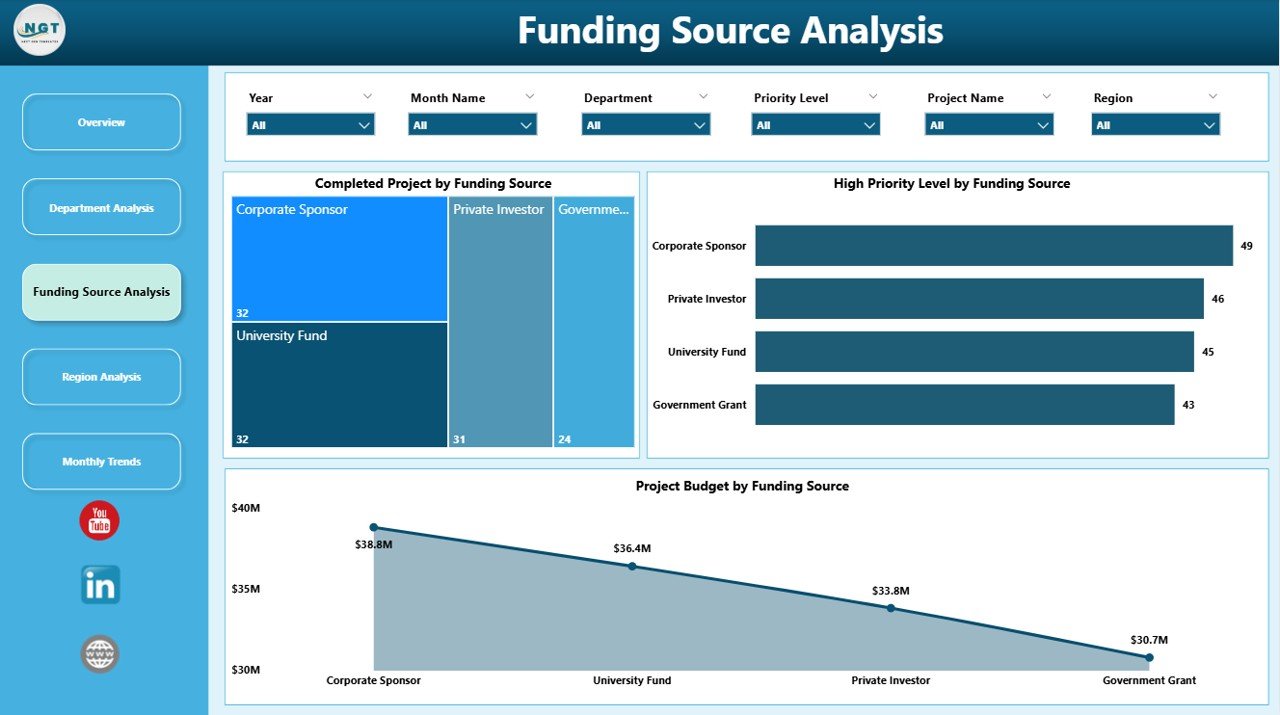
💰 Funding Source Analysis Page
AI research projects often receive funding from government grants, corporate partnerships, private investors, and academic programs.
This page analyzes research funding distribution through charts such as:
• Completed Projects by Funding Source
• High Priority Level by Funding Source
• Project Budget by Funding Source
This analysis helps organizations evaluate which funding partners contribute the most to research success.
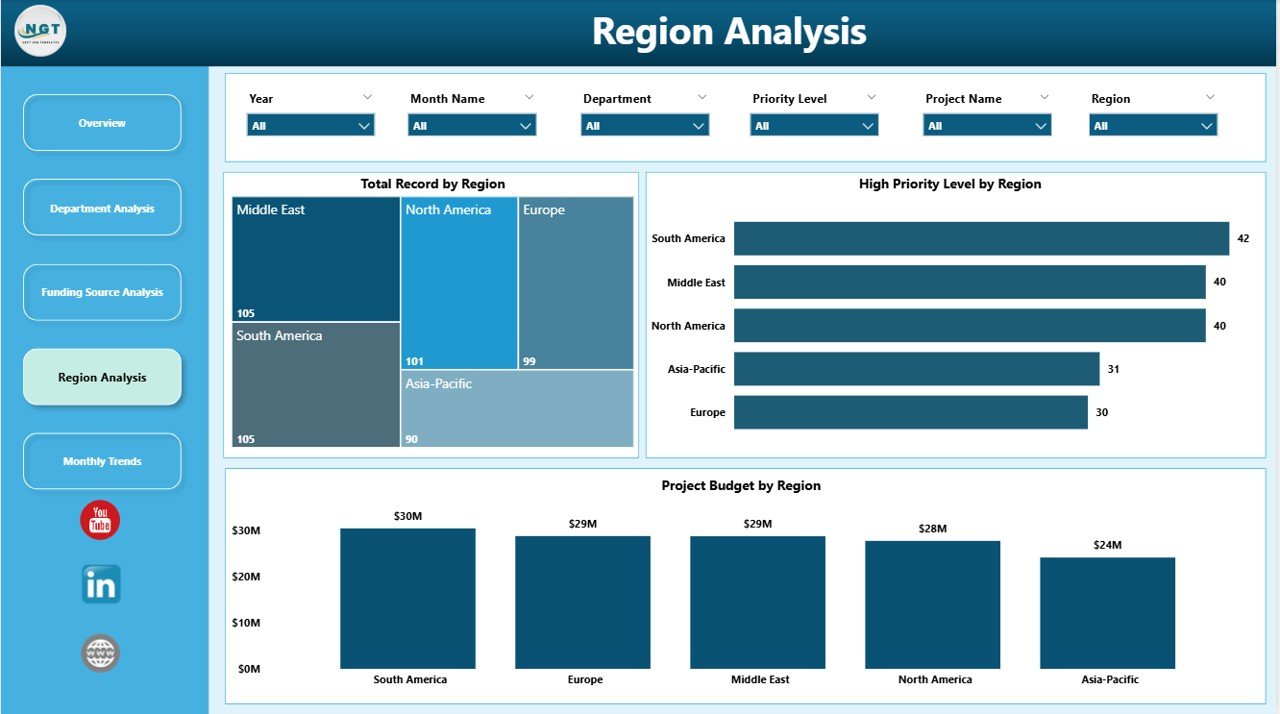
🌍 Region Analysis Page
Large research organizations often operate across multiple geographic locations. The Region Analysis page helps evaluate research performance across these locations.
Charts on this page include:
• Total Record by Region
• High Priority Level by Region
• Project Budget by Region
These insights help organizations identify high-performing research hubs.
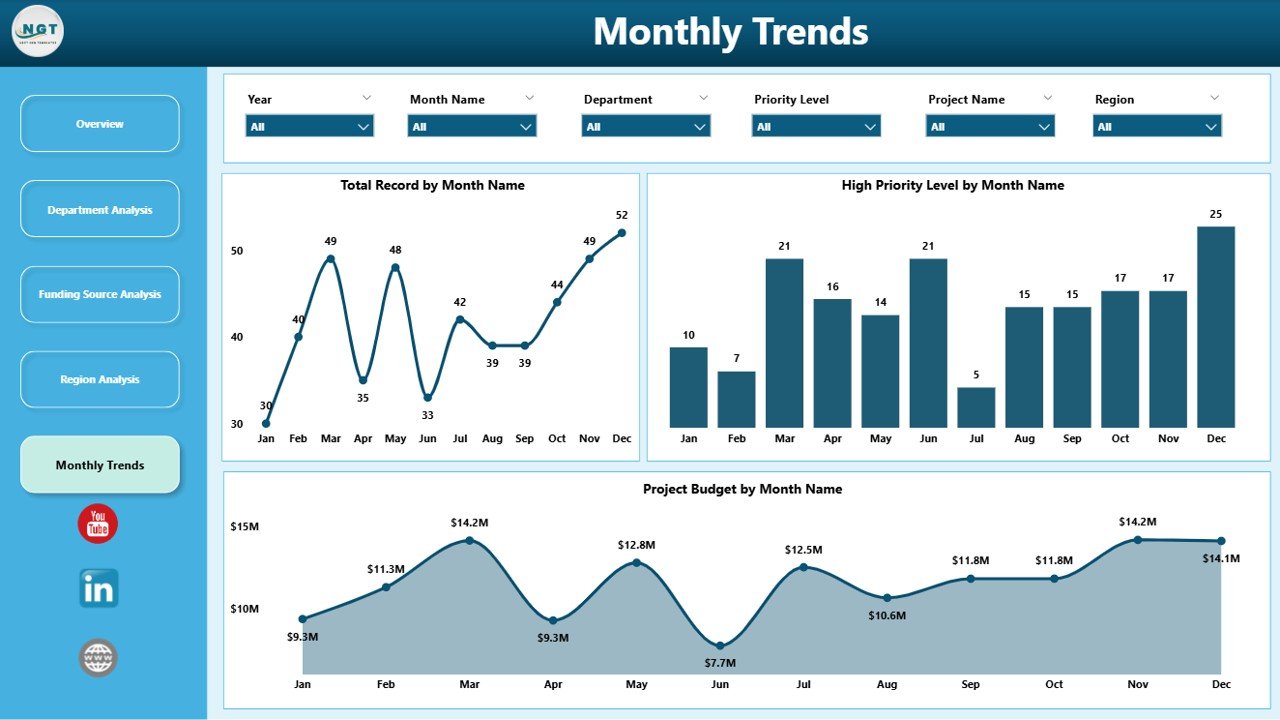
📅 Month Analysis Page
The Month Analysis page focuses on time-based research insights.
Charts included:
• Total Record by Month
• High Priority Level by Month
• Project Budget by Month
This page helps research managers track research activity trends and identify peak research periods.
⚙️ How to Use the AI Research Labs Dashboard in Power BI
Using the dashboard is simple and highly efficient.
1️⃣ Import research datasets into Power BI.
2️⃣ Ensure data includes fields such as project name, department, region, funding source, and budget.
3️⃣ Use slicers to filter research data dynamically.
4️⃣ Analyze performance using different analytical pages.
5️⃣ Refresh the dataset regularly to maintain updated insights.
Within minutes, organizations can transform raw research data into meaningful analytics.
👨💼 Who Can Benefit from This AI Research Labs Dashboard in Power BI
This dashboard is ideal for organizations managing AI research and innovation programs.
🏫 Universities & Research Institutes – Monitor research funding and project progress.
🏢 Technology Companies – Track R&D performance and innovation outcomes.
📊 AI Research Labs – Analyze research productivity and project success rates.
💼 Corporate R&D Departments – Evaluate investment in research initiatives.
📈 Innovation Centers – Identify high-priority research opportunities.
🎓 Data Scientists & Analysts – Explore research performance analytics.
Organizations that adopt this dashboard gain better research visibility, improved funding management, and stronger data-driven decision making.
Click hare to read the Detailed blog post
Visit our YouTube channel to learn step-by-step video tutorials
https://youtube.com/@PKAnExcelExpert
Watch the step-by-step video tutorial:
Compatibility and Requirements
- Works in Power BI Desktop, which is free to download. Microsoft explains how to get it in Get Power BI Desktop.
- Your research data needs fields such as project name, department, region, funding source and budget.
- You can connect the dashboard to Excel files, databases or cloud data sources.
Frequently Asked Questions
How many pages does the dashboard have?
Five pages: Overview, Department Analysis, Funding Source Analysis, Region Analysis and Month Analysis.
What can I filter with the slicers?
You can filter by department, research lab, funding source, region or month.
Which KPIs does the Overview page show?
High Priority Level %, Completed Projects by Region, Actual Value by Research Lab and Project Budget by Project Name.
Can I see how funding is split between sources?
Yes. The Funding Source Analysis page shows Completed Projects, High Priority Level and Project Budget by funding source.
Is there an Excel version?
Yes. See the AI Research Labs Dashboard in Excel and the AI Research Labs KPI Dashboard in Power BI.
Related AI and Research Templates
- AI Research Labs Dashboard in Excel: the same research analytics in Excel
- AI Research Labs KPI Dashboard in Power BI: a KPI-focused Power BI view
- Research Institutions Dashboard in Power BI: a Power BI dashboard for research institutions
- Research & Development (R&D) KPI Dashboard in Power BI: R&D metrics in Power BI
- Power BI Dashboard Mega Collection: 15 Power BI templates in one download
Browse all Power BI dashboards.