

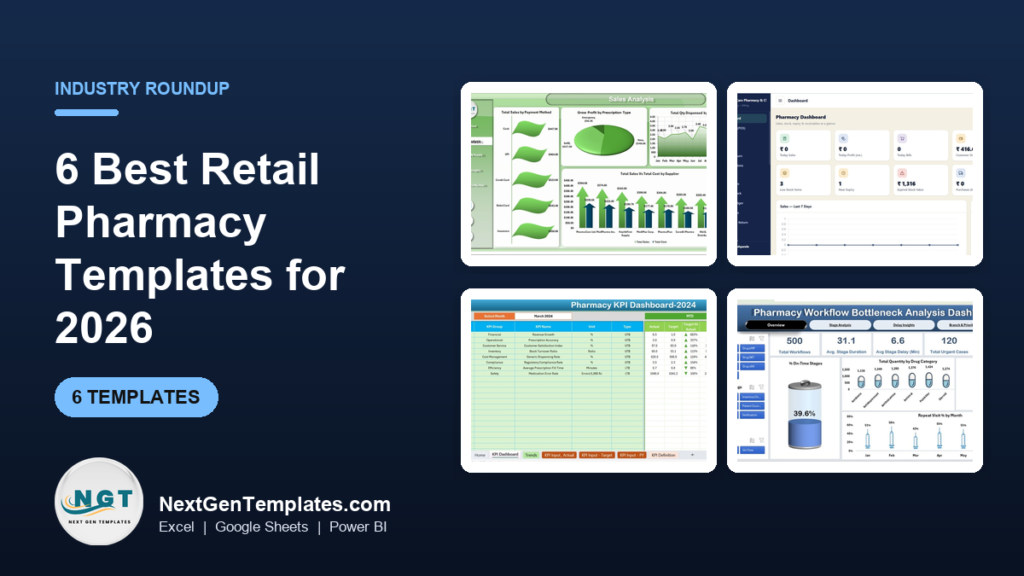
The best pharmacy management Excel template for most retail pharmacies in 2026 is the Pharmacy Dashboard ($17.99 in Excel or Power BI). It reports sales, gross profit, stock, expiry risk and patient trends across five pages. Stores that still bill by hand should start with the Pharmacy Inventory and Billing Management System ($39.99).
Last updated: October 2026
Key takeaways
- Our top pick is the Pharmacy Dashboard: $17.99 in Excel or Power BI, with five analysis pages and a store location slicer for pharmacies with more than one branch.
- The best tool for running the counter is the Pharmacy Inventory and Billing Management System ($39.99): billing, batch-wise stock, expiry alerts, purchases and customer dues in 24 screens.
- The best value is the Pharmacy Sales & Operations Dashboard in Google Sheets at $9.99, with 16 charts across sales, inventory and prescriptions.
- The Pharmacy KPI Dashboard ships with eight pharmacy KPIs already defined, from generic dispensing rate to medication error rate per 1,000 prescriptions.
- Every pick is a one-time purchase from $6.99 to $39.99, with no monthly fee and no per-user licence.
 Launch offer
SUMIFS, XLOOKUP, FILTER, LAMBDA and checking AI-written formulas, with real business projects. 11h 47m of video by PK, with practice files, quizzes and a capstone.
Pharmacy management Excel templates compared
| Template | Format | Best For | Price |
|---|---|---|---|
| Pharmacy Dashboard (Best overall) | Excel, Power BI | Sales, profit, stock and expiry risk across one or more stores | $17.99 |
| Pharmacy Inventory and Billing Management System | Web app (Google Sheets + Apps Script) | Daily billing, batch stock, expiry alerts and dues | $39.99 |
| Pharmacy POS Web App | Web app (Google Sheets + Apps Script) | Fast counter sales with several staff and counters | $39.99 |
| Pharmacy KPI Dashboard | Excel, Power BI, Google Sheets | A monthly KPI review against target and last year | $9.99 to $12.99 |
| Pharmacy Sales & Operations Dashboard (Best value) | Google Sheets | Revenue by category, supplier, pharmacist and payment method | $9.99 |
| Pharmacy Workflow Bottleneck Analysis Dashboard | Excel, Power BI, Google Sheets | Finding where prescriptions wait and why | $6.99 to $17.99 |
A retail pharmacy carries thousands of items, many of them with an expiry date, a batch number and a price that changes with every supplier invoice. One shelf of short-dated stock that nobody spotted can wipe out a week of margin. At the same time the counter has to stay quick, because a patient waiting for a prescription does not care that the stock register is behind.
The usual answer is pharmacy management software on a monthly subscription. Large chains need it, since it links to insurers, wholesalers and e-prescriptions. Many independent pharmacies, medical stores and small chains pay for far more than they use, and still export to Excel to see their own numbers. A good template gives you that view, or runs the counter itself, for a one-time price.
How we picked these
We searched the NextGenTemplates catalog for products built for pharmacies, medical stores and medicine stock. That returned about 20 paid files across Excel, Google Sheets, Power BI and web apps. We kept the ones that serve the daily work of a retail pharmacy: billing at the counter, stock and expiry, sales and margin, service KPIs and prescription flow.
We left out pharmaceutical manufacturing dashboards, which track plants and production and have their own pharmaceutical manufacturing templates guide. We also left out telemedicine and alternative medicine files, which suit clinics, not shops. Where one tool comes in several formats we list it once with every price. We ranked on how many core pharmacy questions a file answers, how much setup it needs, and price.
The 6 best retail pharmacy templates for 2026
1. Pharmacy Dashboard: best overall
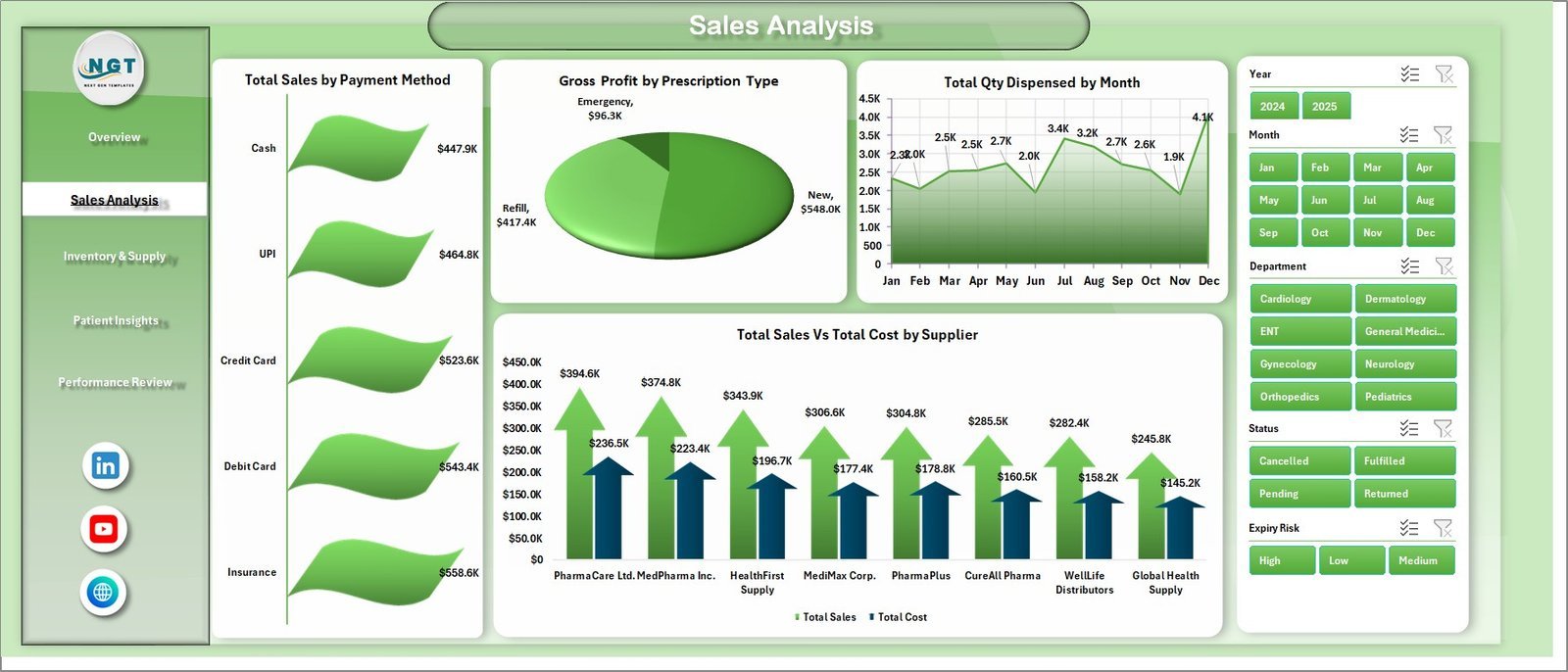
This is the file we would hand a pharmacy owner who wants to see the whole business on one screen. It turns raw sales rows into five analysis pages, so you can ask which drug category earns the margin, which supplier costs the most and which stock is close to expiry.
Who it is for: independent pharmacy owners, small chain managers, hospital in-patient dispensaries and the accountant who reports on them.
What is inside the Excel edition:
- Five pages: Overview, Sales Analysis, Inventory and Supply, Patient Insights and Performance Review
- Five KPI cards: total sales, gross profit, total quantity dispensed, total records and average customer rating
- More than 15 pivot-driven charts, including cost against revenue by category, top drugs, supplier margin and records by expiry risk
- Slicers for drug category, store location, payment method, department, prescription type and month
- Insurance views, such as coverage percent by drug category and patient against insurance payment trends
Setup is simple: paste your data into the Data sheet and click Refresh All. The Power BI edition shows total sales, gross profit, total cost and total insurance amount at the top, with slicers for store, category, supplier, department and gender on every page.
Price: $17.99 in Excel and $17.99 in Power BI.
Best for: pharmacies that already bill in other software and want a clear monthly view of sales, margin and stock risk.
2. Pharmacy Inventory and Billing Management System: best for running the store
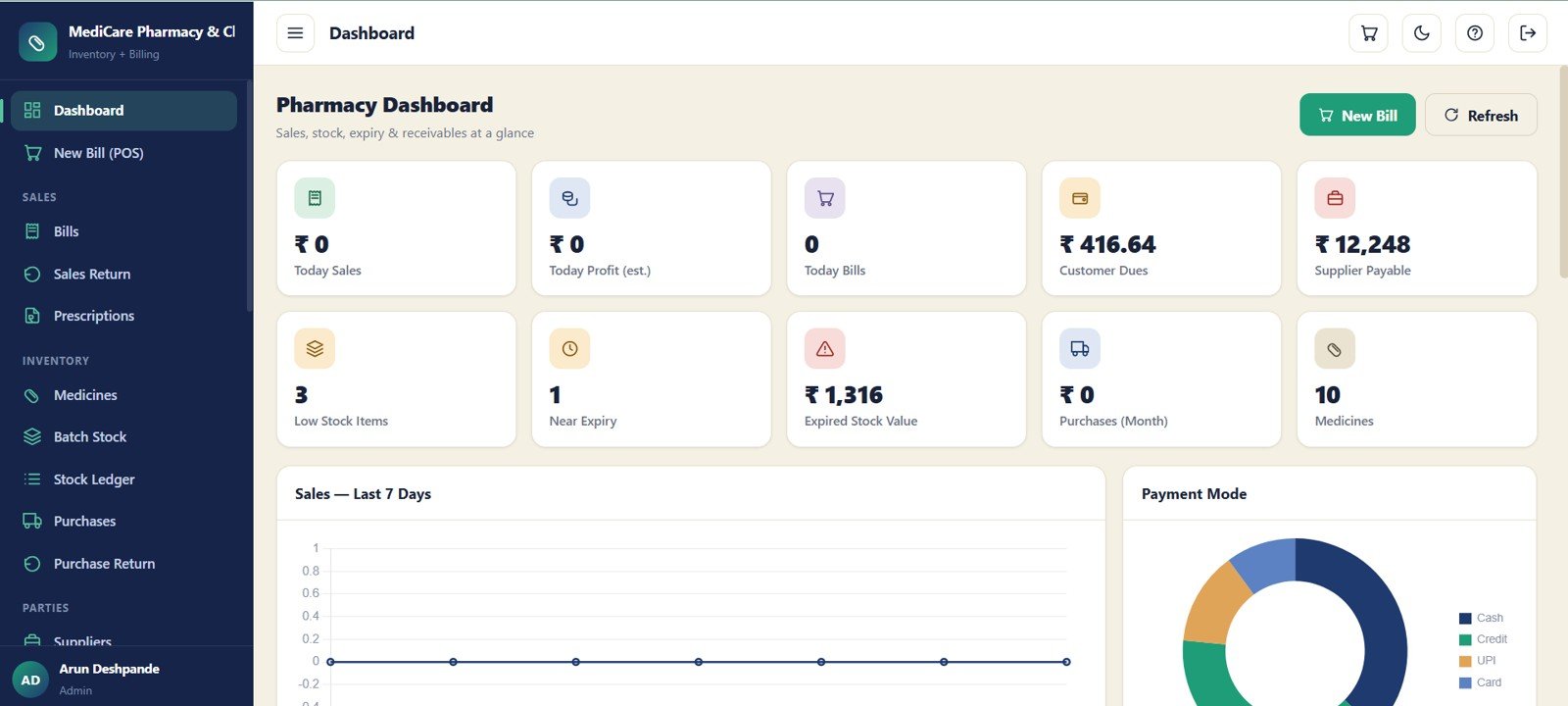
Pick #1 reports on what happened. This one runs the day. It is a complete pharmacy management system built on Google Sheets and Apps Script, with 24 connected screens for billing, stock, purchases, dues and reports, and it lives in your own Google account.
Who it is for: medical stores and independent pharmacies that bill on paper, in a basic sheet or in software they want to leave.
What is inside:
- Billing with bill date, customer, total, balance, payment mode and status, plus print and sales returns
- Batch-wise inventory for each medicine: batch number, expiry, quantity, MRP, sale rate and rack
- A dashboard with 10 KPI cards, including today’s sales and profit, customer dues, supplier payable, low stock items, near expiry and expired stock value
- Purchases, supplier invoices, purchase returns and supplier payments
- Customers, doctors and prescription records linked to bills, plus receipts and expenses
- User management, an audit log, reports with export, and bulk import for the first setup
The expiry cards are the part owners notice first. A near-expiry count on the home screen means short-dated stock gets moved or returned while the supplier will still take it back.
Price: $39.99 one time.
Best for: a single store or small chain that wants billing, stock and expiry control without a monthly fee.
3. Pharmacy POS Web App: best for busy counters
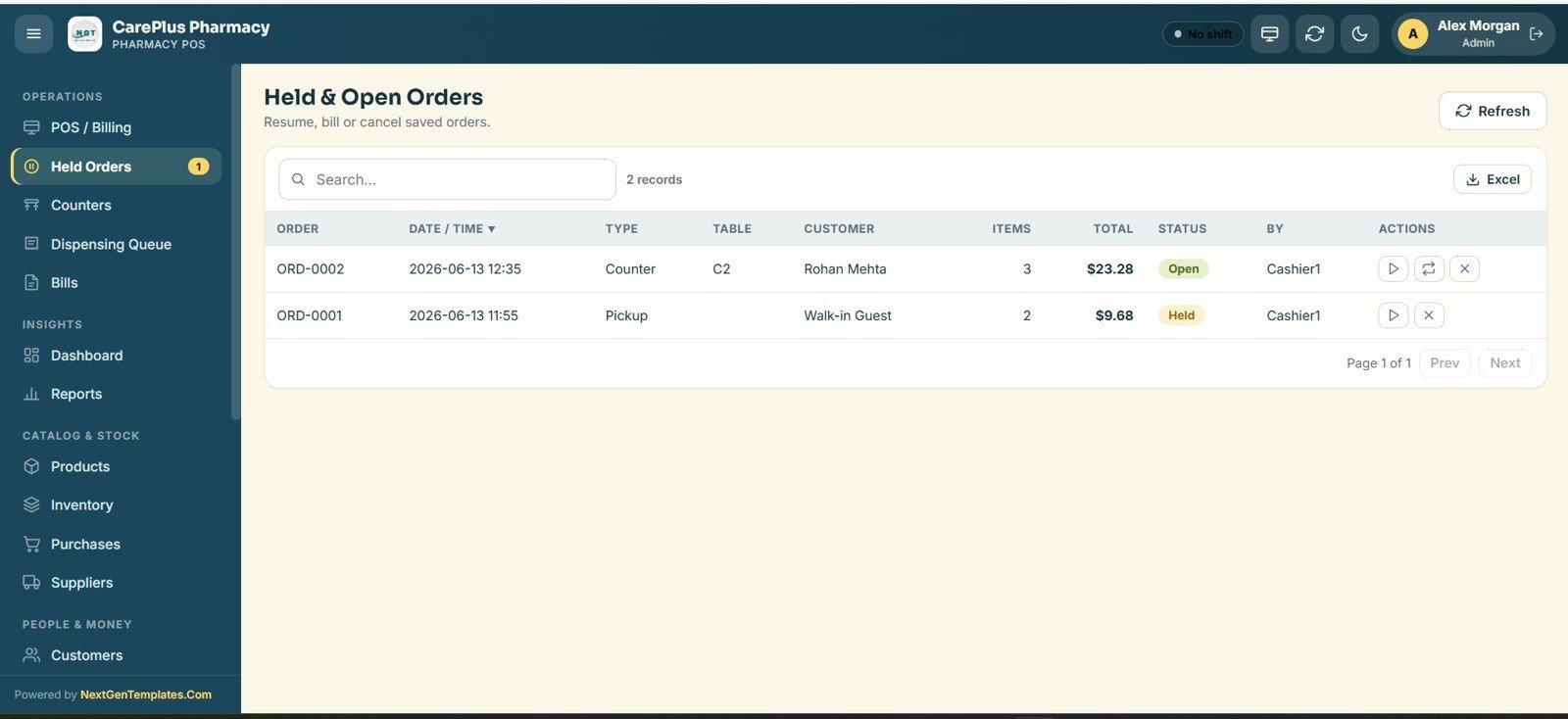
Some pharmacies care most about speed at the till. The Pharmacy POS Web App is built around the counter: a cashier searches a medicine by name, code or barcode, builds a cart, applies tax and holds or settles the bill.
Who it is for: busy retail pharmacies with several counters or shifts, and owners who want each staff member to see only their own screens.
What is inside:
- Role-based logins for five account types: Admin, Manager, Cashier, Inventory and Viewer
- Touch-friendly billing with product cards, barcode search and one-tap Pay or Hold
- Held and open orders, so a bill can be parked and resumed from another counter
- A bills register with reprint, void and refund, each written to an audit log
- A medicine master and stock ledger with price, tax %, opening stock and low-stock flags
- Purchases and suppliers, customer loyalty points, shifts and a live dashboard with 9 KPI cards and hourly sales charts
How does it differ from pick #2? The POS app puts counter speed, staff roles and loyalty first. The inventory and billing system goes deeper on batches, expiry, supplier dues and customer balances. A pharmacy with one counter and a lot of credit customers will usually prefer pick #2.
Price: $39.99 one time.
Best for: stores where queue time at the counter is the main problem.
Not sure where to start? Most pharmacies begin with the Pharmacy Dashboard ($17.99) to see their numbers, then add the Pharmacy Inventory and Billing Management System ($39.99) when they are ready to move billing off paper.
4. Pharmacy KPI Dashboard: best for the monthly review
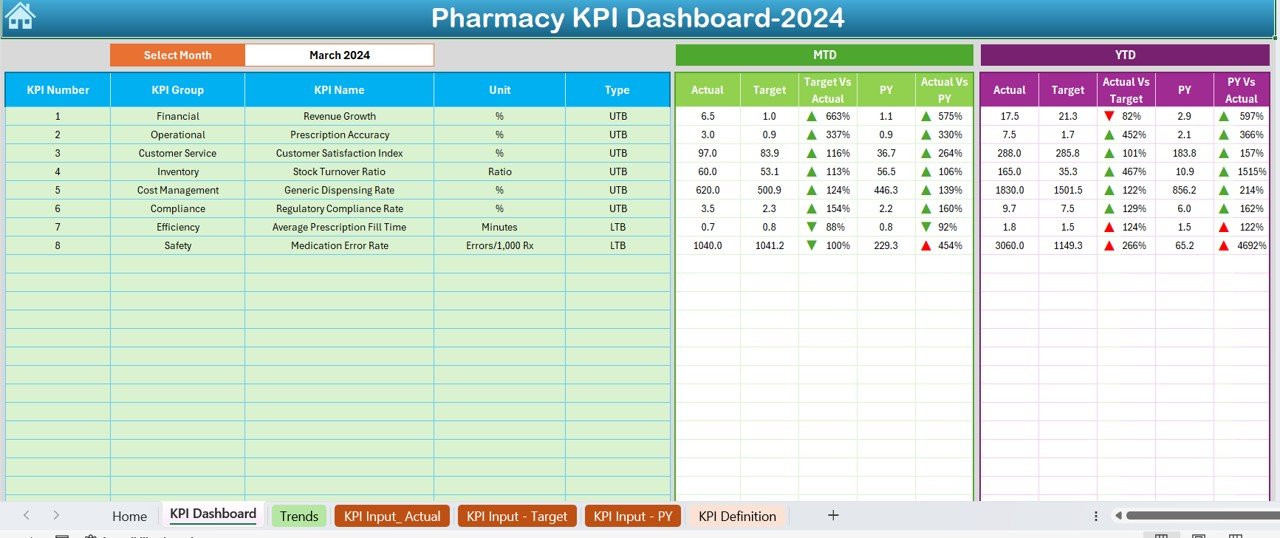
An analysis dashboard answers why a number moved. A KPI dashboard answers a simpler question: are we on target this month and this year? This file keeps a fixed list of pharmacy KPIs and compares actual with target and last year, month to date and year to date.
Who it is for: pharmacy managers, area managers of small chains and owners who hold a monthly review.
What is inside the Excel edition:
- Eight KPIs in eight groups: revenue growth, prescription accuracy, customer satisfaction index, stock turnover ratio, generic dispensing rate, regulatory compliance rate, average prescription fill time and medication error rate per 1,000 prescriptions
- A month selector with MTD and YTD actual, target and previous year
- Green and red arrows, with lower-the-better KPIs such as fill time handled correctly
- A KPI trend sheet, input sheets for actuals, targets and last year, and a definition sheet
The Power BI edition has three pages (Summary, KPI Trend and KPI Definition) with month and KPI group slicers. The Google Sheets edition lets a manager and a head office update the same file at the same time.
Price: $12.99 in Excel, $11.99 in Power BI and $9.99 in Google Sheets.
Best for: a short monthly meeting where every KPI needs a target and a colour.
5. Pharmacy Sales & Operations Dashboard: best value
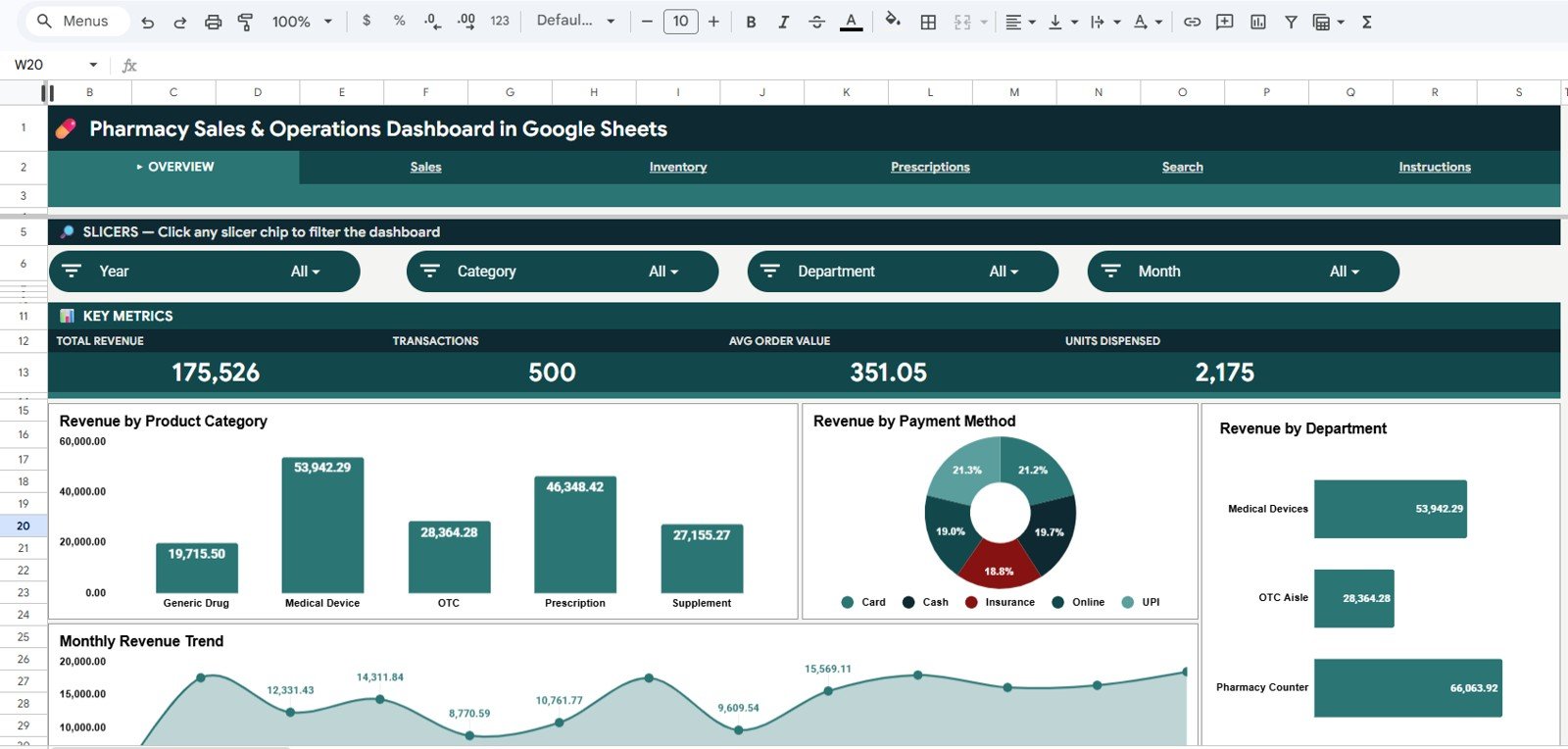
This is the cheapest file in the roundup that still covers sales, stock and prescriptions. It works from transaction rows, runs in a browser and needs no Excel licence, which suits owners who check numbers on a tablet or phone.
Who it is for: independent pharmacy owners and chain managers who want to see which categories, suppliers and pharmacists drive revenue.
What is inside:
- Four KPI cards: total revenue, transactions, average order value and units dispensed
- 16 charts across Overview, Sales, Inventory and Prescriptions tabs, including revenue by category, supplier, department, pharmacist and payment method
- A prescription against generic split and a year-over-year revenue view
- Slicers for date, category, department, supplier and payment method, plus a search sheet to look up any transaction ID
Setup is a copy in Google Drive and a paste into the data sheet. Every chart and card then updates on its own.
Price: $9.99 in Google Sheets.
Best for: owners on a tight budget who already work in Google Drive.
6. Pharmacy Workflow Bottleneck Analysis Dashboard: best for wait times
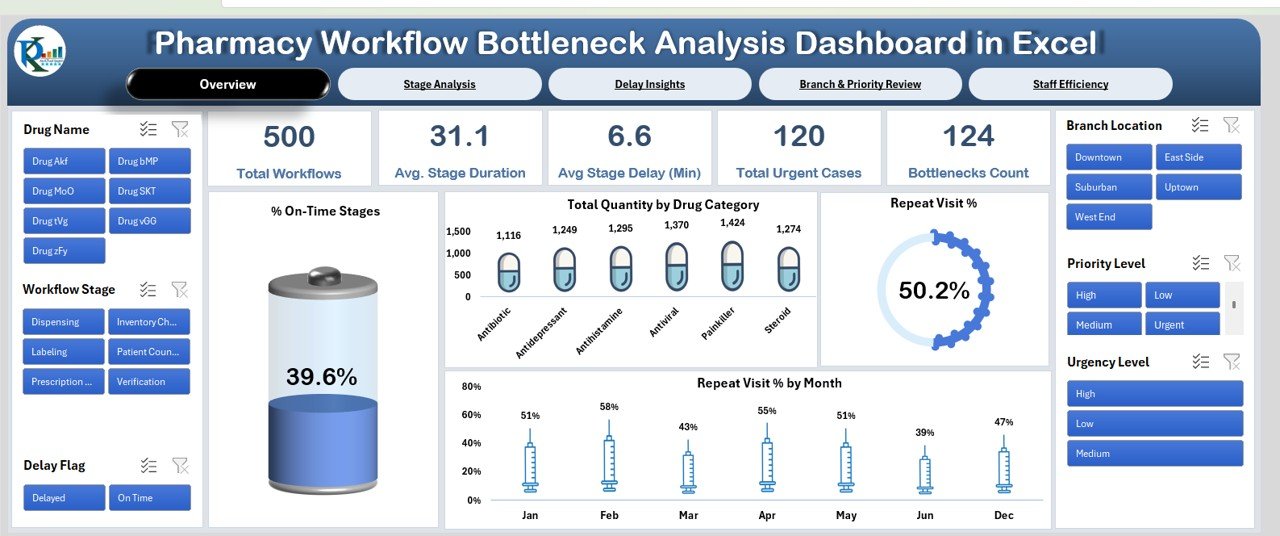
Patients judge a pharmacy by how long they wait. This dashboard follows each prescription through its stages, such as intake, verification, dispensing and labelling, and shows where time is lost and why.
Who it is for: pharmacy managers, team leads and healthcare administrators who want to cut queue time and repeat visits.
What is inside the Excel edition:
- Overview cards for total workflows, average stage duration, average stage delay, bottleneck count and urgent cases
- A stage analysis page with % on-time by stage and expected against actual duration
- Delay insights by reason, including repeat visit % by delay cause
- Branch and priority review, and a staff efficiency page with % on-time and stage duration per staff member
A simpler Pharmacy Workflow Bottleneck Analysis Report ($6.99) covers the same data with one summary sheet and a pivot report.
Price: $13.99 in Excel, $17.99 in Power BI and $6.99 in Google Sheets.
Best for: busy pharmacies where waiting time and repeat visits are the complaint.
Low-cost add-ons for stock and prescriptions
Three smaller files fill gaps that the six picks leave. None of them is a full system, but each one does a single job well for less than $6.
- Pharmacy Stock Expiry Calendar ($4.99 in Excel or Google Sheets): a year, month and day calendar of 18 recurring stock jobs, such as near-expiry shelf sweeps, FEFO rotation checks, cold chain temperature logs and distributor return pickups, across 22 named storage areas.
- Medicine Stock Data Entry System ($5.99): a VBA form that logs medicine name, category, quantity, expiry date, supplier, price and stock status, with live cards for total items, low stock and expiring soon.
- Prescription Record Data Entry System ($5.99): a six-field prescription log with a doctor dropdown and cards for total prescriptions, unique patients and today’s entries. It works fully offline.
Which pharmacy KPIs should you track?
The dashboards above let you edit their KPI lists, so agree on definitions first. These are the formulas most retail pharmacies use. Set targets from your own last 12 months, because a pharmacy near a hospital and one in a shopping street will never share the same numbers.
| KPI | Formula | Why it matters |
|---|---|---|
| Gross margin % | (Sales – Cost of goods sold) / Sales x 100 | Shows whether price changes and supplier deals reach the bottom line |
| Stock turnover ratio | Cost of goods sold / Average stock value | Slow movers tie up cash and drift toward expiry |
| Expired stock value | Sum of cost of items past expiry in the period | Money written off that a near-expiry alert could have saved |
| Generic dispensing rate % | Generic prescriptions / Total prescriptions x 100 | Generics often carry a better margin and lower patient cost |
| Average prescription fill time | Total fill minutes / Prescriptions filled | The wait patients notice most |
| Medication error rate | Errors / Prescriptions filled x 1,000 | A safety measure that should trend toward zero |
| Average order value | Sales / Number of transactions | Tells you whether front-of-store and OTC sales add to each visit |
| Customer dues | Sum of unpaid customer balances | Credit to regular customers quietly drains cash |
For wider definitions, see our list of 15 healthcare KPIs to track and the 12 retail KPIs guide, since a pharmacy is both. Stock-heavy stores may also like our inventory management Excel templates ranking. Running a jewelry or luxury retail store instead of a pharmacy? See our jewelry and luxury retail templates roundup, which uses the same KPI-dashboard-plus-billing-system approach.
How to choose a pharmacy management template
| If you are… | Start with |
|---|---|
| A pharmacy that bills in other software and wants reports | Pharmacy Dashboard |
| A medical store still billing on paper | Pharmacy Inventory and Billing Management System |
| A busy store with several counters and shifts | Pharmacy POS Web App |
| A manager who runs a monthly KPI review | Pharmacy KPI Dashboard |
| An owner on a small budget in Google Drive | Pharmacy Sales & Operations Dashboard |
| A team fighting long queues and repeat visits | Pharmacy Workflow Bottleneck Analysis Dashboard |
| A store that only needs to log stock and expiry | Medicine Stock Data Entry System ($5.99) |
Then pick the format. Choose Excel if one person owns the numbers and the file stays on the office PC. Choose Google Sheets or a web app if the counter, the owner and an accountant all need the same data from different places. Choose Power BI if your group already pays for it and managers want to filter reports themselves. Power BI Desktop is free, but sharing online needs a licence; see Microsoft’s Power BI pricing.
A common pairing is one operating tool and one report: the inventory and billing system for the day, and the Pharmacy Dashboard or KPI Dashboard for the month. Together they cost less than one month of many pharmacy software plans. If you run other kinds of practice too, compare our dental practice templates and veterinary clinic templates, which use the same layout.
When a template is NOT the right answer
A template is a reporting tool or a light operating system. It is the wrong buy in a few cases, and it is better to know that before you pay.
- You bill insurers all day. Real-time claims, eligibility checks and e-prescriptions need certified pharmacy software. None of these files sends claims.
- You must meet product tracing rules. In the US, the Drug Supply Chain Security Act sets electronic tracing duties for prescription drugs. A spreadsheet can report on your data, but it is not a tracing system.
- You handle controlled drug registers. Many countries set strict formats for these records. Keep them in the system your regulator accepts and use a template only for reporting.
- Nobody owns the data. A dashboard is only as fresh as its last update. If no one will spend a few minutes a day or an hour a month on it, it will go stale.
For everyone else, which is most independent pharmacies and small chains, a template is the fastest way to a clear view of the business. Want to try a basic layout first? See our free inventory templates and free Excel dashboard templates. Clinics and hospitals that run their own dispensary will also find picks in our healthcare and hospital management templates roundup.
Frequently asked questions
What is a pharmacy management Excel template?
It is a ready-made workbook that turns a pharmacy's sales, stock and prescription data into a clear report. You paste or type your rows, refresh, and the charts show sales, gross profit, stock levels, expiry risk and service KPIs. It reports on your data; it does not dispense, bill insurers or connect to wholesalers.
Which template should a single independent pharmacy buy first?
If you still bill on paper or in a basic sheet, start with the Pharmacy Inventory and Billing Management System ($39.99), because it handles bills, batch stock and expiry alerts in one place. If billing already runs in other software, start with the Pharmacy Dashboard in Excel ($17.99) to report on it.
Can Excel track medicine expiry dates?
Yes. The Pharmacy Dashboard groups records by expiry risk, the Medicine Stock Data Entry System flags items as Expiring Soon or Expired, and the web app shows near-expiry items and expired stock value on its dashboard. For a scheduled routine of shelf sweeps and returns, add the $4.99 Pharmacy Stock Expiry Calendar.
Is there a pharmacy template in Google Sheets?
Yes. The Pharmacy Sales & Operations Dashboard ($9.99), the Pharmacy KPI Dashboard ($9.99) and the Pharmacy Workflow Bottleneck Analysis Dashboard ($6.99) all come in Google Sheets. Both web apps also run on Google Sheets and Apps Script, so the data stays in your own Google account.
Can these templates replace pharmacy management software?
For many small pharmacies the two web apps cover billing, stock, purchases, dues and reports. They do not submit insurance claims, read e-prescriptions, connect to a wholesaler or meet every national rule on record keeping. Chains and pharmacies that bill insurers all day still need dedicated pharmacy software.
Which KPIs should a retail pharmacy track?
Start with revenue growth, gross margin, stock turnover, generic dispensing rate, average prescription fill time and customer satisfaction. Add prescription accuracy, medication error rate and regulatory compliance rate once the basics are steady. The Pharmacy KPI Dashboard ships with these eight KPIs already defined.
Do I need Power BI to use these files?
No. Most picks come in Excel or Google Sheets. The Power BI editions open in the free Power BI Desktop, where you can edit and view them. Sharing reports online with other people needs a paid Power BI licence.
Are these templates a one-time purchase?
Yes. Dashboards cost between $6.99 and $17.99 once, and each web app costs $39.99 once. You download the file or copy the app into your own account and keep it. There is no monthly or per-user fee.
Can a multi-branch pharmacy use these templates?
Yes. The Pharmacy Dashboard has a store location slicer, the workflow dashboard compares branches, and the KPI dashboard works for a single site or several. For counter billing across branches, the Pharmacy POS Web App supports several counters and five staff roles.
Is patient data safe in these files?
The Excel files stay on your own computer, and the Google Sheets files and web apps live in your own Google account, not on our servers. You still decide who gets access, so limit sharing and follow your local privacy rules for patient and prescription records.
Get your pharmacy management template
Start with the Pharmacy Dashboard ($17.99) to see sales, margin and expiry risk, or the Pharmacy Inventory and Billing Management System ($39.99) to run billing and stock. Each one is a one-time purchase that you can edit and keep.
Want to see how these files work before you buy? Watch the walkthroughs on the NextGenTemplates YouTube channel.