


The best jewelry store management template for most shops is the Jewellery and Watches KPI Dashboard in Excel ($14.99): MTD and YTD views, target vs actual and seven sheets. Shops that need billing, old gold exchange and karigar job work should buy the Jewelry Management System Web App ($39.99). Prices below range from $6.99 to $39.99.
Last updated: October 2026
Key takeaways
- The Jewellery and Watches KPI Dashboard in Excel costs $14.99 and tracks sales, inventory, marketing and customer metrics across 7 sheets, with MTD and YTD switching.
- The Jewellery & Watches Dashboard in Power BI ($17.99) has 5 pages and slicers for brand, city, collection, gemstone and month.
- The Jewelry Management System Web App ($39.99) runs sales, billing, old gold exchange, inventory and karigar job work from 19 connected screens and 8 user roles.
- The Jewellery Stock Register Data Entry System in Excel ($6.99) is the cheapest option: a 7-field VBA form with 200 pre-formatted rows, and no POS or barcodes.
- Published jewelry POS software is billed monthly, so a one-time template at $6.99 to $39.99 is cheaper over a year for shops that do not need card payments or e-commerce sync.
 Launch offer
SUMIFS, XLOOKUP, FILTER, LAMBDA and checking AI-written formulas, with real business projects. 11h 47m of video by PK, with practice files, quizzes and a capstone.
Jewelry store management templates compared
| Template | Format | Best For | Price |
|---|---|---|---|
| Jewellery and Watches KPI Dashboard in Excel (Best overall) | Excel | Owners who want monthly KPI reviews with targets | $14.99 |
| Jewellery & Watches Dashboard in Power BI | Power BI | Executive reporting by collection, gemstone and city | $17.99 |
| Jewellery & Watches Dashboard in Excel | Excel | Budget dashboard with slicers and gemstone analysis | $13.99 |
| Luxury Retail KPI Dashboard in Excel | Excel | Multi-category luxury retail beyond jewelry | $12.99 |
| Jewelry Management System Web App | Google Sheets web app | Full showroom operations | $39.99 |
| Jewellery Stock Register Data Entry System in Excel (Best value) | Excel with VBA | Daily stock tracking on a tight budget | $6.99 |
Prices are in USD. The two Excel dashboards and the Power BI dashboard cover performance reporting, while the web app and the stock register cover day-to-day stock records. Most shops end up pairing one of each.
How we picked these
We searched the Next Gen Templates catalog for jewelry, jewellery, watches and luxury retail products across Excel, Power BI, Google Sheets and web apps. We kept paid products that match how a jewelry business actually works: stock by metal and purity, sales by collection and gemstone, and store-level performance. We left out the luxury travel and luxury spa dashboards because they are hospitality tools, not retail ones. We ranked the rest by how much of a jewelry shop’s workflow each one covers, then by price and format diversity.
What are the 6 best jewelry store management templates for 2026?
1. Jewellery and Watches KPI Dashboard in Excel: best overall
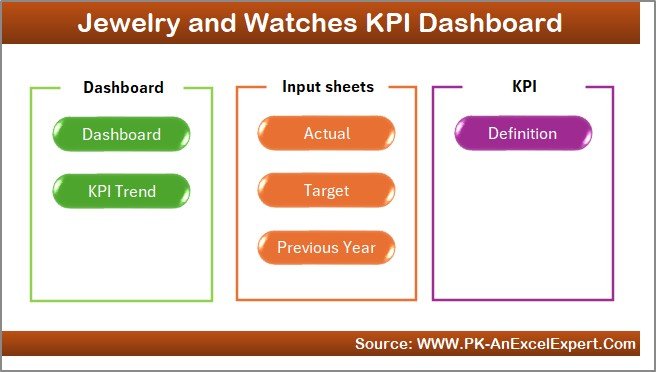
This is a ready-to-use Excel dashboard for jewellery and watch retailers. It tracks sales, inventory, marketing and customer satisfaction metrics in one workbook, with no extra software.
Who it is for: owners and managers of a single boutique or several luxury stores who review performance every month and compare it with targets.
- Dashboard sheet with a Month-to-Date and Year-to-Date switch and a month dropdown that updates every figure
- Target vs Actual comparison with arrows and green, yellow and red colour coding
- Trend charts for KPIs over months and years
- Seven sheets: Home, Dashboard, Trend, Input, Target, PY and Definition
- Customizable layout, so you can add or edit KPIs
Use cases: set a monthly sales target and see in one glance whether you are above or below it. Compare this year against the previous year using the PY sheet. Give associates and senior managers the same view, so a store floor conversation and a board conversation use identical numbers. Use the Definition sheet to settle arguments about how a KPI is calculated.
The Input sheet is where you type monthly actuals, which keeps the process simple: one data entry sheet, one dashboard. Price: $14.99. Get the Jewellery and Watches KPI Dashboard in Excel.
Best for: a jeweler who wants one clean monthly scorecard with targets and no software subscription.
It ranks first because it is the only option here that combines target tracking, prior-year comparison and trend charts at a modest price, and it works in Excel, which most shop owners already have.
2. Jewellery & Watches Dashboard in Power BI: best for executive reporting
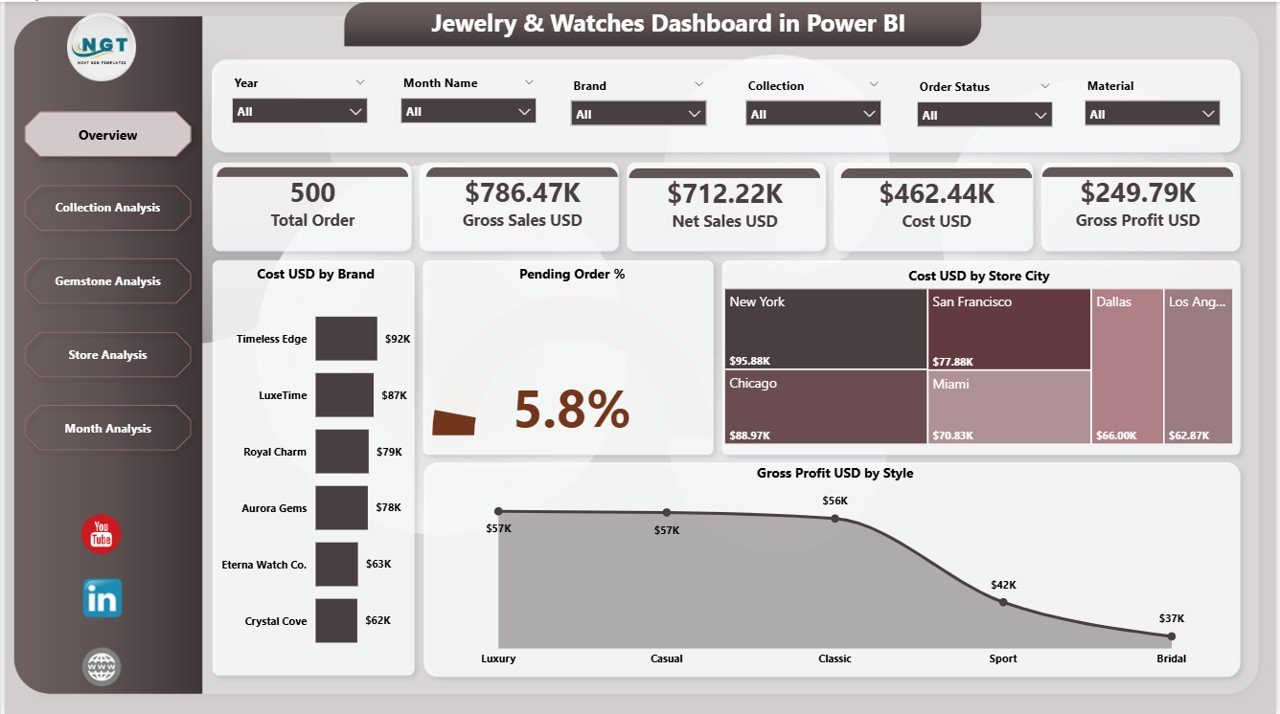
A five-page Power BI dashboard built around net sales, profit, collections, gemstones, stores and monthly trends. It refreshes from Excel data.
Who it is for: retail leaders, analysts and store managers who already use Power BI or want interactive filtering across a multi-city business.
- Overview page with slicers for brand, collection, gemstone, store city and month
- KPI cards including Total Cost (USD), Total Pending Orders (%) and Gross Profit (USD)
- Charts such as Cost by Brand, Pending Order %, Cost by Store City and Gross Profit by Style
- Collection insights to find top-performing collections
- Gemstone analytics comparing stone-wise profit and demand
Use cases: filter to one city and see which jewellery style produces the most gross profit. Compare gemstone demand against profit before placing the next purchase order. Check pending order percentage by brand to find where fulfilment is slipping. Review monthly trends to plan for seasonal peaks.
Price: $17.99. See the Jewellery & Watches Dashboard in Power BI.
Best for: multi-store owners who want click-to-filter reporting rather than a fixed monthly scorecard.
3. Jewellery & Watches Dashboard in Excel: best budget KPI dashboard
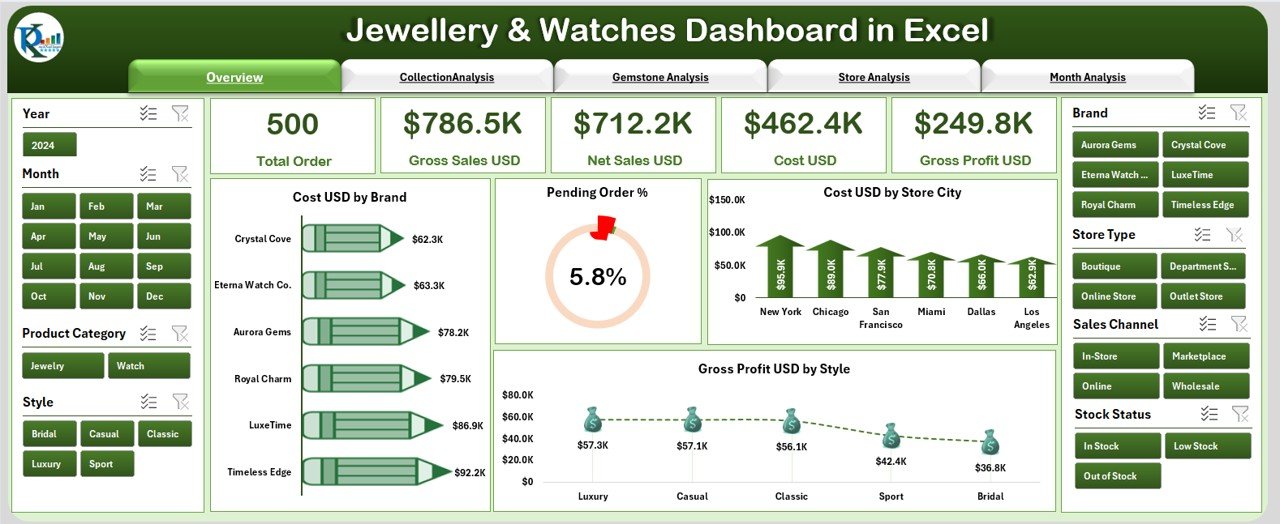
The Excel counterpart to the Power BI version. It has five dashboard pages, KPI cards and slicers, and you update a single Data Sheet to refresh everything.
Who it is for: small boutiques, multi-brand outlets and online jewellery brands that want gemstone and collection analysis without Power BI.
- Page navigation between Overview, Collection Analysis, Gemstone Analysis, Store Analysis and Month Analysis
- KPI cards for total sales, gross profit, cost, pending orders % and total stores
- Slicers for Year, City, Brand, Store, Collection and Style
- Gemstone-level tracking of cost, sales and profit
- Store comparison and month-wise trends
Use cases: spot low-performing collections and decide what to discount. Find the gemstones that bring the highest profit and give them more shelf space. Compare store types side by side. Replace a stack of manual monthly reports with one file.
Price: $13.99. Get the Jewellery & Watches Dashboard in Excel.
Best for: shops that want the Power BI view of the business but prefer to stay inside Excel.
If you cannot decide between this and the Power BI version, pick by software: Excel if the person updating it lives in spreadsheets, Power BI if the person reading it wants to click through filters.
4. Luxury Retail KPI Dashboard in Excel: best for multi-category luxury retail
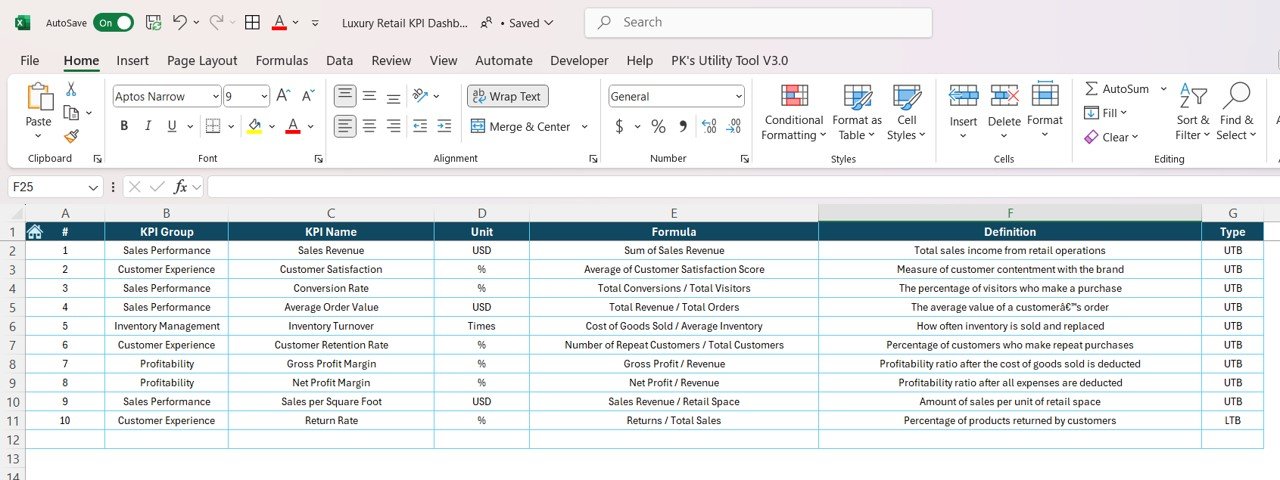
This dashboard is not jewelry specific. It covers sales, inventory, customer satisfaction and marketing for any luxury retailer.
Who it is for: chains that sell jewelry alongside watches, leather goods, fragrance or fashion and need one reporting layout for all categories.
- Sales tracking: revenue, average order value (AOV) and sales growth
- Inventory levels and stock availability, including slow-moving and overstocked items
- Customer satisfaction through NPS, feedback and reviews
- Marketing effectiveness: ROI, conversion rates and customer engagement
- Customizable KPIs
Use cases: track NPS after a store refit to see whether service scores moved. Compare AOV across product categories. Flag slow-moving stock before it ties up cash. Judge whether a campaign paid for itself using ROI.
Price: $12.99. Open the Luxury Retail KPI Dashboard in Excel.
Best for: a luxury group where jewelry is one of several categories. It has no gemstone or collection analysis, so a jewelry-only business will get more from #1 to #3.
5. Jewelry Management System Web App: best for full store operations
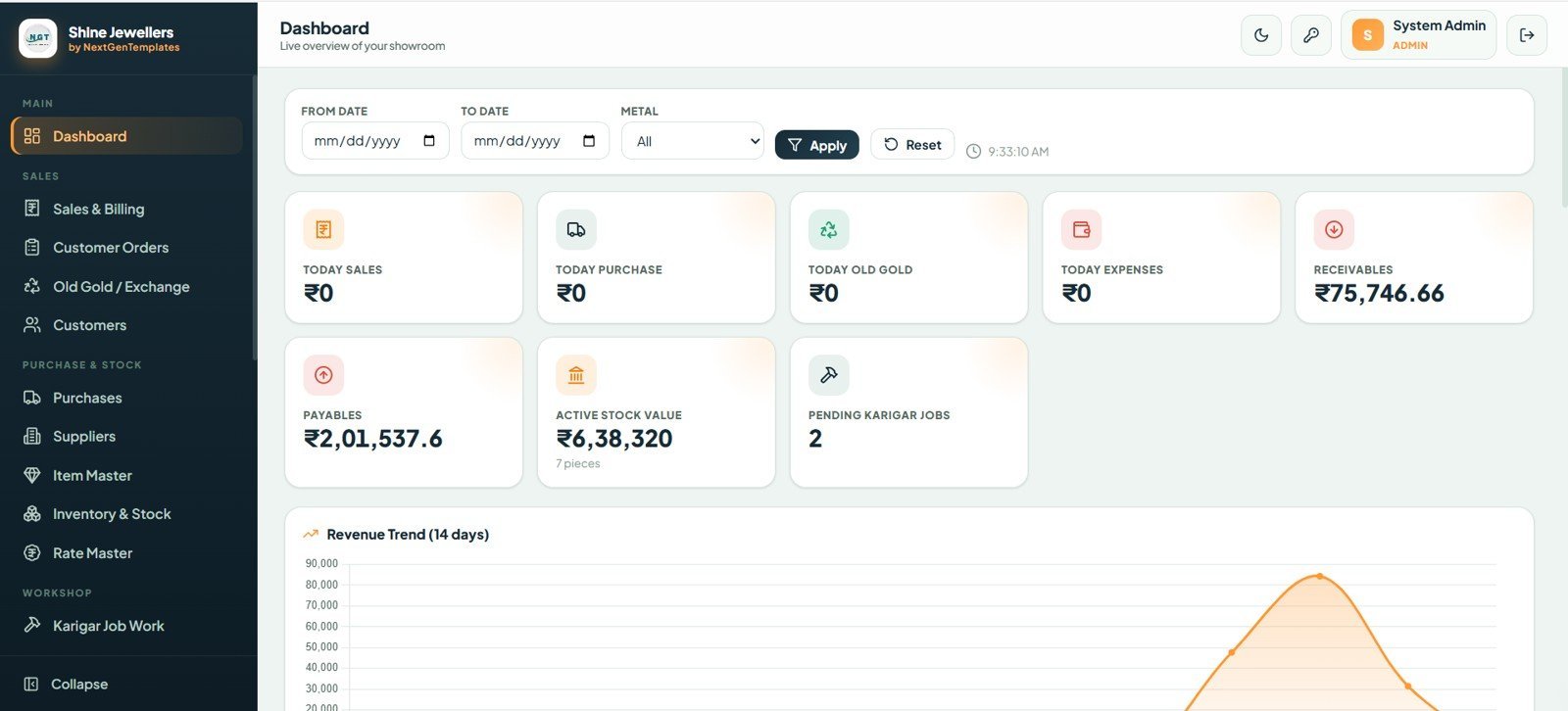
A multi-user web application built on Google Sheets and Google Apps Script. It runs inside your own Google account with no monthly fees, and every screen is connected, so a sale or an old gold exchange flows into inventory, accounts and reports without re-typing.
Who it is for: a jewellery showroom with several staff who need separate access to billing, stock, rates and accounts.
- 19 connected screens including dashboard, sales and billing, customer orders, old gold, customers, purchases, suppliers and item master
- 8 roles: Admin, Manager, Sales, Purchase, Inventory, Karigar, Accounts and Viewer
- Live owner dashboard with 8 KPI cards, such as Today Sales, Receivables, Payables, Active Stock Value and Pending Karigar Jobs
- Sales invoices with net, paid and balance amounts, plus old gold purchase and exchange with purity, net weight and final value
- Tagged item master with purity-wise inventory
Use cases: issue an invoice that nets off an old gold exchange. Check pending karigar jobs without calling the workshop. Give an accountant access to receivables and payables only. Review gold weight by purity from the owner dashboard.
Price: $39.99, one-time. Buy the Jewelry Management System Web App.
Best for: the most comprehensive coverage in this list, for a showroom that would otherwise pay for jewelry shop software every month.
6. Jewellery Stock Register Data Entry System in Excel: best for daily stock tracking on a budget
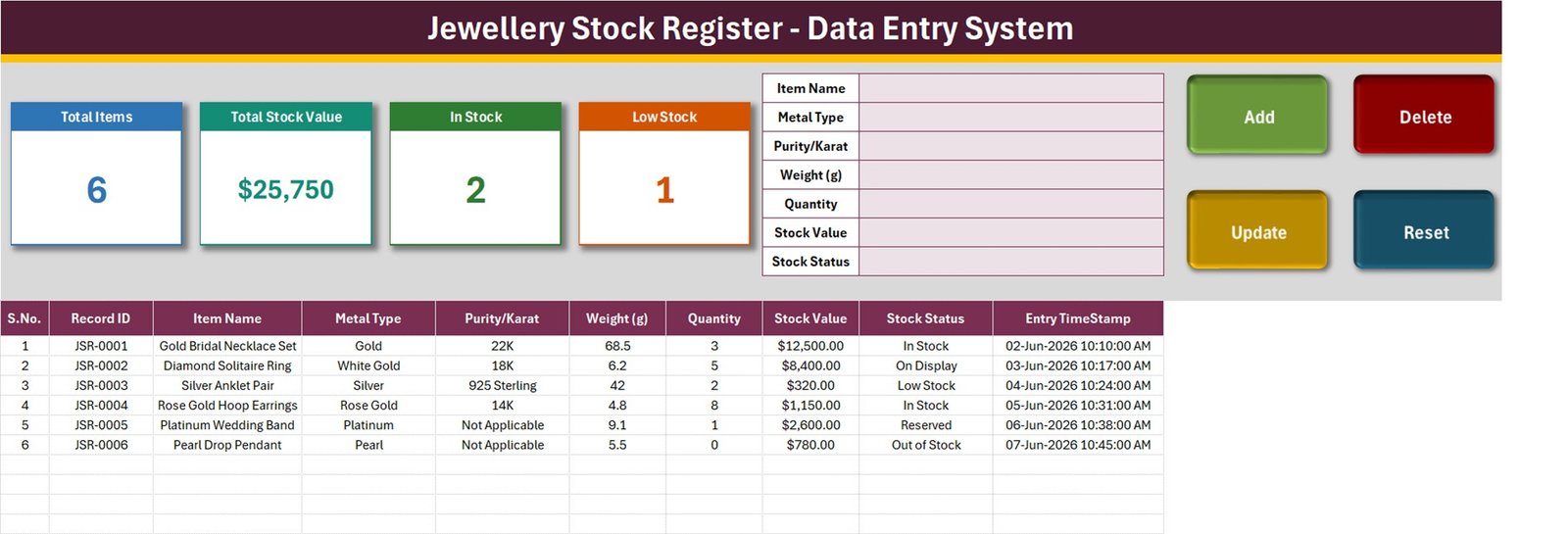
A macro-enabled Excel workbook that turns the paper stock book into a searchable, timestamped record. It is deliberately small: a stock register, not a billing system.
Who it is for: small jewelers, pawn-style counters and market stalls who currently write stock in a notebook.
- Seven-field form: Item Name, Metal Type, Purity/Karat, Weight (g), Quantity, Stock Value and Stock Status
- Add, Update, Delete and Reset buttons running real VBA macros
- Automatic JSR-0001 style Record IDs with an entry timestamp on every row
- Four live stat cards: Total Items, Total Stock Value, In Stock and Low Stock
- Dropdowns for 10 metal types, 10 purity grades and 8 stock statuses, and 200 pre-formatted rows
Use cases: log a 22K gold bridal set, a 925 sterling anklet and a platinum band with their weights and values. Double-click a record to update it by ID even after you have sorted the table. Filter by Low Stock before reordering. Print the register for an end-of-day check.
It has no barcodes, no POS, no gold-rate feed and no supplier ledger, so it is honest about what it will not do. Price: $6.99. Get the Jewellery Stock Register Data Entry System in Excel.
Best for: the lowest-cost way to get stock out of a notebook and into something sortable.
How do I choose between them?
Start with the job you need done this month, not the price.
| If you need to… | Choose | Price |
|---|---|---|
| Replace a paper stock book | Jewellery Stock Register in Excel | $6.99 |
| Review monthly KPIs against targets | Jewellery and Watches KPI Dashboard in Excel | $14.99 |
| Analyse gemstones and collections in Excel | Jewellery & Watches Dashboard in Excel | $13.99 |
| Filter by city, brand and gemstone interactively | Jewellery & Watches Dashboard in Power BI | $17.99 |
| Report across several luxury categories | Luxury Retail KPI Dashboard in Excel | $12.99 |
| Run billing, old gold and karigar jobs | Jewelry Management System Web App | $39.99 |
A practical pairing for a growing shop is the stock register ($6.99) plus the KPI dashboard ($14.99), a combined $21.98. A showroom with staff should go straight to the web app ($39.99) and add a dashboard later.
Which jewelry KPIs should the dashboard track?
Whatever template you use, these are the numbers worth reviewing monthly. The formulas are standard retail maths.
- Gross margin % = (Sales – Cost of goods sold) / Sales x 100. If a ring sells for $1,000 and cost $600, margin is 40%.
- Inventory turnover = Cost of goods sold / Average inventory value. If annual COGS is $300,000 and average stock is $150,000, turnover is 2.0, meaning stock sits about six months.
- Average order value = Revenue / Number of orders.
- Pending order % = Unfulfilled orders / Total orders x 100.
The examples use illustrative numbers, not industry benchmarks. Jewelry stock turns slowly compared with grocery or fashion, so compare your own figure month to month and year to year rather than against another trade. For wider retail context, see our guide to retail KPIs to track in 2026.
How much does jewelry store software cost compared with a template?
Published pricing for retail point-of-sale software is billed monthly. At the time of writing, Shopify lists its Basic plan at about $39 per month on monthly billing, and Lightspeed Retail (which absorbed Vend) lists plans from roughly $89 per month. Prices change and include different payment and hardware terms, so check both pages before you decide. Specialist jewelry systems such as The Edge and Gemnet generally quote by request instead of publishing a price list.
Over 12 months, a $39 per month plan costs $468 and an $89 per month plan costs $1,068. The Jewelry Management System Web App is $39.99 once. That comparison is not like for like: the software includes card processing, hardware support and e-commerce sync that a Google Sheets app does not. If you only need stock, billing records and reports, the template is far cheaper. If you need integrated payments, it is not a substitute.
For a general look at where a spreadsheet beats paid inventory software, read our inventory management Excel templates ranking, or the Fishbowl alternatives and Cin7 alternatives guides. If you are comparing free options first, see free inventory templates and when it pays to upgrade.
When is a template NOT the right answer for a jewelry store?
- You take card payments at the counter. None of these templates process payments. Use a POS such as Shopify POS or Lightspeed Retail for that, and use a dashboard alongside it for analysis.
- You need barcode or RFID scanning. The stock register has no barcodes, and the web app uses tag numbers, not a scanner workflow we can promise. A dedicated jewelry system suits high-volume tagging better.
- You need live gold rates. The stock register has no gold-rate feed. If your pricing moves hourly with the market, check whether a specialist system covers that.
- You run an online store that must sync stock. Spreadsheet templates do not sync with e-commerce platforms automatically.
- Dozens of staff edit at once. The web app has role-based access, but a Google Sheets app has practical limits compared with a hosted database. Test it with your real team size first.
- Regulatory or hallmarking records are required. A template does not make you compliant. Check your local rules and keep any required paperwork separately.
Being clear about these limits is better than a refund request. A template suits owners who want to see their numbers and keep records, and who are comfortable maintaining a file.
Frequently asked questions
What is a jewelry store management template?
A jewelry store management template is a prebuilt spreadsheet, dashboard or app that tracks stock, sales and performance for a jewelry shop. The options here run from a $6.99 Excel stock register to a $39.99 Google Sheets web app with billing, old gold exchange and karigar job work.
Can Excel manage jewelry inventory?
Yes, for small to mid-size stock. The Jewellery Stock Register Data Entry System in Excel ($6.99) records item name, metal, purity, weight, quantity, value and status in 200 pre-formatted rows with VBA buttons. It has no barcodes or POS, so larger shops should consider the web app.
Which template is best for a single jewelry boutique?
For one boutique, start with the Jewellery and Watches KPI Dashboard in Excel ($14.99) for monthly targets and trends. If your main problem is paper stock records rather than reporting, the Jewellery Stock Register in Excel ($6.99) is the cheaper first step.
Is there a Power BI template for jewelry retail?
Yes. The Jewellery & Watches Dashboard in Power BI costs $17.99 and has five pages. It includes slicers for brand, collection, gemstone, store city and month, plus KPI cards for cost, pending orders and gross profit. It refreshes from Excel data.
How much does jewelry POS software cost compared with these templates?
Published POS plans are billed monthly. Shopify Basic is about $39 per month and Lightspeed Retail starts around $89 per month at the time of writing. These templates cost $6.99 to $39.99 once, but they do not include card payments or hardware support.
Can I track old gold exchange in a template?
Yes, in the Jewelry Management System Web App ($39.99). It records old gold purchase and exchange with purity, net weight and final value, and links it to sales invoices. The Excel dashboards and the stock register do not include old gold exchange.
Do I need a monthly subscription for these templates?
No. The Jewelry Management System Web App runs in your own Google account with no monthly fees, and the Excel dashboards are files that need no extra software. Prices shown are the product prices on each page.
What KPIs should a jewelry retailer track?
Track sales, gross profit, gross margin, average order value, pending order percentage and inventory levels. Add collection and gemstone performance, and store-by-store comparison if you have more than one location. The dashboards in this list cover these in different combinations.
Can I customize the jewelry dashboards?
Yes, in some. The Jewellery and Watches KPI Dashboard in Excel lets you add or edit KPIs, and the Luxury Retail KPI Dashboard in Excel has customizable KPIs. Update the Input sheet or Data Sheet and the charts refresh from your own figures.
Get more jewelry and retail templates
Best value for operations: the Jewelry Management System Web App is $39.99 and covers billing, old gold exchange, inventory, karigar jobs and accounts. For reporting, add the Jewellery and Watches KPI Dashboard in Excel at $14.99.
Watch walkthroughs on the NextGenTemplates YouTube channel. For other retail verticals, see our pharmacy management Excel template roundup, the best inventory management Excel templates and our Excel inventory management tools guide.