


The best food manufacturing dashboard in Excel for most plants in 2026 is the Food Manufacturing KPI Dashboard ($12.99 in Excel, $9.99 in Google Sheets). It tracks yield, downtime, defects, compliance, delivery, unit cost and waste against target and last year. Plants that need profit by department, product and region should add the Food and Beverage Dashboard, from $6.99.
Last updated: October 2026
Key takeaways
- Our top pick is the Food Manufacturing KPI Dashboard: $12.99 in Excel, $11.99 in Power BI and $9.99 in Google Sheets, with ten plant KPIs ready to fill in.
- The best value is the Food and Beverage Dashboard in Google Sheets at $6.99, which slices margin, cost, availability and production by department, product category and region.
- Dairy, packaging, bakery and brewery teams each get a dedicated pick, so you are not forcing a generic factory file onto a milk plant or a brewhouse.
- The Bakery Production Planning Management System ($39.99) is the only pick that plans production: bake schedules, work orders, yield, ingredients and batch costing in one web app.
- Every pick is a one-time purchase from $6.99 to $39.99. You keep the file, and there is no yearly contract or per-seat fee.
 Launch offer
From your first Pivot Table to the Data Model, DAX, Power Query and a one-page KPI dashboard. 11h 51m of video by PK, with practice files, quizzes and a capstone.
Food manufacturing dashboard Excel templates compared
| Template | Format | Best For | Price |
|---|---|---|---|
| Food Manufacturing KPI Dashboard (Best overall) | Excel, Power BI, Google Sheets | Monthly plant KPIs against target and last year | $9.99 to $12.99 |
| Food and Beverage Dashboard (Best value) | Excel, Power BI, Google Sheets | Margin, cost and production by department, product and region | $6.99 to $17.99 |
| Dairy Products Processing Plant Dashboard | Power BI, Excel | Dairy plants tracking yield, downtime, energy, water and quality | $6.99 to $17.99 |
| Food Packaging KPI Dashboard | Excel, Power BI, Google Sheets | Packaging lines: run time, material waste, units per hour | $9.99 to $14.99 |
| Bakery Production Planning Management System | Web app (Google Apps Script) | Bakeries planning bakes, work orders and batch costs | $39.99 |
| Craft Brewery KPI Dashboard | Excel, Google Sheets | Breweries tracking production, sales and inventory KPIs | $9.99 to $14.99 |
| Food and Beverage KPI Dashboard | Excel | F&B businesses mixing production with service | $12.99 |
| Food Manufacturing KPI Scorecard | Excel | A one-page traffic-light review for the plant meeting | $14.99 |
Food plants run on thin margins and tight rules. A two-point drop in yield on a high-volume line costs more in a month than most plants spend on software in a year. Yet in many small and mid-size plants the numbers still live in five places: the production log on the floor, the quality team’s check sheets, the stores register, the finance export and the dispatch list. When the owner asks why cost per unit rose in March, someone spends a day joining files.
The big-software answer is a food ERP or a manufacturing execution system. Large groups need one, because those tools pull data in by themselves. They also come with yearly contracts, consultants and months of setup. A food manufacturing dashboard Excel template costs a few dollars once. It will not collect data by itself, but a weekly paste gives you the same management view, and the file is yours to change.
How we picked these
We searched the NextGenTemplates catalog for products built for food manufacturing, food and beverage, food packaging, dairy processing, bakeries and breweries. That gave us roughly 30 paid files across Excel, Google Sheets, Power BI and web apps. We kept the ones that model plant work (yield, downtime, quality, cost, delivery) or the business side of a food producer (margin by product, department and region).
We left out restaurant and food service dashboards, which belong in a different guide, and single-purpose data entry sheets such as shop sales registers. Where one tool comes in several formats we list it once with every price. We ranked on three things, in order: how many core plant questions the file answers, how clearly it fits one kind of producer, and price.
The 8 best food and beverage manufacturing templates for 2026
1. Food Manufacturing KPI Dashboard: best overall

This is the file we would hand a food plant manager first. It does one job well: it puts the ten numbers a plant review always asks about on one screen, with this month and the year so far beside target and last year.
Who it is for: plant managers, production heads, quality managers and the analyst who builds the monthly operations pack.
What is inside the Excel edition:
- Ten KPIs in seven groups: production yield and downtime %, defect rate and compliance rate, on-time delivery and inventory turnover, cost per unit and energy cost per unit, labor cost per unit, and waste reduction rate
- A month selector that updates MTD and YTD actual, target and previous year
- Green and red arrows for each KPI, with lower-the-better KPIs such as downtime handled correctly
- A KPI trend sheet, input sheets for actuals, targets and last year, and a definition sheet
The Power BI edition adds cards that count how many KPIs met or missed target this month, plus month and KPI group slicers. A typical use: the plant head picks May, sees the defect rate in red against target, then opens the trend view to check whether it has been rising since February.
Price: $12.99 in Excel, $11.99 in Power BI and $9.99 in Google Sheets.
Best for: any food plant that wants one monthly view of output, quality, cost and delivery.
2. Food and Beverage Dashboard: best value
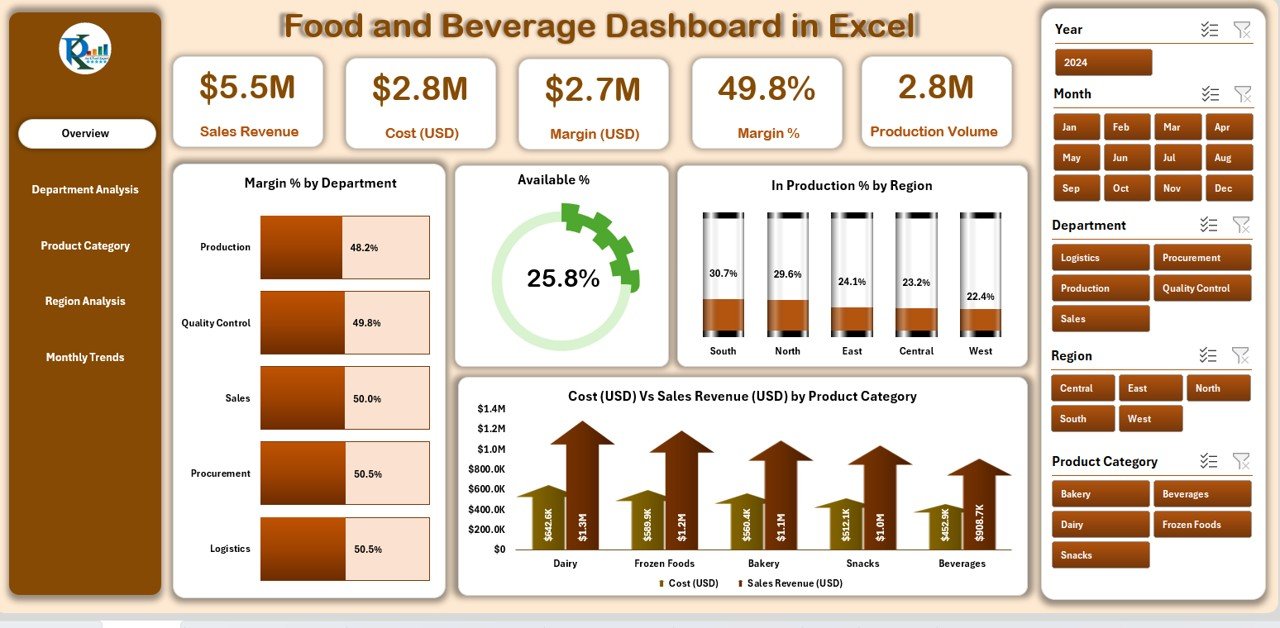
Pick #1 compares KPI totals. This one works from raw rows, so you can ask which department, product category or region is driving cost or eating margin. That makes it the right second file for a plant that sells across several markets.
Who it is for: food manufacturers, beverage plants, distributors and the finance team that reports margin by line.
What is inside the Excel edition:
- Five pages: Overview, Department Analysis, Product Category, Region Analysis and Monthly Trends
- KPI cards for sales revenue, cost, margin, margin % and production volume
- Availability %, in-production % by region and margin % by department
- Cost against sales revenue by product category, with slicers for department, region, product and month
The Power BI edition uses the same five-page layout. The Google Sheets edition adds an inventory view that flags out-of-stock risk and runs in a browser, which is why it is the cheapest useful file in this roundup.
Price: $6.99 in Google Sheets, $17.99 in Excel and $17.99 in Power BI.
Best for: producers that need margin and cost by department, product and region, not just plant KPIs.
3. Dairy Products Processing Plant Dashboard: best for processing plants
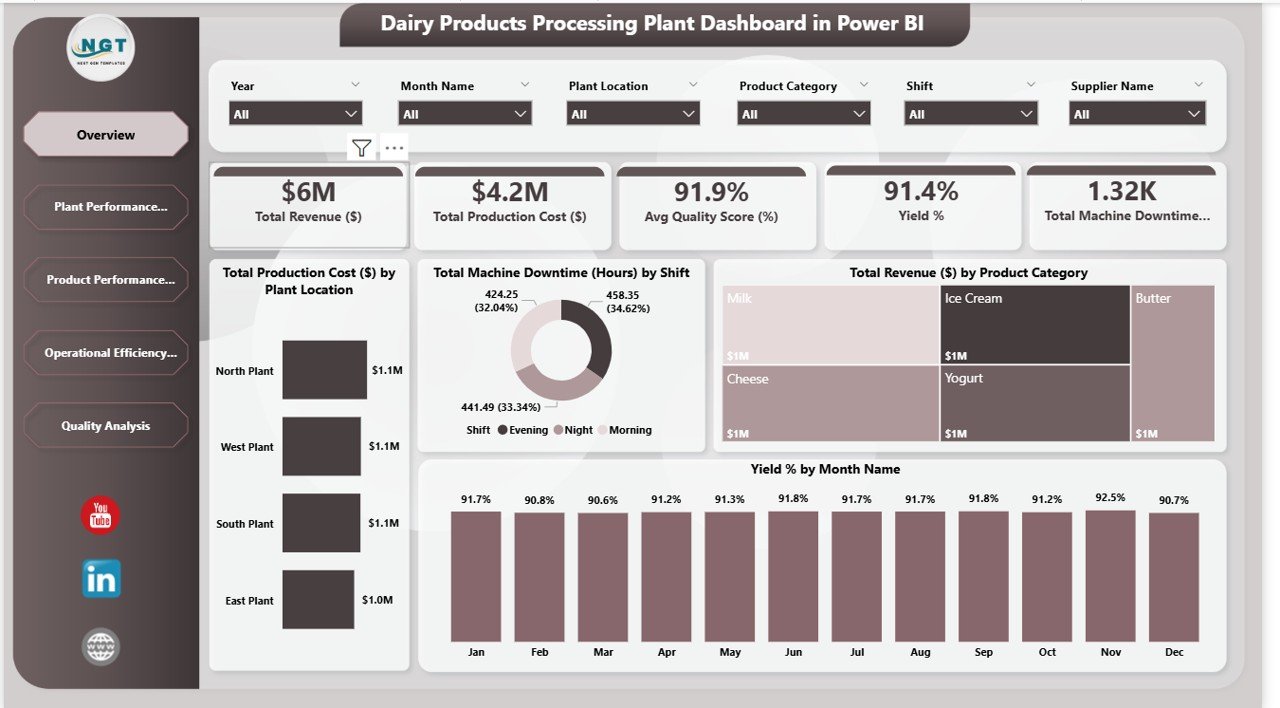
Dairy plants watch things a general factory file skips: yield by product, energy and water per shift, and how many batches were approved, rejected or still under review. This dashboard is built around exactly those.
Who it is for: dairy plant managers, operations heads, maintenance and quality teams, and any wet-processing plant with similar data.
What is inside:
- Five pages: Overview, Plant Performance, Product Performance, Operational Efficiency and Quality Analysis
- Revenue against production cost by plant location, plus total water (liters) and energy (kWh) usage
- Output quantity, yield % and production cost by dairy product
- Machine downtime by product and energy and water use by shift
- Approved, rejected and under-review counts, with quality score by plant and by month
Slicers filter by plant, shift, product and supplier, so a two-site dairy can compare one plant’s night shift with the other’s in a click. Cheese, yogurt or juice plants can rename the product list and keep the rest.
Price: $17.99 in Power BI and $6.99 in Excel.
Best for: processing plants where utilities, yield and batch quality decide the margin.
4. Food Packaging KPI Dashboard: best for packaging lines
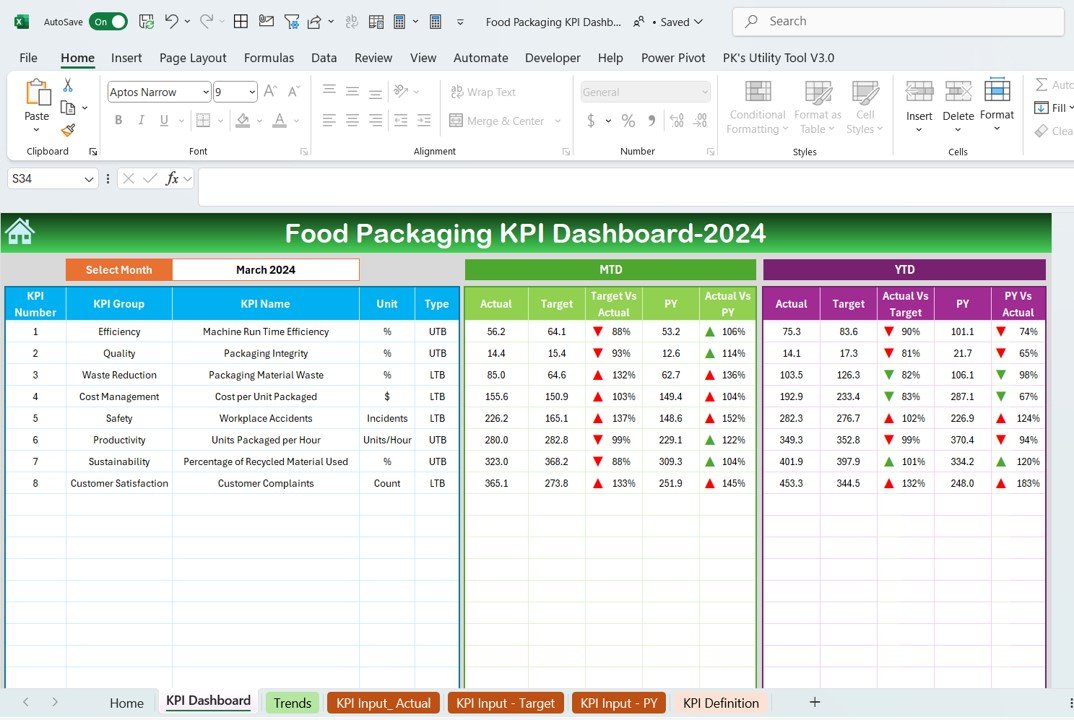
Packaging is where a lot of food plants lose time and material without noticing. This KPI file isolates the packing hall from the rest of the plant so its numbers do not get averaged away.
Who it is for: packaging managers, line supervisors and quality leads in food and co-packing plants.
What is inside the Excel edition:
- Eight KPIs: machine run time efficiency, packaging integrity, packaging material waste, cost per unit packaged, workplace accidents, units packaged per hour, recycled material used and customer complaints
- MTD and YTD actual against target and previous year for the month you pick
- Conditional arrows and a KPI trend sheet
- A definition sheet where each KPI is marked upper the better or lower the better
Teams that want a single-table review can use the Food Packaging KPI Scorecard ($14.99) instead, which shows every KPI with a colour against target.
Price: $14.99 in Excel, $11.99 in Power BI and $9.99 in Google Sheets.
Best for: plants where packing speed, material waste and line safety need their own report.
5. Bakery Production Planning Management System: best for planning production
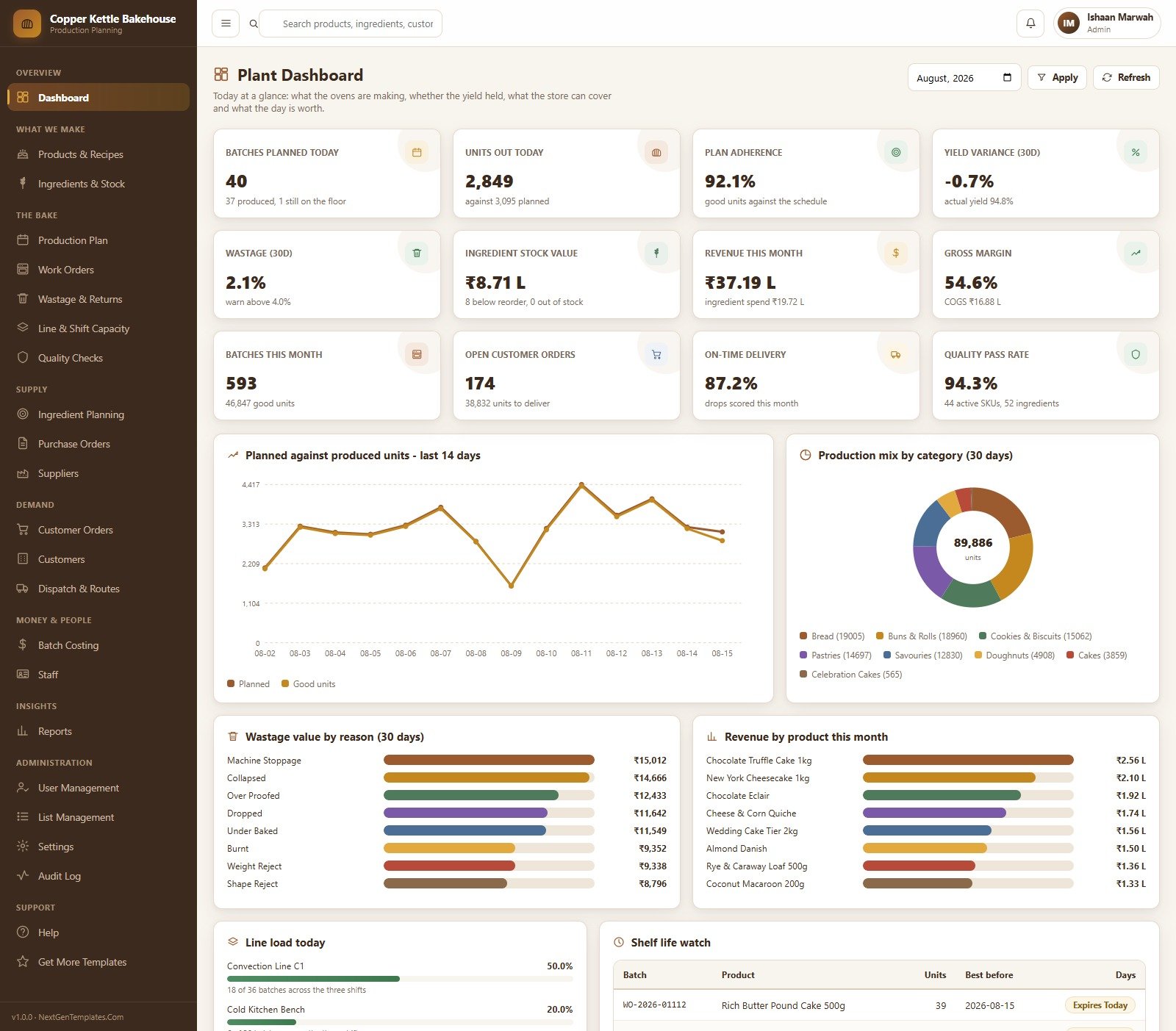
Every other pick here reports on what already happened. This one plans what happens next. It is a full web app that takes a bakery from confirmed customer orders to a costed, dispatched batch, and it runs on your own Google account.
Who it is for: commercial and wholesale bakeries, central kitchens that bake for several outlets, and owners who plan the daily bake on paper today.
What is inside:
- 21 modules, 6 roles with their own screens and 18 reports with Excel and CSV export
- A bake schedule built from confirmed orders, standing orders and part of the forecast, checked against line capacity
- Work orders that move through mixing, proofing, baking and packing, closed with good and rejected counts
- Recipes that cost themselves, ingredient planning against stock and open purchase orders, and one-click purchase orders for shortfalls
- A plant dashboard with 12 cards, including plan adherence, yield variance, wastage, gross margin and quality pass rate
You can sign in to a live demo with sample data before you buy. One honest limit, which the product page states too: it is a planning and record-keeping tool and makes no HACCP, allergen or labelling claims.
Price: $39.99 one time.
Best for: bakeries that need to plan and cost production, not just report on it.
Not sure where to start? Most plants begin with the Food Manufacturing KPI Dashboard ($9.99 to $12.99) and add the Food and Beverage Dashboard ($6.99) when they need margin by product and region.
6. Craft Brewery KPI Dashboard: best for beverage producers
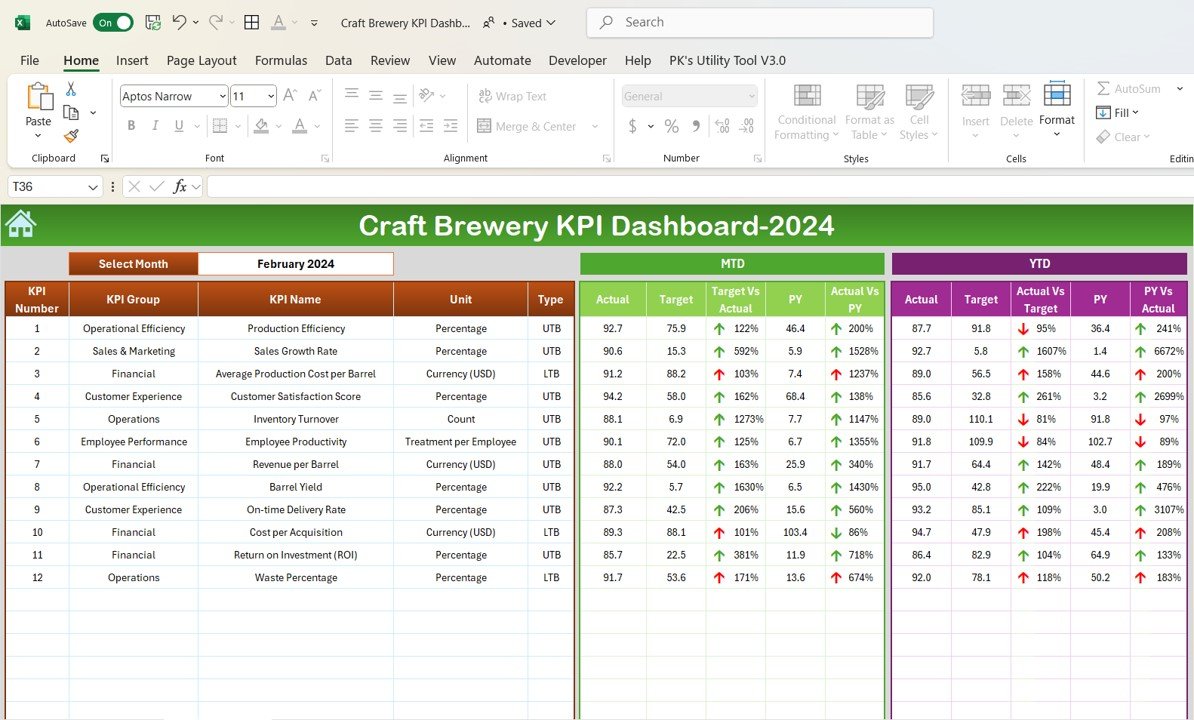
Beverage plants run batch processes with their own rhythm: brew cycles, tank time, distribution and taproom sales. This file tracks brewery KPIs month by month in the same MTD and YTD layout as pick #1.
Who it is for: craft brewery owners, brewhouse managers and small beverage producers.
What is inside:
- Production KPIs such as batches produced, production time and efficiency
- Sales, revenue by product and profitability
- Raw material and finished goods inventory and turnover
- Customer satisfaction, with MTD and YTD against target and previous year
Breweries and wineries that want analysis by batch rather than KPI totals can look at the Brewery & Winery Dashboard ($17.99). It has five pages, 17 charts and slicers for region, sales channel, beverage type and brewmaster. A one-page Craft Brewery KPI Scorecard ($12.99) is also available.
Price: $14.99 in Excel and $9.99 in Google Sheets.
Best for: breweries and small beverage makers that want a monthly KPI report.
7. Food and Beverage KPI Dashboard: best for mixed F&B businesses
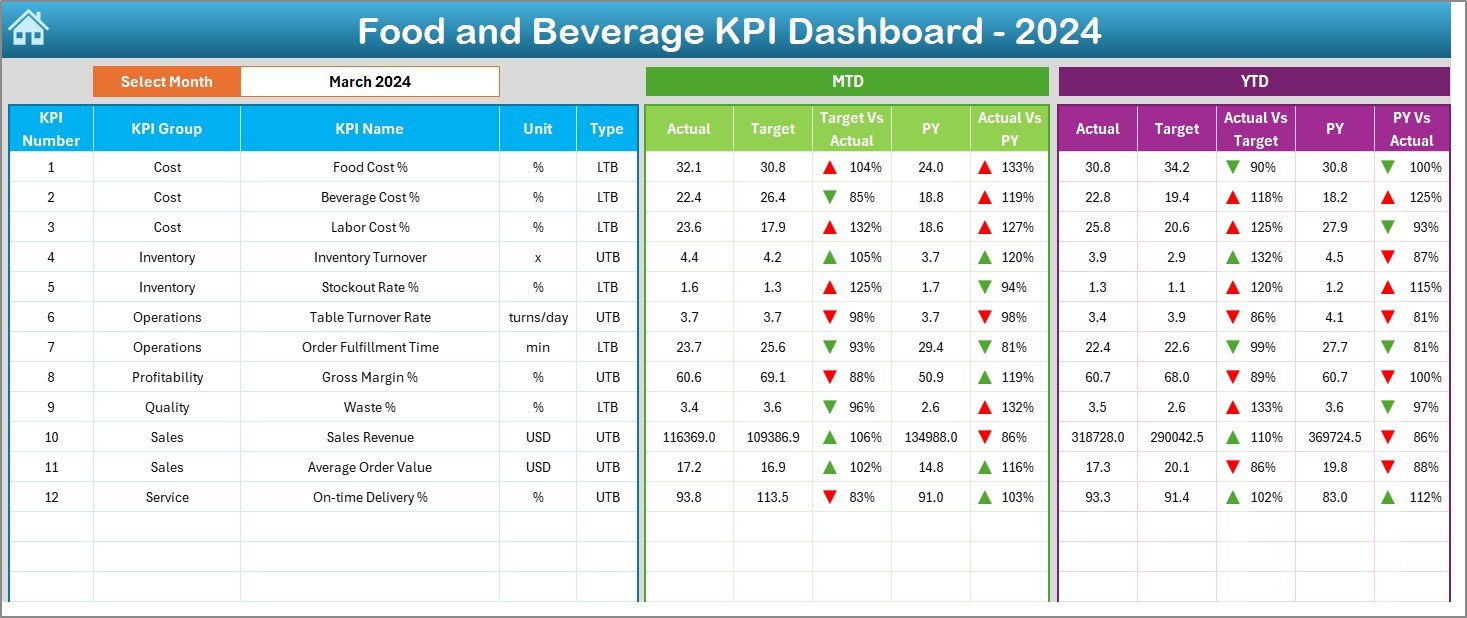
Some food businesses make and serve: a central kitchen with outlets, a hotel food unit, a caterer with its own production. This KPI file covers both sides, which is also why it ranks lower for pure factories.
Who it is for: catering firms, hotel food operations, food processing units with their own outlets, and F&B managers.
What is inside:
- 7 worksheets: Home, Dashboard, KPI Trend, Actual Numbers Input, Target, Previous Year and KPI Definition
- KPIs such as food cost %, beverage cost %, labor cost %, inventory turnover, stockout rate, order fulfilment time, gross margin % and waste %
- A month dropdown with MTD and YTD against target and previous year
- Service KPIs such as table turnover, which a pure plant can delete
Price: $12.99 in Excel.
Best for: businesses that produce food and also sell it through their own outlets.
8. Food Manufacturing KPI Scorecard: best one-page plant review

Some plant meetings do not want charts. They want every KPI, its target, its actual and a colour, on one page. This scorecard does that, which is why some managers prefer it to the full dashboard in pick #1.
Who it is for: plant heads and owners who run a short monthly review against target.
What is inside:
- 4 sheets: Scorecard, KPI Trend, Input Data and KPI Definition
- Dropdowns to switch between month, MTD and YTD
- Traffic-light indicators for actual against target
- Works for bakeries, dairies and beverage units as well as general food plants
Price: $14.99 in Excel.
Best for: a quick plant review when the full dashboard is more than the meeting needs.
Which food manufacturing KPIs should you track?
Every template above lets you edit its KPI list, so it helps to agree on definitions first. These are the formulas most food plants use. Set targets from your own last 12 months rather than copying a figure from another plant, because product mix changes everything.
| KPI | Formula | Why it matters |
|---|---|---|
| Production yield % | Good output / Input quantity x 100 | Every lost point is raw material you paid for and threw away |
| Downtime % | Unplanned stop time / Planned run time x 100 | Changeovers and breakdowns hide here |
| Defect rate % | Defective units / Units inspected x 100 | Rework and rejects cost twice |
| Compliance rate % | Checks passed / Checks performed x 100 | A falling rate is an early warning before an audit |
| On-time delivery % | Orders delivered on time / Orders delivered x 100 | Retailers fine or delist late suppliers |
| Cost per unit | Total production cost / Good units produced | The number buyers push on in every price talk |
| Energy cost per unit | Energy cost / Good units produced | Cooking, chilling and drying make energy a big line |
| Waste % | Waste quantity / Total input quantity x 100 | Covers spoilage, trim, overfill and packaging waste |
For machine-level numbers, our guide to OEE and downtime metrics explains availability, performance and quality. For a wider view, see the 12 manufacturing KPIs to track in 2026, the inventory KPIs list and our supply chain KPIs guide.
How to choose a food manufacturing dashboard template
| If you are… | Start with |
|---|---|
| A food plant reporting monthly KPIs | Food Manufacturing KPI Dashboard |
| A producer comparing margin by product and region | Food and Beverage Dashboard |
| A dairy or other wet-processing plant | Dairy Products Processing Plant Dashboard |
| A packing hall or co-packer | Food Packaging KPI Dashboard |
| A bakery that plans daily bakes | Bakery Production Planning Management System |
| A small bakery that only needs KPIs | Bakery KPI Dashboard ($14.99 Excel, $9.99 Google Sheets) |
| A brewery, winery or drinks maker | Craft Brewery KPI Dashboard |
| A finance team that only needs a cost report | Food and Beverage Report ($6.99) |
Then pick the format. Choose Excel if your planners already live in it and the file stays in the office. Choose Google Sheets if a plant, a head office and a sales team all update the same numbers. Choose Power BI if your company already pays for it and managers want to filter reports themselves. Power BI Desktop is free to build in, but sharing online needs a licence; see Microsoft’s Power BI pricing.
One more rule: buy a KPI dashboard for the monthly review and an analytical dashboard for digging. Many plants end up with one of each, such as pick #1 for the meeting and pick #2 to explain a bad month. Together they cost less than $20 in Google Sheets. Plant managers who want the full toolkit can see our plant manager template stack, and general manufacturers will find more choice in our manufacturing dashboard templates roundup.
When a template is NOT the right answer
A spreadsheet dashboard is a reporting tool. It is the wrong buy in a few cases, and it is better to know that before you pay.
- You need lot traceability. Tracing an ingredient lot to every finished pallet for a recall needs a system that records lots at each step. A dashboard can report a recall drill result, not run one.
- You need a food safety system. HACCP records, preventive controls and supplier approvals belong in a food safety plan. The US rules are set out in the FDA Food Safety Modernization Act pages. None of these templates claims to meet them.
- You want live machine data. Line output every minute from PLCs or counters needs an MES or SCADA link. These files update when you load data.
- Nobody owns the data entry. A dashboard is only as fresh as its last update. If no one will spend 20 minutes a week on it, it will go stale.
For everyone else, which is most small and mid-size food and drink producers, a template is the fastest way to a clean monthly view. If you want to see a basic layout before you buy, try our free Excel dashboard templates. Farms that supply your plant have their own guide too: the best agriculture and farm templates. Teams in other regulated plants may also like our pharmaceutical manufacturing templates.
Frequently asked questions
What is a food manufacturing dashboard in Excel?
It is one Excel workbook that shows how a food plant is performing: production yield, downtime, defect rate, compliance rate, on-time delivery, cost per unit and waste. You type or paste monthly actuals and targets, pick a month, and the dashboard compares them with target and last year, month to date and year to date.
Which KPIs should a food manufacturer track first?
Start with production yield, downtime percentage, defect rate, cost per unit produced and on-time delivery rate. Add compliance rate and waste reduction once the basics are steady. The Food Manufacturing KPI Dashboard ships with ten KPIs in seven groups, so you can begin with its list and edit it later.
Is there a food manufacturing dashboard in Google Sheets?
Yes. The Food Manufacturing KPI Dashboard costs $9.99 in Google Sheets, and the Food and Beverage Dashboard costs $6.99 in Google Sheets. Both run in a browser, so a plant team, a head office and an outside accountant can update and read the same file at the same time.
What is the difference between a KPI dashboard and an analytical dashboard?
A KPI dashboard tracks a fixed list of KPIs against target and last year, month by month. An analytical dashboard slices raw rows such as batches, products or regions with slicers. A plant usually needs the first for the monthly review and the second to find out why a number moved.
Can these templates replace a food ERP or MES?
No. They report on data you export or enter. They do not schedule machines, scan lots, or sync with an ERP, MES or POS on their own. Most small and mid-size plants paste a weekly or monthly export into the data sheet, and the charts update.
Do these templates make my plant food-safety compliant?
No. A dashboard can show a compliance rate or a quality pass rate that you record, but it does not replace a HACCP plan, a food safety plan under FSMA, or an audit. Treat these files as reporting tools that sit beside your food safety system.
Are these templates a one-time purchase?
Yes. The dashboards cost between $6.99 and $17.99 once, and the bakery web app costs $39.99 once. You download an editable file and keep it, with no per-user or yearly fee. Power BI files open in the free Power BI Desktop, but sharing online needs a paid licence.
Excel, Google Sheets or Power BI: which is best for a food plant?
Excel suits planners and finance teams already on Microsoft 365. Google Sheets suits small plants and multi-site teams who want one shared file. Power BI suits companies that already pay for it and want managers to filter reports themselves. Most picks here come in two or three formats.
Can I add my own KPIs?
Yes. The KPI dashboards and scorecards keep every KPI on a definition sheet with its group, unit, formula and type, either upper the better or lower the better. Add a row for a KPI such as overall equipment effectiveness or allergen changeover time, and the dropdowns pick it up.
Get your food manufacturing dashboard
Start with the Food Manufacturing KPI Dashboard for plant KPIs ($9.99 to $12.99) or the Food and Beverage Dashboard for margin by product and region ($6.99 to $17.99). Each file is a one-time purchase that you can edit and keep.
Want to see how these files work before you buy? Watch the walkthroughs on the NextGenTemplates YouTube channel.