


The best veterinary clinic management template for most practices in 2026 is the Veterinary Clinic Dashboard in Excel ($17.99): five pages cover revenue, patients, treatments, vet performance and payments from one data sheet. Multi-location hospitals on Microsoft 365 should pick the Power BI edition at the same price; monthly target reviews suit the $12.99 KPI dashboards.
Last updated: September 2026
Key takeaways
- Our top pick is the Veterinary Clinic Dashboard in Excel ($17.99) — Overview, Patient Analysis, Treatment Insights, Vet Performance and Revenue Breakdown pages, refreshed with one click.
- The Veterinary Clinic Dashboard in Power BI ($17.99) is the pick for multi-doctor and multi-location hospitals that want drill-down and phone viewing.
- The Veterinary Clinic Dashboard in HTML ($12.99) runs in any browser with no Excel, Power BI or Google account, and exports filtered records to CSV.
- All six templates cost $12.99 to $17.99 once, while cloud veterinary practice-management software is sold as a monthly subscription per location.
- Three picks are KPI trackers — Excel dashboard, Excel scorecard and Google Sheets — that compare month-to-date and year-to-date actuals with targets and last year.
Veterinary clinic templates compared
| Template | Format | Best For | Price |
|---|---|---|---|
| Veterinary Clinic Dashboard (Best overall) | Excel | Whole-clinic revenue, patient, treatment and vet reporting | $17.99 |
| Veterinary Clinic Dashboard | Power BI | Multi-doctor and multi-location animal hospitals | $17.99 |
| Veterinary Clinic Dashboard | HTML (browser) | Clinics with no Excel or Power BI licence | $12.99 |
| Veterinary Clinic KPI Dashboard | Excel | Monthly MTD/YTD target vs actual reviews | $12.99 |
| Veterinary Clinic KPI Scorecard | Excel | A one-screen scorecard for owners and partners | $12.99 |
| Veterinary Clinic KPI Dashboard (Best value for teams) | Google Sheets | Practice managers sharing KPIs by link | $12.99 |
Veterinary clinics carry an operational pain that most small businesses do not: every visit mixes clinical work, retail and billing. A single appointment can include a consultation fee, a diagnostic test, a treatment, take-home medication and a follow-up booking, and each lives in a different part of the day. The practice manager ends the month with a practice-management export, a card-terminal report and a spreadsheet of vaccinations, and no quick answer to simple questions: which vet brings in the most revenue, which pet types are growing, and whether the average bill per visit is rising.
The software answer is a cloud veterinary practice-management system such as ezyVet, Covetrus Pulse, Shepherd or Vetspire. They are capable platforms with medical records, reminders and client communication, but they are sold as subscriptions — typically quoted per month, per location and often per user, so check each vendor’s current price. A veterinary clinic management template bought once for $12.99–$17.99 will not replace your medical-records system. It does replace the manual monthly reporting that sits on top of it.
How we picked these
We searched the full NextGenTemplates catalog for products built for veterinary clinics, animal hospitals and pet-care practices, and found fourteen veterinary titles plus related pet-care and animal-shelter tools. We kept the six that model the work of a clinic: visits, patients, treatments, veterinarians, revenue and monthly KPIs. Two appointment calendars were left out of the ranking because they plan the year rather than measure the clinic, and the Veterinary Services dashboards are mentioned below as alternatives rather than ranked twice.
Every pick has a live product page, a one-time price and a documented list of pages or worksheets. Ranking weighs depth of analysis first, then fit for a specific job in the clinic, then price. Where the same design exists in several formats, we ranked the format each clinic type is most likely to use.
The 6 best veterinary clinic templates for 2026
1. Veterinary Clinic Dashboard in Excel — best overall
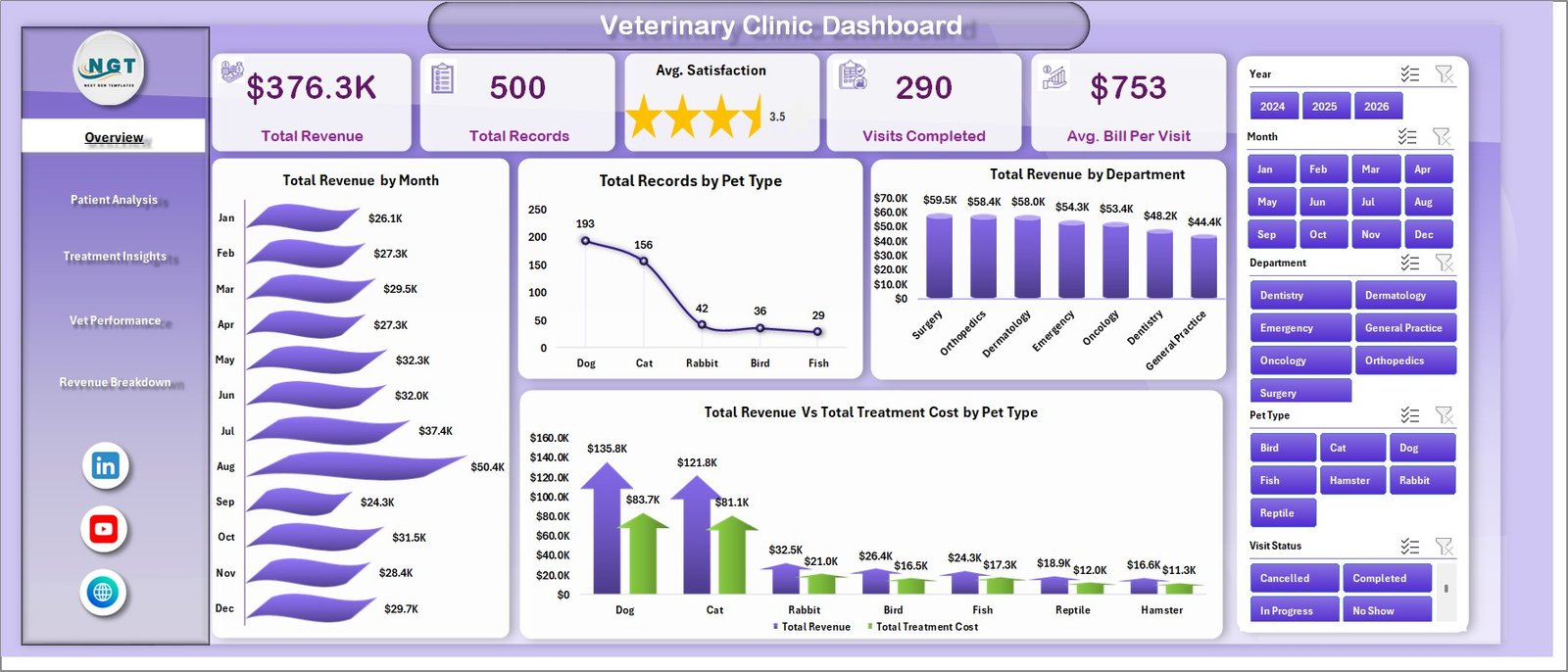
This is the veterinary clinic management template we would hand a practice manager first, because it answers the questions owners ask every month: how much did we bill, which pets and breeds are we seeing, which treatments earn the most, and how is each vet performing. One data sheet feeds five analysis pages through pivot tables, and Refresh All updates every chart.
Who it is for: clinic owners, practice managers and office managers at single-site or small multi-vet practices who already work in Microsoft Excel.
What is inside:
- Five pages: Overview, Patient Analysis, Treatment Insights, Vet Performance and Revenue Breakdown, plus a Data Sheet and a Support Sheet of pivots
- KPI cards for Total Revenue, Total Records, Avg. Satisfaction, Visits Completed and Avg. Bill Per Visit
- Charts for records by breed, pet type and diagnostic category, and revenue by treatment and department
- Revenue vs treatment cost and revenue vs medication cost by pet type and visit type
- Slicers for month, department, pet type, veterinarian and visit type
Concrete uses: find the department whose treatment cost is eating its revenue; see whether August’s revenue spike came from surgery or vaccinations; compare satisfaction ratings and revenue by veterinarian before appraisals; and track average bill per visit month by month after a price change. The sample file ships with 500 records, so you can test every slicer before loading your own data.
Price: $17.99 — buy the Veterinary Clinic Dashboard in Excel.
Best for: one-file, whole-clinic reporting on revenue, patients, treatments and vets.
2. Veterinary Clinic Dashboard in Power BI — best for multi-location hospitals
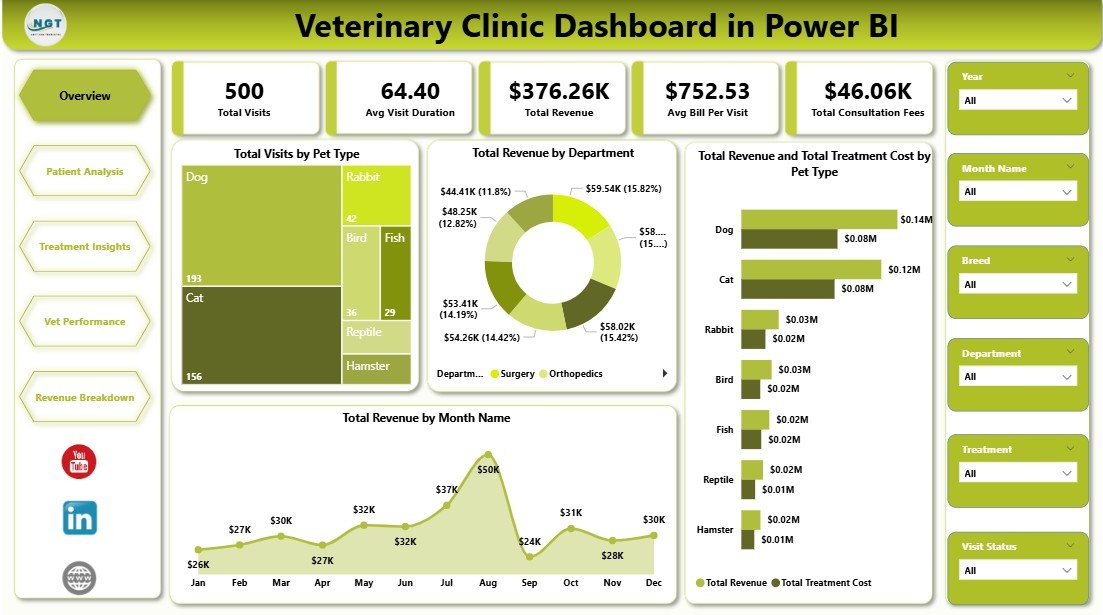
The same five-page design as pick #1, rebuilt in Power BI with DAX measures. It suits animal hospitals that already use Microsoft 365 and want managers to open the report on a phone, drill into a department, or share one report across several sites.
Who it is for: multi-doctor animal hospitals, veterinary groups with two or more locations, and owners who review the business away from the clinic.
What is inside:
- Five report pages: Overview, Patient Analysis, Treatment Insights, Vet Performance and Revenue Breakdown
- KPI cards for Total Visits, Avg Visit Duration, Total Revenue, Avg Bill Per Visit and Total Consultation Fees
- Visits by breed, satisfaction score by diagnosis category and revenue by treatment
- Revenue by payment method, year, department and pet type
- An Excel data source you replace with your own records, then refresh
Concrete uses: watch average visit duration to see whether appointment slots are too short; compare consultation fees with treatment revenue to judge whether the clinic under-prices its time; check which payment methods dominate before renegotiating card fees; and give each site manager the same report view. If your team prefers Google Workspace, the Veterinary Clinic Dashboard in Google Sheets ($9.99) covers similar ground in a browser.
Price: $17.99 — get the Veterinary Clinic Dashboard in Power BI.
Best for: Power BI practices that want interactive drill-down across doctors or sites.
3. Veterinary Clinic Dashboard in HTML — best with no software to install
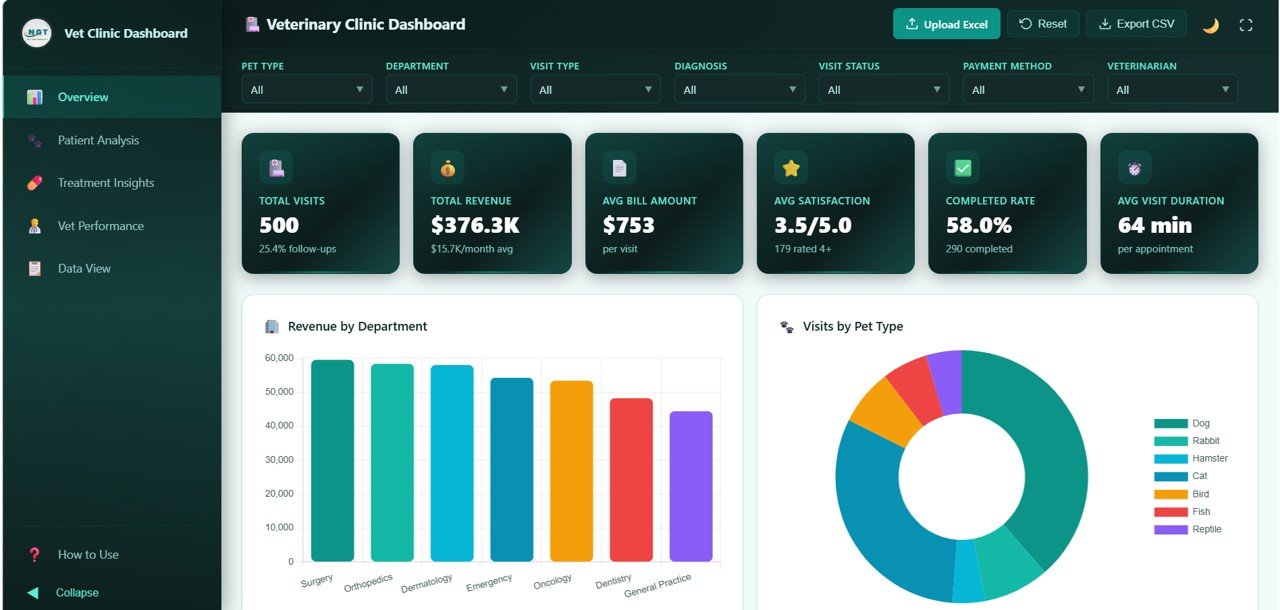
A single-file dashboard built with HTML, CSS and JavaScript. You open index.html in Chrome, Edge, Firefox or Safari and it runs, with no Excel, Power BI or Google account required. That makes it the easiest option for a clinic whose front-desk computers do not carry Microsoft Office.
Who it is for: small neighbourhood clinics, pet-care practices, and owners who want a dashboard on the clinic intranet or a tablet.
What is inside:
- Six KPI cards: Total Visits, Total Revenue, Avg Bill Amount, Avg Satisfaction, Completed Rate and Avg Visit Duration
- 20+ charts over Overview, Patient Analysis, Treatment Insights, Vet Performance and a Data View page
- Visit status split into completed, cancelled, rescheduled and no-show
- Data View with search, sort, pagination and CSV export
- Responsive layout for desktop, tablet and phone
Concrete uses: track the completed rate so no-shows and cancellations are visible every week; show the mix of dogs, cats, birds and exotic pets to plan stock and staff skills; export a filtered visit list for a follow-up call campaign; and check the numbers on a tablet during a team huddle.
Price: $12.99 — buy the Veterinary Clinic Dashboard in HTML.
Best for: clinics that want a polished dashboard without paying for or learning Excel or Power BI.
Not sure which to buy? For whole-clinic reporting, the Veterinary Clinic Dashboard in Excel is $17.99. For several vets or sites on Microsoft 365, choose the Power BI edition at $17.99. For monthly target reviews, the Veterinary Clinic KPI Dashboard in Excel is $12.99.
4. Veterinary Clinic KPI Dashboard in Excel — best for monthly target reviews
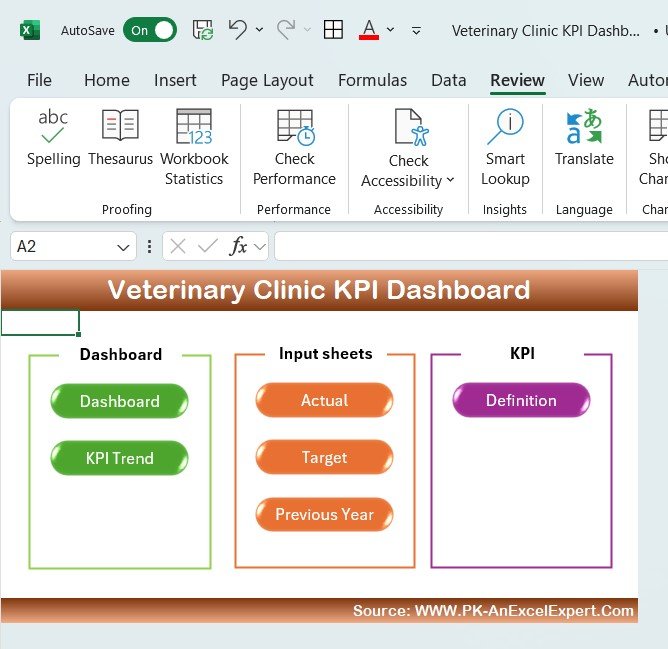
Picks #1 to #3 analyse visit-level records. This one is a KPI tracker: you enter monthly actuals, targets and last year’s figures for each KPI, pick a month, and the dashboard compares month-to-date and year-to-date results with arrows that show whether each KPI is on target.
Who it is for: owners and practice managers who run a monthly performance meeting against a budget or business plan.
What is inside:
- A home page with buttons to Dashboard, KPI Trend, Actual, Target, Previous Year and KPI Definition sheets
- MTD and YTD actual vs target vs previous year for each KPI
- KPI areas for patient intake, treatments and follow-ups, revenue by service, appointments and wait times, staff productivity and client satisfaction
- A definition sheet recording each KPI’s formula, unit and whether higher or lower is better
Concrete uses: set a target for new clients per month and see the YTD gap; compare this October with last October so seasonality is not mistaken for decline; follow average wait time after adding a vet; and give partners the same one-page view every month.
Price: $12.99 — buy the Veterinary Clinic KPI Dashboard in Excel.
Best for: clinics that manage to a monthly plan rather than a visit log.
5. Veterinary Clinic KPI Scorecard in Excel — best one-screen scorecard
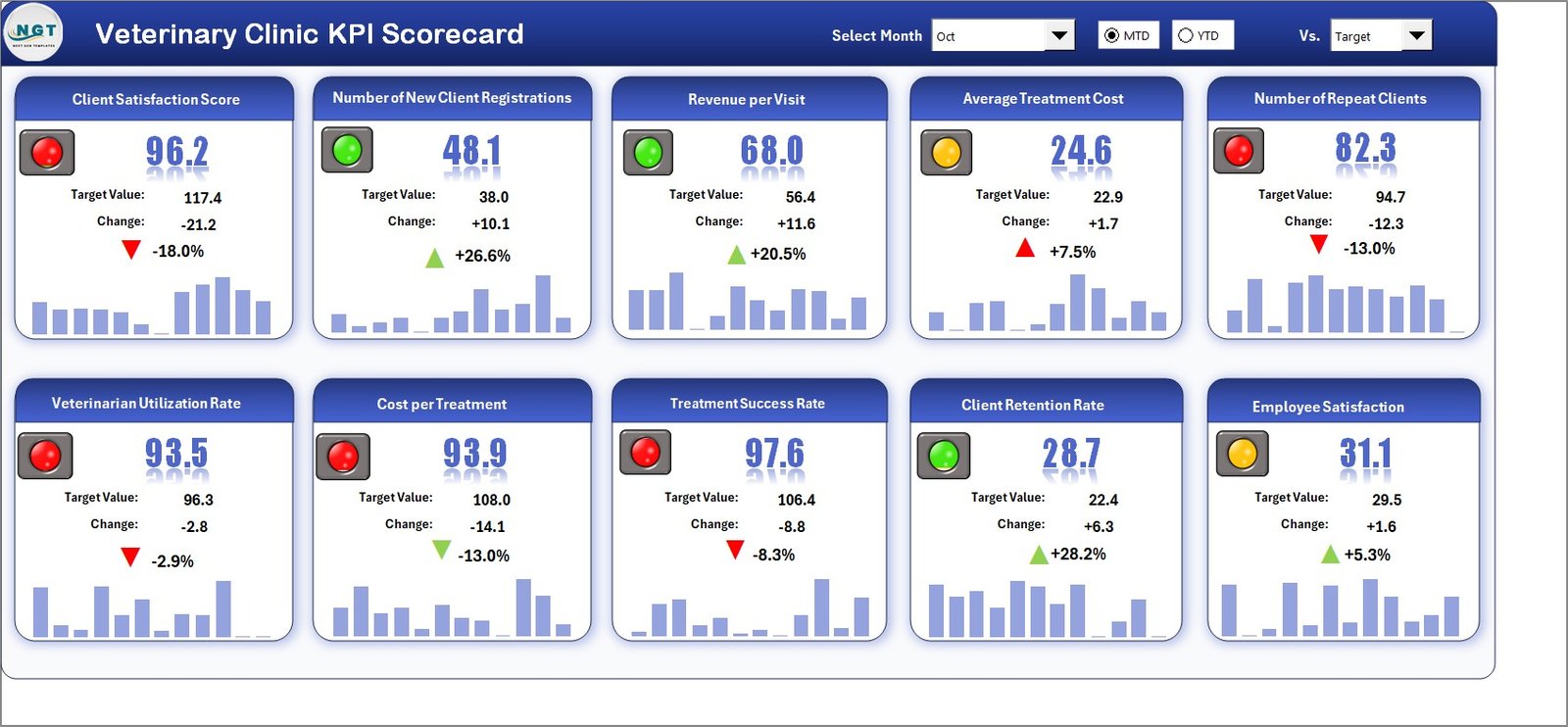
A leaner, four-sheet cousin of pick #4. Instead of a dashboard of charts, the Scorecard sheet lists every KPI in one table with colour-coded status, so an owner can read the whole clinic in thirty seconds and then open the trend sheet only for the KPIs that are red.
Who it is for: clinic owners, partners and veterinary groups that want a compact scorecard for board or partner meetings.
What is inside:
- Four sheets: Scorecard, KPI Trend, Input Data and KPI Definition
- Dropdowns to choose the month and switch between MTD and YTD views
- Colour-coded actual vs target indicators across all KPIs
- Trend charts comparing Actual, Target and Previous Year for the selected KPI
- Editable KPI names, groups, units and formulas
Concrete uses: print one scorecard page for the monthly partner meeting; flag KPIs that missed target two months running; set lower-is-better KPIs such as no-show rate correctly so the colours mean the right thing; and add your own KPIs, such as dental procedures per month.
Price: $12.99 — buy the Veterinary Clinic KPI Scorecard in Excel.
Best for: owners who want the fastest possible read of clinic performance.
6. Veterinary Clinic KPI Dashboard in Google Sheets — best for shared reporting
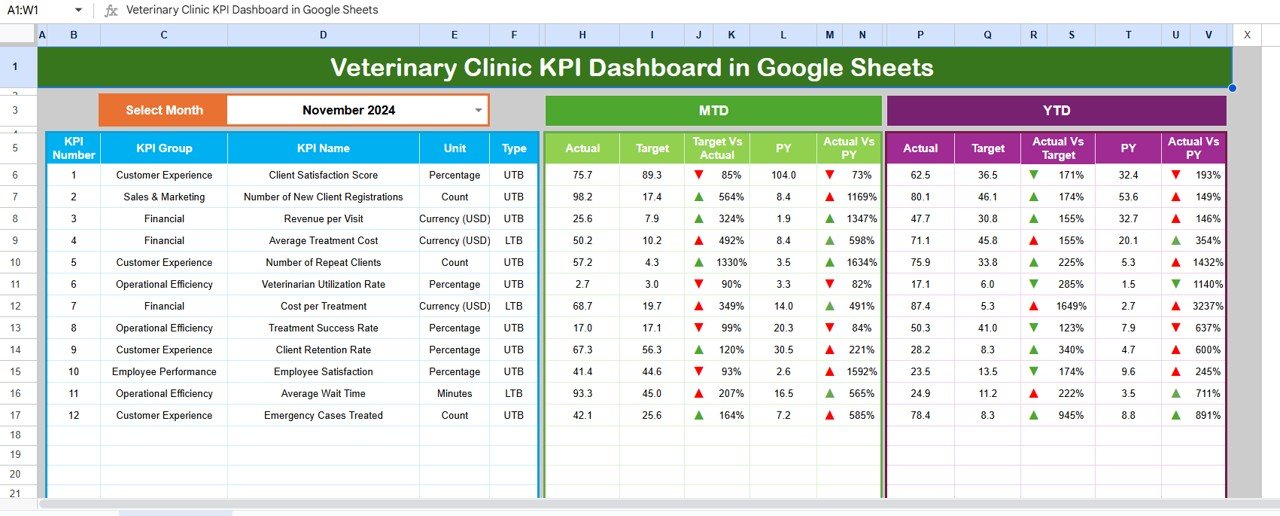
The Google Sheets version of pick #4. Because it lives in Google Drive, the practice manager, the owner and the accountant can all open the same live file by link, with no installation and no emailing of workbooks.
Who it is for: clinics on Google Workspace, owners who work remotely, and groups with a part-time bookkeeper who needs the numbers.
What is inside:
- Six tabs: Dashboard, Trend, Actual Numbers Input, Target, Previous Year and KPI Definition
- A month selector that drives MTD and YTD actuals, targets and previous-year comparisons
- Up and down arrows through conditional formatting
- Customisable KPIs such as consultation volume, treatment success and client satisfaction
- An adjustable starting month to match your fiscal year
Concrete uses: share one KPI file with the owner and accountant; enter the month’s numbers from any laptop; start the year in April if that is your fiscal year; and review MTD performance from a phone before a supplier meeting.
Price: $12.99 — get the Veterinary Clinic KPI Dashboard in Google Sheets.
Best for: practices that share reporting by link rather than by email attachment.
Which veterinary clinic KPIs should you track?
Whichever template you choose, a handful of numbers explain most of a clinic’s performance. Targets vary by country, practice type and species mix, so treat the ranges below as commonly cited starting points and set your own from your baseline. The American Veterinary Medical Association (AVMA) publishes economic and workforce research that helps set realistic benchmarks.
| KPI | Formula | Commonly cited guidance |
|---|---|---|
| Average transaction charge (avg. bill per visit) | Total revenue ÷ number of paid visits | Track monthly; rises with diagnostics and dentistry |
| Revenue per veterinarian | Total revenue ÷ full-time-equivalent vets | Compare vets on the same mix of appointments |
| Active client retention | Clients seen this year who were also seen last year ÷ last year’s clients | Many practices aim for 80%+ |
| No-show and cancellation rate | Missed or cancelled appointments ÷ booked appointments | Lower is better; reminders typically reduce it |
| Drug and supply cost % | Medication and supply cost ÷ revenue | Often cited around 20–25% of revenue |
| Client satisfaction | Average survey rating per visit | Track by vet and department, not only overall |
Average transaction charge and no-show rate deserve the most attention because they move revenue without adding a single appointment. A clinic seeing 600 visits a month that lifts its average bill from $120 to $130 adds $6,000 a month; cutting no-shows from 8% to 5% on the same volume recovers about 18 visits. For wider context, our guide to 15 healthcare KPIs to track in 2026 covers patient-flow metrics that also apply to animal hospitals, and churn and retention metrics explains how to calculate client retention properly.
How to choose a veterinary clinic management template
Use this quick decision path:
- You want one veterinary clinic management template for whole-clinic reporting: Veterinary Clinic Dashboard in Excel ($17.99).
- You run several vets or sites on Microsoft 365: Veterinary Clinic Dashboard in Power BI ($17.99).
- Your computers have no Excel or Power BI: Veterinary Clinic Dashboard in HTML ($12.99).
- You manage against a monthly budget or plan: Veterinary Clinic KPI Dashboard in Excel ($12.99) or the KPI Scorecard ($12.99).
- Your team shares files by link: Veterinary Clinic KPI Dashboard in Google Sheets ($12.99).
- You need to plan vaccination days and clinic events: add the Veterinary Clinic Calendar in Excel ($4.99).
- You offer grooming, boarding or mobile services: look at the Veterinary Services Dashboard in Excel ($13.99).
A sensible pairing is one visit-level dashboard (picks #1 to #3) for operational detail plus one KPI tracker (picks #4 to #6) for the monthly meeting. Buying the same design in two formats can also make sense; our explainer on when to buy Excel, Google Sheets and Power BI together covers that decision. Before you pay, our buying guide on how to evaluate an Excel dashboard template lists the checks that matter.
Template vs veterinary software: what does it cost over five years?
Subscription pricing adds up. At an assumed $250 per month for one location, a cloud practice-management system costs $3,000 a year and $15,000 over five years; at $400 a month it is $24,000. Buying the Veterinary Clinic Dashboard in Excel plus the KPI Dashboard in Excel costs $30.98 once. Even with a freelancer customising the files, the total is likely to stay well below a single year of subscription fees.
That does not make practice-management software a bad buy — you are paying for medical records, reminders, e-prescriptions and integrations. It means you should buy software for those functions and own your reporting. Our breakdown of what to buy and what to template in a small business software stack walks through the same logic, and how much a business dashboard template should cost shows where the $12.99–$17.99 price sits in the market.
When a template is NOT the right answer
A template is the wrong buy in four situations. First, you need electronic medical records with SOAP notes, lab results and imaging attached to each patient. Second, you want automated reminders by SMS or email for vaccinations and follow-ups. Third, you must meet controlled-drug logging or prescription rules that require an audited system. Fourth, you run many hospitals with dozens of staff entering data at once.
In each of those cases, buy veterinary software and use a template only for the reporting layer on top of its export. For everything else — a single clinic or small group tracking revenue, visits, treatments, vets and monthly KPIs — a $12.99–$17.99 veterinary clinic management template does the job a monthly subscription is oversized for. Human clinics face the same choice; see our 6 best dental practice templates and our roundup of healthcare and hospital management templates.
Frequently asked questions
What is a veterinary clinic management template?
A veterinary clinic management template is a pre-built Excel, Google Sheets, Power BI or HTML file that turns clinic data into dashboards and KPIs. You paste visit records or enter monthly figures, and the charts show revenue, visits, pet types, treatments, vet performance and satisfaction without building formulas or pivot tables yourself.
Can I manage a veterinary clinic in Excel?
You can manage the reporting side of a clinic in Excel. The Veterinary Clinic Dashboard in Excel analyses revenue, patients, treatments and veterinarians from one data sheet. Medical records, vaccination reminders and prescriptions still belong in dedicated veterinary practice-management software, which the template sits on top of.
What KPIs should a veterinary clinic track?
Track average transaction charge, revenue per veterinarian, active client retention, new clients per month, no-show and cancellation rate, drug and supply cost as a percentage of revenue, and client satisfaction. Average bill per visit and no-show rate usually move revenue fastest, because they change income without adding appointments.
How do I calculate average transaction charge for a vet clinic?
Divide total revenue for the period by the number of paid visits. For example, $72,000 of revenue from 600 paid visits gives an average transaction charge of $120. Track it monthly and by department, because diagnostics, dentistry and surgery raise it while vaccination-only visits lower it.
Is there a free alternative to veterinary practice management software?
No free tool replaces medical records and reminders, but a one-time template replaces the reporting. The veterinary templates in this list cost $12.99 to $17.99 once, with no monthly fee, and work alongside whatever software or paper system holds your patient records.
Excel, Google Sheets, Power BI or HTML — which format should a vet clinic choose?
Choose the tool your team already uses. Excel suits a practice manager who wants one self-contained file; Google Sheets suits clinics sharing files by link; Power BI suits multi-location hospitals wanting drill-down and mobile viewing; the HTML dashboard suits clinics with no Office licence, because it opens in any browser.
Can these templates track veterinarian performance?
Yes. The Excel, Power BI and HTML dashboards each include a Vet Performance page comparing veterinarians by revenue, visits handled, satisfaction rating and, in Power BI and HTML, visit duration. Compare vets only on similar appointment mixes, since a surgeon and a vaccination clinic doctor will naturally differ.
How much do these veterinary templates cost?
The six ranked templates cost between $12.99 and $17.99 each as one-time purchases, with no subscription or per-user fees. Related tools include the Veterinary Clinic Calendar at $4.99 and the Veterinary Clinic Dashboard in Google Sheets at $9.99, so a clinic can build a full reporting set for under $50.
Do I need technical skills to use these templates?
No advanced skills are needed. For the Excel dashboard you paste records into the data sheet and click Refresh All; for the KPI trackers you type monthly numbers into labelled input sheets. The Power BI file opens in free Power BI Desktop, and the HTML dashboard opens by double-clicking index.html.
Get more veterinary clinic templates
Ready to stop assembling month-end reports by hand? The Veterinary Clinic Dashboard in Excel ($17.99) is the veterinary clinic management template for whole-clinic reporting, and the Veterinary Clinic KPI Dashboard in Excel ($12.99) runs your monthly target review. Together they cost $30.98 — less than one month of most practice software.
See our dashboards in action on the YouTube channel, @NextGenTemplates, and browse more tools in our cheap Excel dashboard templates under $15, our premium Power BI templates under $20, or the best gym and fitness studio templates for another service business.