

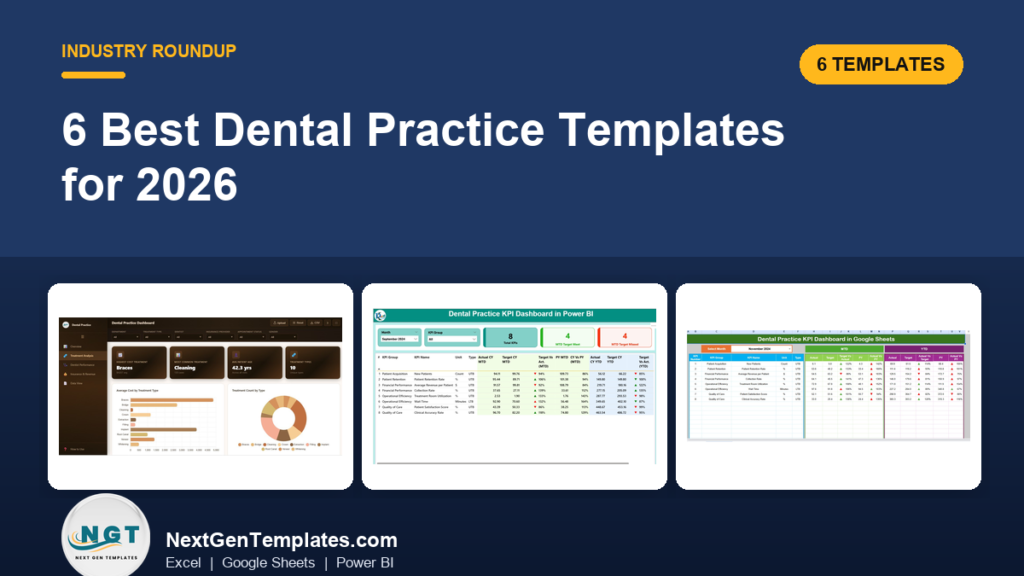
The best dental practice management template for most small clinics is the Dental Clinic Management System V1.0 ($19.99, paid once). It handles appointments, patient and treatment records, expenses and user access in one Excel file. If you already run practice software and only need reporting, a $11.99 to $12.99 dental KPI dashboard is the better buy.
Last updated: September 2026
Related guide: For hospitals and multi-department facilities rather than a single dental office, see our roundup of healthcare and hospital management templates in Excel and Power BI.
Key takeaways
- Open Dental, one of the lowest-priced dental practice systems, lists $199 per month per location in year one, which is $2,388 before hosting or add-ons.
- All 6 templates in this guide are one-time purchases between $11.99 and $19.99, with no per-user or per-location fee.
- Best overall is the Dental Clinic Management System V1.0 in Excel VBA ($19.99); best value is the Dental Practice KPI Dashboard in Power BI ($11.99).
- Four of the six are KPI dashboards that report MTD and YTD actuals against target and previous year, so they sit alongside your clinical software instead of replacing it.
- A spreadsheet will not file insurance claims, store X-rays or chart perio pockets. We say exactly when a dental practice needs certified software instead.
Dental practice templates compared
Here are all six templates side by side. One is marked best overall and one best value.
| Template | Format | Best for | Price |
|---|---|---|---|
| Dental Clinic Management System V1.0 (Best overall) | Excel VBA | Running appointments, patients, expenses and users in one file | $19.99 |
| Dental Practice KPI Dashboard | Excel | Monthly KPI review for owner-dentists who work in Excel | $12.99 |
| Dental Practice KPI Dashboard | Google Sheets | Shared, cloud-based KPI tracking across a team or several sites | $12.99 |
| Dental Practice KPI Dashboard (Best value) | Power BI | Interactive KPI reporting with slicers and drill-through | $11.99 |
| Dental Services KPI Dashboard | Excel | Clinics with several service lines and colour-coded targets | $12.99 |
| Dental Practice Dashboard | HTML | Browser-based analytics with no Excel or Power BI licence | $12.99 |
What does dental practice software actually cost?
Dental practice management systems are priced per location or per provider, every month, for as long as you use them. That is fair for what they do, since they handle clinical charting, imaging and insurance claims. But a lot of small practices pay that bill mainly for scheduling and a few reports.
For a reference point, Open Dental publishes its fees openly. According to the official Open Dental fee schedule, a US office pays $199 per month per location for the first 12 months and $149 per month after that, plus $20 per provider per month above three providers. That comes to $2,388 in year one and $1,788 each year after, before server hardware or cloud hosting. Cloud-first products such as Curve Dental are usually quoted per user and cost more.
A template does not replace all of that. What it does is take over the jobs that do not need certified clinical software: the appointment book for a single-chair or two-chair practice, the patient list, expense tracking, and above all the monthly KPI review. For those jobs, a one-time $12 to $20 file is hard to beat.
How we picked these
We searched the NextGenTemplates catalogue for every dental product in Excel, Google Sheets, Power BI and HTML and found 15 paid options. We kept the six that cover distinct jobs: one full management system and five reporting dashboards, each in a different format or with a different KPI focus. We left out near-duplicates, the $5.99 patient log (it is a single data-entry form, not a management tool), and a web-app version that is still being finalised. Every pick is a paid, one-time download with editable formulas or data.
The 6 best dental practice templates for 2026
1. Dental Clinic Management System V1.0 (Excel VBA): best overall
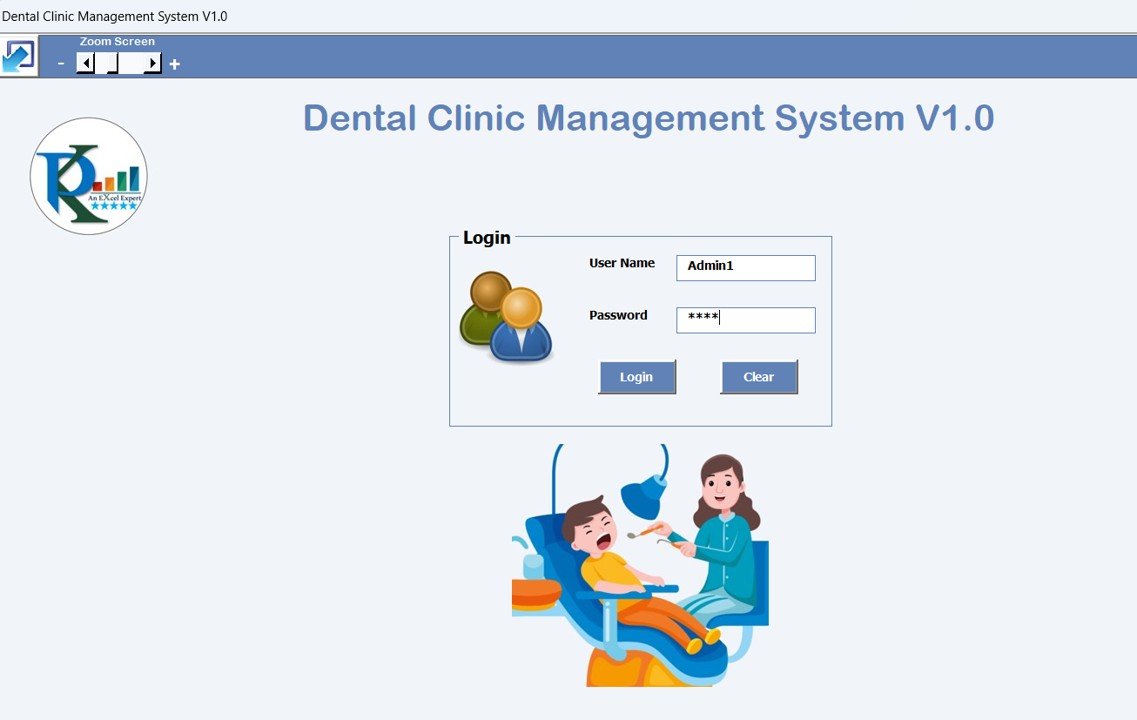
This is the only template on the list that actually runs the practice instead of just reporting on it. It is an Excel and VBA application with a login screen, forms for each part of the clinic, and a main dashboard where you add, update, delete, filter and export records.
Who it is for: a solo dentist or small clinic that currently keeps appointments in a diary or a loose spreadsheet and wants structure without a monthly subscription.
What is inside:
- Secure login with user management, access levels and password resets
- Appointment form that captures patient, doctor, date, time and treatment type
- Patient and treatment master forms for contact details, medical history and treatment progress
- Expense and doctor master forms for clinic costs and doctor-specific fees
- A change log for a full audit trail, plus a reports module
Use it to run the daily appointment book, to see which treatments each patient has had, and to track what the clinic spends each month on supplies and vendors. Against Open Dental’s year-one fee of $2,388, the file pays for itself in the first few days.
Best for: small practices that want a real dental practice management template, not just a report. $19.99. View the Dental Clinic Management System.
2. Dental Practice KPI Dashboard in Excel: best for monthly owner reviews

This workbook turns a month of numbers into a one-page scorecard. You pick a month from a dropdown and every KPI updates to show Month-to-Date and Year-to-Date actuals, targets and previous-year values, with conditional formatting that flags the misses.
Who it is for: an owner-dentist or practice manager who closes the month in Excel and wants a clear view of patient acquisition, retention and revenue.
What is inside:
- Dashboard sheet with MTD and YTD actual, target and previous-year comparisons
- KPI Trend sheet: pick any KPI and chart its history against target and last year
- Input sheets for actual, target and previous-year numbers
- KPIs such as new patients, patient retention rate, revenue per patient and treatment room utilization
Typical use: a 15-minute month-end review where you check whether new-patient numbers held up after a marketing push, or whether chair utilization dipped in a holiday month.
Best for: Excel-first practices that want a tidy monthly scorecard. $12.99. View the Dental Practice KPI Dashboard in Excel.
3. Dental Practice KPI Dashboard in Google Sheets: best for teams and multiple sites

This is the same MTD and YTD scorecard idea, built for Google Sheets so the whole team can open one live link. The front desk can enter numbers while the owner reviews them from home or a second location.
Who it is for: practices with a practice manager, an associate dentist or a second site, where emailing an Excel file back and forth creates version problems.
What is inside:
- Dashboard sheet driven by a month dropdown, showing MTD and YTD actual vs target and previous year with up and down arrows
- KPI Trend view that shows each KPI’s chart, formula, unit and definition
- Structured data-entry tabs for actual, target and previous-year values
- Easy to extend with your own KPIs and brand colours
Google Sheets is free, so the $12.99 file is the whole cost. Share view-only access with associates and edit access with the manager who enters the numbers.
Best for: cloud-based collaboration. $12.99. View the Google Sheets version.
4. Dental Practice KPI Dashboard in Power BI: best value
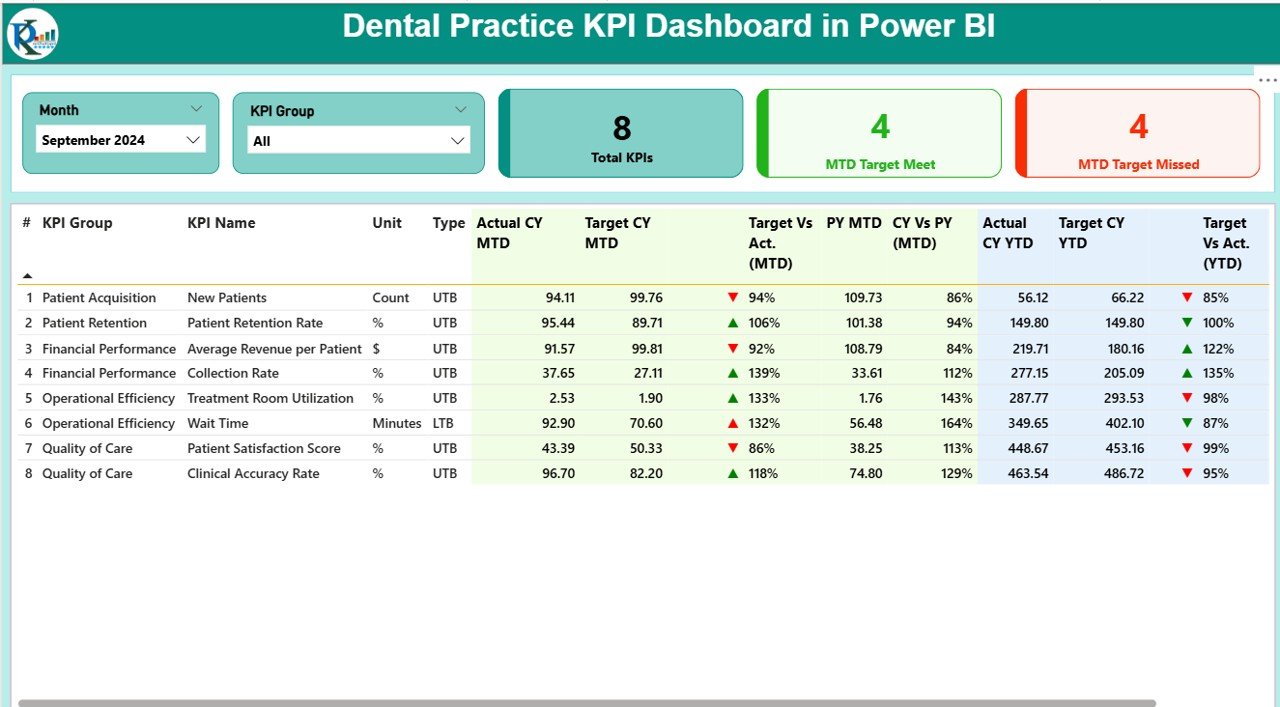
At $11.99 it is the cheapest template here, and it is the most interactive. It is a Power BI report fed by a simple Excel backend, so data entry stays in Excel while the analysis gets proper slicers and drill-through.
Who it is for: practice groups or managers who already use Microsoft 365 and want a report they can slice by month and KPI group.
What is inside:
- Summary page with KPI cards for total KPIs, target met and target missed
- KPI Trend page with combo charts of current year, previous year and target
- KPI Definition drill-through showing each metric’s formula, unit and type
- Excel input sheets for actual, target and definitions. Refresh and the report updates
The sample KPIs are grouped into patient acquisition, patient retention, financial performance, operational efficiency and quality of care, covering new patients, collection rate, wait time and patient satisfaction score.
Best for: the lowest price with the richest interactivity. $11.99. View the Power BI dashboard.
5. Dental Services KPI Dashboard in Excel: best for multi-service clinics
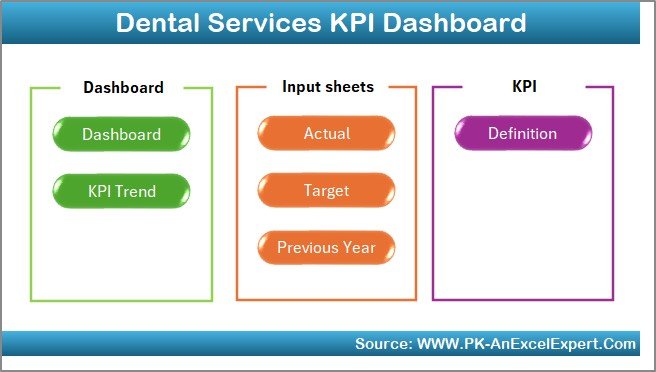
This workbook covers operational, financial and patient-satisfaction KPIs across a broader dental services operation. It has a navigation home sheet and green and red indicators that make it quick to scan.
Who it is for: clinics offering general, cosmetic and specialist services, or small groups, where the manager reports on more than one service line.
What is inside:
- Seven tabs: Home, Dashboard, KPI Trend, Actual Data, Target, Previous Year and KPI Definitions
- MTD and YTD analysis with actual vs target arrows
- Colour-coded indicators: green for improvement, red for decline
- Formulas and dropdowns only, with no macros or add-ins, so it opens anywhere Excel runs
Use it for a monthly management pack. The home sheet takes your clinic name, logo and reporting period, so the output is ready to share with partners.
Best for: macro-free, presentation-ready KPI reporting. $12.99. View the Dental Services KPI Dashboard.
6. Dental Practice Dashboard in HTML: best with no software
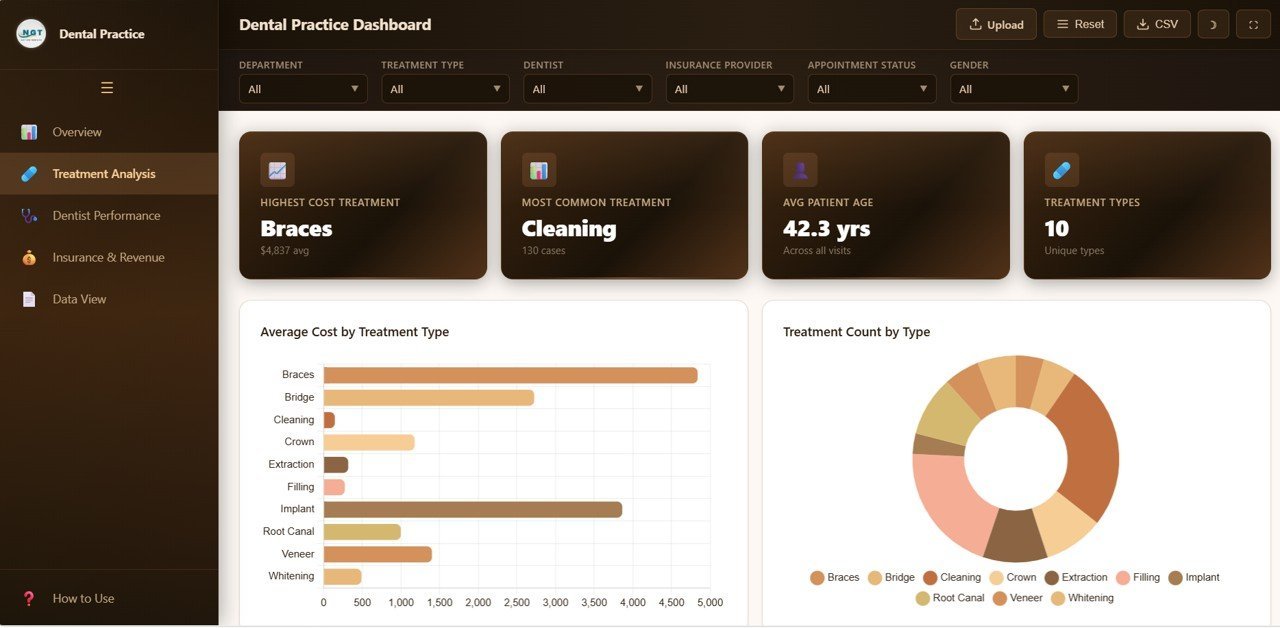
This one works differently from the others. It is an analytics dashboard that runs in any browser: unzip, open index.html, and you have a SaaS-style interface with no Excel or Power BI needed.
Who it is for: clinics on Macs or shared front-desk PCs without Office, or owners who want a modern-looking dashboard to show partners.
What is inside:
- 5 pages: Overview, Treatment Analysis, Dentist Performance, Insurance Revenue and Data View
- 6 KPI cards: total patients, revenue, average treatment cost, satisfaction, completion rate and insurance coverage
- 15+ charts with slicers by department, dentist, treatment type, insurer and period
- Searchable data table with sort, pagination and CSV export
It is especially useful for comparing dentists on completed treatments and satisfaction, and for seeing which insurers bring in the most revenue.
Best for: practices without Office. $12.99. View the HTML dashboard.
Also worth a look: the Dental Practice Dashboard in Excel ($17.99) is a pivot-driven analytics workbook covering treatment cost, patient payments, cancellations, no-shows, dentist performance and insurance analysis. Pick it if you have row-level appointment data rather than monthly KPI totals.
Which dental KPIs should you track?
The dashboards above come with sample KPIs, and they all let you add your own. These are the metrics most practices track, with the formula to use in any of the templates:
| KPI | Formula | Why it matters |
|---|---|---|
| New patients | Count of first visits in the period | The growth engine. A falling count shows up months before revenue does. |
| Patient retention rate | Patients seen this period who were also seen in the prior period ÷ patients seen in the prior period | Recall and hygiene revenue depend on it |
| Average revenue per patient | Production ÷ unique patients seen | Shows treatment acceptance and case mix |
| Collection rate | Collections ÷ net production × 100 | Money earned but not collected is a cash-flow leak |
| Treatment room utilization | Booked chair hours ÷ available chair hours × 100 | An empty chair is your most expensive fixed cost |
| No-show / cancellation rate | Missed or cancelled appointments ÷ scheduled appointments × 100 | Drives confirmation calls and deposit policies |
| Patient satisfaction score | Average survey score for the period | Early warning for reviews and referrals |
Set targets from your own last 12 months first, then tighten them. Industry benchmarks vary widely by region, payer mix and specialty, so your own trend line is the most honest target. For a wider list across hospitals and clinics, see our guide to 15 healthcare KPIs to track in 2026.
How do you choose between them?
| If you need to… | Choose | Price |
|---|---|---|
| Run appointments, patients, expenses and users | Dental Clinic Management System V1.0 | $19.99 |
| Review KPIs monthly in Excel | Dental Practice KPI Dashboard in Excel | $12.99 |
| Share one live file across a team or sites | Dental Practice KPI Dashboard in Google Sheets | $12.99 |
| Slice and drill into KPIs interactively | Dental Practice KPI Dashboard in Power BI | $11.99 |
| Report on several service lines, no macros | Dental Services KPI Dashboard in Excel | $12.99 |
| Run analytics without Excel or Power BI | Dental Practice Dashboard in HTML | $12.99 |
A common pairing is the management system for daily operations plus one KPI dashboard for the monthly review. That costs $31.98 once, about what Open Dental charges for five days in year one.
Other clinic types have their own full systems too. Compare the multispecialty clinic management system in Excel, the pediatric clinic management system and the Excel physiotherapy clinic management system if your practice sits across specialties.
When a template is NOT the right answer
Being honest about this saves you a refund request and saves us one too.
- Insurance claims and e-claims. No spreadsheet submits claims to payers, checks eligibility or posts ERAs. If insurance billing is most of your work, you need certified practice software.
- Clinical charting and imaging. Perio charting, X-ray integration, intraoral camera capture and clinical notes that meet record-keeping rules belong in dedicated dental software.
- Patient data compliance. A file on a shared PC is not a compliant electronic health record. If you store protected health information, check your local rules (HIPAA in the US) before you rely on any spreadsheet for clinical data. Use the templates for operations and KPIs, and keep clinical records in a compliant system.
- Automated reminders and online booking. The templates do not send text reminders or take bookings from your website.
- Large, multi-chair groups. Once you have many providers booking at the same time across locations, a proper multi-user database handles concurrent scheduling better than any file.
In practice, many clinics keep their clinical system and add a KPI dashboard on top. Their software does the charting, and the template gives the owner a clean monthly view without paying for an extra analytics module.
Animal clinics face the same trade-off. Our ranking of the 6 best veterinary clinic management templates compares Excel, Power BI, Google Sheets and HTML dashboards for vet practices from $12.99.
Other appointment-based businesses face the same trade-off. Our ranking of the 6 best salon and spa templates compares a Google Sheets salon management system with Excel and Power BI dashboards from $9.99.
Frequently asked questions
What is the best dental practice management template?
The Dental Clinic Management System V1.0 ($19.99) is the best dental practice management template for small clinics. It is an Excel and VBA application with secure login, appointment scheduling, patient and treatment records, expense tracking, user access control and an audit log, all in one file bought once.
Can Excel be used to manage a dental clinic?
Yes, for scheduling, patient lists, expenses and reporting in a small practice. An Excel VBA system such as the Dental Clinic Management System adds forms, login and an audit trail. Excel cannot submit insurance claims, store X-rays or replace certified clinical charting, so larger practices pair it with dedicated software.
How much does dental practice management software cost?
It is usually priced monthly per location or per provider. Open Dental lists $199 per month per location in the first year and $149 after that for US offices, plus fees above three providers. Cloud products such as Curve Dental typically cost more. The templates in this guide are one-time purchases of $11.99 to $19.99.
What KPIs should a dental practice track?
Start with new patients, patient retention rate, average revenue per patient, collection rate, treatment room utilization, no-show rate and patient satisfaction. The dental KPI dashboards here track these as Month-to-Date and Year-to-Date values against targets and the previous year, so you can see trends, not just totals.
Is there a dental practice dashboard in Google Sheets?
Yes. The Dental Practice KPI Dashboard in Google Sheets costs $12.99 and runs in any browser on a free Google account. Pick a month from the dropdown and it shows MTD and YTD actuals, targets and previous-year figures, and the whole team can work in the same live file.
Do I need Power BI Pro to use the Power BI dental dashboard?
No. You can open and refresh the report in the free Power BI Desktop app on Windows. You only need a paid Power BI licence if you want to publish it to the Power BI service and share it online with colleagues. Data entry stays in the included Excel file.
Can these templates replace Dentrix or Open Dental?
Not fully. They replace the scheduling, patient-list, expense and reporting jobs for small practices, but not insurance claims, imaging, clinical charting or automated reminders. Many clinics keep their clinical system and use a template for owner-level KPI reporting, which costs far less than an analytics add-on.
Is patient data safe in an Excel template?
The management system has password login and user access levels, but security depends on where you store the file. Keep it on an encrypted, backed-up drive with restricted access, and follow your local health-data rules, such as HIPAA in the US. Avoid storing detailed clinical records in spreadsheets.
Can I customise the KPIs in the dental dashboards?
Yes. Every KPI dashboard here lets you add, remove or rename KPIs and set your own targets through input sheets. The Power BI and Google Sheets versions also store each KPI’s formula, unit and definition, so the whole team reads the numbers the same way.
Which template is best for a dental clinic with no Microsoft Office?
The Dental Practice Dashboard in HTML ($12.99). It runs in Chrome, Edge, Firefox or Safari with nothing to install, has five analytics pages and 15+ charts, and exports data to CSV. The Google Sheets KPI dashboard is the other Office-free option if you want shared editing.
Get more dental and healthcare templates
Start with the full system. The Dental Clinic Management System V1.0 is $19.99, paid once, with no monthly fee. Pair it with the Dental Practice KPI Dashboard in Power BI ($11.99) for monthly reporting.
Running a different kind of clinic? See the mental health center management system, the clinic contract management dashboard, and our full healthcare management templates roundup.
Watch walkthroughs of our dashboards on the NextGenTemplates YouTube channel.