

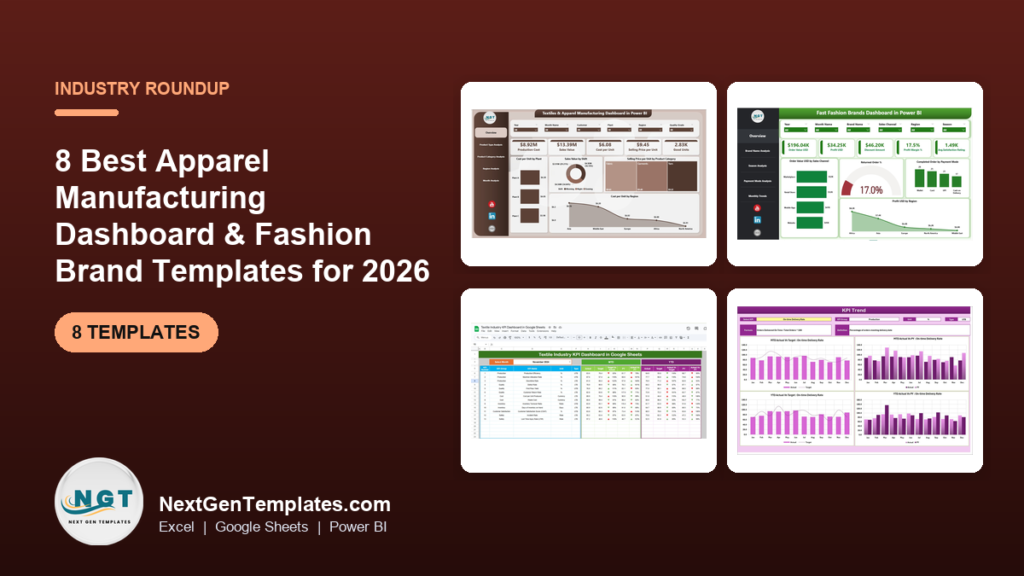
The best apparel manufacturing dashboard for most garment factories in 2026 is the Apparel Manufacturing KPI Dashboard in Excel ($14.99). It tracks production speed, downtime, defect rates, inventory and on-time delivery against target and last year. Brands that care more about sales, margins and returns than the cutting floor should start with the Fashion & Apparel Dashboard, from $9.99.
Last updated: October 2026
Key takeaways
- Our top pick is the Apparel Manufacturing KPI Dashboard, at $14.99 in Excel, $11.99 in Power BI and $9.99 in Google Sheets. It covers output, quality, inventory and delivery in all three formats, which no other factory file here does.
- The best value is the Textiles & Apparel Manufacturing Dashboard in Google Sheets at $9.99: 16 KPI cards, 15 slicers, a 90% on-time delivery gauge and a sample log of 500 orders across 8 mills.
- Fashion labels should look at the Fashion & Apparel Dashboard for profit by channel, brand and category, and the Fast Fashion Brands Dashboard for discounts, returns and seasons.
- Mills and fabric makers get two dedicated picks: the Textiles & Apparel Manufacturing KPI Dashboard ($11.99 to $12.99) and the Textile Industry KPI Dashboard ($11.99 to $12.99).
- All eight are one-time purchases from $9.99 to $17.99. Apparel ERP and PLM suites are usually sold on yearly contracts, and Power BI Pro alone is billed per user per month.
 Launch offer
From your first Pivot Table to the Data Model, DAX, Power Query and a one-page KPI dashboard. 11h 51m of video by PK, with practice files, quizzes and a capstone.
Apparel manufacturing dashboard and fashion brand templates compared
| Template | Format | Best For | Price |
|---|---|---|---|
| Apparel Manufacturing KPI Dashboard (Best overall) | Excel, Power BI, Google Sheets | Garment factories reporting output, quality and delivery KPIs | $9.99 to $14.99 |
| Textiles & Apparel Manufacturing Dashboard (Best value) | Google Sheets, Excel, Power BI | Cost per unit, rejects and on-time delivery by mill, shift and buyer | $9.99 to $17.99 |
| Fashion & Apparel Dashboard | Excel, Power BI, Google Sheets | Brands comparing profit by channel, brand, department and category | $9.99 to $17.99 |
| Fashion & Apparel KPI Dashboard | Excel, Power BI | Brand KPIs against target and last year, MTD and YTD | $11.99 to $14.99 |
| Fast Fashion Brands Dashboard | Power BI, Excel (plus a KPI edition) | Multi-brand labels tracking discounts, returns and seasons | $12.99 to $17.99 |
| Textiles & Apparel Manufacturing KPI Dashboard | Excel, Power BI | Textile mills, garment exporters and production teams | $11.99 to $12.99 |
| Textile Industry KPI Dashboard | Google Sheets, Excel, Power BI | Fabric production, weaving and dyeing KPIs | $11.99 to $12.99 |
| Apparel Manufacturing KPI Scorecard | Excel | A one-page monthly scorecard for the plant review | $14.99 |
Fashion and apparel companies collect plenty of numbers and struggle to see them together. Line output sits in the production log. Defects sit in the quality team’s sheet. Fabric stock lives in the store room register, sales come from the POS or the online shop, and returns arrive as emails. When the owner asks why margin fell in the spring season, someone spends two days joining exports.
The software fix is an apparel ERP, a PLM suite or a BI tool with per-user licences. Large groups with many factories need those, because they pull data in automatically. They also come with yearly contracts and a long setup. An apparel manufacturing dashboard template costs $9.99 to $17.99 once. It will not fetch data by itself, but a weekly export gives you the same management views, and the file is yours to edit.
How we picked these
We searched the NextGenTemplates catalog for products built for apparel manufacturing, garment factories, textile mills, fashion brands and fast fashion labels. That gave us about 40 paid files across Excel, Google Sheets and Power BI. We kept the ones that model either the factory floor (output, quality, cost, delivery) or the brand side (sales, margin, returns, seasons).
We left out cheap data entry sheets for single shops, plus near-duplicates such as thrift, rental and ethical fashion files, which are covered in the decision section instead. Where one tool comes in several formats we list it once with every price. We ranked on three things, in order: how many core apparel questions the file answers, how clearly it fits one job, and price.
The 8 best apparel manufacturing dashboard and fashion brand templates for 2026
1. Apparel Manufacturing KPI Dashboard: best overall

This is the file we would hand a garment factory manager first. Most fashion templates look at sales. This one looks at the factory: how many units the lines made, how long they stood idle, how many pieces failed inspection and whether orders left on time.
Who it is for: production managers, plant heads, quality managers and the planner who builds the monthly operations pack.
What is inside:
- Production efficiency: units produced, downtime and production speed
- Quality control: defect rates, returns and product quality
- Inventory of raw materials and finished goods
- Production time: cycle time, setup time and delays
- Orders completed, sales revenue and on-time delivery
The Google Sheets edition uses a month dropdown and puts MTD and YTD actuals beside target and last year, with up and down arrows. The Power BI edition has three pages (Summary, Trend and Definition), slicers for month and KPI group, and cards that count how many KPIs met or missed target this month. A typical use: the plant head picks March, sees the defect rate in red against target, and opens the trend page to check whether it has been climbing since January.
Price: $14.99 in Excel, $11.99 in Power BI and $9.99 in Google Sheets.
Best for: any garment factory that wants one monthly KPI view for output, quality and delivery.
2. Textiles & Apparel Manufacturing Dashboard: best value
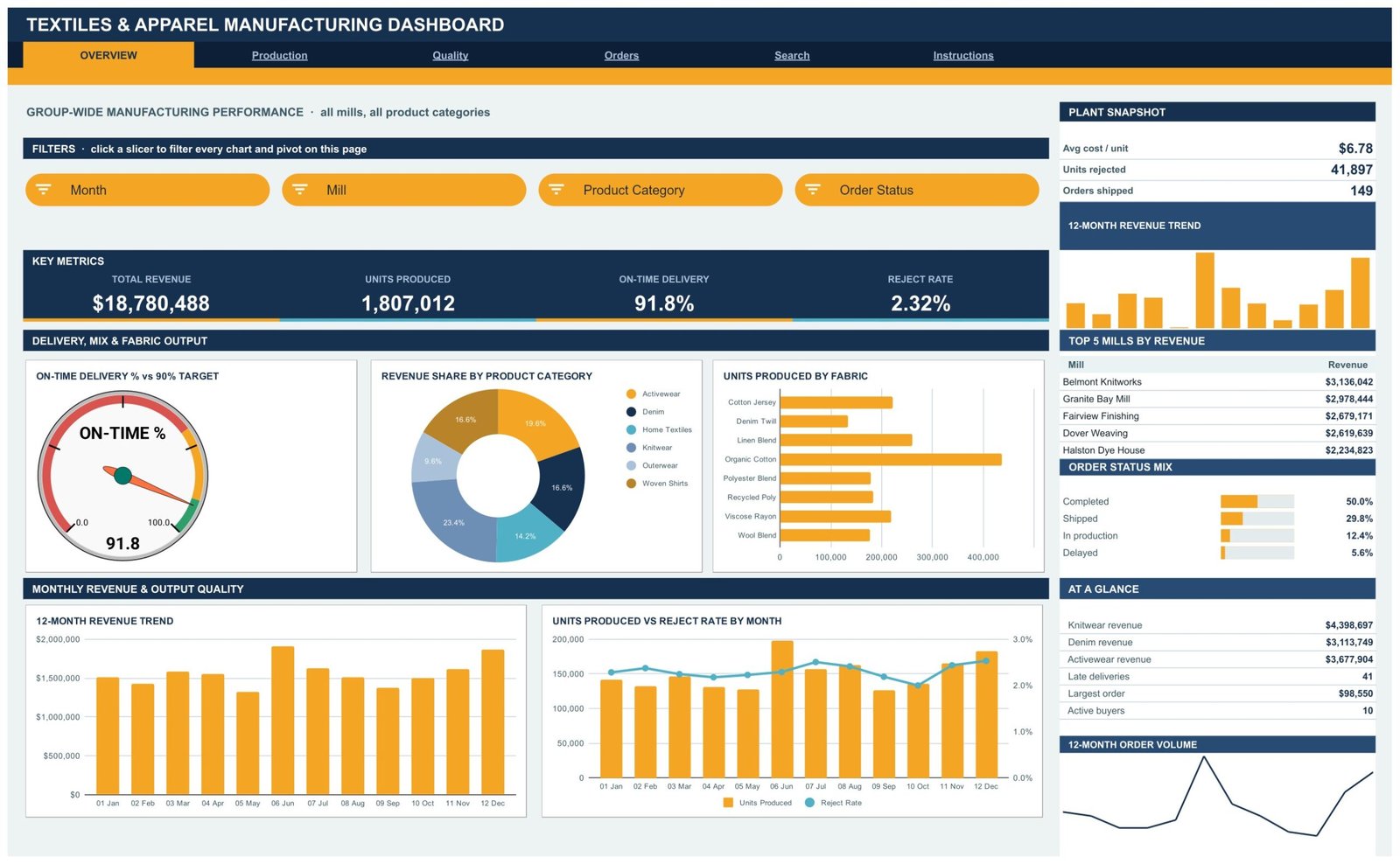
Where pick #1 compares KPI totals, this file works from raw production rows. That lets you ask which mill, fabric, shift or buyer is behind a number. The Google Sheets edition is the deepest file in this roundup for the price.
Who it is for: multi-mill manufacturers, export garment houses and operations heads who report cost and delivery to buyers.
What is inside the Google Sheets edition:
- 4 report pages (Overview, Production, Quality, Orders) with 16 KPI cards and 16 charts
- 15 slicers by month, mill, product category, shift, fabric type, buyer and order status
- An on-time delivery gauge with a 90% target: red below 70%, amber to 90%, green above
- Units rejected by product category and units produced against rejected by fabric
- An order lookup page that prints all 16 fields of any order ID
The sample log holds 500 orders across 8 mills, 6 product categories, 8 fabric types and 10 buyers, and the formulas reach row 1,001. The Excel and Power BI editions take a different angle: five pages (Overview, Product Type, Product Category, Region and Month) built around cost per unit by plant, sales value by shift and selling price by category.
Price: $9.99 in Google Sheets, $13.99 in Excel and $17.99 in Power BI.
Best for: factories that need to trace rejects, cost and late orders back to a mill, shift or buyer.
3. Fashion & Apparel Dashboard: best for brand profitability
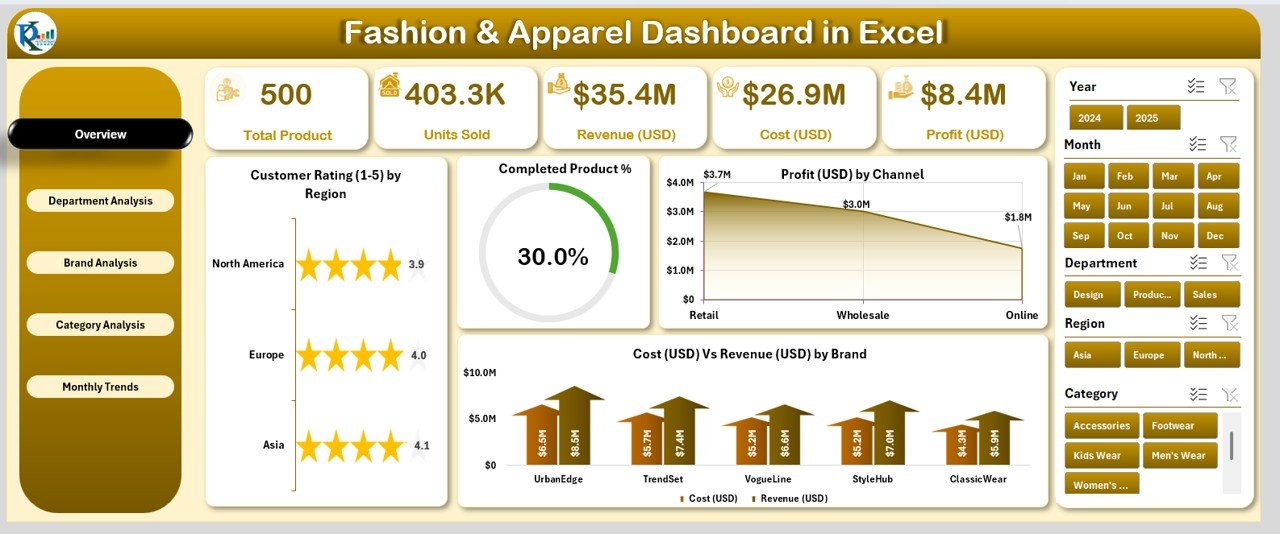
This is the brand-side pick. It answers the questions a founder or merchandising head asks every month: which brands, departments and categories make money, through which channel, and what customers think of them.
Who it is for: fashion brands, multi-label retailers, designers and apparel wholesalers.
What is inside the Excel edition:
- 5 KPI cards: Total Revenue, Total Cost, Profit Margin, Completed Product % and Average Customer Rating
- Profit by channel and cost against revenue by brand on the overview
- Department analysis for lines such as menswear, womenswear, footwear and accessories
- Brand and category pages with customer rating and completed product %
The Power BI edition has the same five-page structure (Overview, Department, Brand, Category and Monthly Trends) with profit split across retail, online and wholesale. The Google Sheets edition is built differently: 7 tabs, 19 chart views and slicers by channel, country, category, product, size, status and date, plus an order search. Pick it if size-level sales and returns matter to you.
Price: $13.99 in Excel, $17.99 in Power BI and $9.99 in Google Sheets.
Best for: brands that want profit and customer rating by brand, department, category and channel in one file.
4. Fashion & Apparel KPI Dashboard: best for monthly brand KPIs
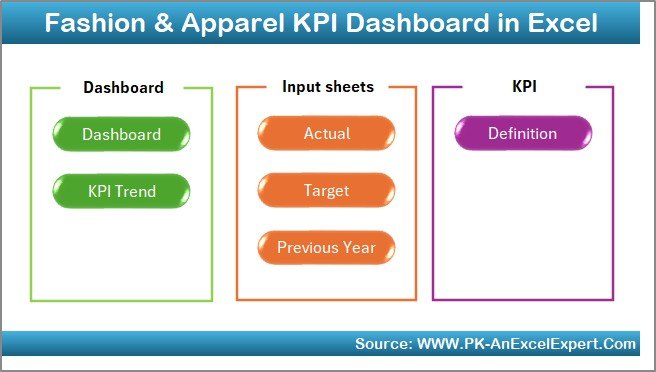
Pick #3 slices transactions. This one tracks a fixed list of brand KPIs against target and last year. That makes it the better file for a board pack or a monthly review where the same numbers need to appear in the same place every time.
Who it is for: brand managers, finance leads and owners of retail, wholesale, export or e-commerce fashion businesses.
What is inside the Excel edition:
- 7 sheets: Summary, Dashboard, Trend, Actual Numbers, Target, Previous Year and KPI Definition
- MTD and YTD views that update when you pick a month
- Green and red arrows for improvement and decline
- A KPI definition sheet with each KPI’s unit, formula and type (upper or lower the better)
A brand owner who sets a sell-through or return-rate target in the Target sheet will see at a glance which months beat it and which did not. The Power BI edition is cheaper and suits teams who already publish reports to Power BI.
Price: $14.99 in Excel and $11.99 in Power BI.
Best for: a repeatable monthly KPI report for a fashion brand.
5. Fast Fashion Brands Dashboard: best for discounts, returns and seasons
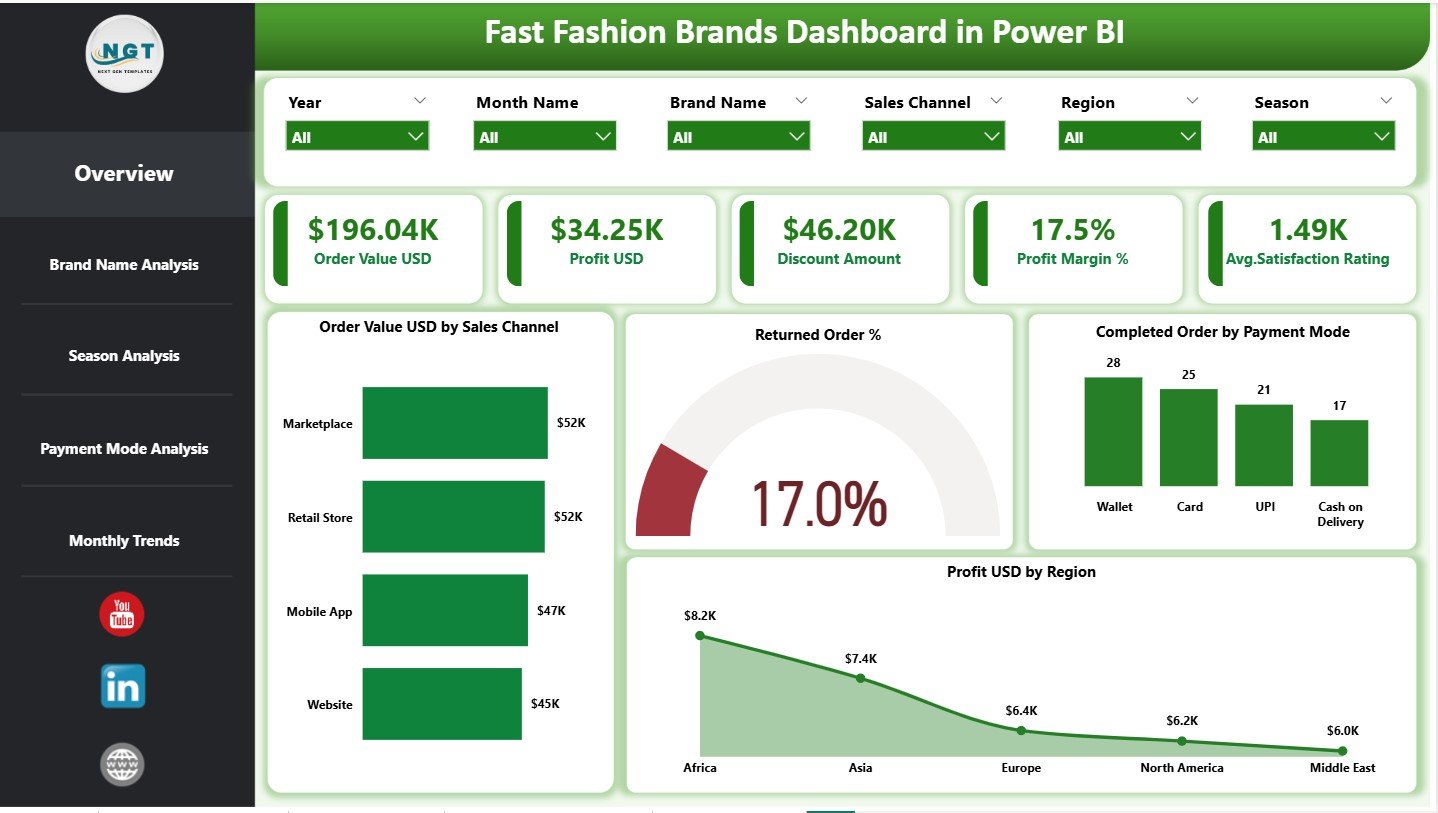
Fast fashion lives on short cycles, heavy markdowns and high return rates. This file is built for exactly that. It compares several labels side by side and splits performance by season and payment mode, which most general retail dashboards skip.
Who it is for: multi-brand fashion groups, e-commerce labels, merchandisers and retail analysts.
What is inside:
- 5 pages: Overview, Brand Analysis, Season Analysis, Payment Mode Analysis and Monthly Trends
- KPI cards for order value, profit, discount amount, profit margin % and satisfaction rating
- Discount amount, profit margin and returned orders by brand
- Order value, discount % and profit across spring, summer, fall and winter
There is also a separate Fast Fashion Brands KPI Dashboard in Excel ($12.99). It scores 13 KPIs in 7 groups with traffic lights: on target from 100%, at risk from 95% to 99%, missed below 95%. It handles lower-is-better KPIs properly, so cutting design-to-shelf lead time to 23.52 days against a 24.78-day target scores 105.4%.
Price: $17.99 in Power BI, $13.99 in Excel, and the Fast Fashion Brands KPI Dashboard at $12.99.
Best for: labels whose margin depends on markdowns, returns and seasonal drops.
6. Textiles & Apparel Manufacturing KPI Dashboard: best for mills and exporters

This KPI file sits between pick #1 and pick #7. It covers both fabric and garment work, so it fits vertical companies that spin or weave and also sew, and exporters who report to overseas buyers.
Who it is for: textile mills, garment factories, exporters and production teams.
What is inside the Excel edition:
- 7 worksheets, including Summary, Dashboard, Trend, Actuals, Targets, Previous Year and KPI Definitions
- KPIs for efficiency, quality, cost, machine performance and delivery
- A month dropdown that updates every chart
- MTD and YTD actual against target and previous year in one view
Use it for the weekly production meeting: pick the month, read machine performance and delivery against target, then open the trend sheet for any KPI that turned red.
Price: $12.99 in Excel and $11.99 in Power BI.
Best for: vertical textile and apparel companies that report fabric and garment KPIs together.
7. Textile Industry KPI Dashboard: best for fabric production

Brands rarely make their own fabric, but their suppliers do, and a fabric delay stops a whole season. This file is for the mill side: fabric production, weaving, dyeing and quality control.
Who it is for: textile production managers, quality control teams and supply chain managers at mills.
What is inside:
- Production efficiency, defect rate and delivery timeline KPIs
- Built-in formulas for averages, percentages and trends
- Charts for performance trends and areas to improve
- Editable KPI list for your own processes
Dye houses that need more detail on wet processing can look at the Textile Dyeing and Finishing KPI Dashboard ($14.99 in Excel, $11.99 in Power BI) instead.
Price: $12.99 in Google Sheets, $12.99 in Excel and $11.99 in Power BI.
Best for: fabric mills tracking efficiency, defects and delivery.
8. Apparel Manufacturing KPI Scorecard: best one-page plant review
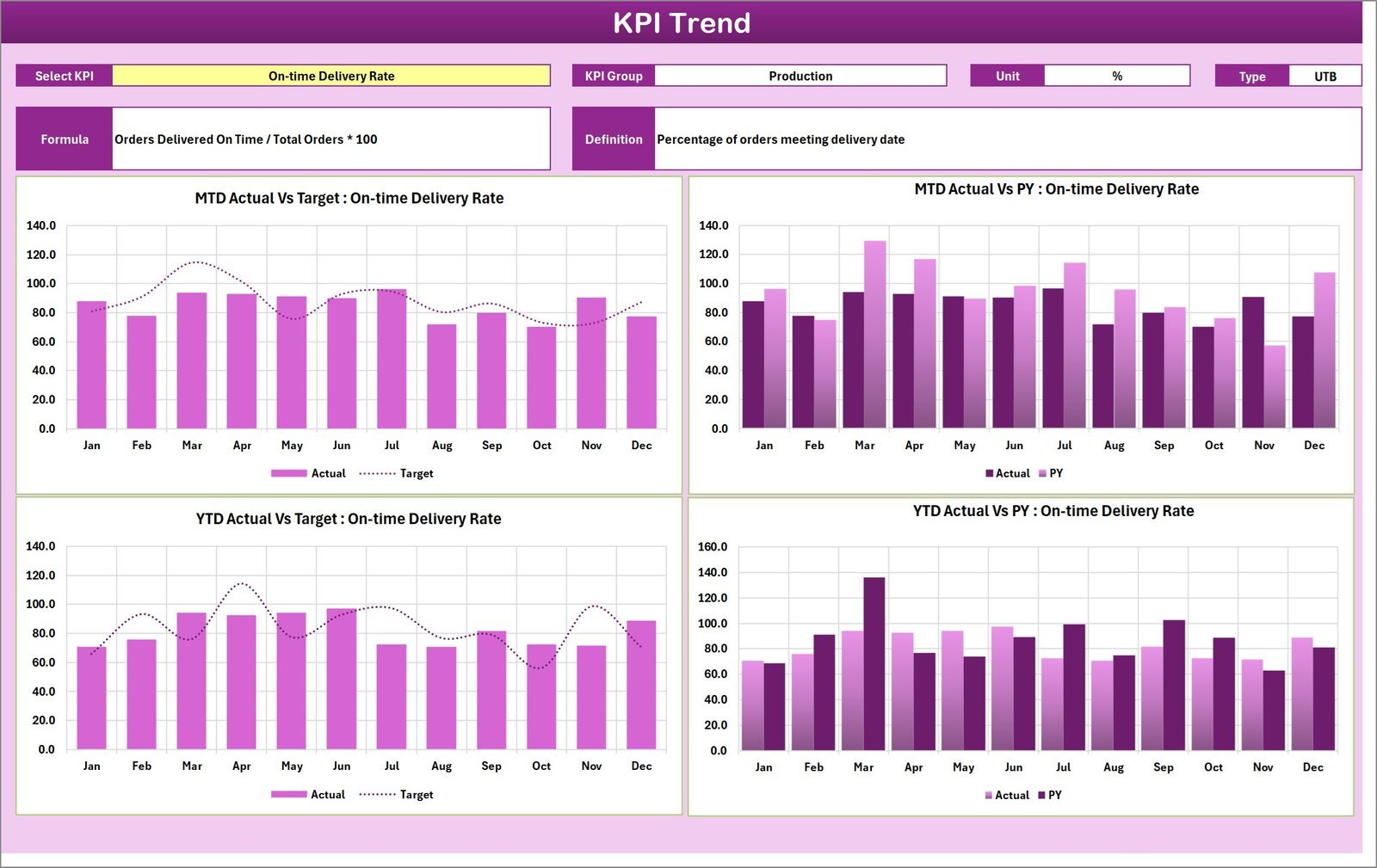
Some plant reviews do not want charts at all. They want one table with every KPI, its target, its actual and a colour. This scorecard does that and nothing more, which is why some managers prefer it to a full dashboard.
Who it is for: plant heads and owners who run a short monthly review against target.
What is inside:
- 4 sheets: Scorecard, KPI Trend, Input Data and KPI Definition
- Dropdowns to switch between Month, MTD and YTD
- Colour-coded indicators for actual against target
- A trend sheet with MTD and YTD actual, target and previous year for any KPI
Price: $14.99 in Excel.
Best for: a quick one-page review when the full dashboard is more than the meeting needs.
Ready to start? Most factories begin with the Apparel Manufacturing KPI Dashboard ($9.99 to $14.99) and add the Textiles & Apparel Manufacturing Dashboard ($9.99) when they need to trace problems to a mill or shift.
Which apparel manufacturing KPIs should you track?
The templates above let you edit their KPI lists, so it helps to know which numbers matter. These are the formulas most garment and fashion teams use. Set your own targets from your last 12 months rather than copying an industry figure.
| KPI | Formula | Why it matters |
|---|---|---|
| Line efficiency % | (Units produced x SMV) / (Operators x Minutes worked) x 100 | Shows how much of paid sewing time turned into output |
| Defects per hundred units (DHU) | Defects found / Units checked x 100 | The standard garment quality measure at inline and end-of-line checks |
| Reject rate % | Units rejected / Units produced x 100 | Rejects are paid for twice: once to make, once to replace |
| Cost per unit | Total production cost / Good units | The number buyers squeeze in every price talk |
| On-time delivery % | Orders shipped on or before due date / Orders shipped x 100 | Late shipments mean air freight or penalties |
| Sell-through % | Units sold / Units received x 100 | Tells a brand how much stock will end up marked down |
| Return rate % | Units returned / Units sold x 100 | Online fashion returns eat margin quickly |
| Gross margin % | (Revenue – Cost of goods) / Revenue x 100 | Compares brands, channels and categories fairly |
SMV is the standard minute value of a garment, the time a trained operator needs to sew it. If your factory does not have SMVs yet, start with units per operator per hour and add line efficiency later. For warehouse and stock KPIs, see our guide to warehouse KPIs to track in 2026. Brands that report sales and cash to investors can borrow from the sales KPIs and finance KPIs lists too.
How to choose an apparel manufacturing dashboard template
| If you are… | Start with |
|---|---|
| A garment factory reporting monthly KPIs | Apparel Manufacturing KPI Dashboard |
| A multi-mill or export manufacturer tracing rejects and late orders | Textiles & Apparel Manufacturing Dashboard |
| A fashion brand comparing profit by brand and channel | Fashion & Apparel Dashboard |
| A fast fashion label fighting markdowns and returns | Fast Fashion Brands Dashboard |
| A boutique owner | Fashion Boutiques Dashboard ($13.99 Excel, $17.99 Power BI) |
| An online clothing store | Fashion E-commerce Dashboard ($13.99 Excel, $17.99 Power BI) |
| A shoe maker | Footwear Manufacturing Dashboard ($17.99) |
Then pick the format. Choose Excel if your planners already live in it and nobody outside the office needs the file. Choose Google Sheets if several sites or a remote sourcing team update the same numbers. Choose Power BI if your company already pays for it and managers want to filter reports themselves. Power BI Desktop is free to build in, but sharing online needs a licence; see Microsoft’s Power BI pricing. If you are new to Power BI, our Power BI dashboard templates ranked by industry shows how other sectors use it.
One more rule: buy a KPI dashboard for the monthly review and an analytical dashboard for digging. Many factories end up with one of each, for example pick #1 for the meeting and pick #2 to explain a bad month. Together they still cost less than $30.
When a template is NOT the right answer
A spreadsheet dashboard is a reporting tool. It is the wrong buy in a few cases, and it is better to know that before you pay.
- You need live shop-floor data. If you want line output every hour from IoT counters or bundle scanning, you need a manufacturing execution system. These templates update when you load data.
- You manage tech packs and samples. Product lifecycle work (style specs, BOMs, sample rounds, supplier comments) belongs in a PLM tool, not a dashboard.
- You run many factories with one ERP. A group with 10 plants and one ERP should build reports on the ERP data warehouse. Templates shine when data is scattered and the team is small.
- Nobody owns the data entry. A dashboard is only as current as its last paste. If no one will spend 20 minutes a week on it, it will go stale.
For everyone else, which is most small and mid-size factories and brands, a template is the fastest way to get a clean monthly view. For a gentle start, our free Excel dashboard templates list shows what a basic layout looks like before you buy. There is also a longer walkthrough of the Power BI edition of pick #1 in 7 ways the apparel manufacturing KPI dashboard in Power BI helps factory performance.
Frequently asked questions
What is an apparel manufacturing dashboard?
An apparel manufacturing dashboard is one report that shows how a garment factory is doing: units produced, downtime, defect and return rates, cycle time, inventory and on-time delivery. The templates here do it in Excel, Google Sheets or Power BI from data you paste in each month, with no software contract.
Which KPIs should a garment factory track?
Start with line efficiency, units produced per day, defects per hundred units, reject rate, cost per unit and on-time delivery. Add downtime and setup time if changeovers hurt you. The Apparel Manufacturing KPI Dashboard tracks these month to date and year to date against target and last year.
Is there an apparel manufacturing dashboard in Google Sheets?
Yes. The Apparel Manufacturing KPI Dashboard in Google Sheets costs $9.99, and the Textiles & Apparel Manufacturing Dashboard in Google Sheets also costs $9.99. The second one has 16 KPI cards, 15 slicers and a sample log of 500 orders across 8 mills, so several sites can share one file.
What is the difference between a KPI dashboard and an analytical dashboard?
A KPI dashboard compares a fixed list of KPIs with target and last year, month by month. An analytical dashboard slices raw rows, such as orders or production lots, by plant, region, brand or category. Factories usually need the first for the monthly review and the second to find out why a number moved.
Can a fashion brand use these templates for retail sales?
Yes. The Fashion & Apparel Dashboard covers revenue, cost, profit by channel and customer rating by brand and category. The Fast Fashion Brands Dashboard adds discounts, returns and seasons. Boutiques and online stores can also look at the Fashion Boutiques and Fashion E-commerce dashboards in the same catalog.
Do these templates connect to my ERP or PLM system?
No. They report on data you export or type in, such as a production log, an order list or monthly KPI actuals. They do not sync with an ERP, PLM or POS system by themselves. Most teams paste a weekly or monthly export into the data sheet and the dashboard updates.
Are these templates a one-time purchase?
Yes. Every pick costs between $9.99 and $17.99 once. You download an editable file and keep it, with no per-user or yearly fee. Power BI files open in the free Power BI Desktop, but sharing them online needs a paid Power BI licence.
Excel, Google Sheets or Power BI: which format is best for apparel?
Excel suits factory planners and finance teams who already use Microsoft 365. Google Sheets suits small brands and multi-site teams who share one file. Power BI suits companies with a Power BI licence that want managers to filter the numbers themselves. Most picks here come in two or three formats.
Can I add my own KPIs?
Yes. The KPI dashboards and scorecards keep every KPI on a definition sheet with its unit, formula and whether higher or lower is better, so you can add or rename rows. The Fast Fashion Brands KPI Dashboard is wired for 22 KPI rows, with 13 filled in.
Get more apparel and fashion dashboard templates
Start with the Apparel Manufacturing KPI Dashboard for the factory floor ($9.99 to $14.99) or the Fashion & Apparel Dashboard for the brand side ($9.99 to $17.99). Each file is a one-time purchase that you can edit and keep.
Want to see how these files work before you buy? Watch the walkthroughs on the NextGenTemplates YouTube channel.