

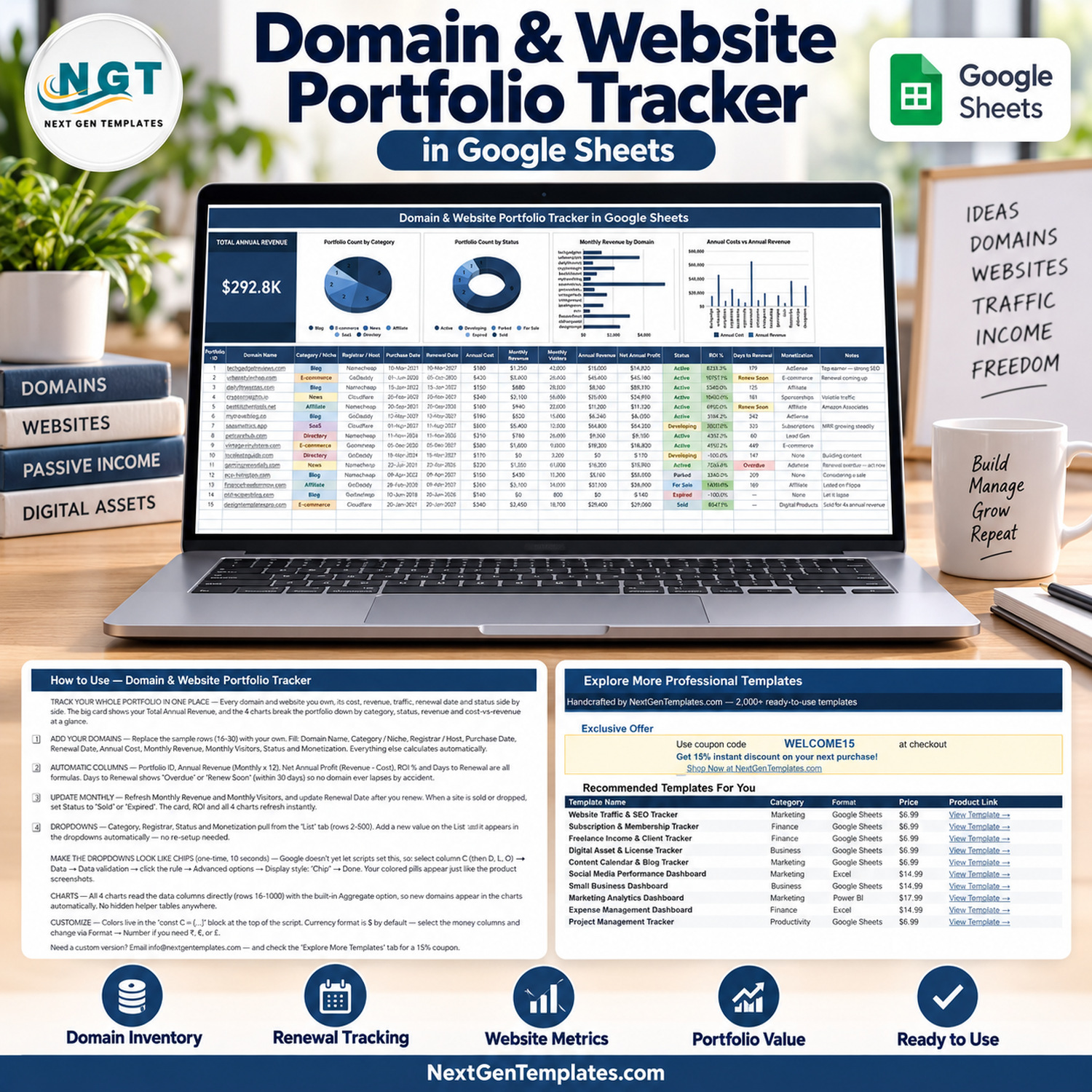
The Domain and Website Portfolio Tracker in Google Sheets puts your whole web estate on one page: 16 columns per domain, 5 of them automatic formulas, 1 headline KPI card and 4 linked charts. 15 sample domains are pre-filled so you can see the layout working before you type anything, and the charts already read rows 16 to 1000 — add a domain and it appears in every chart on its own.
🌍 Join 8,400+ teams in 40+ countries using NextGenTemplates to replace paid SaaS tools with one-time-purchase Excel, Google Sheets, Power BI and HTML templates.
✅ Instant download · One-time payment · No subscription · No per-user fees · Lifetime access
If you own more than three or four sites, the numbers live in five places at once — the registrar invoice, the AdSense dashboard, the affiliate portal, Analytics and a note on your phone. This domain and website portfolio tracker collects all of it in a single Google Sheet so you can see which sites earn, which ones bleed, and which renewal is about to catch you out.
🔑 Key Features of the Domain and Website Portfolio Tracker
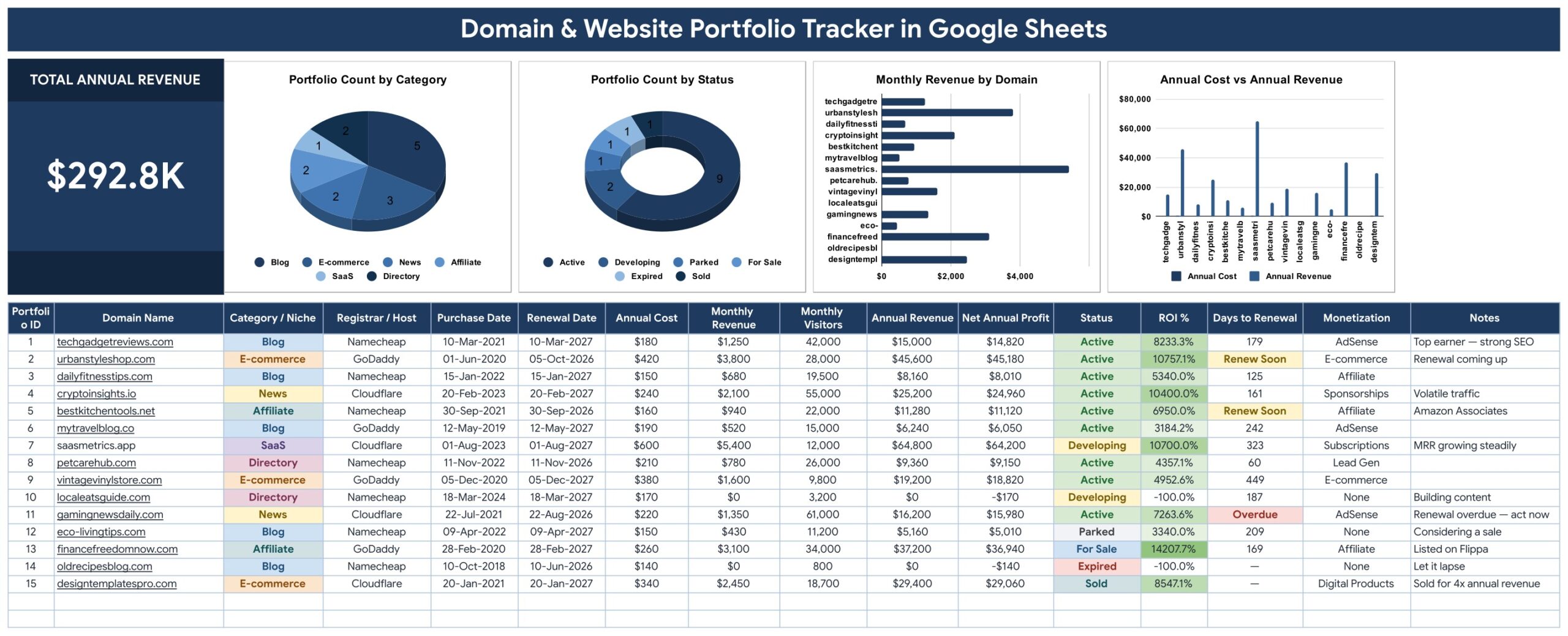
📋 One row per domain, 16 columns wide. Portfolio ID, Domain Name, Category / Niche, Registrar / Host, Purchase Date, Renewal Date, Annual Cost, Monthly Revenue, Monthly Visitors, Annual Revenue, Net Annual Profit, Status, ROI %, Days to Renewal, Monetization and Notes. You type 10 of them; the sheet works out the rest.
🧮 Five columns calculate themselves. Annual Revenue is Monthly Revenue × 12, Net Annual Profit is Annual Revenue − Annual Cost, ROI % compares profit against what the domain costs to hold, Days to Renewal counts down from the renewal date you entered, and Portfolio ID numbers each row as you add it.
⏳ Renewal flags you can actually see. The Days to Renewal column switches to Renew Soon inside 30 days and Overdue once the date has passed, colour-coded amber and red, so a domain you forgot about stops being invisible. It is a formula on the date in your own sheet — not a registrar feed.
📊 One KPI card and four charts. A Total Annual Revenue card sits top-left, followed by Portfolio Count by Category, Portfolio Count by Status, Monthly Revenue by Domain and Annual Cost vs Annual Revenue. All four are wired straight to the data columns with the built-in Aggregate option — there are no hidden helper tables to maintain.
🔽 Dropdowns that grow with you. Category / Niche, Registrar / Host, Status and Monetization all pull from a separate List tab (rows 2 to 500). Add “Porkbun” or “Newsletter” on the List tab and it appears in the dropdown immediately — no data-validation surgery required.
🎨 Colours in one place. Every colour in the build lives in a single const C = {...} block at the top of the script, and the currency format is a normal cell format you can switch from $ to ₹, € or £ from Format → Number.
📦 What’s Inside the Domain and Website Portfolio Tracker in Google Sheets
Page 1: Portfolio Tracker
The working page. A Total Annual Revenue card on the left, then Portfolio Count by Category, Portfolio Count by Status, Monthly Revenue by Domain and Annual Cost vs Annual Revenue across the top, sitting over the data-entry table with its coloured Category, Status and Monetization chips.
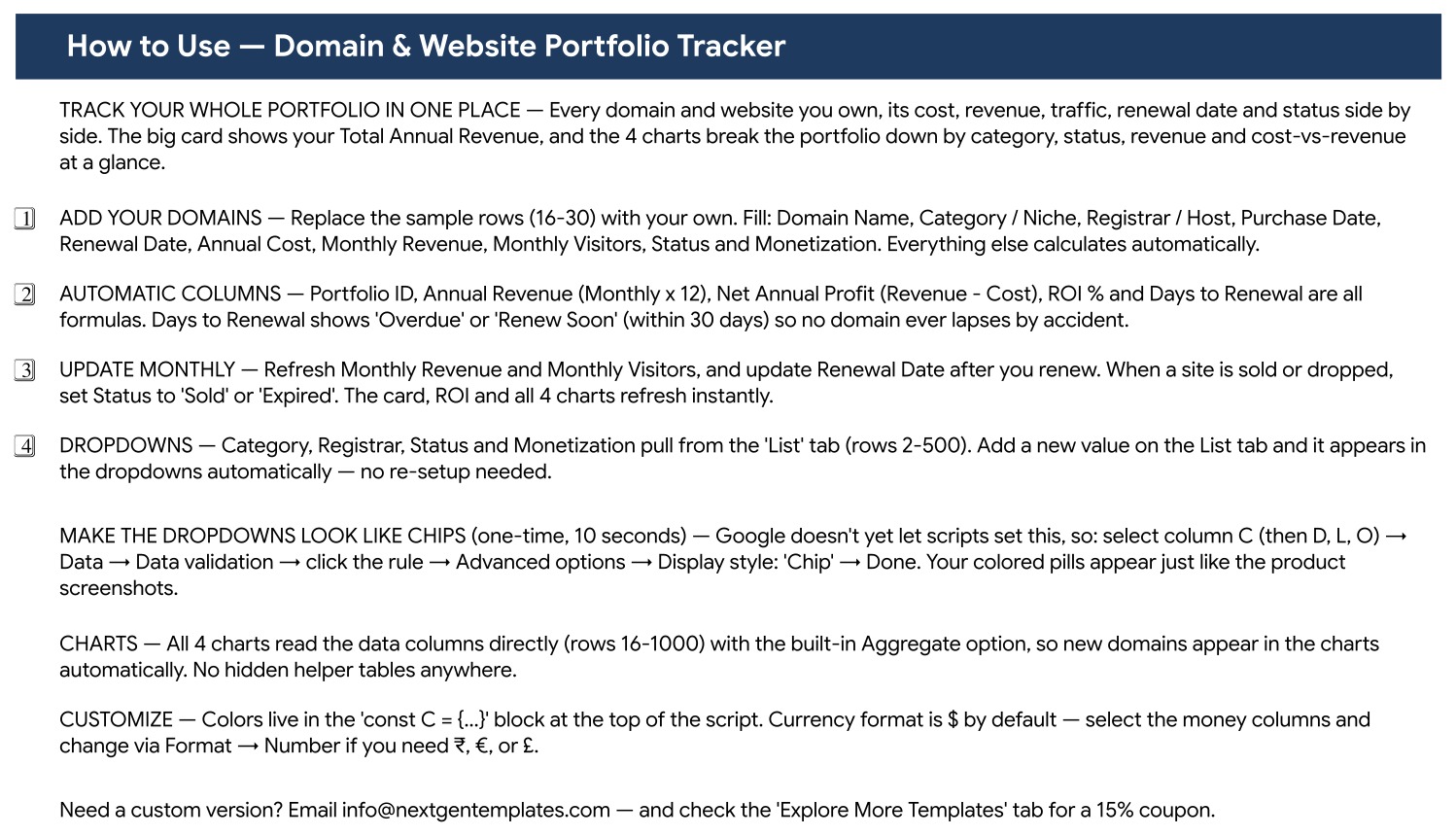
Page 2: How to Use
A four-step setup page covering where to add your domains, which columns calculate themselves, what to refresh each month and how the List-tab dropdowns work — plus the ten-second trick that turns the dropdowns into coloured chips.
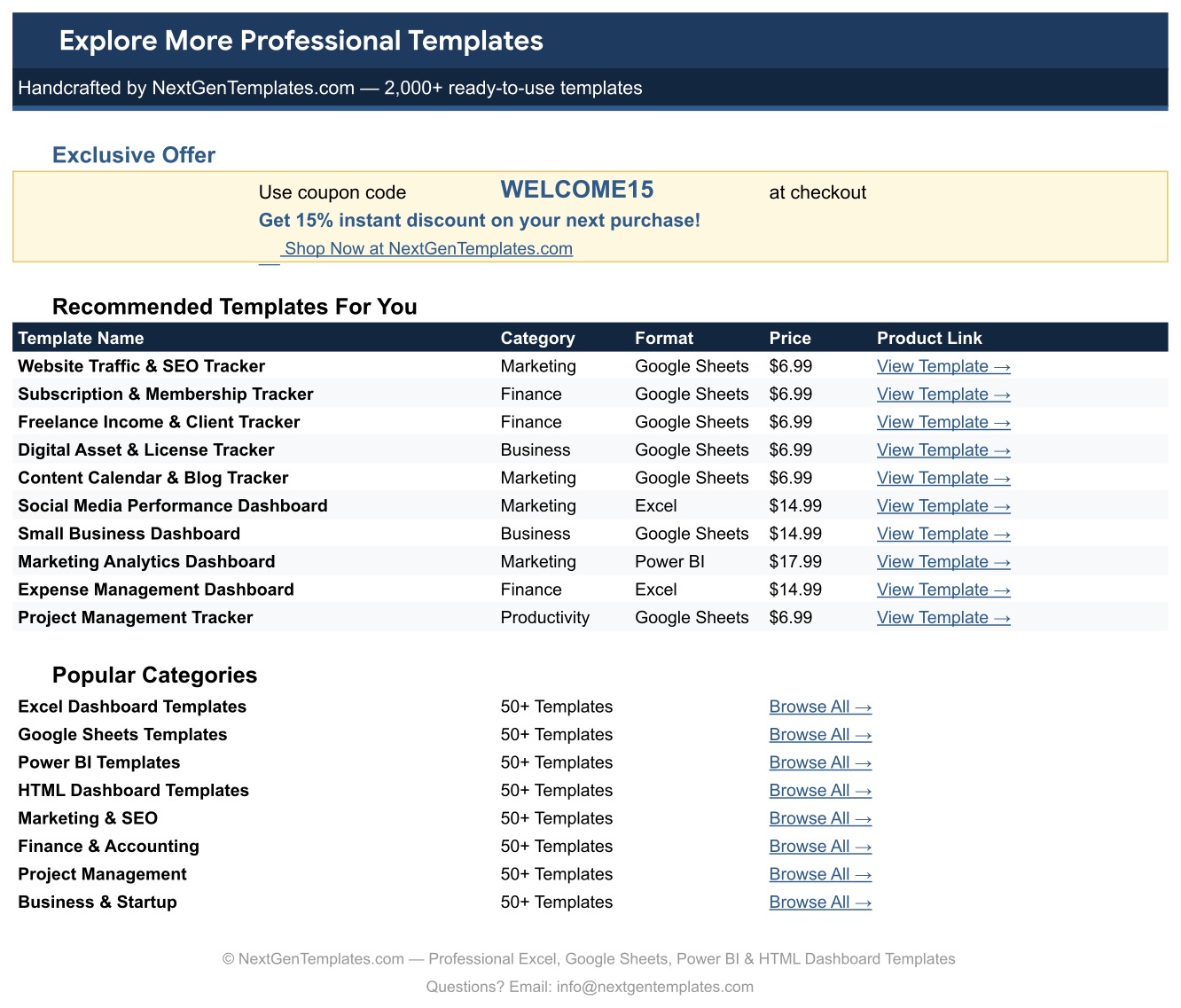
Page 3: Explore More Templates
A directory of related NextGenTemplates products with a WELCOME15 coupon code for 15% off your next purchase, plus links into the main template categories.
📊 Domain & Website Portfolio Tracker vs. an Excel Portfolio Sheet vs. Paid Domain Monitoring SaaS
| Feature | Domain & Website Portfolio Tracker in Google Sheets | Excel portfolio spreadsheet | DomainTools / Dofo / SaaS monitors |
|---|---|---|---|
| Cost | One-time purchase ✅ | One-time, if you build it yourself | $25–$99 / user / month |
| Platform | Browser — any OS, any device ✅ | Desktop Excel | Vendor web app |
| Setup time | Under 10 minutes ✅ | Hours of formula building | Account setup + domain import |
| Real-time collaboration | Native Google Sheets sharing ✅ | File passing or OneDrive | Seat-based, paid per user |
| Automatic WHOIS / expiry lookup | ❌ No — you enter the renewal date | ❌ No | ✅ Yes |
| Uptime, DNS and SSL monitoring | ❌ No | ❌ No | ✅ Yes |
| Revenue, cost and ROI per domain | Built in — ROI % and Net Annual Profit columns ✅ | Only if you write the formulas | Rarely — most track registration data, not income |
| Customisable fields and colours | Every column and colour is yours ✅ | ✅ Yes | ❌ Fixed schema |
| Year-1 cost at 5 users | One licence, shared ✅ | Excel licences | $1,500–$5,900 |
For owners who want to track domain renewals and website revenue in one place without paying a monitoring subscription, the Domain and Website Portfolio Tracker sits in the sweet spot — it is a portfolio P&L, not a WHOIS service.
👥 Who This Template Is For — and Who It’s Not For
✅ This template is built for:
- Bloggers and affiliate marketers running 5–50 sites who need one view of cost, revenue and traffic
- Domain investors tracking purchase date, holding cost, status and asking-price outcomes across a portfolio
- Small agencies and freelancers holding client domains and wanting a renewal list they can share by link
- Side-project builders who want to know which of their sites actually pays for itself
❌ This template is NOT for:
- Anyone who needs automatic WHOIS lookups, registrar API sync or email renewal alerts — nothing here connects to GoDaddy, Namecheap or Cloudflare
- Teams needing uptime, DNS or SSL certificate monitoring — use a monitoring service for that
- Portfolios in the thousands of domains, where a spreadsheet stops being the right container
- Anyone who cannot use a Google account, since this is a Google Sheets file, not an Excel workbook
⚙️ How to Use the Domain and Website Portfolio Tracker
- Open the PDF in your download and click the “Make a copy” link to create your own editable copy in Google Drive.
- Replace the 15 sample rows (16–30) with your own domains, filling Domain Name, Category, Registrar, Purchase Date, Renewal Date, Annual Cost, Monthly Revenue, Monthly Visitors, Status and Monetization.
- Leave Portfolio ID, Annual Revenue, Net Annual Profit, ROI % and Days to Renewal alone — they are formulas.
- Open the List tab and edit the Category, Registrar, Status and Monetization lists so the dropdowns match your own naming.
- Once a month, refresh Monthly Revenue and Monthly Visitors, and update Renewal Date after you renew. The card, the ROI column and all four charts refresh instantly.
- Optional: select column C, then D, L and O, and set Data → Data validation → Advanced → Display style to “Chip” to get the coloured pills shown in the screenshots.
💼 Real-World Use Cases
Maya runs nine niche blogs alongside a full-time job. She uses the domain portfolio tracker to see that two of her sites carry a negative ROI % while one pays for the other eight, and lets the Days to Renewal column tell her which renewal is due before her card gets charged.
Dev buys and flips domains. Purchase Date, Annual Cost and Status (“Parked”, “For Sale”, “Sold”) give him a holding-cost history per name, and the Notes column records where each one is listed. When a sale closes he sets Status to Sold and the Portfolio Count by Status chart updates.
Priya manages 24 client domains at a three-person agency. She shares one link with her account manager instead of emailing a spreadsheet, and filters by Registrar / Host when a renewal invoice arrives so nothing gets paid twice.
❓ Frequently Asked Questions
Does the Domain and Website Portfolio Tracker check expiry dates automatically?
No. The Domain and Website Portfolio Tracker in Google Sheets does not query WHOIS and does not connect to GoDaddy, Namecheap, Cloudflare or any other registrar. You type the renewal date, and the Days to Renewal formula counts down from it and flags “Renew Soon” or “Overdue”.
Will it monitor uptime, DNS or SSL certificates?
No. This is a records-and-money tracker, not a monitoring service. This template holds cost, revenue, traffic, status and renewal dates that you enter yourself. Use a dedicated uptime monitor alongside it if you need availability alerts.
How long does setup take?
Under 10 minutes. Open the PDF, click the “Make a copy” link, replace the 15 sample rows with your own domains and edit the four dropdown lists on the List tab. Every formula column and all four charts are already wired to the data range.
How many domains can it hold?
The charts in the Domain and Website Portfolio Tracker read rows 16 to 1000, so roughly 985 domains work without touching a formula. Beyond that you would extend the chart ranges, though a portfolio that size is usually better served by a database.
How does this compare to DomainTools or a paid monitoring subscription?
Paid monitors handle WHOIS, expiry lookups and DNS checks for $25–$99 per user per month. This tracker costs a single one-time payment and answers a different question — which of your domains actually makes money, with ROI %, Net Annual Profit and Monthly Visitors per site.
Do I need Excel or any macros?
Neither. This website portfolio tracker in Google Sheets runs entirely in the browser with no macros and no add-ons. You need a free Google account and the “Make a copy” link supplied in your download PDF.
Can I change the currency?
Yes. The money columns default to $, but they are ordinary cell formats — select Annual Cost, Monthly Revenue, Annual Revenue and Net Annual Profit and change them from Format → Number to ₹, € or £.
👤 About the Author
Built by PK — Microsoft Certified Professional with 15+ years of Excel, Google Sheets and Power BI experience. Founder of NextGenTemplates, reaching 300K+ subscribers across YouTube channels (@PKAnExcelExpert, @NextGenTemplates, @NeoTechNavigators). Every template is hand-built and tested before release.
🔗 Explore Related Templates
Pair this domain renewal and ROI tracker with the Blog Content & SEO Tracker in Google Sheets for the article-level view of the same sites, and with the Affiliate Marketing Income Tracker in Google Sheets when most of your revenue comes through affiliate links. Renewals for your tools, not your domains, belong in the Subscription and Membership Tracker in Google Sheets.
For traffic analytics rather than portfolio economics, see the SEO Performance KPI Dashboard in Google Sheets or the Website Traffic KPI Dashboard in Excel. Browse the full Google Sheets Trackers range or the wider Google Sheets Templates library.
New to how Google Sheets handles the dropdown lists used here? Google’s own data validation guide explains the Chip display style, and ICANN’s EPP status code reference is the authority on what a registrar’s expiry and redemption states actually mean.
📖 Click here to read the Detailed Blog Post
🎥 Visit our YouTube channel for step-by-step video tutorials
👉 YouTube.com/@NextGenTemplates
Watch the step-by-step video Demo:
📅 Last updated: September 2026

































Reviews
There are no reviews yet.