



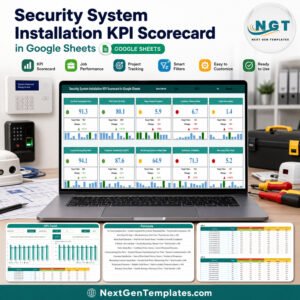
The Security System Installation KPI Scorecard in Google Sheets tracks 10 installation KPIs across 4 KPI groups and 8 tabs, with 12 months of MTD and YTD figures already loaded. One month dropdown drives all ten cards, and each card carries a red / amber / green light, a variance arrow and a 12-month sparkline. Setup takes under 10 minutes: open the copy link, type your own numbers into Input Data, and every card, light and chart redraws.
🌍 Join 8,400+ teams in 40+ countries using NextGenTemplates to replace paid SaaS tools with one-time-purchase Excel, Google Sheets, Power BI and HTML templates.
✅ Instant download · One-time payment · No subscription · No per-user fees · Lifetime access
This is the KPI Scorecard edition — a month-picker scorecard with traffic lights and a KPI Trend page. It is not the analytical Google Sheets Dashboard line, and it is not the GS KPI Dashboard line. Its closest sibling is the Window and Door Installation KPI Scorecard in Google Sheets.
🔑 Key Features of the Security System Installation KPI Scorecard
🚦 Ten security-install KPIs with automatic traffic lights. The scorecard tracks On-Time Installation Rate, First-Time Fix Rate, Mean Install Duration, Callback / Rework Rate, False Alarm Rate, Commissioning Pass Rate, Customer Satisfaction (CSAT), Monitoring Contract Attach Rate, Technician Utilisation and Warranty Claim Rate.
🧭 Direction-aware scoring. Six KPIs are Upper-the-Better and four are Lower-the-Better, so Callback / Rework Rate, False Alarm Rate, Mean Install Duration and Warranty Claim Rate score green when they fall. The Type column on KPI Definition drives the arrow and the light.
📅 One dropdown, ten cards. Pick a month in the header and all ten cards recalculate. Two more dropdowns switch the scorecard between MTD and YTD, and between Target and Prior Year, giving four views of one month from three clicks.
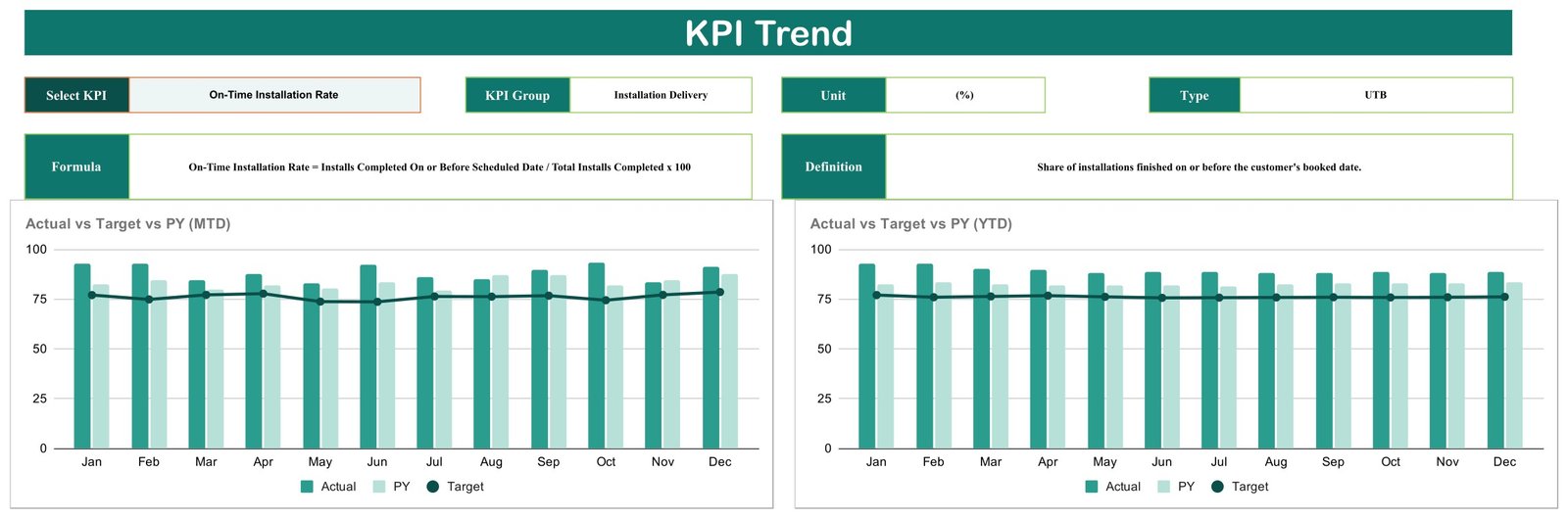
📈 A dedicated KPI Trend page. Select any KPI and the page shows its group, unit, direction type, formula and definition beside two charts: Actual vs Target vs PY (MTD) and Actual vs Target vs PY (YTD), each across twelve months.
📱 Runs anywhere Google Sheets runs. A lead technician can check last month’s callback rate on a phone in the van while the office manager edits the same file.
📦 What’s Inside the Security System Installation KPI Scorecard
Eight tabs: four you work in, and four that do the arithmetic behind the scenes (Support, Trend_Support, Color Settings and a Read Me placeholder).
Page 1: Scorecard
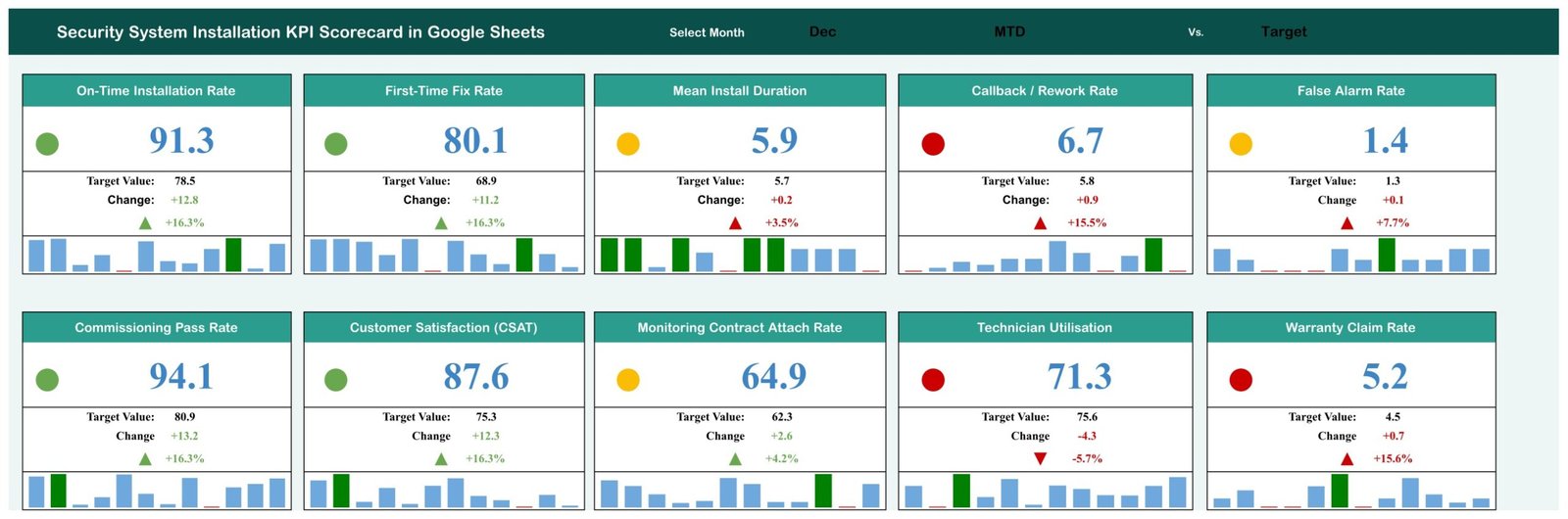
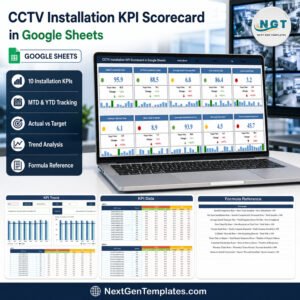
Ten KPI cards show the selected month’s actual in large type, the target beneath it, the absolute change, the percentage change with an arrow, a red / amber / green light and a 12-month sparkline. Header dropdowns control Select Month, MTD vs YTD and Target vs PY.
Page 2: KPI Trend
A single-KPI deep dive. Choosing a KPI fills in its KPI Group, Unit, Type, Formula and Definition, then draws Actual vs Target vs PY (MTD) and Actual vs Target vs PY (YTD) from January to December. Actual and prior year appear as columns, target as a line.
Page 3: KPI Definition
Ten numbered rows list KPI Group, KPI Name, Unit, Formula, Definition and Type. The four groups are Installation Delivery, Quality & Reliability, Commercial and Workforce. Renaming a KPI here renames it on every card and chart.

Page 4: Input Data
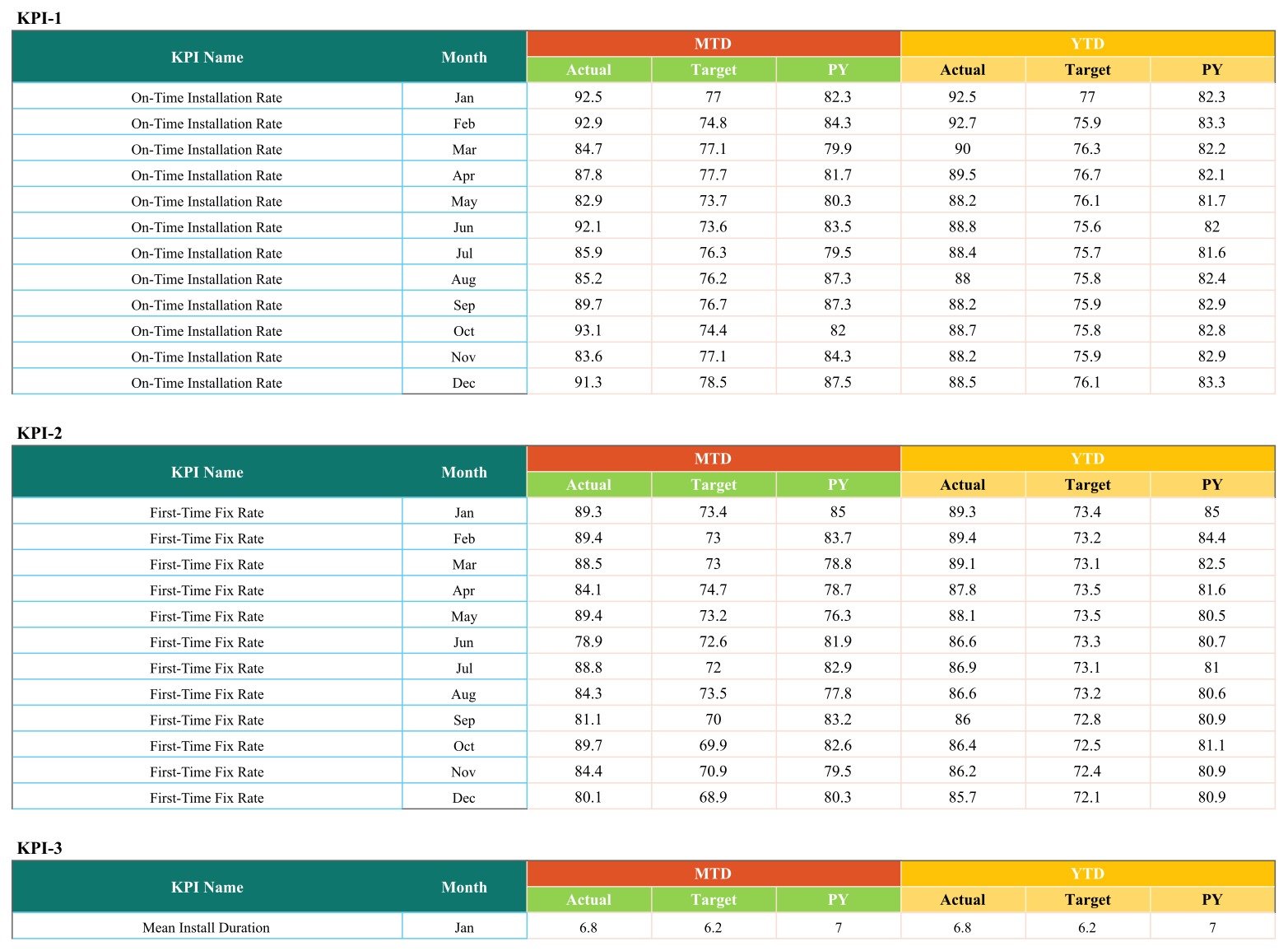
The only tab you type in. Ten stacked blocks, one per KPI, each holding twelve month rows with MTD Actual, MTD Target, MTD PY, YTD Actual, YTD Target and YTD PY — 720 pre-filled figures you overwrite.
📊 Security System Installation KPI Scorecard vs. Excel Scorecard vs. Paid Field-Service SaaS
| Feature | This Google Sheets Scorecard | Microsoft Excel Scorecard | ServiceTitan / Jobber / Simpro |
|---|---|---|---|
| Cost | $8.99 one-time | $9.99 one-time | $49-300 / user / month |
| Platform | Google Sheets, browser or app | Desktop Excel | Vendor cloud |
| Setup time | Under 10 minutes | Under 10 minutes | 2-8 weeks onboarding |
| Real-time team collaboration | ✅ Native, multi-editor | Only via OneDrive co-authoring | ✅ Included |
| Mobile access | ✅ Google Sheets app | Limited | ✅ Dedicated app |
| Editable KPI names and formulas | ✅ Edit KPI Definition, cards follow | ✅ Editable | Vendor-defined metric set |
| Share with a link | ✅ One Google Drive link | Send the file | Per-seat login required |
| Job dispatch, invoicing, GPS | ❌ Not included | ❌ Not included | ✅ Full operational suite |
| Year-1 cost at 5 users | $8.99 | $9.99 | $2,940-18,000 |
For a security-install firm that wants a clean monthly KPI review without per-technician SaaS fees, this scorecard sits in the sweet spot — it reports on the work, it does not run the work.
👥 Who This Template Is For — and Who It’s Not For
✅ This template is built for:
- Owners and operations managers of security system installation firms with 3-60 technicians
- Alarm, CCTV and access-control installers who have the numbers but review them in email threads
- Branch managers presenting a one-page monthly KPI review to a regional director
❌ This template is NOT for:
- Firms wanting job dispatch, technician GPS, invoicing or scheduling — this is a reporting scorecard, not an operations platform
- Anyone needing a live feed from an alarm receiving centre; every figure is typed or pasted in monthly
- Teams that need email or SMS alerts when a KPI turns red — the scorecard shows the light, it does not send anything
- Companies looking for compliance or code-conformance evidence — this template makes no such claim
⚙️ How to Use the Security System Installation KPI Scorecard
- Open the PDF in your download and click the Make a Copy link to create your own editable Google Sheets file.
- On the KPI Definition tab, rename any KPI, unit, formula or definition that does not match how your firm measures it.
- Set each KPI’s Type to UTB where higher is better, or LTB where lower is better, so the lights score correctly.
- On the Input Data tab, replace the sample MTD and YTD figures with your own, one row per month per KPI.
- Return to the Scorecard tab and pick your month from the Select Month dropdown; all ten cards update instantly.
- Switch MTD to YTD, or Target to PY, to see the same month from a different angle before your monthly review.
- Open KPI Trend, pick the KPI that turned red, and read its twelve-month pattern before deciding what to do.
💼 Real-World Use Cases
Marcus owns a 14-technician alarm and CCTV installation firm. Every first Monday he opens the scorecard, selects last month, and sees On-Time Installation Rate green but Callback / Rework Rate red. He opens KPI Trend, finds callbacks climbing for three straight months, and books a refresher on panel commissioning — a decision he used to make on gut feel.
Priya coordinates service for a regional access-control installer. She keeps False Alarm Rate and Commissioning Pass Rate in front of her team because those two drive most of her inbound complaint calls, and the month dropdown lets her pull up any month during a customer call without rebuilding a report.
❓ Frequently Asked Questions
What KPIs does the Security System Installation KPI Scorecard track?
It tracks 10 KPIs: On-Time Installation Rate, First-Time Fix Rate, Mean Install Duration, Callback / Rework Rate, False Alarm Rate, Commissioning Pass Rate, Customer Satisfaction (CSAT), Monitoring Contract Attach Rate, Technician Utilisation and Warranty Claim Rate, grouped into Installation Delivery, Quality & Reliability, Commercial and Workforce.
How long does setup take?
Under 10 minutes. Click the Make a Copy link in the PDF, rename any KPIs on the KPI Definition tab, then paste your own monthly figures into Input Data. The Security System Installation KPI Scorecard recalculates every card, light, arrow, sparkline and chart automatically — there is nothing to wire up.
Can I change the KPI names to match my own metrics?
Yes. Edit the KPI Name, Unit, Formula, Definition and Type columns on the KPI Definition tab. The Security System Installation KPI Scorecard reads those cells, so the cards and the KPI Trend selector rename themselves. You do not need to touch any formula.
How does this compare to ServiceTitan or Jobber?
ServiceTitan and Jobber run your operation — dispatch, scheduling, invoicing — for $49-300 per user per month. The Security System Installation KPI Scorecard is an $8.99 one-time reporting layer for numbers you already have. Many firms use both; this replaces the monthly KPI spreadsheet, not the field-service platform.
Do the traffic lights work for metrics where lower is better?
Yes. Each KPI carries a Type of UTB or LTB on the KPI Definition tab. The Security System Installation KPI Scorecard ships with six UTB and four LTB metrics, so a falling Callback / Rework Rate, False Alarm Rate, Mean Install Duration or Warranty Claim Rate scores green rather than red.
Is this the same as the GS KPI Dashboard or the Google Sheets Dashboard product?
No. This is the KPI Scorecard line — one month-picker page with ten traffic-light cards plus a KPI Trend page. The GS Dashboard and GS KPI Dashboard lines are wider, multi-page analytical builds with slicers and pivot-driven charts. They are companions to this scorecard, not duplicates of it.
👤 About the Author
Built by PK — Microsoft Certified Professional with 15+ years of Excel, Google Sheets and Power BI experience. Founder of NextGenTemplates, reaching 300K+ subscribers across YouTube channels (@PK-AnExcelExpert, @NextGenTemplates, @NeoTechNavigators). Every template is hand-built and tested before release.
🔗 Explore Related Templates
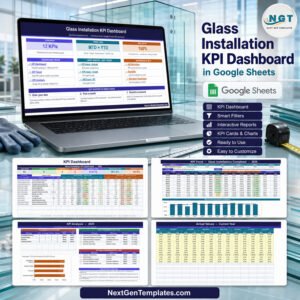
- Glass Installation KPI Scorecard in Google Sheets — the same ten-card structure tuned to glazing and glass fit-out.
- Locksmith Business KPI Scorecard in Google Sheets — the natural pairing for firms doing access control and mechanical locking.
- Elevator Maintenance KPI Scorecard in Google Sheets — for building-systems contractors who also service lifts.
- Browse the full Google Sheets Templates catalogue.
📖 Click here to read the Detailed Blog Post
🎥 Visit our YouTube channel for step-by-step video tutorials
👉 YouTube.com/@NextGenTemplates
Watch the step-by-step video Demo:
📅 Last updated: September 2026
Compatibility and Requirements
- Works in Google Sheets. You need a free Google account and a web browser, and the Google Sheets app works on a phone.
- You pick the month and the MTD or YTD view from dropdowns on the Scorecard sheet. Google explains dropdowns in Create an in-cell dropdown list.
More Questions About This Template
Do I need Excel to use this scorecard?
No. It runs in Google Sheets in a browser or in the Google Sheets app. If you prefer Excel, there is a Security System Installation KPI Scorecard in Excel.
Is there a dashboard version of this template?
Yes. See the Security System Installation KPI Dashboard in Google Sheets. It is also available in Excel and Power BI.
Which sheet do I type my numbers into?
Use the Input Data sheet. It holds ten blocks, one per KPI, with twelve month rows each for MTD and YTD actual, target and prior year. The Scorecard and KPI Trend sheets update from it.
What does the PDF in the download contain?
The download is one PDF named Security System Installation KPI Scorecard in Google Sheets. It holds the Make a Copy link that creates your own editable Google Sheets file.
Related Security and Installation Templates
- Security System Installation KPI Dashboard in Google Sheets: the dashboard edition for the same KPIs
- Security System Installation KPI Scorecard in Excel: the same scorecard in Excel
- Security System Installation KPI Dashboard in Power BI: the Power BI edition
- Office Security Incident Report Tracker in Google Sheets: log security incidents in Google Sheets
Browse all Google Sheets KPI dashboards.


















Reviews
There are no reviews yet.