

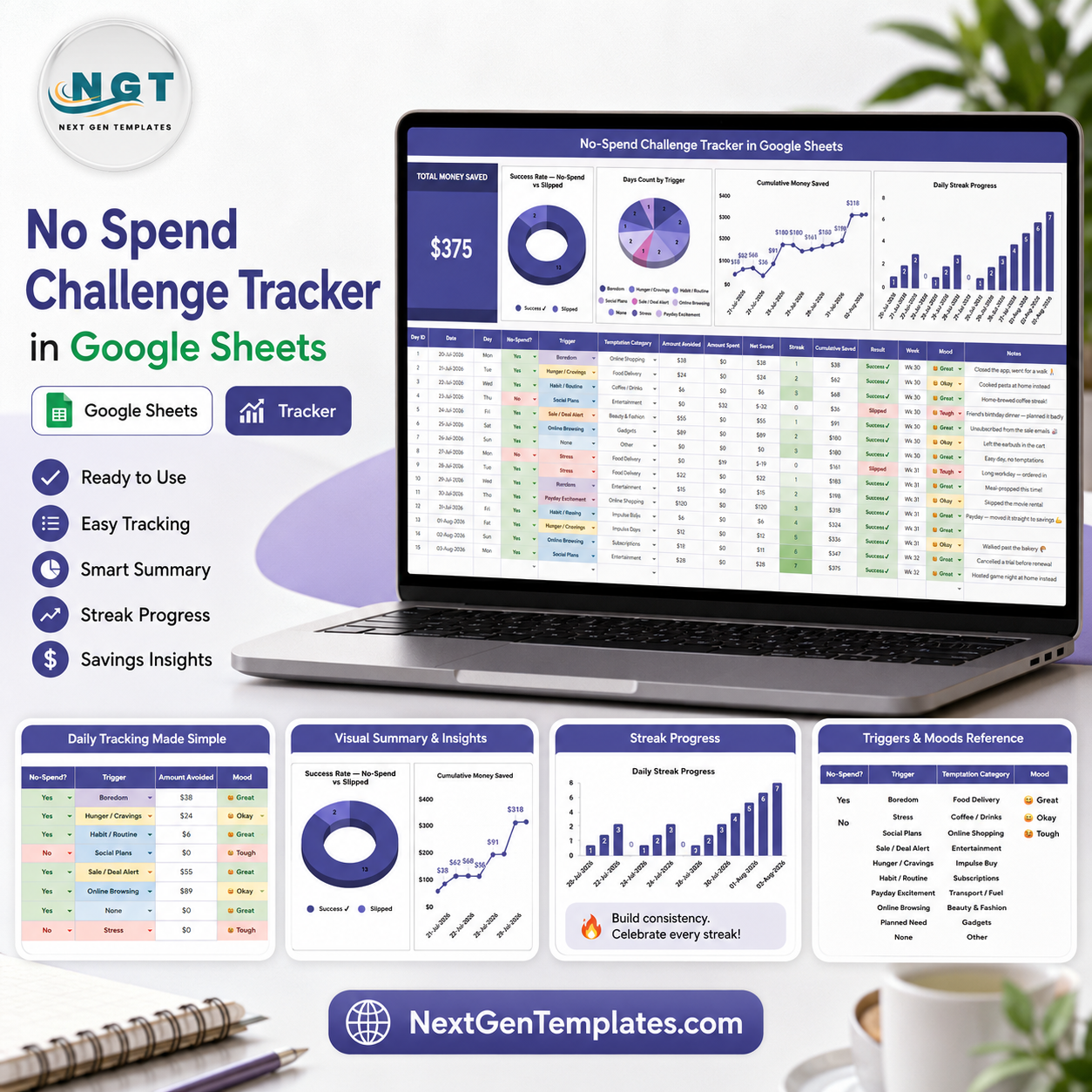

No Spend Challenge Tracker in Google Sheets helps you turn a no-spend challenge into a visible savings habit instead of a vague promise. Use it to log each challenge day, record whether you avoided spending, capture the trigger behind the temptation, and watch your saved money and streak progress update in one place. This Google Sheets tracker includes 2 practical sheet tabs, 1 headline savings card, 4 dashboard charts, and 4 dropdown-control sections so you can review results without building formulas from scratch. Built by PK, a Microsoft Certified Professional with 15+ years of spreadsheet experience and a 300K+ subscriber learning audience, it is designed as a one-time template purchase with no bank login or monthly app subscription.
Key Features of No Spend Challenge Tracker in Google Sheets
- Track successful no-spend days, partial slips, and missed days in a clean Google Sheets workflow.
- Monitor Total Money Saved as the main overview card for quick progress checks.
- Analyze your challenge with charts for success rate, triggers, cumulative savings, and daily streak progress.
- Use slicers and dropdown-ready fields to filter the dashboard quickly by key tracker dimensions.
- Document spending triggers, temptation categories, and mood patterns so the challenge becomes more actionable.
- Customize dropdown option lists for your own responses, spending triggers, temptation types, and moods.
- Works in Google Sheets, so you can access it from your browser and keep your own editable copy in Google Drive.
What Is Inside the Template
This tracker is organized around multiple sheet pages, so the daily tracking area and the dashboard-support options stay easy to manage. The workbook is built for people who want a simple challenge tracker, but still want enough analysis to see why spending urges happen and how savings build over time.
1. Overview Page
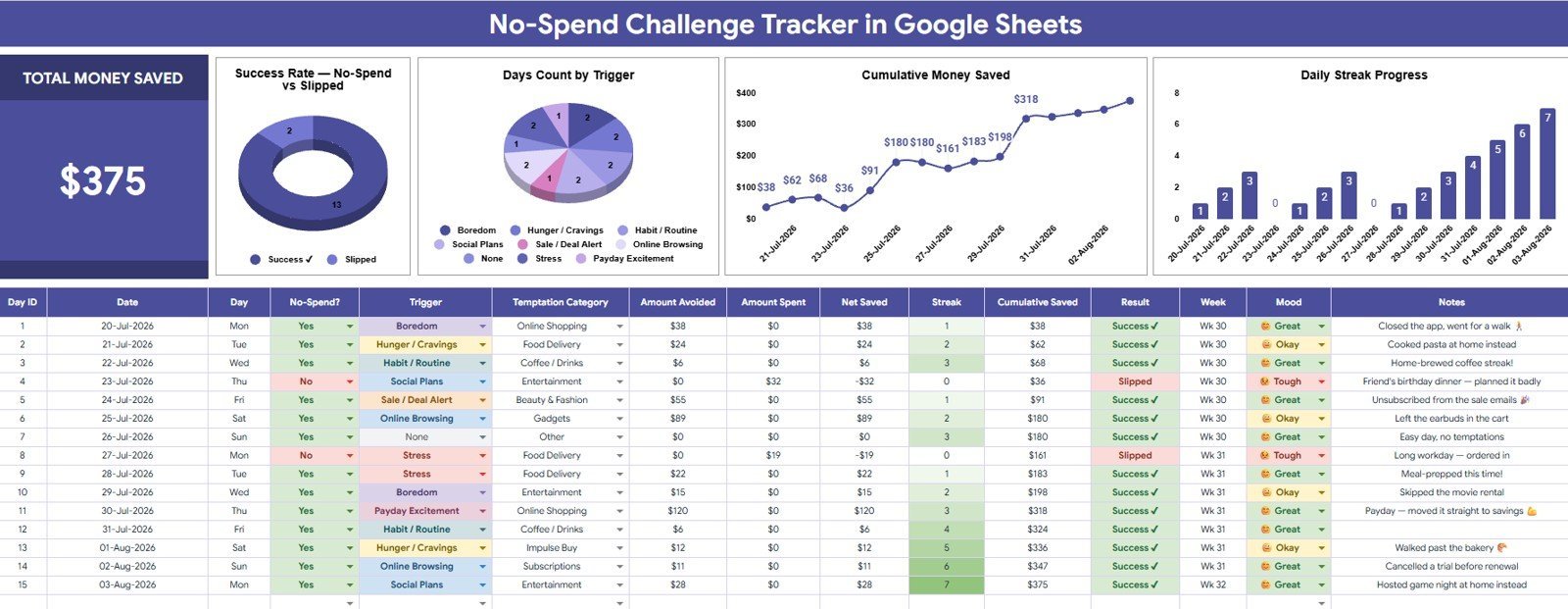
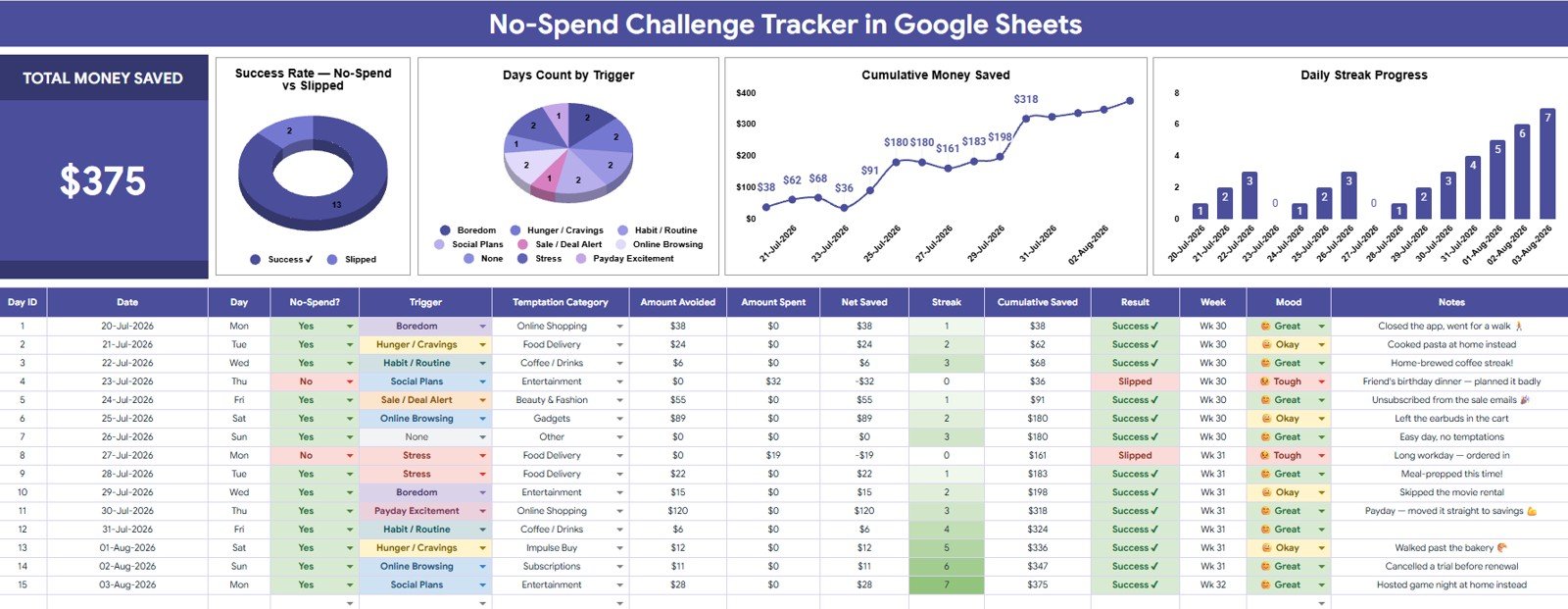
The Overview Page gives you the high-level picture of your no-spend challenge. At the top, the Total Money Saved card shows the headline result so you can immediately see how much money your challenge has protected.
Success Rate by No-Spend Result: This chart compares successful no-spend days with days where spending happened.
Use it to understand whether your challenge discipline is improving and where your results need extra attention.
Days Count by Trigger: This chart groups challenge days by the spending trigger you recorded.
It helps identify the situations, habits, or emotions most often connected to spending pressure.
Cumulative Money Saved by Date: This trend shows how your saved amount grows across the challenge timeline.
It makes progress easier to feel because every successful day contributes to the running savings total.
Daily Streak Progress by Date: This chart tracks streak movement across the dates in your challenge.
It is useful for spotting strong runs, resets, and the points where your routine may need more support.
 No Spend Challenge Tracker in Google Sheets
2. Dropdown Options Sheet
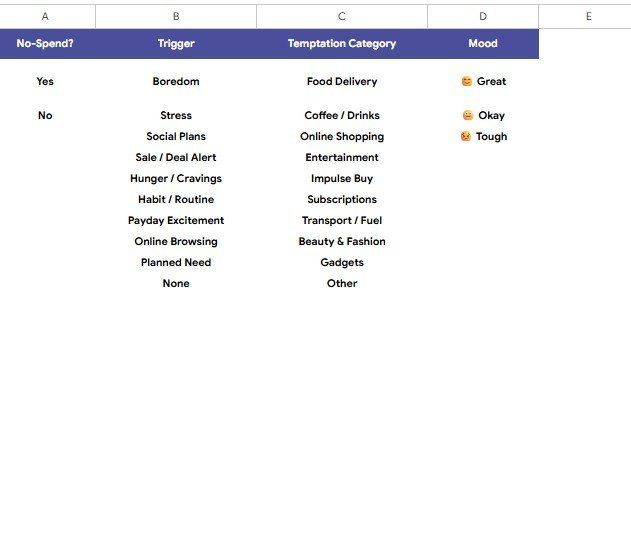
The Dropdown Options Sheet keeps your tracker consistent by storing the lists used in the input fields. Instead of typing different labels every time, you can use controlled options that keep analysis clean and make the dashboard easier to filter.
- No-Spend Options by Response: Define the response labels used to record whether the day was a success, miss, or other result.
- Trigger Options by Spending Trigger: Maintain a reusable list of triggers such as boredom, stress, social pressure, convenience, or sale temptation.
- Temptation Category Options by Spending Type: Group temptations by categories like food, shopping, entertainment, subscriptions, or impulse purchases.
- Mood Options by Tracker Mood: Track the mood connected to each day so you can compare emotional context with spending behavior.
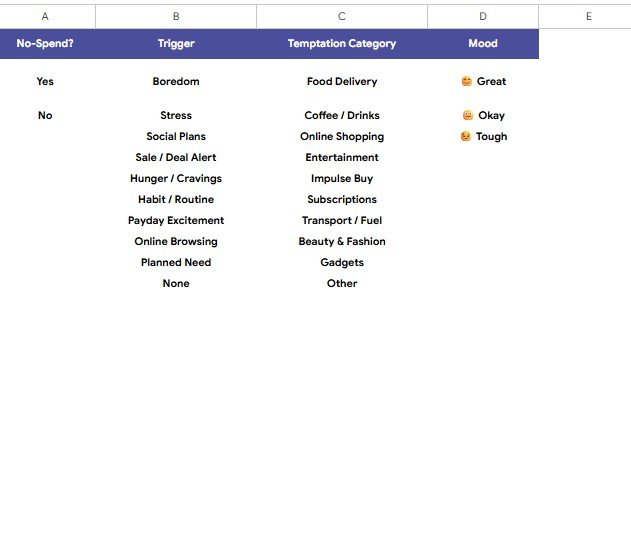 Dropdown Options Sheet
How This Compares to Other Tracking Options
| Option | Best For | Limitations |
|---|---|---|
| No Spend Challenge Tracker in Google Sheets | Simple challenge tracking, savings visibility, trigger review, and customizable dropdowns. | Requires manual entries, which is ideal for habit awareness but not automatic bank syncing. |
| Microsoft Excel no-spend tracker | Offline desktop spreadsheet users who prefer Excel files and local storage. | Less convenient for browser access and Google Drive sharing unless converted. |
| Paid budgeting app or personal finance SaaS | Automatic account syncing, subscription budgeting, and broad household finance management. | Usually costs more over time, may require bank connections, and can feel heavier than a focused challenge tracker. |
Who This Tracker Is For
This template is for individuals, couples, students, families, and personal finance creators who want a structured way to complete a no-spend challenge. It is especially helpful if you want to see saved money, recognize spending triggers, and build daily accountability without committing to a complex finance app.
Who This Tracker Is Not For
This template is not a bank-syncing budgeting platform, bookkeeping system, debt payoff calculator, or investment planner. It is also not financial advice. It is a practical Google Sheets tracker for recording challenge behavior, organizing responses, and reviewing progress visually.
How to Use the No Spend Challenge Tracker
- Open the Google Sheets copy included with your purchase.
- Review the Dropdown Options Sheet and customize response, trigger, temptation, and mood lists if needed.
- Record each challenge day with your no-spend result, money saved, trigger, temptation category, and mood.
- Use the Overview Page to review Total Money Saved and the four visual dashboard charts.
- Apply slicers to filter your results and understand which patterns are helping or hurting your challenge.
- Use your insights to adjust rules, plan difficult days, and keep the challenge realistic.
Real-World Use Cases
Monthly saver: Track a 30-day no-spend challenge and use the cumulative savings chart to stay motivated.
Impulse spender: Record triggers and temptation categories to identify the moments where purchases usually happen.
Household budget planner: Use the tracker with a partner or family member to make discretionary spending more visible.
Student or beginner budgeter: Build awareness of daily choices before moving into a larger budgeting system.
FAQs
What does the No Spend Challenge Tracker in Google Sheets track?
It tracks challenge results, money saved, spending triggers, temptation categories, moods, and streak progress so you can review your no-spend behavior visually.
Can I customize the dropdown options?
Yes. The Dropdown Options Sheet is included so you can adjust response labels, spending triggers, temptation categories, and mood options for your own challenge.
Does this template connect to my bank account?
No. This is a manual Google Sheets tracker. Manual entry keeps the challenge intentional and avoids sharing bank credentials with another app.
Can I use it for a 7-day, 30-day, or yearly challenge?
Yes. You can use it for short or long no-spend challenges by recording the dates that apply to your goal.
Do I need advanced Google Sheets skills?
No. The dashboard, charts, and dropdown structure are already set up. You only need to enter your challenge data and review the results.
Is this financial advice?
No. This template is an organization and tracking tool. It does not replace advice from a qualified financial professional.
About the Author
Built by PK – Microsoft Certified Professional with 15+ years of Excel, Google Sheets, and Power BI experience. Founder of NextGenTemplates, reaching 300K+ subscribers across YouTube channels. Every template is hand-built and tested before release.
Explore Related Templates
- Savings Goal Tracker in Google Sheets
- Retirement Savings Tracker in Google Sheets
- Personal Finance Net Worth Tracker in Google Sheets
- Shared Expense Splitter Tracker in Google Sheets
- Stock Portfolio Tracker in Google Sheets
- Browse Google Sheets templates
- Browse Google Sheets tracker templates
Start Your No-Spend Challenge With a Clear Tracker
Use the No Spend Challenge Tracker in Google Sheets to make your challenge measurable, visual, and easier to maintain. Instead of guessing whether your habits are improving, you can track saved money, review spending triggers, and see streak progress in one editable spreadsheet.
Watch the step-by-step video Demo:
Last updated: August 3, 2026.
Compatibility and Requirements
- Works in Google Sheets. You need a free Google account and a web browser.
- The response, trigger, temptation and mood lists are dropdowns. Google explains them in Create an in-cell dropdown list.























Reviews
There are no reviews yet.