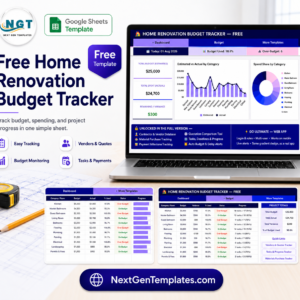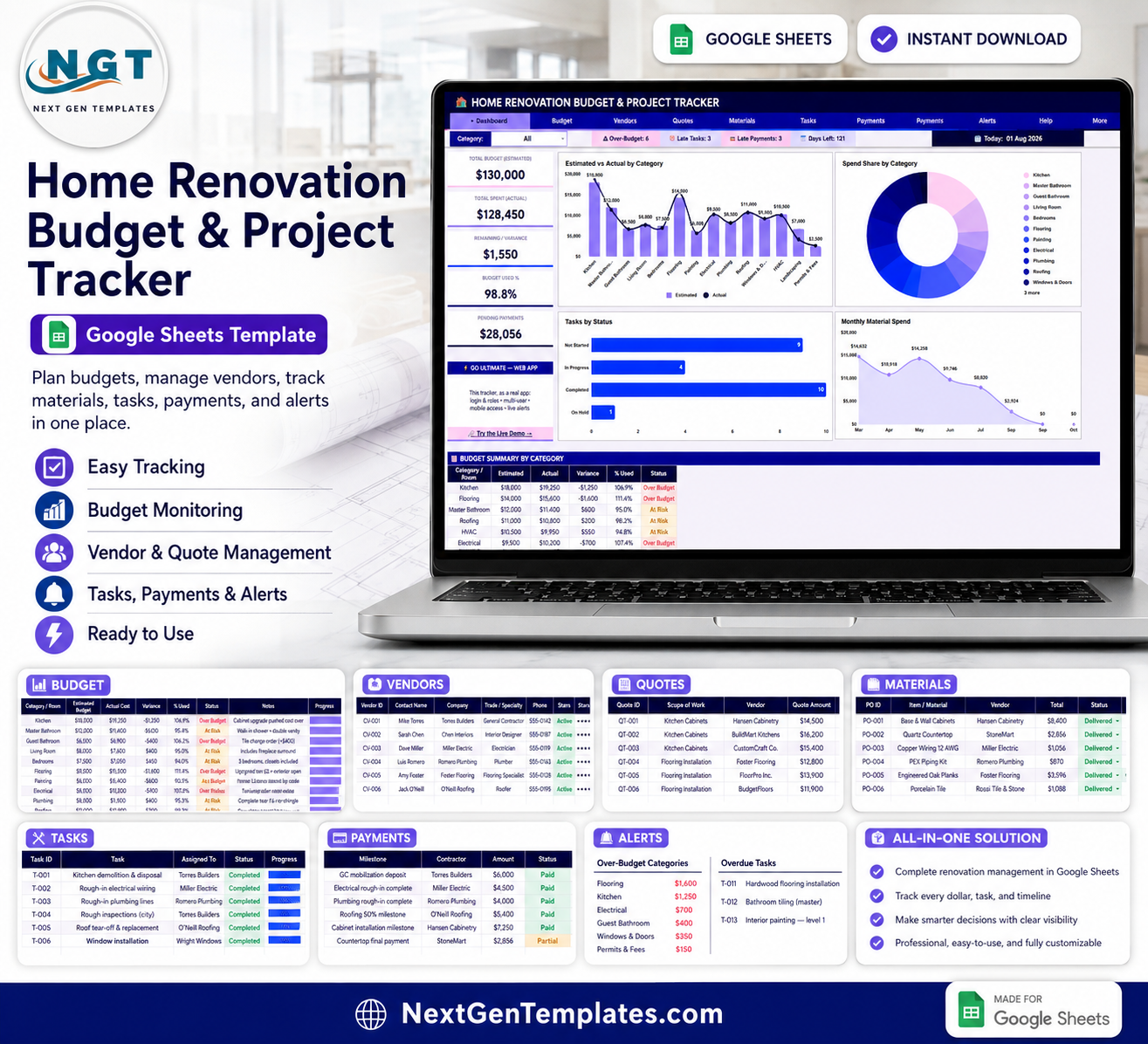
Home Renovation Budget and Project Tracker in Google Sheets gives homeowners, contractors, interior designers, and property investors an 8-tab planning system with 10 overview cards, 5 overview charts, vendor records, quote comparison, material spend analysis, task tracking, payment monitoring, and alert pages. Renovation budgets often fail because quotes, purchase orders, due dates, and payment milestones live in separate places. This Google Sheets tracker puts those moving parts into one editable file, without a monthly SaaS bill. Built by PK for the NextGenTemplates audience of 300K+ subscribers, it is a practical spreadsheet template you can review through the screenshots before use.
Key Features of Home Renovation Budget and Project Tracker in Google Sheets
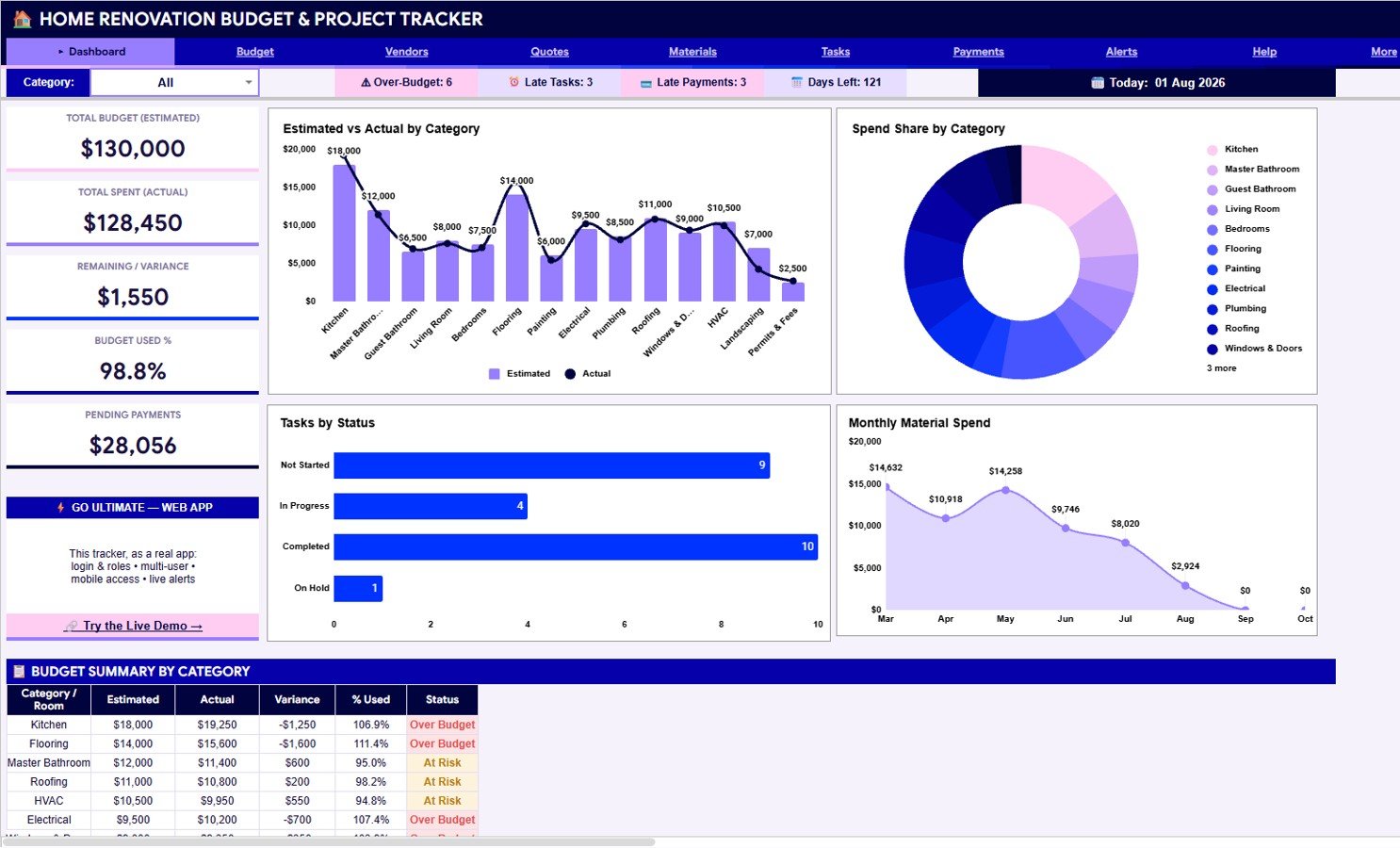
- Overview dashboard: See total estimated budget, actual spend, variance, budget used percent, pending payments, over-budget items, late tasks, late payments, days left, and today’s date.
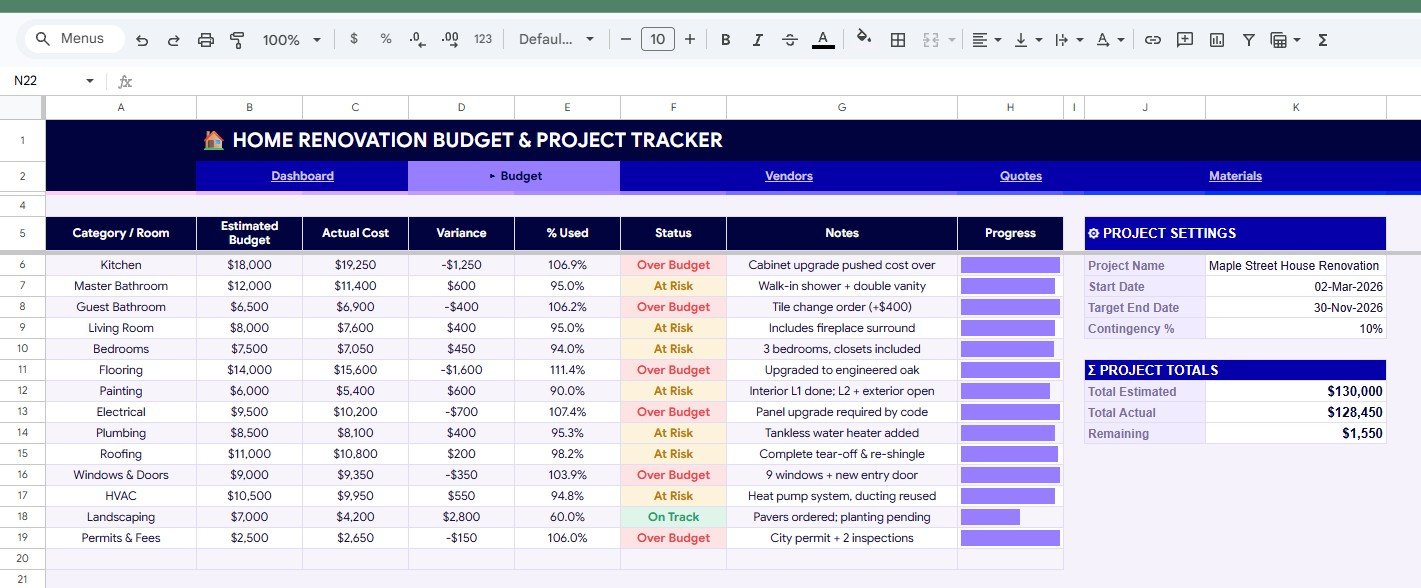
- Budget analysis: Compare estimated budget, actual cost, variance, percent used, status, and progress by category or room.
- Vendor tracking: Store vendor ID, trade, hourly rate, rating, status, and contact information in one structured sheet.
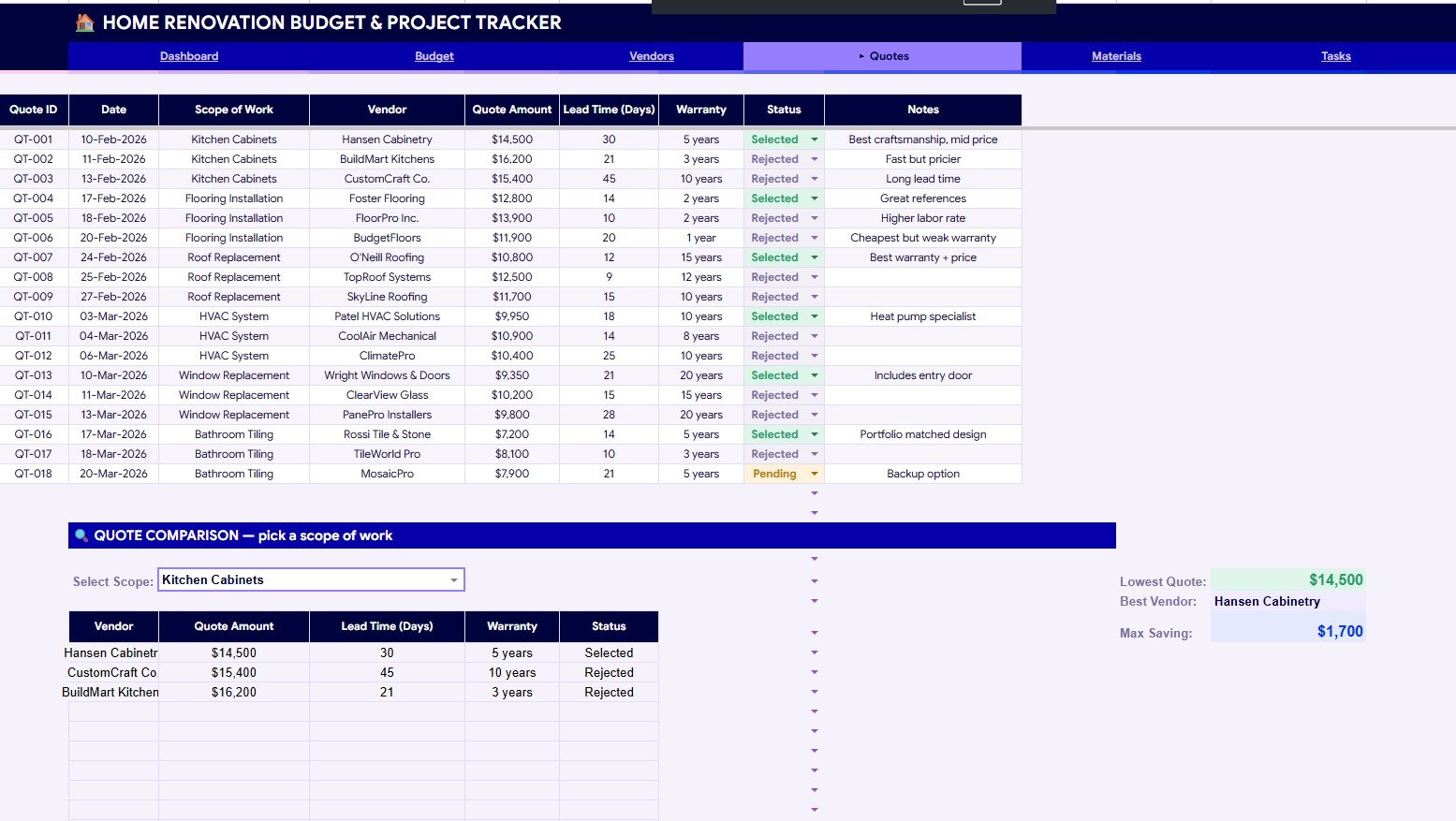
- Quote comparison: Review quote amount, lead time, warranty, status, lowest quote, and savings by scope of work.
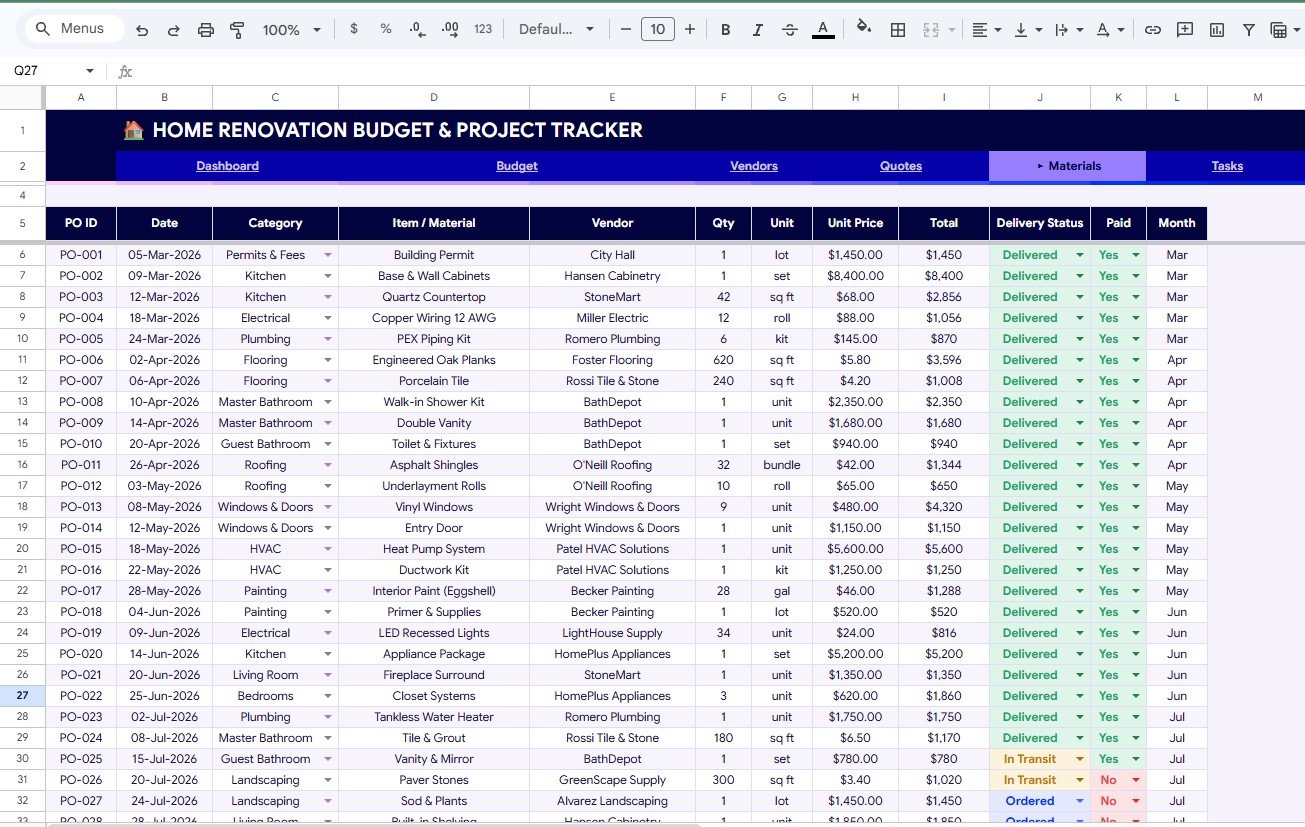
- Material control: Track spend by category, vendor, delivery status, purchase order paid status, month, and item quantity.
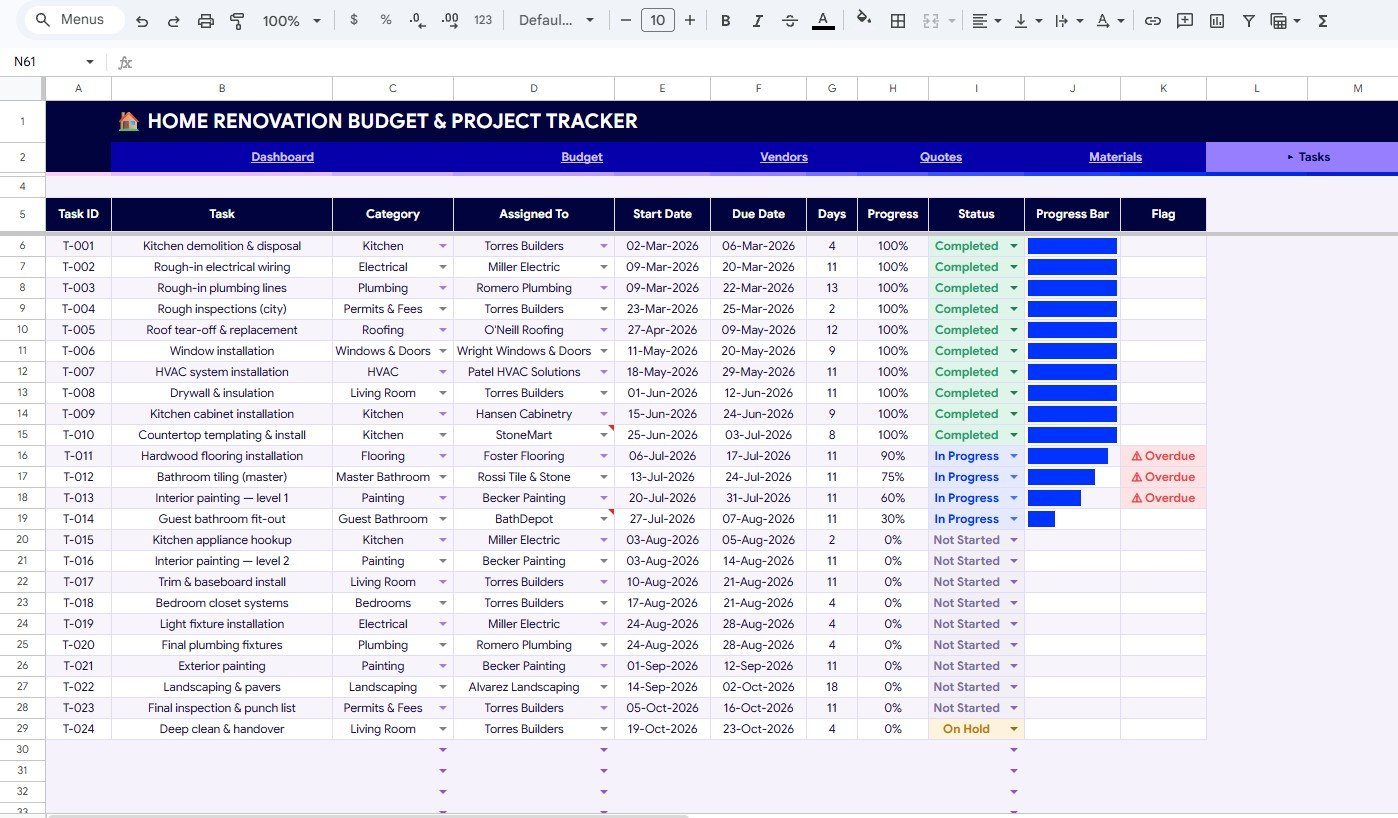
- Task management: Monitor task progress, status, due dates, overdue flags, and assigned vendor tasks.
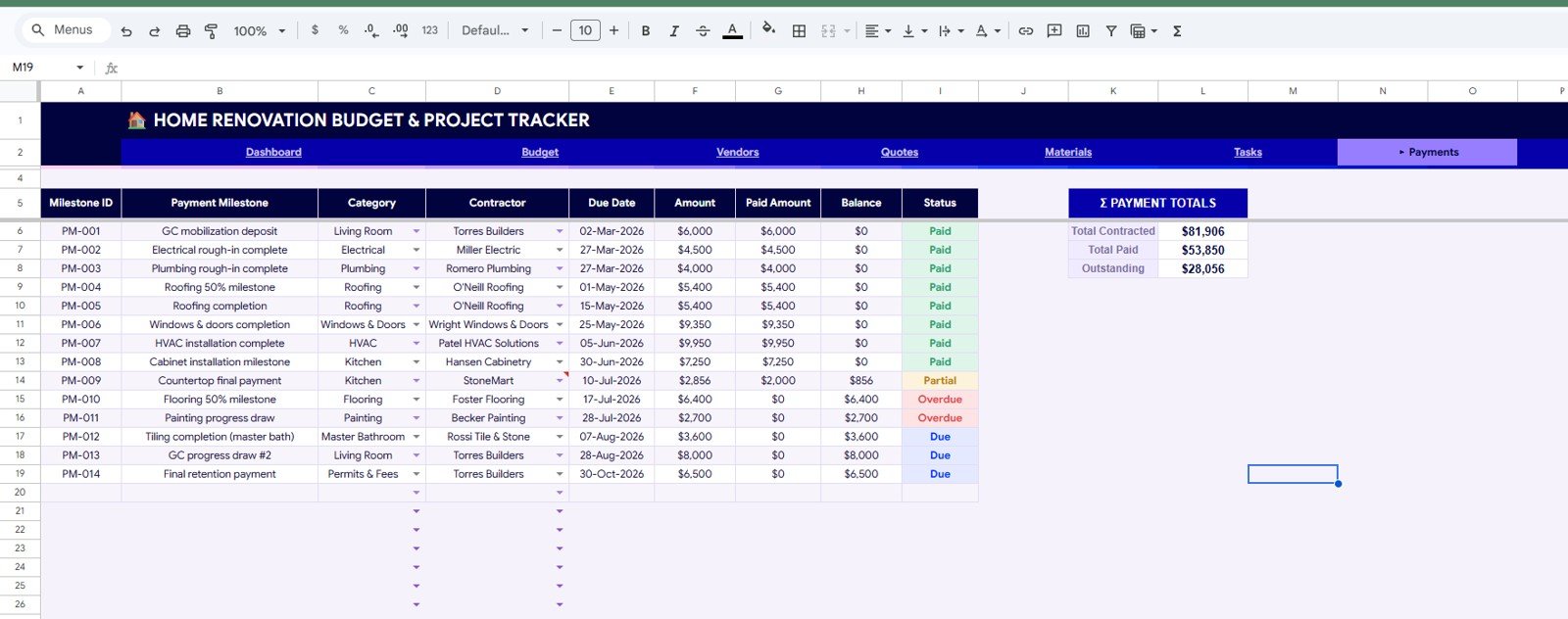
- Payment monitoring: Track milestones, paid amount, balance, payment status, contract totals, and outstanding contractor balances.
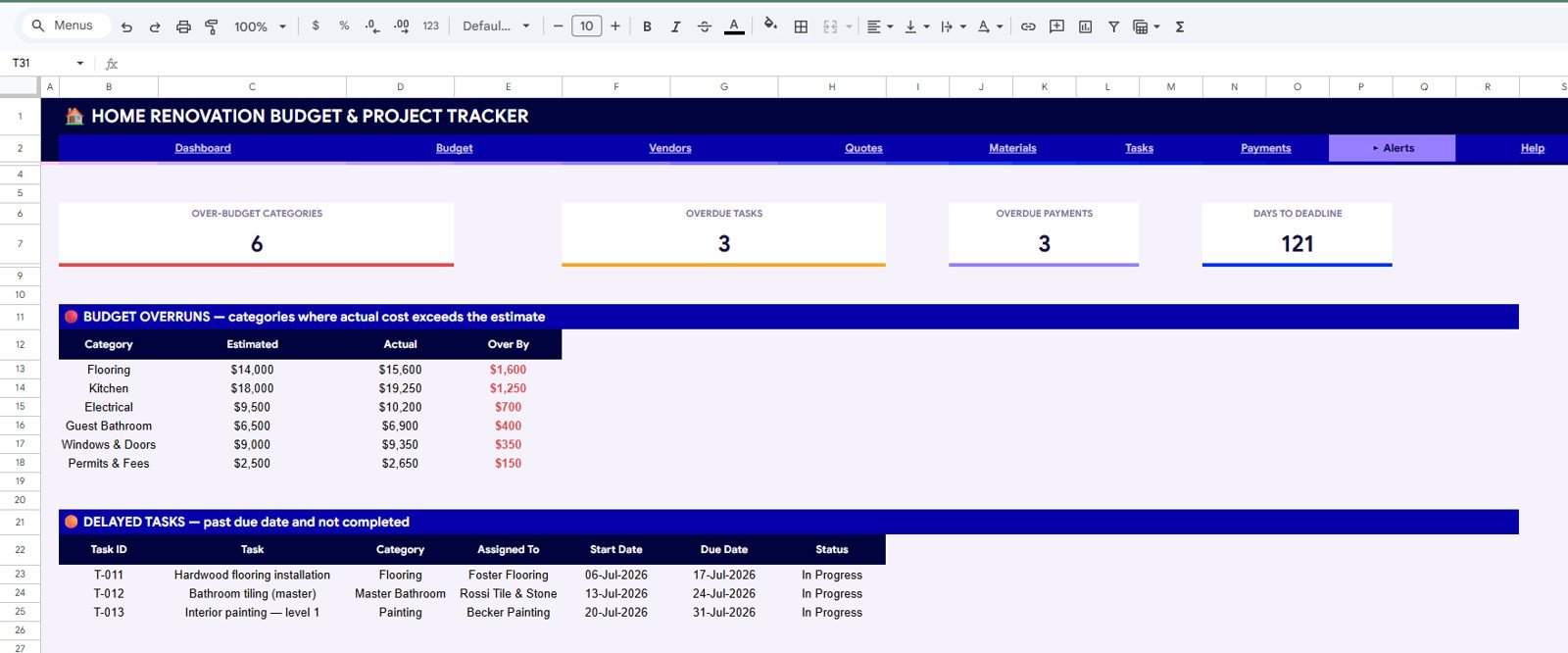
- Alerts sheet: Review over-budget categories, delayed tasks, overdue payments, and days to deadline before they become bigger problems.
What’s Inside the Home Renovation Budget and Project Tracker in Google Sheets
1. Overview Page
The Overview Page is the high-level renovation command center. Cards summarize budget, spend, variance, completion pressure, late work, pending payments, and current timing.
The charts cover estimated versus actual cost by category, spend share, task status, monthly material spend, and category-level budget summary.
2. Budget Sheet
The Budget sheet compares estimated and actual cost by category or room, then calculates variance, percent used, status, progress, and project totals from the project settings.
3. Vendors Sheet
The Vendors sheet keeps contractor and supplier information organized by vendor ID, trade, hourly rate, rating, status, and contact details.
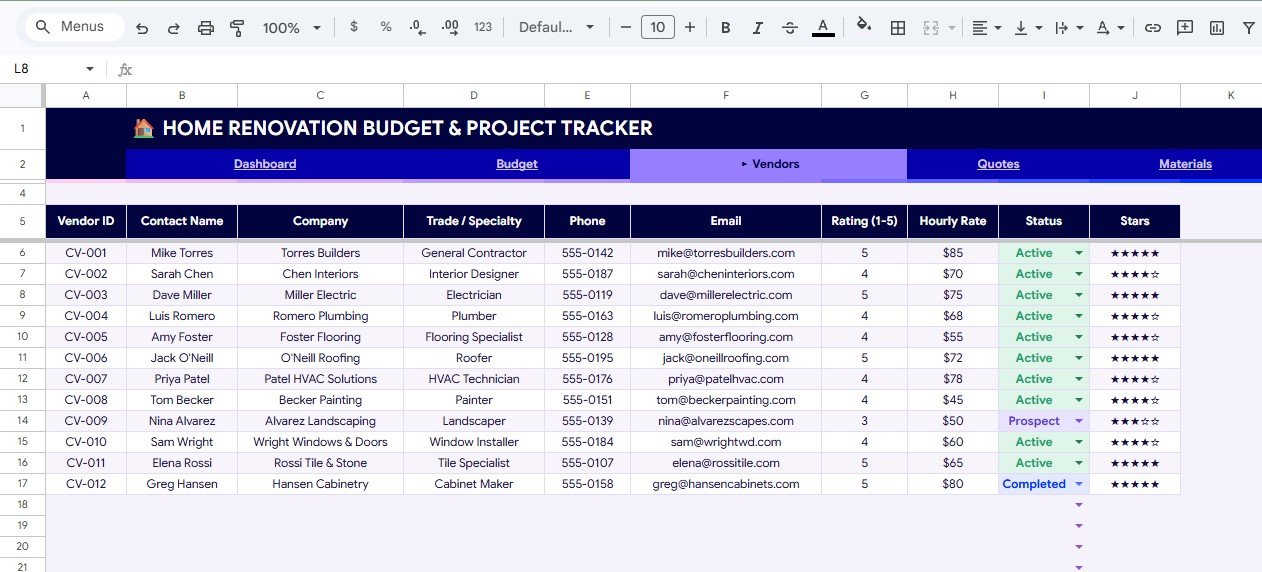
4. Quotes Sheet
The Quotes sheet helps compare vendors by amount, lead time, warranty, status, lowest quote, and maximum saving by scope of work.
5. Materials Sheet
The Materials sheet tracks material spend by category and vendor, delivery status, purchase order payment status, monthly total cost, and item quantity.
6. Tasks Sheet
The Tasks sheet reviews task progress, status, days, due dates, overdue flags, and vendor assignments so schedule risks are visible early.
7. Payments Sheet
The Payments sheet tracks amount, paid amount, balance, payment status, contract totals, and outstanding balance by contractor.
8. Alerts Sheet
The Alerts sheet calls out over-budget categories, delayed tasks, overdue payments, project deadlines, and the amount each category is over budget.
Home Renovation Budget and Project Tracker in Google Sheets vs. Microsoft Excel vs. Paid CRM/SaaS – Where This Fits
| Feature | This Google Sheets tracker | Microsoft Excel tracker | Paid project SaaS |
|---|---|---|---|
| Cost | $9.99 sale price | Template cost plus license needs | Recurring monthly or annual fee |
| Platform | Google Sheets in browser or mobile app | Excel desktop or web | Vendor-hosted system |
| Setup time | Copy the file and replace sample data | Open workbook and adapt sheets | Account setup and configuration |
| Real-time team collaboration | Native Google Drive sharing | Depends on Microsoft cloud setup | Usually plan based |
| Mobile access | Google Sheets app or browser | Excel app or browser | Usually included |
| Customizable fields | Editable spreadsheet structure | Editable workbook structure | Limited by vendor settings |
| Share with link | Yes, with permission controls | Yes, with compatible sharing | Usually account based |
| Year-1 cost at 5 users | $9.99 template price | Template price plus license costs | Can become much higher |
| Quote and payment tracking | Included as dedicated sheets | Must be built or customized | Plan dependent |
Who This Template Is For – and Who It’s Not For
This template is a good fit for homeowners planning a remodel, renovation contractors, interior design teams, property managers, real estate investors, and small construction offices that want budget, vendor, quote, task, material, payment, and alert visibility in Google Sheets.
It is not a replacement for accounting software, permit management, client portals, field crew GPS, automated vendor integrations, payment gateways, or enterprise construction management systems. It works best when your team wants editable spreadsheet control and a clear weekly review process.
How to Use the Home Renovation Budget and Project Tracker in Google Sheets
- Open the PDF guide after purchase and create your editable Google Sheets copy.
- Review the sample data and keep the column structure consistent.
- Enter budget categories, rooms, vendors, quotes, materials, tasks, and payments.
- Use slicers and charts on the Overview Page to review the project each week.
- Check the Alerts sheet before approving new purchases or contractor payments.
Real-World Use Cases
Maya, homeowner: uses the tracker to compare kitchen, bathroom, and living-room budgets before approving extra material purchases.
Carlos, renovation contractor: reviews vendor quotes, lead times, task due dates, and outstanding balances before his weekly project meeting.
Priya, property investor: tracks multiple renovation costs and payment milestones so each property stays close to the expected margin.
Frequently Asked Questions
What is included in this home renovation tracker?
It includes Overview, Budget, Vendors, Quotes, Materials, Tasks, Payments, and Alerts sheets with cards, charts, slicers, and structured analysis views.
Does this template work in Google Sheets?
Yes. It is built for Google Sheets and is intended to be copied to your own Google Drive from the purchase guide.
Can I track contractors and vendors?
Yes. The Vendors sheet stores vendor IDs, trade or specialty, hourly rates, ratings, status, and contact details.
Can I compare quotes before choosing a contractor?
Yes. The Quotes sheet compares quote amount, lead time, warranty, status, lowest quote, and maximum saving by scope of work.
Does it show over-budget items?
Yes. The overview cards and Alerts sheet highlight over-budget categories, delayed tasks, overdue payments, and deadline pressure.
Can I customize the tracker?
Yes. After creating your own copy, you can edit labels, add rows, adjust formulas, and adapt sheets if you are comfortable maintaining spreadsheet logic.
About the Author
Built by PK – Microsoft Certified Professional with 15+ years of Excel, Google Sheets, and Power BI experience. Founder of NextGenTemplates, reaching 300K+ subscribers across YouTube channels. Every template is hand-built and tested before release.
Explore Related Templates
- Home Renovation Project Management Web App
- Real Estate Property Tracker in Google Sheets
- Budget Request and Approval Tracker in Google Sheets
- Architecture and Design Dashboard in Google Sheets
- Browse more Google Sheets templates and Google Sheets tracker templates.
Ready to control renovation budgets, vendors, quotes, materials, tasks, payments, and alerts in one editable spreadsheet? Add the Home Renovation Budget and Project Tracker in Google Sheets to your template library today.
Watch the step-by-step video Demo:
Last updated: August 1, 2026.