

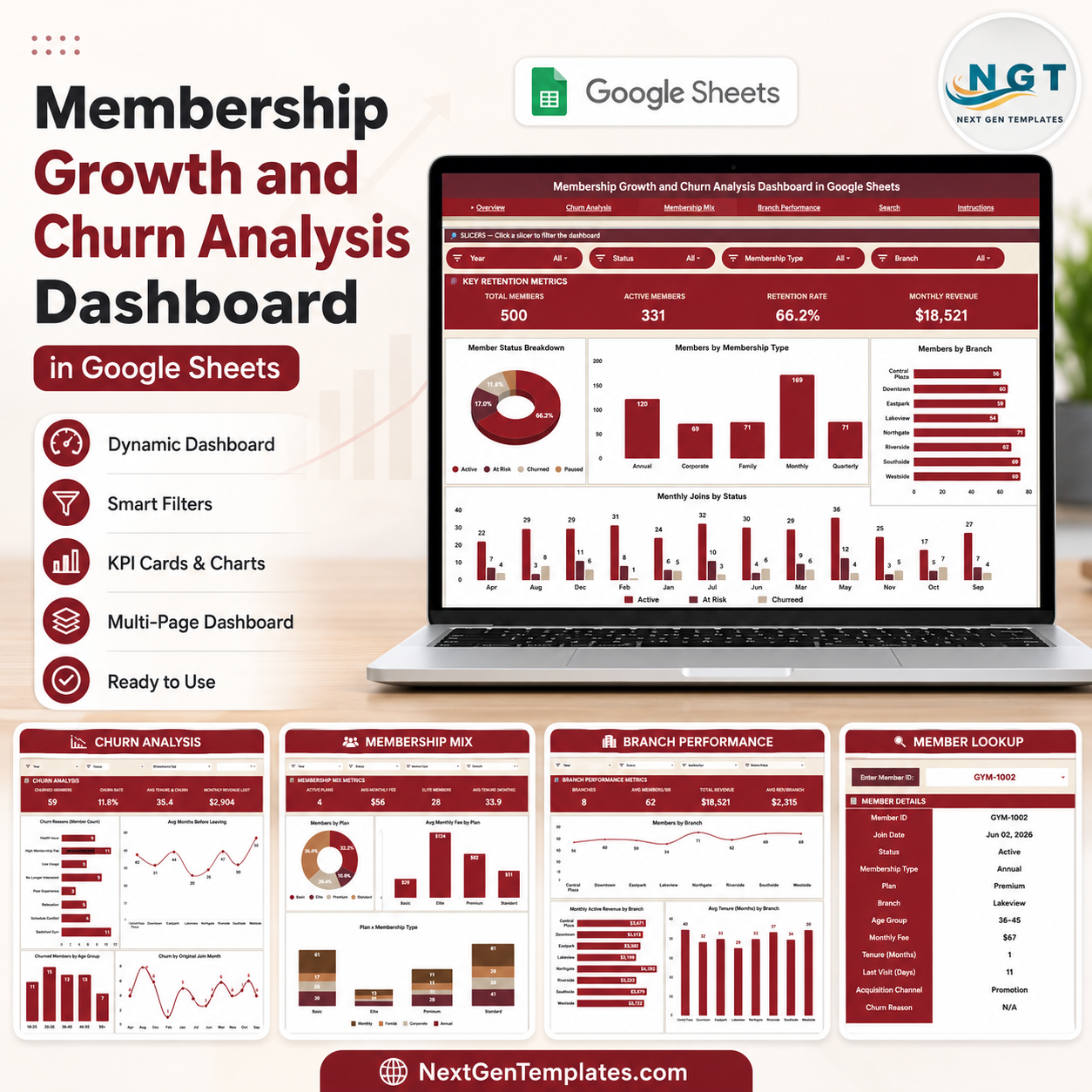

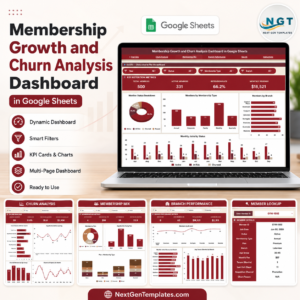
The Membership Growth and Churn Analysis Dashboard in Google Sheets is a ready-to-use membership analytics template for gyms, clubs, studios, associations, subscription communities, and membership-based service businesses. It helps you monitor total members, active members, retention rate, monthly revenue, churn reasons, membership mix, branch performance, member tenure, and searchable member-level details in one organized Google Sheets dashboard.
This template is designed for operators who want a practical, no-code way to understand membership growth and churn without rebuilding reports from scratch. Update the source data, use the included slicers, and review the dashboard pages to spot retention risks, revenue trends, branch-level performance, and member acquisition patterns faster.
What Is Included?
- Google Sheets dashboard template for membership growth and churn analysis.
- Overview dashboard with high-level member, retention, and revenue metrics.
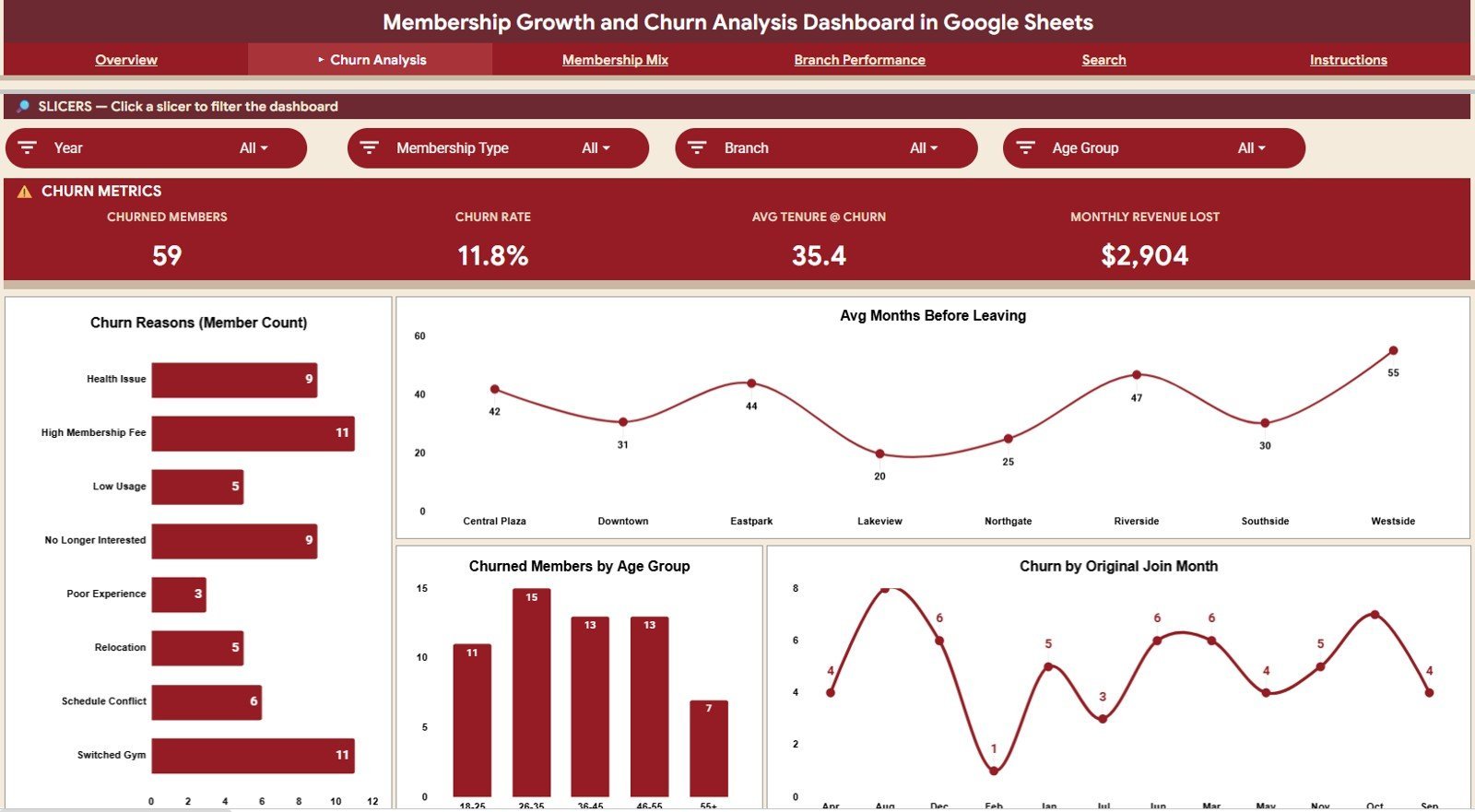
- Churn Analysis tab for churn reasons, age groups, join month, and branch trends.
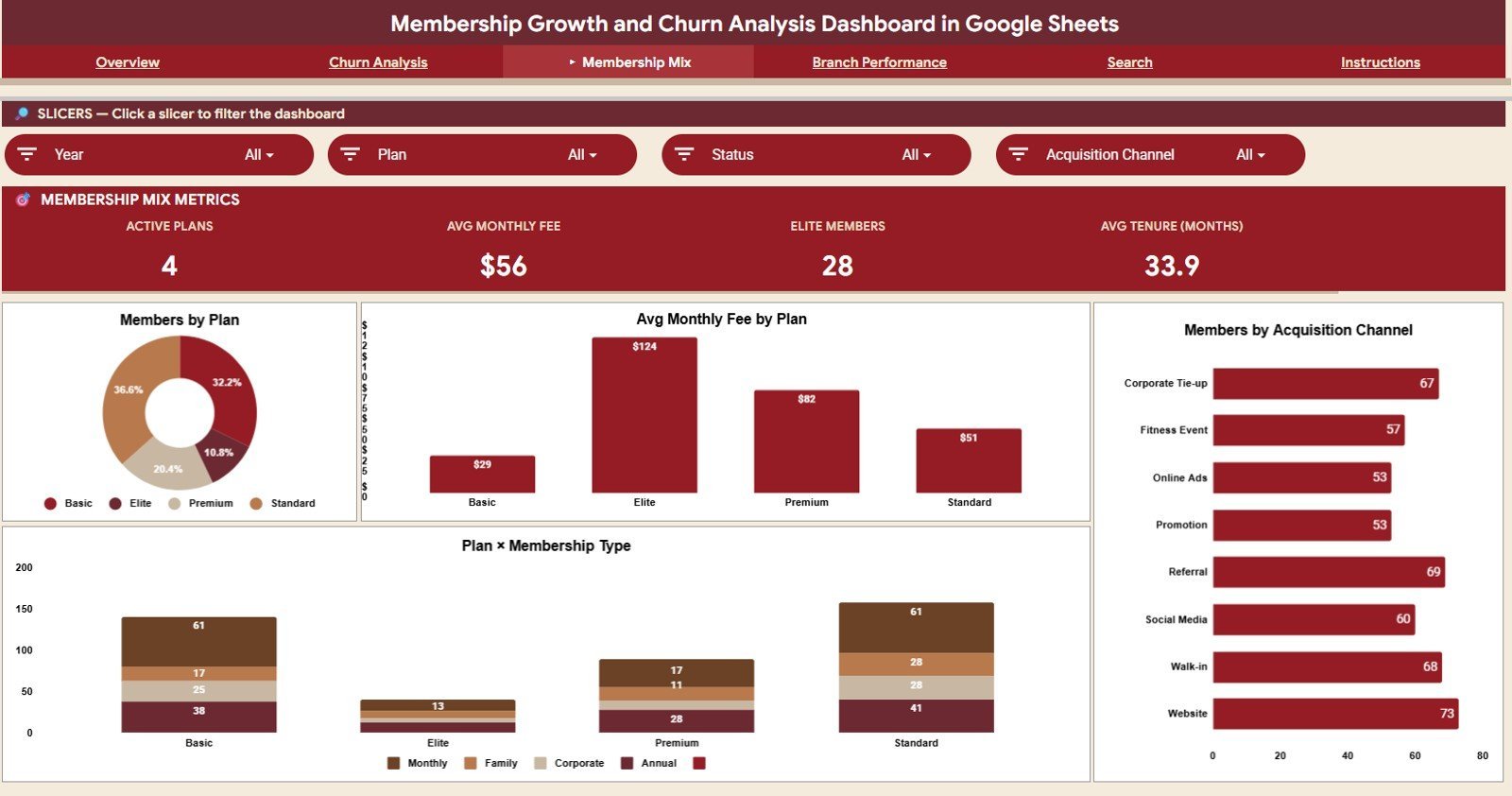
- Membership Mix tab for plan, fee, acquisition channel, and membership type analysis.
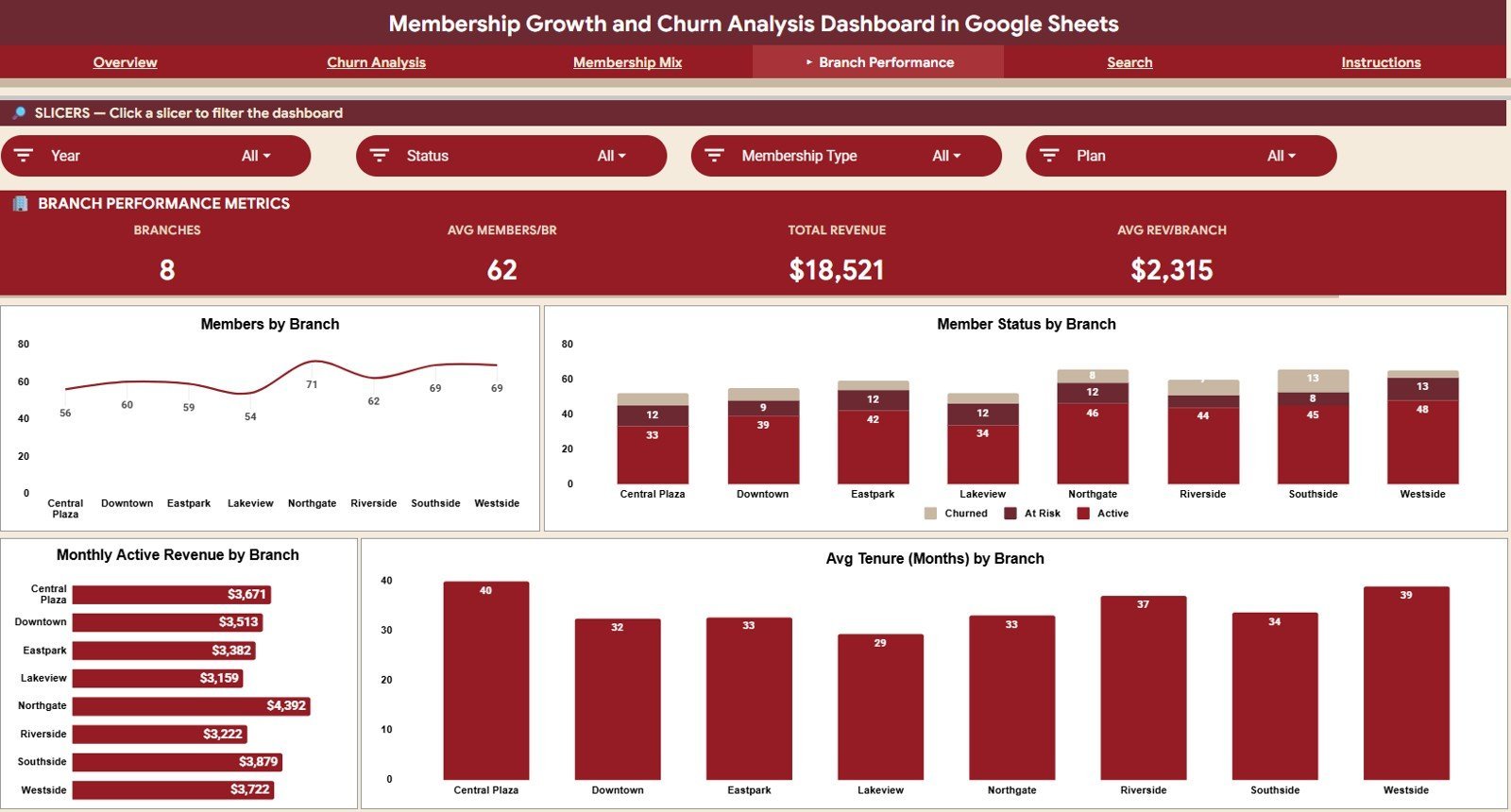
- Branch Performance tab for branch-level member count, status, revenue, and tenure.
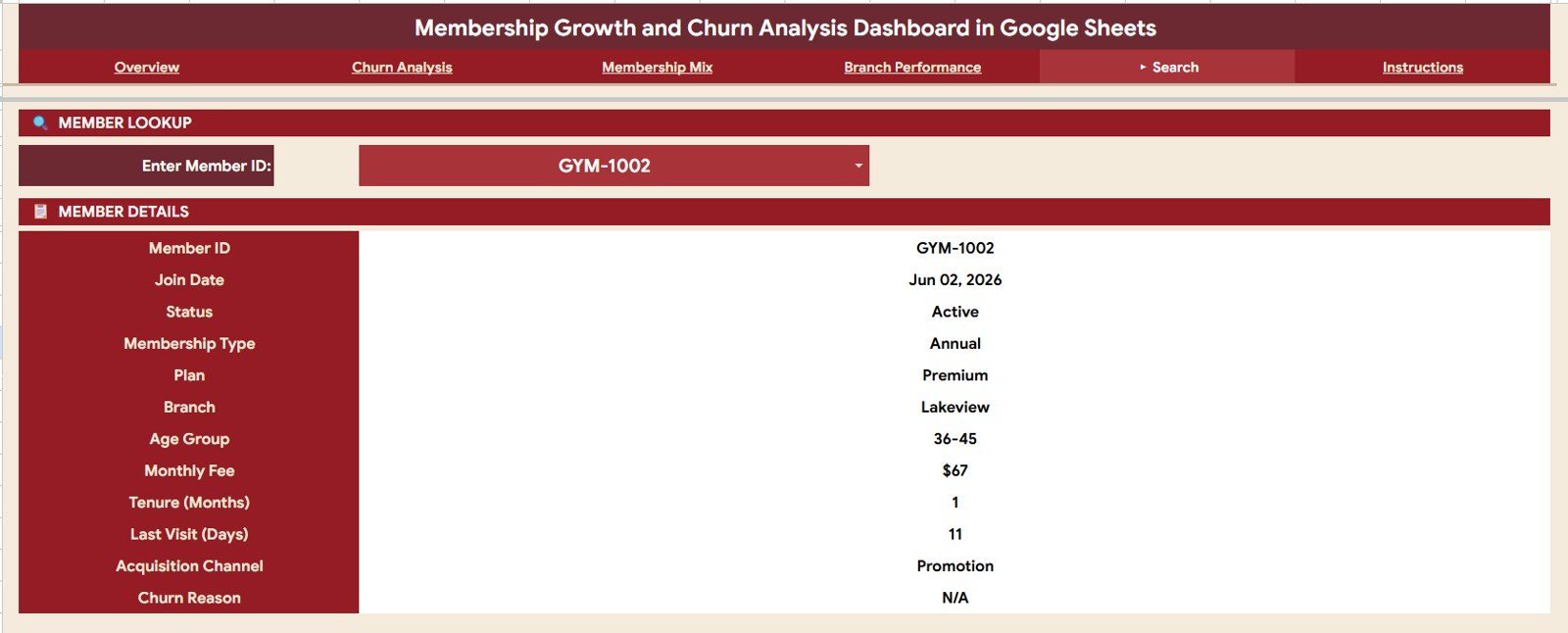
- Search tab to look up individual member details by Member ID.
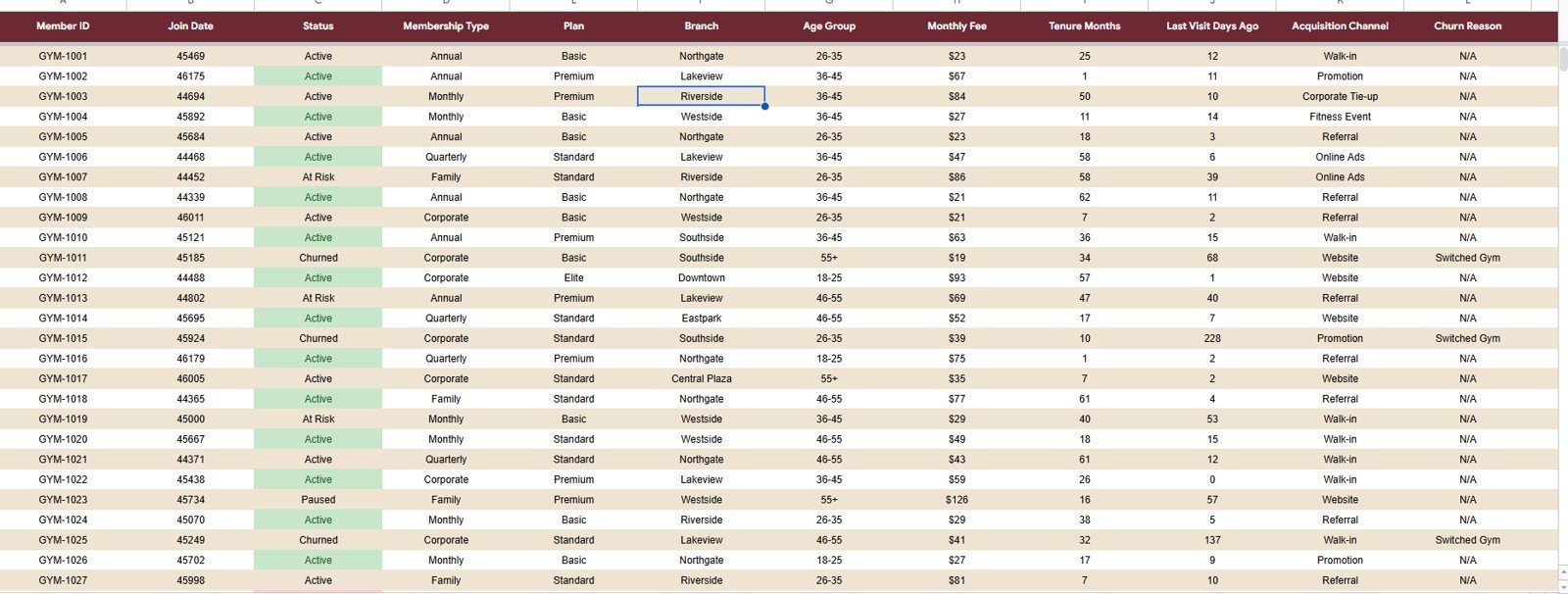
- Data sheet tab formatted for structured membership records.
- Built-in charts and slicers for quick filtering and dashboard exploration.
Overview Page
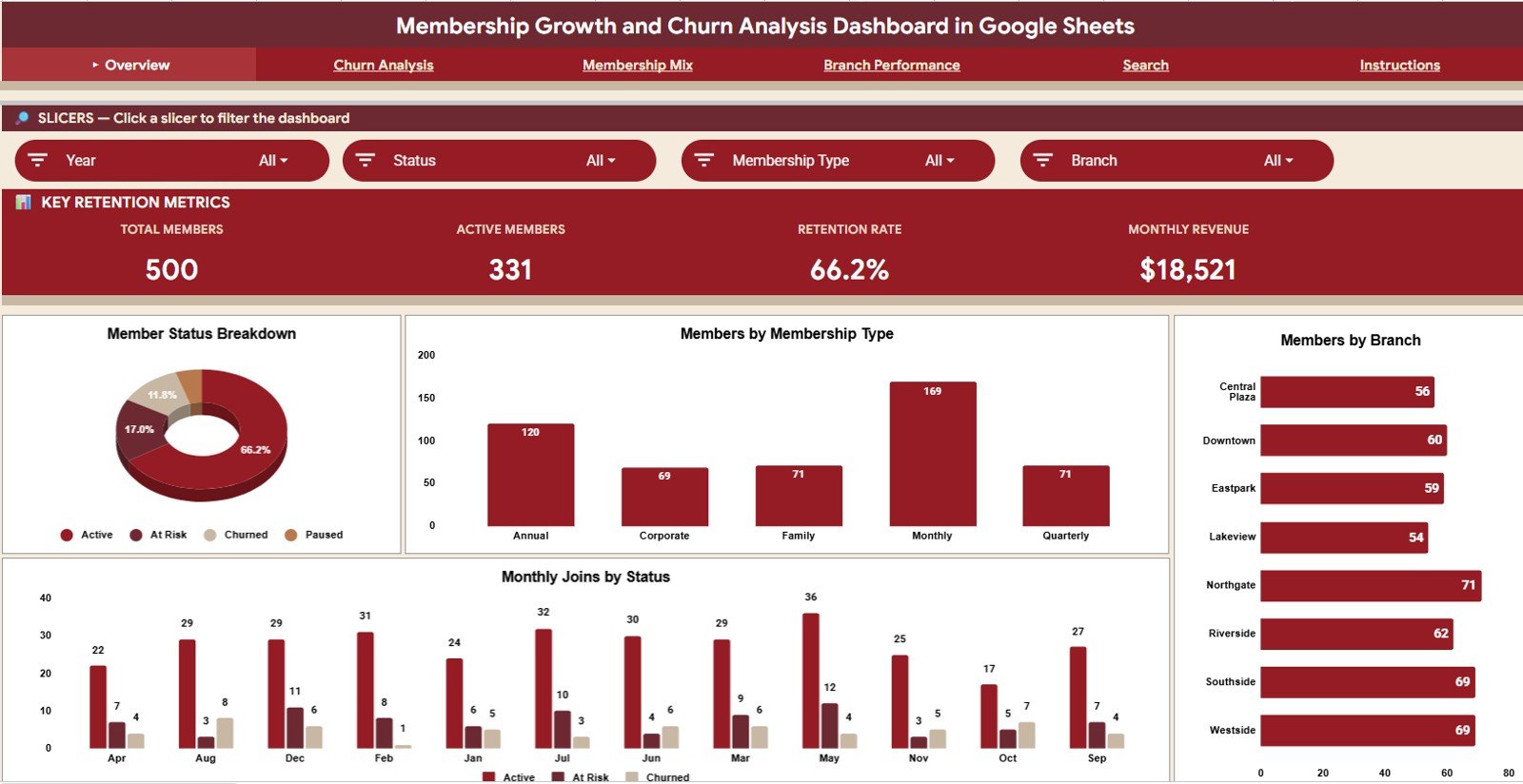
The Overview page gives you a quick read on overall membership health. At the top of the sheet, KPI cards summarize Total Members, Active Members, Retention Rate, and Monthly Revenue.
The dashboard also includes slicers so you can filter the view by relevant membership fields and review the updated charts instantly.
- Member Count by Status: Shows how members are distributed across active, churned, paused, or other statuses. This helps you quickly understand whether the member base is growing, stable, or at risk.
- Members by Membership Type: Breaks down members by membership type so you can compare the size of each membership group. Use this to see which membership categories drive the largest share of your base.
- Members by Branch: Compares member counts across locations or branches. This makes it easier to identify stronger-performing branches and locations that may need more retention support.
- Monthly Joins by Status: Tracks monthly joining patterns while showing how member status changes over time. It helps connect acquisition momentum with member quality and retention outcomes.
Churn Analysis
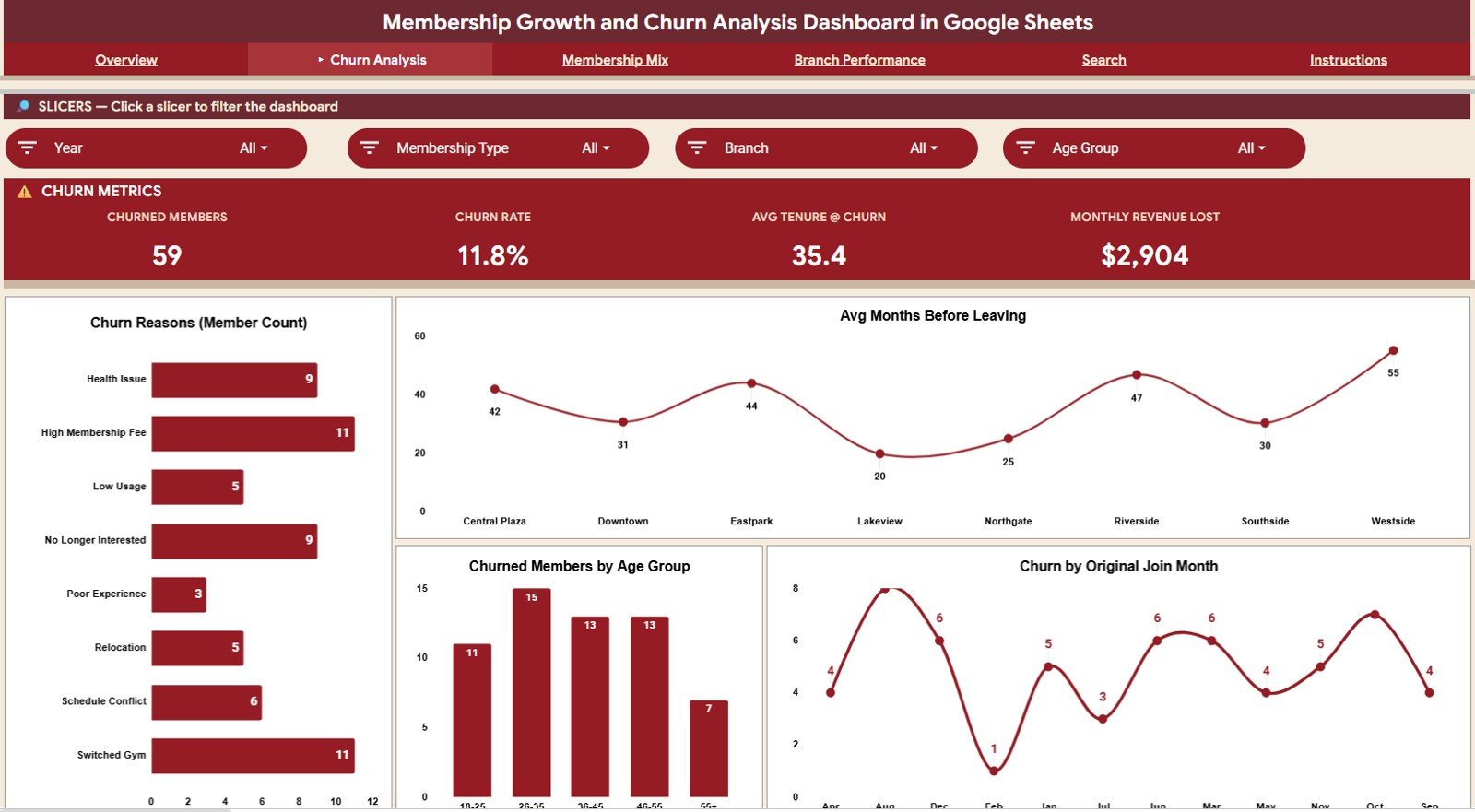
The Churn Analysis tab focuses on the members who left and the patterns behind those exits. It is useful for diagnosing why churn is happening and where retention efforts should be prioritized.
- Churned Members by Churn Reason: Shows the most common reasons members leave. This chart helps you separate pricing, engagement, relocation, service, or schedule-related churn patterns.
- Avg Months Before Leaving by Branch: Compares how long members typically stay before leaving at each branch. Use it to spot branches where churn happens earlier than expected.
- Churned Members by Age Group: Breaks churned members into age groups to identify demographic patterns. This can guide retention offers, programming, and member communication.
- Churn by Original Join Month: Shows churn patterns based on the month members originally joined. It helps reveal whether certain acquisition periods or seasonal cohorts have weaker retention.
Membership Mix
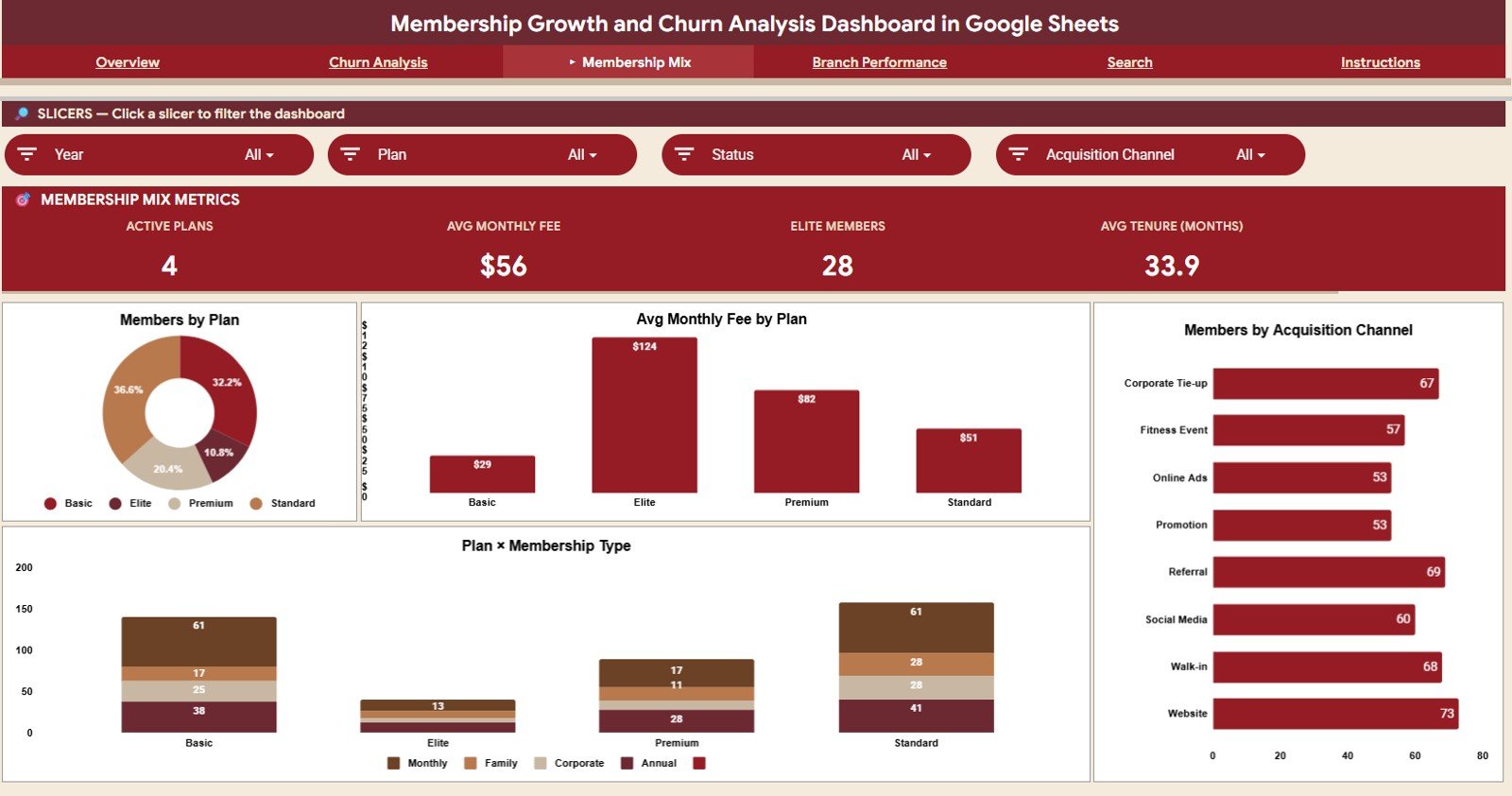
The Membership Mix tab helps you understand which plans, channels, and membership types make up your member base. It is especially helpful when reviewing pricing strategy, acquisition sources, and product mix.
- Members by Plan: Displays how many members are assigned to each plan. This helps identify the plans that attract the most members and the plans that may need repositioning.
- Average Monthly Fee by Plan: Compares the average monthly fee across plans. Use this to understand pricing differences and how each plan contributes to recurring revenue.
- Members by Acquisition Channel: Shows where members came from, such as referrals, ads, walk-ins, partnerships, or online channels. This helps evaluate which channels produce the most members.
- Membership Type by Plan: Cross-compares membership types with plan selections. It helps reveal how different member segments choose plans and where upsell opportunities may exist.
Branch Performance
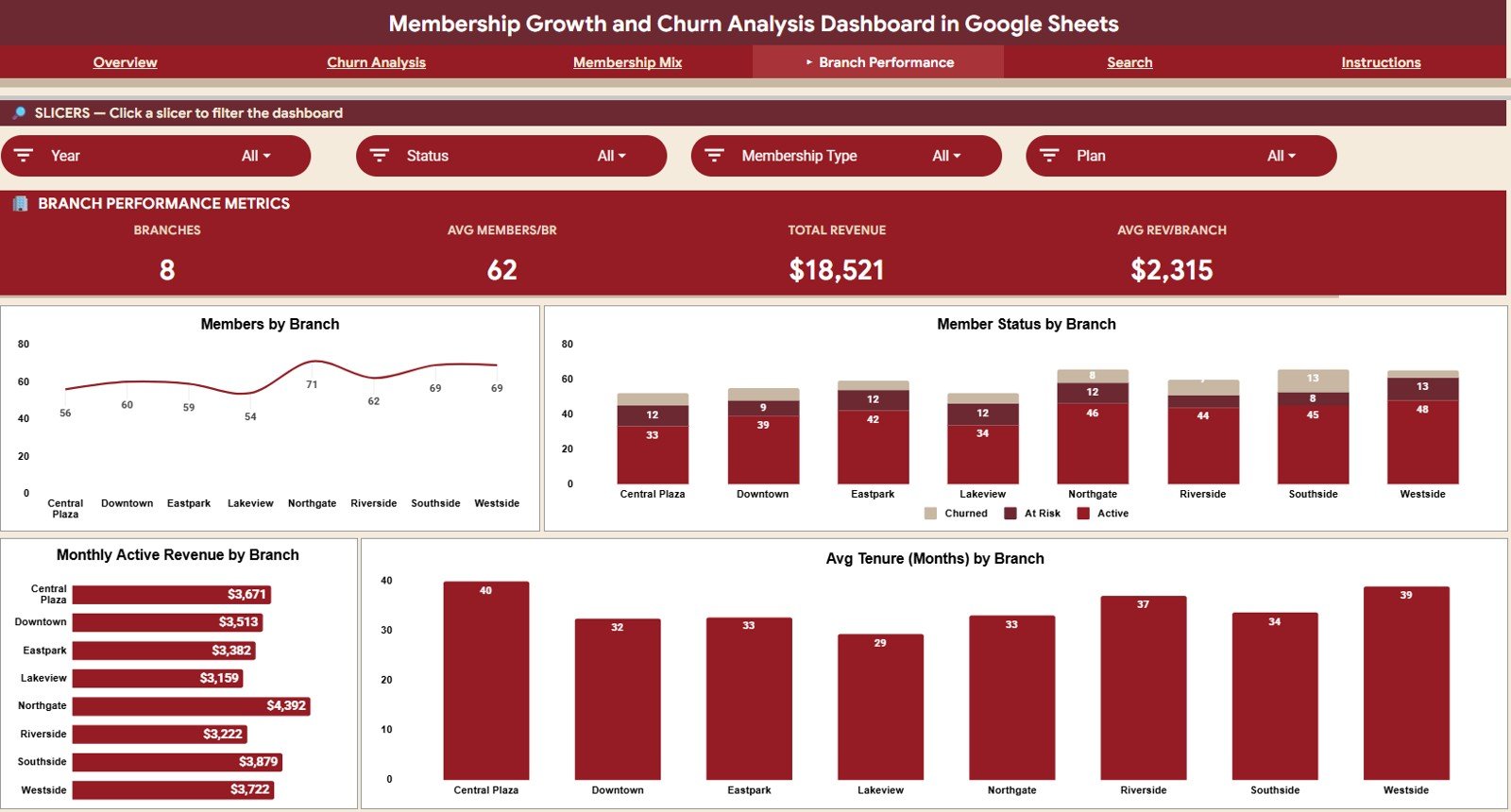
The Branch Performance tab compares locations using member count, status, revenue, and tenure views. This page is useful for owners and regional managers who need to evaluate performance across multiple sites.
- Members by Branch: Shows the total members associated with each branch. It helps you compare location size and membership concentration.Membership Growth and Churn Analysis Dashboard in Google Sheets
- Member Status by Branch: Breaks member status down by branch so you can review active, churned, or paused distribution at each location. This makes retention gaps easier to see.
- Monthly Active Revenue by Branch: Compares recurring active revenue across branches. This chart helps connect branch size with revenue contribution.Membership Growth and Churn Analysis Dashboard in Google Sheets
- Avg Tenure Months by Branch: Shows the average membership tenure for each branch. Higher tenure can indicate stronger satisfaction, engagement, or retention programs.Membership Growth and Churn Analysis Dashboard in Google Sheets
Search Sheet Tab
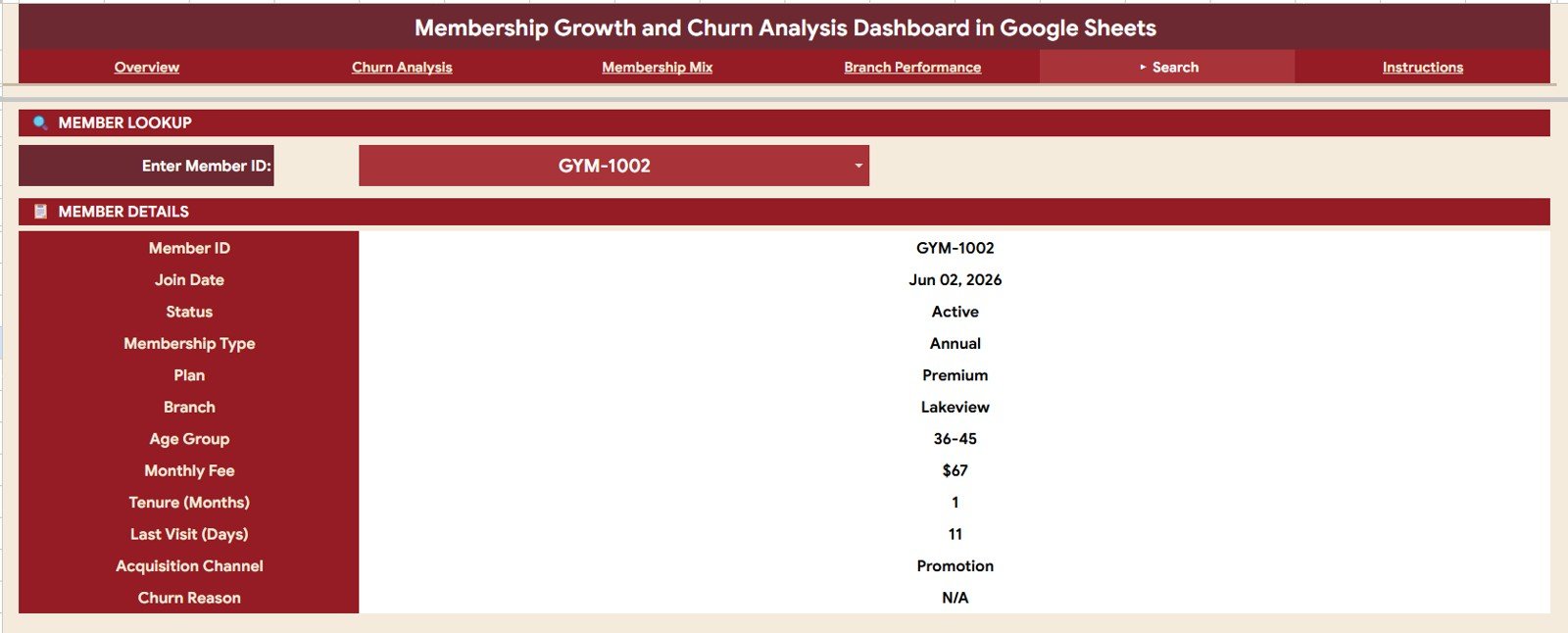
The Search sheet lets you select a Member ID and quickly view the member record details in one place. It includes Member ID, Join Date, Status, Membership Type, Plan, Branch, Age Group, Monthly Fee, Tenure Months, Last Visit Days, Acquisition Channel, and Churn Reason.Membership Growth and Churn Analysis Dashboard in Google Sheets
Data Sheet Tab
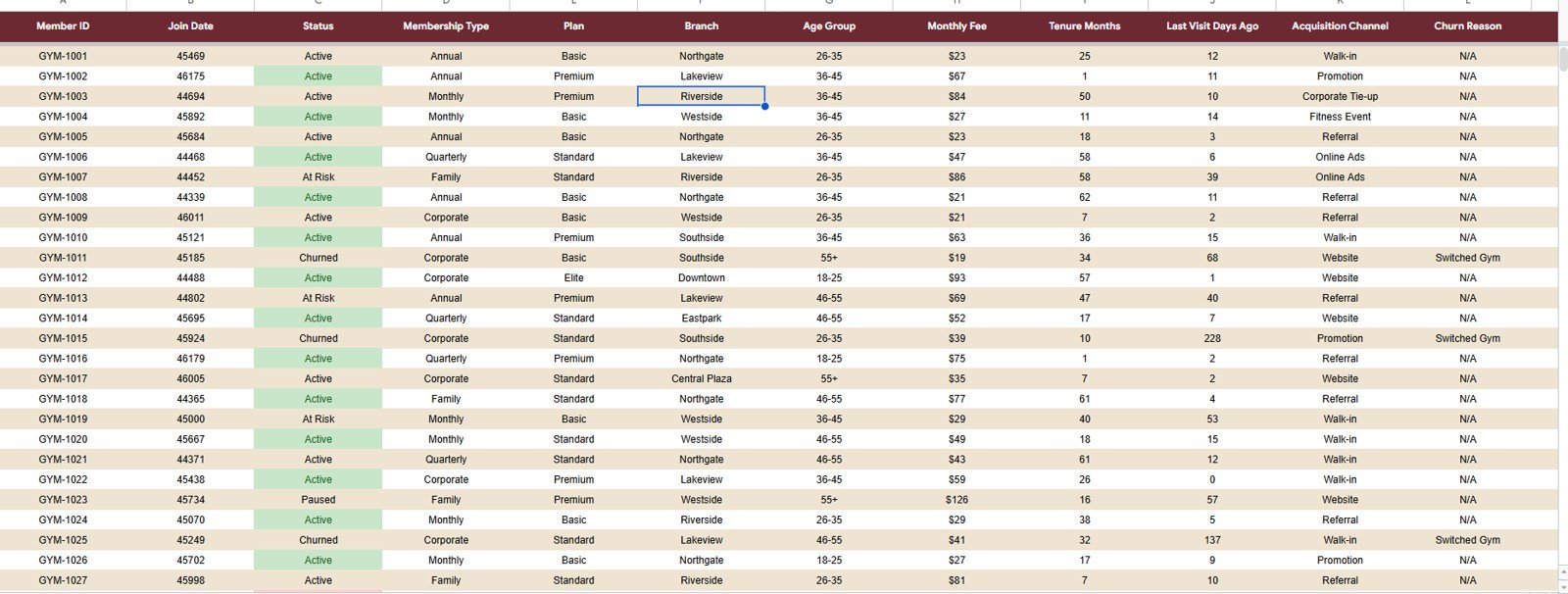
The Data sheet is where the membership records are stored in a consistent format. Add or update your member data in the same structure so the dashboard pages, charts, slicers, and search view stay connected.Membership Growth and Churn Analysis Dashboard in Google Sheets
Who Can Use This Dashboard?
- Gym owners and fitness studio operators tracking member retention.
- Clubs, associations, and community organizations managing memberships.
- Subscription-based service businesses reviewing churn and recurring revenue.
- Branch managers comparing member growth across locations.
- Consultants and analysts preparing membership performance reports.Membership Growth and Churn Analysis Dashboard in Google Sheets
Why Use This Google Sheets Dashboard?
- No complex software setup required.
- Works in Google Sheets and can be shared with your team.
- Helps connect membership growth, retention, churn, and revenue in one file.
- Provides dashboard pages for both executive review and operational analysis.
- Includes searchable member-level details for quick follow-up.Membership Growth and Churn Analysis Dashboard in Google Sheets
How It Helps Your Membership Business
Membership growth is only valuable when members stay long enough to create recurring revenue and long-term engagement. This dashboard gives you a structured way to review acquisition, active member counts, churn reasons, revenue by branch, and member-level follow-up data. Instead of checking scattered files, you can review the most important membership metrics in a single Google Sheets template.Membership Growth and Churn Analysis Dashboard in Google Sheets
Files and Delivery
This is a digital Google Sheets dashboard template. After purchase, you will receive access instructions so you can create your own editable copy in Google Drive.Membership Growth and Churn Analysis Dashboard in Google Sheets
Important Notes
- This is a digital product; no physical item will be shipped.
- You need a Google account to use Google Sheets.
- The template is editable, so you can adjust labels, data, charts, and formatting for your own business.
- Sample data may be included for demonstration and should be replaced with your own membership records.<
Watch the step-by-step video Demo:
Last updated: July 23, 2026.
Compatibility and Requirements
- Works in Google Sheets with a free Google account and a web browser. Nothing to install.
- New to Google Sheets? Google’s guide How to use Google Sheets covers opening, editing and sharing a sheet.
Frequently Asked Questions
Which KPIs are on the Overview page?
Total Members, Active Members, Retention Rate and Monthly Revenue, with slicers to filter the charts.
Can I see why members leave?
Yes. The Churn Analysis tab breaks churn down by reason, age group, join month and branch.
Does it compare branches?
Yes. The Branch Performance tab shows member count, status, revenue and tenure for each branch.
How do I find one member’s details?
Use the Search tab and look up the member by Member ID.
Related Membership and Retention Templates
- Membership Management KPI Dashboard in Google Sheets: track membership KPIs against targets.
- Customer Churn KPI Dashboard in Google Sheets: churn KPIs for any customer base.
- Gym Retention Dashboard in Google Sheets: retention analysis for gyms.
- Gym Membership Tracker in Google Sheets: log members and renewals.
- Subscription and Membership Tracker in Google Sheets: track subscriptions and memberships.
Browse all Google Sheets dashboards.































Reviews
There are no reviews yet.