

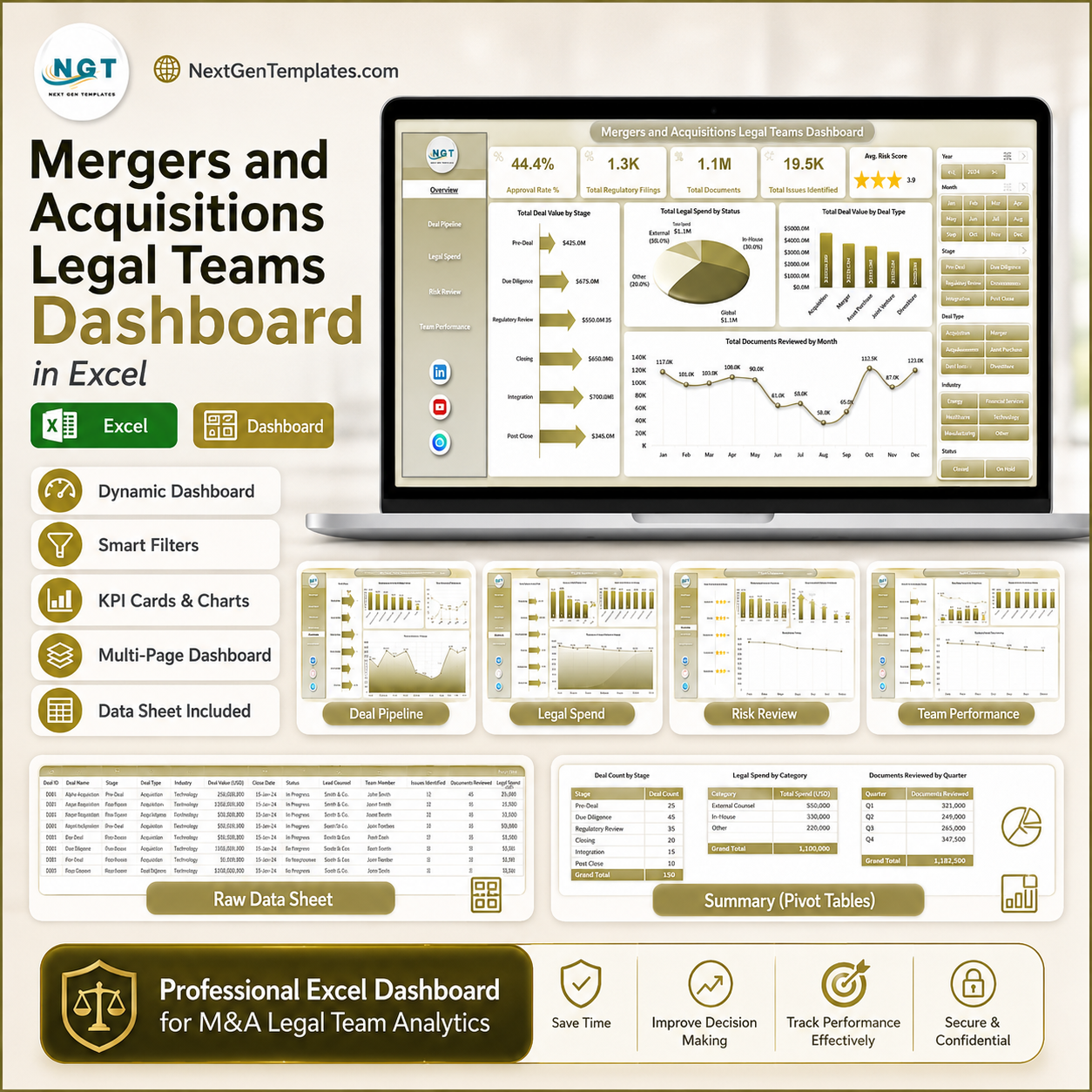


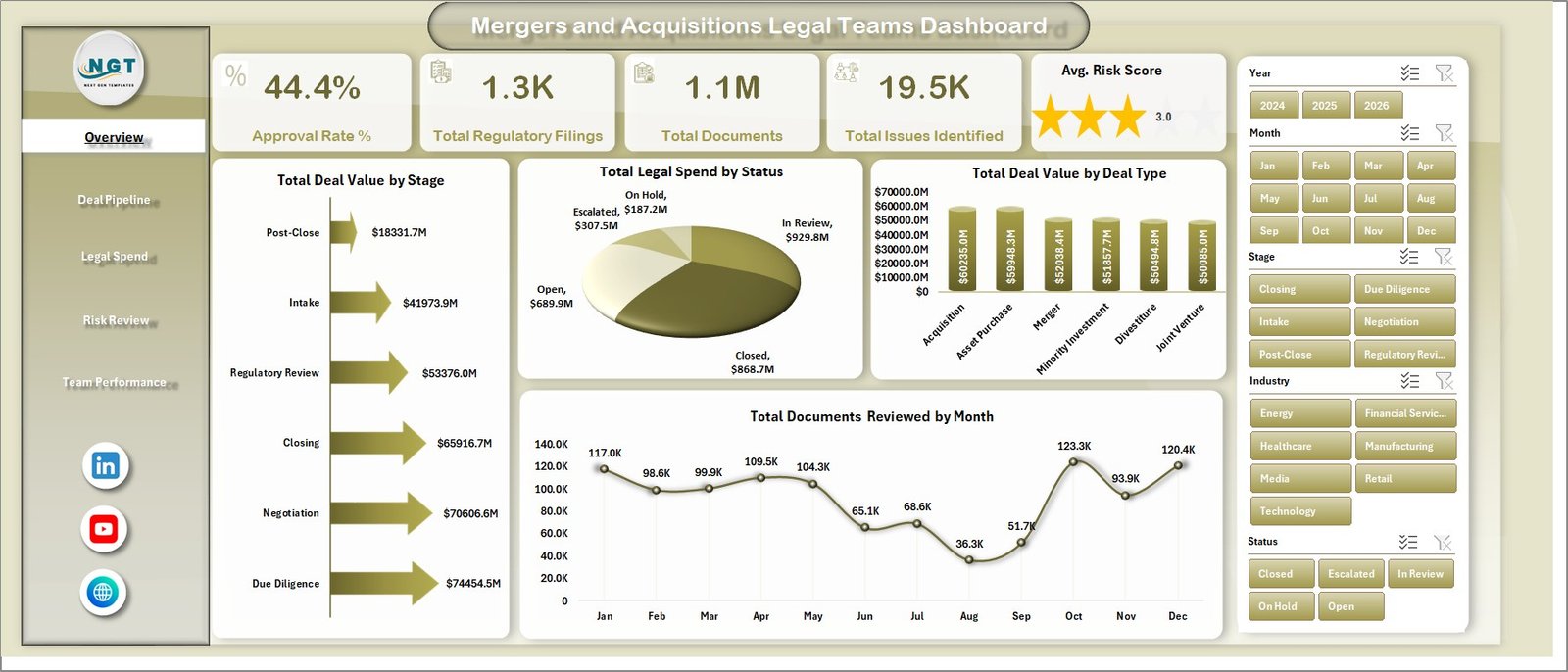
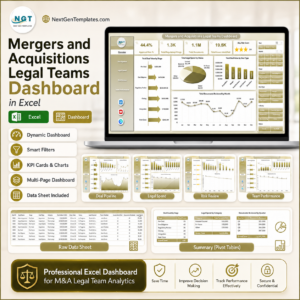
Mergers and Acquisitions Legal Teams Dashboard in Excel gives legal operations leaders, M&A counsel, corporate development teams, and due diligence managers a ready Excel reporting workbook with 7 worksheet tabs, 5 dashboard pages, 5 executive KPI cards, 18 focused chart views, slicers, a Data Sheet, and a Support Sheet. M&A legal work often involves high-value deals, regulatory filings, document review, risk scoring, outside counsel spend, and approval gates across several jurisdictions. This template turns that activity into a clear Excel dashboard. Built by PK, trusted by 300K+ learners across YouTube channels, it is a one-time download with no monthly software subscription.
Key Features of Mergers and Acquisitions Legal Teams Dashboard in Excel
- 5 dashboard pages: Overview Page, Deal Pipeline, Legal Spend, Risk Review, and Team Performance.
- 5 KPI cards: Approval Rate %, Total Regulatory Filings, Total Documents, Total Issues Identified, and Avg. Risk Score.
- Deal pipeline analysis: Review approval rate, legal budget, legal spend, days to close, stage, jurisdiction, and industry performance.
- Spend and risk review: Compare outside counsel spend, budget utilization, issues identified, risk score, filings, and documents reviewed.
- Interactive slicers: Filter dashboard pages quickly without rebuilding charts or formulas.
- Refreshable Excel model: Update the Data Sheet, click Refresh All, and the pivot-powered charts refresh together.
What’s Inside the Mergers and Acquisitions Legal Teams Dashboard in Excel
1 – Overview Page
The Overview Page gives a leadership-level snapshot of M&A legal activity. The top cards show Approval Rate %, Total Regulatory Filings, Total Documents, Total Issues Identified, and Avg. Risk Score, so legal teams can review approval progress, documentation load, compliance activity, and risk exposure quickly.
Total Deal Value by Stage: This chart shows where deal value sits across pipeline stages. It helps legal leaders identify whether major exposure is concentrated in diligence, negotiation, approval, or closing.
Total Legal Spend by Status: This visual compares legal spend by matter status. It helps teams see how much cost is tied to active, pending, delayed, or completed work.
Total Deal Value by Deal Type: This chart compares value across acquisition, merger, divestiture, joint venture, or other deal types. It helps counsel understand which transaction types carry the largest financial weight.
Total Documents Reviewed by Month: This monthly view shows document review workload over time. It helps managers plan diligence staffing during peak review periods.
2 – Deal Pipeline
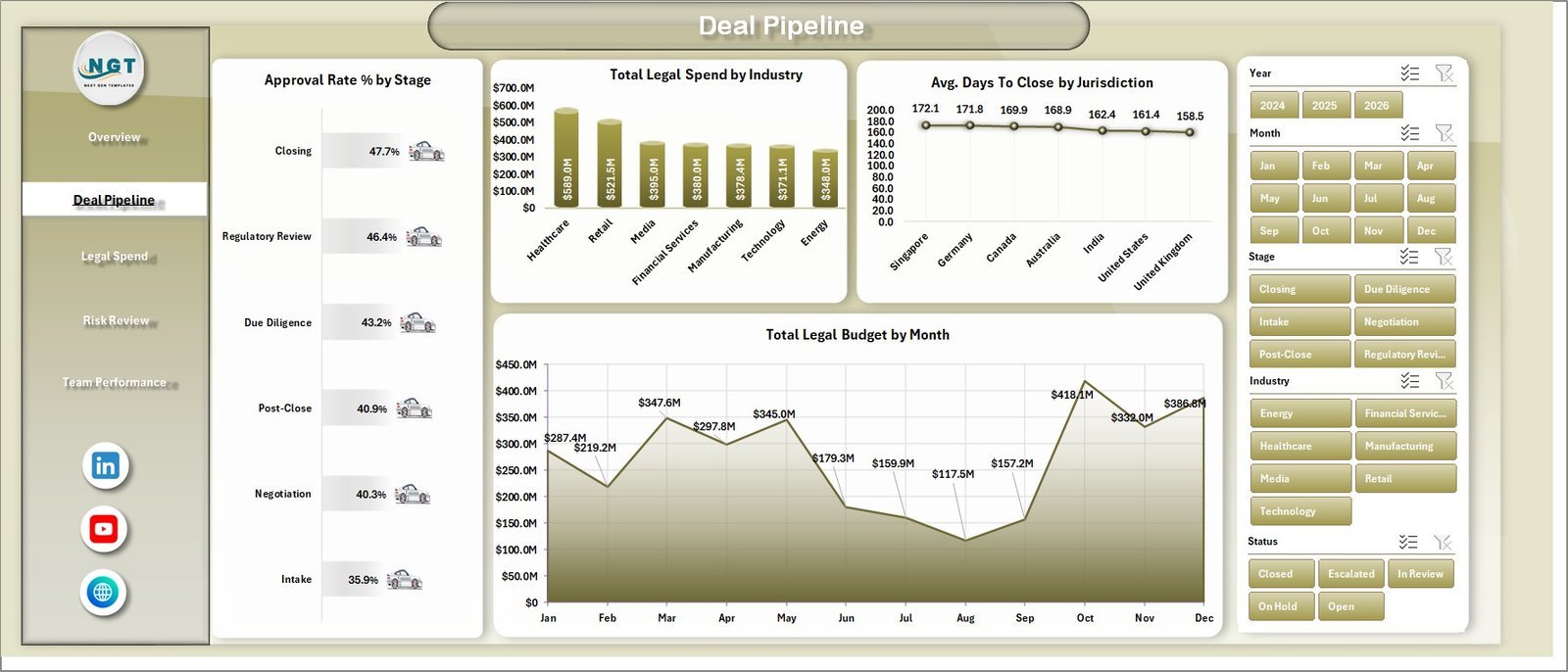
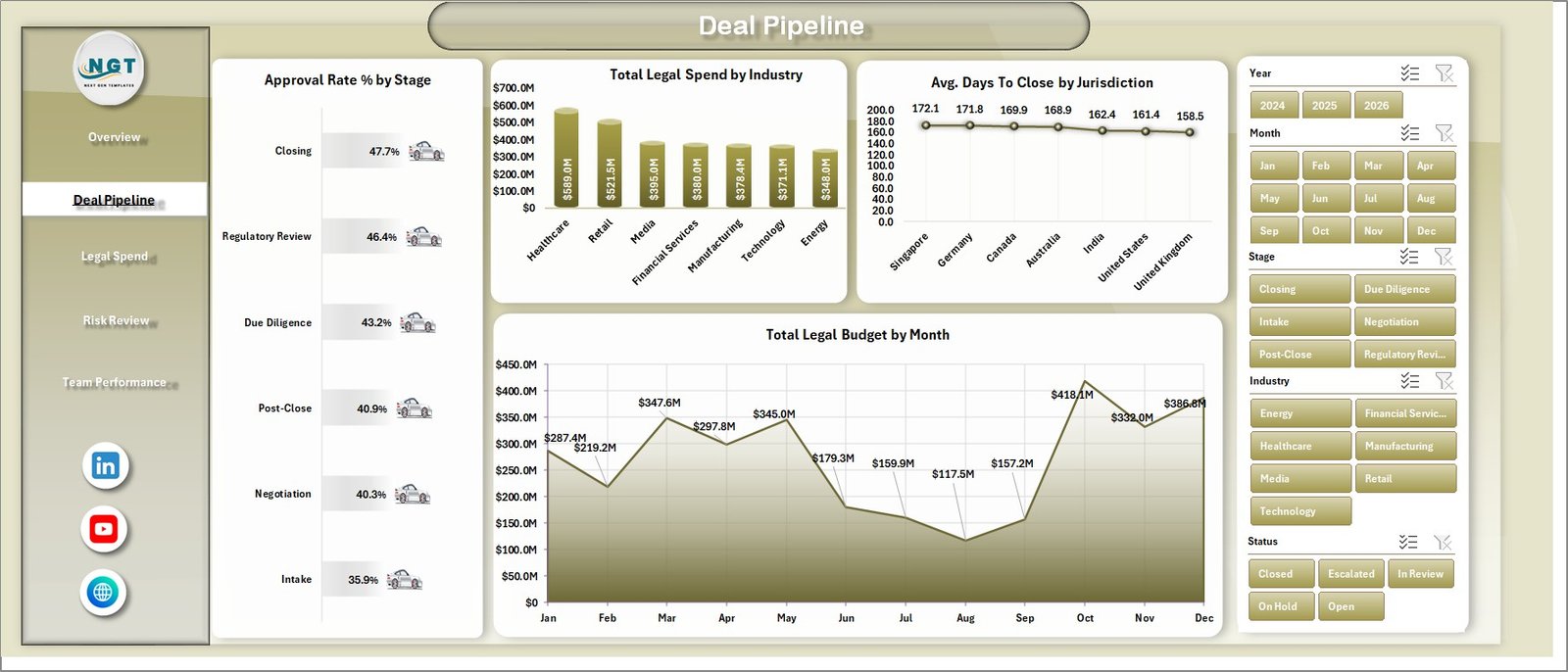
The Deal Pipeline sheet focuses on approval, spend, close time, budget, stage, jurisdiction, industry, and month-level movement. Approval Rate % by Stage shows which deal stages pass review smoothly and which need attention. Total Legal Spend by Industry highlights sectors that require heavier counsel support. Avg. Days To Close by Jurisdiction compares deal cycle time across regions. Total Legal Budget by Month supports legal budget planning and accrual reviews.
3 – Legal Spend
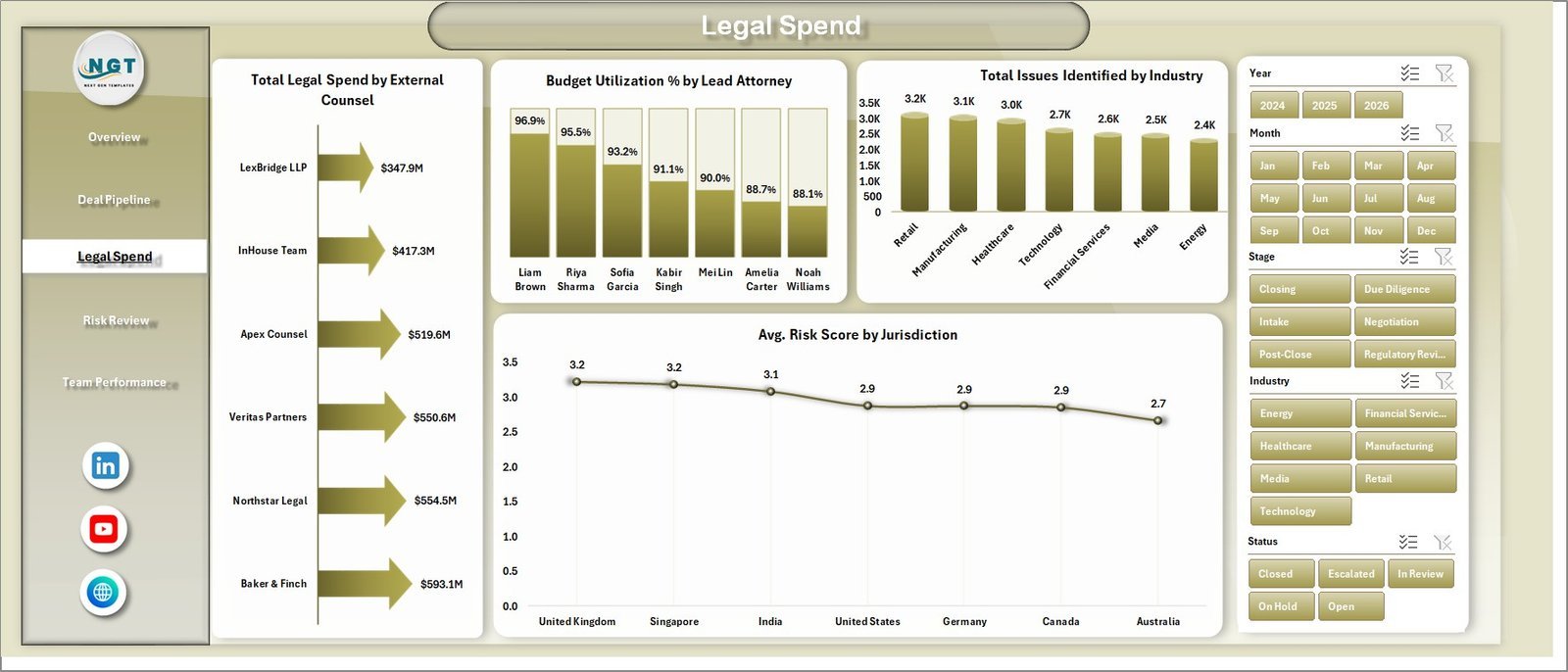
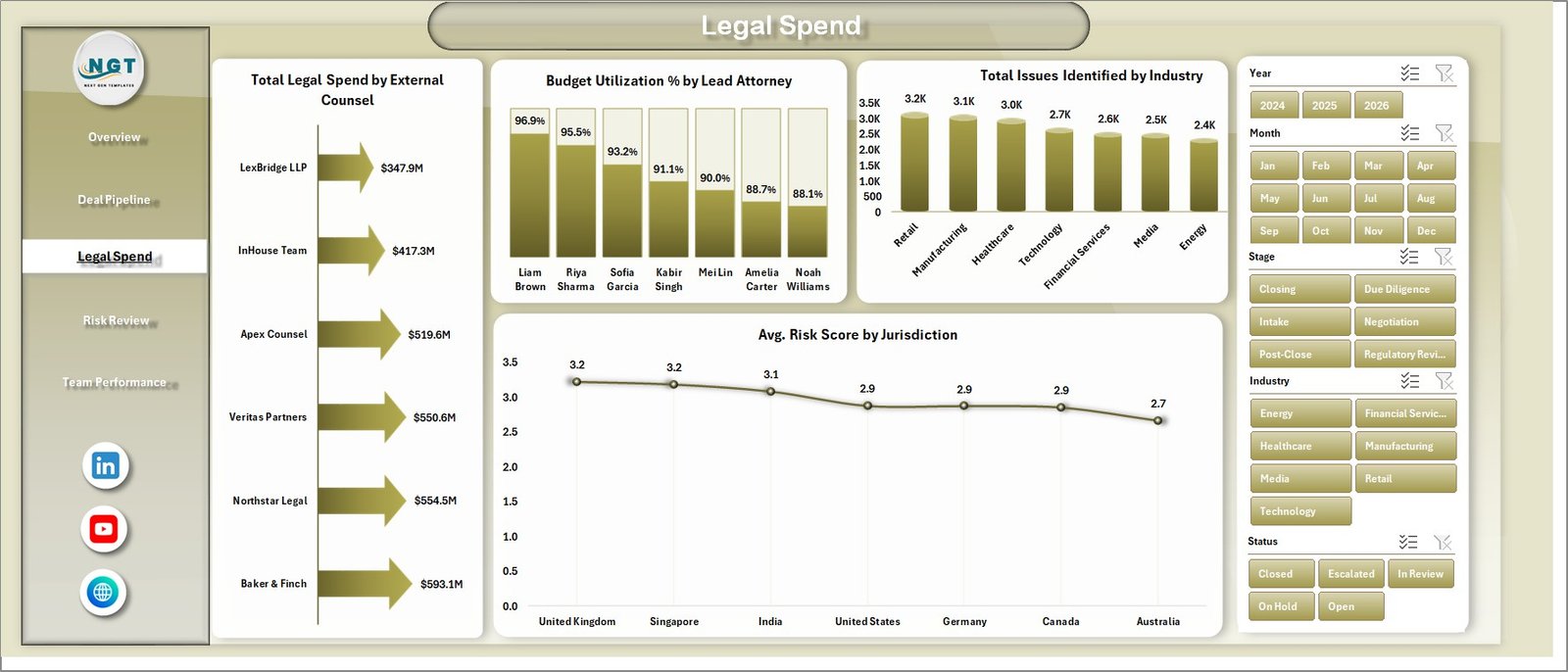
The Legal Spend sheet helps legal operations and finance teams review outside counsel, attorney utilization, issue volume, and jurisdictional risk. Total Legal Spend by External Counsel compares vendor cost. Budget Utilization % by Lead Attorney shows how each matter owner is using the assigned budget. Total Issues Identified by Industry reveals where due diligence issues are concentrated. Avg. Risk Score by Jurisdiction helps teams see where legal exposure is higher.
4 – Risk Review
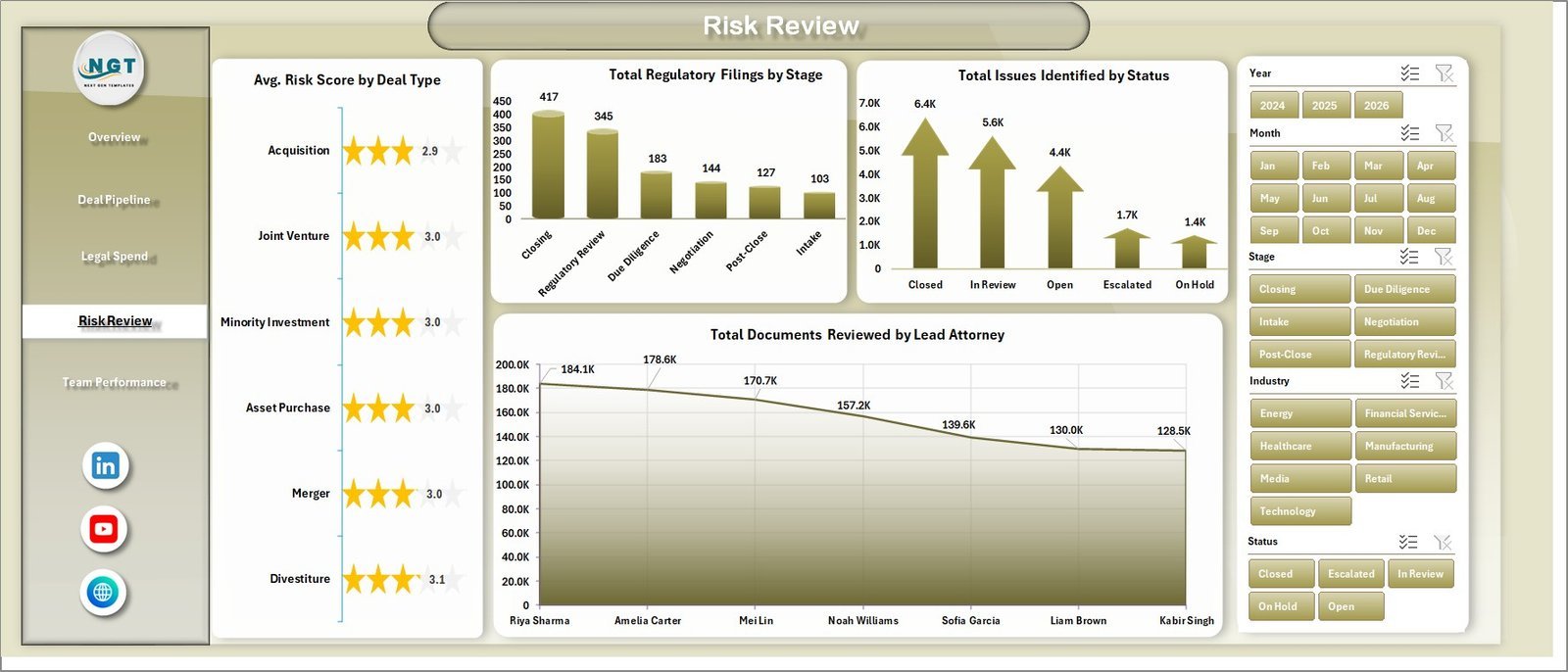
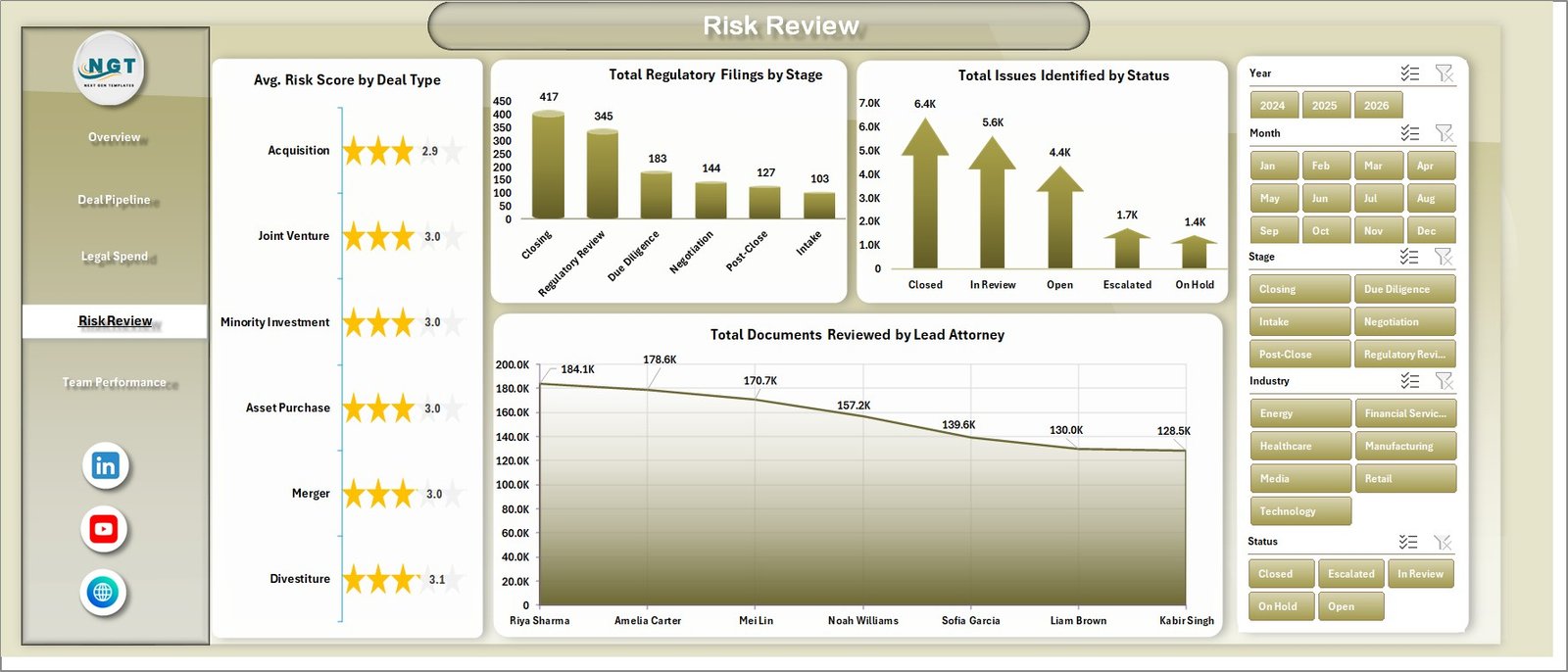
The Risk Review sheet connects risk score, deal type, filings, stage, issue status, and attorney document workload. Avg. Risk Score by Deal Type shows which transaction structures carry more risk. Total Regulatory Filings by Stage tracks compliance activity across the deal pipeline. Total Issues Identified by Status shows open, resolved, escalated, or pending issues. Total Documents Reviewed by Lead Attorney helps managers check workload balance.
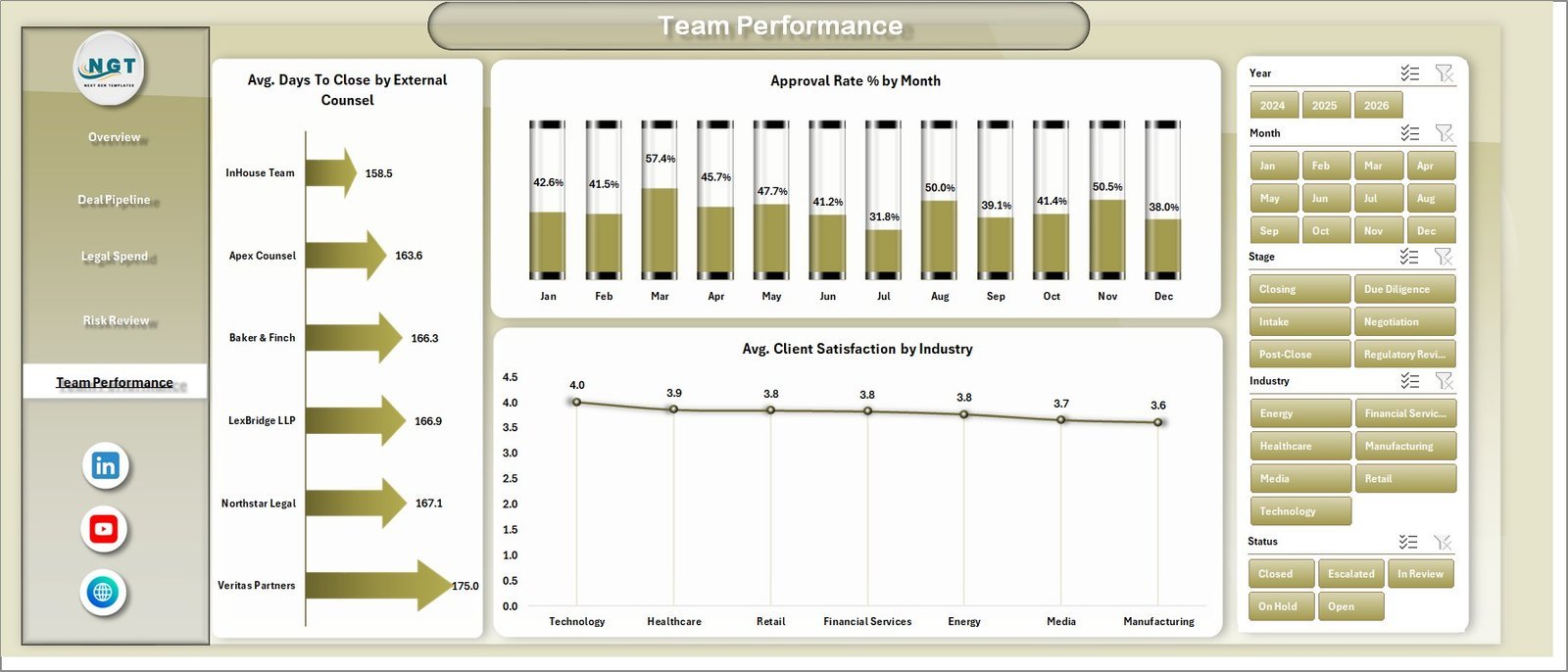
5 – Team Performance
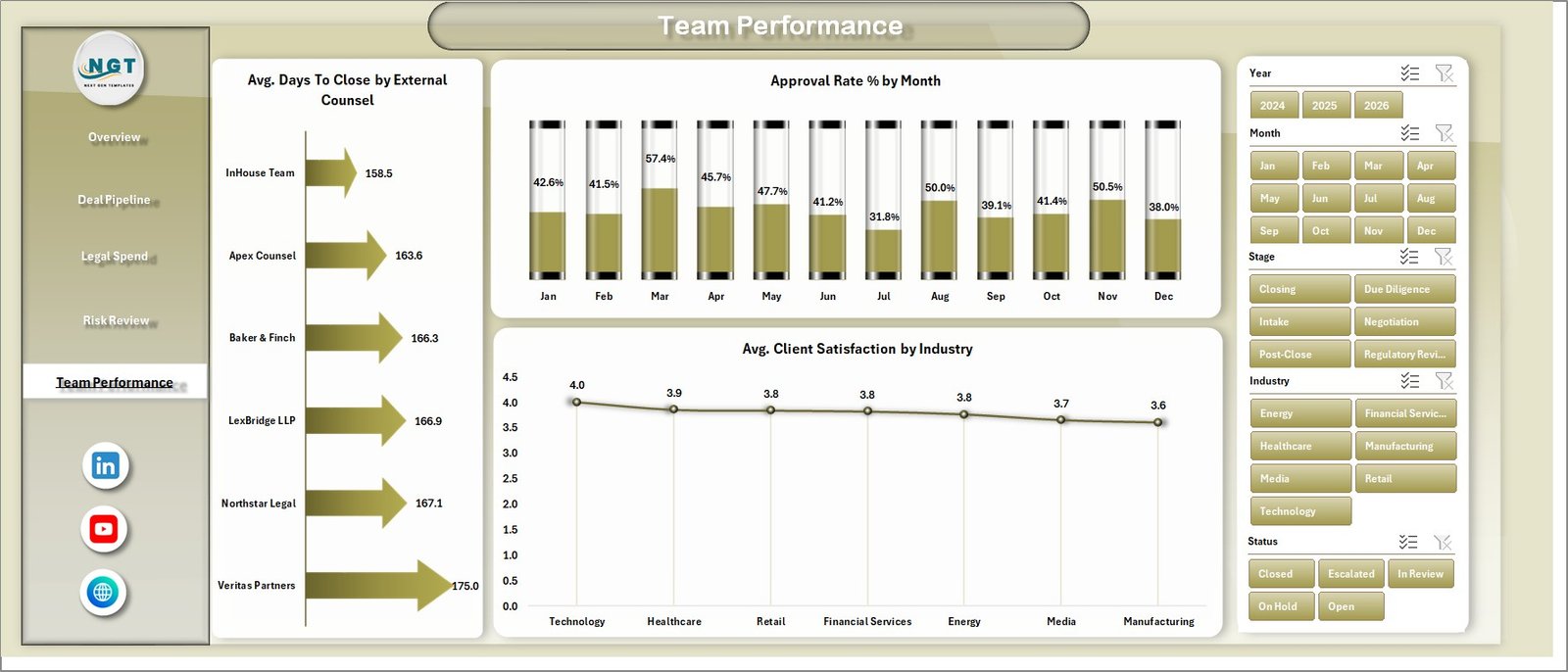
The Team Performance sheet focuses on counsel speed, approval trend, and client satisfaction. Avg. Days To Close by External Counsel compares closing speed by outside counsel. Approval Rate % by Month tracks whether approvals are improving or slowing over time. Avg. Client Satisfaction by Industry helps legal teams connect service quality with the industry mix of deals.
6 – Data Sheet Tab
The Data Sheet is where users add or replace records in the same format as the sample data. Keep the column structure consistent so cards, slicers, pivots, and charts stay connected.

7 – Support Sheet
The Support Sheet contains the pivot tables used to create the dashboard dynamically. After updating the Data Sheet, go to the Excel Data ribbon and click Refresh All. All pivots and related charts refresh together, and the sheet can be hidden for daily users.

Mergers and Acquisitions Legal Teams Dashboard in Excel vs. Google Sheets vs. Paid Legal SaaS – Where This Fits
| Feature | This Excel dashboard | Google Sheets alternative | Paid legal SaaS |
|---|---|---|---|
| Cost | $17.99 sale price, one-time | Template cost or custom build time | Recurring subscription |
| Platform | Microsoft Excel | Browser-based spreadsheet | Vendor-hosted system |
| Setup time | Replace data and refresh pivots | Import data and adjust formulas | Implementation and onboarding |
| Real-time collaboration | Available through OneDrive or SharePoint | Native collaboration | Usually included by plan |
| Customizable fields | Editable sheets, pivots, charts, and labels | Editable but needs formula control | Depends on vendor permissions |
| Year-1 cost at 5 users | $17.99 plus Microsoft licensing if needed | Low software cost plus setup time | Often hundreds or thousands |
| M&A legal analytics | Deal value, spend, budget, filings, documents, issues, risk, approvals, and team performance | Must be built or adapted | May require premium reporting |
Who This Template Is For – and Who It’s Not For
This template is for M&A legal teams, in-house counsel, legal operations managers, corporate development analysts, due diligence leaders, external counsel managers, and consultants who maintain structured matter or deal records and need an editable Excel reporting layer.
It is not a legal document repository, contract lifecycle management platform, e-signature system, virtual data room, timekeeping system, or matter management database. Use it after your M&A legal data is structured enough for Excel reporting.
How to Use the Mergers and Acquisitions Legal Teams Dashboard in Excel
- Download and unzip the product file.
- Open the workbook in Microsoft Excel.
- Review the sample pages, cards, charts, slicers, and fields.
- Replace sample rows in the Data Sheet with your own M&A legal records.
- Keep the same column structure so pivots and slicers stay connected.
- Open the Excel Data ribbon and click Refresh All.
- Use the dashboard slicers to filter by stage, deal type, status, jurisdiction, industry, lead attorney, external counsel, and month.
Real-World Use Cases
Anika, legal operations manager: reviews legal spend by external counsel and budget utilization by attorney before a monthly finance meeting.
Marcus, corporate development counsel: uses deal value by stage and approval rate by stage to prepare an acquisition pipeline review.
Priya, due diligence lead: monitors documents reviewed, issues identified, risk score, and average days to close to keep deal reviews moving.
Frequently Asked Questions
What does this dashboard track?
It tracks approval rate, regulatory filings, documents, issues identified, risk score, deal value, legal spend, legal budget, days to close, external counsel, lead attorney, industry, jurisdiction, status, stage, and client satisfaction.
Can I use my own M&A legal data?
Yes. Replace the sample rows in the Data Sheet, keep the same headers, and click Refresh All from the Excel Data ribbon.
Does this dashboard use macros?
No. It is designed around Excel tables, pivot tables, charts, and slicers.
Can I customize the workbook?
Yes. You can edit sheet names, chart formatting, pivot fields, slicers, colors, labels, and source data columns if you understand Excel pivots.
Is this a legal matter management system?
No. It is an Excel analytics dashboard for reporting on M&A legal activity, not a matter database or document management system.
Is this a subscription?
No. It is a one-time downloadable Excel template from NextGenTemplates.
About the Author
Built by PK – Microsoft Certified Professional with 15+ years of Excel, Google Sheets, and Power BI experience. Founder of NextGenTemplates, reaching 300K+ subscribers across YouTube channels. Every template is hand-built and tested before release.
Explore Related Templates
You may also like Mergers and Acquisitions Legal Teams Dashboard in Power BI, Legal Research Dashboard in Excel, and Compliance Audits Dashboard in Excel. Browse more Excel Dashboard templates and MS Excel templates.
Download the Mergers and Acquisitions Legal Teams Dashboard in Excel and start reviewing deal value, legal spend, documents, filings, issues, approval rate, risk score, and team performance in one editable workbook.
Last updated: July 9, 2026.




























Reviews
There are no reviews yet.