

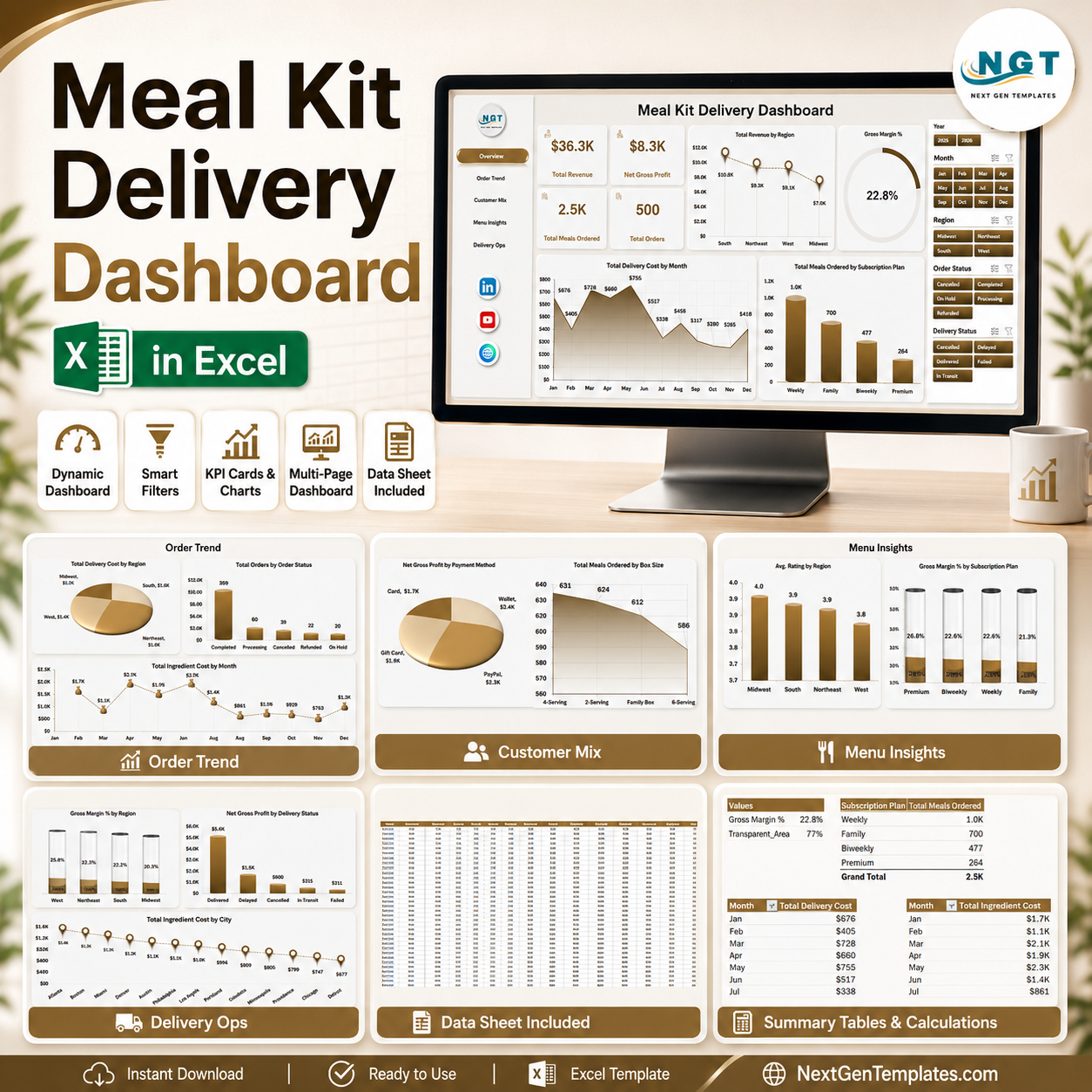


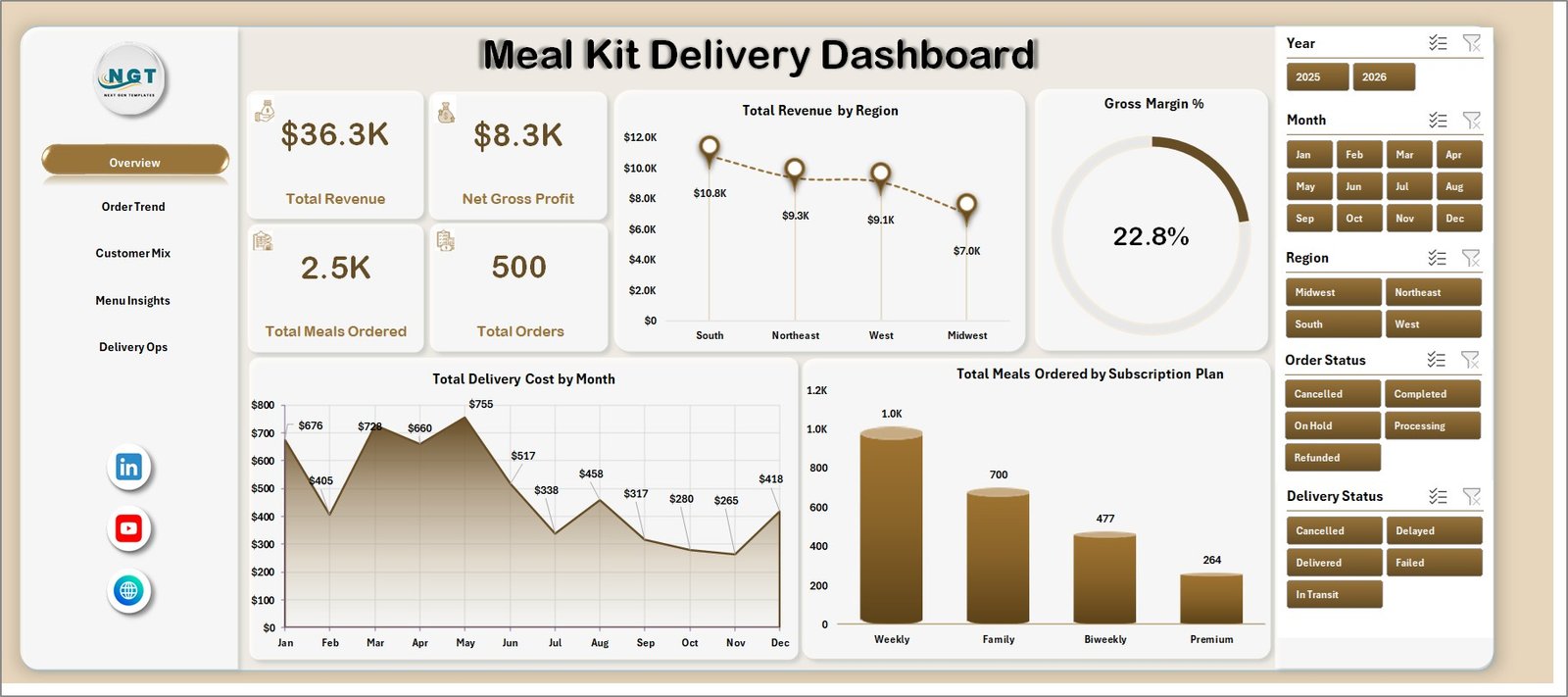
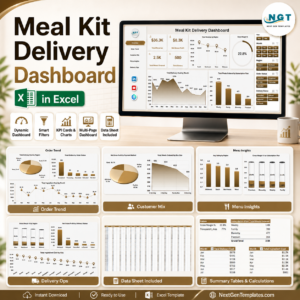
Meal Kit Delivery Dashboard in Excel helps meal kit teams review revenue, gross profit, meals ordered, and order volume from one workbook. Meal delivery margins can swing quickly when ingredient cost, delivery cost, subscription mix, and failed deliveries move at the same time. This template gives founders, operations managers, analysts, and finance teams a ready structure to see those drivers across 7 worksheet tabs, 4 executive cards, 20+ chart views, slicers, a data sheet, and a support sheet. Instant download, one-time payment, no subscription, and editable Excel logic give you a practical risk reversal: keep the file, adapt the fields, and refresh the dashboard whenever new data is added.
Key Features of Meal Kit Delivery Dashboard in Excel
- 4 high-level KPI cards for Total Revenue, Net Gross Profit, Total Meals Ordered, and Total Orders.
- 5 analytical dashboard pages covering overview, order trend, customer mix, menu insights, and delivery operations.
- Interactive slicers for quick filtering across regions, subscription plans, meal preferences, customer segments, delivery partners, and time periods.
- Refreshable pivot-table engine powered by a support sheet that can be hidden after setup.
- Editable data sheet where you paste or replace sample meal kit delivery records in the same format.
- Excel-native charts for revenue, gross margin, delivery cost, ingredient cost, order status, customer segment, and cuisine analysis.
- No SaaS lock-in because the workbook stays in your control and can be customized for your business process.
What’s Inside the Meal Kit Delivery Dashboard in Excel
1 – Overview Page
The Overview page acts as the executive control panel. The top KPI cards summarize Total Revenue, Net Gross Profit, Total Meals Ordered, and Total Orders so a manager can see business health before drilling into the details. The page also includes slicers for fast filtering and charts for revenue by region, gross margin percentage, delivery cost by month, and meals ordered by subscription plan.
Total Revenue by Region helps you compare market performance and spot where customer demand is strongest. Gross Margin % by Overall Performance shows whether revenue growth is translating into profit after food and delivery costs.
Total Delivery Cost by Month reveals cost pressure over time, especially during high-volume periods. Total Meals Ordered by Subscription Plan shows which plans drive the most meal volume and where retention efforts may matter most.
Meal Kit Delivery Dashboard in Excel
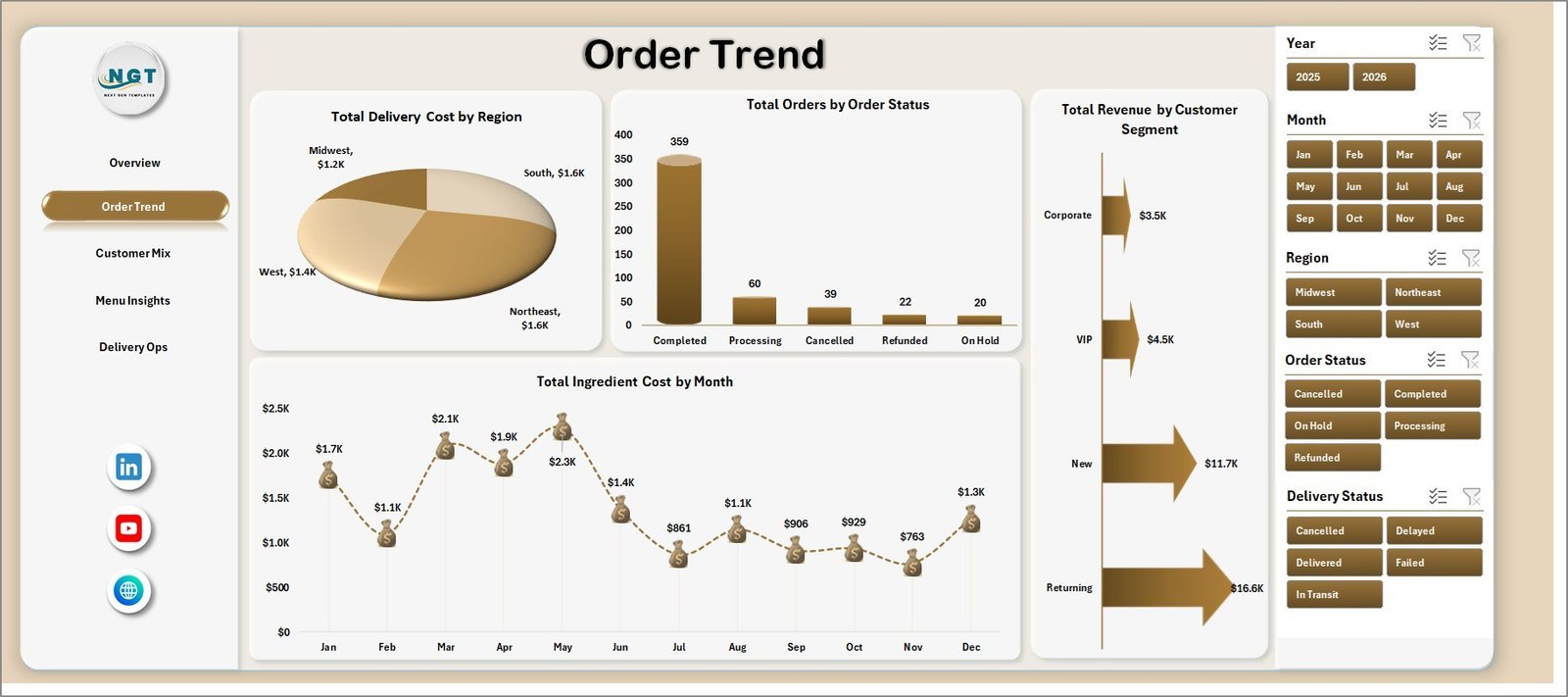
2 – Order Trend
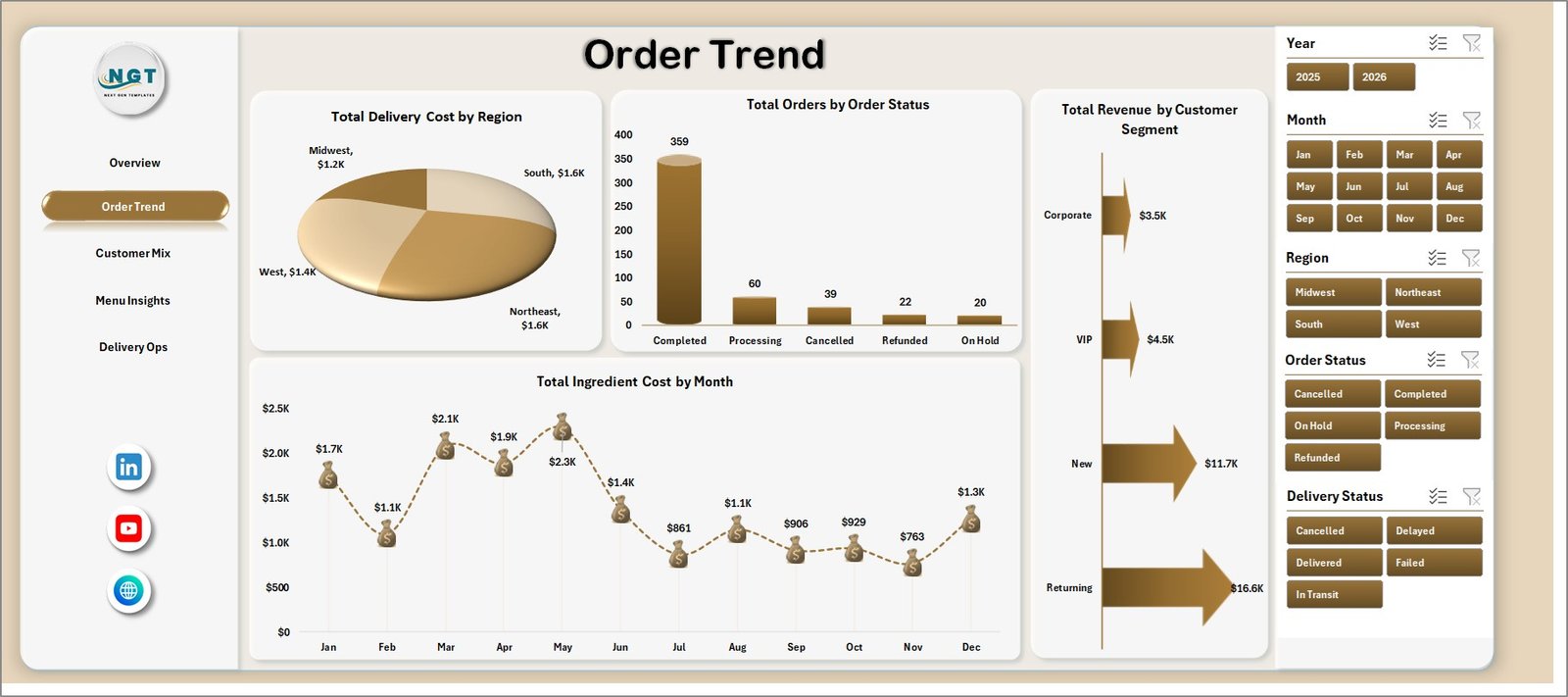
The Order Trend sheet focuses on how orders, revenue, ingredient cost, and delivery cost move across operating dimensions. Total Delivery Cost by Region highlights where logistics spend is highest. Total Orders by Order Status helps teams separate completed, delayed, cancelled, or pending orders for operational follow-up.
Total Revenue by Customer Segment shows which customer groups are generating the most value, while Total Ingredient Cost by Month helps finance and procurement teams detect cost inflation or menu-cost changes.
Order Trend
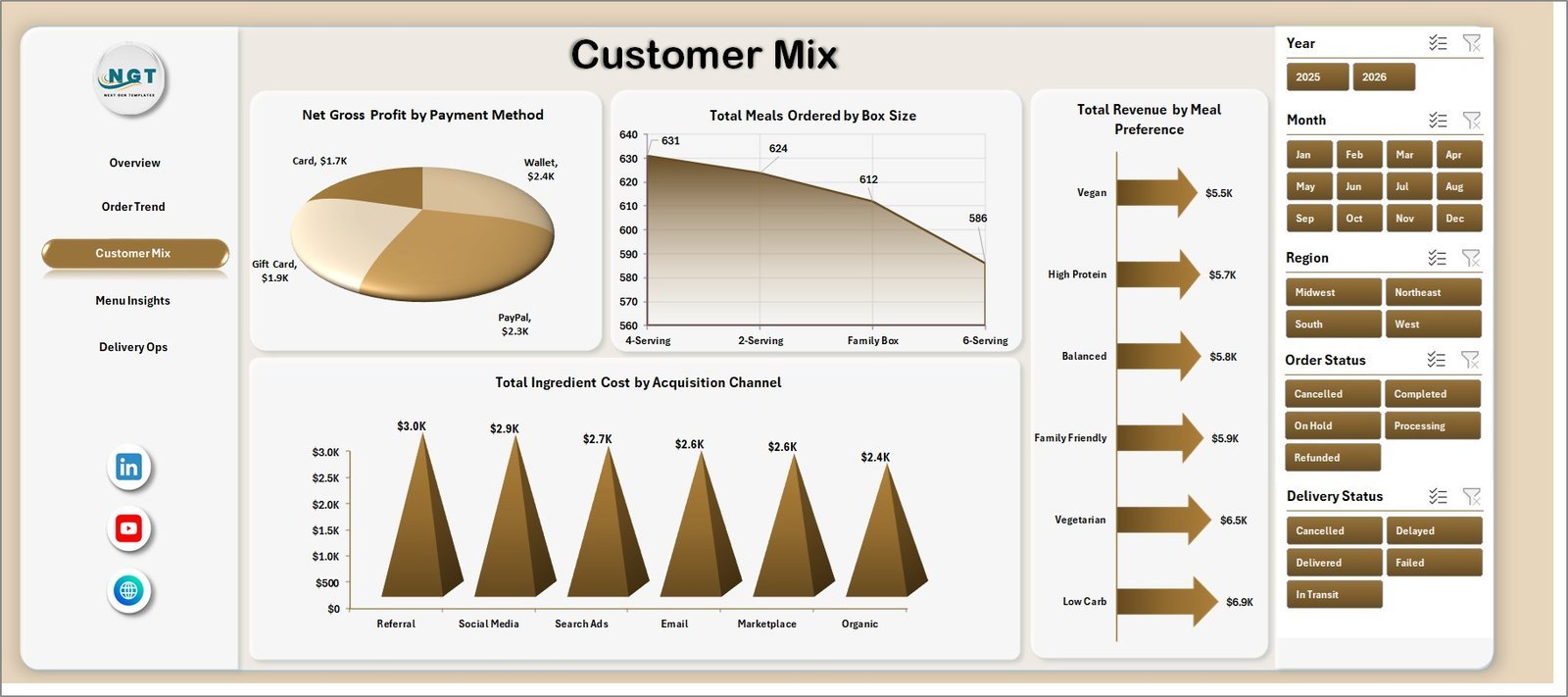
3 – Customer Mix
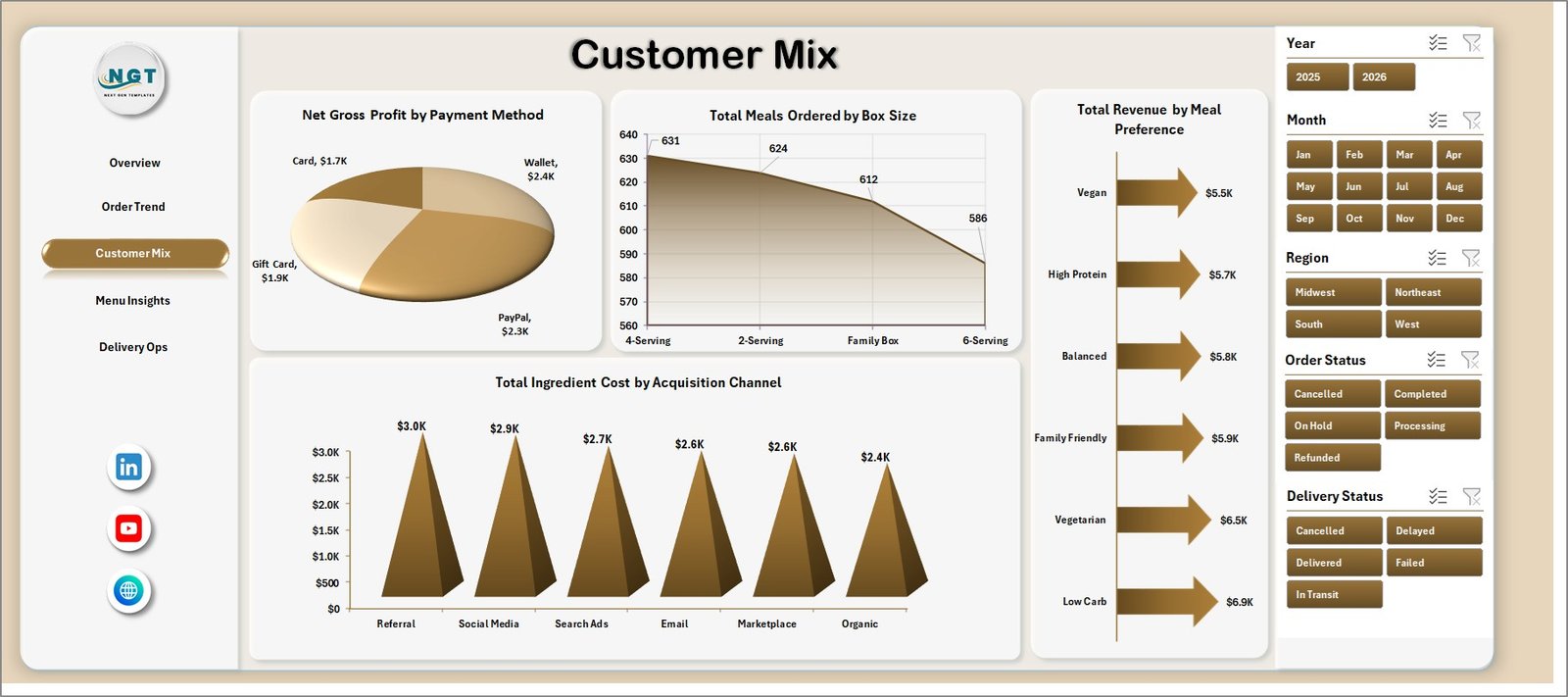
The Customer Mix page explains who is buying and how customer behavior affects profitability. Net Gross Profit by Payment Method can uncover channel-specific cost or settlement patterns. Total Meals Ordered by Box Size shows demand across small, medium, and larger family-style boxes.
Total Revenue by Meal Preference identifies which dietary preferences drive revenue, while Total Ingredient Cost by Acquisition Channel connects customer source with cost behavior.
Customer Mix
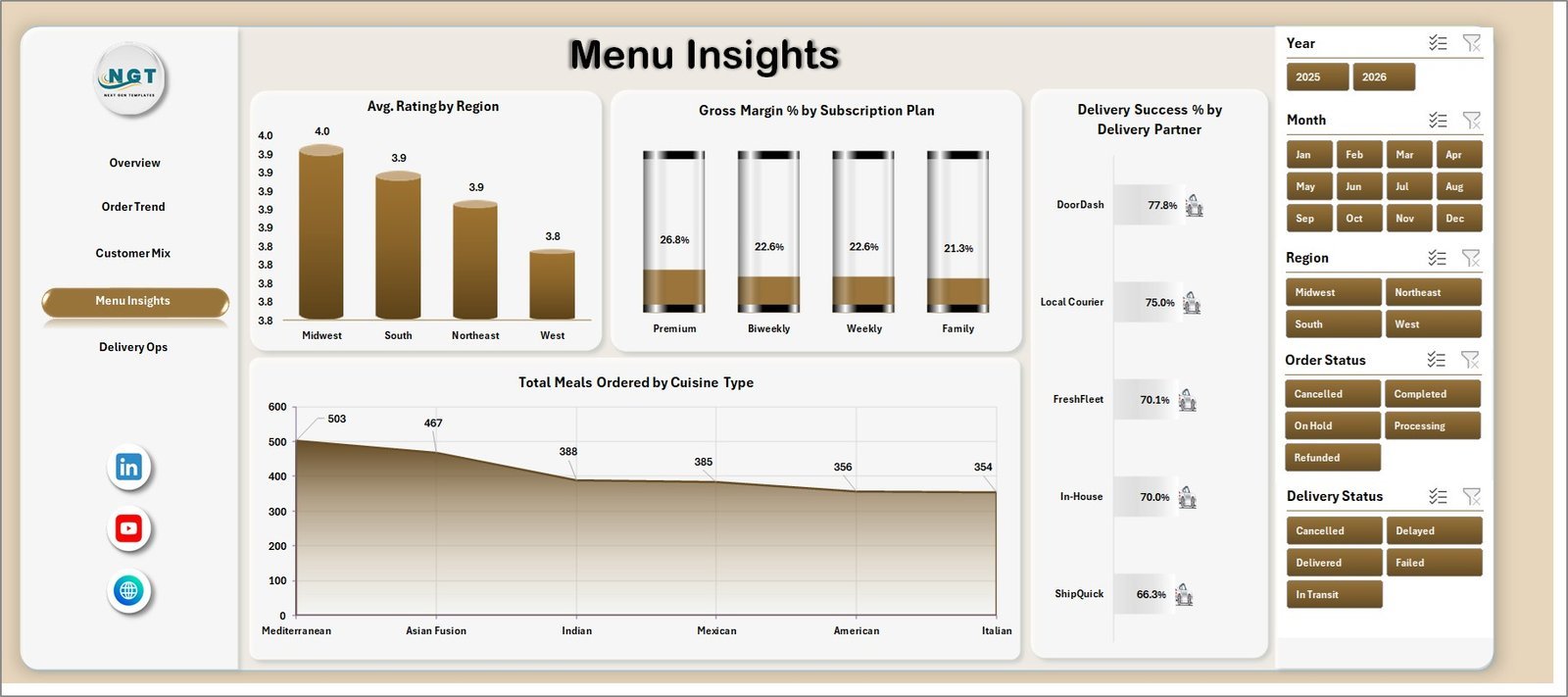
4 – Menu Insights
The Menu Insights sheet is built for product and culinary teams. Avg. Rating by Region helps compare customer satisfaction across markets. Gross Margin % by Subscription Plan shows whether each plan is priced and costed correctly.
Delivery Success % by Delivery Partner compares carrier performance, while Total Meals Ordered by Cuisine Type shows which cuisine categories deserve more promotion or menu development.
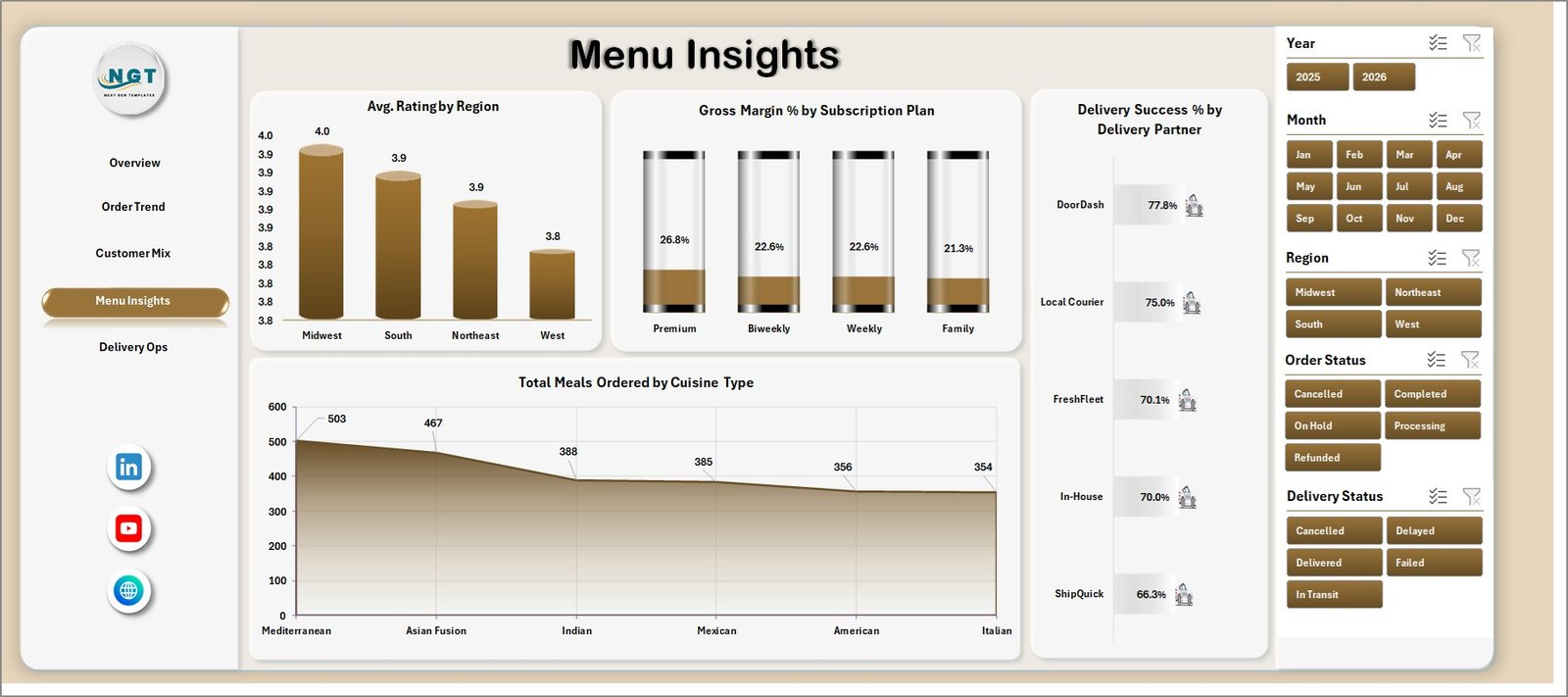
Menu Insights
5 – Delivery Ops
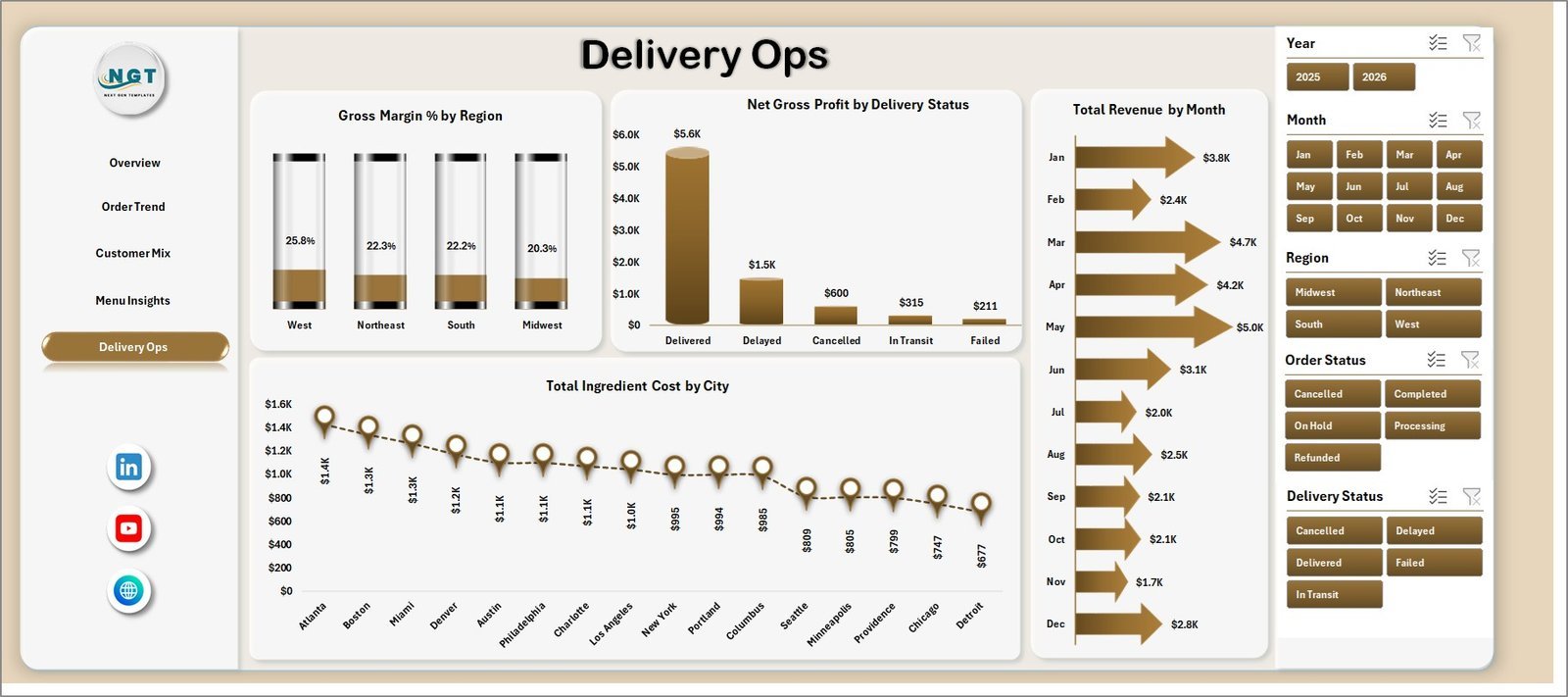
The Delivery Ops page brings finance and fulfillment together. Gross Margin % by Region compares profit quality by market. Net Gross Profit by Delivery Status shows how failed or delayed deliveries affect margin.
Total Revenue by Month gives a clean monthly sales trend, while Total Ingredient Cost by City helps identify locations where food cost requires attention.
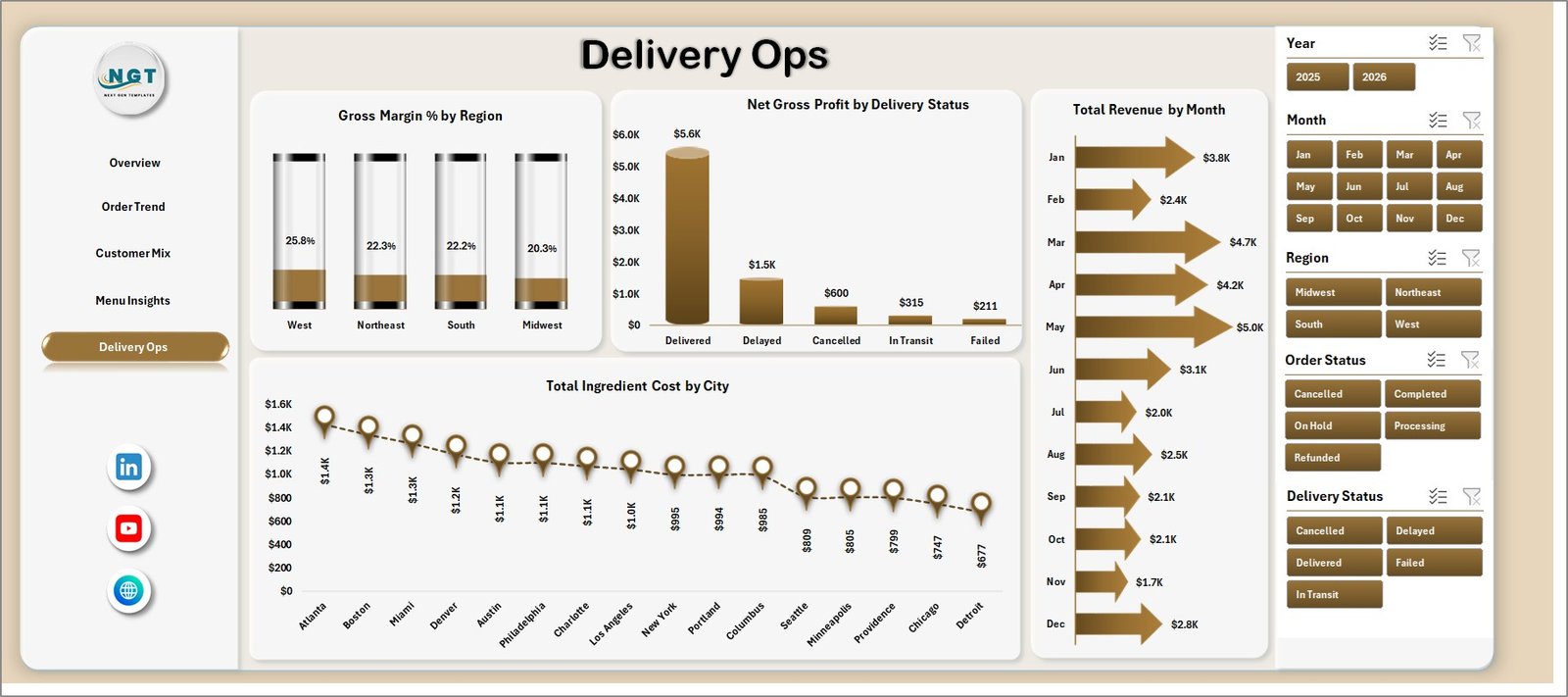
Delivery Ops
6 – Data Sheet Tab
The Data sheet is where you replace the sample records with your own meal kit delivery data. Keep the same column structure, add new rows, and use Excel’s refresh option to update the dashboard visuals.

Data Sheet tab
7 – Support Sheet
The Support sheet contains the pivot tables used to create the dashboard dynamically. After updating the Data sheet, go to the Data tab in the Excel Ribbon and click Refresh All. All pivots and dashboard charts refresh together. You can keep this sheet hidden for cleaner navigation.

Support sheet tab
Meal Kit Delivery Dashboard in Excel vs. Google Sheets vs. Paid Food Delivery SaaS – Where This Fits
| Feature | This Excel dashboard | Google Sheets dashboard | Paid food delivery SaaS |
|---|---|---|---|
| Cost | $17.99 one-time | Low one-time or custom build | $50-$300+ per month |
| Platform | Microsoft Excel | Google Sheets | Vendor cloud system |
| Setup time | 10-30 minutes | 30-60 minutes | Days or weeks |
| Custom fields | Editable workbook | Editable sheet | Depends on plan |
| Year-1 cost at 5 users | $17.99 plus Excel access | One-time template cost | $600-$3,600+ |
| Best use | Fast internal reporting | Team collaboration | Full ordering operations |
Who This Template Is For – and Who It’s Not For
This template is for meal kit founders, subscription box teams, delivery operations managers, finance analysts, and food consultants who need a clear reporting workbook without building one from scratch. It is also useful for startups preparing investor updates or monthly operations reviews.
It is not for businesses needing live API integrations, route optimization, payment processing, inventory purchasing, or warehouse execution inside the same tool. In those cases, use this workbook as a reporting layer or move to a dedicated SaaS platform.
How to Use the Meal Kit Delivery Dashboard in Excel
- Download and unzip the file.
- Open the workbook in Microsoft Excel.
- Go to the Data sheet and replace sample records with your own data in the same structure.
- Use the Excel Ribbon Data tab and click Refresh All.
- Review the Overview page first, then drill into Order Trend, Customer Mix, Menu Insights, and Delivery Ops.
- Adjust slicers to filter by period, region, customer segment, subscription plan, or delivery partner.
Real-World Use Cases
Asha, a meal kit founder, uses the Overview page each Monday to compare revenue, gross profit, and orders by region before planning promotions.
Daniel, an operations lead, watches delivery cost by month and delivery success by partner so he can renegotiate poor-performing delivery lanes.
Maya, a finance analyst, studies ingredient cost by month, city, and acquisition channel to explain margin movement in the monthly management report.
Frequently Asked Questions
Does this dashboard require macros?
No. The workbook is designed around Excel dashboards, charts, slicers, and pivot tables. Refresh the file after replacing the data.
Can I add more rows to the Data sheet?
Yes. Add your records in the same format and refresh the workbook so the pivot tables and charts update.
Can I customize the KPIs?
Yes. Since this is an Excel file, you can edit formulas, chart titles, slicers, and data columns as needed.
Is this suitable for a new meal kit startup?
Yes. It works well for early-stage teams that need structured reporting before investing in larger business intelligence tools.
Can I hide the Support sheet?
Yes. The Support sheet contains pivot tables for the dashboard and can be hidden after setup.
Does it work with Excel for Mac?
Most dashboard features should work in modern Excel for Mac, but some slicer and pivot behavior can vary by Excel version.
About the Author
Built by PK – Microsoft Certified Professional with 15+ years of Excel, Google Sheets, and Power BI experience. Founder of NextGenTemplates, reaching 300K+ subscribers across YouTube channels. Every template is hand-built and tested before release.
Explore Related Templates
Explore more Excel Dashboard templates and MS Excel templates. Related products include Food and Beverage Report in Excel, Meal Prep Business KPI Dashboard in Excel, and General Store POS Web App.
Download the Meal Kit Delivery Dashboard in Excel today and start reviewing subscription revenue, margins, orders, meals, menu performance, and delivery operations from one editable workbook.
Last updated: July 7, 2026



























Reviews
There are no reviews yet.