



In today’s ultra-competitive logistics world, the last-mile delivery stage makes or breaks customer satisfaction. That’s why we created the Last-Mile Delivery KPI Dashboard in Power BI — a ready-to-use analytics tool designed to give you real-time visibility, accurate insights, and actionable data on every single delivery. 🚚📊
Whether you manage an e-commerce business, courier company, or logistics network, this dashboard helps you track performance, control costs, and improve customer experience — all within one interactive Power BI workspace.Last-Mile Delivery KPI Dashboard in Power BI
✨ Key Features of the Last-Mile Delivery KPI Dashboard in Power BI
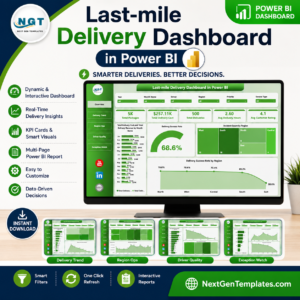
💠 Real-Time Delivery Insights: Monitor all your delivery KPIs — speed, cost, and success rates — through dynamic charts and visuals.
💠 Interactive Filters: Instantly drill down by month, region, or KPI group with smart slicers.
💠 Target vs Actual Tracking: Automatically see how each KPI is performing against its monthly and yearly targets with up/down icons.
💠 MTD & YTD Comparisons: Compare current vs previous year performance to spot improvement trends.
💠 Fully Customizable: Add new KPIs, adjust visuals, or integrate live APIs as your logistics grows.
💠 Plug-and-Play Excel Integration: Uses simple Excel sheets for Actuals, Targets, and KPI Definitions — no coding needed.
💠 Visually Stunning Reports: Present your data through engaging Power BI visuals for fast decision-making.

📦 What’s Inside the Last-Mile Delivery KPI Dashboard
This Power BI dashboard includes three smart analytical pages that together provide a 360° view of your logistics performance:
📊 Summary Page (Main Dashboard):
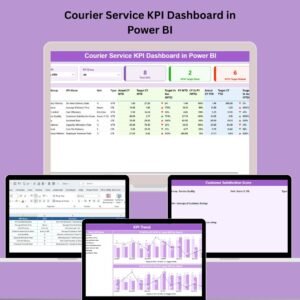
The command center for managers — view total KPIs, MTD targets met, and missed counts. Use Month and KPI Group slicers to focus on what matters most.Last-Mile Delivery KPI Dashboard in Power BI
📈 KPI Trend Page:
Visualize MTD and YTD trends with combo charts comparing Current Year, Previous Year, and Target values. Select any KPI from the slicer to analyze historical performance.
📘 KPI Definition Page:
A built-in reference sheet that explains each KPI — its name, formula, type, and definition. Access it with a single drill-through click for clarity and transparency.
🗂️ Excel Data Source:
Includes three easy-to-edit worksheets:
Input_Actual: Record your live delivery data (MTD, YTD).
Input_Target: Define your performance targets.
KPI_Definition: Store KPI details (unit, formula, type).
You can expand or update your data anytime — the dashboard automatically refreshes your Power BI visuals.
🧭 How to Use the Last-Mile Delivery KPI Dashboard
1️⃣ Enter your actual performance data in the Excel Input_Actual sheet.
2️⃣ Set monthly and yearly targets in the Input_Target sheet.
3️⃣ Update KPI definitions as per your business needs.
4️⃣ Open the Power BI file — your dashboard refreshes automatically!
5️⃣ Use slicers to filter by month, category, or metric for instant insights.
6️⃣ Drill through to the KPI Definition page to check calculation logic.
7️⃣ Publish and share the dashboard securely via Power BI Service or internal portals.
It’s that simple — no coding, no complex setup, just plug in your data and get actionable insights instantly. ⚡
👥 Who Can Benefit from This Dashboard
🏬 E-Commerce Businesses: Monitor delivery times, cost per shipment, and satisfaction scores.
🚛 Courier & Parcel Services: Track route efficiency, on-time percentages, and partner performance.
🏗️ 3PL Providers: Evaluate SLA compliance and delivery partner quality.
🍔 Food & Grocery Delivery Firms: Analyze fulfillment times and customer ratings.
🏢 Retail Distribution Chains: Identify cost savings and branch-level delivery improvements.
📈 Business Analysts & Managers: Build monthly reports with professional Power BI visuals.
This dashboard turns raw logistics data into clear, actionable business intelligence — empowering your team to optimize routes, control expenses, and enhance delivery reliability.
⚡ Why Choose This Dashboard?
Built entirely in Power BI with Excel backend
Works perfectly for both SMEs and enterprise logistics teams
Customizable KPIs and visuals for any delivery setup
Helps you reduce costs, boost on-time delivery, and improve customer loyalty
Click here to read the Detailed Blog Post
Watch the step-by-step video tutorial:
Visit our YouTube channel to learn step-by-step video tutorials
Compatibility and Requirements
- Opens in Power BI Desktop, which is free for Windows. Microsoft explains how to install it in Get Power BI Desktop.
- The data comes from an Excel workbook with three sheets, so you also need Microsoft Excel or another tool that edits .xlsx files to update it.
Frequently Asked Questions
What pages does the Last-Mile Delivery KPI Dashboard have?
Three pages: a Summary page with total KPIs and MTD targets met and missed, a KPI Trend page with MTD and YTD combo charts, and a KPI Definition page you reach by drill through.
Where do I enter my delivery data?
In the Excel source file. Input_Actual holds your MTD and YTD actuals, Input_Target holds targets and KPI_Definition holds each KPI’s unit, formula and type.
Can I compare this year with last year?
Yes. The KPI Trend page compares Current Year, Previous Year and Target values for the KPI you pick in the slicer.
Can I add my own KPIs?
Yes. You can add new KPIs in the Excel sheets, and the Power BI visuals update when the data refreshes.
Related Delivery and Courier Templates
- Last-Mile Delivery KPI Dashboard in Excel: the same KPIs in Excel
- Last-mile Delivery Dashboard in Power BI: a multi-page operations dashboard
- Courier Service KPI Dashboard in Power BI: KPIs for courier teams
- Food Delivery KPI Dashboard in Power BI: delivery KPIs for food businesses
- Logistics and Transportation Hub: 7 logistics templates in one download
Browse all Power BI KPI dashboards or the Power BI dashboards.



















Reviews
There are no reviews yet.