

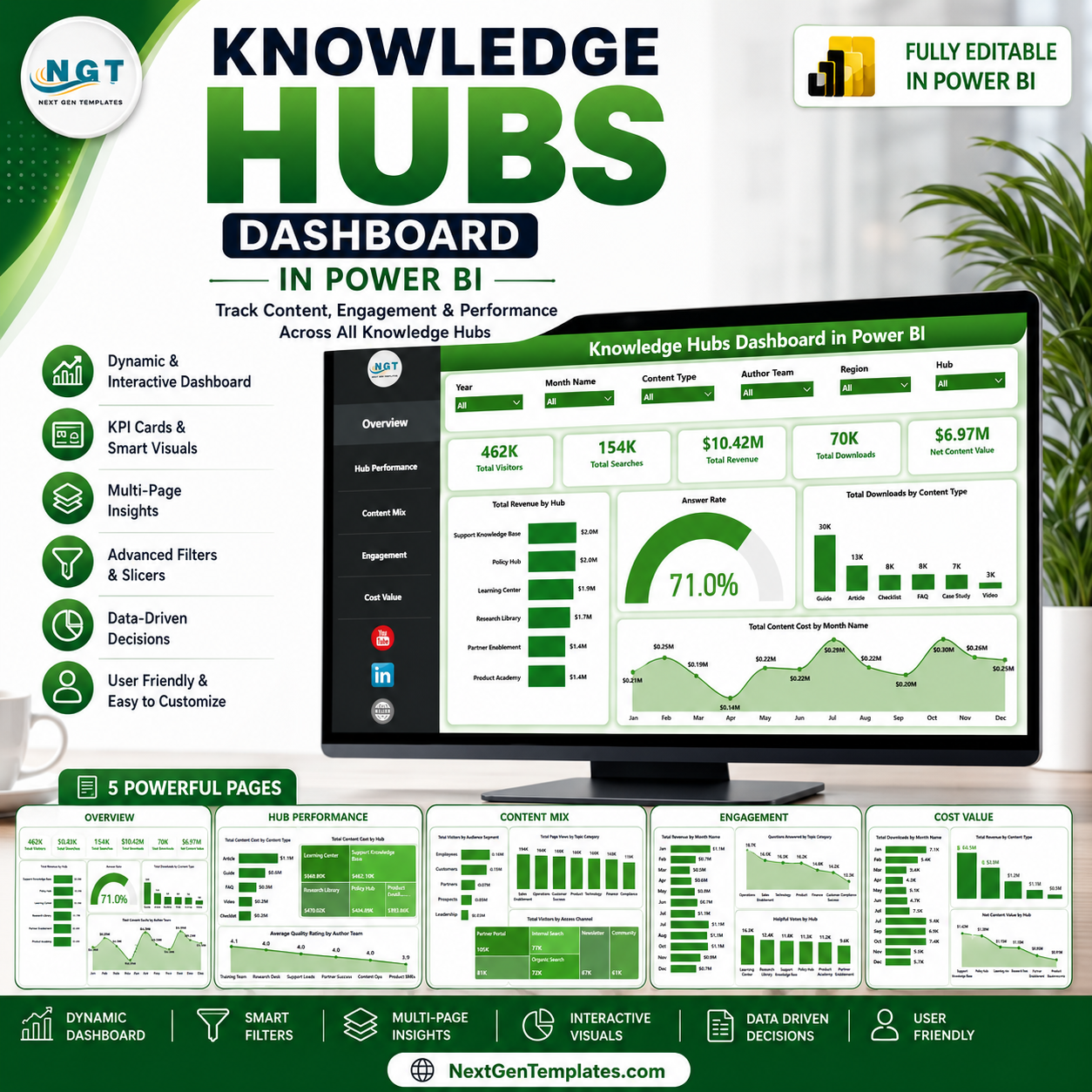
Knowledge Hubs Dashboard in Power BI helps content, learning, support, and knowledge-management teams turn hub activity into a clear performance view. Many teams track visitors, searches, downloads, answer quality, content cost, revenue, and helpful votes in separate files; this PBIX brings those signals into 5 Power BI pages, 5 headline cards, multiple slicers, and focused visuals. Use it to replace sample data, refresh the report, and review hub performance without building every chart from scratch. It is a one-time downloadable template, and the editable Power BI file gives you room to adjust pages, fields, and calculations for your own reporting process.
Knowledge Hubs Dashboard in Power BI
Key Features of Knowledge Hubs Dashboard in Power BI
- 5 report pages: Overview Page, Hub Performance, Content Mix, Engagement, and Cost Value.
- Executive KPI cards: Total Visitors, Total Searches, Total Revenue, Total Downloads, and Net Content Value.
- Interactive slicers: Quickly filter the dashboard by hub, content type, topic, author team, audience segment, access channel, and month fields.
- Knowledge hub performance: Compare revenue, answer rate, downloads, cost, quality rating, page views, and helpful votes.
- Cost and value tracking: Review content cost, revenue, downloads, and net content value across hubs and content types.
- Editable PBIX file: Customize visuals, measures, labels, report pages, data connections, and colors in Power BI Desktop.
What’s Inside the Knowledge Hubs Dashboard in Power BI
1. Overview Page
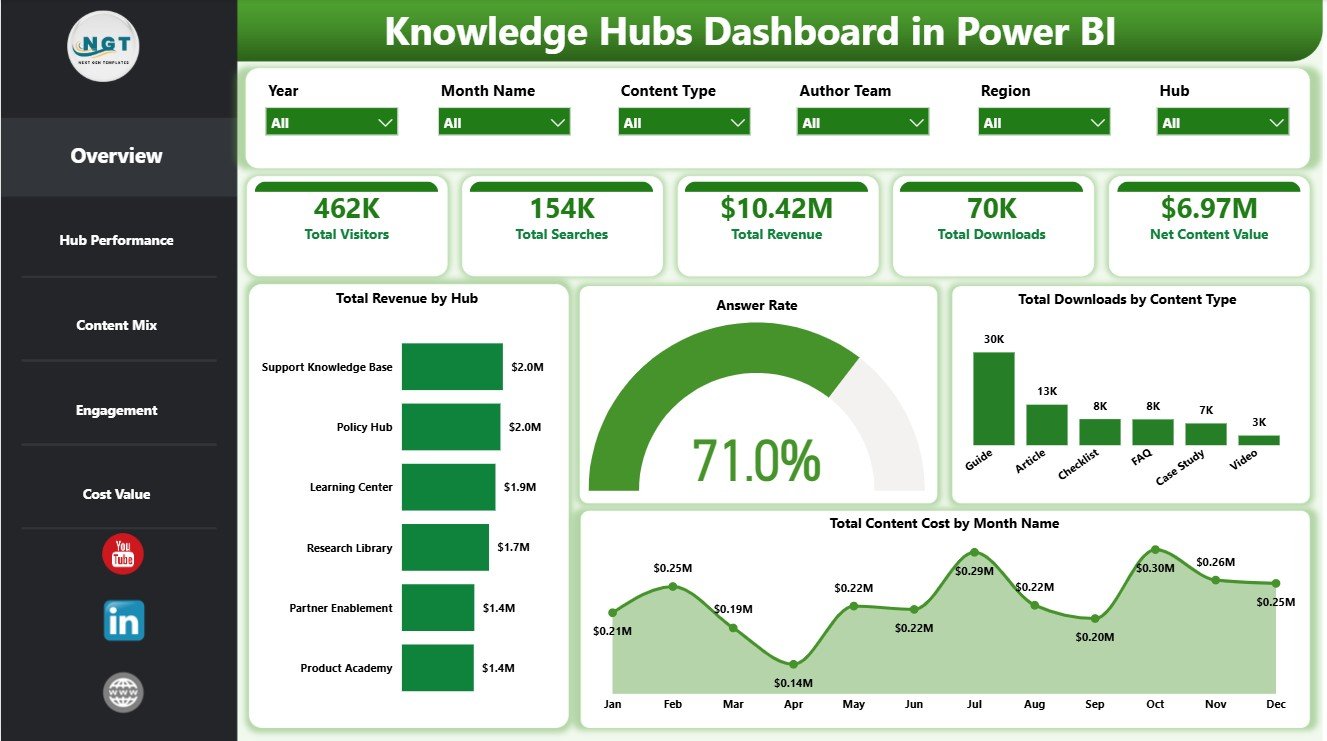
The Overview Page gives leaders a fast snapshot of knowledge hub activity. The top cards show Total Visitors, Total Searches, Total Revenue, Total Downloads, and Net Content Value so users can review reach, demand, monetization, and content value in one place.
Total Revenue by Hub: This chart compares revenue contribution across knowledge hubs. It helps managers identify which hubs are generating the strongest commercial or value contribution.
Answer Rate by Overall Content Responses: This visual shows how response volume connects with answer rate performance. It helps content teams understand whether the hub is successfully answering user questions.
Total Downloads by Content Type: This chart breaks downloads by format or content type. It helps teams see which resources users rely on most often.
Total Content Cost by Month Name: This monthly view tracks content cost over time. It helps owners monitor spending movement and spot months that need budget review.
2. Hub Performance
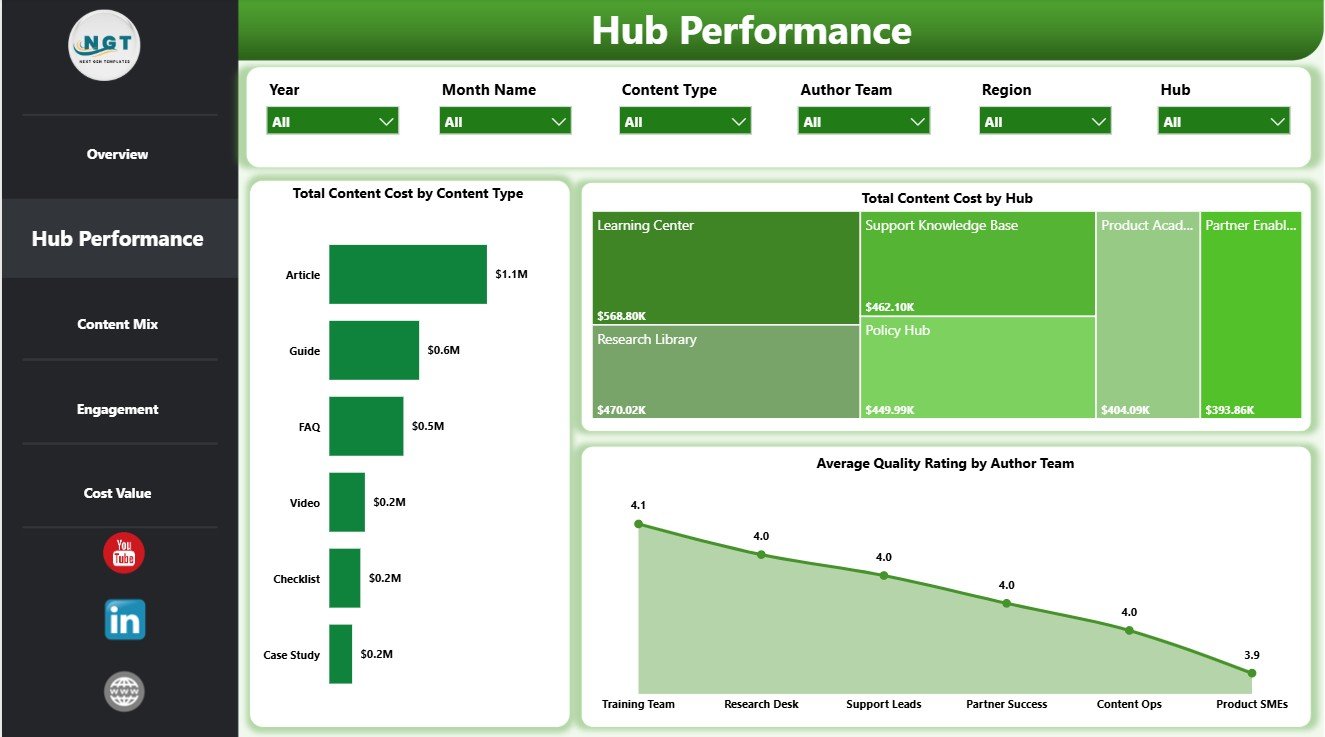
The Hub Performance page focuses on cost, hub-level comparison, and author-team quality. It is useful for knowledge managers who need to understand where investment and quality are concentrated.
Total Content Cost by Content Type: This visual compares production or maintenance cost by content type. It helps identify expensive formats and review whether they justify their value.
Total Content Cost by Hub: This chart compares content cost across hubs. It supports budget review and helps identify hubs that need deeper cost analysis.
Average Quality Rating by Author Team: This chart compares average quality rating across author teams. It helps managers recognize strong teams and locate areas needing editorial support.
Hub Performance
3. Content Mix
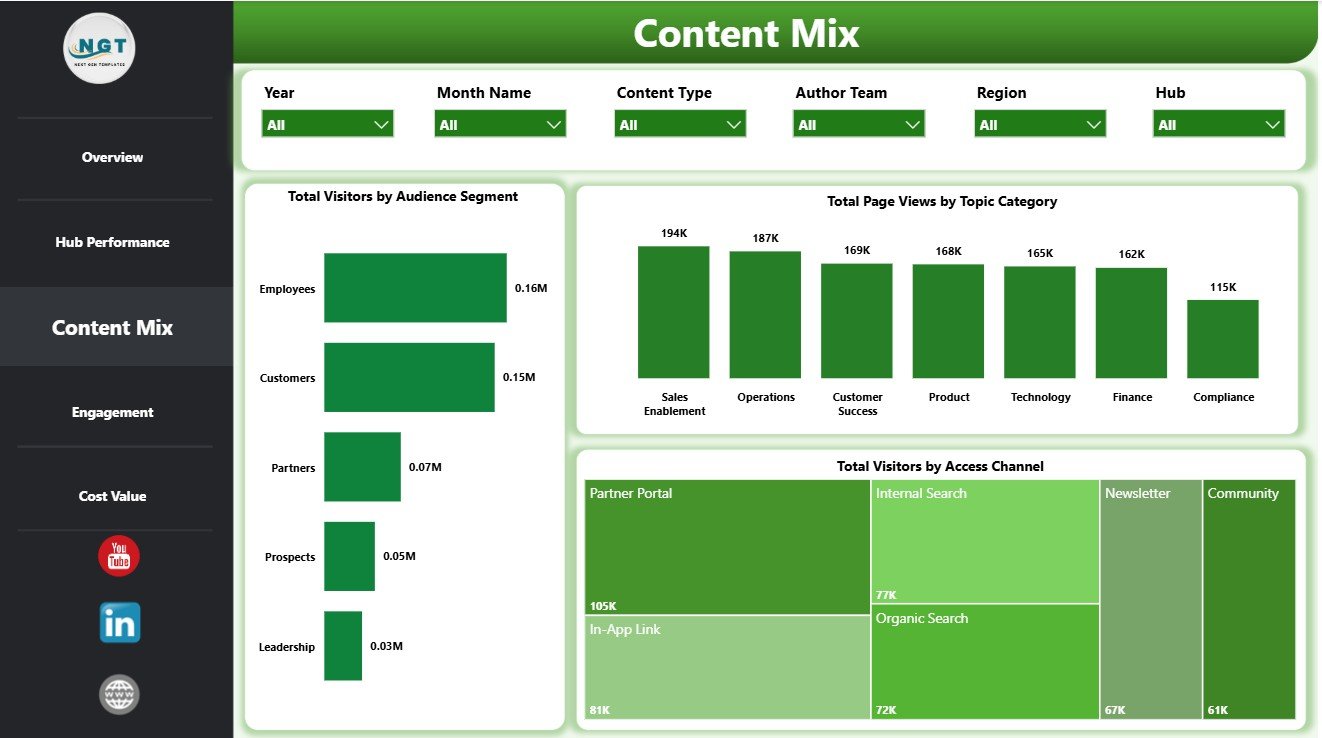
The Content Mix page explains how visitors, page views, and access patterns are distributed. It helps content strategists understand audience behavior by segment, topic, and access channel.
Total Visitors by Audience Segment: This chart shows visitor volume by audience segment. It helps teams see which groups are using the knowledge hubs most.
Total Page Views by Topic Category: This visual compares page views across topic categories. It helps content owners identify high-interest topics and underused areas.
Total Visitors by Access Channel: This chart shows how users reach the hub. It helps teams compare channels such as direct access, search, referral, or internal navigation.
Content Mix
4. Engagement
The Engagement page connects revenue, questions answered, and helpful votes. It is designed for teams that need to understand whether content is attracting attention and solving real user needs.
Total Revenue by Month Name: This trend tracks revenue month by month. It helps managers review growth, dips, seasonality, and the impact of content changes.
Questions Answered by Topic Category: This chart compares answered questions by topic. It helps content teams see where users need the most support.
Helpful Votes by Hub: This visual compares helpful votes across hubs. It helps identify knowledge areas that users find most useful.

Engagement
5. Cost Value
The Cost Value page brings downloads, revenue, and net value into one review area. It helps teams compare output and cost so content decisions are based on performance, not only publishing volume.
Total Downloads by Month Name: This monthly chart tracks download demand over time. It helps teams spot peak usage periods and evaluate release timing.
Total Revenue by Content Type: This chart compares revenue by content type. It helps identify which formats contribute the most value.
Net Content Value by Hub: This visual compares value after considering content cost. It helps leadership identify the hubs with the strongest return.
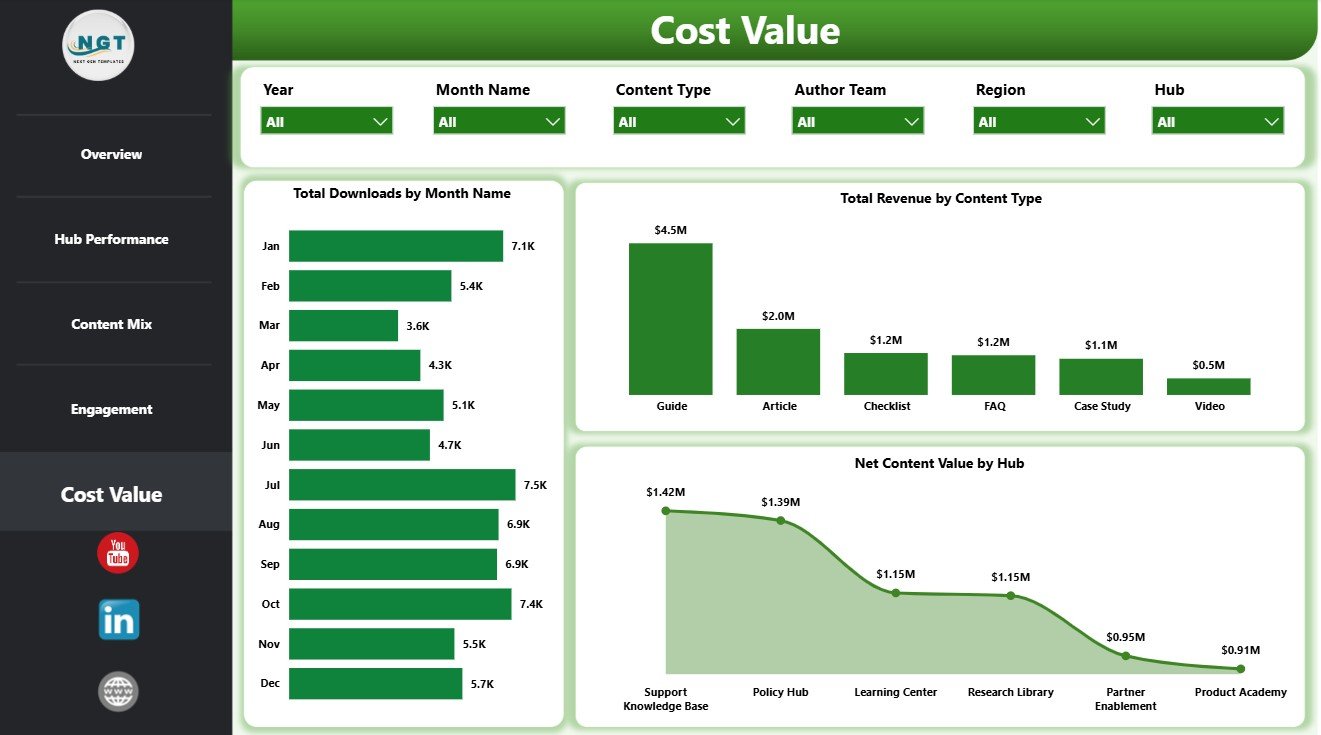
Cost Value
Knowledge Hubs Dashboard in Power BI vs. Tableau vs. Paid CRM/SaaS – Where This Fits
| Feature | This Power BI dashboard | Tableau alternative | Paid knowledge-base SaaS |
|---|---|---|---|
| Cost | $17.99 one-time template price | License plus dashboard build time | Monthly or annual subscription |
| Platform | Power BI Desktop / Power BI Service | Tableau Desktop or Cloud | Vendor-hosted platform |
| Setup time | Open PBIX, connect or replace data, refresh | Build model and visuals | Implementation and configuration |
| Customizable fields | Editable visuals, measures, fields, and slicers | Editable with Tableau skills | Limited by vendor settings |
| Knowledge hub analytics | Visitors, searches, answers, downloads, cost, revenue, and value pages included | Must be designed | Depends on vendor plan and exports |
| Year-1 cost at 5 users | $17.99 plus any Microsoft licensing | Often higher license or development cost | Often hundreds or thousands |
Who This Template Is For – and Who It’s Not For
This template is for knowledge managers, content operations teams, learning teams, customer support analysts, documentation owners, internal portal managers, and BI consultants who need an editable Power BI reporting layer. It is not a content management system, help desk, search engine, learning platform, CRM, or automated content quality tool.
How to Use the Knowledge Hubs Dashboard in Power BI
- Download and unzip the product file.
- Open the PBIX file in Power BI Desktop.
- Review the Overview, Hub Performance, Content Mix, Engagement, and Cost Value pages.
- Replace the sample source with your own knowledge hub data using the same field structure.
- Refresh the report and validate KPI cards, slicers, and chart totals.
- Customize visuals, colors, measures, and filters before sharing internally.
Real-World Use Cases
Anita, knowledge manager: reviews Total Searches, Answer Rate, and Helpful Votes before planning the next content refresh cycle.
Rahul, content operations lead: uses Hub Performance and Cost Value pages to compare content cost, revenue, and net value by hub.
Meera, support analyst: uses Content Mix and Engagement pages to identify topic categories with high visitor demand and unanswered questions.
Frequently Asked Questions
Do I need Power BI Desktop?
Yes. The PBIX file opens in Power BI Desktop, which is available from Microsoft.
Can I replace the sample data?
Yes. Replace or connect your own structured knowledge hub data, then refresh the report and check the visuals.
Can I customize the dashboard?
Yes. You can edit report pages, charts, slicers, fields, measures, labels, and colors.
Does this template include multiple report pages?
Yes. It includes Overview, Hub Performance, Content Mix, Engagement, and Cost Value pages.
Is this a SaaS subscription?
No. This is a one-time downloadable Power BI dashboard template from NextGenTemplates.
Can it help with content ROI review?
Yes. The Cost Value page includes revenue, downloads, and net content value views that support content investment review.
About the Author
Built by PK – Microsoft Certified Professional with 15+ years of Excel, Google Sheets, and Power BI experience. Founder of NextGenTemplates, reaching 300K+ subscribers across YouTube channels. Every template is hand-built and tested before release.
Explore Related Templates
You may also like IVF Centers Dashboard in Power BI, Insurance Tech Startups Dashboard in Power BI, and Knowledge Hubs KPI Dashboard in Power BI. Browse more Power BI templates and Power BI dashboard templates.
Click here to read the detailed blog post
Download the Knowledge Hubs Dashboard in Power BI today and turn hub activity, engagement, cost, revenue, and content value into an interactive Power BI report.
Last updated: June 28, 2026.


























Reviews
There are no reviews yet.