



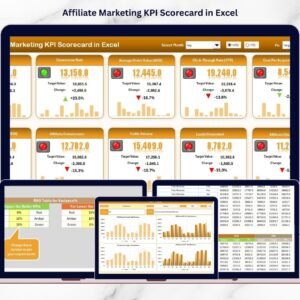
The Affiliate Marketing KPI Dashboard in Excel is an essential tool for affiliate marketers, digital marketers, and businesses with affiliate marketing programs. This interactive Excel dashboard helps you track and analyze the key performance indicators (KPIs) of your affiliate campaigns, allowing you to make data-driven decisions and optimize your affiliate marketing strategies.
Whether you’re monitoring affiliate sales, tracking click-through rates (CTR), or measuring ROI, this dashboard consolidates all your KPIs in one place, making it easy to track performance and manage your affiliate network. The customizable features enable you to tailor the dashboard to your specific marketing goals and KPIs.
Key Features of the Affiliate Marketing KPI Dashboard in Excel
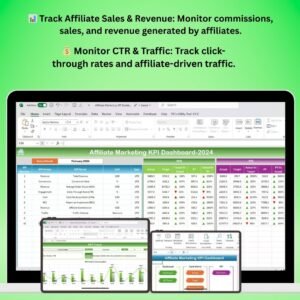
📊 Track Affiliate Sales & Revenue
Monitor affiliate sales, commissions, and overall revenue generated from affiliate marketing campaigns. Keep track of which affiliates are driving the most conversions and revenue.
💰 Monitor Affiliate Click-Through Rates (CTR)
Track the CTR for your affiliate links and monitor how effectively affiliates are driving traffic to your website or product pages. Use this data to identify high-performing affiliates and optimize your campaigns.
📈 Measure Return on Investment (ROI)
Evaluate the ROI of your affiliate marketing campaigns by comparing revenue generated to marketing costs. Ensure that your campaigns are profitable and adjust your strategies accordingly.
📅 Affiliate Performance Tracking
Monitor individual affiliate performance, including their sales, commissions, and click-through rates. Assess which affiliates are delivering the best results and focus on strengthening your partnerships with them.
📥 Affiliate Payout Tracking
Keep track of affiliate payouts, commissions owed, and payment schedules. Stay organized and ensure timely payments to your affiliates.
🖥️ Customizable & Interactive Layout
The dashboard is fully customizable, allowing you to filter data by affiliate, time period, or product category. Use interactive charts and graphs to drill down into specific performance metrics and gain actionable insights.
Why You’ll Love the Affiliate Marketing KPI Dashboard in Excel

✅ Track Affiliate Campaign Performance
Monitor the success of your affiliate campaigns by tracking key metrics such as sales, revenue, and click-through rates. Ensure that your campaigns are running efficiently.
✅ Optimize Affiliate Relationships
Identify your top-performing affiliates and focus on building stronger relationships with them. Use performance data to incentivize and reward affiliates who drive the most value.
✅ Measure ROI for Affiliate Campaigns
Calculate the ROI of your affiliate marketing efforts to ensure that your campaigns are profitable. Adjust your strategies based on data insights to maximize returns.
✅ Monitor Affiliate Payments & Payouts
Track affiliate payouts and commissions to ensure timely payments. Stay organized and avoid payment errors, maintaining healthy relationships with your affiliate partners.
✅ Fully Customizable for Your Marketing Needs
Tailor the dashboard to fit your affiliate marketing goals. Customize KPIs, data points, and visualizations to match your business objectives.
What’s Inside the Affiliate Marketing KPI Dashboard Template in Excel?
- Affiliate Sales & Revenue Tracking: Monitor sales, commissions, and revenue generated by affiliates.
- Click-Through Rate (CTR) Tracking: Track affiliate traffic and identify top-performing affiliates.
- ROI Analysis: Evaluate the ROI of your affiliate campaigns by comparing revenue to marketing costs.
- Affiliate Performance Monitoring: Track individual affiliate performance, including their sales and CTR.
- Payout Tracking: Keep a log of commissions owed and paid to affiliates.
- Customizable Filters & Visualizations: Filter data by affiliate, time period, or product category for specific insights.
How to Use the Affiliate Marketing KPI Dashboard in Excel
1️⃣ Download the Template: Get instant access to the Affiliate Marketing KPI Dashboard in Excel.
2️⃣ Input Your Affiliate Data: Enter affiliate sales, commissions, clicks, and marketing expenses into the dashboard.
3️⃣ Track & Monitor KPIs: Use the dashboard to monitor performance metrics such as sales, CTR, and ROI.
4️⃣ Analyze & Optimize Performance: Use data insights to optimize affiliate campaigns and improve profitability.
5️⃣ Generate Reports & Insights: Create customized reports to share with stakeholders or affiliate partners.
Who Can Benefit from the Affiliate Marketing KPI Dashboard in Excel?
🔹 Affiliate Marketers & Campaign Managers
🔹 Digital Marketing Teams & Agencies
🔹 E-commerce Businesses
🔹 Business Owners with Affiliate Programs
🔹 Performance Marketers & Sales Teams
🔹 Companies Managing Multiple Affiliates
Maximize the impact of your affiliate marketing campaigns and optimize performance with the Affiliate Marketing KPI Dashboard in Excel. Track sales, measure ROI, monitor affiliate performance, and ensure profitable campaigns.
Click here to read the Detailed blog post
Visit our YouTube channel to learn step-by-step video tutorials
Youtube.com/@PKAnExcelExpert
Compatibility and Requirements
- Works in Microsoft Excel desktop (Excel 2016 or later, or Microsoft 365).
- Results show in interactive charts and graphs. Microsoft explains Excel charts in Create a chart from start to finish.
Frequently Asked Questions
What does the Affiliate Marketing KPI Dashboard track?
It tracks affiliate sales, commissions, revenue, click-through rates, ROI and payouts, both overall and for each affiliate.
Can I see which affiliates perform best?
Yes. It shows sales, commissions and click-through rates for each affiliate, so your top performers stand out.
Does it track payouts?
Yes. It keeps a log of commissions owed, commissions paid and payment schedules.
Can I filter the data?
Yes. You can filter by affiliate, time period or product category.
Is there a Power BI or Google Sheets version?
Yes. See the Affiliate Marketing KPI Dashboard in Power BI and the Affiliate Marketing KPI Dashboard in Google Sheets.
Related Affiliate Marketing Templates
- Affiliate Marketing KPI Dashboard in Power BI: the same KPIs in Power BI
- Affiliate Marketing KPI Dashboard in Google Sheets: the same KPIs in Google Sheets
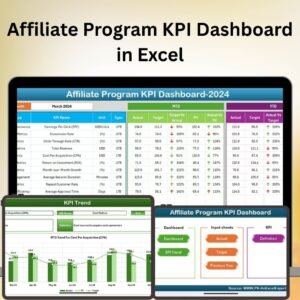
- Affiliate Program KPI Dashboard in Excel: KPIs for running an affiliate program
- Affiliate Marketing Checklist in Excel: set up and run campaigns step by step
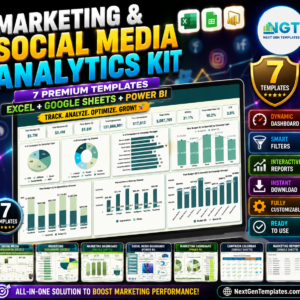
- Marketing and Social Media Analytics Kit: 7 marketing templates in one download
Browse all Excel KPI dashboards or the Excel sales and marketing templates.





Reviews
There are no reviews yet.