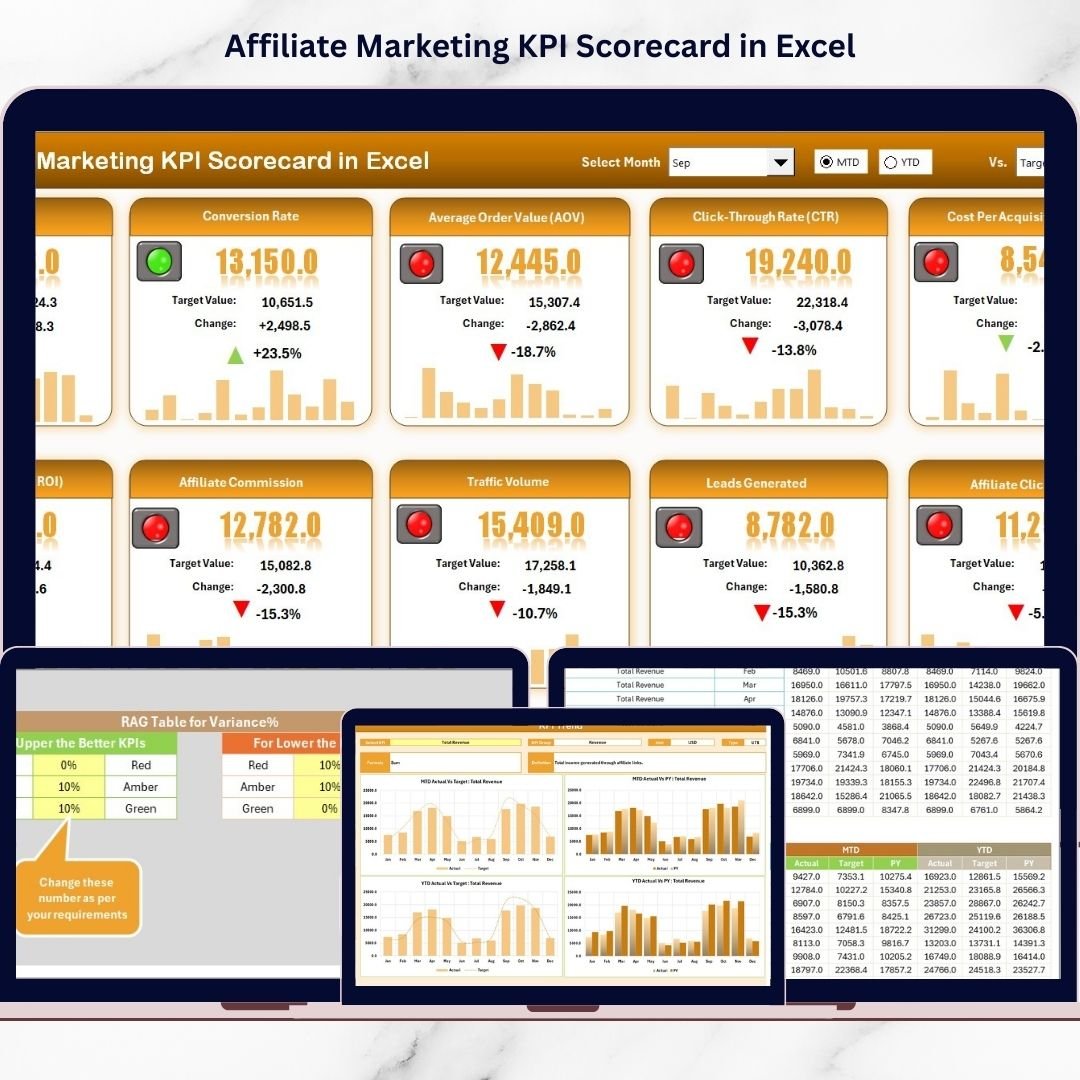


Stop guessing what’s working in your affiliate program — and start scaling with confidence. The Affiliate Marketing KPI Scorecard in Excel is a ready-to-use, dashboard-style tracking system that helps you monitor performance in one place using Actual vs Target, MTD vs YTD, and trend insights.
Instead of jumping between affiliate networks, scattered spreadsheets, and platform dashboards, this scorecard gives you a clean and structured Excel system to track the 10 most important affiliate KPIs—including Revenue, Conversions, CPA, Net Profit, Refund Rate, and Active Affiliates. So, you spot problems early, fix leaks faster, and grow your program smarter.
Whether you manage one affiliate network or multiple programs, this Excel scorecard helps you stay consistent, track progress, and make decisions quickly — without complicated tools.
✅ Key Feature of Affiliate Marketing KPI Scorecard in Excel
📌 One-View KPI Tracking to monitor 10 critical affiliate KPIs in a single scorecard
📌 Actual vs Target Comparison to instantly see what’s on track and what needs action
📌 MTD and YTD Performance Mode so you can review short-term and long-term results
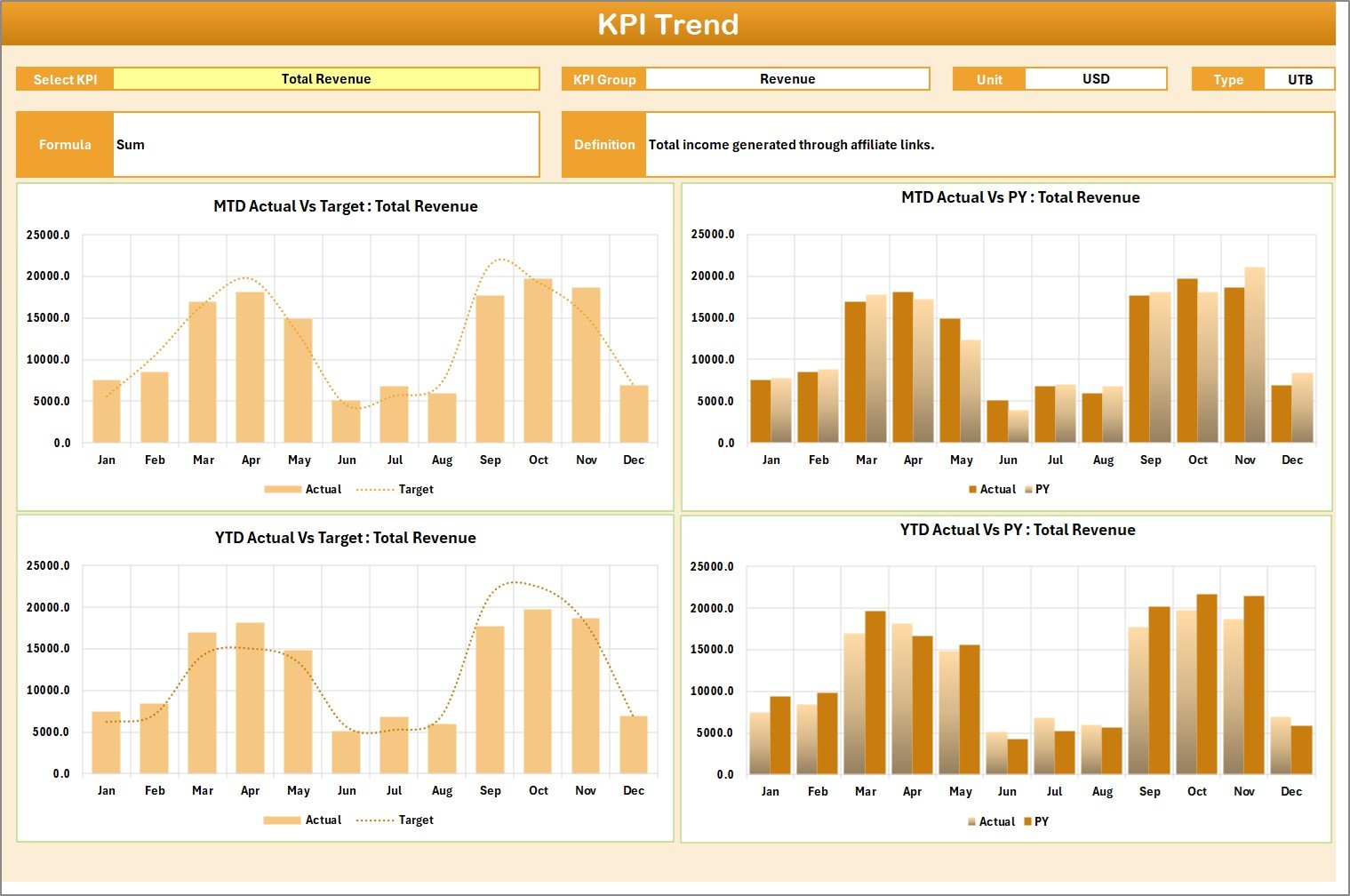
📌 KPI Trend Analysis with interactive trend charts for Actual, Target, and PY (Previous Year)
📌 Dropdown-Based KPI Selection to analyze any KPI instantly without changing formulas
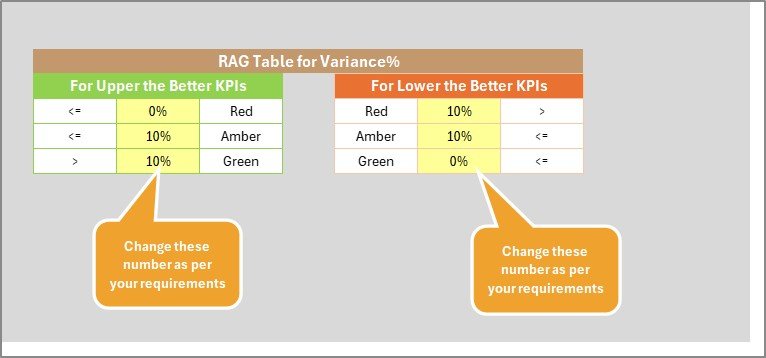
📌 KPI Type Logic Included (Upper the Better / Lower the Better) for correct status indicators
📌 Clear Visual Indicators using conditional formatting (Green/Yellow/Red insights)
📌 Simple Data Entry Structure so your scorecard updates smoothly as you add new data
📌 Built-in KPI Standards using a dedicated KPI Definition sheet for clarity and consistency
📌 Excel-Friendly & Fast — no advanced setup, no complicated tools, just plug-and-play tracking
📦 What’s Inside the Affiliate Marketing KPI Scorecard in Excel
This premium Excel template includes 4 powerful worksheets, designed for easy tracking and deep insights:
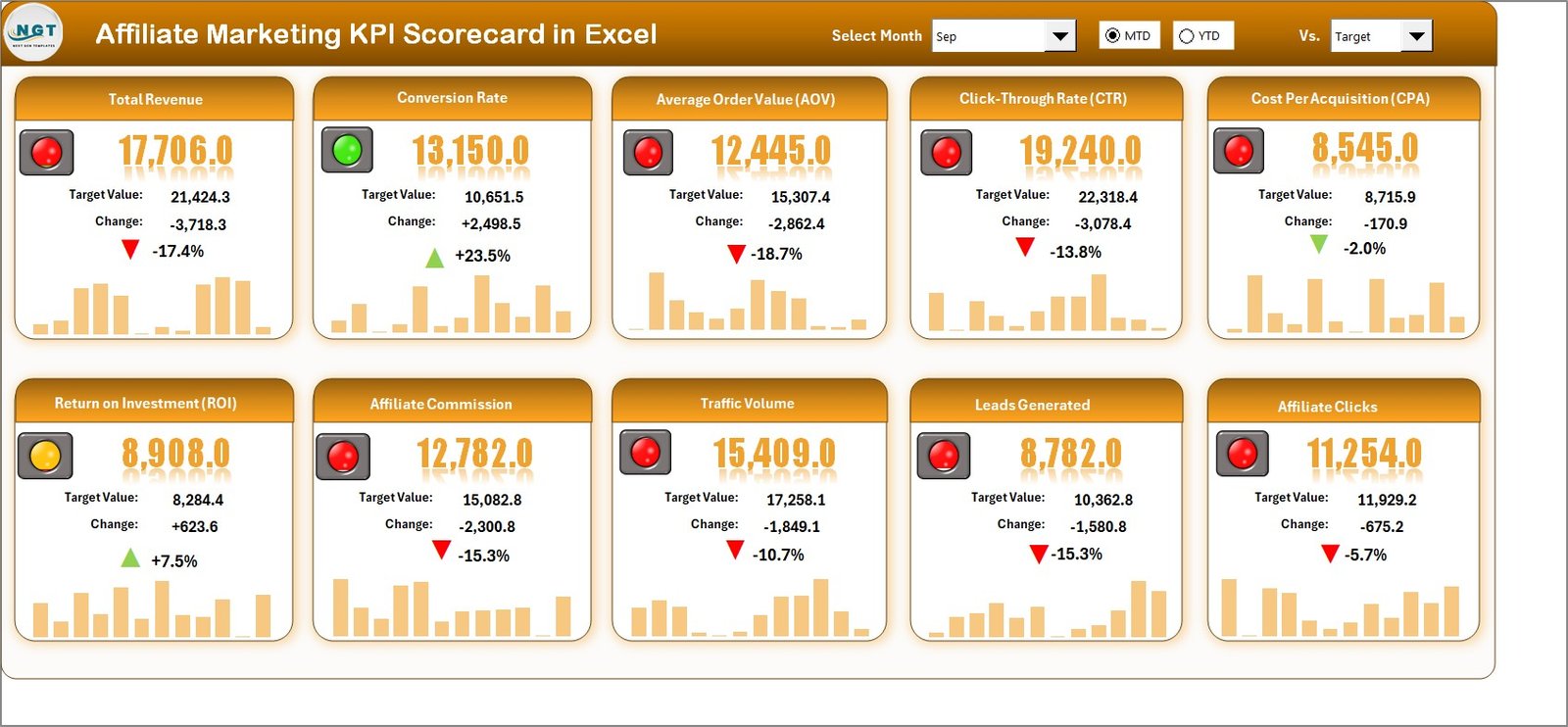
📊 1) Scorecard Sheet (Main Dashboard View)
✅ View all KPI performance on one screen
✅ Select Month + MTD/YTD from dropdowns
✅ Check performance status using visual indicators
✅ Compare Actual vs Target and take quick action
📈 2) KPI Trend Sheet (Performance Movement Analysis)
✅ Select KPI from dropdown (Cell C3)
✅ See KPI Group, Unit, Type, Formula, and Definition
✅ Track KPI trend lines for Actual, Target, and PY
✅ Analyze both MTD and YTD trends to catch early warning signs
🧾 3) Input Data Sheet (Your Data Entry Area)
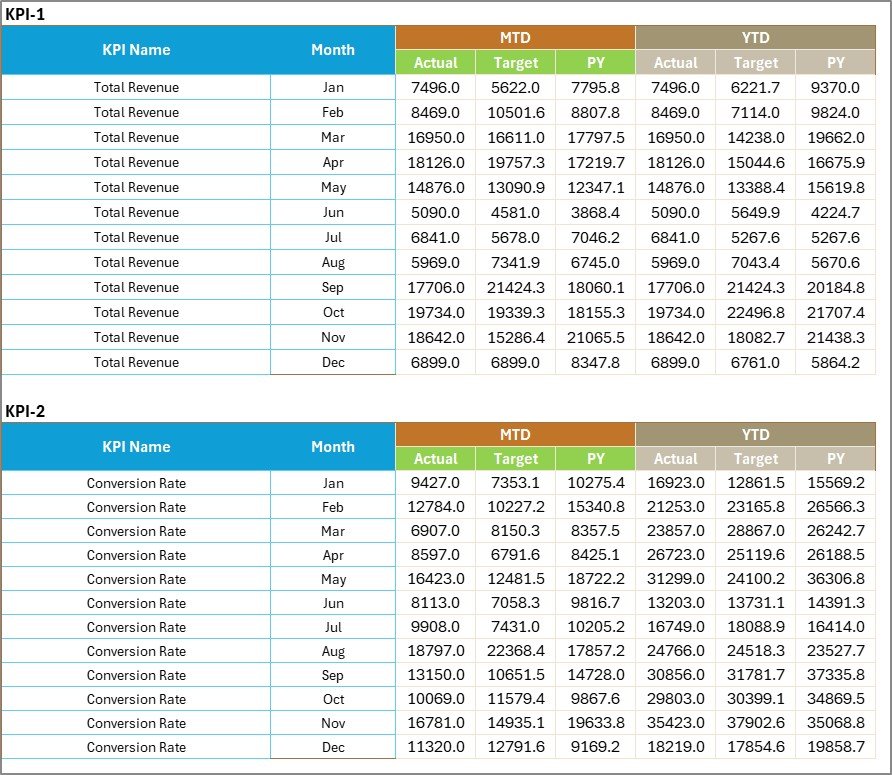
✅ Enter Actual values, Targets, and PY (optional)
✅ Maintain clean monthly/weekly tracking
✅ Supports structured reporting for charts and scorecard calculations
📘 4) KPI Definition Sheet (Your KPI Standards Library)
✅ Store KPI Name, Group, Unit, Formula, and Definition
✅ Keeps teams aligned and prevents wrong KPI calculations
✅ Builds a consistent reporting system across campaigns and managers
🧩 How to Use the Affiliate Marketing KPI Scorecard in Excel
✅ Step 1: Start with the provided KPI list (10 core KPIs included)
✅ Step 2: Update the KPI Definition Sheet (optional edits allowed)
✅ Step 3: Add your monthly/weekly numbers in the Input Data Sheet
✅ Step 4: Go to the Scorecard Sheet, choose Month + MTD/YTD
✅ Step 5: Check KPI status and compare Actual vs Target
✅ Step 6: Open the KPI Trend Sheet to understand why a KPI is rising or dropping
✅ Step 7: Take action — scale winners, fix weak affiliates, and protect your profit
This workflow helps you build a habit of performance review and improvement, without wasting hours in reports.
🎯 Who Can Benefit from This Affiliate Marketing KPI Scorecard in Excel
👨💻 Affiliate Managers who want faster KPI-based decisions
📈 Performance Marketers who want to track CPA, ROAS, AOV, and profit correctly
🏢 Marketing Agencies managing affiliate programs for multiple clients
🛍️ Ecommerce Brands needing control on commissions, refunds, and margins
💼 Business Owners who want a simple system to monitor affiliate growth
📊 Growth Teams who want MTD/YTD tracking and clear targets for consistent scaling
If you want to stop working blindly and start managing affiliates like a pro — this template is for you.
Click hare to read the Detailed blog post
Watch the step-by-step video tutorial:
Visit our YouTube channel to learn step-by-step video tutorials
Youtube.com/@PKAnExcelExpert
Compatibility and Requirements
- Works in Microsoft Excel desktop (Excel 2016 or later, or Microsoft 365).
- You pick the month and MTD or YTD from dropdowns on the Scorecard sheet, and choose a KPI from a dropdown on the KPI Trend sheet. Microsoft explains dropdowns in Create a drop-down list.
Frequently Asked Questions
Which sheets are included?
Four sheets: Scorecard, KPI Trend, Input Data and KPI Definition.
How many KPIs does the scorecard track?
It comes with 10 core affiliate KPIs, including Revenue, Conversions, CPA, Net Profit, Refund Rate and Active Affiliates. You can edit the list on the KPI Definition sheet.
How do I update the scorecard?
Enter your Actual values, Targets and optional Previous Year (PY) figures on the Input Data sheet. Then choose a month and MTD or YTD on the Scorecard sheet and it updates.
How do I see the trend for one KPI?
Open the KPI Trend sheet and select the KPI from the dropdown in cell C3. It shows the KPI group, unit, type, formula and definition, plus trend lines for Actual, Target and PY.
Is there a dashboard or Google Sheets version?
Yes. See the Affiliate Marketing KPI Dashboard in Excel, the Affiliate Marketing KPI Dashboard in Power BI and the Affiliate Marketing KPI Dashboard in Google Sheets.
Related Affiliate and Marketing Templates
- Affiliate Marketing KPI Dashboard in Excel: a dashboard view of the same KPIs
- Affiliate Marketing KPI Dashboard in Power BI: the Power BI edition
- Affiliate Marketing Checklist in Excel: a task checklist for your program
- Digital Marketing KPI Scorecard in Excel: a scorecard for wider digital marketing
- Marketing Manager Toolkit: 9 marketing templates in one download
Browse all Excel KPI dashboards.