

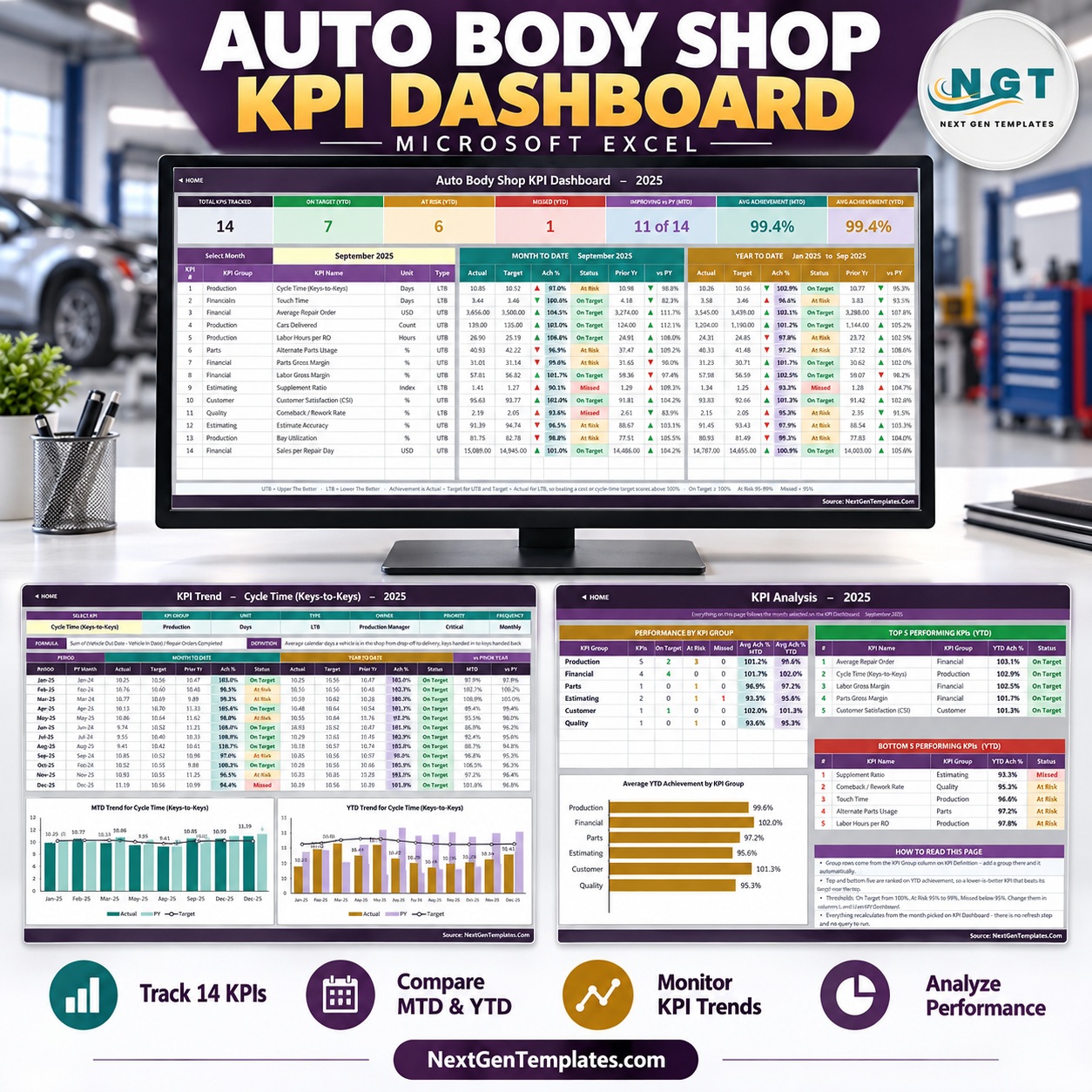
The Auto Body Shop KPI Dashboard in Excel scores 14 collision-repair KPIs in 6 groups, month to date and year to date, against target and prior year, with one month dropdown driving every number. It ships as an 11-sheet workbook built on plain worksheet formulas: no macros, no Power Query, no add-ins.
🌍 Join 8,400+ teams in 40+ countries using NextGenTemplates to replace paid SaaS tools with one-time-purchase Excel, Google Sheets, Power BI, and HTML templates.
✅ Instant download · One-time payment · No subscription · No per-user fees · Lifetime access
This is the month-picker KPI dashboard edition (MTD/YTD scoring, KPI Trend and KPI Analysis pages). It is a different template from our analytical Auto Repair Dashboard in Excel and from the Auto Body Shop KPI Scorecard in Google Sheets, which is a separate scorecard design with its own KPI set.
🔑 Key Features of the Auto Body Shop KPI Dashboard in Excel
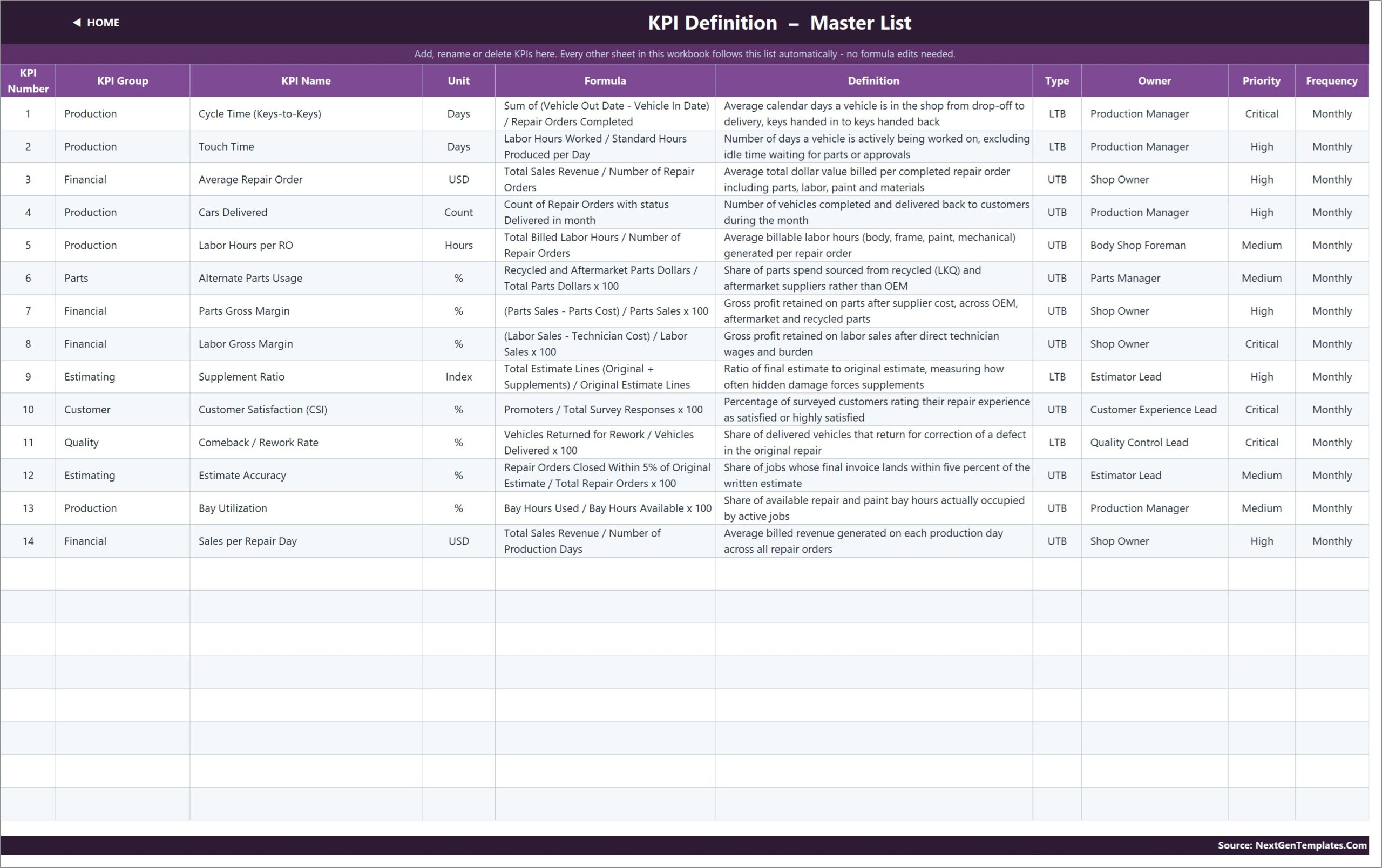
🚗 14 body shop KPIs, ready to use: Cycle Time (Keys-to-Keys), Touch Time, Average Repair Order, Cars Delivered, Labor Hours per RO, Alternate Parts Usage, Parts Gross Margin, Labor Gross Margin, Supplement Ratio, Customer Satisfaction (CSI), Comeback / Rework Rate, Estimate Accuracy, Bay Utilization and Sales per Repair Day.
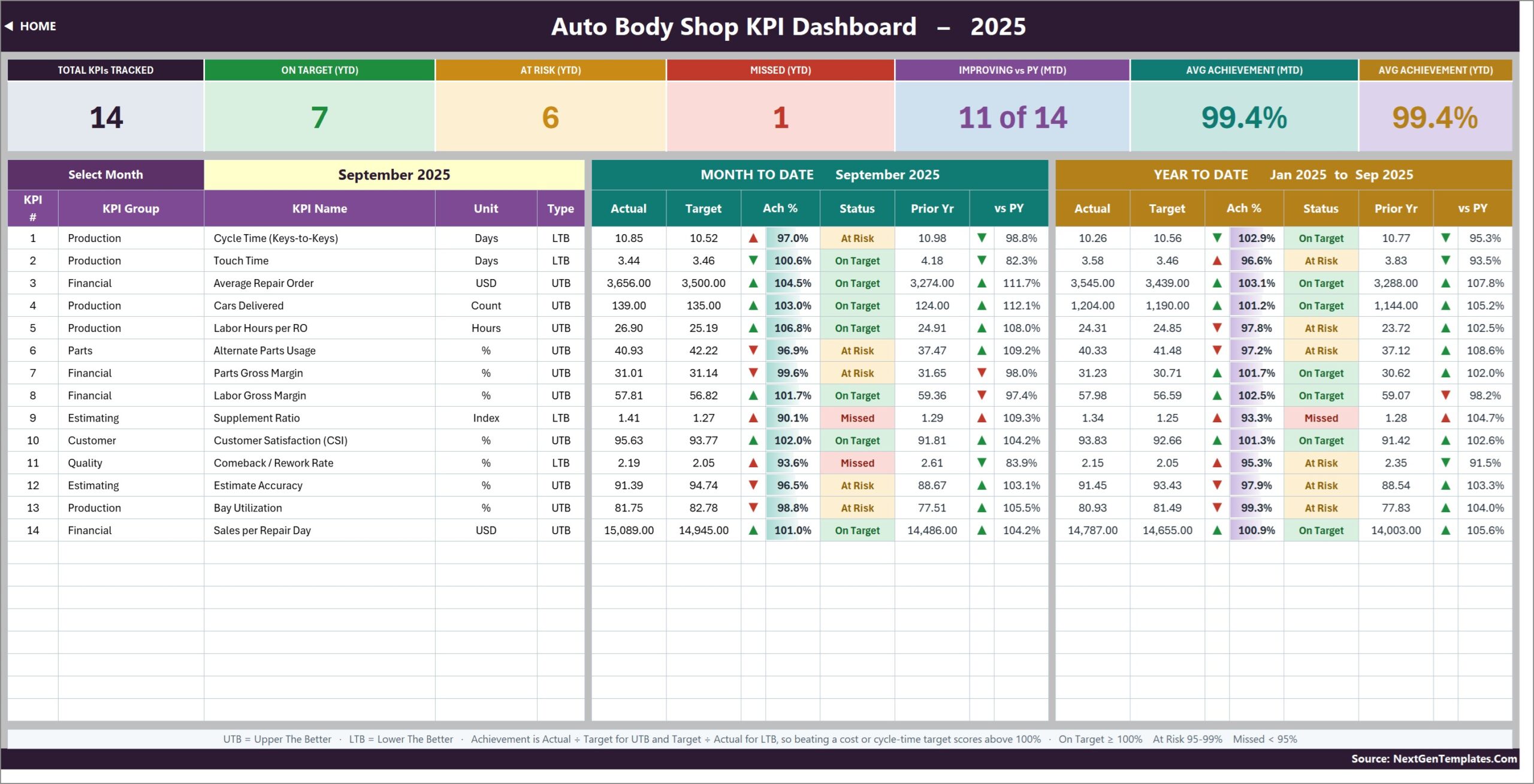
📅 One dropdown, whole dashboard: pick a month in cell D6 on KPI Dashboard and all 14 rows show MTD and YTD actual, target, achievement %, status, prior year and vs PY, plus seven summary cards such as On Target (YTD) and Avg Achievement (MTD).
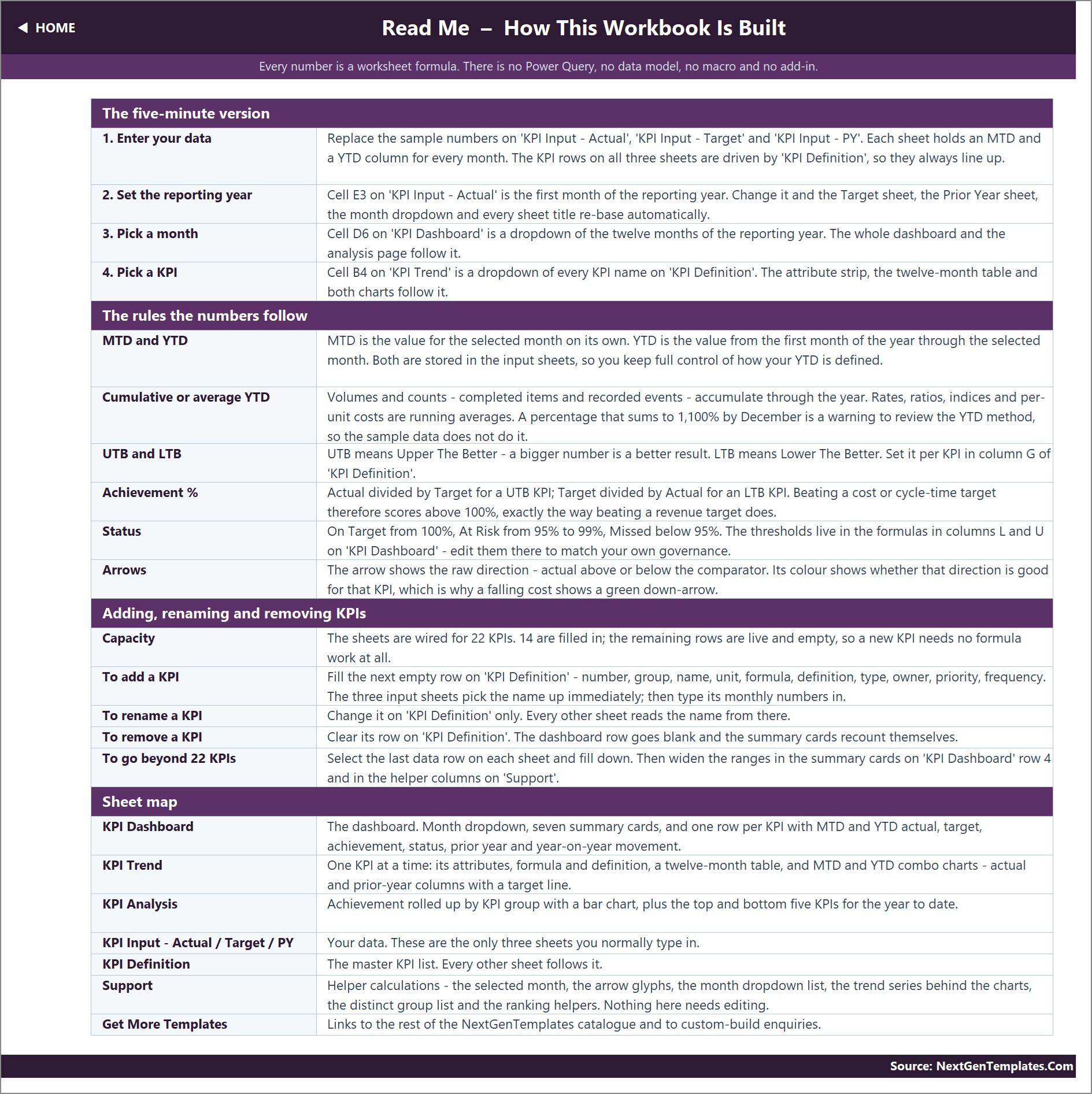
🎯 Direction-aware scoring: 4 KPIs are Lower The Better (Cycle Time, Touch Time, Supplement Ratio, Comeback / Rework Rate) and 10 are Upper The Better, so a shorter cycle time scores above 100% instead of reading as a miss.
🚦 Traffic-light status: On Target from 100%, At Risk from 95% to 99%, Missed below 95%. The thresholds sit in visible formulas you can edit.
➕ Room to grow: the sheets are wired for 22 KPIs, so 8 more can be added on KPI Definition with no formula work.
📦 What’s Inside the Workbook
Home
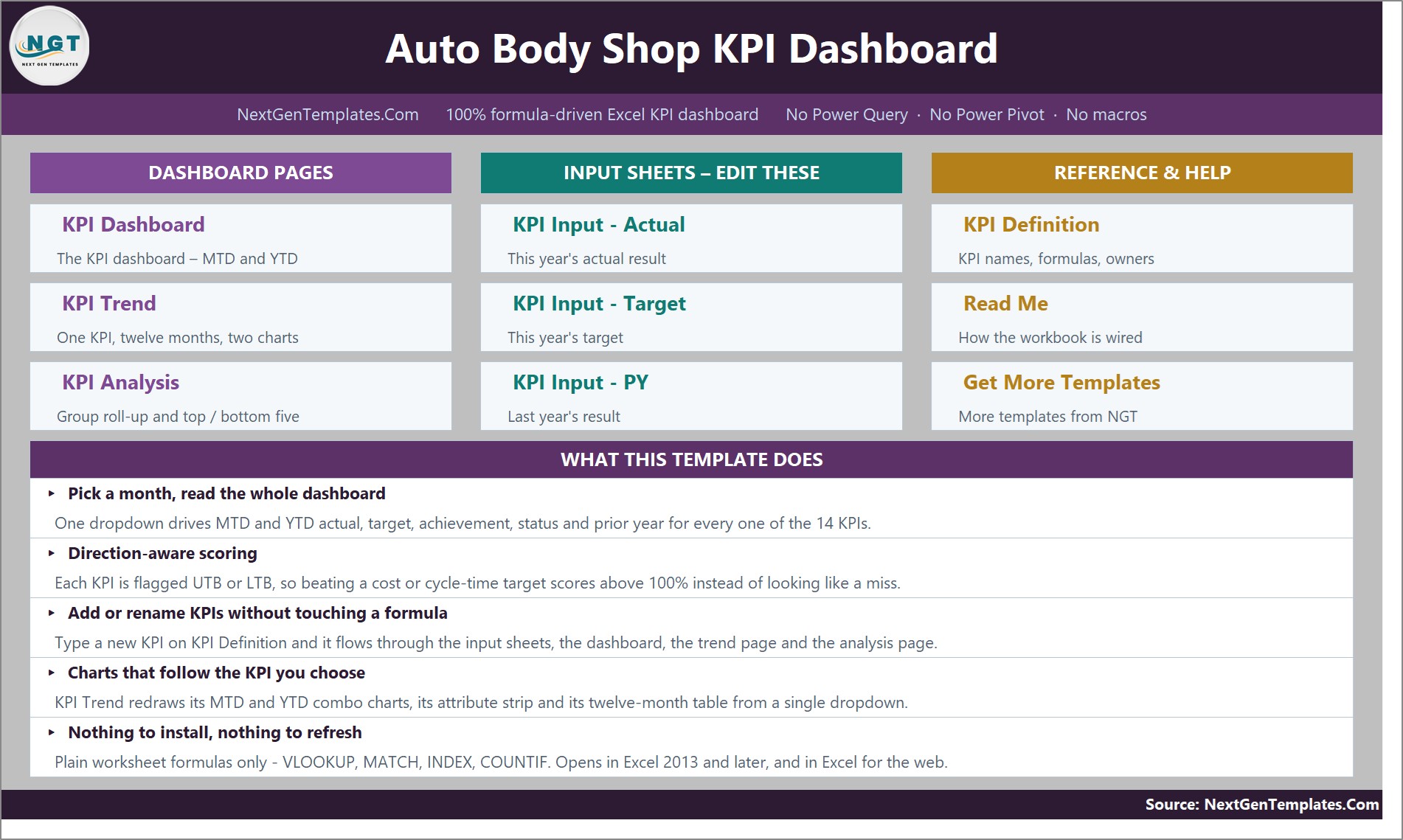
A navigation page linking the three dashboard pages, the three input sheets and the reference sheets, with a short summary of what the template does.
KPI Dashboard
Seven cards (Total KPIs Tracked, On Target, At Risk and Missed YTD, Improving vs PY, Avg Achievement MTD and YTD) above a 14-row MTD and YTD table with arrows and status labels. In the September 2025 sample, 7 KPIs are On Target, 6 At Risk and 1 Missed year to date.
KPI Trend
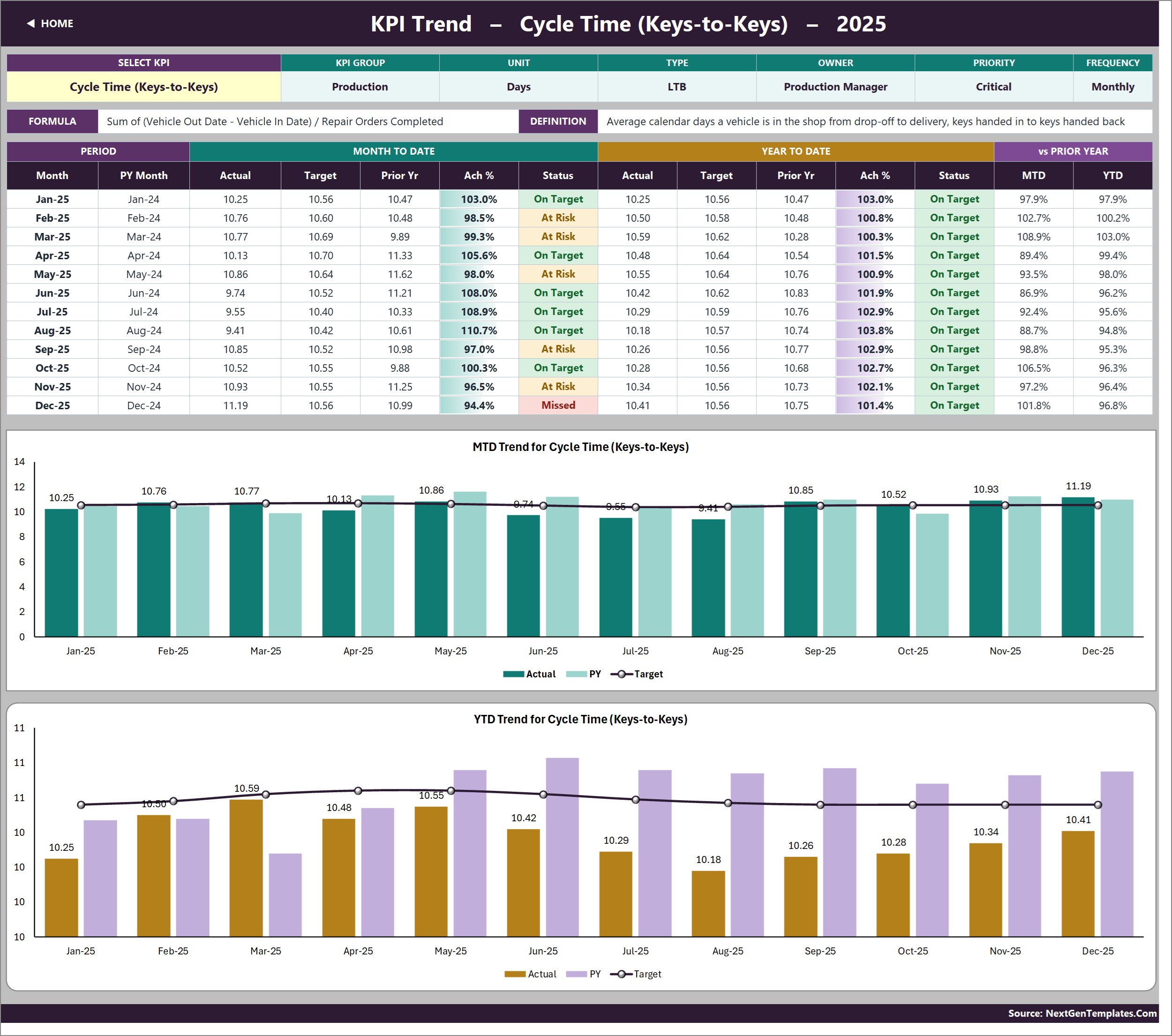
Pick any KPI to see its group, unit, type, owner, priority, formula and definition, a twelve-month MTD/YTD table, and two combo charts: MTD Trend and YTD Trend, each showing Actual and PY columns with a Target line.
KPI Analysis
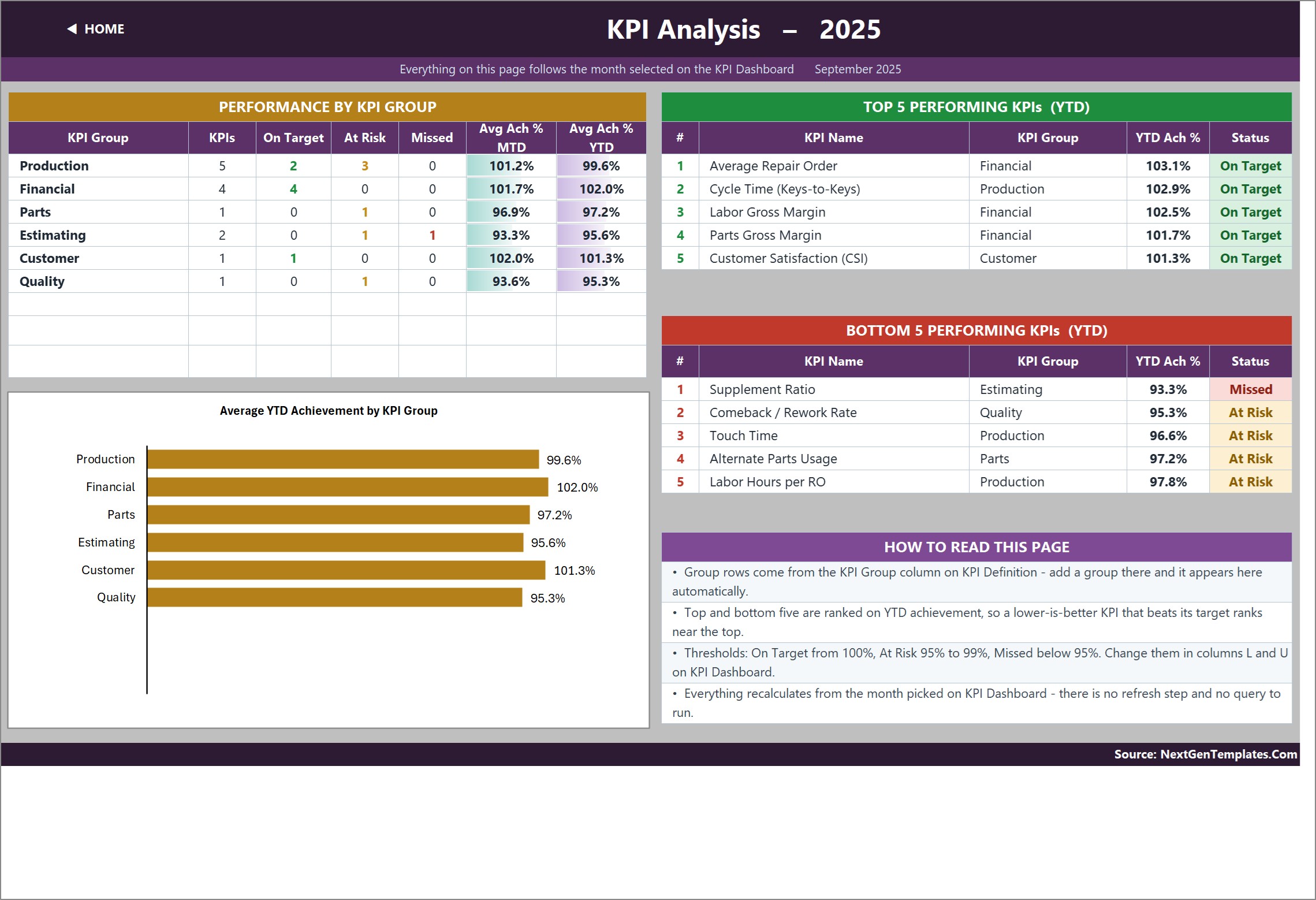
Performance by KPI Group (Production, Financial, Parts, Estimating, Customer, Quality), the chart Average YTD Achievement by KPI Group, and Top 5 and Bottom 5 KPIs ranked on YTD achievement.
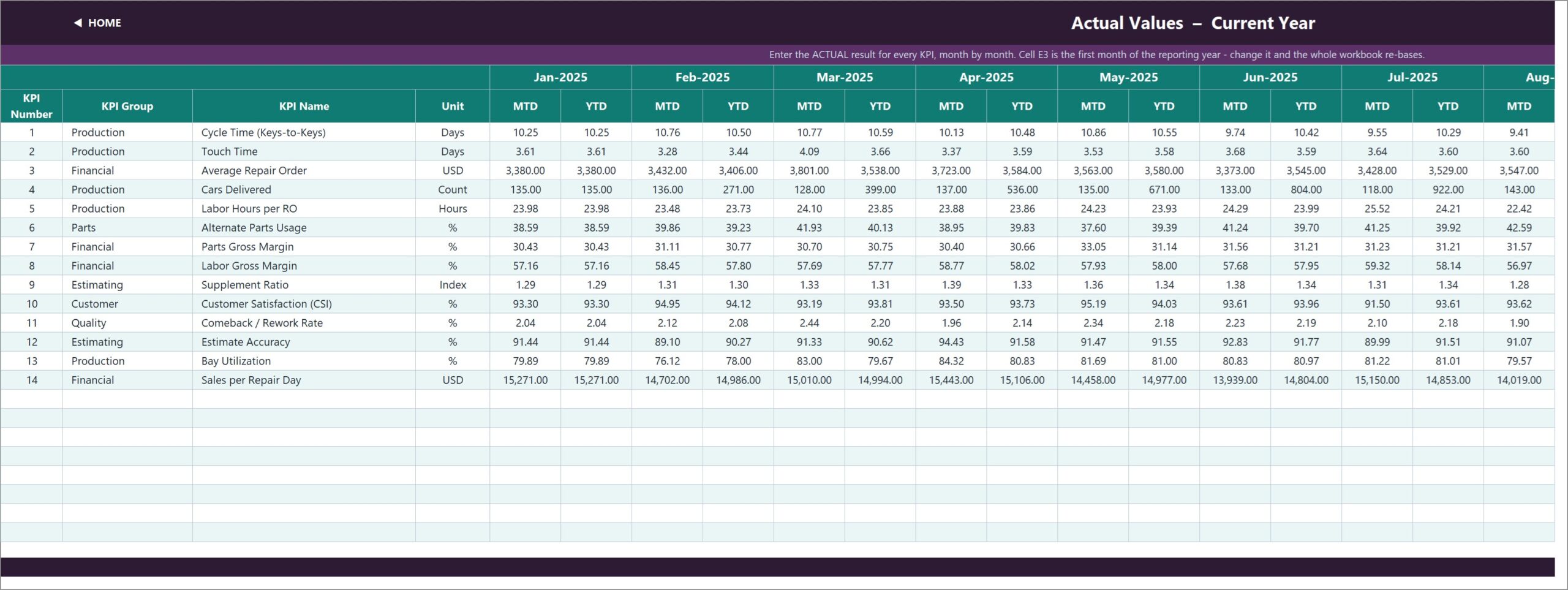
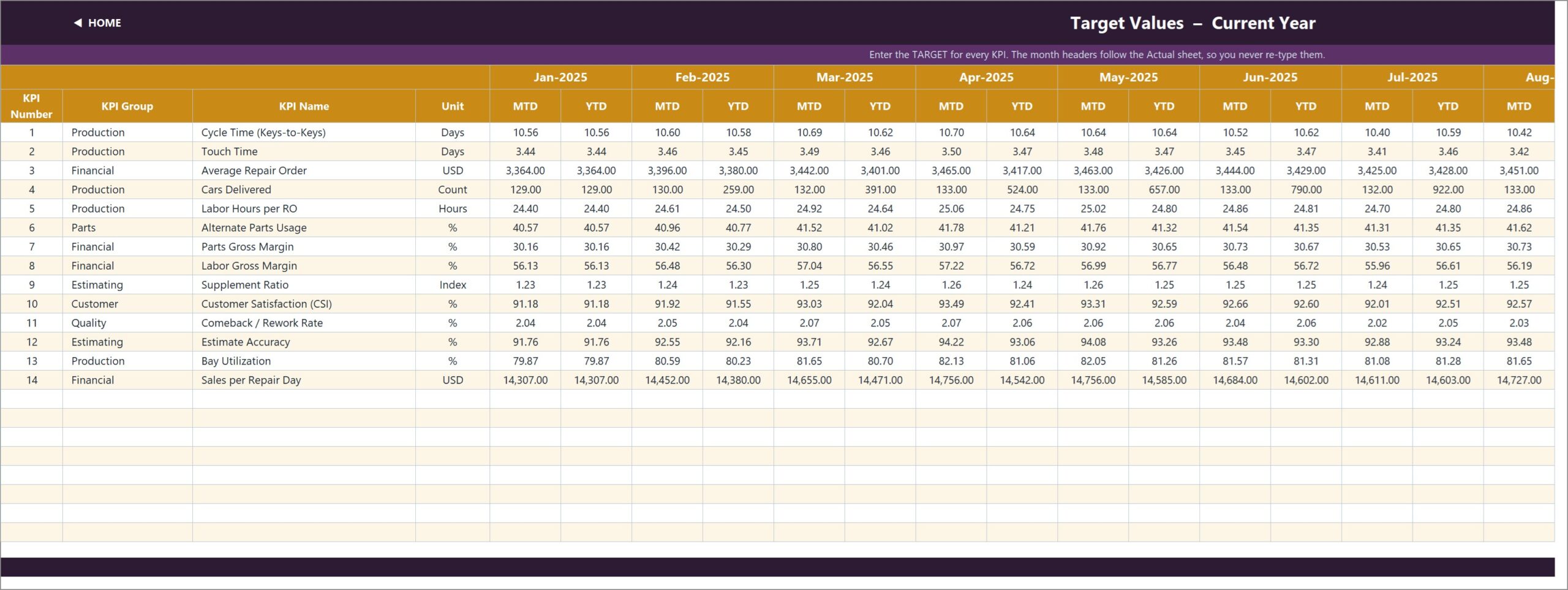
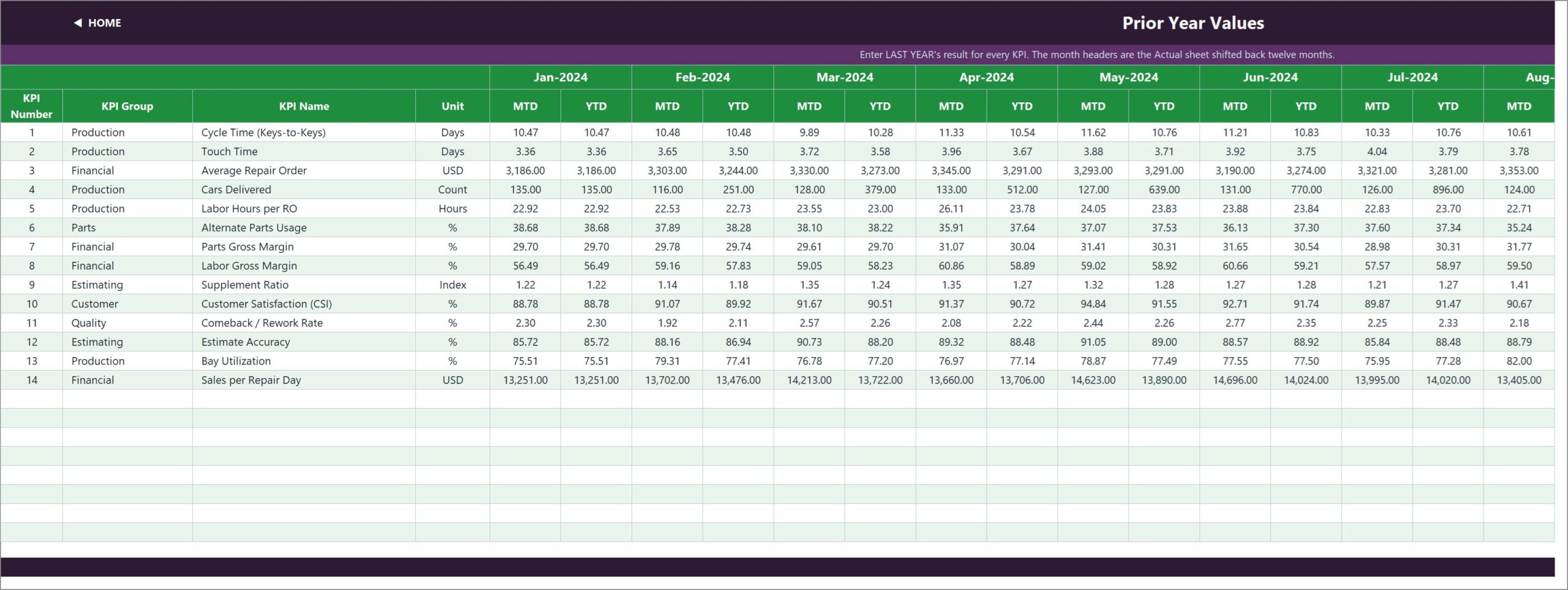
KPI Input – Actual, Target and PY
Three input sheets with an MTD and a YTD column for every month. Cell E3 on KPI Input – Actual sets the first month of the reporting year, and the other sheets re-base from it.
KPI Definition, Read Me and Get More Templates
The master list holds each KPI’s group, unit, formula, definition, UTB/LTB type, owner, priority and frequency. Read Me explains the rules; Get More Templates links the wider catalogue.
⚠️ Good to know before you buy: both the MTD and the YTD figures are typed on the input sheets; the workbook does not calculate YTD for you, which lets you choose sum or average per KPI. The KPI Trend charts use a whole-number axis, so for a KPI with a narrow decimal range (for example YTD Cycle Time around 10.2-10.6 days) the axis ticks repeat (10, 10, 11, 11); the data labels and table still show the correct decimals. All sample figures are fictional.
📊 This Excel KPI Dashboard vs. a Google Sheets KPI Template vs. Body Shop Management Software
| Feature | This Excel dashboard | Google Sheets KPI template | Body shop management software |
|---|---|---|---|
| Cost | ✅ $12.99 one-time | $9-15 one-time | $100-400 per month |
| Platform | Microsoft Excel (desktop and web) | Google Sheets | Vendor web app |
| Setup time | ✅ About 15 minutes | About 15 minutes | Days to weeks of onboarding |
| Real-time team collaboration | Via OneDrive / SharePoint | ✅ Built in | ✅ Built in |
| Mobile access | Excel mobile app | ✅ Sheets app | ✅ Vendor app |
| Customizable KPIs | ✅ Edit KPI Definition, up to 22 KPIs | Limited | Fixed report set |
| Share with link | Via OneDrive | ✅ Yes | User seats only |
| Year-1 cost at 5 users | ✅ $12.99 total | $9-15 total | $1,200-4,800+ |
| Automatic data capture from repair orders | No, monthly figures are typed | No | ✅ Yes |
| UTB / LTB direction per KPI | ✅ Yes | Varies | Varies |
For owners who want a monthly scorecard of cycle time, margins and comebacks without another subscription, this Excel KPI dashboard sits in the sweet spot.
👥 Who This Template Is For — and Who It’s Not For
✅ This template is built for:
- Independent collision and auto body shop owners reviewing results once a month
- Production managers tracking cycle time, touch time and bay utilization
- Multi-location operators who want one consistent KPI layout per shop
❌ This template is NOT for:
- Shops that need figures pulled automatically from estimating or shop management systems; it does not import from any software
- Teams wanting job-by-job repair order tracking; this is a monthly KPI summary
⚙️ How to Use the Auto Body Shop KPI Dashboard in Excel
- Unzip the download and open the .xlsx in Microsoft Excel.
- Set the first month of your reporting year in cell E3 on KPI Input – Actual.
- Review the 14 KPIs on KPI Definition; rename, add or set UTB/LTB as needed.
- Type monthly MTD and YTD actuals, targets and prior-year values on the three input sheets.
- Pick a month in cell D6 on KPI Dashboard, then open KPI Trend and KPI Analysis.
💼 Real-World Use Cases
Maria runs a 9-bay collision shop. Each month she enters cycle time, cars delivered and CSI, then uses the Bottom 5 list on KPI Analysis to see that Supplement Ratio and Comeback / Rework Rate need attention first.
Dev manages production across two locations. He keeps one copy per shop and compares Bay Utilization and Labor Hours per RO against target, using KPI Trend to spot the months where touch time drifted.
❓ Frequently Asked Questions
What KPIs does the Auto Body Shop KPI Dashboard in Excel track?
It tracks 14 KPIs: Cycle Time (Keys-to-Keys), Touch Time, Average Repair Order, Cars Delivered, Labor Hours per RO, Alternate Parts Usage, Parts and Labor Gross Margin, Supplement Ratio, CSI, Comeback / Rework Rate, Estimate Accuracy, Bay Utilization and Sales per Repair Day.
Does it need macros or Power Query?
No. Every number is a worksheet formula. The workbook contains no macros, no Power Query, no data model and no add-in, so it opens without security prompts.
How long does setup take?
Most shops are running in about 15 minutes: set the first month in E3, check the KPI list, then type your monthly MTD and YTD values over the sample year on the three input sheets.
Is YTD calculated automatically?
No. YTD is typed next to MTD on each input sheet, so you decide whether a KPI accumulates (such as Cars Delivered) or averages (such as Cycle Time). The dashboard then scores whatever you enter.
How does this compare to body shop management software?
Management software captures repair orders automatically but costs a monthly fee per location. This Excel dashboard is a one-time purchase for monthly KPI review; it does not connect to any software or import data.
Can I add my own KPIs?
Yes. Fill the next empty row on KPI Definition and the input sheets, dashboard, trend and analysis pages pick it up. The sheets are wired for 22 KPIs, 14 of which are filled.
👤 About the Author
Built by PK — Microsoft Certified Professional with 15+ years of Excel, Google Sheets, and Power BI experience. Founder of NextGenTemplates, reaching 300K+ subscribers across YouTube channels (@PK-AnExcelExpert, @NextGenTemplates, @NeoTechNavigators). Every template is hand-built and tested before release.
🔗 Explore Related Templates
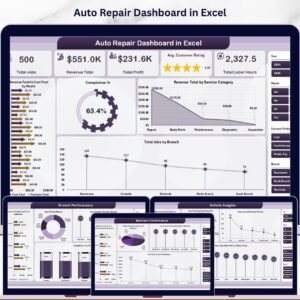
🔧 Auto Repair Dashboard in Excel — an analytical multi-page dashboard for mechanical repair data, not a KPI scorecard.
📋 Auto Body Shop KPI Scorecard in Google Sheets — a different scorecard template for body shops that prefer Google Sheets.
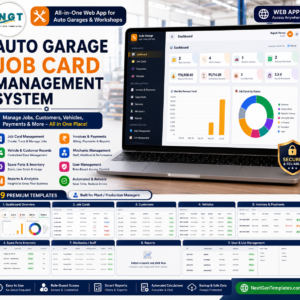
🛠️ Auto Garage Job Card Management System Web App — job-card level tracking for garages.
📝 Vehicle Service Log Data Entry System in Excel — a simple service record log.
Browse every KPI Dashboard template. New to dropdown cells? See Microsoft’s guide to applying data validation to cells.
📖 Click here to read the Detailed Blog Post
🎥 Visit our YouTube channel for step-by-step video tutorials
👉 YouTube.com/@NextGenTemplates
📅 Last updated: September 2026






























Reviews
There are no reviews yet.