

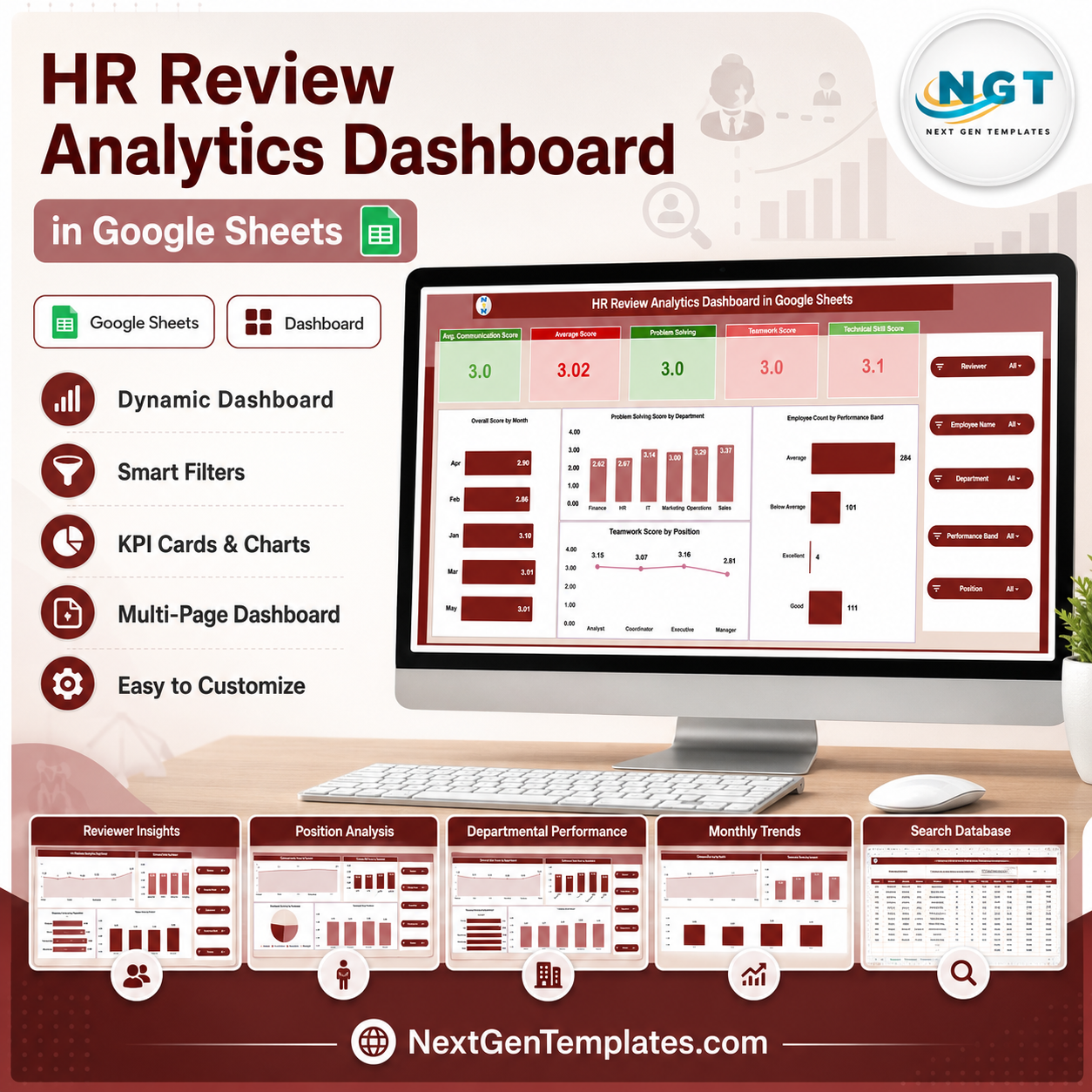




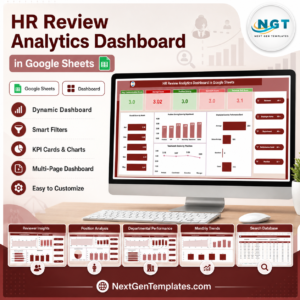
The HR Review Analytics Dashboard in Google Sheets scores every employee across 6 review dimensions — communication, problem solving, teamwork, technical skill, punctuality, and an overall average — using 5 KPI cards and 19 interactive charts spread over 7 tabs. Setup takes under 10 minutes: paste your appraisal records into the Data tab and every chart, card, and slicer updates automatically.
🌍 Join 10,000+ customers in 180+ countries using NextGenTemplates to replace paid SaaS tools with one-time-purchase Excel, Google Sheets, Power BI, and HTML templates.
✅ Instant download · One-time payment · No subscription · No per-user fees · Lifetime access
🔑 Key Features of the HR Review Analytics Dashboard in Google Sheets
📊 Six review dimensions in one model — This dashboard tracks communication, problem solving, teamwork, technical skill, and punctuality scores, then rolls them into an overall average so each employee’s full profile reads from a single row.
🎛️ Slicer-driven filtering — Native Google Sheets slicers on the Overview tab let you filter all 5 KPI cards and every chart by department, position, reviewer, or month in one click, no formulas required.
📈 19 pre-built charts across 5 analysis tabs — Reviewer Insights, Position Analysis, Departmental Performance, and Monthly Trends each get a dedicated view, so you can drill from a company number to one team fast.
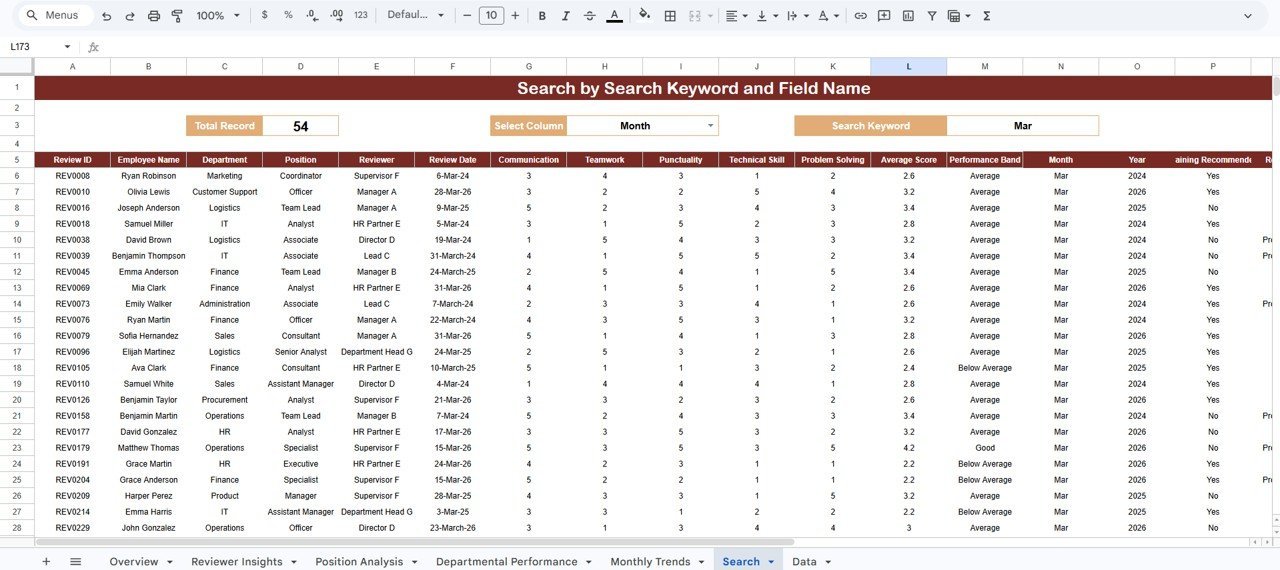
🔍 Built-in Search tab — Choose a column, type a keyword, and the sheet returns every matching review plus a live total record count, ideal before a one-on-one.
☁️ Cloud-native and shareable — Because it runs in Google Sheets, your whole HR team opens the same dashboard on any device and edits together in real time.
📦 What’s Inside the HR Review Analytics Dashboard in Google Sheets
Overview Page
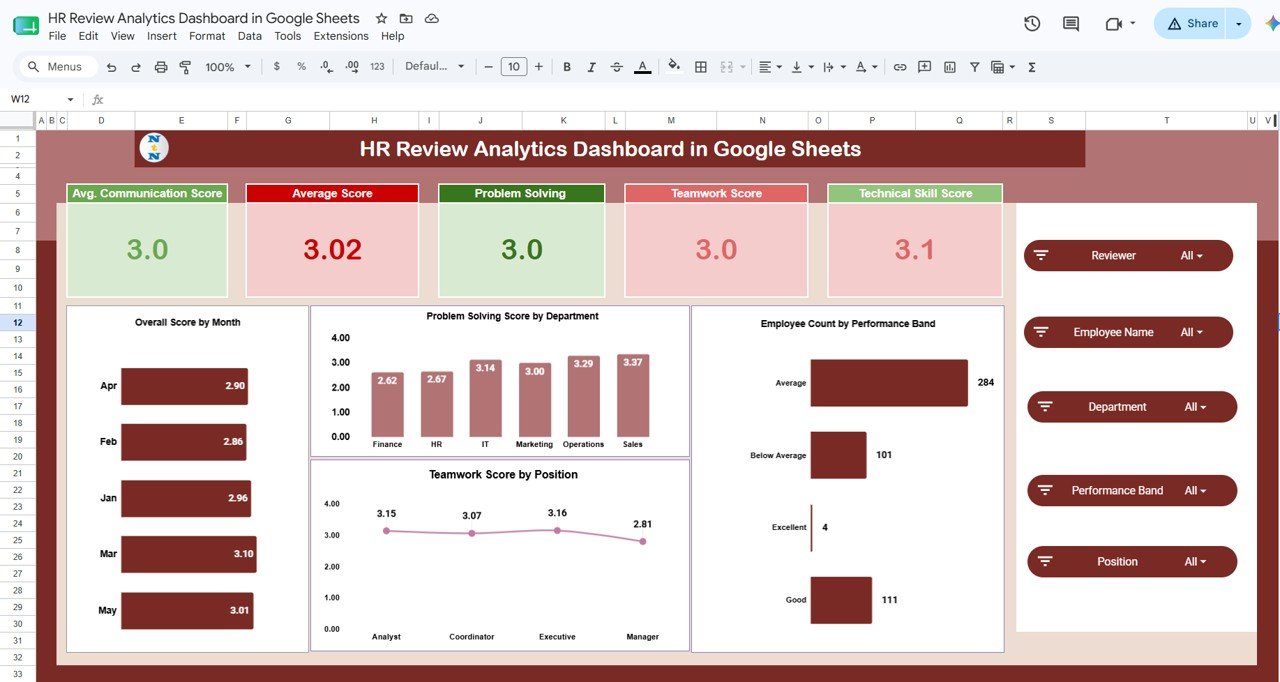
Five KPI cards — Average Communication Score, Average Score, Problem Solving, Teamwork Score, and Technical Skill Score — sit above charts for Overall Score by Month, Problem Solving Score by Department, Teamwork Score by Position, and Employee Count by Performance Band. Slicers filter the whole page at once.
Reviewer Insights
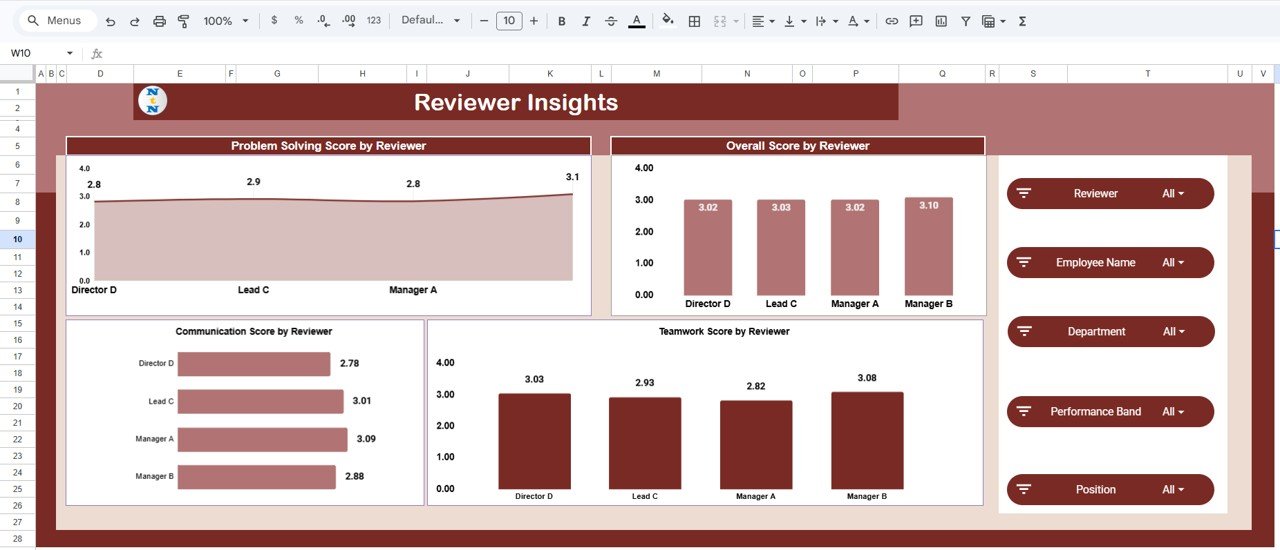
Compare how each reviewer scores employees with Problem Solving Score by Reviewer, Overall Score by Reviewer, Communication Score by Reviewer, and Teamwork Score by Reviewer — the quickest way to catch lenient or strict raters and keep appraisals consistent.
Position Analysis
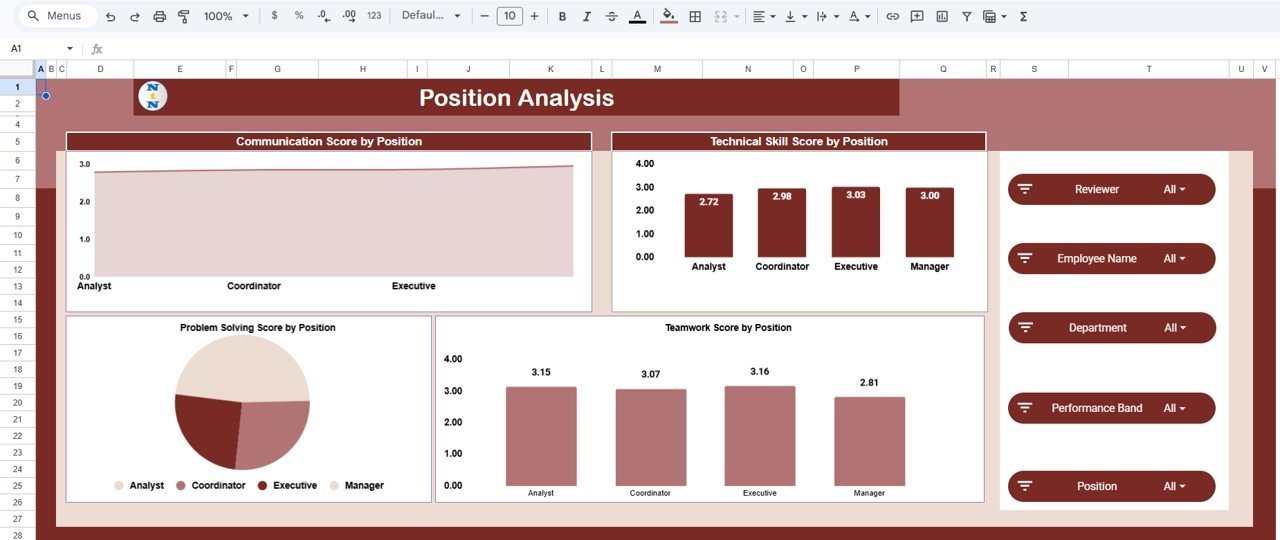
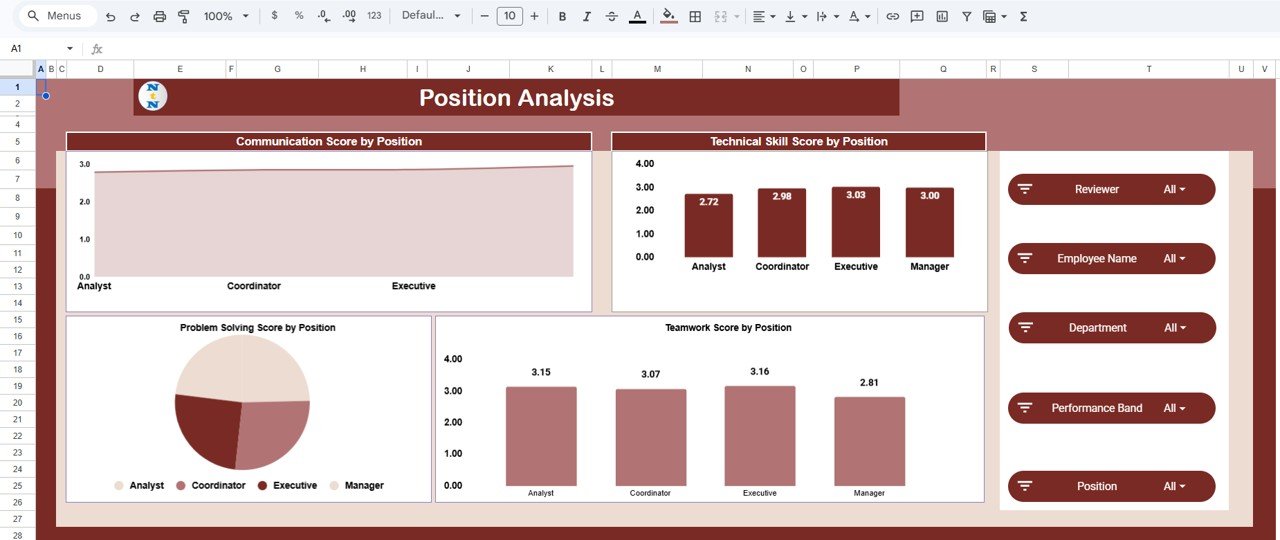
Scores broken down by job role through Communication Score by Position, Technical Skill Score by Position, Problem Solving Score by Position, and Teamwork Score by Position, so you can see which competencies are strong or weak at each level.
Departmental Performance
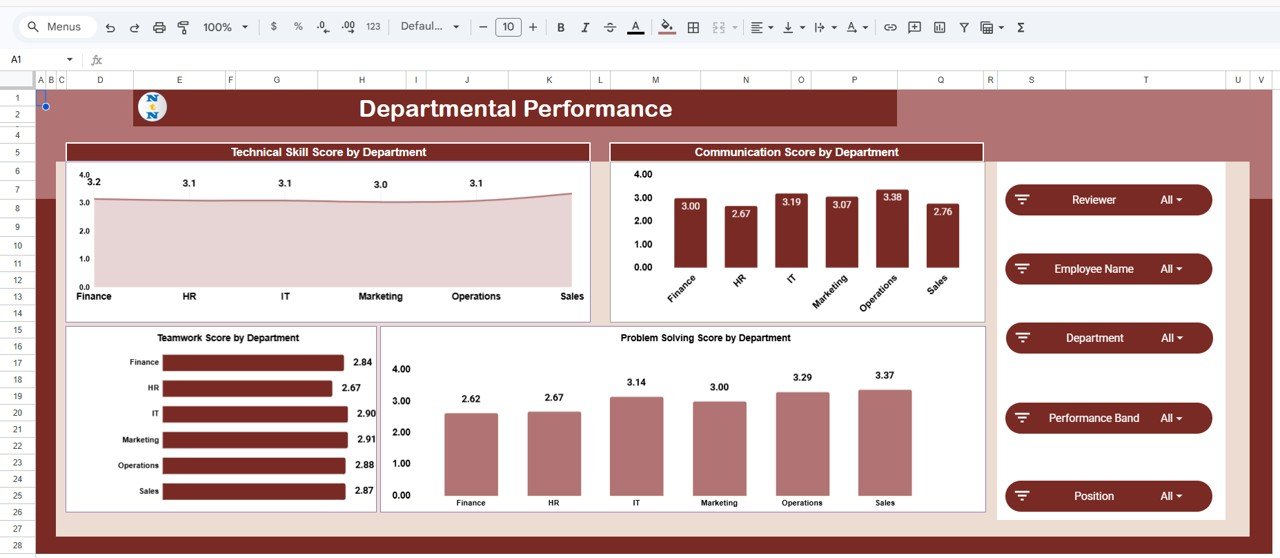
Technical Skill Score by Department, Communication Score by Department, Teamwork Score by Department, and Problem Solving Score by Department sit side by side, making it easy to benchmark teams and aim training budgets where they help most.
Monthly Trends
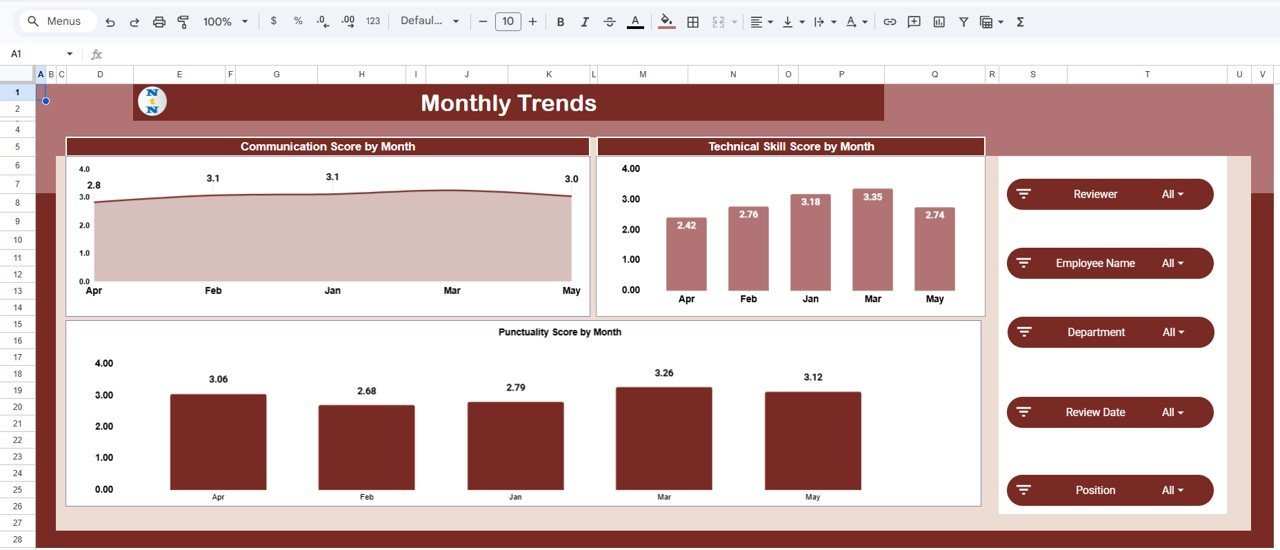
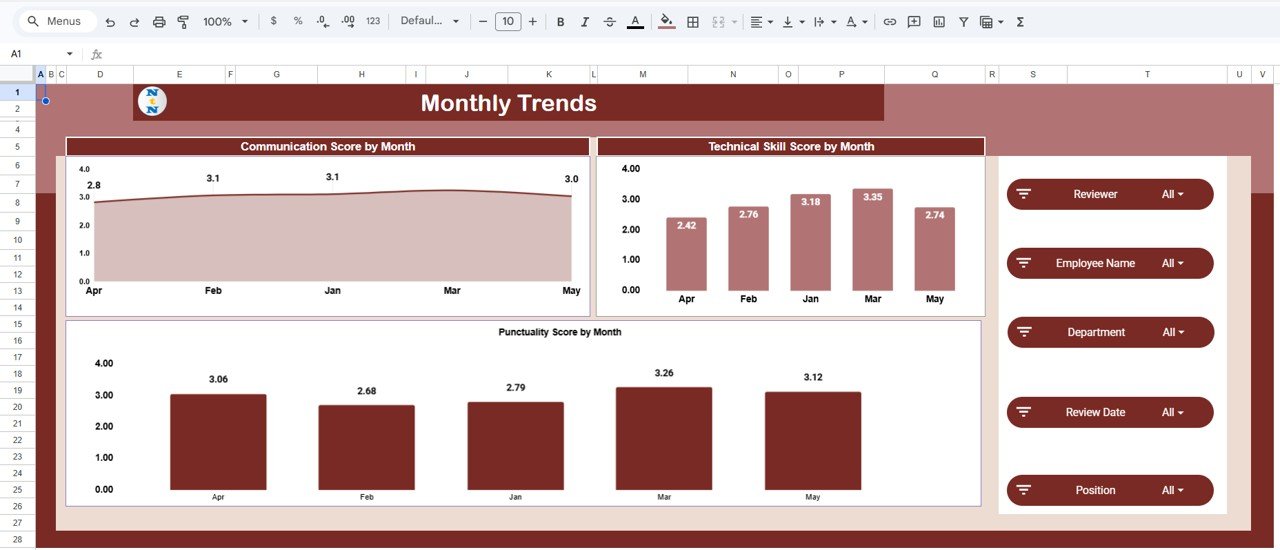
Track movement over time with Communication Score by Month, Technical Skill Score by Month, and Punctuality Score by Month, so you can confirm whether coaching and feedback are actually moving the numbers.
Search Sheet
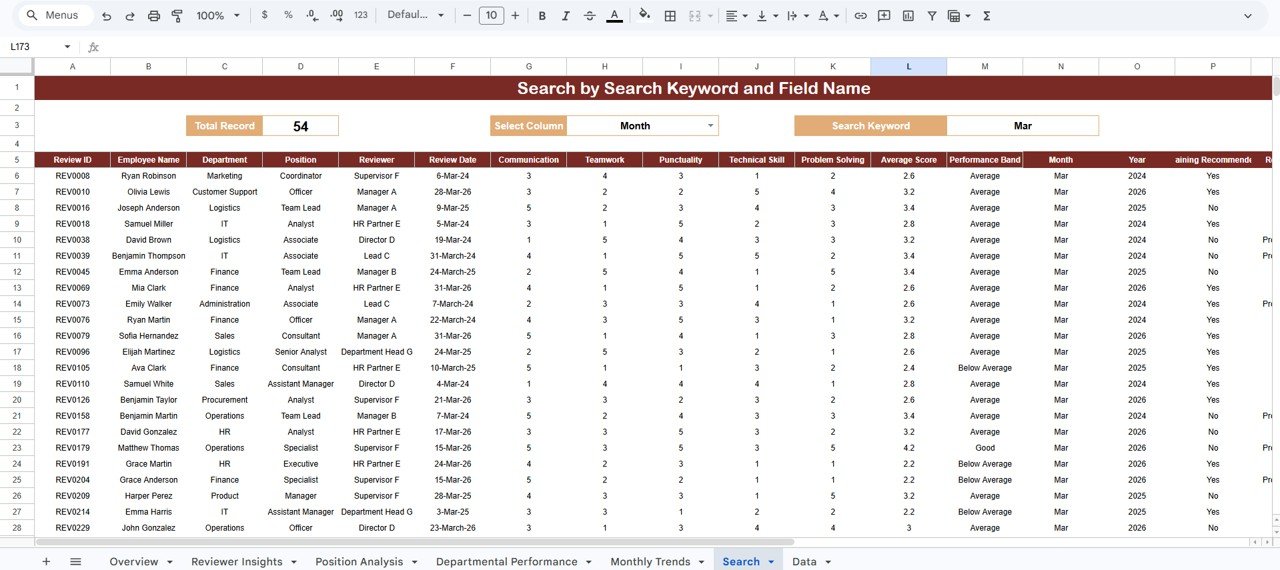
Find review records instantly: select a column, enter a search keyword, and the sheet shows every matching record with a total count, so a full review history is one search away.
Data Sheet
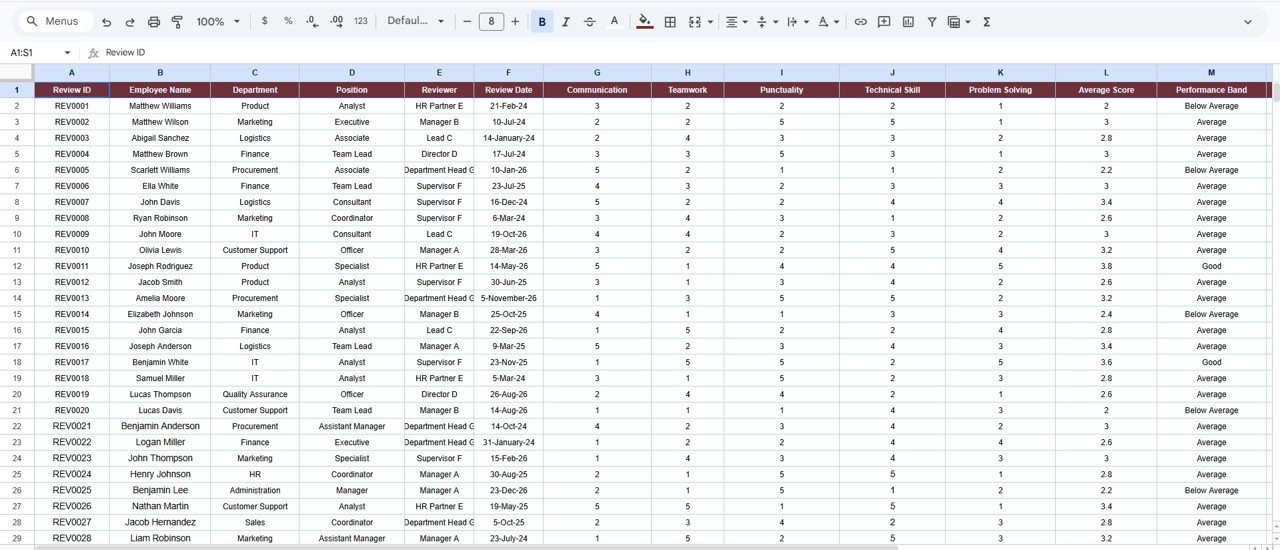
The Data tab holds your review records. Keep the existing column format, add or paste new rows, and every KPI card, chart, and search result updates automatically across the workbook.
📊 HR Review Analytics Dashboard vs. Excel vs. Paid Review SaaS — Where This Fits
| Feature | HR Review Analytics Dashboard (Google Sheets) | Microsoft Excel Dashboard | Lattice / 15Five / BambooHR |
|---|---|---|---|
| Cost | $9.99 one-time | $17.99 one-time | $7–11 / user / month |
| Platform | Google Sheets (browser) | Excel desktop | Proprietary web app |
| Setup time | Under 10 minutes | Under 10 minutes | Days (onboarding + config) |
| Real-time team collaboration | ✅ Built in | Via OneDrive only | ✅ Yes |
| Mobile access | ✅ Sheets app | Limited | ✅ Yes |
| Own your data | ✅ In your Drive | ✅ Local file | ❌ Vendor-hosted |
| Customizable fields | ✅ Fully editable | ✅ Fully editable | Limited to plan |
| Year-1 cost at 25 users | $9.99 | $17.99 | $2,100–$3,300 |
For HR teams that want reviewer, department, and trend analytics without paying per-seat SaaS fees, the HR Review Analytics Dashboard in Google Sheets sits in the sweet spot.
👥 Who This Template Is For — and Who It’s Not For
✅ This template is built for:
- HR managers and people-ops leads at 10–500 person companies running periodic appraisals
- Team leads comparing competency scores across reviewers and departments
- HR consultants who need a clean, shareable review report for multiple clients
❌ This template is NOT for:
- Teams needing automated 360-degree feedback collection with email workflows and reminders
- Organizations that require SOC 2, SSO, or HRIS integration out of the box
- Continuous OKR or goal-tracking instead of periodic review scoring
⚙️ How to Use the HR Review Analytics Dashboard in Google Sheets
1️⃣ Open the included PDF guide and click the Google Sheets copy link to create your own editable copy in Google Drive.
2️⃣ Paste your employee review records into the Data tab, keeping the existing column format.
3️⃣ Open the Overview tab and use the slicers to filter the KPI cards and charts by department, position, reviewer, or month.
4️⃣ Explore the Reviewer, Position, Department, and Monthly Trends tabs, then use the Search tab to pull up individual review records.
💼 Real-World Use Cases
Priya leads HR at a 60-person software firm. Each quarter she pastes appraisal scores into the Data tab and uses Reviewer Insights to catch managers who rate everyone a 5, keeping reviews fair before scores reach leadership.
Daniel runs an HR consultancy. He copies the dashboard for each client, drops in their review data, and shares a read-only link so department heads explore scores by team without a meeting.
Anita manages a retail chain’s regional staff. She watches Monthly Trends to confirm her punctuality coaching is lifting scores month over month before rolling it out to more stores.
❓ Frequently Asked Questions
What does the HR Review Analytics Dashboard in Google Sheets track?
The HR Review Analytics Dashboard in Google Sheets tracks six review dimensions — communication, problem solving, teamwork, technical skill, punctuality, and an overall average score — across 19 charts and 7 tabs, broken down by reviewer, position, department, and month.
How long does setup take?
Setup takes under 10 minutes. Open the PDF guide, click the Google Sheets copy link to create your own copy, then paste your review records into the Data tab and every chart updates automatically.
How does this compare to Lattice or 15Five?
Lattice and 15Five charge about $7–11 per user per month and host your data. The HR Review Analytics Dashboard in Google Sheets is a one-time $9.99 purchase, keeps data in your own Drive, and delivers the same reviewer, department, and trend analytics without per-seat fees.
Can my whole HR team use it at once?
Yes. Because the HR Review Analytics Dashboard in Google Sheets runs in Google Sheets, multiple HR users can view and edit the same workbook in real time on desktop or the mobile Sheets app.
Do I need formulas or coding to use it?
No. The HR Review Analytics Dashboard in Google Sheets uses native slicers and pre-built charts, so you filter and read the data with clicks. You only add rows to the Data tab in the existing format.
Is the download a subscription?
No. It is a one-time payment with lifetime access and no recurring fees. You own the Google Sheet outright once you create your copy.
👤 About the Author
Built by PK — Microsoft Certified Professional with 15+ years of Excel, Google Sheets, and Power BI experience. Founder of NextGenTemplates, reaching 300K+ subscribers across YouTube channels (@PK-AnExcelExpert, @NextGenTemplates, @NeoTechNavigators). Every template is hand-built and tested before release.
🔗 Explore Related Templates
Browse more Google Sheets Dashboards and HR & Payroll Templates. Related picks: Employee Performance Review Dashboard in Google Sheets, HR KPI Dashboard in Google Sheets, and Workforce Analytics Dashboard in Google Sheets.
Also available as: Employee Performance Review Dashboard in Excel and in Power BI. 💎 Save 35% — get all 10 HR templates in the HR & Workforce Analytics Bundle →
📖 Click here to read the Detailed Blog Post
Watch the step-by-step video Demo:
🎥 Visit our YouTube channel for step-by-step video tutorials
👉 YouTube.com/@NextGenTemplates
Compatibility and Requirements
- Works in Google Sheets. You need a free Google account and a web browser.
- The Overview tab uses slicers to filter the KPI cards and charts. Google explains charts in Add and edit a chart or graph.
















Reviews
There are no reviews yet.