



The Financial Goal Progress Checklist Template in Excel is an essential tool designed to help individuals, families, and financial planners track and monitor their financial goals. Whether you’re saving for a down payment on a house, preparing for retirement, or setting up an emergency fund, this checklist helps you stay on track and motivated by providing a clear, actionable way to visualize and achieve your financial goals.
This Excel-based template allows you to break down your financial objectives into manageable tasks, set realistic deadlines, and monitor your progress over time. The user-friendly interface helps you assess how close you are to meeting your financial goals and provides insights into areas where you may need to adjust your approach. With customizable features, it’s suitable for anyone looking to improve their financial health and stay committed to their goals.
Key Features of the Financial Goal Progress Checklist Template in Excel
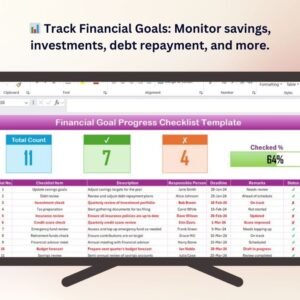
📊 Track Financial Goals & Milestones
Track all your financial goals, including savings, investments, debt repayment, and retirement planning. Break down each goal into actionable milestones and monitor your progress over time.
💰 Set Target Amounts & Deadlines
Define specific target amounts for each goal and set realistic deadlines. Use this template to ensure that you stay focused on your goals and maintain a clear timeline for achieving them.
🔄 Monitor Progress in Real-Time
Easily track your progress and compare your actual contributions to the target amounts. The template allows you to update your progress, ensuring that you stay motivated as you move closer to your financial goals.
📅 Customizable for Your Needs
Tailor the checklist to fit your unique financial situation. Whether you’re saving for a specific purchase, paying off debt, or building an emergency fund, this template is adaptable to various financial goals.
📈 Visualization of Financial Progress
View your progress through dynamic charts and visual indicators. The dashboard offers a quick overview of where you stand relative to your financial goals, helping you make adjustments as needed.
🖥️ User-Friendly Interface
The checklist is designed with ease of use in mind. With a simple layout, dropdown menus, and clear categories, you can quickly enter data and start tracking your financial goals.
Why You’ll Love the Financial Goal Progress Checklist Template in Excel

✅ Stay Focused on Your Financial Goals
Break down large financial goals into smaller, more manageable tasks and milestones, keeping you on track to achieve them.
✅ Track Your Progress Over Time
Monitor your progress in real-time with the template’s dynamic tracking features. This helps you stay motivated and make adjustments when needed to stay on target.
✅ Set Realistic Deadlines & Targets
Set specific target amounts and deadlines for each financial goal, helping you stay organized and focused on what’s important.
✅ Improve Your Financial Health
Use the checklist to track and optimize your savings, investments, and debt repayment efforts, leading to improved financial health.
✅ Fully Customizable for Your Needs
Tailor the template to reflect your unique financial objectives, whether it’s saving for a vacation, buying a home, or preparing for retirement.
What’s Inside the Financial Goal Progress Checklist Template in Excel?
- Financial Goal Tracking: Track goals like savings, investment growth, debt repayment, and retirement funds.
- Milestone Breakdown: Break down each goal into smaller milestones with target amounts and deadlines.
- Progress Monitoring: Monitor your progress over time and compare actual amounts with target values.
- Customizable Fields: Customize the template for your unique goals and financial priorities.
- Visualization Tools: Use charts and graphs to visualize your financial progress and keep track of your goals.
How to Use the Financial Goal Progress Checklist Template in Excel
1️⃣ Download the Template: Get immediate access to the Financial Goal Progress Checklist Template in Excel.
2️⃣ Input Your Financial Goals: Enter your specific goals, target amounts, and deadlines.
3️⃣ Track & Monitor Progress: Use the checklist to update your progress and compare actual contributions with the target amounts.
4️⃣ Visualize Your Financial Journey: Review your progress through visual charts and make adjustments to your savings strategy as needed.
Who Can Benefit from the Financial Goal Progress Checklist Template in Excel?
🔹 Individuals & Families Seeking Financial Stability
🔹 Financial Planners & Advisors
🔹 People Planning for Big Purchases (Home, Car, etc.)
🔹 Individuals Focused on Retirement Savings
🔹 Those Looking to Pay Down Debt or Build Emergency Funds
🔹 Anyone Interested in Improving Their Financial Health
Stay on track with your financial goals and take control of your financial future with the Financial Goal Progress Checklist Template in Excel. Easily track your goals, monitor progress, and visualize your path to financial success.
Click here to read the Detailed blog post
Visit our YouTube channel to learn step-by-step video tutorials
Youtube.com/@PKAnExcelExpert
Compatibility and Requirements
- Works in Microsoft Excel desktop (Excel 2016 or later, or Microsoft 365).
- New to Excel? Start with Microsoft’s free Excel for Windows training.
Frequently Asked Questions
Which goals can I track?
Savings, investments, debt repayment, retirement funds, an emergency fund or a specific purchase.
Can I split a goal into steps?
Yes. Each goal can be broken into milestones with target amounts and deadlines.
How do I see my progress?
You compare actual contributions with target amounts, and charts and visual indicators show where you stand.
Is it easy to enter data?
Yes. The layout is simple, with dropdown menus and clear categories.
Is there a Google Sheets version?
Yes. The Financial Goal Progress Checklist in Google Sheets covers the same job in Google Sheets.
Related Financial Goal Templates
- Financial Goal Progress Checklist in Google Sheets: the same checklist in Google Sheets
- Financial Goals Tracker Check List Template in Excel: another way to track goals in Excel
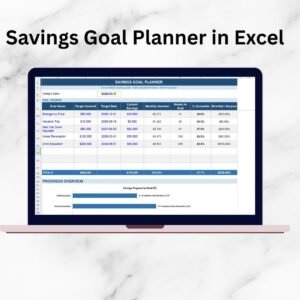
- Savings Goal Planner in Excel: plan savings toward a target
- Income Diversification Checklist Template in Excel: plan more income streams
- Checklist & SOP Pack: 12 checklist templates in one download
Browse all Excel checklists or the Excel financial tools.





























Reviews
There are no reviews yet.