



The Cybersecurity Review Calendar in Excel is an essential tool for IT managers, cybersecurity professionals, and businesses seeking to enhance their cybersecurity posture. This interactive Excel-based calendar allows you to track and schedule important cybersecurity reviews, audits, vulnerability assessments, and compliance checks to ensure that your systems and data remain secure.
Designed for organizations of all sizes, the Cybersecurity Review Calendar in Excel provides a clear overview of cybersecurity tasks and deadlines, ensuring that key activities are performed regularly to prevent security breaches. With this tool, you can stay on top of essential cybersecurity reviews and assessments, ensuring compliance with security standards and best practices.
Key Features of the Cybersecurity Review Calendar in Excel
🔐 Track Cybersecurity Review Activities
Schedule and track critical cybersecurity activities such as vulnerability assessments, security audits, and penetration testing. Ensure that reviews are performed on time and documented for compliance purposes.
⚡ Automated Reminders & Deadlines
Set automated reminders and deadlines for cybersecurity reviews to ensure they are completed on time. Stay on top of important security assessments and audits to maintain a strong security posture.
📊 Track Compliance & Risk Management
Monitor compliance with cybersecurity standards and regulations such as GDPR, HIPAA, and ISO 27001. Track risk management activities to ensure that your organization’s systems and data are protected against potential threats.
📅 Interactive & Customizable Calendar
The Excel calendar is interactive and fully customizable to meet your specific cybersecurity needs. You can adjust review schedules, assign tasks, and add notes to keep all stakeholders informed.
🖥️ Centralized & Easy-to-Use
Easily organize and manage all your cybersecurity reviews, assessments, and audits in one centralized location. The user-friendly interface ensures that you can track tasks, set deadlines, and view progress with ease.
Why You’ll Love the Cybersecurity Review Calendar in Excel

✅ Ensure Timely Cybersecurity Reviews
Track and manage the schedule for your cybersecurity reviews, ensuring that assessments are done on time to reduce the risk of security breaches.
✅ Stay Compliant with Cybersecurity Regulations
Monitor compliance with cybersecurity regulations and standards to avoid penalties and ensure that your systems meet industry requirements.
✅ Optimize Risk Management
Stay ahead of potential security risks by tracking your risk management activities and ensuring that vulnerabilities are addressed promptly.
✅ Simplify Review Scheduling & Management
Easily manage your cybersecurity review schedule and deadlines in one place. Use automated reminders to stay organized and ensure timely completion of tasks.
✅ Data-Driven Security Decisions
Use the insights from the calendar to make informed decisions regarding your organization’s cybersecurity needs. Prioritize high-risk areas and optimize your security strategy.
What’s Inside the Cybersecurity Review Calendar Template?
- Cybersecurity Review Scheduling: Track and manage review activities such as vulnerability assessments, audits, and penetration testing.
- Automated Reminders & Deadlines: Set deadlines for cybersecurity reviews and receive automated reminders.
- Compliance & Risk Management Tracking: Track compliance with standards and manage cybersecurity risks.
- Customizable & Interactive Calendar: Tailor the calendar to your organization’s specific cybersecurity needs.
- Real-Time Data Insights: Stay updated on your cybersecurity review progress and deadlines.
- Easy-to-Use Interface: Manage tasks and track cybersecurity activities efficiently.
How to Use the Cybersecurity Review Calendar in Excel
1️⃣ Download the Template: Get instant access to your Cybersecurity Review Calendar in Excel.
2️⃣ Input Review Data: Enter your cybersecurity review activities, deadlines, and tasks into the calendar.
3️⃣ Track & Monitor Deadlines: Use the calendar to track cybersecurity review schedules and ensure timely completion.
4️⃣ Optimize Security Strategy: Use insights from the calendar to optimize cybersecurity strategies, improve risk management, and maintain compliance.
Who Can Benefit from the Cybersecurity Review Calendar in Excel?
🔹 IT Managers & Security Teams
🔹 Cybersecurity Professionals
🔹 Risk & Compliance Managers
🔹 Small & Medium Businesses (SMBs)
🔹 Enterprises & Corporations
🔹 Anyone Responsible for Cybersecurity & Data Protection
Stay on top of cybersecurity activities with the Cybersecurity Review Calendar in Excel. Monitor reviews, track compliance, and ensure that your organization’s systems are secure against emerging threats.
Click here to read the Detailed blog post
Visit our YouTube channel to learn step-by-step video tutorials
Youtube.com/@PKAnExcelExpert
Compatibility and Requirements
- Works in Microsoft Excel desktop (Excel 2016 or later, or Microsoft 365).
- The calendar is interactive and customizable, so you can adjust review schedules, assign tasks and add notes. Microsoft’s Excel for Windows training covers the basics if you want to edit it further.
Frequently Asked Questions
What can I schedule in this calendar?
You can schedule cybersecurity reviews such as vulnerability assessments, security audits and penetration testing, and track the deadline for each one.
Does it track compliance?
Yes. It helps you monitor compliance with standards such as GDPR, HIPAA and ISO 27001, and it tracks risk management activities alongside the reviews.
Can I change the calendar to fit my organization?
Yes. The calendar is fully customizable. You can adjust review schedules, assign tasks and add notes so stakeholders stay informed.
Does it include reminders?
Yes. You can set deadlines for each review and use the automated reminders to see what is due.
Is there a checklist or a dashboard to go with it?
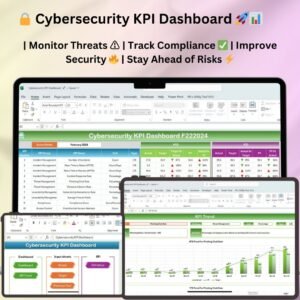
Yes. See the Cybersecurity Review Checklist in Excel and the Cybersecurity KPI Dashboard in Excel.
Related Cybersecurity and Review Templates
- Cybersecurity Review Checklist in Excel: a checklist for the same reviews
- Cybersecurity KPI Dashboard in Excel: track cybersecurity KPIs
- Audit Schedule Calendar in Excel: schedule audits on a calendar
- Legal Compliance Calendar in Excel: keep compliance deadlines in one place
- IT and Cybersecurity Operations Bundle: 8 Excel and Power BI templates in one download
Browse all Excel calendar templates.






















Reviews
There are no reviews yet.