



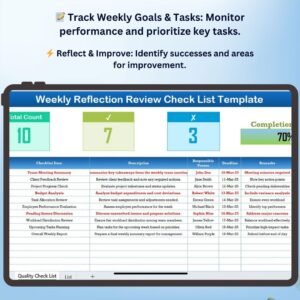
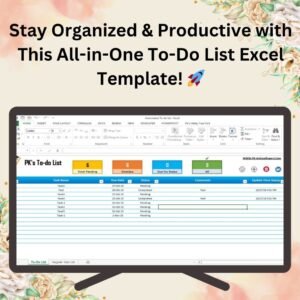
The Weekly Reflection To-Do List Checklist in Excel is an effective and organized tool designed to help individuals manage their tasks, reflect on their weekly achievements, and set goals for the upcoming week. Whether you’re a student, professional, or anyone looking to stay organized, this template helps you track tasks, evaluate productivity, and maintain a balanced work-life routine.
This customizable Excel checklist allows you to organize your weekly to-do list, reflect on your accomplishments, identify areas for improvement, and plan for the future. It provides an overview of your week, making it easier to prioritize tasks and stay on track with your goals.
Key Features of the Weekly Reflection To-Do List Checklist in Excel
📅 Comprehensive Weekly Task Tracking
Track all your to-dos for the week, including personal, work-related, or study tasks. Organize your priorities and ensure that nothing is overlooked.
⚡ Weekly Reflection Section
Reflect on your progress by reviewing completed tasks, evaluating challenges, and noting accomplishments. This helps you stay motivated and focus on continuous improvement.
📈 Goal Setting & Planning
Set actionable goals for the upcoming week and prioritize them based on urgency and importance. The checklist ensures that you stay focused on your key objectives.
📅 Customizable Task Categories
Easily categorize your tasks by type (e.g., work, personal, health) to maintain balance in your routine. You can adjust the checklist to fit your specific needs and responsibilities.
🖥️ Interactive & User-Friendly Interface
With an intuitive Excel design, this checklist allows for quick data entry, task tracking, and weekly planning. Use it with minimal effort and experience maximum productivity.
Why You’ll Love the Weekly Reflection To-Do List Checklist

✅ Stay Organized & Focused
Keep track of all your weekly tasks and goals, ensuring that nothing falls through the cracks. Stay on top of your commitments with an organized, easy-to-use template.
✅ Reflect on Your Progress
Use the weekly reflection section to assess your achievements, identify challenges, and set goals for improvement. This reflection fosters personal growth and encourages productivity.
✅ Prioritize Tasks & Set Goals
Set realistic goals for the coming week and categorize tasks based on priority. This helps you stay focused on what truly matters and ensures that you complete key tasks.
✅ Improve Time Management
By regularly reviewing and adjusting your to-do list, you’ll develop better time management skills, allowing you to make the most of your time.
✅ Boost Motivation & Productivity
Seeing completed tasks and reflecting on your progress motivates you to keep moving forward and achieve more in the week ahead.
What’s Inside the Weekly Reflection To-Do List Checklist Template?
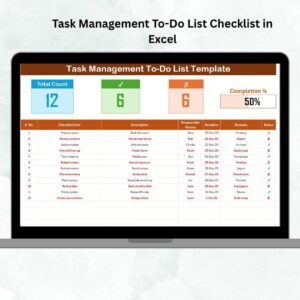
- Task Tracking: Organize tasks by category (work, personal, etc.), status, and deadline.
- Weekly Reflection: Review accomplishments, evaluate challenges, and assess progress toward goals.
- Goal Setting: Set actionable goals for the upcoming week and prioritize based on importance.
- Customizable Categories: Adjust the task categories to fit your personal or professional life.
- Interactive Excel Interface: Easily track tasks, mark completed items, and update your checklist throughout the week.
How to Use the Weekly Reflection To-Do List Checklist
1️⃣ Download the Template: Instantly access your Weekly Reflection To-Do List Checklist.
2️⃣ Enter Your Tasks: Add tasks for the week, including deadlines and priorities.
3️⃣ Track & Reflect: Use the checklist to track completed tasks and reflect on your progress.
4️⃣ Set Goals & Plan: Set your goals for the upcoming week and adjust priorities as needed.
Who Can Benefit from the Weekly Reflection To-Do List Checklist?
🔹 Professionals & Managers
🔹 Students & Academic Learners
🔹 Busy Parents & Caregivers
🔹 Freelancers & Entrepreneurs
🔹 Anyone Looking to Stay Organized & Boost Productivity
Stay organized, reflect on your accomplishments, and plan for the future with the Weekly Reflection To-Do List Checklist in Excel. Improve your time management, boost productivity, and achieve your weekly goals with this easy-to-use tool.
Click here to read the Detailed blog post
Visit our YouTube channel to learn step-by-step video tutorials
Youtube.com/@PKAnExcelExpert
Compatibility and Requirements
- Works in Microsoft Excel desktop (Excel 2016 or later, or Microsoft 365).
- New to Excel? Microsoft covers the basics in Excel for Windows training.
Frequently Asked Questions
How are tasks organized?
Tasks are organized by category (such as work, personal or health), status and deadline.
Is there space to reflect on the week?
Yes. The Weekly Reflection section lets you review accomplishments, challenges and progress toward your goals.
Can I plan the next week?
Yes. You set goals for the upcoming week and prioritize them by importance.
Can I change the categories?
Yes. You can adjust the task categories to fit your personal or work life.
Related To-Do and Weekly Planning Templates
- Fully Functional To-do List in Excel: a fully functional to-do list in Excel
- Weekly Reflection Review Checklist in Excel: review your week
- Weekly Reflection Tracking Checklist in Excel: track weekly progress and well-being
- Daily To-Do List Checklist in Google Sheets: a daily to-do list in Google Sheets
- Checklist & SOP Pack: 12 checklist templates in one download
Browse all Excel checklists or the Google Sheets checklists.























Reviews
There are no reviews yet.