

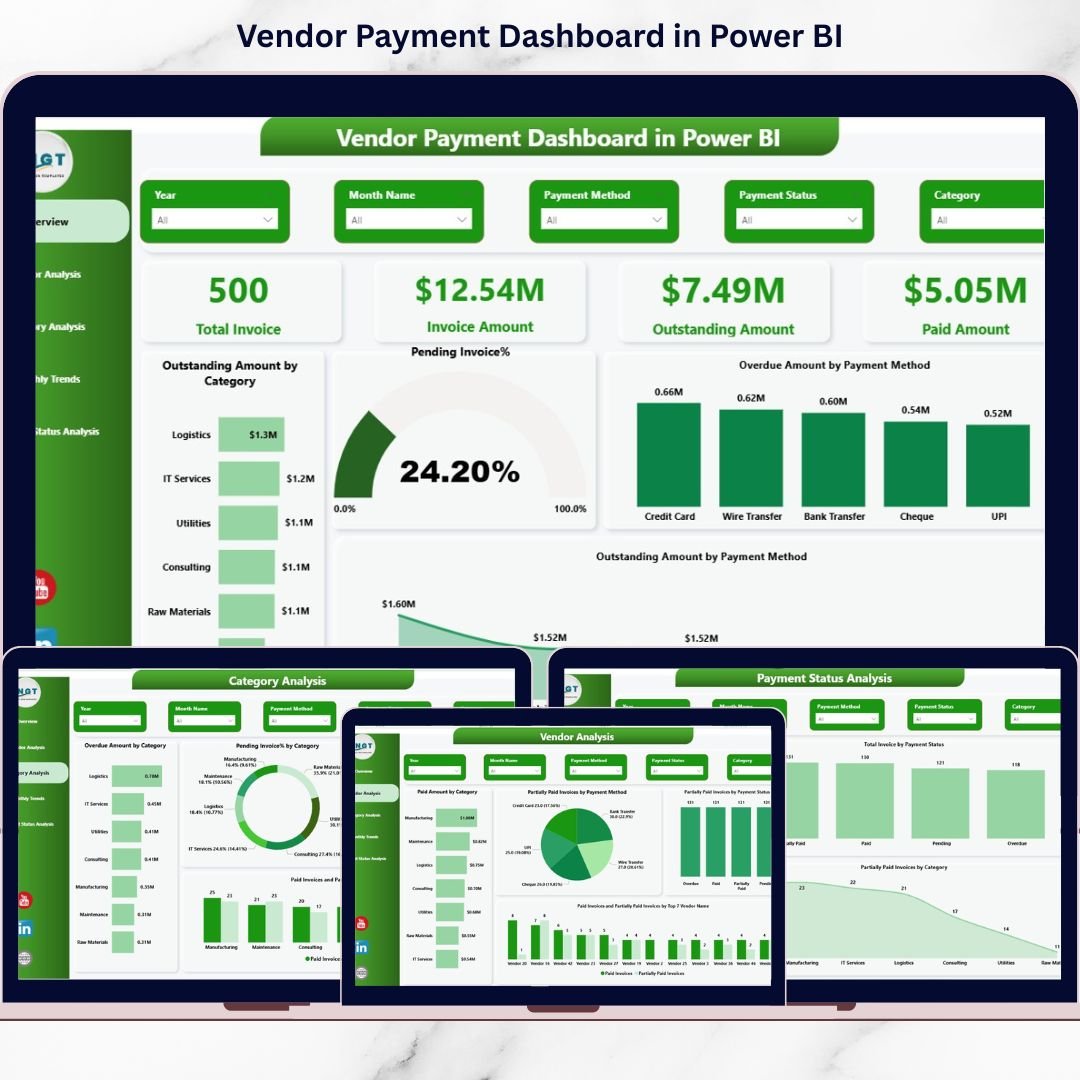
Are overdue invoices silently damaging your cash flow? Are vendor follow-ups becoming stressful and time-consuming? If yes, it’s time to upgrade your financial visibility with our powerful Vendor Payment Dashboard in Power BI.
This ready-to-use Power BI solution transforms complex invoice data into clear, interactive, and real-time insights. Instead of struggling with scattered Excel sheets, you can now monitor outstanding balances, overdue amounts, payment trends, and vendor performance — all from one centralized dashboard.
Take control of your vendor payments before they control your business.
🚀 Key Features of Vendor Payment Dashboard in Power BI
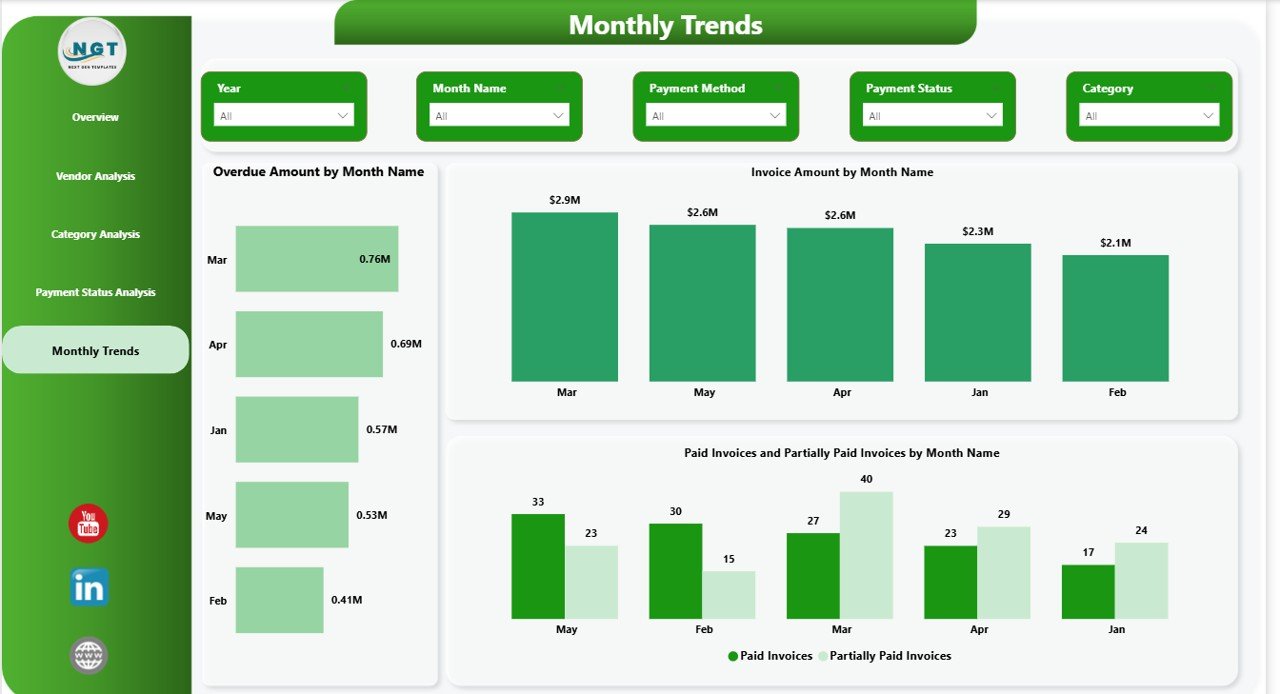
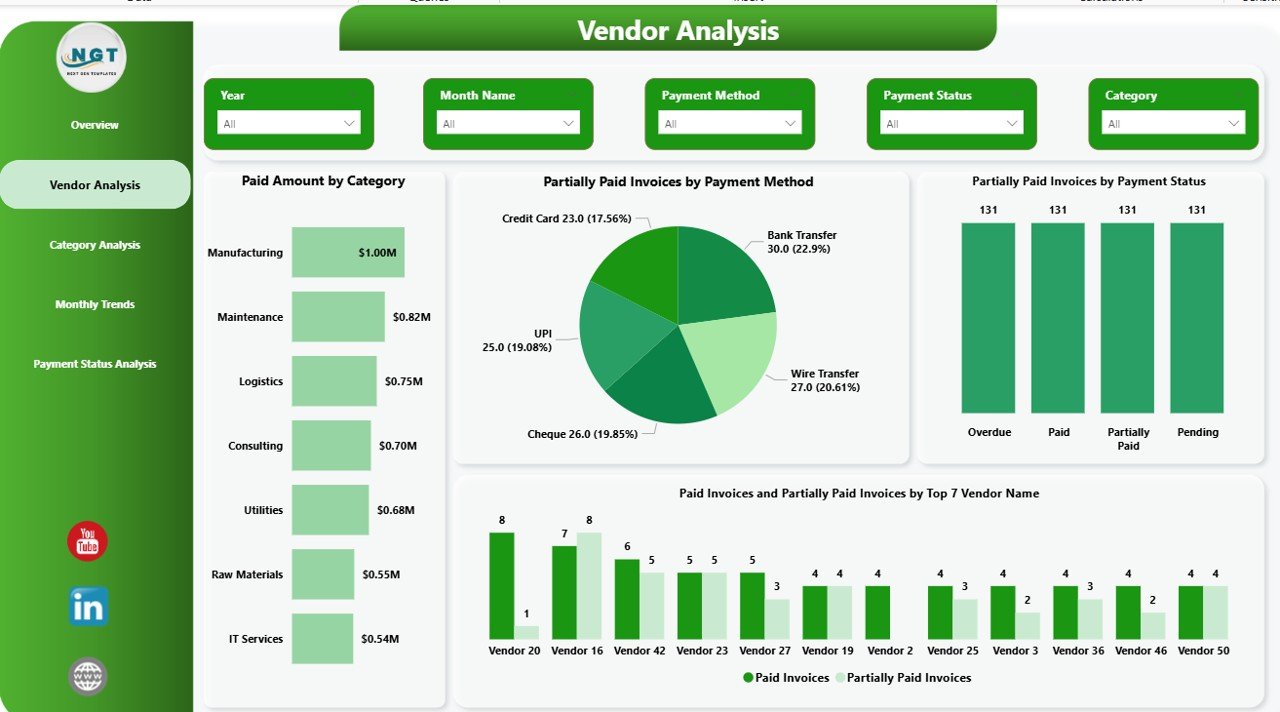
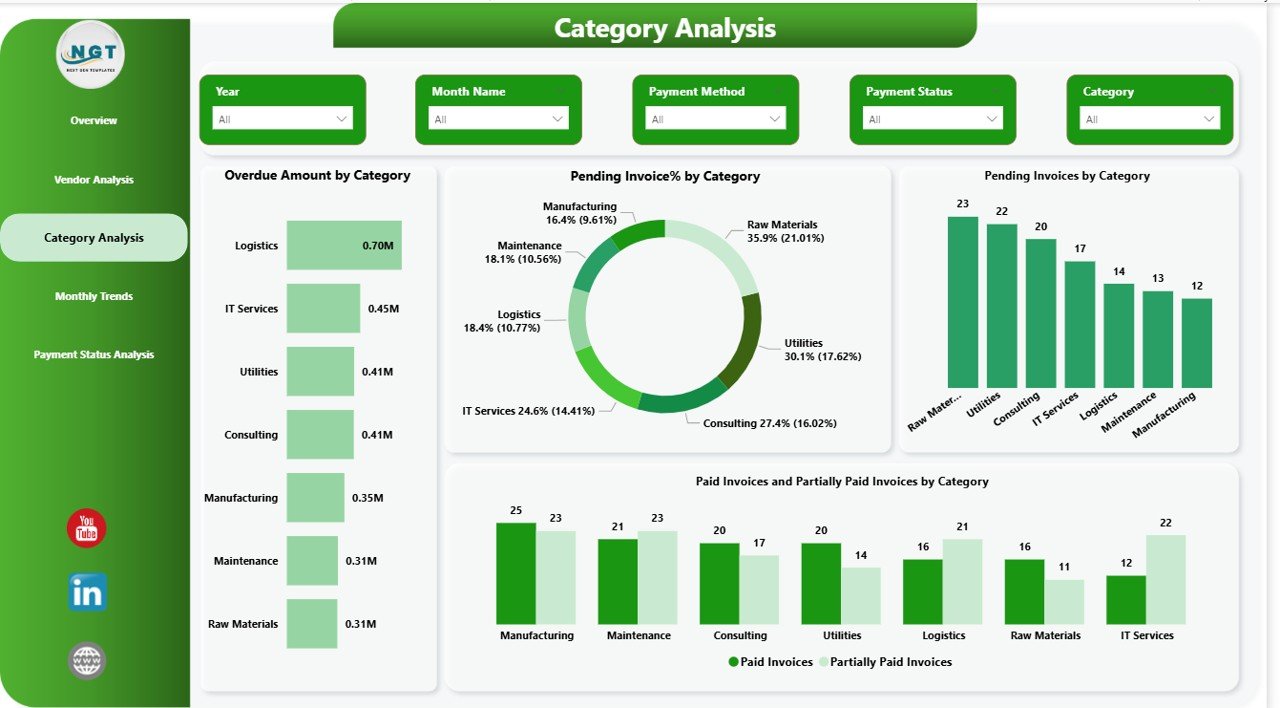
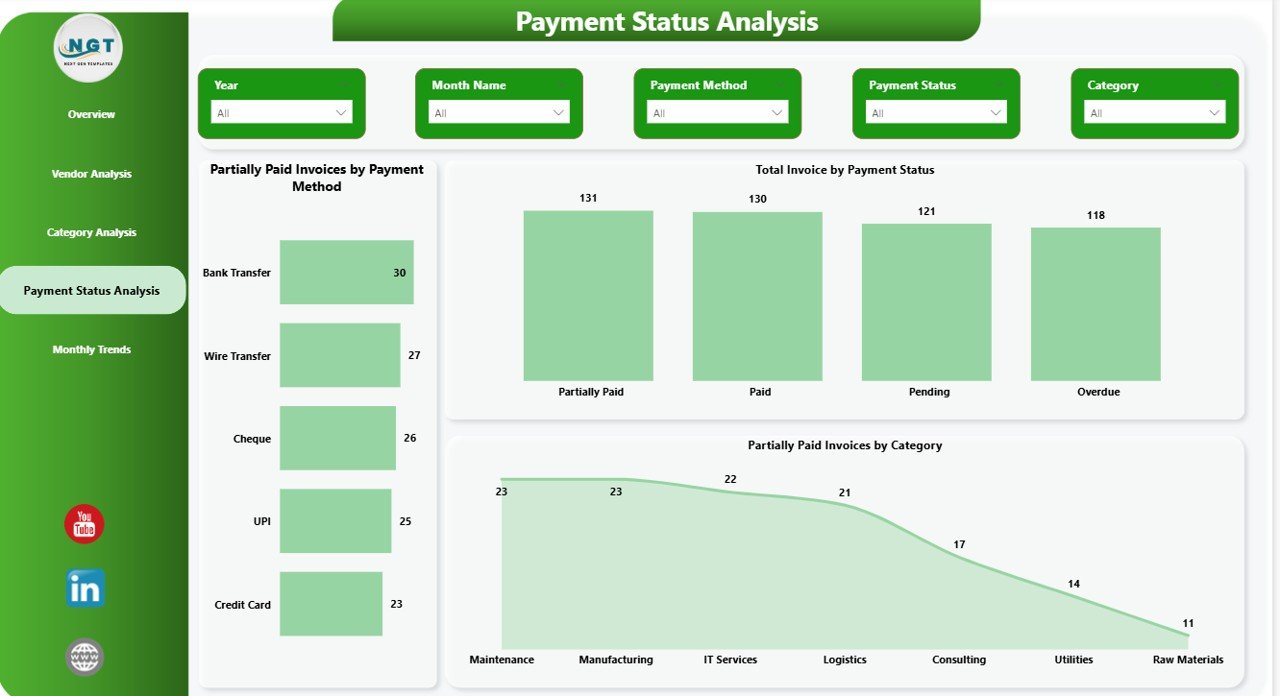
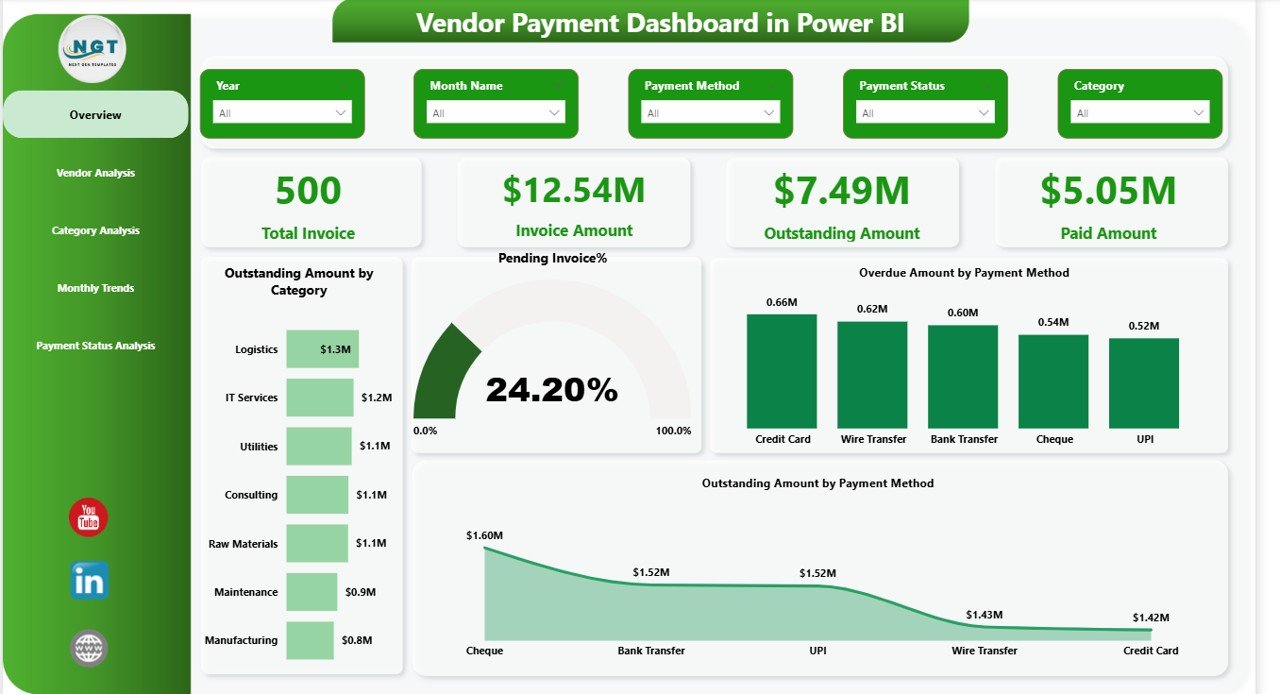
📊 5 Interactive Dashboard Pages – Overview, Vendor Analysis, Category Analysis, Payment Status Analysis, and Monthly Trends for complete visibility.
💳 Real-Time KPI Tracking – Instantly monitor Total Invoices, Invoice Amount, Outstanding Amount, Paid Amount, and Pending %.
⚠️ Overdue Invoice Alerts – Identify high-risk payments quickly using clear visual indicators.
📈 Monthly Trend Analysis – Track invoice amounts, overdue payments, and payment behavior month by month.
🏷️ Category & Vendor Insights – Analyze spending and payment performance by vendor and category.
🎯 Payment Method Analysis – Understand outstanding and overdue amounts by payment method.
🔎 Dynamic Slicers & Filters – Filter data by vendor, category, payment method, or date in seconds.
📦 What’s Inside the Vendor Payment Dashboard in Power BI
When you purchase this digital product, you get:
✔️ Fully designed Power BI (.pbix) file
✔️ 5 structured dashboard pages
✔️ Pre-built KPI cards and calculated measures
✔️ Interactive charts (Bar, Donut, Line, KPI Cards)
✔️ Clean data model structure
✔️ Ready-to-use visuals with slicers
✔️ Easy-to-edit layout for customization
This dashboard is designed for immediate implementation. Simply connect your data and start analyzing.
🛠️ How to Use the Vendor Payment Dashboard
Using this dashboard is simple and practical:
1️⃣ Import your invoice dataset into Power BI.
2️⃣ Ensure required fields like Invoice Number, Vendor Name, Invoice Date, Due Date, Invoice Amount, Paid Amount, Payment Status, and Payment Method are included.
3️⃣ Refresh the data model.
4️⃣ Use slicers to filter by vendor, category, or date.
5️⃣ Monitor overdue invoices and outstanding balances instantly.
You can also customize visuals, colors, and measures according to your business requirements.
👥 Who Can Benefit from This Vendor Payment Dashboard?
This dashboard is ideal for:
💼 Finance Managers
📊 Accounts Payable Teams
🏢 CFOs and Financial Controllers
🛒 Procurement Managers
📈 Business Owners
🏭 Small & Medium Enterprises
Whether you manage 50 invoices or 5,000 invoices per month, this solution scales with your business.
💡 Why This Dashboard Is a Game-Changer
Instead of spending hours preparing reports, you can now refresh your data and get instant clarity. Moreover, the dashboard highlights overdue invoices clearly, helping you reduce penalties and improve vendor relationships.
Because it centralizes payment data, leadership can forecast cash flow more accurately. As a result, businesses strengthen financial control and improve strategic planning.
Stop reacting to payment issues. Start managing them proactively.
Click here to read the Detailed blog post
Watch the step-by-step video tutorial:






























