



The Income and Expense Dashboard in Google Sheets is a ready-made financial tool that helps you track and manage your personal or business finances in one place. It is built for freelancers, small business owners, households and anyone who wants a clear view of their money. Enter your transactions, and automated calculations and charts show your total income, total expenses and net savings or loss.
This interactive dashboard works as a simple Google Sheets finance tracker and budget tracker. It shows your cash flow, spending trends and overall financial stability without advanced financial knowledge or manual math.

Key Features of the Income and Expense Dashboard in Google Sheets
- Income and expense tracking: Record income sources and expenses with ease, and categorize them for better financial clarity.
- Real-time data entry: Enter income and expense data quickly and see the dashboard update automatically.
- Financial insights: Get real-time insights into your financial health with visual summaries and charts.
- Customizable categories: Tailor income and expense categories to your specific needs, for example rent, utilities or salary.
- Automated calculations: The dashboard automatically calculates total income, total expenses and net savings or loss.
- Easy-to-use interface: Designed with simplicity in mind, so no advanced financial knowledge is required.
- Visual charts: Color-coded charts help you track spending trends and financial progress over time.
Why You’ll Love This Budget Tracker
- Stay on top of your finances: Track your financial data in real time and get a complete view of income, expenses and net savings.
- Easily customizable: Modify categories, expenses and income sources to match your unique financial situation.
- User-friendly: The simple layout and automatic calculations make it easy to get started.
- Save time: Automate tedious calculations and focus on making informed financial decisions.
- Visual financial insights: Charts and graphs help you understand your spending patterns, making it a practical financial health tracker.
What’s Inside the Template
| Section | What it does |
|---|---|
| Income & Expense Tracker | A section to record all income and expenses, categorized for easier management. |
| Customizable Categories | Modify categories based on your personal or business financial structure. |
| Financial Summary | An overview of total income, expenses and savings for easy reporting and analysis. |
| Simple Dashboard | A visual summary of your financial situation, including charts and graphs to track trends. |
| Real-Time Updates | Your financial overview updates automatically as you input data. |
Who Is It For?
This template supports income and expenses management for a wide range of users:
- Small business owners
- Freelancers and contractors
- Personal finance enthusiasts
- Project managers
- E-commerce sellers
- Households and families
- Financial planners
How to Use the Income and Expense Dashboard
- Download the template: Access the pre-configured Income & Expense Dashboard in Google Sheets.
- Input your data: Enter your income and expense data into the designated fields.
- Track spending and income: Monitor your cash flow and make sure your financial health is on track.
- Analyze your finances: Use the summary and charts to analyze income, expenses and savings trends.
- Customize the template: Modify categories and adjust the dashboard to suit your situation.
Watch the step-by-step video tutorial: Income and Expense Dashboard in Google Sheets
Click here to read the detailed blog post on the Income and Expense Dashboard in Google Sheets.
Visit our YouTube channel to learn from step-by-step video tutorials: Youtube.com/@PKAnExcelExpert
Frequently Asked Questions
What does the Income and Expense Dashboard in Google Sheets calculate?
It automatically calculates total income, total expenses and net savings or loss, and presents them in a financial summary with charts.
Can I change the income and expense categories?
Yes. Categories are fully customizable, so you can add or modify items such as rent, utilities or salary to fit your personal or business finances.
Is it suitable for both personal and business use?
Yes. It is designed for personal or business finances and suits freelancers, small business owners, e-commerce sellers, households and financial planners.
Do I need advanced financial or spreadsheet skills?
No. The template has an easy-to-use interface and requires no advanced financial knowledge. You simply enter your data in the designated fields.
Does the dashboard update automatically?
Yes. As you enter income and expense data, the dashboard, summary and charts update in real time.
Is there a tutorial to help me get started?
Yes. A step-by-step video tutorial is embedded above, and a detailed blog post is linked on this page.
Also check our Attendance Template in Google Sheet
Last updated: October 2026
Compatibility and Requirements
- Works in Google Sheets with a free Google account and a web browser. Nothing to install.
- Make a copy to your own Google Drive and edit it there. Google explains charts in Add & edit a chart or graph.
Related Finance Templates
- Income and Expenses Monthly and Yearly View in Google Sheets: see income and spending by month and year
- Cash Flow Dashboard in Google Sheets
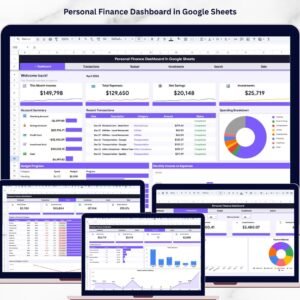
- Personal Finance Dashboard in Google Sheets: budgets and investments as well as income
- Income and Expense Data Entry System in Excel: an Excel option with an entry form
- Finance & Accounting Command Center: 8 Excel, Power BI and Google Sheets finance templates
Browse all Google Sheets dashboards or the Google Sheets financial templates.



















Reviews
There are no reviews yet.