



The Smart Data Entry Form with Minimum VBA is a ready-made Excel data entry tool that makes entering records in Excel faster and more accurate. It is built for small business owners, freelancers, HR teams, sales teams and anyone who logs customer details, inventory or sales data. It needs only minimal VBA code, so you can capture clean, validated, date-stamped records without writing complex macros.
The form uses a small amount of VBA to automate the process. It suits users who want a solution that is simple to use and still effective for data entry workflows. You can customize the fields to match your needs and manage your data in a structured, organized way.

Key Features of the Smart Data Entry Form with Minimum VBA
- Easy-to-use interface: A clean form layout that makes data entry simple, even for people new to Excel forms.
- Minimal VBA code: A small amount of VBA automates the form actions, so there is no complex programming to learn or maintain.
- Data validation: Built-in data validation rules help keep entries accurate and consistent and prevent common input errors.
- Automatic date stamping: The current date is inserted automatically, which supports tracking and record-keeping.
- User customization: You can change the form fields to fit your own data entry needs.
- Integrated data storage: Entered data is saved to your Excel worksheet, ready for lookup and analysis.
- Quick data entry: You can enter large amounts of data much faster than typing directly into rows.
Why You’ll Love This VBA Data Entry Form
- Saves time: The automated form cuts down the time you spend on manual data entry.
- Simple to set up: You can start entering data quickly with only minimal VBA knowledge.
- Fewer errors: Automated validation and automatic date insertion reduce mistakes.
- Customizable: You can adapt the form to your own fields and processes.
- Ideal for many uses: It works well for customer information, inventory records, sales data and other structured lists.
What’s Inside the Template
| Component | What it does |
|---|---|
| User-friendly form layout | Lets you move easily through the fields as you enter data |
| Basic VBA automation | Uses minimal VBA to simplify data entry and automate tasks |
| Date insertion | Adds the current date automatically for record-keeping |
| Data validation | Checks that entered data is accurate using built-in validation rules |
| Data storage | Saves entered data to your worksheet automatically for later reference and analysis |
Who Is This Excel Data Entry Tool For?
This tool suits anyone who needs to collect and organize records in Excel in a consistent way, including:
- Small business owners who track customers, stock or sales
- Freelancers who manage client and project information
- Data entry professionals who handle high volumes of records
- Project managers who keep structured project logs
- HR departments that maintain employee data
- Sales teams that record leads and transactions
- Consultants who organize client data efficiently
How to Use the Smart Data Entry Form
- Download the template: Download the file, which includes the data entry form and its minimal VBA code.
- Enable macros: Unzip the file and make sure macros are enabled in Excel before you use it.
- Customize the form: Change the fields to match your data entry needs.
- Enter data: Fill in your data through the form with a few simple clicks.
- Validate entries: The form checks your entries automatically to help keep them accurate.
- Store data: Your records are saved to the Excel worksheet for future use.
After downloading and unzipping this file, make sure macros are enabled before use. For step-by-step instructions on enabling macros in Excel, see our tutorial: https://www.pk-anexcelexpert.com/4-easy-ways-to-enable-macros-in-excel-vba/
Click here to read the detailed blog post
Watch the Step-by-Step Video Tutorial
Visit our YouTube channel for step-by-step video tutorials: Youtube.com/@PKAnExcelExpert
Frequently Asked Questions
What is the Smart Data Entry Form with Minimum VBA?
It is an Excel data entry form that uses a small amount of VBA code to automate data entry. It includes data validation, automatic date stamping, and automatic storage of entries in your worksheet.
Do I need to know VBA to use this data entry form?
No. The form is built with minimal VBA, so you can set it up and start entering data with very little VBA knowledge.
Can I change the fields in the form?
Yes. The form is customizable, so you can change the fields to suit your own data, such as customer information, inventory or sales records.
How does the form reduce data entry errors?
Built-in data validation rules check your entries for accuracy and consistency. Automatic date stamping means you never have to type the date by hand.
Where is my entered data saved?
Each entry is saved automatically to your Excel worksheet. Your data stays in one place for easy access and analysis.
Why does the file ask me to enable macros?
The form runs on VBA, so macros must be enabled after you download and unzip the file. Follow our macro-enabling tutorial linked above for step-by-step instructions.
Improve your data entry process and cut down on manual work with the Smart Data Entry Form with Minimum VBA.
Also check our Asset Transfer Management System V1.0
Last updated: October 2026
Compatibility and Requirements
- Needs Microsoft Excel desktop on Windows with macros enabled, because the file runs on VBA.
- It does not work in Excel for the web, Google Sheets or the Excel mobile apps. Microsoft explains macro settings in Enable or disable macros in Microsoft 365 files.
Related Data Entry Templates
- Data Entry Form in Excel: another form-based entry template
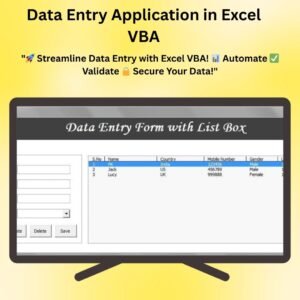
- Data Entry Application in Excel VBA: a fuller VBA data entry app
- Data Entry Form with Picture Box in Excel VBA: a free form that also stores a picture per record
- Purchase Entry Data Entry System in Excel: a ready entry system for purchases
- VBA Management Systems Mega Pack: 5 premium VBA systems in one bundle
Browse all Excel VBA tools or the MS Excel templates.





























Reviews
There are no reviews yet.