



Managing a Facility Maintenance & Renovation Tracker in Google Sheets becomes challenging when you handle maintenance issues, renovation requests, department-wise needs, estimated costs, and priority levels manually. Whether it’s an office, school, hospital, warehouse, retail store, or industrial unit—maintenance tasks are constant and unavoidable. A disorganized system leads to delays, miscommunication, and unnecessary expenses. That’s why the Facility Maintenance & Renovation Tracker in Google Sheets is the perfect tool to manage everything from one centralized place.
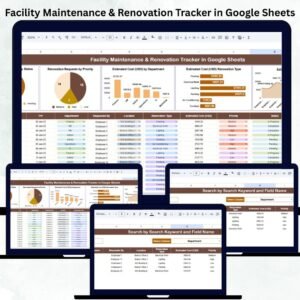
This ready-to-use tracker gives facility managers, operations teams, and admin departments full visibility into maintenance and renovation activities. With automated charts, a powerful search tool, and a clean data structure, you can stay organized, respond faster, and plan facility improvements with confidence. All you need to do is enter your data—the dashboard updates automatically!

✨ Key Features of Facility Maintenance & Renovation Tracker in Google Sheets
This tracker includes valuable features that bring clarity and speed to facility management.Facility Maintenance & Renovation Tracker in Google Sheets
🗂️ Centralized Tracker Sheet – Record all maintenance and renovation requests with details like request type, priority, department, cost, and status.Facility Maintenance & Renovation Tracker in Google Sheets
📊 Automated Visual Dashboards – Analyze trends through charts that update instantly.
🚨 Priority-Level Insights – Identify urgent, high, medium, or low-priority tasks.
🏢 Department-Wise Cost Tracking – View estimated spending across teams.
💰 Renovation Type Analysis – Compare costs by renovation type such as electrical, plumbing, furniture, or infrastructure.
👤 Requester Insights – See who submits the most maintenance or renovation requests.
🔍 Smart Search Function – Find any record instantly using keywords or filters.
💻 Accessible on All Devices – Works online with Google Sheets for real-time collaboration.
📥 No Technical Skills Needed – Just enter your data and the dashboard generates insights automatically.
This tracker eliminates guesswork and helps teams resolve issues more efficiently.
📦 What’s Inside the Facility Maintenance & Renovation Tracker in Google Sheets
When you download this template, you get a complete system designed for structured facility management:
📄 Tracker Sheet (Main Database)
Includes all essential fields such as:
Request ID
Maintenance or Renovation Type
Priority Level
Department
Requested By
Estimated Cost
Request Date
Status
Completion Date
Comments or Notes
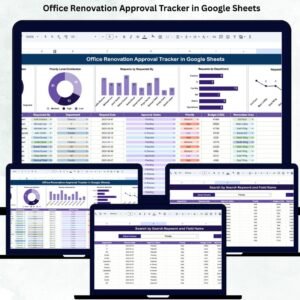
📊 Visual Analysis Charts
Renovation Requests by Status
Requests by Priority Level
Estimated Cost by Department
Estimated Cost by Renovation Type
Estimated Cost by Requester
🔎 Smart Search Panel
Search by any keyword, department name, requester, renovation type, priority, or status.
Everything is customizable, easy to edit, and built for error-free reporting.
🛠️ How to Use the Facility Maintenance & Renovation Tracker in Google Sheets
Using this tracker is simple:
1️⃣ Enter all maintenance and renovation requests with the required details.
2️⃣ Update task status as requests move toward completion.
3️⃣ Use dashboards to analyze department-wise requests, renovation costs, and trends.
4️⃣ Apply filters to evaluate priority-based tasks or pending issues.
5️⃣ Search records instantly when preparing reports or reviewing older issues.
6️⃣ Review cost charts to plan your renovation budget properly.
7️⃣ Monitor workload to ensure teams can resolve issues on time.
The dashboard updates automatically—no formulas or manual calculations needed.
👥 Who Can Benefit from This Facility Maintenance & Renovation Tracker in Google Sheets
This tracker is ideal for:
🏢 Facility Managers – Get complete visibility of staff workloads and unresolved issues.
⚙️ Operations Teams – Track what needs immediate attention.
🧰 Maintenance & Housekeeping Departments – Manage daily tasks with clarity.
📋 Admin Staff – Log requests and follow up on progress easily.
💼 Finance Teams – Understand estimated costs and plan budget forecasts.
🏭 Manufacturing & Industrial Units – Monitor repairs, inspections, and renovations.
🏫 Schools & Universities – Track classroom renovations, maintenance jobs, and cost planning.
🏥 Hospitals & Clinics – Ensure critical areas receive timely maintenance.
Anyone responsible for maintaining a safe, functional facility will benefit from this tool.
Click here to read the Detailed blog post
Visit our YouTube channel to learn step-by-step video tutorials
Watch the step-by-step video Demo:
Visit our YouTube channel to learn step-by-step video tutorials
Youtube.com/@NeotechNavigators
Compatibility and Requirements
- Works in Google Sheets with a free Google account and a web browser.
- It works on any device and supports real-time collaboration in Google Sheets.
- New to Google Sheets? Google explains the basics in How to use Google Sheets.
Frequently Asked Questions
What fields does the tracker sheet have?
Request ID, maintenance or renovation type, priority level, department, requested by, estimated cost, request date, status, completion date and comments.
Which charts are included?
Requests by status, requests by priority level, and estimated cost by department, by renovation type and by requester.
How do I find an old request?
Use the search panel to look up any keyword, department, requester, renovation type, priority or status.
Do I need formulas to update the charts?
No. Enter your data and the charts update automatically.
Related Facility and Renovation Templates
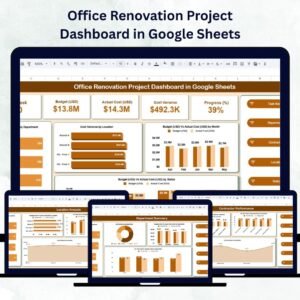
- Office Renovation Project Dashboard in Google Sheets: track renovation projects on a dashboard
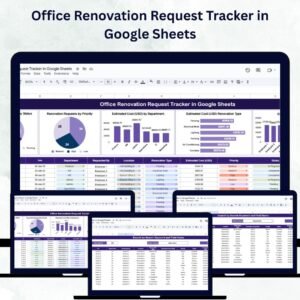
- Office Renovation Request Tracker in Google Sheets: log office renovation requests
- Office Cleaning Request Tracker in Google Sheets: handle cleaning requests
- Office Renovation Project Dashboard in Excel: the Excel option for renovation projects
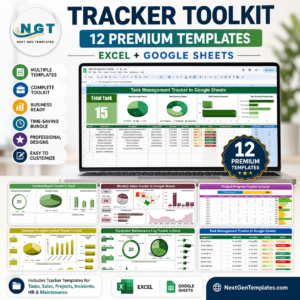
- Tracker Toolkit: 12 tracker templates in one bundle
Browse all Google Sheets trackers or the Google Sheets dashboards.











Reviews
There are no reviews yet.