

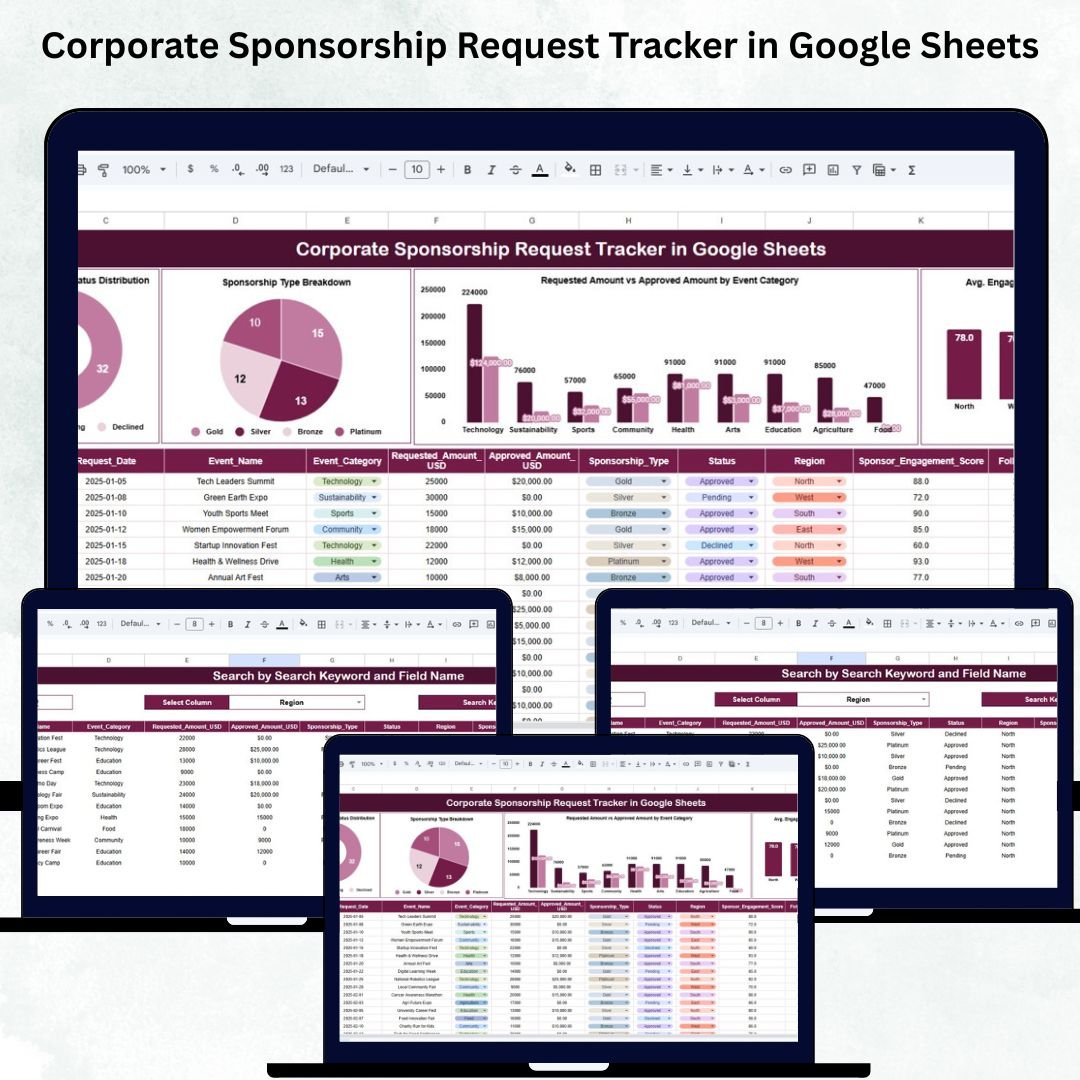

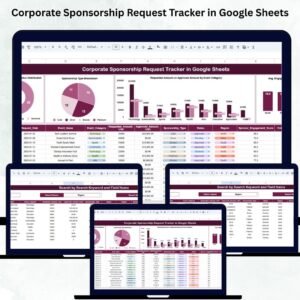
Managing sponsorship requests is a critical part of corporate marketing, CSR operations, and event partnerships. But when details like event names, categories, requested amounts, approved amounts, regions, and engagement scores are scattered across multiple files and emails, teams lose visibility. This leads to duplicate entries, delayed approvals, poor financial forecasting, and missed opportunities. To solve these challenges, we created the Corporate Sponsorship Request Tracker in Google Sheets—a clean, automated, and cloud-based system that centralizes all sponsorship activities.Corporate Sponsorship Request Tracker in Google Sheets
This tracker gives organizations a powerful way to review sponsorship performance, analyze approval trends, manage budget distribution, and locate requests instantly. With auto-updating charts, structured data input, and an advanced search system, this tool transforms the way teams handle sponsorship requests. Whether you manage sports partnerships, CSR funding, advertising sponsorships, or event collaborations, this Google Sheets tracker helps your team stay organized and make smarter decisions.
✨ Key Features of the Corporate Sponsorship Request Tracker in Google Sheets
📌 1. Manage All Sponsorship Requests in One Place
The tracker allows you to store and manage every request with essential fields like:Corporate Sponsorship Request Tracker in Google Sheets
Event Name
Sponsorship Type
Requested Amount
Approved Amount
Region
Status
Engagement Score
Requester Details
Everything stays organized in one clean database, removing the need for multiple spreadsheets.Corporate Sponsorship Request Tracker in Google Sheets
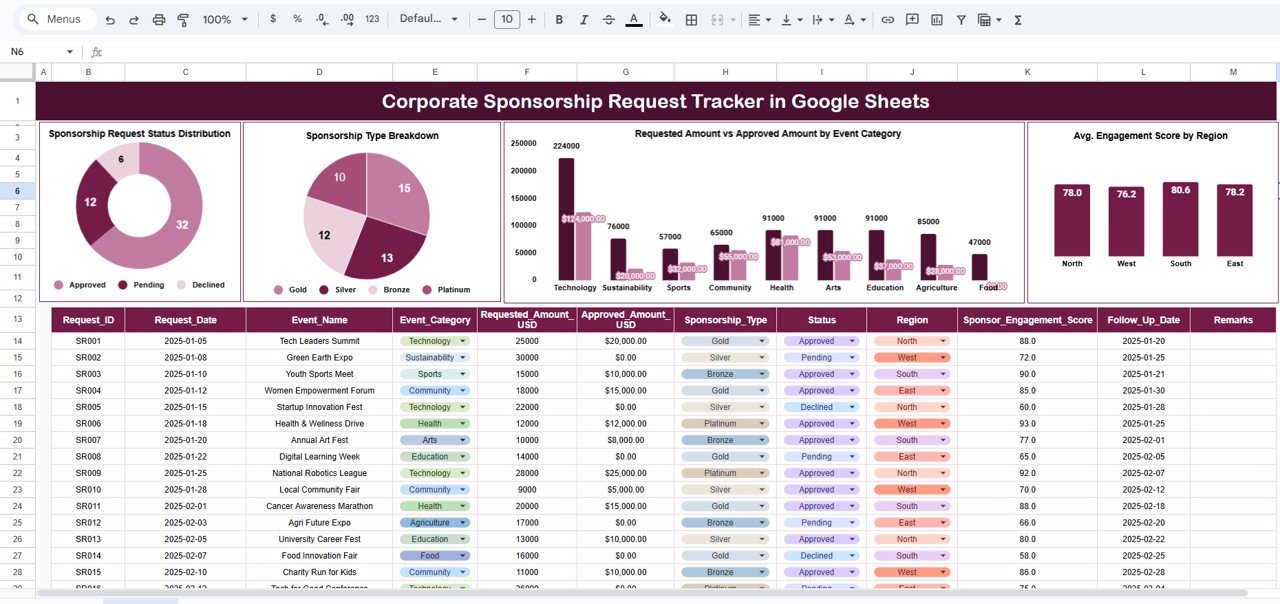
📊 2. Sponsorship Request Status Distribution
This chart displays the count of requests based on their current status, such as:
Approved
Pending
Rejected
In-Review
It gives teams an instant overview of workflow progress and sponsorship pipeline health.
🎯 3. Sponsorship Type Breakdown
This visual shows how sponsorship requests are distributed across categories like:
Event Sponsorship
CSR Activity
Sports Sponsorship
Community Support
Branding & Promotion
This helps organizations understand which types of sponsorships receive the most interest and budget requests.
💰 4. Requested Amount vs Approved Amount by Event Category
One of the most important charts in the dashboard, this visual compares financial requests with approved budgets.
It helps teams:
Identify categories with higher approval rates
Detect budget-heavy requests
Manage funding allocation strategically
Spot gaps between expected and approved sponsorship values
This improves transparency and strengthens financial decision-making.
🌍 5. Average Engagement Score by Region
Engagement score measures the outcome or impact of a sponsorship.
This chart allows teams to track performance by region and understand:
Which regions generate higher engagement
Where sponsorships perform best
Which areas may need additional support or evaluation
Great for CSR teams and event managers evaluating sponsorship effectiveness.
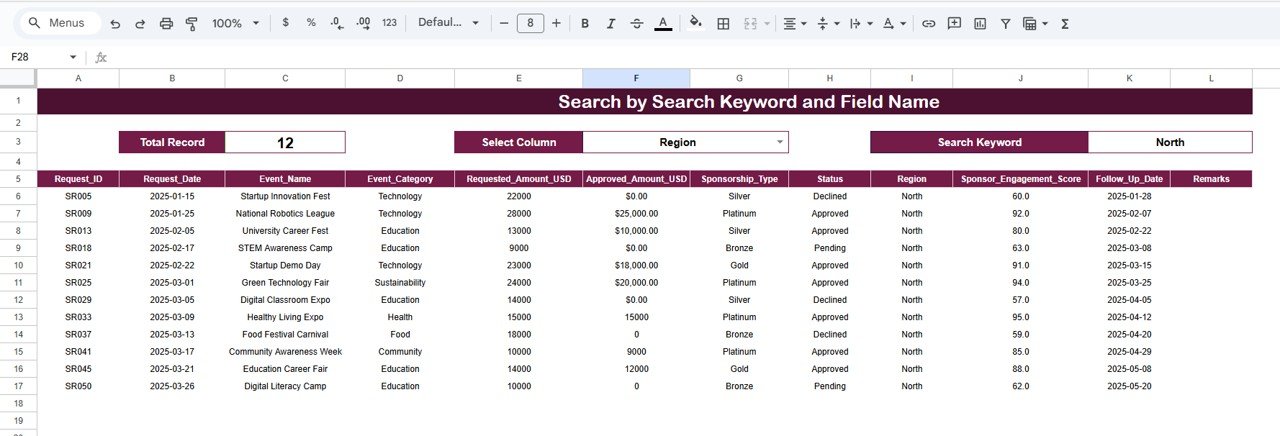
✨ Advanced Search System – Find Any Sponsorship Instantly
The tracker includes a professional-grade search feature that lets you locate any sponsorship record within seconds. You can search using:
Event Name
Sponsorship Type
Region
Status
Requester Name
Engagement Score
Any custom keyword
Instead of scrolling through hundreds of rows, teams can filter results instantly, saving time and ensuring accuracy.
📦 What’s Inside the Corporate Sponsorship Request Tracker
This Google Sheets template includes:
Structured Data Entry Sheet
Auto-updating Charts
Status Distribution Visual
Sponsorship Type Breakdown
Financial Comparison Chart
Engagement Score Chart
Advanced Search Tab
Clean, modern formatting
Cloud storage and sharing features
Everything is automated and ready to use—no setup or coding required.
🛠 How to Use the Corporate Sponsorship Request Tracker in Google Sheets
Using the tracker is simple and intuitive:
- Step 1: Open the Google Sheet and review the data entry fields
- Step 2: Enter sponsorship details (event, type, region, status, amounts)
- Step 3: Add engagement scores after each event
- Step 4: Charts update automatically
- Step 5: Use the Search Tab to quickly locate any request
- Step 6: Share the sheet with CSR, finance, or marketing teams
- Step 7: Review approval and financial trends during monthly meetings
No formulas are required—everything is automated in the backend.
🎯 Who Can Benefit from This Corporate Sponsorship Request Tracker in Google Sheets
This tracker is perfect for:
CSR Teams
Marketing Departments
Sponsorship Managers
Event & Sports Teams
Nonprofits handling corporate proposals
Branding & partnership teams
Corporate finance units evaluating sponsorship ROI
Organizations managing multiple sponsorship categories
Any team that receives, reviews, or approves sponsorship requests will benefit immediately from this centralized system.Corporate Sponsorship Request Tracker in Google Sheets
Click here to read the detailed blog post
Watch the step-by-step video Demo:
Visit our YouTube channel to learn step-by-step tutorials – Neotech Navigators
Compatibility and Requirements
- Works in Google Sheets with a free Google account and a web browser. Nothing to install.
- Share the file with CSR, finance or marketing teams from Google Sheets. Google explains charts in Add & edit a chart or graph.
Frequently Asked Questions
What does each sponsorship record hold?
Event name, sponsorship type, requested amount, approved amount, region, status, engagement score and requester details.
Which request statuses does it track?
Approved, Pending, Rejected and In-Review, shown in a status distribution chart.
How do I find a request quickly?
Use the Search tab to look up records by event name, sponsorship type, region, status, requester name, engagement score or any keyword.
Do the charts update on their own?
Yes. Enter the request details and engagement scores and the charts update automatically.
Related Sponsorship and CSR Templates
- Corporate Sponsorship Request Tracker in Excel: the same tracker for Excel users
- Sponsorship KPI Dashboard in Google Sheets: track sponsorship KPIs against targets
- Donation Management Tracker in Google Sheets: manage incoming donations
- CSR Events Calendar in Google Sheets: plan CSR events across the year
- Nonprofit and NGO Operations Bundle: 7 nonprofit templates for Excel and Google Sheets
Browse all Google Sheets tracker templates or the Google Sheets dashboard templates.























Reviews
There are no reviews yet.