



Managing education logistics in a remote or hybrid setup can be challenging. Schools, universities, and training institutions need a structured way to organize academic and administrative activities without confusion. Overlapping schedules, missed events, or miscommunication can cause delays and frustration.
That’s why we created the Education Logistics Remote Work Calendar in Excel — a ready-to-use, interactive solution designed to streamline academic logistics. With its automated event management, multiple calendar views, and easy-to-use forms, this Excel-based tool ensures smooth planning, better accountability, and improved communication across teams.
🔑 Key Features of Education Logistics Remote Work Calendar in Excel
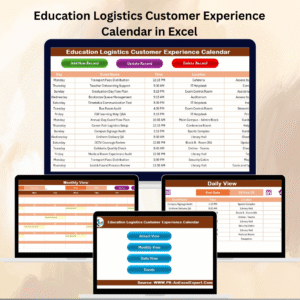
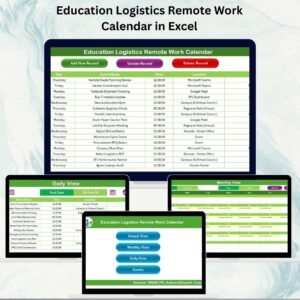
✨ Five Dedicated Sheets – Home, Annual View, Monthly View, Daily View, and Events database.
✨ Navigation Made Easy – One-click buttons from the Home sheet to access any view instantly.
✨ Annual View Control Panel – Change the year, starting month, day of the week, or theme.
✨ Highlight Events & Days – Mark weekends, holidays, or key academic days.
✨ Event Management System – Add, update, or delete events with automated forms.
✨ Monthly View Filters – See events for a chosen month, with clear alerts for multiple events on the same date.
✨ Daily View Clarity – Focus on short-term tasks with event details like time, location, and description.
✨ Centralized Event Database – Keep all events traceable with unique IDs, dates, and descriptions.
📦 What’s Inside the Calendar

When you download this Excel calendar, you’ll get:
1️⃣ Home Sheet – An index with navigation buttons to jump between Annual, Monthly, Daily, and Events tabs.
2️⃣ Annual View – A 12-month snapshot with controls to customize themes, highlight specific days, and add events.
3️⃣ Monthly View – A single-month calendar with event indicators and quick event management options.
4️⃣ Daily View – A detailed breakdown of scheduled events between chosen start and end dates.
5️⃣ Events Database – The master sheet storing all events with fields like Event ID, Date, Day, Name, Time, Location, and Description.
This structured layout makes planning intuitive, organized, and error-free.
🛠️ How to Use the Education Logistics Remote Work Calendar
✔️ Step 1 – Navigate Easily: Start at the Home sheet and jump to the view you need.
✔️ Step 2 – Set Preferences: Use the Annual View control panel to define year, start month, and theme.
✔️ Step 3 – Add Events: Click the “Add New Event” button, fill in details, and save.
✔️ Step 4 – Track Events: Use Show Event buttons in Annual/Monthly views or check the Daily view for detailed planning.
✔️ Step 5 – Manage Records: Use the Events sheet to update or delete existing records quickly.
Everything is automated through simple VBA-driven forms — no advanced Excel knowledge required!
👥 Who Can Benefit from This Calendar
🎓 Teachers & Professors – Plan lectures, exams, and workshops.
📋 Administrators – Organize meetings, trainings, and institutional activities.
🏫 Schools & Universities – Track annual academic events and hybrid schedules.
💼 Education Coordinators – Align academic and operational logistics seamlessly.
👩💻 Students – Stay informed of classes, exams, and extracurriculars.
Whether it’s daily lesson planning or year-long event scheduling, this calendar adapts to your needs.
With the Education Logistics Remote Work Calendar in Excel, you can:
✅ Prevent overlapping schedules.
✅ Improve coordination between departments.
✅ Increase accountability for academic & administrative events.
✅ Save time with automation and smart forms.
✅ Manage remote & hybrid education logistics effectively.
Click here to read the Detailed blog post
Visit our YouTube channel to learn step-by-step video tutorials 👉 Youtube.com/@PKAnExcelExpert
Watch the step-by-step video tutorial:
Compatibility and Requirements
- Needs Microsoft Excel desktop on Windows with macros enabled, because the event forms run on VBA. Microsoft explains how in Enable or disable macros in Microsoft 365 files.
- It does not work in Excel for the web, Google Sheets or the Excel mobile apps.
Frequently Asked Questions
What sheets are in the Education Logistics Remote Work Calendar?
Five: Home, Annual View, Monthly View, Daily View and an Events database that stores every event.
How do I add an event?
Click the Add New Event button, fill in the form and save. You can update or delete existing events from the Events sheet.
Can I change the year and start month?
Yes. The Annual View control panel lets you set the year, the starting month, the first day of the week and the theme.
What details are saved for each event?
Each event gets an Event ID, date, day, name, time, location and description.
What happens when two events fall on the same date?
The Monthly View shows a clear alert for dates with more than one event, and the Daily View lists the details for each one.
Related Education Calendar Templates
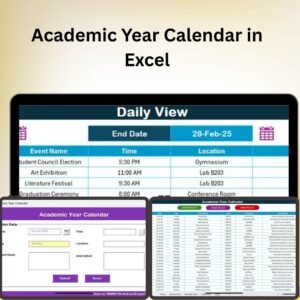
- Academic Year Calendar in Excel: plan the full academic year.
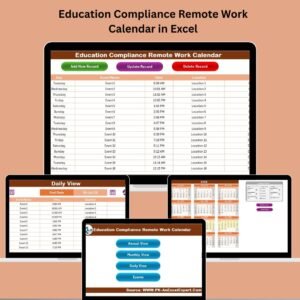
- Education Compliance Remote Work Calendar in Excel: remote work planning for compliance teams in education.
- Education Operations Remote Work Calendar in Excel: remote work planning for operations staff.
- Academic Year Calendar in Google Sheets: an academic calendar in Google Sheets.
- Education & School Management Bundle: 8 school templates in Excel and Google Sheets.
Browse all Excel calendar templates or the Excel education templates.





























Reviews
There are no reviews yet.