



In business, submitting a proposal isn’t just a task — it’s an opportunity. But with so many moving parts like deadlines, responsibilities, and approvals, it’s easy for things to fall through the cracks. The Client Proposal Tracking Checklist in Excel solves that problem with an easy-to-use, fully interactive Excel template built to manage every step of the proposal process.
Whether you’re a freelancer, agency, or enterprise team, this checklist helps you track, delegate, and complete every action item efficiently — increasing your chances of winning the deal.
🧩 Key Features of the Template
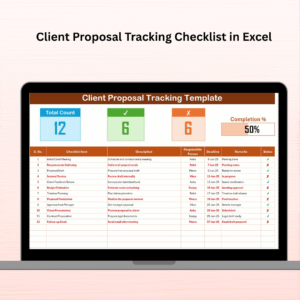
🧾 Client Proposal Tracking Checklist Sheet

Dynamic Progress Bar shows % of tasks completed
Auto-generated Serial Numbers for all items
Built-in dropdowns for assigning Responsible Persons
Status column accepts ✔ or ✘ to mark tasks complete or skipped
Fields include: Checklist Item, Description, Deadline, Remarks, and Status
📃 List Sheet Tab
Update Responsible Persons once — names auto-populate dropdowns
Helps standardize task ownership and simplifies collaboration
🎯 Smart Summary Section
Automatically calculates Total Tasks, Completed Tasks, and Not Applicable
Displays visual progress with a bar that updates in real-time
🧠 Fully Customizable
Add new columns like “Proposal Amount” or “Client Feedback Status”
Duplicate sheets to track multiple proposals in one file
🧩 Excel-Native Design
No add-ins or software required
Compatible with Google Sheets for cloud collaboration
🌟 Advantages of Using This Checklist
📈 Boosts Proposal Efficiency
✅ Avoid missed steps or late submissions — everything is documented.
👥 Encourages Team Accountability
✅ Assign each task and track it to completion.
🕒 Saves Time and Reduces Stress
✅ One glance shows what’s done, what’s left, and who’s responsible.
📋 Custom-Fit for Any Proposal Type
✅ From marketing proposals to software bids — you can adapt this to fit your workflow.
🎯 Drives Better Results
✅ More organized proposals = higher win rates!
🛠️ How to Use It (Step-by-Step)
1️⃣ Download and Open the Excel File
Start with the “Client Proposal Tracking Checklist” tab.
2️⃣ Add Proposal Tasks
Enter all steps from planning to submission.
3️⃣ Assign Responsibility
Use the dropdown in the “Responsible Person” column to assign tasks.
4️⃣ Set Deadlines
Add realistic dates to avoid last-minute pressure.
5️⃣ Track Status
Use ✔ for done, ✘ for skipped — watch the progress bar auto-update.
6️⃣ Duplicate for New Proposals
Need to track another proposal? Just copy the sheet and rename it.
👥 Who Should Use This Template?
📊 Sales Teams – Track multiple quote submissions and their timelines
💼 Freelancers – Never forget what to include in a proposal again
🏗️ Agencies & Consultants – Improve coordination across departments
🏛️ Corporate Teams – Standardize proposal workflows and boost accountability
📖 Click here to read the Detailed Blog Post
🎥 Watch the Full Video Tutorial
👉 YouTube.com/@PKAnExcelExpert
Watch the step-by-step video tutorial:
Compatibility and Requirements
- Works in Microsoft Excel desktop (Excel 2016 or later, or Microsoft 365).
- The Responsible Person column uses dropdowns. Microsoft explains how they work in Create a drop-down list.
Frequently Asked Questions
What does the template track?
Each checklist item has a description, a responsible person, a deadline, remarks and a status. A summary section shows total tasks, completed tasks and not applicable tasks, with a progress bar.
How do I mark a task as done?
Enter ✔ in the Status column for a finished task and ✘ for a skipped one. The progress bar updates by itself.
How do I add team members to the dropdown?
Type the names once on the List sheet. They then appear in the Responsible Person dropdown on the checklist sheet.
Can I track more than one proposal?
Yes. Copy the checklist sheet and rename it, so each proposal has its own tab in the same file.
Can I add my own columns?
Yes. You can add columns such as Proposal Amount or Client Feedback Status.
Related Client Proposal Templates
- Client Proposal To-Do Checklist in Excel: a to-do style checklist for proposal tasks
- Client Proposal Checklist Template in Excel: a general proposal checklist
- Client Proposal Monitoring Checklist in Excel: for following proposals after they are sent
- Client Proposal Review Checklist in Excel: for reviewing a proposal before submission
- Sales Tracking Dashboard in Excel: a dashboard for your sales numbers
Browse all Excel checklist templates.
































Reviews
There are no reviews yet.