



Submitting client proposals just got smarter! With our Client Proposal Monitoring Checklist in Excel, you can now track, assign, and complete proposal tasks with accuracy and confidence—without juggling sticky notes or scattered emails. Designed for real-time task visibility, accountability, and deadline tracking, this template is a must-have tool for professionals managing multiple client proposals. Whether you’re a project manager or freelancer, this checklist ensures no step is missed.
🧩 Key Features of Client Proposal Monitoring Checklist
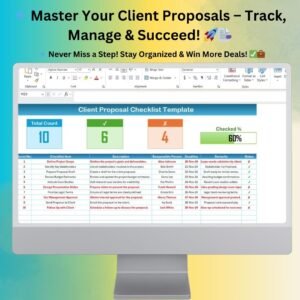
✅ Visual Progress Tracker

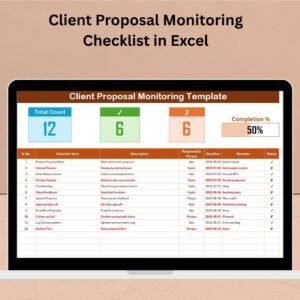
Monitor your progress at a glance with a dynamic progress bar, updated automatically based on ✔ and ✘ status marks.
✅ Comprehensive Checklist Table
Each task is captured with the following columns:
Serial No., Checklist Item, Description, Responsible Person, Deadline, Remarks, Status
✅ Dropdown for Team Assignment
Assign responsibilities efficiently using a dropdown menu sourced from a dynamic list in the backend tab.
✅ Status Monitoring
Use ✔ or ✘ to indicate task completion or failure—instantly updating the dashboard summary.
✅ Auto-Summary Metrics
Quickly view the total tasks, completed items, missed steps, and completion percentage.
📂 What’s Inside the Client Proposal Monitoring Checklist
🟢 1. Main Checklist Sheet Tab
This is your central hub to input and monitor all checklist items. It includes:
A summary section (Total, ✔, ✘, Progress Bar)
A detailed checklist table
Conditional formatting and dynamic updates
🟢 2. List Sheet Tab
Streamline team collaboration! This sheet helps auto-populate the Responsible Person dropdown in the checklist using a unique list.
🎁 Bonus: Fully editable for different teams, clients, or departments.
🛠️ How to Use the Product
👉 Step 1: Open the Excel Template
Navigate to the main tab and review the pre-set checklist structure.
👉 Step 2: Input Your Proposal Tasks
Replace sample data with your actual tasks—break large tasks into bite-sized items for clarity.
👉 Step 3: Add Descriptions, Assign People, Set Deadlines
Make your checklist actionable with detailed descriptions and realistic due dates.
👉 Step 4: Update Status Regularly
Use ✔ for completed, ✘ for missed tasks. The visual bar and summary will auto-refresh!
👉 Step 5: Use the List Tab for Team Setup
Add or edit names in the list sheet—your dropdown will stay up to date.
👥 Who Can Benefit from This Checklist?
✅ Project Managers – Streamline proposal steps and hold team members accountable
✅ Consultants & Freelancers – Keep solo work highly organized
✅ Sales & Marketing Teams – Ensure RFPs, tenders, and client bids are complete and error-free
✅ SMEs – Improve the professionalism of client communication and submissions
✅ Agencies – Scale proposal handling without losing control
This Excel checklist adapts to any workflow and works with Excel 2010 or later—including Mac & Microsoft 365.
🔧 Customize the Template Your Way
You can easily:
Add columns like “Client Name” or “Proposal Stage”
Insert drop-downs or slicers for filtering
Apply conditional formatting for overdue tasks
Duplicate sheets for multiple clients
No coding. No new software. Just Excel.
🧠 Why Excel Is the Best Tool for This
No learning curve—use what you already know
Full control over formatting and features
Offline access ensures 100% availability
Powerful Excel features like formulas, filters, and visuals included!
🧲 Final Words: Ready to Win More Proposals?
Organized proposals = more wins. It’s as simple as that.
Stop scrambling and start using the Client Proposal Monitoring Checklist to stay ahead of deadlines, improve team performance, and send out polished, professional proposals every time.
✅ Click here to read the Detailed blog post
🔗 Visit our YouTube channel to learn step-by-step video tutorials
Watch the step-by-step video tutorial:
Compatibility and Requirements
- Works in Microsoft Excel desktop (Excel 2016 or later, or Microsoft 365).
- The Responsible Person column uses a dropdown fed by the List sheet. Microsoft explains how in Create a drop-down list.
Frequently Asked Questions
What columns does the checklist table have?
Serial No., Checklist Item, Description, Responsible Person, Deadline, Remarks and Status.
How does the progress bar work?
You mark each task with a ✔ or a ✘ in the Status column. The summary at the top updates the total tasks, completed items, missed steps, completion percentage and the progress bar.
How do I change the names in the Responsible Person dropdown?
Open the List sheet and add or edit the names there. The dropdown in the main checklist reads from that list.
Can I add my own columns, such as Client Name or Proposal Stage?
Yes. You can add columns, add dropdowns or slicers for filtering, apply conditional formatting for overdue tasks and duplicate the sheet for each client.
Are there other proposal checklists available?
Yes. See the Client Proposal Tracking Checklist in Excel and the Client Proposal Review Checklist in Excel.
Related Proposal and Checklist Templates
- Client Proposal Checklist Template in Excel: a general checklist for proposal steps
- Client Proposal Planner Checklist in Excel: plan proposal tasks ahead of the deadline
- Client Proposal To-Do Checklist in Excel: a simple to-do view of proposal tasks
- Client Proposal Documentation Checklist in Excel: track the documents a proposal needs
- Project Management Checklist in Google Sheets: a project checklist for Google Sheets
Browse all Excel checklist templates.





























Reviews
There are no reviews yet.