

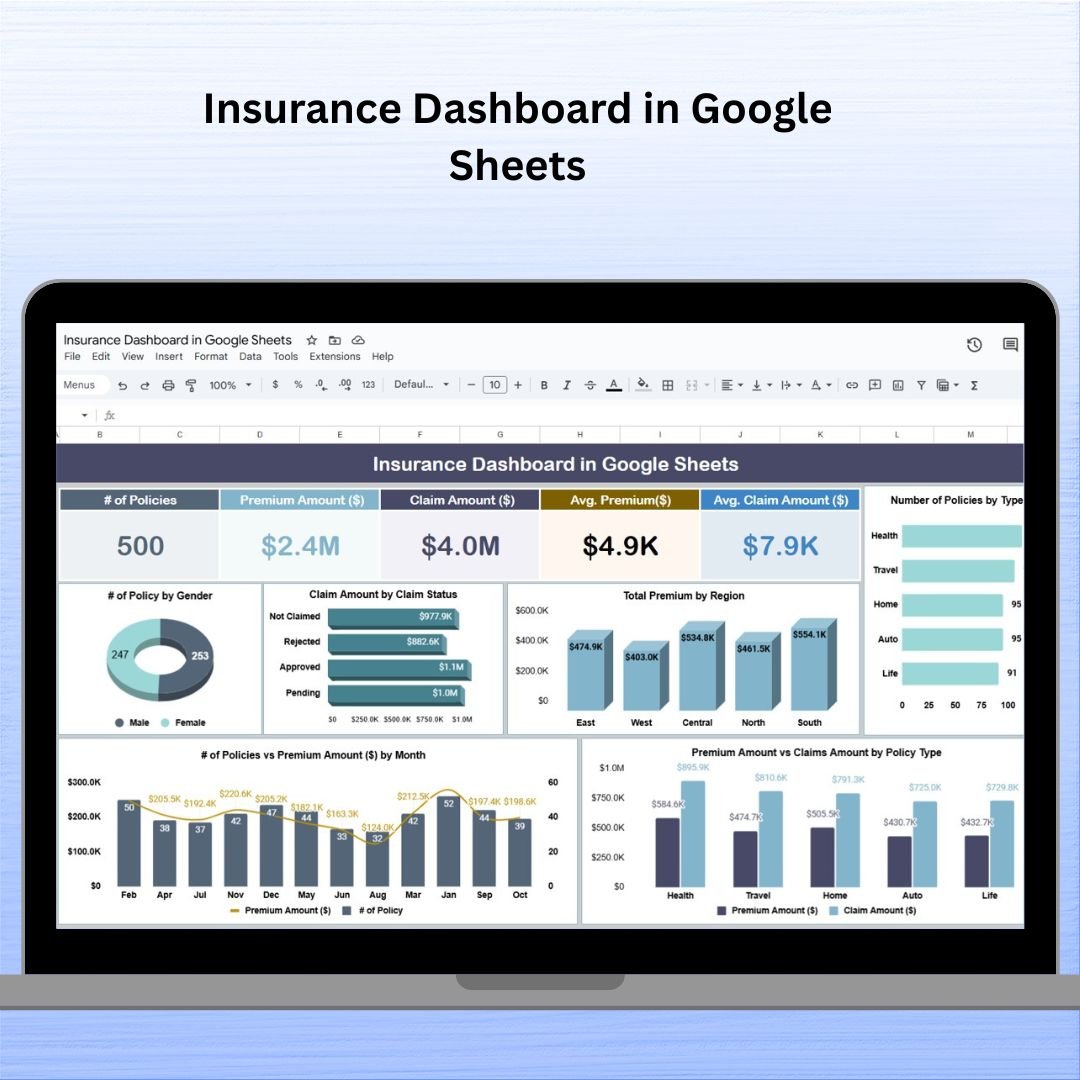


The Insurance Dashboard in Google Sheets is an intuitive and powerful tool designed to help insurance companies and agencies track and analyze key performance indicators (KPIs) related to policies, premiums, claims, and overall sales performance. It offers a comprehensive view of your insurance data, allowing you to make informed decisions based on real-time information. Whether you’re managing policyholders, assessing claims, or monitoring agent performance, this dashboard simplifies data visualization and decision-making processes.

📝 What’s Inside the Insurance Dashboard in Google Sheets 📝
The Insurance Dashboard consists of two primary sheets that work together to provide a detailed overview of your insurance data:
Dashboard Sheet Tab
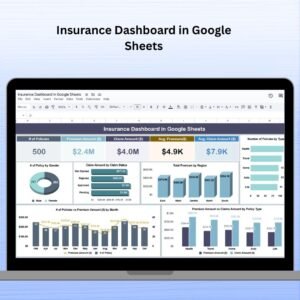
Key Metrics Cards: Get a quick overview of your business performance with cards displaying the following:
# of Policies: Total active policies.
Premium Amount ($): Total premiums collected.
Claim Amount ($): Total claims paid out.
Avg. Premium ($): Average premium across all policies.
Avg. Claim Amount ($): Average claim amount across all claims.
Charts for Detailed Analysis: Dive deeper with several visual charts:
# of Policies by Gender: Visualize policy distribution by gender.
Claim Amount by Claim Status: Track claims based on their status (approved, pending, etc.).
Total Premium by Region: Evaluate regional premium performance.
# of Policies by Type: Analyze which policy types (life, health, auto) are most popular.
Premium vs. Claims Amount by Policy Type: Compare premium income vs. claim payouts per policy type.
# of Policies vs. Premium by Month: Track monthly trends in policies sold and premiums collected.
Policy Sold by Agent: Measure the performance of individual agents.
Data Sheet Tab
Data Input for Dashboard: This sheet is where all the raw data is entered. It includes fields such as:
Policy ID: Unique identifier for each policy.
Customer Name: Name of the policyholder.
Policy Type: Type of insurance (e.g., health, auto, life).
Premium Amount ($): Premium paid for the policy.
Claim Amount ($): Amount claimed by the policyholder.
Claim Status: Current status of the claim (approved, pending, rejected).
Region: Region where the policyholder is based.
Sales Agent: Name of the agent who sold the policy.
Date: Policy sale date and other relevant dates.
🛠️ How to Use the Insurance Dashboard in Google Sheets 🛠️
Input Data: Enter insurance policy details, premiums, claims, and sales agent performance in the Data Sheet Tab.
Visualize Key Metrics: The data from the Data Sheet will automatically feed into the Dashboard Sheet Tab, displaying real-time insights via charts and cards.
Monitor Trends and Performance: Use the various charts and metrics to identify trends, such as seasonal changes in sales, policy types, and claims processing.
Analyze Agent Performance: Track which agents are performing the best and where improvements can be made.
💼 Who Can Benefit from This Insurance Dashboard 💼
Insurance Agencies: Manage and track all aspects of your insurance business, from policies and premiums to claims and agent performance.
Claims Adjusters: Monitor claims statuses and identify any delays or bottlenecks in the claims process.
Sales Managers: Evaluate the performance of sales agents and assess which policy types are most popular.
Business Analysts: Use the dashboard for detailed analysis of sales trends, regional performance, and customer behavior.
Insurance Executives: Gain a comprehensive overview of business performance and make data-driven decisions with ease.
🌟 Benefits of Using the Insurance Dashboard in Google Sheets 🌟
Cost-Effective: Google Sheets is a free tool, providing a budget-friendly solution for insurance companies to manage large volumes of data without investing in expensive software.
Real-Time Data: Since Google Sheets is cloud-based, updates to the data sheet are immediately reflected in the dashboard, ensuring up-to-date insights.
User-Friendly: The interface is simple and intuitive, making it easy for anyone, even without advanced technical skills, to input data, create charts, and customize the dashboard.
Customizable: Tailor the dashboard to your specific insurance business needs by adding new charts, adjusting data fields, and modifying the layout.
Collaboration: Google Sheets allows multiple users to access and edit the dashboard simultaneously, promoting teamwork and real-time collaboration.
Click here to read the detailed blog post
Visit our YouTube channel to learn step-by-step video tutorials
Watch the step-by-step video tutorial:
Compatibility and Requirements
- Works in Google Sheets with a free Google account and a web browser.
- Make a copy to your own Google Drive, then share it with your team if you want to work on it together.
- New to Sheets? Google’s guide How to use Google Sheets covers the basics.
- Google’s guide Add & edit a chart or graph explains how to edit the charts if you want to change them.
Frequently Asked Questions
Which sheets are in the Insurance Dashboard?
Two sheets. The Data sheet holds the raw policy records, and the Dashboard sheet turns them into metric cards and charts.
What do the metric cards show?
Number of policies, total premium amount, total claim amount, average premium and average claim amount.
Which fields do I enter for each policy?
Policy ID, customer name, policy type, premium amount, claim amount, claim status, region, sales agent and date.
Can I compare premiums with claims?
Yes. One chart compares premium against claim amount by policy type, and other charts show claim amount by claim status and premium by region.
Can my team work in it at the same time?
Yes. Google Sheets lets several people open and edit the file at once, so agents and managers can share one copy.
Related Insurance Templates
- Insurance Dashboard in Excel: the same topic as an Excel dashboard
- Insurance Dashboard in Power BI: an interactive Power BI version
- Insurance Brokers Dashboard in Excel: built around broker sales
- Insurance Coverage Checklist in Google Sheets: check what each policy covers
- Google Sheets Business Pack (Pro): 14 Google Sheets business templates in one bundle
Browse all Google Sheets dashboards or the Google Sheets financial tools.



























Reviews
There are no reviews yet.