



The Healthcare Incentive Dashboard and Tracker in Google Sheets is a powerful tool designed to help healthcare organizations track employee performance and manage incentive programs effectively. This customizable dashboard allows healthcare facilities to monitor key performance indicators (KPIs) such as attendance, patient satisfaction, and procedure accuracy, while also calculating incentives based on performance metrics. Google Sheets provides a collaborative, cloud-based platform that ensures real-time updates, easy sharing, and seamless collaboration across teams.
By centralizing all performance and incentive data in one place, this dashboard enables managers to make data-driven decisions, increase transparency, and motivate employees through structured incentive programs.

Key Features of the Healthcare Incentive Dashboard and Tracker in Google Sheets
📋 Comprehensive Dashboard Overview
Performance Metrics Display: The dashboard provides a visual overview of key KPIs such as total sales, patient satisfaction scores, average performance ratings, and more.
Incentive Calculations: Automatically calculates the total incentives based on predefined criteria, tracking eligibility and payout amounts for each employee.
📈 Employee Performance Tracking
Individual Performance Records: Track individual employee performance data, including attendance, patient feedback, and procedure accuracy.
Customizable Weightages: Adjust the weightages assigned to each performance metric, allowing the dashboard to align with your organization’s specific incentive structures.
📊 Analytical Tools for Data Insights
Charts and Graphs: Visualize trends and patterns in employee performance, total payouts, and incentive distributions using a variety of chart types.
Cumulative Analysis: Track performance and incentive data over time to spot trends and identify areas for improvement.
💻 Support and Customization Features
Support Sheet Tab: Access guidelines and instructions for setting up and customizing the dashboard.
Printable and Customizable: The dashboard is fully printable and can be customized to meet the unique needs of your organization.
🛠 Real-Time Collaboration and Accessibility
Multi-User Access: Allow multiple team members and managers to access and update the dashboard simultaneously, fostering collaboration and ensuring transparency in incentive tracking.
Cloud-Based Access: Access the dashboard from any device with an internet connection, making it easy to stay updated and manage incentive programs remotely.
Benefits of Using Google Sheets for Healthcare Incentive Tracking
✅ Cost-Effective Solution
Google Sheets is a free tool, offering a cost-effective way to manage performance tracking and incentive programs without the need for expensive software.
✅ User-Friendly Interface
The simple, intuitive design of Google Sheets ensures that all team members can easily understand and use the dashboard, even with limited technical expertise.
✅ Scalable and Flexible
As your healthcare organization grows, the dashboard can be easily adapted to accommodate new performance metrics, incentive structures, or business objectives.
Getting Started with Your Healthcare Incentive Dashboard in Google Sheets
Define Performance Metrics: Identify the KPIs that matter most to your healthcare organization, such as employee attendance, patient satisfaction, or treatment accuracy.
Design the Dashboard Layout: Organize the dashboard into clear sections for data entry, performance tracking, and visualizations.
Input Employee Data: Enter employee performance data into the dashboard, ensuring consistency and accuracy.
Customize Weightages: Adjust the weightages of each performance metric based on your incentive structure and organizational priorities.
Monitor and Update: Regularly review and update the dashboard to reflect the most current data and adjust for changes in incentive criteria or business goals.
By using the Healthcare Incentive Dashboard and Tracker in Google Sheets, your organization can streamline the management of incentive programs, improve performance tracking, and motivate your team to achieve better outcomes.
Click here to read the Detailed blog post
Healthcare Incentive Dashboard and Tracker in Google Sheets
Visit our YouTube channel to learn step-by-step video tutorials
YouTube.com/@PKAnExcelExpert
Compatibility and Requirements
- Works in Google Sheets. You need a free Google account and a web browser.
- Charts show performance trends and payouts. Google explains this in Add & edit a chart or graph.
Who Uses This Dashboard
Healthcare facilities and managers who run staff incentive programs and track measures such as attendance, patient feedback and procedure accuracy.
Frequently Asked Questions
What performance data can I track?
Individual records such as attendance, patient feedback and procedure accuracy, plus overview KPIs like patient satisfaction scores and average performance ratings.
How are incentives calculated?
The dashboard calculates total incentives from criteria you set, and tracks each employee’s eligibility and payout amount.
Can I change how much each metric counts?
Yes. Adjust the weightage of each performance metric to match your incentive structure.
Is there help for setting it up?
Yes. The Support sheet tab has guidelines and instructions for setup and customization.
Can I print it?
Yes. The dashboard is printable.
Related Incentive Templates
- Incentive Dashboard in Excel: an incentive dashboard in Excel
- Sales Incentive Dashboard and Tracker in Google Sheets: track sales team incentives
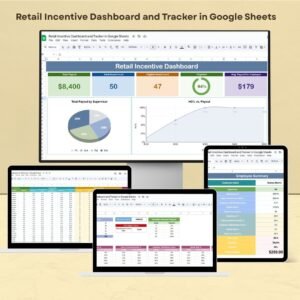
- Retail Incentive Dashboard and Tracker in Google Sheets: incentives for retail staff
- Customer Service Incentive Dashboard and Tracker in Google Sheets: incentives for customer service teams
- Healthcare & Hospital Management Bundle: 8 healthcare and hospital templates in one download
Browse all Google Sheets dashboards.











Reviews
There are no reviews yet.