



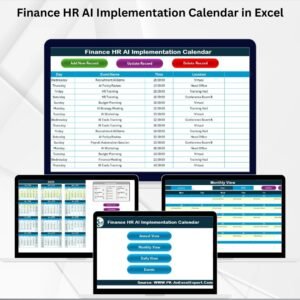
The HR AI Implementation Calendar in Excel is an essential tool designed to help human resources teams plan, manage, and execute artificial intelligence (AI) initiatives within their organizations. This calendar provides a structured approach to implementing AI solutions for HR processes such as recruitment, talent management, employee engagement, and performance management. With this tool, HR professionals can track key milestones, deadlines, and tasks, ensuring that AI implementation is smooth, efficient, and successful.
By integrating AI into HR practices, organizations can automate processes, reduce manual workloads, and enhance decision-making. This Excel-based calendar helps you stay organized while planning AI rollouts and monitoring progress at every stage of implementation. Whether you’re automating your recruitment process or enhancing employee performance reviews, the HR AI Implementation Calendar ensures that all tasks are tracked and executed efficiently.
Key Features of the HR AI Implementation Calendar in Excel
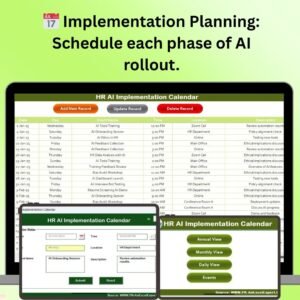
📅 Detailed Implementation Planning
Plan and schedule each phase of AI implementation in HR, from defining objectives to choosing AI tools, piloting the solution, and full-scale deployment. Keep track of tasks, deadlines, and milestones.
🔑 Task & Milestone Tracking
Monitor the progress of each AI-related task and milestone. Ensure that each stage is completed on time, from data preparation to testing and deployment.
🗓 Team Collaboration & Responsibility Assignment
Assign roles and responsibilities to team members, ensuring clear accountability for each task in the AI implementation process. Promote collaboration within the HR department for a seamless project flow.
📊 AI Tool Integration Tracking
Track the AI tools and technologies being integrated into HR processes, such as recruitment software, performance evaluation tools, and chatbots for employee engagement.
🚀 Timeline & Deadlines Management
Use the calendar to set realistic timelines for the entire AI implementation process. Ensure that your HR department adheres to deadlines and delivers the AI project on schedule.
🔄 Progress Monitoring & Reporting
Get real-time updates on task progress and ensure that any delays or issues are addressed promptly. Use the calendar to generate periodic progress reports and analyze the overall performance of the AI implementation.
Why You’ll Love the HR AI Implementation Calendar in Excel

✅ Streamlined AI Implementation
Easily track and manage every step of the AI implementation process within your HR department, from initial planning to full deployment.
✅ Increase Efficiency & Automation
Automate repetitive tasks, reduce administrative burdens, and speed up HR processes with AI integration, ultimately improving efficiency.
✅ Clear Task Ownership & Accountability
Assign specific tasks to team members, ensuring that every aspect of the AI project is covered and responsibilities are clear.
✅ Monitor Progress & Deadlines
Keep track of timelines and monitor the progress of tasks to ensure your AI implementation stays on track.
✅ Adaptable to Your HR Needs
Customize the calendar to suit the specific requirements of your organization’s AI implementation, whether you’re enhancing recruitment, performance management, or employee engagement.
What’s Inside the HR AI Implementation Calendar in Excel?
Implementation Planning: Schedule and manage each phase of AI rollout.
Task & Milestone Tracking: Monitor deadlines and track the completion of tasks.
Team Collaboration: Assign roles and ensure team members are accountable for each task.
AI Tool Integration: Track AI software and tools being integrated.
Timeline Management: Set and manage realistic timelines for implementation.
Progress Monitoring: Analyze project performance and ensure timely execution.
How to Use the HR AI Implementation Calendar in Excel
1️⃣ Download the Template: Access the HR AI Implementation Calendar in Excel instantly.
2️⃣ Customize Your Plan: Adapt the calendar to suit your HR department’s specific needs and objectives.
3️⃣ Assign Responsibilities: Assign tasks to team members and set deadlines for each phase.
4️⃣ Track AI Tool Integrations: Monitor the integration of AI tools and track their implementation progress.
5️⃣ Review Progress & Adjust: Regularly check project progress and adjust timelines or tasks as needed to stay on track.
Who Can Benefit from the HR AI Implementation Calendar in Excel?
🔹 HR Managers & Professionals
🔹 Talent Acquisition Teams
🔹 Employee Engagement Specialists
🔹 HR Project Managers
🔹 Organizational Development Teams
🔹 Small & Medium Enterprises (SMBs)
🔹 Large Enterprises Implementing AI Solutions
Ensure that your HR AI projects are efficiently planned and executed with the HR AI Implementation Calendar in Excel. Streamline the adoption of AI tools and technologies in HR processes to improve productivity, automate workflows, and enhance employee experience.
Click here to read the Detailed blog post
Visit our YouTube channel to learn step-by-step video tutorials
Youtube.com/@PKAnExcelExpert
Compatibility and Requirements
- Works in Microsoft Excel desktop (Excel 2016 or later, or Microsoft 365).
- New to Excel? Microsoft has a free guide: Excel for Windows training.
Frequently Asked Questions
Which phases can I plan with this calendar?
You can schedule each phase of an HR AI project, from defining objectives and choosing AI tools to piloting the solution and full deployment.
Can I assign tasks to team members?
Yes. You assign roles and responsibilities for each task, so everyone knows who owns which step.
Can I track the AI tools we add?
Yes. You can list the AI tools being added to HR processes, such as recruitment software, performance evaluation tools and employee chatbots, and track their progress.
Can I change the timeline later?
Yes. Review progress regularly and adjust timelines or tasks as your plan changes.
Related HR AI Implementation Calendars
- Finance HR AI Implementation Calendar in Excel: the same plan for finance HR teams
- Education HR AI Implementation Calendar in Excel: HR AI planning for education
- Technology HR AI Implementation Calendar in Excel: HR AI planning for technology firms
- Operations AI Implementation Calendar in Excel: plan AI rollouts in operations
- Calendar & Planner Pack: 12 calendar and planner templates in one download
Browse all Excel calendars or the Excel HR and payroll templates.
































Reviews
There are no reviews yet.