



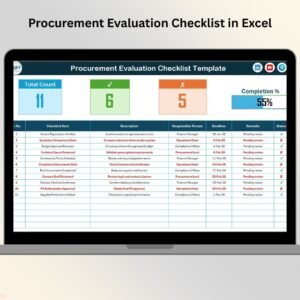
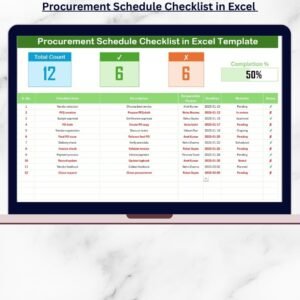
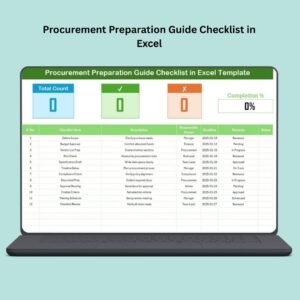
The Procurement Tracking Checklist in Excel is a powerful tool designed to streamline your procurement process. This Excel-based checklist is ideal for procurement managers, purchasing teams, and business owners looking to monitor and manage their procurement activities efficiently. It allows you to track every step in the procurement cycle, from initial request to final delivery, ensuring that nothing slips through the cracks.
By using this checklist, you can track orders, vendor communications, delivery statuses, and purchase orders, making it easier to manage procurement tasks, avoid delays, and maintain good vendor relationships. Whether you’re handling office supplies, raw materials, or specialized equipment, this tool provides a comprehensive overview of the procurement process.
Key Features of the Procurement Tracking Checklist in Excel
📅 Procurement Process Tracking
Monitor every stage of the procurement cycle, including purchase requests, orders, invoicing, and delivery. Ensure all tasks are completed on time to prevent delays and keep the process efficient.
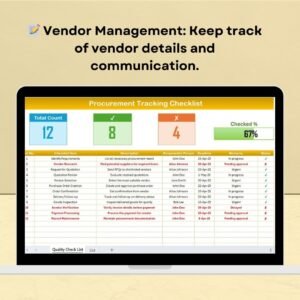
📝 Vendor Management & Communication
Keep track of vendor details, order status updates, and communication logs. Easily reference vendor contact information and purchase history to ensure smooth transactions.
📈 Purchase Order & Invoice Management
Track purchase orders, delivery dates, and invoice statuses. Use the checklist to confirm whether each order has been processed, delivered, and invoiced correctly.
🔄 Delivery & Shipment Status Monitoring
Track delivery schedules and shipment statuses. Ensure that deliveries arrive on time and in the correct quantity, reducing the risk of stockouts or overstocking.
⚙️ Customizable & Scalable Checklist
Tailor the checklist to fit your specific business needs. Add additional fields for item categories, priority levels, or specific order requirements, making it adaptable for any procurement process.
🔑 Reporting & Insights
Generate real-time reports that give you a clear overview of procurement activities, order statuses, and potential bottlenecks. Use these insights to improve efficiency and decision-making.
Why You’ll Love the Procurement Tracking Checklist in Excel

✅ Streamlined Procurement Management
Keep track of every procurement task, ensuring that no orders are missed or delayed. Stay organized and reduce operational inefficiencies with this centralized tool.
✅ Efficient Vendor Communication
Track vendor details, keep a log of communications, and ensure that your procurement team is up-to-date with vendor statuses, orders, and delivery schedules.
✅ Increase Operational Efficiency
Monitor the entire procurement cycle from request to delivery, helping to streamline operations and improve supply chain efficiency.
✅ Improve Transparency & Accountability
Assign responsibilities and track procurement progress in one easy-to-read document. Ensure accountability by tracking each step of the procurement process.
✅ Customizable for Your Business
Adapt the checklist to suit your company’s unique procurement needs. Whether you handle low or high volumes of procurement, the checklist can scale with your operations.
What’s Inside the Procurement Tracking Checklist in Excel?
Procurement Process Tracking: Monitor purchase requests, orders, invoices, and delivery.
Vendor Management: Track vendor details, order history, and communication logs.
Purchase Order & Invoice Management: Keep tabs on purchase orders, delivery dates, and invoices.
Delivery & Shipment Status Monitoring: Track deliveries and ensure everything arrives on time.
Customizable Checklist: Adapt the checklist to fit your company’s specific procurement needs.
Reporting & Insights: Generate procurement reports and identify bottlenecks.
How to Use the Procurement Tracking Checklist in Excel
1️⃣ Download the Template: Instantly access your Procurement Tracking Checklist in Excel.
2️⃣ Input Procurement Details: Add item names, vendors, order quantities, and purchase dates.
3️⃣ Track Vendor Communications: Keep track of vendor interactions and delivery status updates.
4️⃣ Monitor Purchase Orders & Invoices: Track the status of all orders and ensure timely payment.
5️⃣ Generate Reports & Analyze Data: Use the reporting features to analyze procurement trends and improve your processes.
Who Can Benefit from the Procurement Tracking Checklist in Excel?
🔹 Procurement Managers
🔹 Supply Chain & Operations Teams
🔹 Purchasing Departments
🔹 Small & Medium Businesses (SMBs)
🔹 Enterprises with Complex Procurement Needs
🔹 Inventory & Warehouse Managers
🔹 Financial & Accounting Teams
Optimize your procurement process and stay organized with the Procurement Tracking Checklist in Excel. Keep track of orders, vendors, and deliveries in one easy-to-use, customizable tool that enhances operational efficiency and ensures smooth procurement operations.
Click here to read the Detailed blog post
Visit our YouTube channel to learn step-by-step video tutorials
Youtube.com/@PKAnExcelExpert
Watch the step-by-step video Demo:
Compatibility and Requirements
- Works in Microsoft Excel desktop (Excel 2016 or later, or Microsoft 365).
- New to Excel? Microsoft’s free Excel for Windows training covers the basics.
Frequently Asked Questions
What does the Procurement Tracking Checklist cover?
Every step of the procurement cycle: purchase requests, orders, vendor details and communication, purchase order and invoice status, and delivery and shipment status.
What details do I enter?
Item names, vendors, order quantities and purchase dates. You then update vendor contacts, delivery status and invoice status as each order moves along.
Can I add my own fields?
Yes. You can add fields such as item categories, priority levels or order requirements to fit your own procurement process.
Is there a video walkthrough?
Yes. The demo video above shows the checklist step by step.
Related Procurement Templates
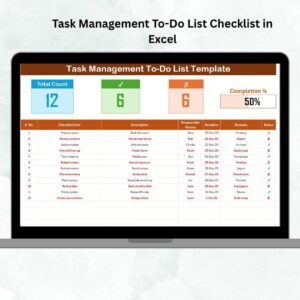
- Procurement To-Do List Checklist in Excel: a to-do style procurement checklist
- Procurement Dashboard in Excel: a full procurement dashboard in Excel
- Procurement Tracker and Dashboard in Google Sheets: track and chart purchases in Google Sheets
- Purchase Order Tracker in Google Sheets: log and follow purchase orders in Google Sheets
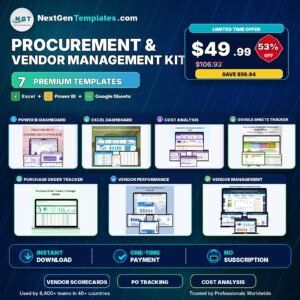
- Procurement and Vendor Management Kit: procurement and vendor templates in one kit
Browse all Excel checklists or the Excel operations templates.
















Reviews
There are no reviews yet.