



Theater Management KPI Scorecard Key Features
Unlock the full potential of your theater operations with our Theater Management KPI Scorecard – a ready-to-use, comprehensive digital template designed to streamline your performance tracking and decision-making processes. This powerful scorecard offers a user-friendly interface with 4 dynamic worksheets that cater to every aspect of your theater’s Key Performance Indicators (KPIs). Whether you want monthly, MTD, or YTD analysis, this tool is built to deliver clear, actionable insights to boost efficiency and profitability.
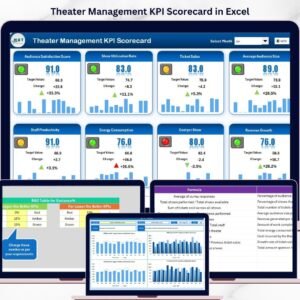
- 🎯 Scorecard Sheet: The main dashboard provides intuitive dropdown menus to select a specific month, MTD, or YTD data with instant actual vs. target comparison. Color-coded visuals and conditional formatting make it effortless to quickly identify your theater’s performance status across all KPIs.
- 📈 KPI Trend Sheet: Dive deeper by selecting specific KPIs to analyze trends over time. This sheet includes KPI groupings, units, formulas, and definitions, along with MTD and YTD trend charts for actual, target, and prior year performance.
- 📝 Input Data Sheet: Easily enter and update all your KPI data such as actual values and targets, ensuring the scorecard remains accurate and up-to-date for ongoing performance monitoring.
- 📚 KPI Definition Sheet: Maintain clarity and consistency by documenting KPI names, groups, units, formulas, and detailed definitions all in one place.

What’s Inside the Theater Management KPI Scorecard
This digital template includes 4 comprehensive worksheets tailored specifically for theater management:
- 🎬 Scorecard Sheet: Your central hub for real-time KPI performance review with dropdown filters and vibrant visual indicators.
- 📊 KPI Trend Sheet: Analyze trends with detailed charts and KPI metadata for enhanced understanding and forecasting.
- ✍️ Input Data Sheet: Seamlessly input and update your KPI data to maintain accurate performance tracking.
- 📖 KPI Definition Sheet: Keep all KPI-related information organized and accessible for consistent reporting.
How to Use the Theater Management KPI Scorecard
Using this scorecard is simple and efficient, designed for theater managers and teams to quickly gain insights and optimize operations:
- 🛠️ Select your desired month, MTD, or YTD period via dropdown menus on the Scorecard Sheet.
- 📉 Input actual values and targets in the Input Data Sheet to keep data fresh and relevant.
- 📈 Use the KPI Trend Sheet to monitor performance changes over time and identify growth opportunities.
- 📚 Reference the KPI Definition Sheet for clarity on each KPI’s purpose, calculation, and measurement unit.
- 🔍 Quickly assess performance with color-coded visuals on the Scorecard Sheet to spot areas needing improvement.
Who Can Benefit from This Theater Management KPI Scorecard
This scorecard is a must-have tool for:
- 🎭 Theater Managers: Gain an all-inclusive view of operational KPIs to make informed decisions.
- 📊 Performance Analysts: Easily track and analyze theater performance trends over time.
- 📅 Event Coordinators: Monitor the success of shows and events against set targets.
- 💼 Business Owners: Oversee theater profitability and operational efficiency with real data.
- 🎟️ Marketing Teams: Evaluate ticket sales and promotional effectiveness via KPI tracking.
Click here to read the Detailed blog post.
Visit our YouTube channel to learn step-by-step video tutorials and master the Theater Management KPI Scorecard today!
Compatibility and Requirements
- Works in Microsoft Excel desktop (Excel 2016 or later, or Microsoft 365).
- You pick the month, MTD or YTD period from dropdown menus on the Scorecard sheet. Microsoft explains dropdown lists in Create a drop-down list.
Frequently Asked Questions
Which sheets are included?
Four sheets: Scorecard, KPI Trend, Input Data and KPI Definition.
How do I update the scorecard?
Enter your actual values and targets in the Input Data sheet. Then choose a month, MTD or YTD on the Scorecard sheet and it shows actual against target.
Can I see the trend for one KPI?
Yes. Select the KPI on the KPI Trend sheet. It shows the KPI group, unit, formula and definition, with MTD and YTD trend charts for actual, target and prior year.
How do I know which KPIs are off target?
The Scorecard sheet uses color-coded visuals and conditional formatting, so KPIs that need attention stand out.
Is there a similar scorecard for other industries?
Yes. See the Event Management KPI Scorecard in Excel and the Hospitality KPI Scorecard in Excel.
Related KPI Scorecard Templates
- Event Management KPI Scorecard in Excel: track shows and events against targets
- Hospitality KPI Scorecard in Excel: a scorecard for guest-facing venues
- Operations KPI Scorecard in Excel: general operational KPIs
- Non-Profit KPI Scorecard in Excel: a scorecard for arts and community organizations
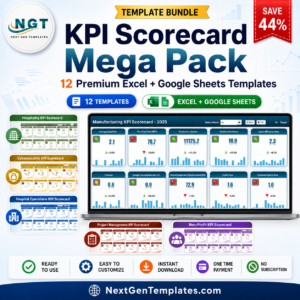
- KPI Scorecard Mega Pack: 12 scorecard templates in one download
Browse all Excel KPI dashboards.








Reviews
There are no reviews yet.