



Key Features of Geriatric Care KPI Dashboard
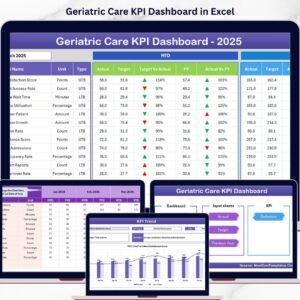
The Geriatric Care KPI Dashboard is a comprehensive and interactive digital tool designed to help healthcare professionals effectively monitor and analyze key performance indicators (KPIs) specific to geriatric care. This dashboard features 7 meticulously designed worksheets that provide a seamless experience for tracking, inputting, and visualizing critical data.
- 🏠 Home Sheet: Acts as the central navigation hub with 6 intuitive buttons for quick access to all other sheets, ensuring smooth workflow and easy navigation.
- 📊 Dashboard Sheet: The main overview tab where users can select the month via a drop-down menu. It dynamically updates all KPI metrics including Month-to-Date (MTD) Actual, Target, Previous Year data, and Year-to-Date (YTD) figures. Conditional formatting with up/down arrows visually highlights performance trends against targets and previous year metrics.
- 📈 KPI Trend Sheet: Allows selection of any KPI to view detailed trends. Displays KPI Group, Unit, Type (Lower the Better or Upper the Better), Formula, and a clear definition. MTD and YTD trend charts compare Actual, Target, and Previous Year data for in-depth analysis.
- ✍️ Actual Numbers Input Sheet: Enables entry of actual monthly data for both MTD and YTD values. The month can be adjusted at the top, allowing for flexible and accurate data input.
- 🎯 Target Number Input Sheet: Dedicated to entering target KPIs for specific months, supporting both MTD and YTD targets to facilitate goal tracking and performance management.
- 📅 Previous Year Number Sheet: Input sheet for last year’s numbers to provide a baseline for comparison and trend analysis.
- 📚 KPI Definition Sheet: Contains detailed fields for KPI Name, Group, Unit, Formula, Definition, and Type (Lower the Better or Upper the Better), enabling users to customize and understand each KPI thoroughly.
What’s Inside the Geriatric Care KPI Dashboard
This digital product includes a fully editable Excel workbook with seven interactive worksheets that cover every aspect of KPI management in geriatric care. From data entry to visualization, all elements are designed to enhance decision-making and operational efficiency. The dashboard integrates powerful conditional formatting along with clear trend charts to display actionable insights at a glance.
The user-friendly design allows healthcare managers, quality officers, and analysts to input actual, target, and previous year data effortlessly and observe real-time updates across the dashboard. The inclusion of KPI definitions ensures clarity, making it easy to onboard new users or stakeholders.
How to Use the Geriatric Care KPI Dashboard
Using this dashboard is straightforward and requires minimal training:
- 🖱️ Start at the Home Sheet to navigate quickly to other sections.
- 📅 Select the month in the Dashboard Sheet dropdown to update all KPI metrics accordingly.
- ✏️ Enter actual performance data in the Actual Numbers Input Sheet for MTD and YTD.
- 🎯 Input your targets in the Target Number Input Sheet to set benchmarks.
- 📊 Use the KPI Trend Sheet to analyze KPI performance trends and compare against previous periods.
- 🧾 Update previous year data in the Previous Year Number Sheet for accurate year-over-year analysis.
- 📖 Customize or review KPI details in the KPI Definition Sheet to ensure alignment with your organizational goals.
This dashboard is optimized for continuous performance tracking, enabling you to make data-driven decisions that improve geriatric care quality and operational efficiency.
Who Can Benefit from This Geriatric Care KPI Dashboard
Whether you are a healthcare administrator, quality assurance manager, data analyst, or consultant specializing in geriatric care, this dashboard is designed to meet your needs. It is ideal for:
- 🏥 Healthcare Providers: Track patient care metrics and improve service delivery.
- 📈 Quality Managers: Monitor KPIs to ensure compliance and drive continuous improvement.
- 🧑⚕️ Clinical Teams: Gain insights into performance trends and outcomes for elderly patients.
- 📊 Data Analysts: Access organized data and visualizations to support reporting and strategic planning.
- 🛠️ Consultants: Help organizations implement effective KPI tracking systems for geriatric care.
The dashboard’s intuitive design and comprehensive features make it an essential tool for anyone involved in managing or improving geriatric healthcare services.
Click here to read the Detailed blog post.
Visit our YouTube channel to learn step-by-step video tutorials

Compatibility and Requirements
- Works in Microsoft Excel desktop (Excel 2016 or later, or Microsoft 365).
- You pick the month from a dropdown on the Dashboard sheet, and the KPI Trend sheet has a KPI selector. Microsoft explains dropdowns in Create a drop-down list.
Frequently Asked Questions
Which sheets are included?
Seven sheets: Home, Dashboard, KPI Trend, Actual Numbers Input, Target Number Input, Previous Year Number and KPI Definition.
How do I update the dashboard?
Enter your MTD and YTD actuals in the Actual Numbers Input sheet and your goals in the Target Number Input sheet. Then select a month on the Dashboard sheet and all KPI figures update.
Can I compare this year with last year?
Yes. Add last year’s figures to the Previous Year Number sheet. The Dashboard and the KPI Trend charts then show Actual, Target and Previous Year side by side.
How do I see the trend for one KPI?
Open the KPI Trend sheet and select the KPI. It shows the KPI Group, Unit, Type (Lower the Better or Upper the Better), Formula and Definition, plus MTD and YTD trend charts.
Can I change the KPI names or formulas?
Yes. The KPI Definition sheet holds the KPI Name, Group, Unit, Formula, Definition and Type for each KPI, and you can edit these fields.
Is there a Power BI version?
Yes. See the Geriatric Care KPI Dashboard in Power BI.
Related Healthcare Templates
- Geriatric Care KPI Dashboard in Power BI: the same topic as a Power BI report
- Home Health Care KPI Dashboard in Excel: KPIs for home-based care
- Healthcare KPI Dashboard in Excel: a general healthcare KPI view
- Healthcare Quality Assurance KPI Dashboard in Excel: quality KPIs for care teams
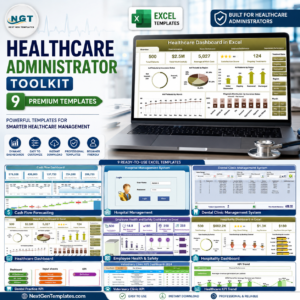
- Healthcare Administrator Toolkit: 9 healthcare templates in one download
Browse all Excel KPI dashboards.





Reviews
There are no reviews yet.