



Key Features of Paediatrics Clinics KPI Dashboard
Introducing the Paediatrics Clinics KPI Dashboard – a comprehensive and dynamic digital tool designed specifically to streamline performance monitoring and enhance decision-making for paediatric healthcare providers. This dashboard consolidates critical Key Performance Indicators (KPIs) into an intuitive visual interface, enabling clinics to track monthly and yearly progress effortlessly.
Featuring 7 meticulously crafted worksheets, the dashboard empowers users with precise data insights and actionable trends. The Home Sheet serves as an interactive index with easy navigation buttons to jump between sheets, ensuring seamless user experience.
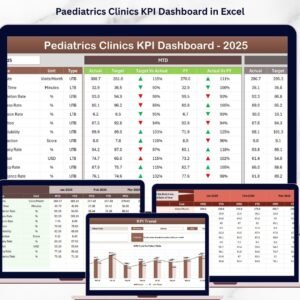
The Dashboard Sheet is the centerpiece, displaying all essential KPIs with an interactive month selector. Users can compare Month-To-Date (MTD) actuals, targets, and previous year’s data with visual up/down arrow conditional formatting showing performance trends. It also includes Year-To-Date (YTD) figures for a comprehensive overview.
The KPI Trend Sheet allows users to select specific KPIs to analyze detailed trends. With clear visualization of MTD and YTD Actual, Target, and Previous Year numbers, alongside descriptions like KPI Group, Unit, Formula, and Type (Lower the Better or Upper the Better), users gain deep understanding of each performance metric.
Data entry sheets such as Actual Numbers Input, Target Number Input, and Previous Year Number Input enable easy updating of figures, customizable by month, maintaining accuracy and relevance.
Finally, the KPI Definition Sheet provides detailed descriptions, formulas, and classifications for each KPI, ensuring clarity and consistency throughout the dashboard.
What’s Inside the Paediatrics Clinics KPI Dashboard

- 🏠 Home Sheet: Central navigation hub with direct access to all tabs.
- 📊 Dashboard Sheet: Interactive overview of all KPIs with monthly and yearly comparisons and visual indicators.
- 📈 KPI Trend Sheet: Detailed trend charts and KPI specifications for targeted analysis.
- ✍️ Actual Numbers Input: User-friendly interface to input real-time MTD and YTD data.
- 🎯 Target Number Input: Set and update monthly KPI targets effortlessly.
- 📅 Previous Year Number Input: Track historical data for performance benchmarking.
- 📚 KPI Definition Sheet: Comprehensive KPI glossary with formulas and performance types.
How to Use the Paediatrics Clinics KPI Dashboard
Using this dashboard is straightforward and efficient. Begin at the Home Sheet to navigate to your desired section. Select the month from the drop-down menu on the Dashboard Sheet to instantly update all KPI figures and visuals.
Input your clinic’s actual performance numbers monthly into the Actual Numbers Input Sheet, update your goals in the Target Number Input Sheet, and maintain historical data in the Previous Year Number Input Sheet. Use the KPI Trend Sheet to analyze specific KPIs over time, aiding in identifying performance gaps and opportunities.
The KPI Definition Sheet is your reference to understand each metric’s formula, unit, and whether a higher or lower value indicates better performance. This clarity ensures accurate interpretation and strategic planning.
Who Can Benefit from This Paediatrics Clinics KPI Dashboard
👩⚕️ Paediatric Clinic Managers: Monitor clinic performance against targets and optimize operational efficiency.
📊 Healthcare Analysts: Gain insights into monthly and yearly trends with detailed KPI definitions and visuals.
🏥 Hospital Administrators: Track multiple clinic KPIs in one dashboard for informed decision-making.
💼 Consultants and Auditors: Assess paediatric clinic performance with clear data and trend analysis.
📈 Quality Improvement Teams: Identify areas for enhancement and implement data-driven strategies.
Whether you are managing a single paediatric clinic or overseeing multiple centers, this KPI dashboard is tailored to provide clarity, ease of use, and actionable insights that drive results.
Click here to read the Detailed blog post.
Visit our YouTube channel to learn step-by-step video tutorials.
Watch the step-by-step video tutorial:
Compatibility and Requirements
- Works in Microsoft Excel desktop (Excel 2016 or later, or Microsoft 365).
- The Dashboard sheet uses a month drop-down and up/down arrow conditional formatting. Microsoft explains the feature in Use conditional formatting to highlight information in Excel.
Frequently Asked Questions
Which sheets are included?
Seven sheets: Home, Dashboard, KPI Trend, Actual Numbers Input, Target Number Input, Previous Year Number Input and KPI Definition.
How do I update the dashboard?
Enter your MTD and YTD figures in the Actual Numbers Input sheet and your goals in the Target Number Input sheet. Then pick a month from the drop-down on the Dashboard sheet and all figures and visuals update.
Can I compare this year with last year?
Yes. Add last year’s figures to the Previous Year Number Input sheet. The Dashboard shows them next to your actuals and targets, with up and down arrows for the trend.
How do I see the trend for one KPI?
Open the KPI Trend sheet and select the KPI. It shows MTD and YTD Actual, Target and Previous Year numbers, plus the KPI Group, Unit, Formula and Type (Lower the Better or Upper the Better).
Is there a Power BI version?
Yes. See the Paediatrics Clinics KPI Dashboard in Power BI.
Related Clinic Templates
- Paediatrics Clinics KPI Dashboard in Power BI: the same KPIs in Power BI
- Clinics KPI Dashboard in Excel: a general clinic KPI dashboard
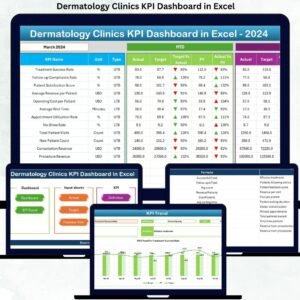
- Dermatology Clinics KPI Dashboard in Excel: the same layout for dermatology
- Clinic Dashboard in Excel: a clinic dashboard in Excel
- Healthcare & Hospital Management Bundle: 8 healthcare templates in one download
Browse all Excel KPI dashboards.








Reviews
There are no reviews yet.