



The Task Management Audit Checklist in Excel is a comprehensive and efficient tool designed to help project managers, team leaders, and businesses ensure that their task management processes are well-organized, streamlined, and properly tracked. This checklist helps audit the entire task management workflow—from task creation and resource allocation to progress tracking and task completion.
With this Excel-based checklist, you can systematically assess each task’s status, verify that all necessary steps are being followed, and ensure that no task is overlooked. Whether you’re reviewing tasks for a specific project or auditing an ongoing process, this checklist helps keep everything on track and aligned with your business goals.
Key Features of the Task Management Audit Checklist in Excel
📋 Comprehensive Task Auditing
Track the status of every task within your project, ensuring that all key aspects of task management, such as deadlines, responsibilities, and resources, are being met.
🔄 Task Completion Verification
Ensure that all tasks are completed on time and according to specified guidelines. Use the checklist to confirm whether every step of the task management process has been properly executed.
📝 Resource Allocation Tracker
Audit how resources (time, personnel, budget, etc.) are being allocated to tasks. Verify that resources are being used efficiently and effectively to complete tasks.
📅 Deadline & Milestone Monitoring
Track task deadlines and milestones. Verify if tasks are being completed within their allocated timeframes and whether the milestones are being met for timely project completion.
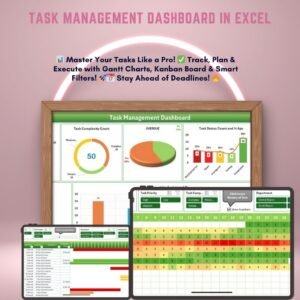
📊 Visual Reports & Data Analysis
Use charts and graphs to visualize task progress, resource allocation, and task completion trends. Make it easy to spot bottlenecks or areas that require attention.
⚙️ Customizable Fields & Metrics
Customize the checklist to meet your specific project requirements. Add new fields, KPIs, or metrics that are relevant to your task auditing process.
Why You’ll Love the Task Management Audit Checklist in Excel

✅ Efficient Task Auditing
Track and verify task completion in an organized, systematic manner, ensuring that all tasks are being managed according to the agreed-upon guidelines.
✅ Optimize Resource Allocation
Ensure that resources (time, manpower, budget) are being used effectively for each task. Identify any misallocation and make adjustments as needed.
✅ Stay on Track with Deadlines
Monitor whether tasks are being completed on time. Identify potential delays early in the process and take corrective action to prevent bottlenecks.
✅ Make Informed Decisions
With visual data insights, you can make more informed decisions to improve task management processes, optimize resource allocation, and achieve timely project completion.
✅ Fully Customizable to Your Needs
Whether you’re auditing a single project or a set of ongoing tasks, this checklist is fully customizable to fit your specific task management and auditing needs.
What’s Inside the Task Management Audit Checklist in Excel?
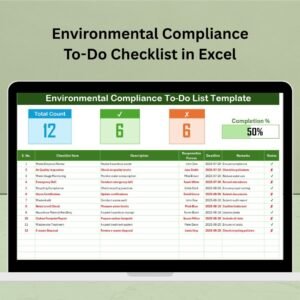
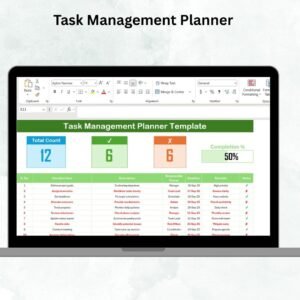
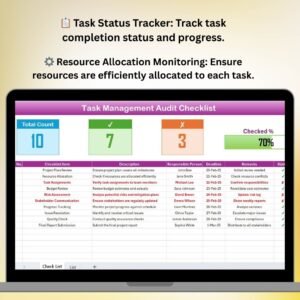
- Task Status Tracker: Audit task progress, completion status, and deadlines.
- Resource Allocation Monitoring: Track resource allocation for each task.
- Milestone Verification: Ensure all project milestones and deadlines are being met.
- Customizable Fields: Add custom fields to track additional KPIs or task-specific metrics.
- Data Visualization: Use charts and graphs to assess task progress, resource usage, and performance trends.
How to Use the Task Management Audit Checklist in Excel
1️⃣ Download the Template: Get instant access to the Task Management Audit Checklist in Excel.
2️⃣ Customize Your Checklist: Add relevant fields, KPIs, and metrics to align the checklist with your task management process.
3️⃣ Track Task Status: Monitor and verify the completion status of each task.
4️⃣ Verify Resource Allocation: Ensure resources are being allocated efficiently across tasks.
5️⃣ Analyze Data & Visualize Trends: Use charts and graphs to track task completion, identify bottlenecks, and optimize task management.
Who Can Benefit from the Task Management Audit Checklist in Excel?
🔹 Project Managers & Task Coordinators
🔹 Operations Managers & Team Leaders
🔹 Businesses & Organizations with Multiple Ongoing Tasks
🔹 HR Managers & Resource Allocation Specialists
🔹 Consultants & Freelancers Managing Multiple Clients or Projects
🔹 Small & Medium Enterprises (SMEs) & Large Corporations
Ensure that your task management processes are efficient, on track, and aligned with your business objectives with the Task Management Audit Checklist in Excel. Use this tool to audit your tasks, verify resource allocation, track deadlines, and visualize progress for optimal results.
Click here to read the Detailed blog post
Visit our YouTube channel to learn step-by-step video tutorials
Youtube.com/@PKAnExcelExpert
Compatibility and Requirements
- Works in Microsoft Excel desktop (Excel 2016 or later, or Microsoft 365).
- The progress views are standard Excel charts. Microsoft explains them in Create a chart from start to finish.
Frequently Asked Questions
What does the checklist audit?
It checks each task’s status, deadlines and milestones, and how time, people and budget are allocated to it.
Can I see progress in charts?
Yes. Charts and graphs show task progress, resource allocation and completion trends so bottlenecks are easier to spot.
Can I add my own fields?
Yes. You can add fields, KPIs or metrics that fit your own task auditing process.
Is it only for one project?
No. You can use it to audit a single project or a set of ongoing tasks.
Related Task Management Templates
- Task Management Checklist in Excel: a general task checklist
- Task Management Evaluation Checklist in Excel: rate how tasks were handled
- Task Management Monitoring Template in Excel: keep an eye on open tasks
- Task Management Dashboard in Excel: a dashboard view of task data
- Task Management Tracker in Google Sheets: track tasks in Google Sheets
Browse all Excel checklists or the Excel project management templates.




Reviews
There are no reviews yet.