


Strategic planning is not just about setting goals—it is about tracking execution, controlling budgets, managing risks, and ensuring alignment across the organization. However, many businesses still rely on scattered spreadsheets, presentations, and static reports. As a result, leadership teams lose visibility, accountability weakens, and strategic decisions become reactive instead of proactive.
That is exactly where the Strategic Planning Dashboard in Google Sheets becomes a game-changing solution 🚀
This ready-to-use dashboard converts complex strategic planning data into clear KPIs, interactive visuals, and actionable insights—all inside Google Sheets, without coding or expensive BI tools.
Designed for leadership teams, PMOs, strategy teams, and consultants, this dashboard provides a single source of truth for monitoring strategic initiatives, budgets, risks, performance scores, and stakeholder satisfaction in real time.
🔑 Key Features of Strategic Planning Dashboard in Google Sheets
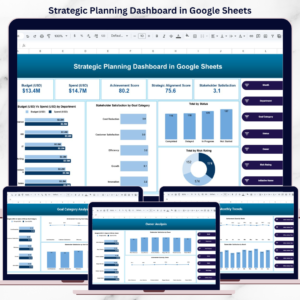
📊 Centralized Strategic Visibility – Track all initiatives, budgets, risks, and outcomes in one dashboard
🎯 Budget vs Spend Tracking – Instantly identify overspending and underutilized budgets
📈 Performance Measurement – Monitor achievement scores and strategic alignment scores
😊 Stakeholder Satisfaction Monitoring – Measure perception and engagement across initiatives
⚠️ Risk Rating Analysis – Identify high-risk initiatives before they derail strategy
🧩 Interactive Slicers – Filter by Month, Department, Goal Category, Owner, Status, Risk Rating, and Initiative
☁️ 100% Google Sheets Based – Cloud access, real-time collaboration, no software installation
📂 What’s Inside the Strategic Planning Dashboard
This dashboard is structured with multiple analytical pages, each designed for leadership-level clarity:
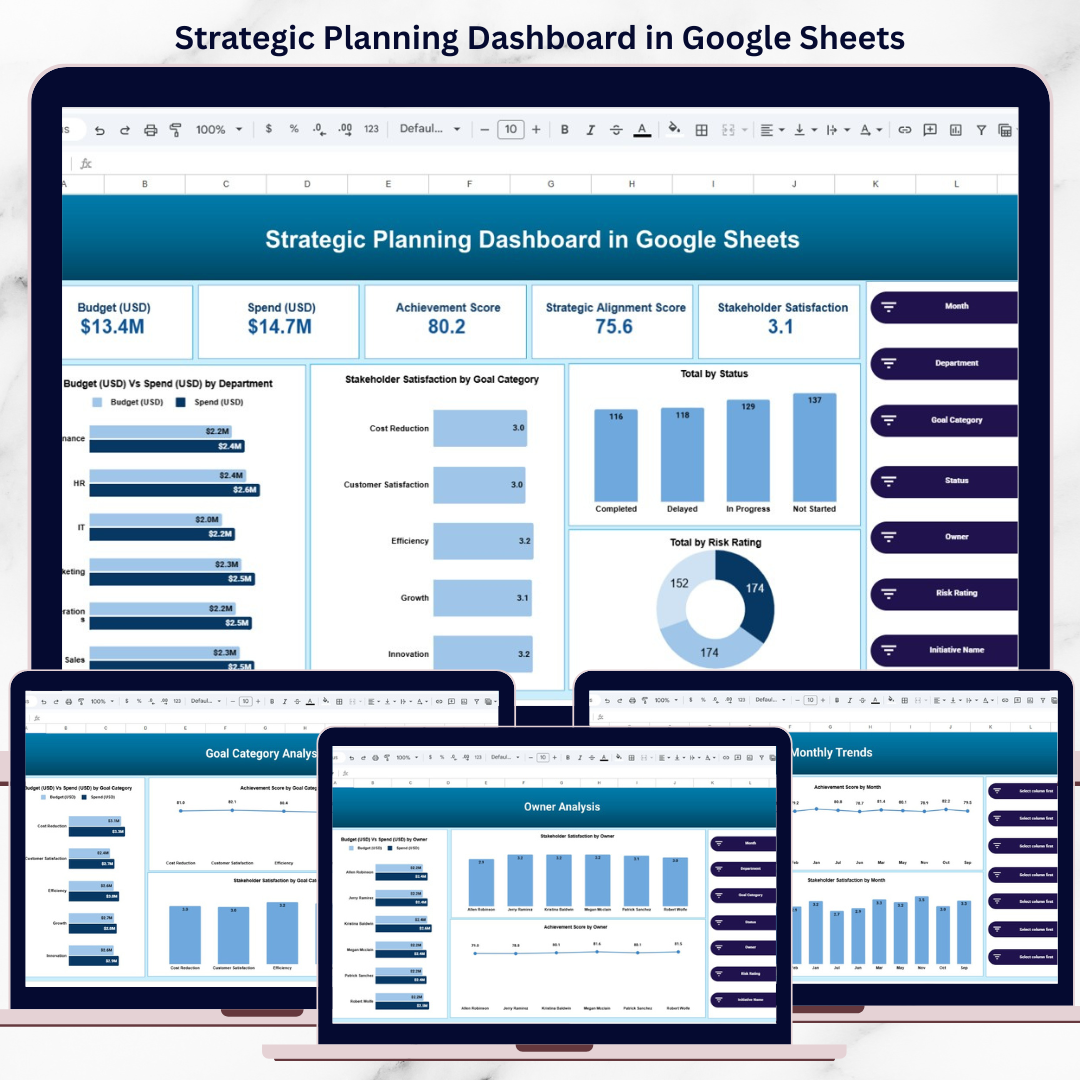
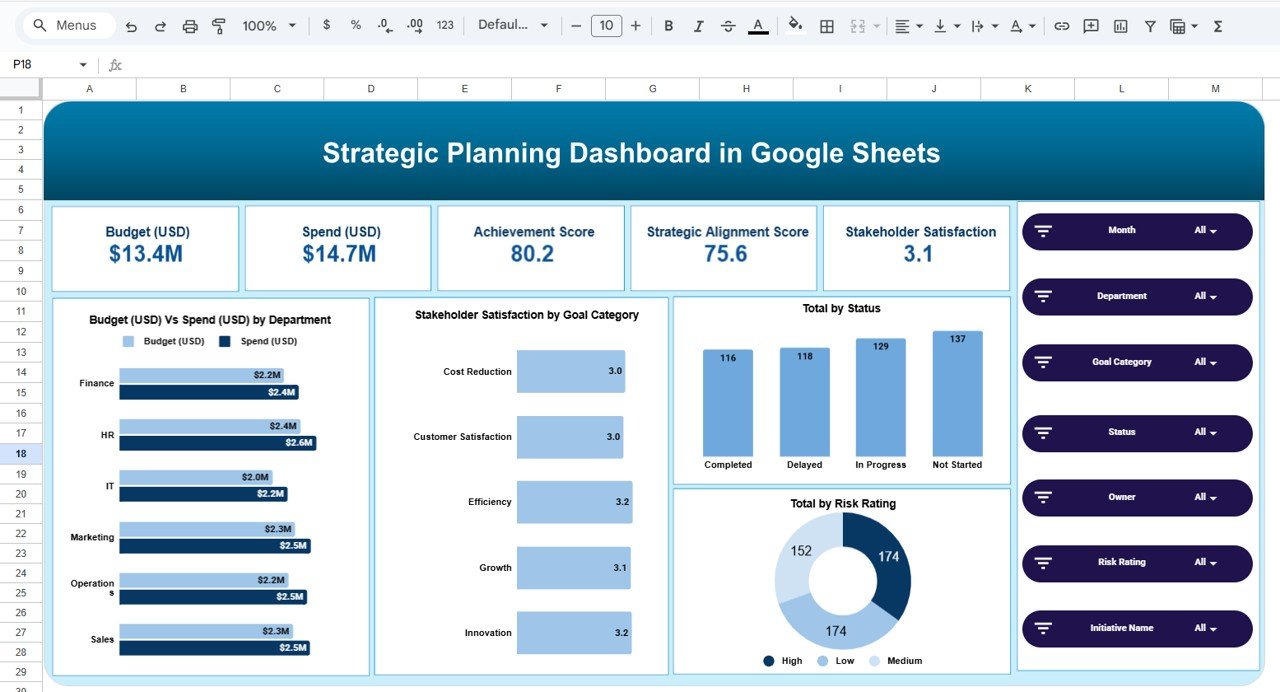
📌 Overview Page
A high-level snapshot of overall strategy execution:
Total Budget vs Total Spend
Achievement Score
Strategic Alignment Score
Stakeholder Satisfaction Score
Initiative Status Distribution
Risk Rating Distribution
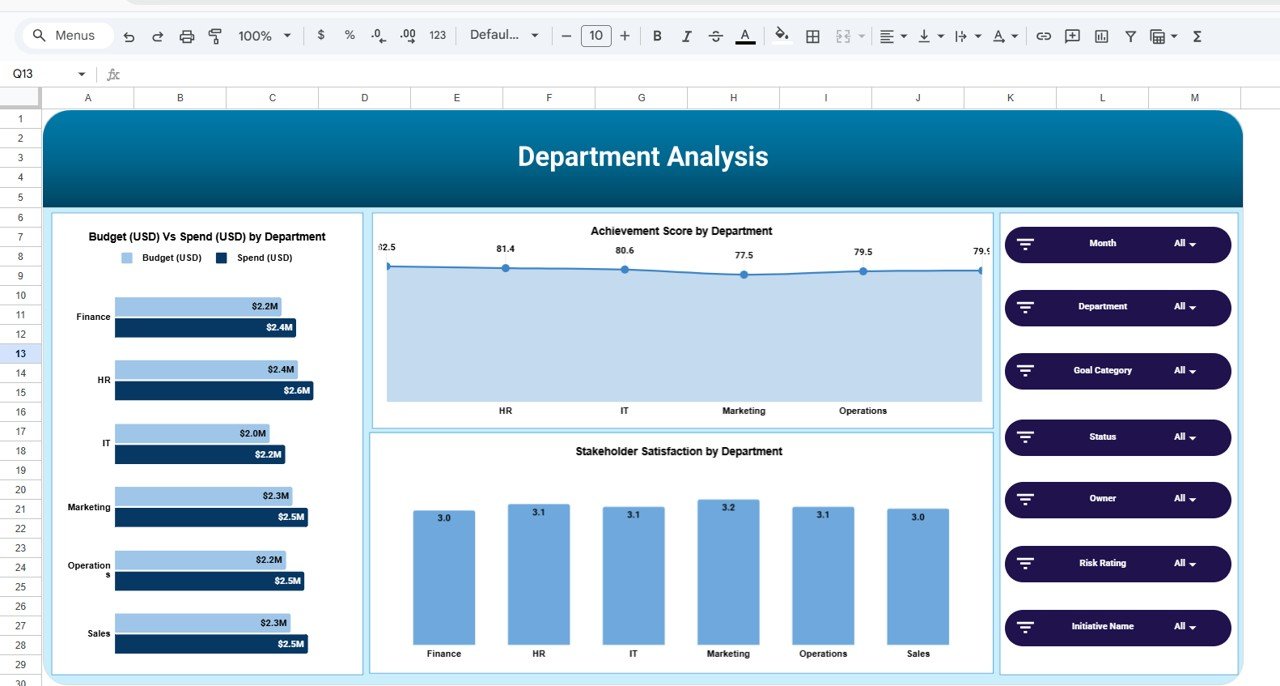
🏢 Department Analysis
Budget vs Spend by Department
Achievement Score by Department
Stakeholder Satisfaction by Department
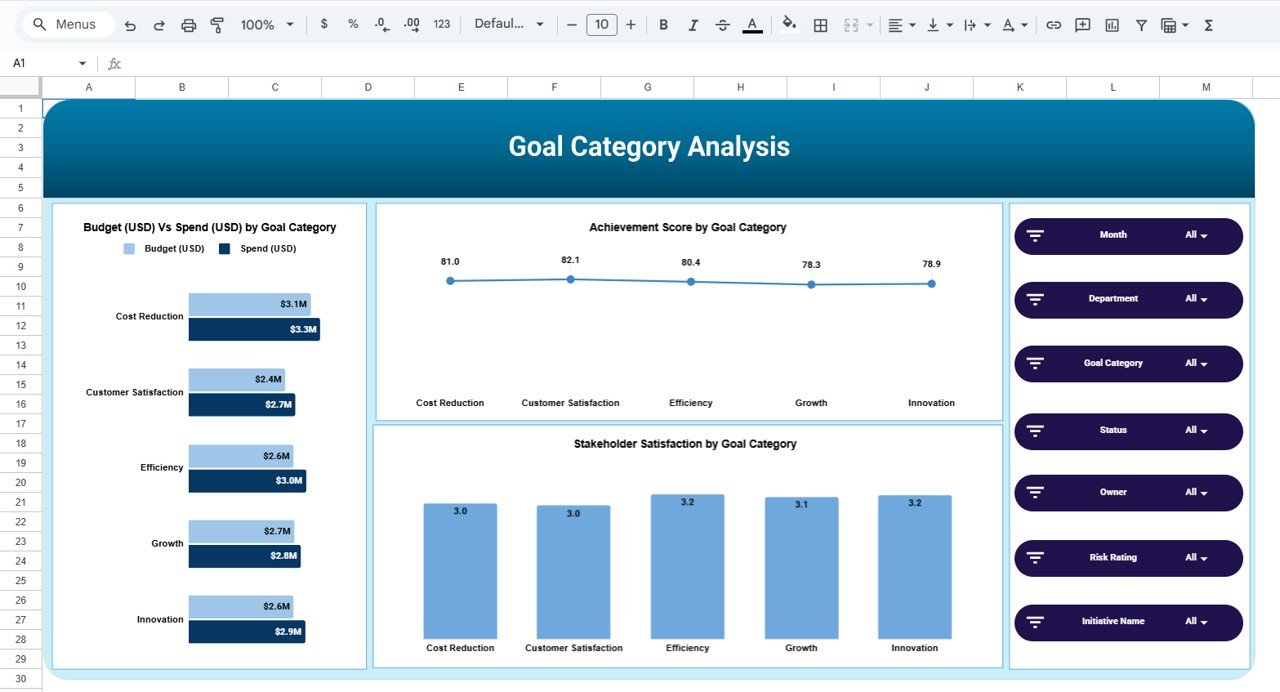
🎯 Goal Category Analysis
Budget vs Spend by Strategic Goal
Achievement Trends by Goal Category
Stakeholder Satisfaction by Goal Category
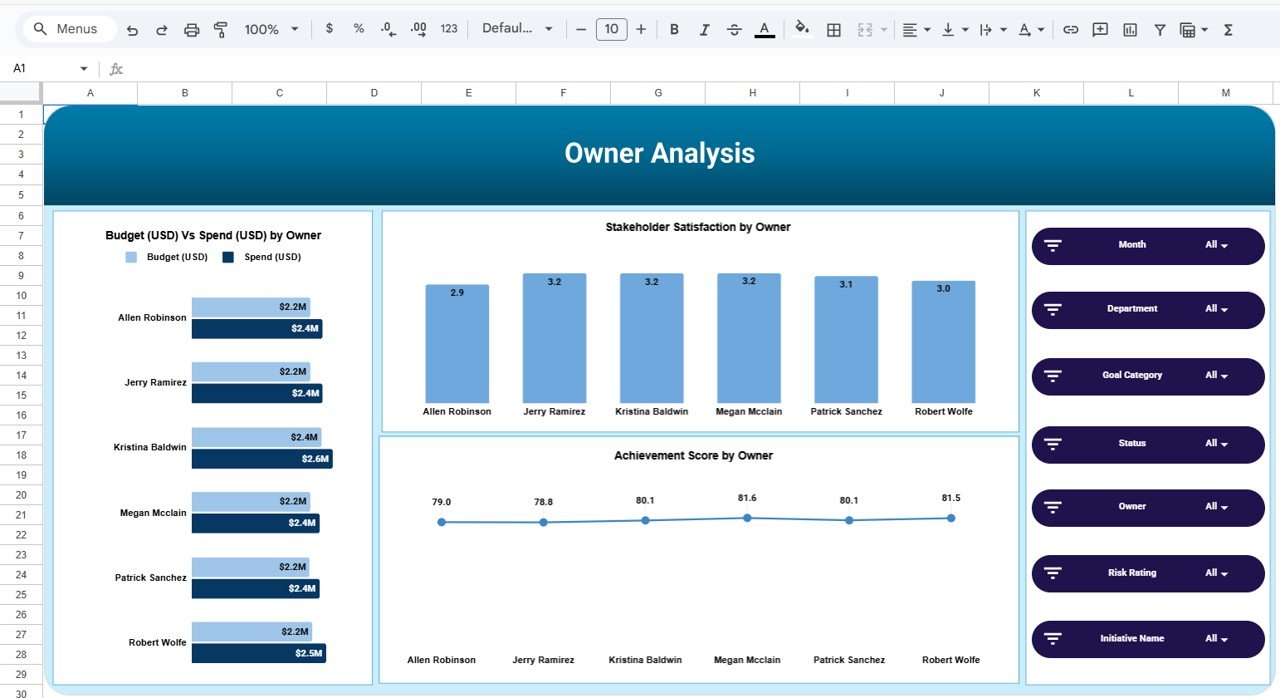
👤 Owner Analysis
Budget vs Spend by Initiative Owner
Achievement & Satisfaction Scores by Owner
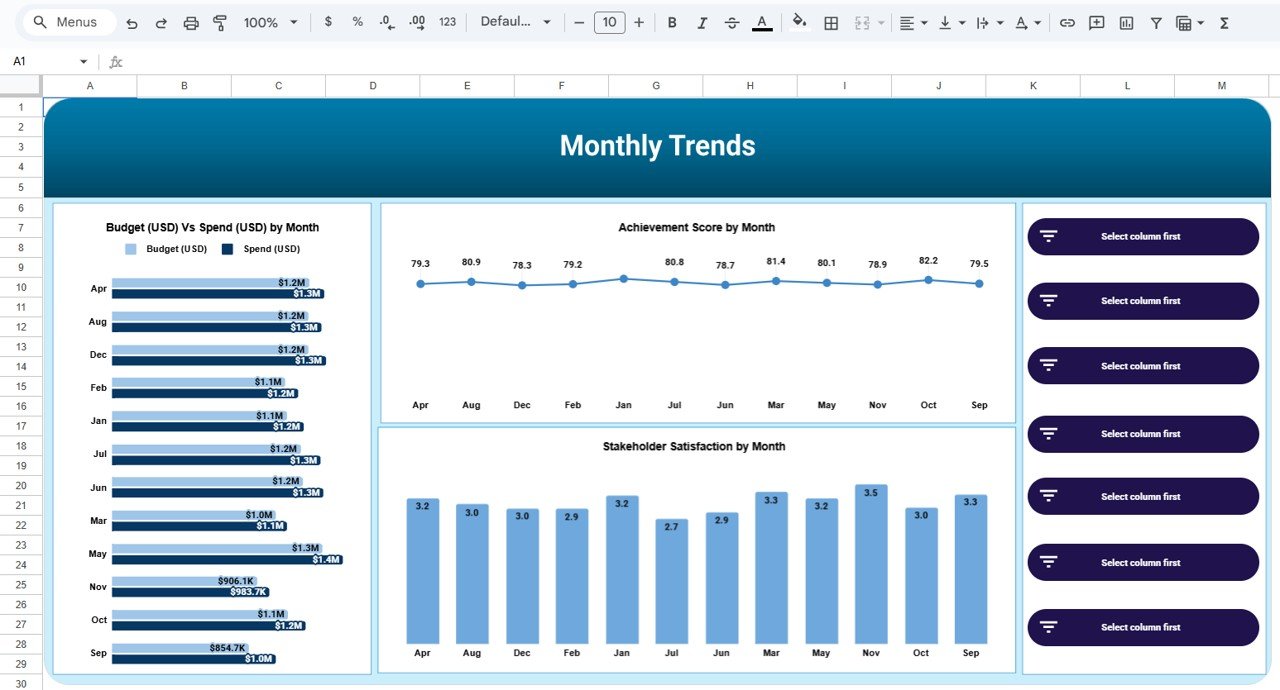
📆 Monthly Trends
Budget vs Spend by Month
Achievement Score Trends
Stakeholder Satisfaction Trends
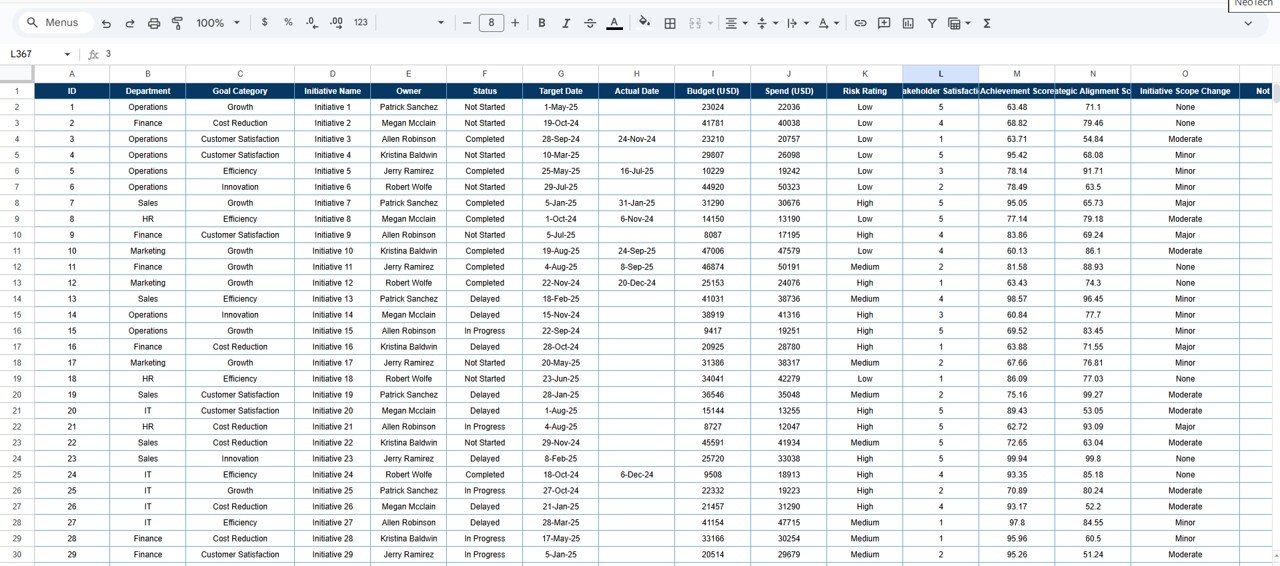
🗂️ Data Input Sheet
A structured backend table capturing:
Department
Goal Category
Initiative Name
Owner
Status
Budget & Spend
Risk Rating
Achievement Score
Strategic Alignment Score
Stakeholder Satisfaction
All charts and KPIs update automatically as data changes.
🛠️ How to Use the Strategic Planning Dashboard
1️⃣ Enter or update strategic initiative data in the Data Input Sheet
2️⃣ Use slicers to filter by department, owner, goal, or time period
3️⃣ Review Budget vs Spend to control financial discipline
4️⃣ Analyze achievement, alignment, and satisfaction scores
5️⃣ Identify high-risk or delayed initiatives early
6️⃣ Use insights during leadership, PMO, and strategy review meetings
No advanced formulas. No BI tools. Just clear strategic insight.
👥 Who Can Benefit from This Dashboard?
🏢 CXOs & Leadership Teams
📊 Strategy & PMO Teams
🧠 Business & Corporate Planning Teams
📈 Department Heads
🧾 Consultants & Advisors
🚀 Growing & Enterprise Organizations
If strategy execution matters to your organization, this dashboard is essential.
🎯 Why This Dashboard Is a Must-Have
✅ Eliminates scattered strategic reports
✅ Improves accountability and ownership
✅ Strengthens budget governance
✅ Supports data-driven strategic decisions
✅ Saves hours of manual reporting
✅ Fully customizable and scalable
🔍 Opportunities for Improvement (Future Enhancements)
🔔 Automated alerts for budget overruns
📐 OKR and Balanced Scorecard integration
📝 Google Forms for initiative updates
🔮 Forecasting for future strategic spend
🏁 Final Thoughts
The Strategic Planning Dashboard in Google Sheets empowers organizations to move from planning to execution with clarity and control. Instead of relying on static reports, leadership teams gain real-time insights into budgets, risks, performance, and alignment—all in one interactive dashboard.
If you want better strategy execution, stronger accountability, and smarter decisions, this dashboard is the perfect solution.
### 📘 Click here to read the Detailed blog post
Watch the step-by-step video tutorial:
### 🎥 Visit our YouTube channel to learn step-by-step video tutorials
Compatibility and Requirements
- Works in Google Sheets. You need a free Google account and a web browser.
- The dashboard uses slicers to filter by Month, Department, Goal Category, Owner, Status, Risk Rating and Initiative. Google explains how charts work in Add and edit a chart or graph.
More Questions About This Template
Where do I enter my initiative data?
Use the Data Input Sheet. Each row holds the Department, Goal Category, Initiative Name, Owner, Status, Budget, Spend, Risk Rating, Achievement Score, Strategic Alignment Score and Stakeholder Satisfaction.
Do the charts update when I change the data?
Yes. All charts and KPIs update automatically as the data changes.
What can I filter by?
You can use slicers for Month, Department, Goal Category, Owner, Status, Risk Rating and Initiative.
Do I need coding or a BI tool?
No. The dashboard runs entirely in Google Sheets and needs no coding or BI software.
Is there an Excel or Power BI version?
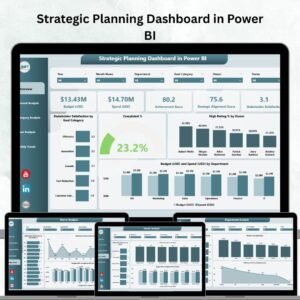
Yes. See the Strategic Planning Dashboard in Excel and the Strategic Planning Dashboard in Power BI.
Related Strategic Planning Templates
- Strategic Planning Dashboard in Excel: the same dashboard in Excel
- Strategic Planning Dashboard in Power BI: the Power BI edition
- Annual Strategic Planning Calendar in Google Sheets: a yearly calendar for your strategy dates
- Strategic Planning KPI Dashboard in Excel: a KPI-focused view of strategy
- Google Sheets Business Pack (Pro): 14 business templates in one download
Browse all Google Sheets dashboards.































Reviews
There are no reviews yet.