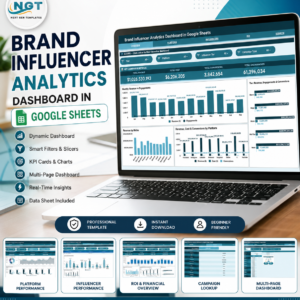
The Social Media Influencer Tracking Dashboard in Google Sheets tracks 4 headline KPIs (Total Revenue, Total Cost, Total Conversions, Total Engagements) across 6 connected tabs, with 14 pre-built charts and slicer-based filtering by platform, niche, influencer tier and month. Setup takes under 10 minutes — paste your campaign data into the Data sheet and every chart, KPI card and lookup updates automatically.
🌍 Join 8,400+ teams in 40+ countries using NextGenTemplates to replace paid SaaS tools with one-time-purchase Excel, Google Sheets, Power BI, and HTML templates.
✅ Instant download · One-time payment · No subscription · No per-user fees · Lifetime access
Built for agencies and brands running creator campaigns, this dashboard turns a flat list of influencer campaigns into a connected reporting system. You see spend, return and engagement by platform and niche, compare influencer tiers side by side, and pull a single campaign’s full record from a dropdown — all inside Google Sheets Dashboards you already know how to use.
🔑 Key Features of the Social Media Influencer Tracking Dashboard
🔹 4 KPI cards on the Overview page — Total Revenue, Total Cost, Total Conversions and Total Engagements update the moment you add or edit a campaign row, giving you a live top-line read on every creator program.
🔹 14 pre-built charts across 4 analysis tabs — revenue, cost, reach, impressions, engagements, clicks and conversions are broken down by platform, niche, influencer tier, content type, campaign type and month so trends are visible without writing a single formula.
🔹 Slicer-based filtering — the Overview page carries native Google Sheets slicers, so you can isolate one platform, one niche or one influencer tier and watch every card and chart re-filter instantly.
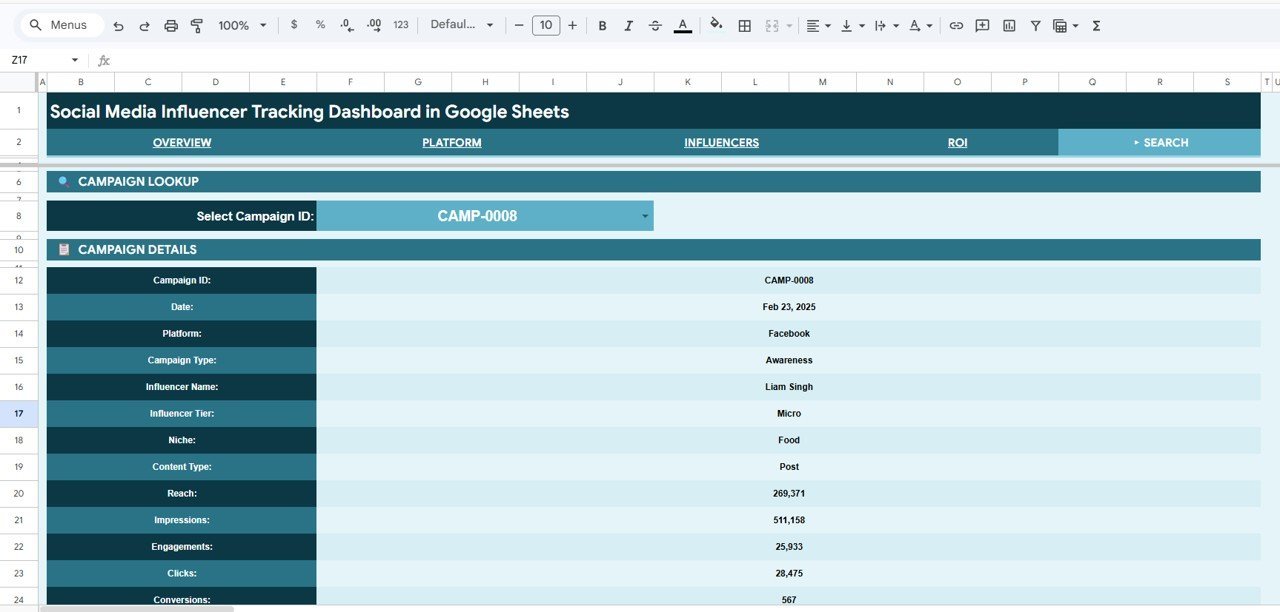
🔹 Campaign lookup on the Search sheet — pick any Campaign ID from a dropdown and the sheet returns the full record: Date, Platform, Campaign Type, Influencer Name, Influencer Tier, Niche, Content Type, Reach, Impressions, Engagements, Clicks and Conversions.
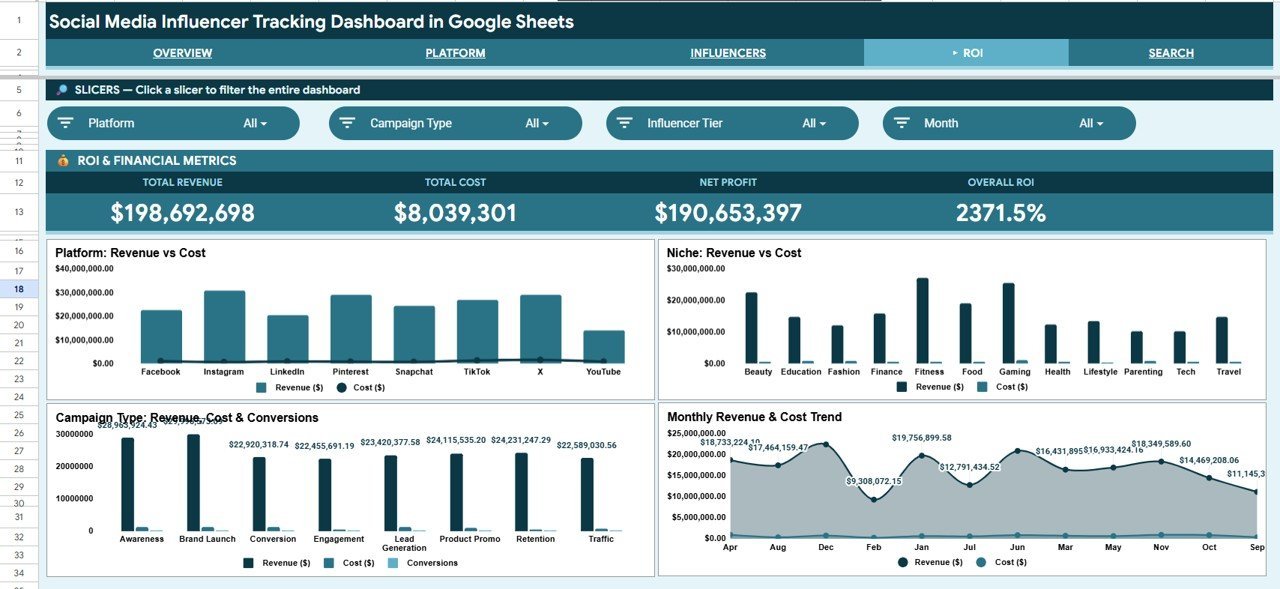
🔹 ROI and Financial Analysis tab — Revenue vs Cost is plotted by Platform, Niche, Campaign Type and Month, so you can see exactly which creators and channels earn back their fee and which drain budget.
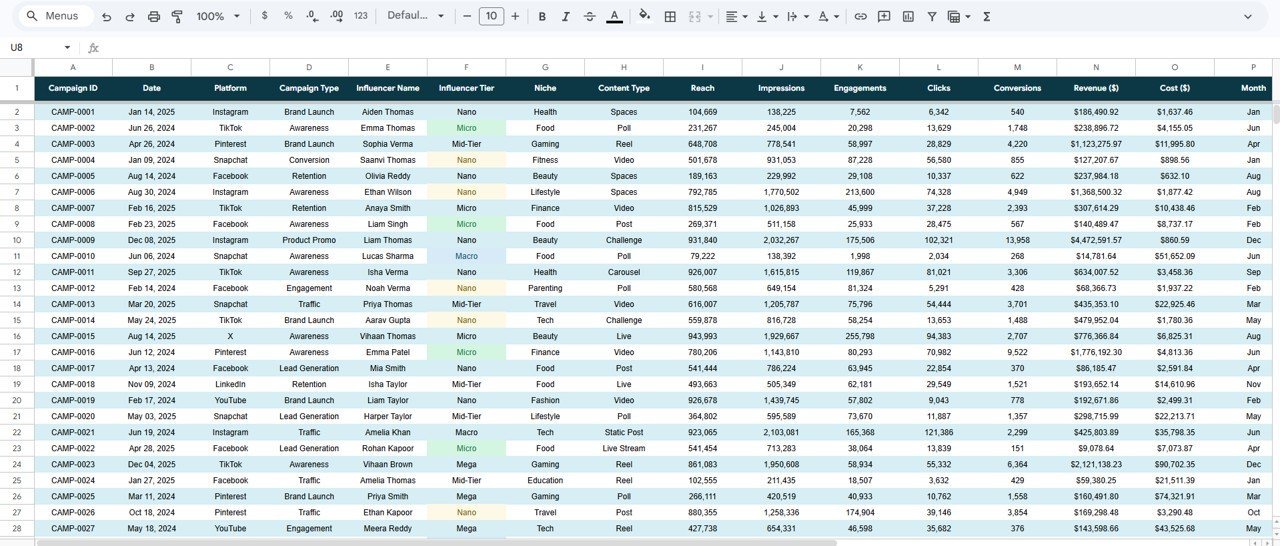
🔹 Structured Data sheet — a clean, columnar input table feeds every page. Add rows in the same format and the whole workbook scales with your campaign history.
📦 What’s Inside the Social Media Influencer Tracking Dashboard
The workbook has 6 connected tabs — an Overview page, three analysis pages, a campaign Search sheet and the Data sheet. Each page is described below.
Page 1: Overview
The landing page shows four KPI cards — Total Revenue, Total Cost, Total Conversions and Total Engagements — above slicers for quick filtering. Charts include Revenue by Niche, Revenue Cost and Conversions by Platform, Revenue Engagements and Conversions by Influencer Tier, and Revenue and Engagements by Month.

Page 2: Platform Analysis
This page compares how each social platform performs. Charts include Total Reach by Platform, Impressions Engagements and Clicks by Platform, and Revenue by Content Type — so you can tell which platforms drive raw reach versus paid return.

Page 3: Influencers Analysis
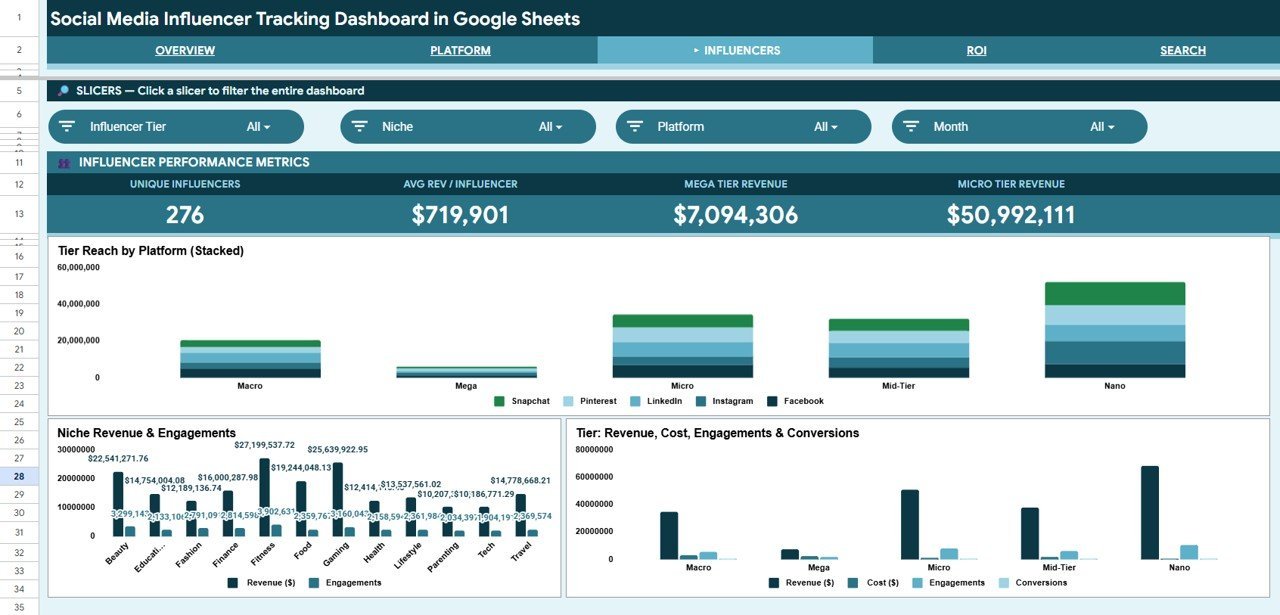
This page profiles influencer performance by tier and niche. Charts include Reach by Influencer Tier and Platform, Revenue and Engagements by Niche, and Revenue Cost Engagements and Conversions by Influencer Tier — useful for deciding whether mega, macro or micro creators give the best return.

Page 4: ROI and Financial Analysis
This page focuses on money in versus money out. Charts include Revenue vs Cost by Platform, Revenue vs Cost by Niche, Revenue Cost and Conversions by Campaign Type, and Revenue and Cost by Month — making profitable channels and campaign formats obvious at a glance.

Search Sheet
The Search sheet is a campaign lookup. Select any Campaign ID from the dropdown and it returns the complete record — Date, Platform, Campaign Type, Influencer Name, Influencer Tier, Niche, Content Type, Reach, Impressions, Engagements, Clicks and Conversions — without scrolling the raw data.

Data Sheet
The Data sheet is the single source for the whole workbook. Add your campaigns in the same column format and every KPI card, chart, slicer and lookup expands automatically to include the new rows.

📊 Influencer Tracking Dashboard in Google Sheets vs. Excel vs. Paid Influencer SaaS — Where This Fits
| Feature | This Google Sheets Dashboard | Microsoft Excel Dashboard | Paid Influencer SaaS (GRIN / Upfluence / CreatorIQ) |
|---|---|---|---|
| Cost | $9.99 one-time | $15–25 one-time | $1,000–2,500 / month |
| Platform | Google Sheets (browser, free) | Microsoft Excel (desktop) | Proprietary web app |
| Setup time | Under 10 minutes | Under 10 minutes | Days (onboarding + integrations) |
| Real-time team collaboration | ✅ Built-in via Google Drive | ❌ Needs OneDrive/SharePoint | ✅ Included |
| Mobile access | ✅ Google Sheets app | ⚠️ Excel mobile, limited | ✅ Included |
| Customizable fields | ✅ Fully editable | ✅ Fully editable | ❌ Locked to vendor schema |
| Share with link | ✅ One click | ⚠️ File send / cloud only | ✅ Included |
| Campaign ID lookup | ✅ Built-in Search sheet | ✅ With formulas | ✅ Included |
| Year-1 cost at 5 users | $9.99 total | $15–25 total | $12,000–30,000 |
For agencies and brands that want platform, tier and ROI reporting on creator campaigns without paying four-figure monthly SaaS fees, the Social Media Influencer Tracking Dashboard sits in the sweet spot.
👥 Who This Template Is For — and Who It’s Not For
✅ This template is built for:
- Influencer marketing managers running campaigns across Instagram, TikTok, YouTube and X who need one tracker for spend and return
- Small and mid-size agencies reporting creator results to clients without a $1,000+/month platform
- Brand and social media teams comparing mega, macro and micro influencer tiers on cost and conversions
- Freelancers and consultants who want a clean, shareable Google Sheets report for each client
❌ This template is NOT for:
- Enterprise teams that need automatic API ingestion from Instagram, TikTok or YouTube — this is a manual-entry tracker, not a live integration
- Teams that require built-in influencer discovery, contracts or payment processing — use a full SaaS platform for that
- Users who never open Google Sheets and want a fully managed dashboard service
⚙️ How to Use the Social Media Influencer Tracking Dashboard
- Open the PDF in your download and click the Google Sheets copy link to create your own editable copy in Google Drive.
- Go to the Data sheet and replace the sample campaigns with your own, keeping the same column order.
- Open the Overview page and use the slicers to filter by platform, niche, influencer tier or month.
- Review the Platform, Influencers and ROI analysis tabs to compare spend, reach and return.Social Media Influencer Tracking Dashboard in Google Sheets
- Use the Search sheet dropdown to pull any single campaign’s full record on demand.Social Media Influencer Tracking Dashboard in Google Sheets
💼 Real-World Use Cases
Priya manages influencer campaigns at a 12-person beauty brand. She uses the Social Media Influencer Tracking Dashboard to compare revenue and cost across Instagram and TikTok, spot which niches convert, and show her founder a clean monthly ROI view — without paying $1,500 a month for an influencer SaaS tool.Social Media Influencer Tracking Dashboard in Google Sheets
Marcus runs a small social media agency with six clients. He keeps a copy of the dashboard per client, filters the Influencers Analysis tab by tier, and proves to each client that micro creators are returning more revenue per dollar than the macro names they wanted to chase.Social Media Influencer Tracking Dashboard in Google Sheets
Lena is a freelance creator-marketing consultant. She uses the Search sheet to answer ad-hoc client questions instantly — pulling a single campaign’s reach, engagements and conversions in seconds during a call instead of scrolling through a spreadsheet.
❓ Frequently Asked Questions
What KPIs does the Social Media Influencer Tracking Dashboard track?
The Social Media Influencer Tracking Dashboard tracks 4 headline KPIs — Total Revenue, Total Cost, Total Conversions and Total Engagements — plus reach, impressions and clicks broken down by platform, niche, influencer tier, content type, campaign type and month across its analysis tabs.Social Media Influencer Tracking Dashboard in Google Sheets
How long does setup take?
Setup takes under 10 minutes. Make your own copy of the Social Media Influencer Tracking Dashboard, paste your campaign rows into the Data sheet in the existing column order, and every KPI card, chart, slicer and the Search lookup update automatically.Social Media Influencer Tracking Dashboard in Google Sheets
How does this compare to paid influencer SaaS like GRIN or Upfluence?
Paid influencer platforms typically cost $1,000–2,500 per month. The Social Media Influencer Tracking Dashboard is a one-time $9.99 purchase that covers platform, tier and ROI reporting — without discovery, contracts or live API ingestion, which is the trade-off for the lower price.Social Media Influencer Tracking Dashboard in Google Sheets
Can I filter the dashboard by platform or influencer tier?
Yes. The Overview page includes native Google Sheets slicers, so you can filter by platform, niche, influencer tier or month and every KPI card and chart re-filters instantly to match your selection.
Do I need to install anything?
No. The Social Media Influencer Tracking Dashboard runs entirely in Google Sheets in your browser. There is no software to install and no subscription — just make a copy to your own Google Drive and start entering data.Social Media Influencer Tracking Dashboard in Google Sheets
Can I add more campaigns over time?
Yes. The Data sheet is the single input table for the workbook. Add new campaign rows in the same format and every chart range, KPI card, slicer and the Search lookup expand automatically to include them.Social Media Influencer Tracking Dashboard in Google Sheets
👤 About the Author
Built by PK — Microsoft Certified Professional with 15+ years of Excel, Google Sheets, and Power BI experience. Founder of NextGenTemplates, reaching 300K+ subscribers across YouTube channels (@PK-AnExcelExpert, @NextGenTemplates, @NeoTechNavigators). Every template is hand-built and tested before release.
🔗 Explore Related Templates
Pair this with the Influencer Collaboration Analytics Dashboard in Google Sheets for collaboration-side reporting. Also available as: Influencer Campaign Dashboard in Excel and Influencer Campaign Dashboard in Power BI for teams on those platforms. For broader social reporting, browse our Google Sheets Dashboards collection.
💎 Save more — get this plus 6 other marketing reports in the Marketing and Social Media Analytics Kit (7 templates) →
📖 Click here to read the Detailed Blog Post
Watch the step-by-step video Demo:
🎥 Visit our YouTube channel for step-by-step video tutorials
👉 YouTube.com/@NextGenTemplates