
Send bulk emails using VBA and Outlook

MS Excel - instant download

Original price was: ₹1,499.00.Current price is: ₹699.00.
Details, requirements and demo below
Sale!

Send bulk emails using VBA and Outlook

Original price was: ₹1,499.00.Current price is: ₹699.00.

Easily send personalized bulk emails directly from Excel using VBA and Outlook. Streamline your email campaigns with customizable fields, automated tracking, and attachment support.

Key Features:

  • One-Click Email Sending: Send multiple emails at once with just a click using VBA and Outlook integration.
  • Personalized Emails: Customize each email with unique recipient info, subject, body text, and attachments.
  • Automated Status Tracking: Automatically update email statuses as “Sent” in the Excel sheet.
  • Attachment Support: Attach files to each email simply by providing file paths in Excel.
  • Seamless Outlook Integration: Send emails directly from Excel through Microsoft Outlook.
  • Customizable Fields: Specify recipient, CC, subject, message, and attachments.
  • Bulk Sending: Ideal for sending marketing campaigns, reports, and notifications.
  • Time-Saving: Avoid manual email creation by automating the process.
  • Flexible for Various Use Cases: Perfect for businesses, marketers, or customer support teams.
  • Easy to Use: User-friendly Excel interface with built-in VBA functionality.
- +

💡 Buy any 2 templates and save 20% automatically at checkout.

Pricing country
Prices follow your selected country; checkout uses your billing country.
Excel + AI Mastery: 100 Essential Formulas courseLaunch offer
🎓 NEXTGENTEMPLATES ACADEMY
Want to build templates like this yourself?
Excel + AI Mastery: 100 Essential Formulas

SUMIFS, XLOOKUP, FILTER, LAMBDA and checking AI-written formulas, with real business projects. 11h 47m of video by PK, with practice files, quizzes and a capstone.

The “Send Bulk Emails Using VBA and Outlook” tool is designed to streamline the process of sending personalized, bulk emails directly from Excel, integrating with Microsoft Outlook. This solution is ideal for businesses or individuals who need to send multiple emails efficiently while maintaining a high level of personalization for each recipient. Send bulk emails using VBA and Outlook

Send bulk emails using VBA and Outlook

Key Features:

  • One-Click Email Sending: With this tool, sending a bulk email campaign becomes as simple as pressing a button. It leverages the power of Visual Basic for Applications (VBA) to automatically send emails through Outlook, making the process faster and reducing human errors.

  • Customizable Fields: Tailor your emails to each recipient by specifying fields such as the recipient’s email address, CC recipients, subject, body text, and even attachments. All of these can be easily edited directly in Excel, and the data can be mapped to send customized emails to multiple people.

  • Automated Status Tracking: To help manage the bulk email process efficiently, the tool includes an automated status update for each email sent. It marks the emails as “Sent” in the Excel sheet, providing a visual confirmation and helping you track the success of your email campaign.

  • Attachment Support: Whether you need to send reports, images, or other documents, this tool makes it easy to attach files to each email. By simply adding the file path in the Excel sheet, you can automatically include the appropriate attachment with each email sent. This ensures that all recipients get the correct materials without having to manually attach them each time.Send bulk emails using VBA and Outlook

How it Works:

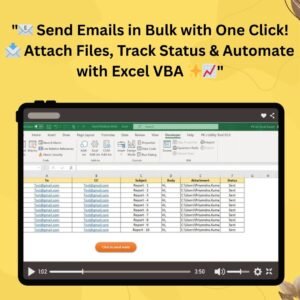
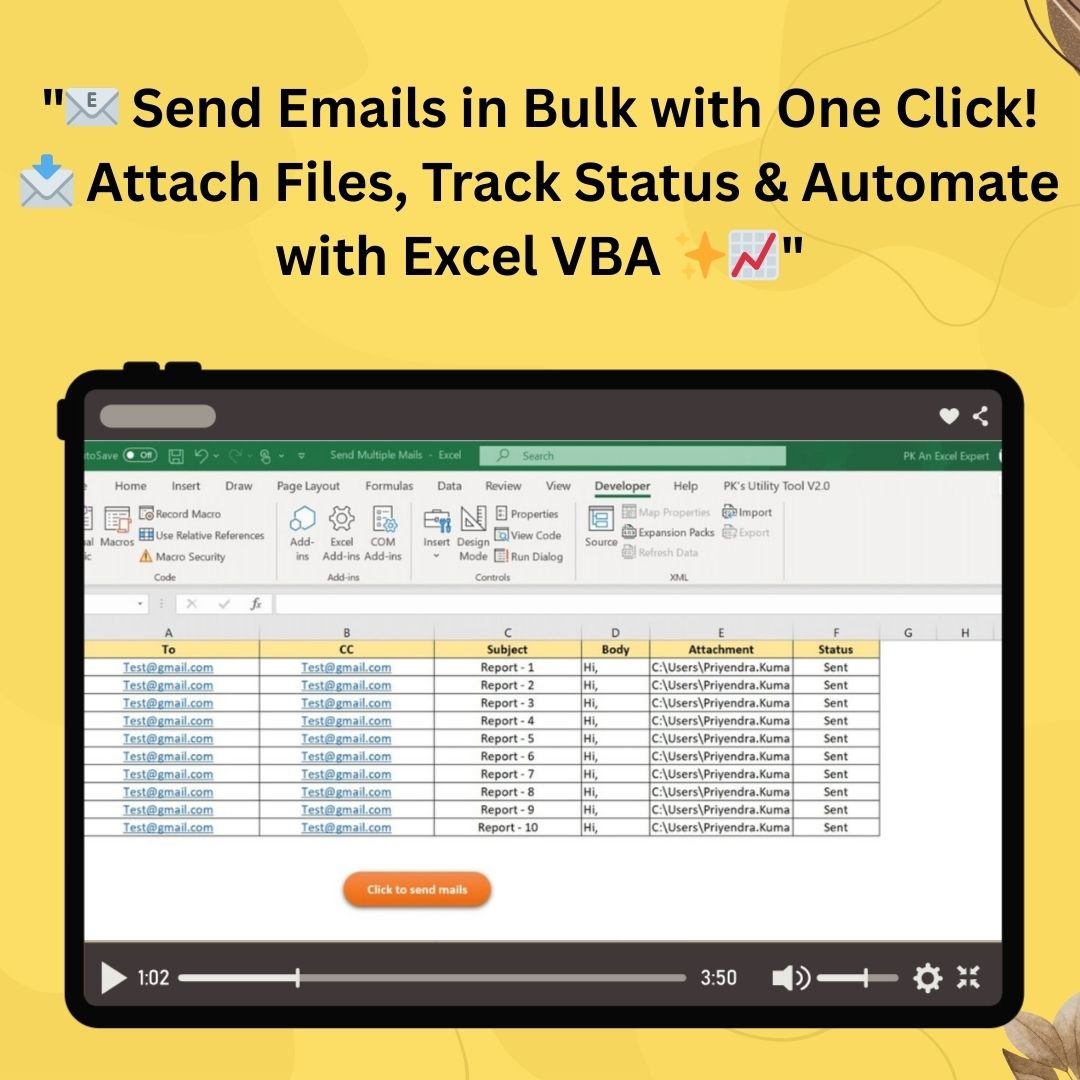
  1. Data Preparation: Set up an Excel sheet with columns that specify each recipient’s email address (To), CC recipients, subject, message body, attachment file paths, and other details. You can also include a column to track the status of each email (Sent/Not Sent).

  2. VBA Integration: The VBA script is integrated into your Excel file. When you click the “Send Mails” button, the tool triggers the macro that connects to Microsoft Outlook. The emails are sent one by one, and each email is customized using the data you’ve inputted.

  3. Email Personalization: For each entry, the tool sends the email based on the information provided in your Excel file, including dynamically adjusting the subject line, body, and attachments based on the data in your rows.

  4. Track Sent Emails: After each email is successfully sent, the system automatically updates the Excel sheet to reflect the email’s status as “Sent”. This allows you to keep track of your progress in real-time.

Benefits:

  • Efficiency: Sending personalized bulk emails has never been easier. The one-click solution removes the need for manual email creation, saving you hours of work.
  • Scalability: Whether you’re sending 10 emails or 1,000, this tool scales with your needs, automating repetitive tasks without additional effort.
  • Accuracy: Customization options ensure that the emails are not only addressed correctly but also contain personalized details, making the emails feel more genuine and professional.
  • Flexibility: The ability to attach different files to each email based on the recipient’s needs makes this tool versatile for a variety of use cases, such as sending invoices, reports, or marketing material.
  • User-Friendly Interface: The Excel interface is familiar to most users, meaning you don’t have to learn complicated software or systems. Just input the necessary information into your Excel file, and you’re ready to send!

Use Cases:

  • Marketing Campaigns: Send personalized marketing messages or newsletters to a large number of clients or subscribers.
  • Business Communication: Keep your clients or employees informed by sending important documents or updates quickly and easily.
  • Customer Support: Send out support tickets, troubleshooting documents, or other customer-related communication in bulk.
  • Sales and Reporting: Automatically send reports, proposals, or quotes to multiple prospects and clients without losing track of who received them.

Conclusion:

The “Send Bulk Emails Using VBA and Outlook” tool is a must-have solution for anyone looking to streamline the process of sending personalized bulk emails. With its powerful automation, seamless Outlook integration, and simple Excel interface, this tool makes it easy to send emails to a large number of recipients without losing the personal touch. Whether you’re sending marketing materials, customer updates, or reports, this tool will save you time and effort, while ensuring accuracy and efficiency.

Click here to read the detailed blog post Send bulk emails using VBA and Outlook


After downloading and unzipping this file, ensure that macros are enabled before use. Refer to our below tutorial link for step-by-step instructions on enabling macros in Excel.

4 Easy ways to Enable Macros in Excel VBA

Visit our YouTube channel to learn step-by-step video tutorials
Youtube.com/@PKAnExcelExpert

Watch the step-by-step video tutorial:Send bulk emails using VBA and Outlook


Also check our Incentive Dashboard in Excel

Frequently asked questions

Does it work on Mac?
No - please use Windows. Our VBA tools use forms with controls such as ListBox, which work only in Microsoft Excel for Windows. They do not work on Mac Excel, Excel Online (browser), Google Sheets or the Excel mobile app.
Which Excel version do I need?
Microsoft Excel 2016, 2019, 2021 or Microsoft 365 for Windows (the desktop app).
The macros do not run or I see a yellow security bar. What do I do?
Unzip the download first. Right-click the .xlsm file > Properties > tick Unblock > OK. Open it and click Enable Content on the yellow bar. If Excel still says macros are blocked, check File > Options > Trust Center > Macro Settings.
Is there a login? What are the default details?
Systems with a login screen come with default admin login details in the user manual (or message us and we will send them). Sign in as admin and change the password straight away. Where the system has User Management, the admin can change user names and passwords and add or edit users.
Are the sheets or the VBA code protected?
Data sheets are protected so the forms and reports keep working - you enter data through the forms. In some tools the VBA code is also protected. If you need to edit the code, email [email protected] with your order number and we will share the password.
Can I enter back-dated (past) records?
Yes, you can enter records with past dates.
Can more than one person use it at the same time?
It is a single-user desktop workbook. For shared, multi-user access from anywhere, see our Google Apps Script web apps.
How many records can it handle?
It has been tested with several thousand records and suits normal small-business volumes.
Is it a one-time payment or a subscription?
One-time payment. No subscription, no per-user fees and nothing to renew - the file is yours to keep.
How do I get the file after payment?
Instantly. The download link appears on screen after checkout, is emailed to you, and stays under My Account > Downloads on our website. If the email does not arrive within a few minutes, check your spam or promotions folder.
Is a user manual included?
Most of our newer products include a PDF user manual in the download. If yours does not have one, message us with your order number and we will send it.
Do I get free updates?
Bug fixes are always free - if something does not work as described, we fix it and send you the corrected file. New versions with new features are not included in the price, unless this product's description says otherwise.
Can you customise it for me?
Yes. Small changes to this template (your columns, categories, logo, colours, minor layout) cost the template price plus $40-80 (Rs 3,000-6,000 + GST), quoted once you send your list. A fully custom build is usually $100-200 (Rs 8,000-18,000 + GST) with two revision rounds. Email your requirements to [email protected] or message us on WhatsApp.
Can I use it for my business or my clients?
Yes, for your own personal or internal business use, for as long as you like. Reselling or redistributing the template is not allowed.
What is your refund policy?
Because these are digital downloads, they are non-refundable once delivered - except when the product does not match its description (report it within 48 hours of purchase) or there is a technical problem our team cannot fix within 72 hours. Email [email protected] with your order number.
How do I get help?
Email [email protected] (Mon-Fri, 10 AM-7 PM IST) or message us on WhatsApp +91 80770 90260 (chat only, no calls). Please include your order number.

Still have a question? Click Need help? at the bottom-left to ask our assistant, or message us on WhatsApp.

Application

MS Excel

Template Type

VBA Tool

Price

Paid

Business Or Department

IT and Software Development

Reviews

There are no reviews yet.

Only logged in customers who have purchased this product may leave a review.

Send bulk emails using VBA and OutlookSend bulk emails using VBA and Outlook
Original price was: ₹1,499.00.Current price is: ₹699.00.
- +
Scroll to Top