



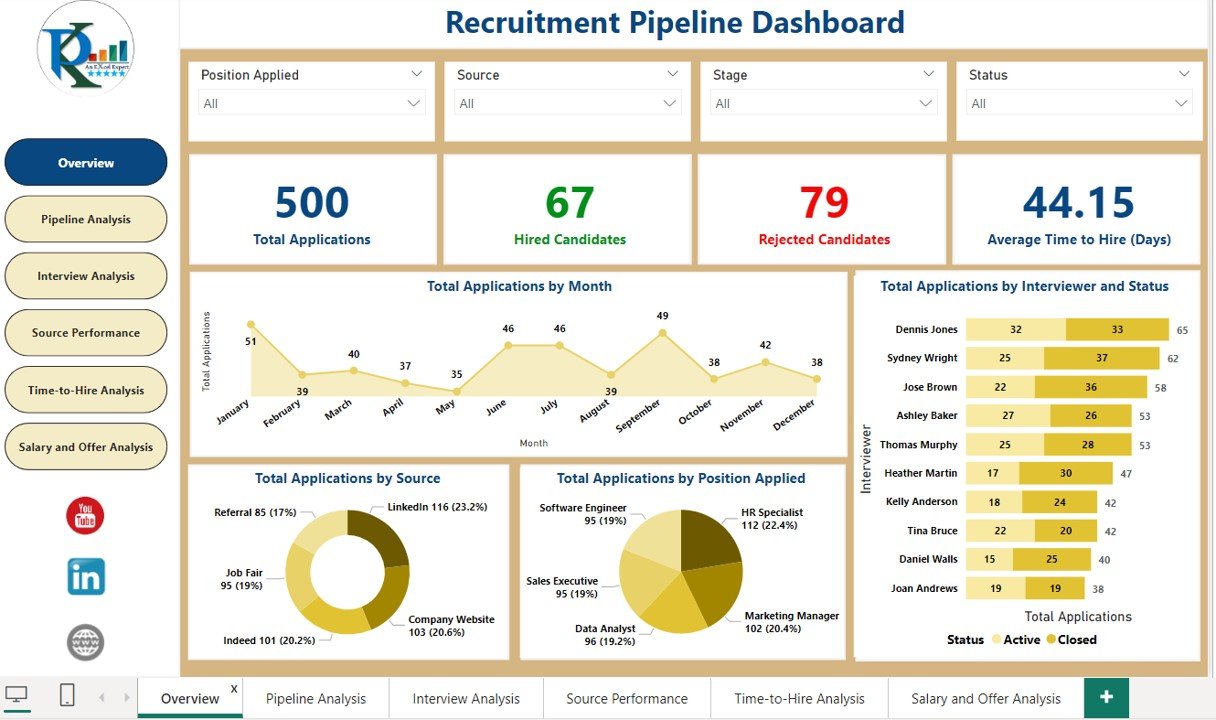
The Recruitment Pipeline Dashboard in Power BI is an interactive reporting tool for HR professionals, recruiters and hiring managers who want a clear view of the hiring process. It tracks applications, candidate movement across hiring stages, source performance, interviewer results, time-to-hire and salary offers in one place. Corporate HR teams and recruitment agencies can use it to spot bottlenecks, cut hiring time and make data-driven hiring decisions.
Key Features of the Power BI Recruitment Dashboard
Total Application Tracking
- Track total applications received over time by month, job position, source and hiring stage.
- See hiring trends through dynamic visual charts and graphs.
- Spot changes in application volume so you can improve recruitment campaigns.
Pipeline Analysis
- Monitor candidate movement across hiring stages: applied, screened, interviewed, offer extended, hired and rejected.
- Find bottlenecks in the recruitment process and fix them.
- Compare hiring success rates by job role, department or interviewer.
Source Performance Analysis
- Measure how well hiring channels such as LinkedIn, referrals, job fairs, Indeed and company websites perform.
- See which sources bring in the most qualified and successful hires.
- Review salary trends by hiring source to plan recruitment spending.
Interview Performance Insights
- Track the number of interviews conducted by each recruiter to balance workloads.
- Identify top-performing interviewers based on hire success rates.
- Review interview success rates by job role to adjust your recruitment strategy.
Time-to-Hire Analysis
- Monitor the average time taken to hire candidates for each role.
- Find delays in the hiring pipeline and improve interview scheduling.
- Compare time-to-hire trends across positions, sources and interviewers.
Salary & Offer Insights
- View average salary trends for each job role and hiring source.
- See how salary offers affect hiring decisions.
- Track offers extended, accepted or declined to improve your negotiation approach.
Interactive Reports & Custom Filters
- Power BI visuals let you move between reports and data quickly.
- Drill down by job role, department and recruiter with custom filters.
- Navigate multiple reports and filters through a clean, intuitive layout.
What’s Inside the Dashboard
The Recruitment Pipeline Dashboard in Power BI brings these analysis areas together in one interactive report:
| Analysis Area | What It Shows |
|---|---|
| Total Applications | Applications by month, job position, source and hiring stage |
| Pipeline Analysis | Candidates at each stage, from applied to hired or rejected |
| Source Performance | Effectiveness and salary trends by hiring channel |
| Interview Performance | Interviews per recruiter and interviewer success rates |
| Time-to-Hire | Average hiring time by role, source and interviewer |
| Salary & Offers | Average salaries plus offers extended, accepted and declined |
A step-by-step user guide is included to help you get started.
Why Choose This Power BI Recruitment Dashboard?
- Saves time: Replace manual reports with real-time data insights from Power BI’s interactive visuals.
- Supports data-driven decisions: Make smarter hiring choices by identifying top sources, the best interviewers and pipeline bottlenecks.
- Easy to use: HR-friendly design with a sleek, intuitive layout.
- Fully customizable: Change KPIs, graphs and filters to fit your company’s hiring strategy.
- One-time purchase: No recurring fees.
Who Is This Hiring Dashboard For?
- HR managers who need a clear view of hiring performance across departments.
- Recruiters and hiring specialists tracking candidates, interviews and offers.
- Hiring managers who want to know how long it takes to fill a role and where delays happen.
- Corporate HR teams and recruitment agencies comparing sources and improving recruitment spending.
How to Use It
- Download the file after purchase. Setup is easy.
- Open it in Power BI Desktop or Power BI Online.
- Follow the included step-by-step user guide to connect or enter your recruitment data.
- Use the filters for job role, department and recruiter to explore your pipeline.
- Customize KPIs, graphs and filters to fit your hiring process.
Click here to read the detailed blog post Recruitment pipeline
Visit our YouTube channel for step-by-step video tutorials: Youtube.com/@PKAnExcelExpert
Watch the step-by-step video tutorial: Recruitment pipeline
Frequently Asked Questions
Which Power BI versions does this dashboard work with?
The Recruitment Pipeline Dashboard in Power BI works in both Power BI Desktop and Power BI Online.
Which hiring stages does the pipeline analysis cover?
It tracks candidates through the applied, screened, interviewed, offer extended, hired and rejected stages, so you can see where candidates drop off or get stuck.
Can I compare hiring sources like LinkedIn and referrals?
Yes. The source performance analysis compares channels such as LinkedIn, referrals, job fairs, Indeed and company websites, including salary trends by source.
Does it include time-to-hire analysis?
Yes. The time-to-hire analysis shows the average time to hire for each role and compares trends across positions, sources and interviewers.
Can I customize the dashboard?
Yes. You can change KPIs, graphs and filters to match your company’s hiring strategy.
Is there a recurring fee or a guide to help me start?
No recurring fee applies because it is a one-time purchase. A step-by-step user guide is included.
Also check our Expense Tracking Dashboard in Power BI
Last updated: October 2026
Compatibility and Requirements
- Opens in Power BI Desktop, which is free from Microsoft. See Get Power BI Desktop.
- It also works in Power BI Online, and a step-by-step user guide is included.
Related Recruitment Templates
- Recruitment Pipeline Dashboard in Google Sheets: the same pipeline view in Google Sheets
- Recruitment and Hiring Dashboard in Power BI: a recruitment and hiring dashboard in Power BI
- Recruitment and Hiring Dashboard in Excel: a recruitment and hiring dashboard in Excel
- Recruitment Funnel KPI Dashboard in Excel: tracks recruitment funnel KPIs in Excel
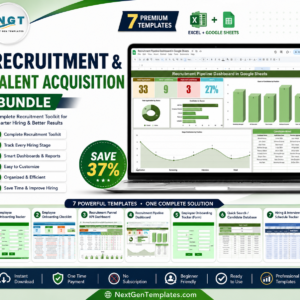
- Recruitment & Talent Acquisition Bundle: seven recruitment templates in one bundle
Browse all Power BI dashboards or the Excel HR and payroll templates.



Reviews
There are no reviews yet.