


Managing office utility expenses without a structured reporting system often leads to budget overruns, delayed payments, and poor visibility into cost drivers. Electricity bills, internet charges, water usage, waste management fees, and other utilities generate high-volume data every month. However, when this information remains scattered across invoices and spreadsheets, finance and facilities teams struggle to control costs and identify savings opportunities.
That is exactly why the Office Utility Cost Dashboard in Google Sheets becomes a powerful, ready-to-use analytics solution.
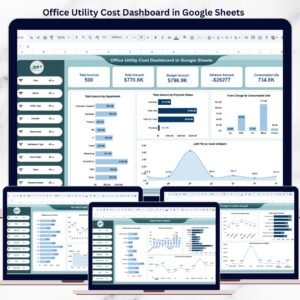
This professionally designed dashboard converts raw utility invoice data into clear KPIs, interactive charts, and actionable insights—helping organizations monitor utility spending, control budgets, and improve operational efficiency. Instead of manually reviewing invoices, teams can instantly analyze utility costs across departments, locations, providers, and time periods from a single Google Sheets dashboard.
Because the dashboard is built entirely in Google Sheets, it is cloud-based, easy to share, and fully customizable—without requiring advanced technical or BI skills.
🔑 Key Features of Office Utility Cost Dashboard in Google Sheets
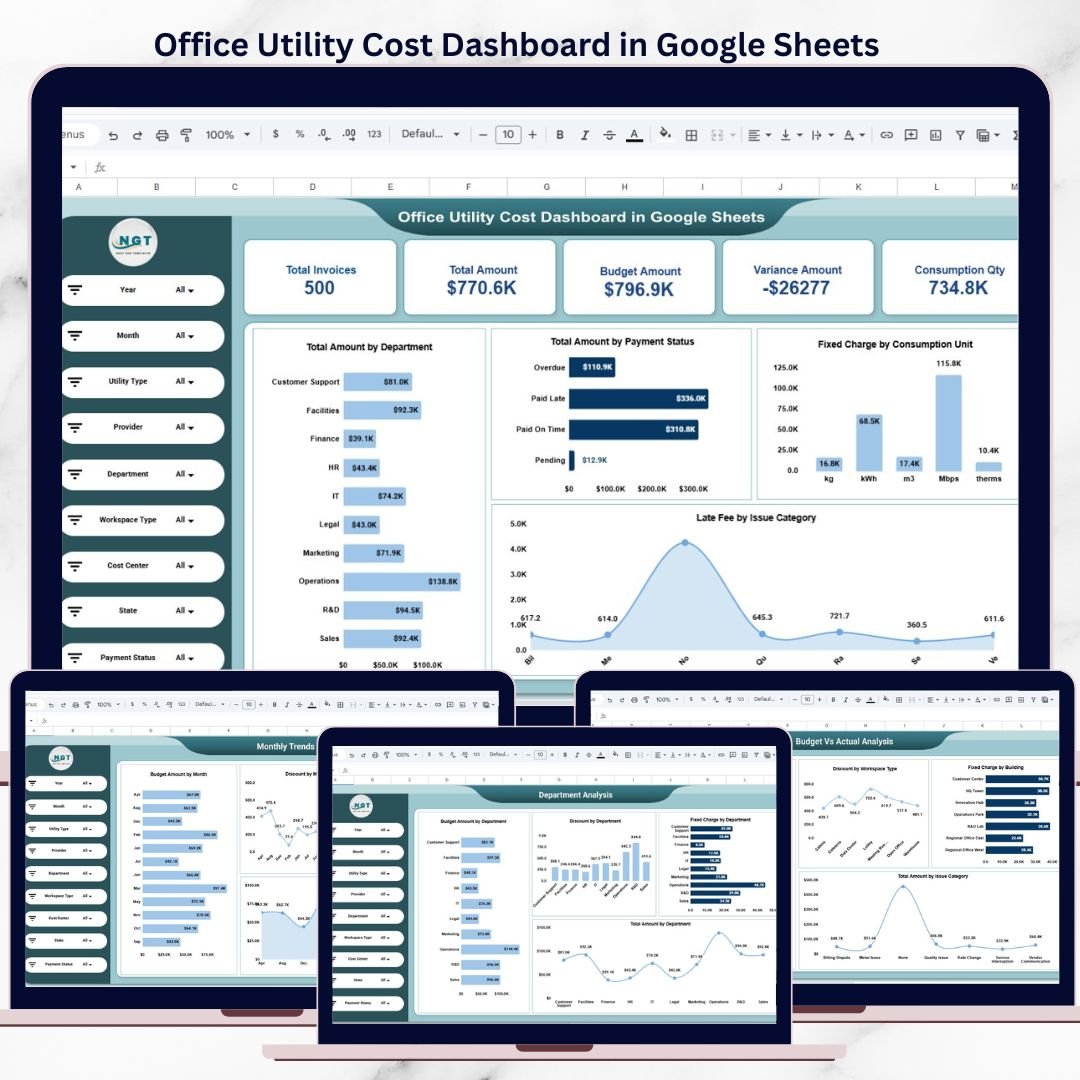
📊 Centralized Utility Cost KPIs
Track critical utility performance indicators in one place, including:
Total Invoices
Total Utility Amount
Budget Amount
Variance Amount
Total Consumption Quantity
These KPIs provide an instant snapshot of overall utility spending and financial health.
🎛 Interactive Filters & Dynamic Analysis
Analyze data using powerful filters such as:
Year & Month
Utility Type
Provider
Department
Workspace Type
Cost Center
State
Payment Status
All charts and KPIs update automatically, allowing deep and focused analysis with just a few clicks.
💰 Budget vs Actual Cost Monitoring
Compare planned budgets against actual utility expenses to:
Detect overspending early
Control cost leakages
Improve budgeting and forecasting accuracy
This feature supports proactive financial decision-making.
📂 What’s Inside the Office Utility Cost Dashboard
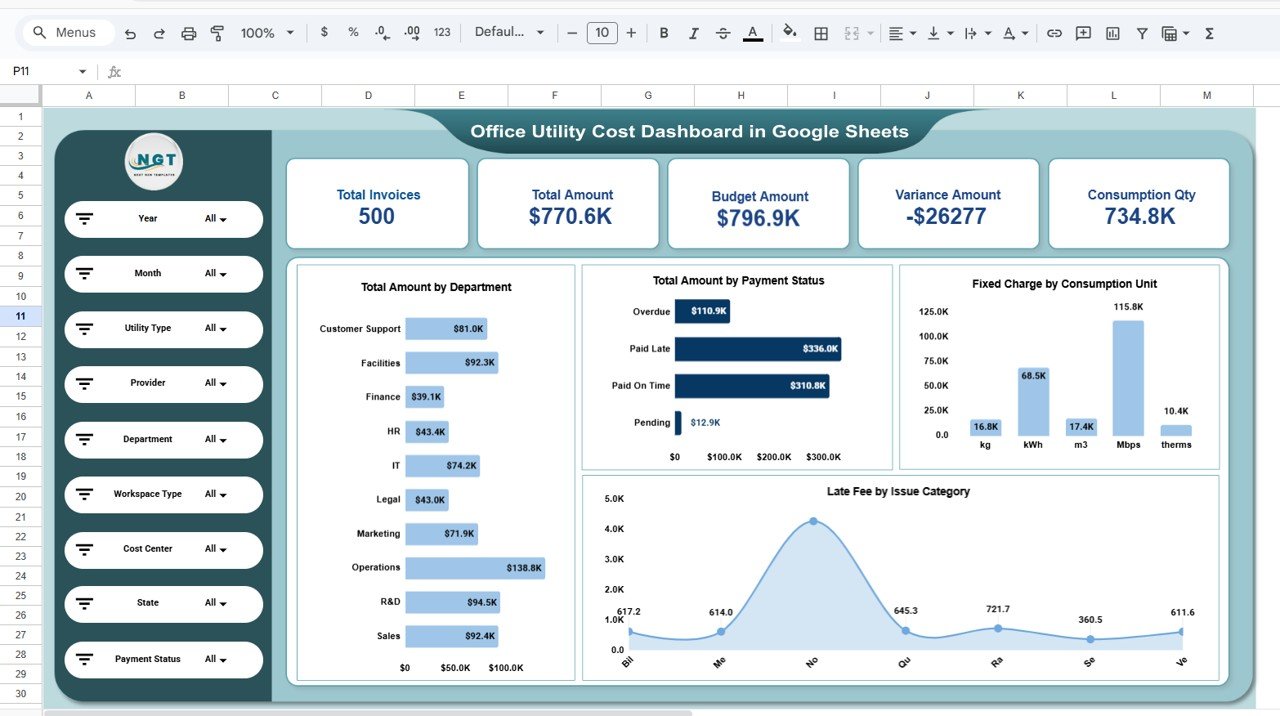
📌 1. Overview Sheet
A high-level summary designed for leadership and quick reviews. It shows:
Total invoices and total spending
Budget vs actual comparison
Variance analysis
Consumption quantity overview
Total amount by department
Payment status distribution
Fixed charges by consumption unit
Late fees by issue category
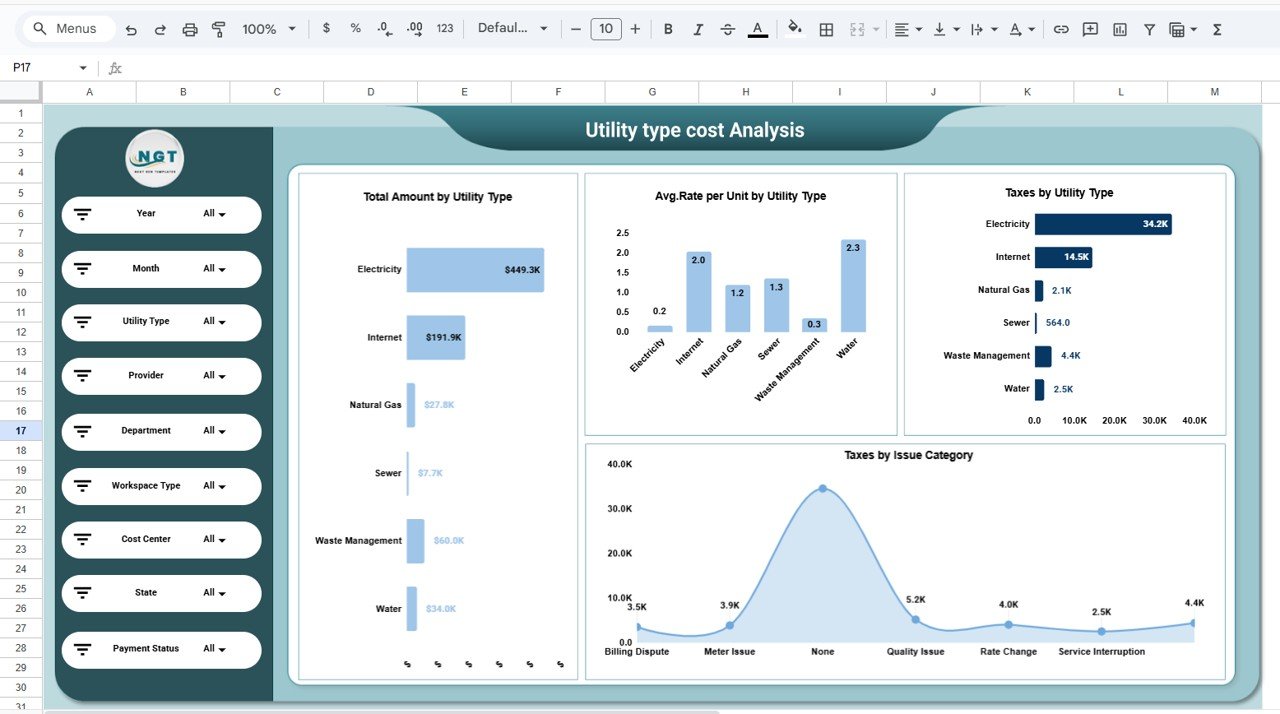
⚡ 2. Utility Type Cost Analysis
Focuses on utility-specific insights such as:
Total amount by utility type (Electricity, Internet, Water, Gas, Waste Management, Sewer)
Average rate per unit
Taxes by utility type
Taxes by issue category
This helps identify high-cost utilities and optimization opportunities.
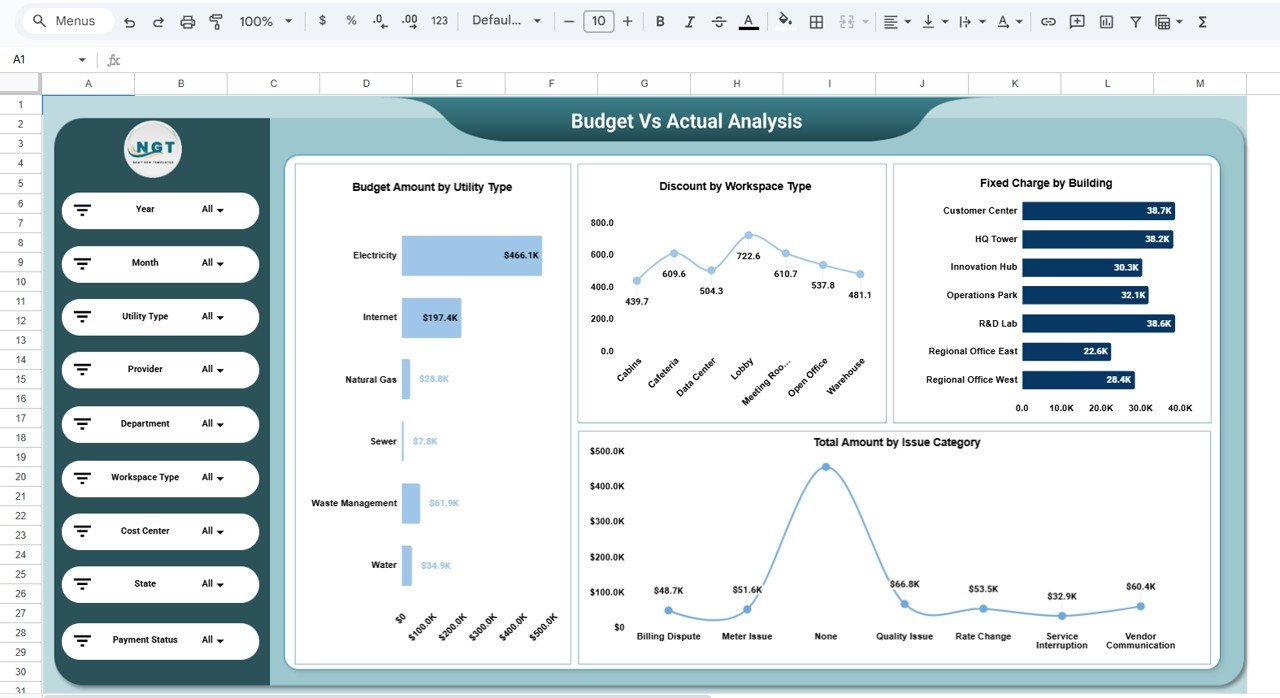
📉 3. Budget vs Actual Analysis
Strengthens financial control through:
Budget amount by utility type
Discounts by workspace type
Fixed charges by building
Total amount by issue category
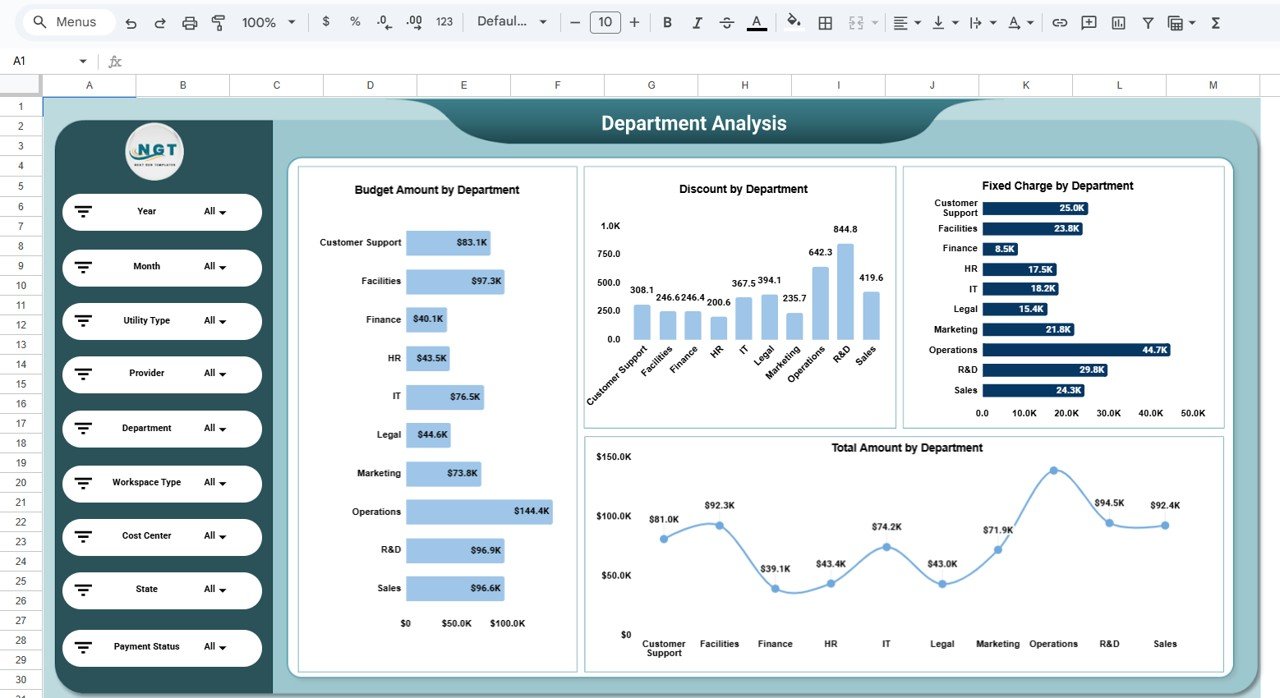
🏢 4. Department Analysis
Evaluates spending across departments with:
Budget amount by department
Discounts by department
Fixed charges by department
Total utility cost trends
Ideal for internal cost allocation and accountability.
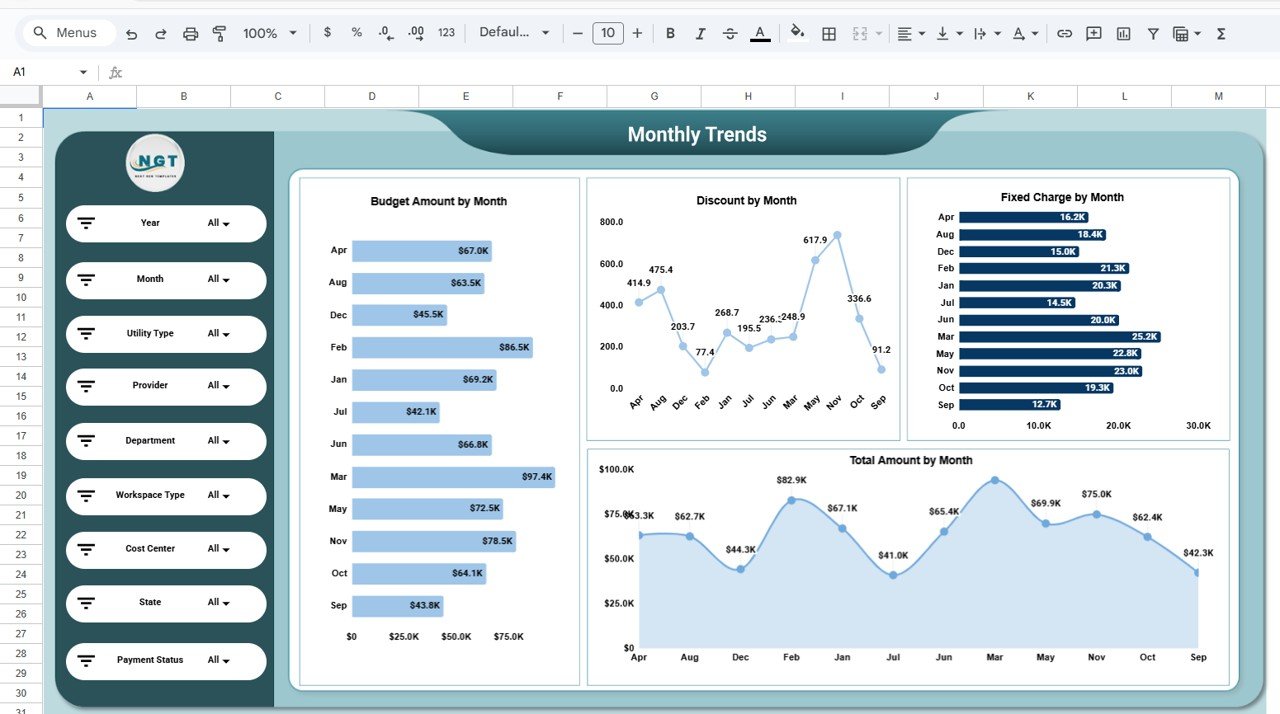
📅 5. Monthly Trends Analysis
Tracks spending patterns over time, including:
Budget amount by month
Discounts by month
Fixed charges by month
Total amount trends
Helps detect seasonal patterns and unusual cost spikes early.
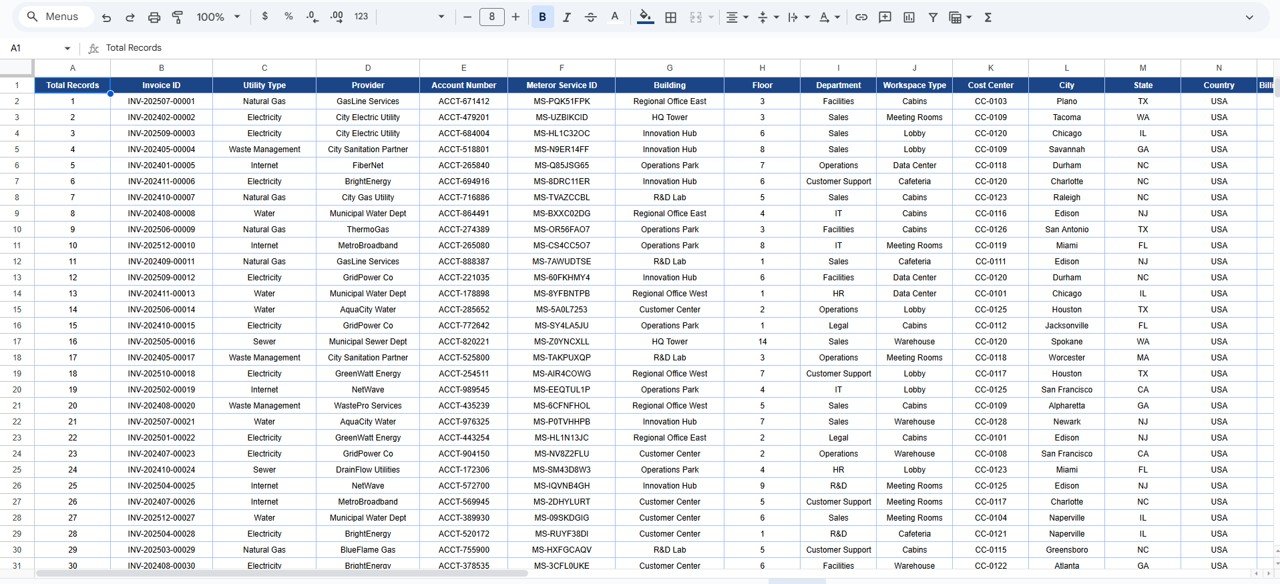
🔍 6. Detailed Data Table & Search
Includes a structured data table with:
Invoice ID, utility type, provider, meter details
Department, workspace, cost center
Billing amounts, taxes, discounts, and payment status
Advanced search lets you instantly find records by keyword and selected field.
▶️ How to Use the Office Utility Cost Dashboard
Enter or paste utility invoice data into the data table
Use filters to analyze specific utilities, departments, or months
Review KPIs and charts for insights
Compare budget vs actual regularly
Share dashboards with stakeholders for accountability
👥 Who Can Benefit from This Dashboard
💼 Finance & Accounts Teams
🏢 Facilities & Admin Teams
⚙️ Operations Managers
📊 Business Analysts
👔 Management & Leadership
### Click here to read the Detailed blog post
Watch the step-by-step video tutorial:
👉 Visit our YouTube channel to learn step-by-step video tutorials
Youtube.com/@NeotechNavigators
Compatibility and Requirements
- Works in Google Sheets with a free Google account and a web browser.
- The dashboard is shared and edited like any Google Sheet.
- Google explains how charts work in Add & edit a chart or graph.
Frequently Asked Questions
Which KPIs does the dashboard show?
Total invoices, total utility amount, budget amount, variance amount and total consumption quantity.
Which filters can I use?
Year and month, utility type, provider, department, workspace type, cost center, state and payment status.
Which utilities does it cover?
Electricity, internet, water, gas, waste management and sewer.
How do I find one invoice?
Use the search on the data table to find records by keyword and selected field.
Related Utility and Energy Templates
- Office Utility Cost Dashboard in Excel: the same topic in Excel
- Office Utility Cost Dashboard in Power BI: the Power BI edition
- Energy & Utility Dashboard in Google Sheets: energy and utility use online
- Energy Dashboard in Google Sheets: track energy use
- Google Sheets Business Pack (Pro): 14 Google Sheets business templates
Browse all Google Sheets dashboards or the Google Sheets financial tools.
































Reviews
There are no reviews yet.