
Office Relocation Feedback Tracker in Google Sheets

Google Sheets - instant download

Original price was: $12.99.Current price is: $6.99.
Details, requirements and demo below
Sale!

Office Relocation Feedback Tracker in Google Sheets

Original price was: $12.99.Current price is: $6.99.

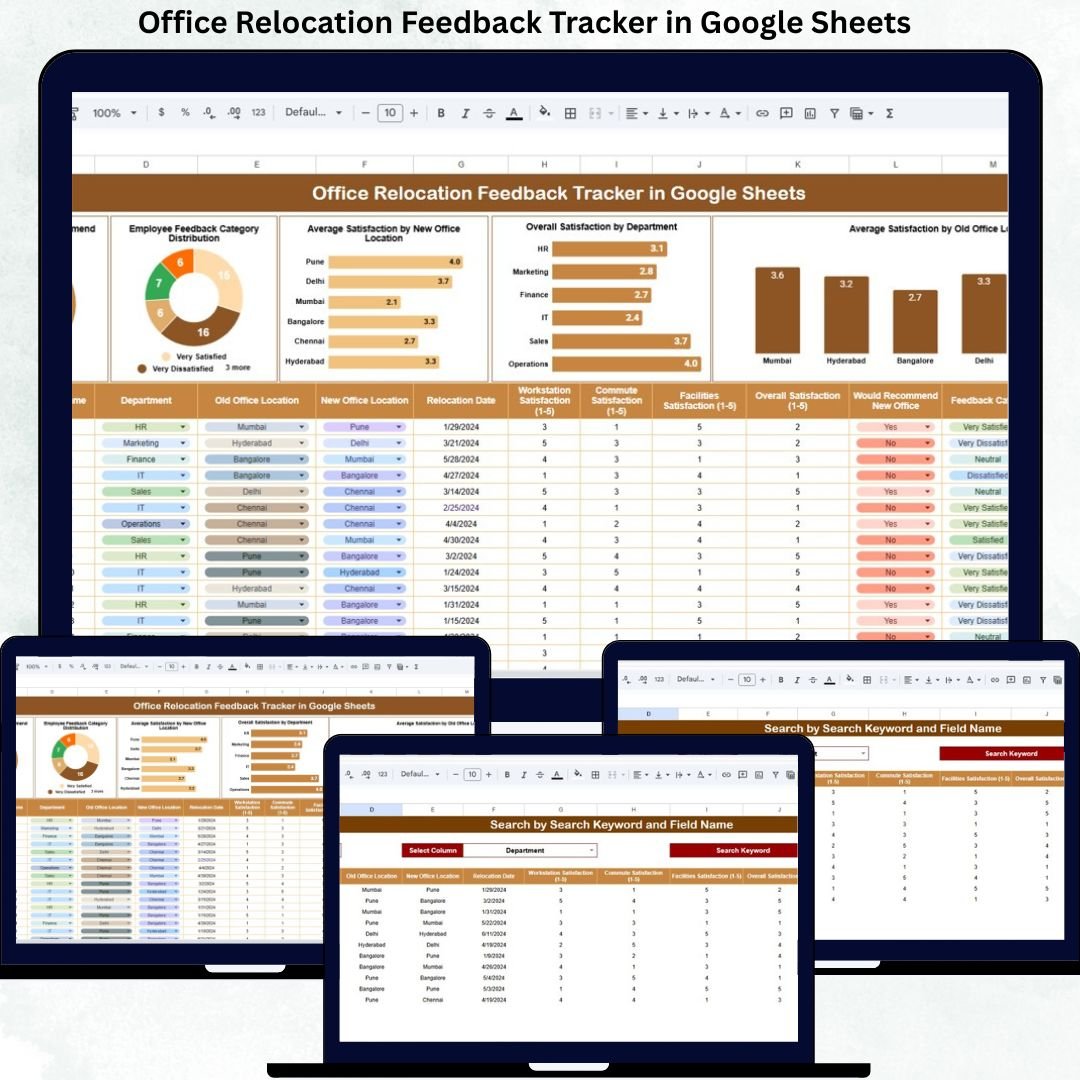
Understand employee sentiment after relocation with the Office Relocation Feedback Tracker in Google Sheets—a simple, visual, and powerful feedback analysis tool.

  • 📋 Centralized Feedback Tracker – All relocation feedback in one place

  • 📊 Interactive Satisfaction Charts – See trends instantly

  • 👍 Recommendation Analysis – Measure acceptance of the new office

  • 🏢 Department-Wise Insights – Identify team-specific concerns

  • 📍 Location-Wise Comparison – Compare satisfaction across offices

  • 🔍 Smart Search Feature – Find feedback in seconds

  • 🤝 Real-Time Collaboration – Teams work together seamlessly

  • 📈 Data-Driven Improvements – Turn feedback into action

  • ☁️ Cloud-Based & Easy to Use – No software installation needed

- +

💡 Buy any 2 templates and save 20% automatically at checkout.

Pricing country
Prices follow your selected country; checkout uses your billing country.
Excel + AI Mastery: 100 Essential Formulas courseLaunch offer
🎓 NEXTGENTEMPLATES ACADEMY
Want to build templates like this yourself?
Excel + AI Mastery: 100 Essential Formulas

SUMIFS, XLOOKUP, FILTER, LAMBDA and checking AI-written formulas, with real business projects. 11h 47m of video by PK, with practice files, quizzes and a capstone.

Office Relocation Feedback Tracker in Google Sheets is more than a physical move—it directly impacts employee comfort, commute time, collaboration, productivity, and morale. When employees shift to a new office environment, their experience determines how quickly they adapt and how satisfied they remain. However, many organizations fail to collect feedback in a structured way. As a result, important issues remain hidden, and improvement opportunities are missed.Office Relocation Feedback Tracker in Google Sheets

That is exactly why the Office Relocation Feedback Tracker in Google Sheets becomes a powerful and practical solution.

This ready-to-use tracker helps HR teams, facility managers, and leadership collect, organize, and analyze employee feedback after an office relocation. Instead of relying on scattered emails or informal conversations, this tracker converts feedback into structured data, clear charts, and actionable insights. With real-time updates, visual analysis, and a smart search feature, organizations gain a complete view of employee sentiment toward the new office setup.Office Relocation Feedback Tracker in Google Sheets

Because it is built entirely in Google Sheets, the tracker remains flexible, collaborative, cloud-based, and cost-effective—without requiring any specialized software.Office Relocation Feedback Tracker in Google Sheets


✨ Key Features of the Office Relocation Feedback Tracker in Google Sheets

📋 1. Centralized Employee Feedback Database

Capture all relocation-related feedback in one structured tracker instead of multiple files or surveys.

📊 2. Interactive Satisfaction Charts

Visual charts transform raw feedback into clear insights about satisfaction, acceptance, and problem areas.

🔍 3. Smart Search Feature

Instantly locate employee feedback by department, location, category, or employee name.

🤝 4. Real-Time Collaboration

HR, admin, and leadership teams can review and update feedback together in real time.

📈 5. Data-Driven Improvement Planning

Identify improvement areas quickly and prioritize actions based on real employee input.


📦 What’s Inside the Office Relocation Feedback Tracker in Google Sheets

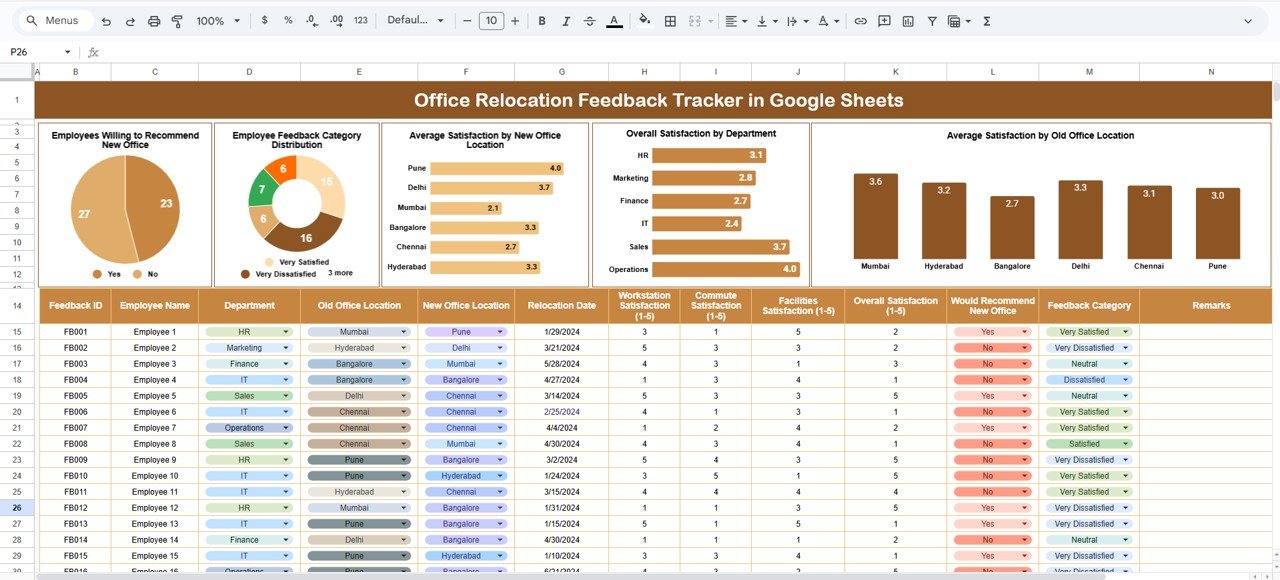
🗂️ Tracker Sheet Tab – Core Feedback System

This is the heart of the tracker where all employee feedback is recorded in a clean, consistent format. Typical fields include:

  • Employee Name / ID

  • Department

  • Old Office Location

  • New Office Location

  • Satisfaction Score (e.g., 1–5)

  • Willingness to Recommend (Yes/No)

  • Feedback Category (Facilities, Commute, Amenities, Workspace, etc.)

  • Comments

As soon as data is entered, all charts update automatically, ensuring real-time insights.


📊 Charts Included in the Office Relocation Feedback Tracker

👍 Employees Willing to Recommend New Office

This chart shows how many employees are willing to recommend the new office location. It acts as a strong indicator of overall acceptance and satisfaction.

📂 Employee Feedback Category Distribution

This chart highlights which areas receive the most feedback—such as commute, facilities, workspace, amenities, or location—helping teams focus on priority issues.

📍 Average Satisfaction by New Office Location

If employees move to multiple locations or floors, this chart compares satisfaction scores across locations, helping identify underperforming areas.

🏢 Overall Satisfaction by Department

This chart displays department-wise satisfaction levels, helping managers understand if specific teams face unique challenges.

🔁 Average Satisfaction by Old Office Location

This analysis shows how previous office conditions influence perception and adjustment to the new location.


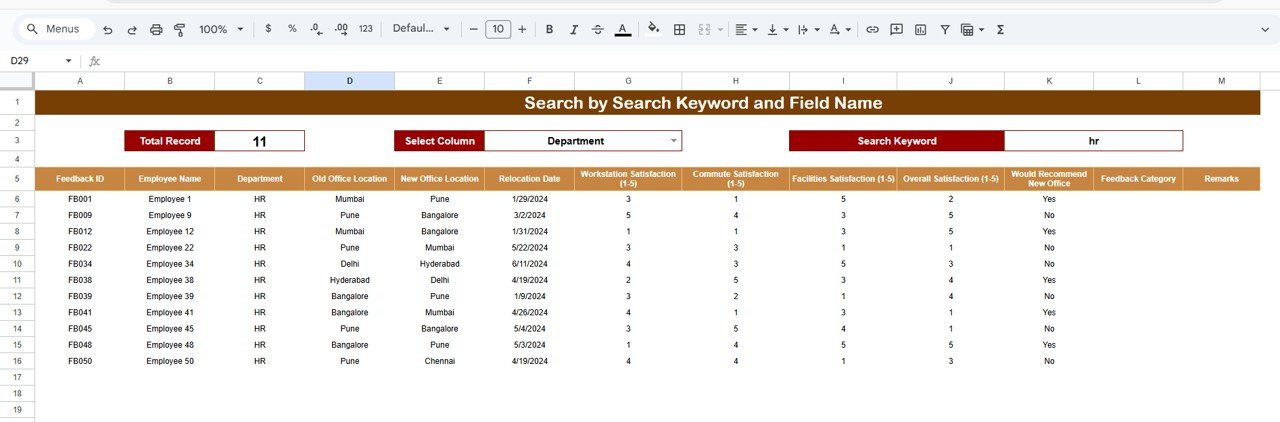
🔍 Search Feature – Find Feedback Instantly

The tracker includes a smart search option that allows users to quickly filter feedback by:

  • Employee Name

  • Department

  • Old Office Location

  • New Office Location

  • Feedback Category

This feature saves time during reviews, one-on-one discussions, and management meetings.


🎯 Who Can Benefit from This Office Relocation Feedback Tracker

👥 HR Teams

Measure employee satisfaction and engagement after relocation.

🏢 Facility & Admin Teams

Identify infrastructure and workspace improvement areas quickly.

📊 Leadership Teams

Make informed decisions using real employee feedback.

🔄 Change Management Teams

Ensure smoother transitions during office moves.

🚀 Growing Organizations

Build a repeatable feedback system for future relocations.


### Click here to read the Detailed blog post

Watch the step-by-step video tutorial:

 

Visit our YouTube channel to learn step-by-step video tutorials — Youtube.com/@NeotechNavigators

Frequently asked questions

How do I get my own copy?
After purchase you get a link to the Google Sheet. Open it while signed in to your Google account and use File > Make a copy - the copy in your Google Drive is fully yours and editable.
Do I need a paid Google account? Will it expire?
No. A free Google account is enough, and your copy lives in your own Google Drive - it never expires and there is nothing to renew.
Does it work on Mac, phone or tablet?
Yes - in any browser on Windows, Mac or Chromebook, and in the Google Sheets mobile app for viewing and quick entries.
Can I share it with my team?
Yes. Share your copy with colleagues using Google's normal sharing, with view or edit rights as you choose.
Can I change the design and formulas?
Yes, your copy is fully editable - colours, labels, logo, formulas and charts. If a range is protected, use Data > Protect sheets and ranges to remove it in your copy.
Are there macros or add-ons?
No macros or add-ons - it uses normal Google Sheets formulas and charts.
Is it a one-time payment or a subscription?
One-time payment. No subscription, no per-user fees and nothing to renew - the file is yours to keep.
How do I get the file after payment?
Instantly. The download link appears on screen after checkout, is emailed to you, and stays under My Account > Downloads on our website. If the email does not arrive within a few minutes, check your spam or promotions folder.
Is a user manual included?
Most of our newer products include a PDF user manual in the download. If yours does not have one, message us with your order number and we will send it.
Do I get free updates?
Bug fixes are always free - if something does not work as described, we fix it and send you the corrected file. New versions with new features are not included in the price, unless this product's description says otherwise.
Can you customise it for me?
Yes. Small changes to this template (your columns, categories, logo, colours, minor layout) cost the template price plus $40-80 (Rs 3,000-6,000 + GST), quoted once you send your list. A fully custom build is usually $100-200 (Rs 8,000-18,000 + GST) with two revision rounds. Email your requirements to [email protected] or message us on WhatsApp.
Can I use it for my business or my clients?
Yes, for your own personal or internal business use, for as long as you like. Reselling or redistributing the template is not allowed.
What is your refund policy?
Because these are digital downloads, they are non-refundable once delivered - except when the product does not match its description (report it within 48 hours of purchase) or there is a technical problem our team cannot fix within 72 hours. Email [email protected] with your order number.
How do I get help?
Email [email protected] (Mon-Fri, 10 AM-7 PM IST) or message us on WhatsApp +91 80770 90260 (chat only, no calls). Please include your order number.

Still have a question? Click Need help? at the bottom-left to ask our assistant, or message us on WhatsApp.

Application

Google Sheets

Template Type

Tracker

Price

Paid

Business Or Department

Maintenance and Facilities

Reviews

There are no reviews yet.

Only logged in customers who have purchased this product may leave a review.

Office Relocation Feedback Tracker in Google SheetsOffice Relocation Feedback Tracker in Google Sheets
Original price was: $12.99.Current price is: $6.99.
- +
Scroll to Top