


The Monthly Review Evaluation Checklist in Excel is an essential tool for businesses, managers, and teams looking to evaluate and track performance, goals, and progress on a monthly basis. This customizable template helps ensure that every team member or department is aligned with the organization’s objectives, making it easier to monitor key tasks, performance metrics, and areas for improvement.
Designed to streamline monthly evaluations, this checklist includes key sections for reviewing goals, analyzing achievements, tracking milestones, and identifying challenges. Whether you’re conducting performance reviews, managing projects, or evaluating team progress, this Excel-based checklist is the perfect solution for ensuring consistent and thorough monthly reviews.
Key Features of the Monthly Review Evaluation Checklist in Excel
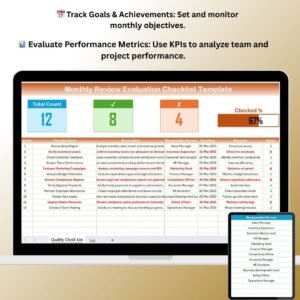
📅 Track Monthly Goals & Achievements
Set and review monthly goals, track achievements, and assess whether targets were met. This ensures that everyone is on the same page and working towards the same objectives.
📊 Performance Metrics & Analysis
Use KPIs and performance metrics to evaluate individual or team performance. Track progress on specific projects, tasks, or department-wide initiatives to monitor success.
📝 Identify Challenges & Areas for Improvement
Record challenges faced during the month, identify areas for improvement, and suggest corrective actions to address any performance gaps.
📈 Visual Data Insights & Reports
Use graphs, charts, and data visualization to summarize monthly performance, making it easy to share insights with managers, teams, or stakeholders.
💬 Action Plan & Follow-up Tasks
Create action plans based on the evaluation results. Assign follow-up tasks and set deadlines to ensure that improvements are implemented in the upcoming month.
🔄 Customizable Fields & Sections
Modify the template to suit your specific monthly review process. Add, remove, or adjust sections to match your team’s unique performance metrics and goals.
Why You’ll Love the Monthly Review Evaluation Checklist in Excel

✅ Streamline Monthly Evaluations
Easily track monthly goals, review achievements, and analyze performance metrics with this organized and structured checklist.
✅ Ensure Team Alignment & Accountability
Keep your team or department aligned with clear monthly goals and performance objectives. The checklist holds everyone accountable for their contributions and progress.
✅ Improve Performance & Set Clear Goals
Identify areas for improvement and create actionable plans for the upcoming month. This checklist encourages continuous improvement and helps boost overall performance.
✅ Data-Driven Insights for Better Decision Making
Visualize monthly performance with charts and graphs, making it easier to make informed decisions, share insights, and improve planning for future projects.
✅ Fully Customizable & Scalable
The checklist is fully adaptable to suit your team’s specific needs. Customize fields, sections, and performance metrics as required to match your review process.
What’s Inside the Monthly Review Evaluation Checklist Template in Excel?
- Monthly Goal Tracker: Set and track goals, achievements, and milestones for each month.
- Performance Evaluation: Use KPIs to evaluate the success of projects, tasks, and initiatives.
- Challenge Log & Improvements: Record challenges and identify areas for improvement with actionable steps.
- Data Visualization: Generate visual reports with charts and graphs to summarize key performance metrics.
- Follow-up Tasks & Action Plans: Assign tasks and set deadlines to address issues and drive improvement.
- Customizable Template: Modify sections, goals, and fields to align with your specific needs.
How to Use the Monthly Review Evaluation Checklist in Excel
1️⃣ Download the Template: Instantly access the Monthly Review Evaluation Checklist in Excel.
2️⃣ Set Monthly Goals & Objectives: Input your goals for the month and track progress as the month progresses.
3️⃣ Track & Analyze Performance: Use the template to track KPIs, analyze achievements, and assess challenges.
4️⃣ Record Actionable Insights: Log challenges and areas for improvement, and create an action plan for the upcoming month.
5️⃣ Generate Reports & Share Insights: Create visual reports and share insights with your team or management to discuss improvements and future strategies.
Who Can Benefit from the Monthly Review Evaluation Checklist in Excel?
🔹 Managers & Team Leads
🔹 Human Resources & Performance Review Teams
🔹 Project Managers & Coordinators
🔹 Business Owners & Entrepreneurs
🔹 Department Heads & Supervisors
🔹 Consultants & Performance Analysts
Ensure your team stays on track and aligned with organizational goals with the Monthly Review Evaluation Checklist in Excel. Monitor progress, identify challenges, and implement improvements for enhanced performance and growth.
Click here to read the Detailed blog post
Visit our YouTube channel to learn step-by-step video tutorials
Youtube.com/@PKAnExcelExpert
Compatibility and Requirements
- Works in Microsoft Excel desktop (Excel 2016 or later, or Microsoft 365).
- The performance charts are standard Excel charts. Microsoft’s guide to creating a chart from start to finish shows how to change them.
Frequently Asked Questions
What sections does the Monthly Review Evaluation Checklist include?
A monthly goal tracker, a performance evaluation with KPIs, a challenge log for improvements, data visualization, and follow-up tasks with action plans.
Can I use it for one person or a whole team?
Yes. The KPIs and metrics work for individual or team performance, so managers can review one employee or a full department.
How do I record follow-up actions?
Log the challenges and areas for improvement, then assign follow-up tasks with deadlines in the action plan section.
Can I change the sections and goals?
Yes. You can add, remove or adjust sections, goals and fields to match your own monthly review process.
Is there a Google Sheets version?
Yes. The Monthly Review Monitoring Checklist in Google Sheets covers monthly reviews in the browser.
Related Review and Evaluation Templates
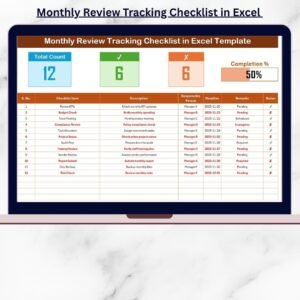
- Monthly Review Tracking Checklist in Excel: another monthly review layout
- Monthly Performance Review Checklist Template in Excel: a checklist for performance reviews
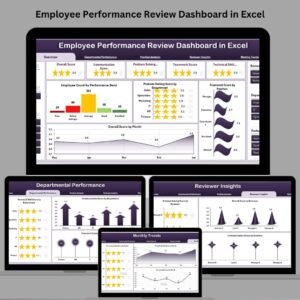
- Employee Performance Review Dashboard in Excel: report on review results
- Performance Review Tracker in Google Sheets: track reviews in Google Sheets
- Checklist & SOP Pack: 12 Excel and Google Sheets checklists
Browse all Excel checklist templates or the HR and Payroll templates.

























Reviews
There are no reviews yet.