



In today’s digital workplace, IT support plays a vital role in ensuring seamless business operations and employee productivity. Managing support tickets effectively can be challenging without a centralized system to track resolution times, technician workloads, and issue trends. The IT Support Ticket Dashboard in Power BI is a ready-to-use, interactive solution designed to help IT managers and support teams streamline operations, monitor performance, and enhance service quality.
This dashboard consolidates all ticket data into visually engaging reports and interactive charts, enabling data-driven decisions that reduce downtime, improve technician efficiency, and increase user satisfaction.
✨ Key Features of the IT Support Ticket Dashboard
1. Overview Page
Gain a high-level summary of IT support activities.
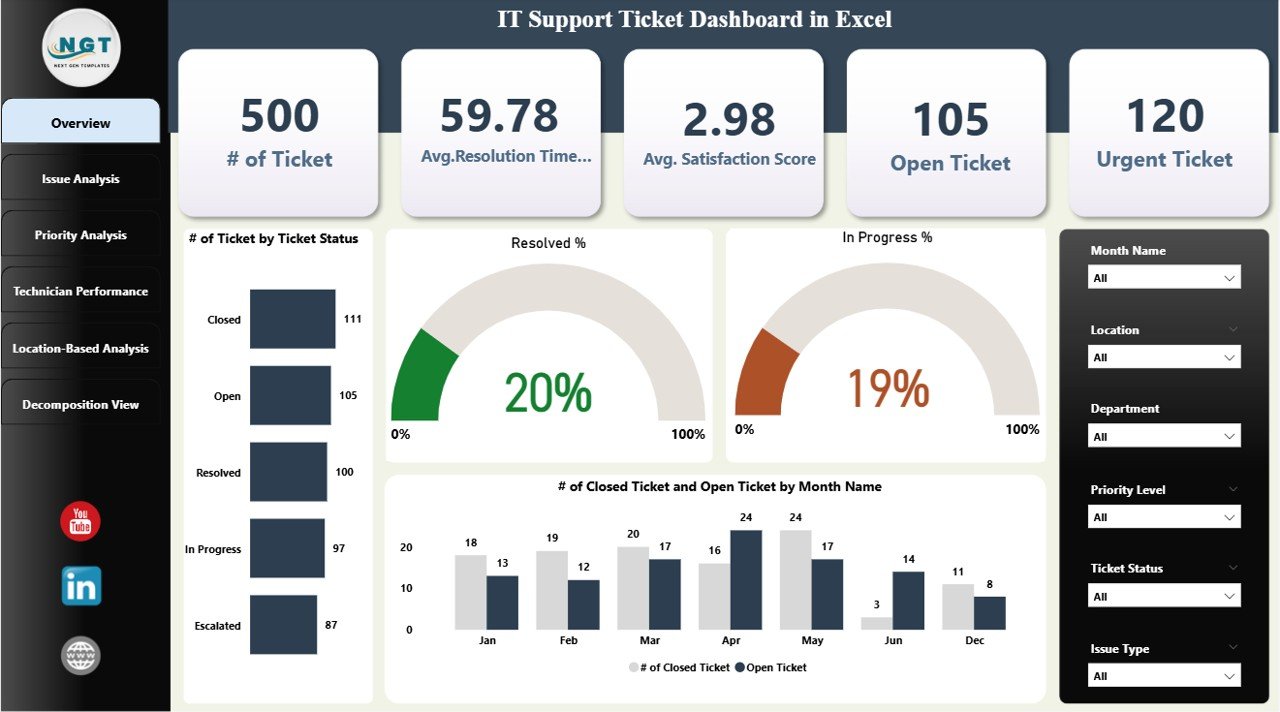
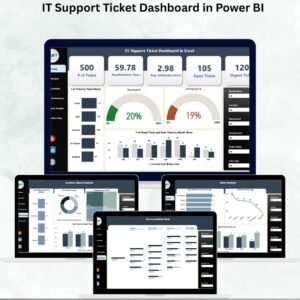
Cards: Number of Tickets, Avg. Resolution Time, Avg. Satisfaction Score, Open Tickets, Urgent Tickets.
Charts: Tickets by Status (Open, In Progress, Closed), Resolved %, In Progress %, and Monthly Ticket Trends.
This page helps IT leaders quickly identify system health and potential bottlenecks.
2. Issue Analysis Page
Understand the types of issues being reported.
Satisfaction scores by issue type
Resolution rate (%) by issue type
Open and urgent tickets by category
This ensures recurring or critical issues are addressed effectively.
3. Priority Analysis Page
Track tickets based on urgency.
Ticket count by priority level (High, Medium, Low)
Avg. Satisfaction Score by priority
In-progress vs closed tickets by priority
Helps IT teams prioritize urgent issues for faster resolution.
4. Technician Performance Page
Monitor workload and efficiency of IT staff.
Resolution rates by technician
Ticket volume assigned to each technician
In-progress tickets by staff
This allows managers to recognize high performers and balance workloads.
5. Location-Based Analysis Page
Evaluate IT support performance across offices or departments.
Ticket volume by location
Avg. Satisfaction Score by location
Open and urgent tickets by site
This ensures consistent IT support across multiple locations.
6. Decomposition View Page
Drill down into tickets for root-cause analysis.
Interactive decomposition tree to analyze tickets by Issue Type, Priority, Technician, or Location
Helps uncover hidden trends and systemic issues.
📦 What’s Included
A fully functional Power BI .pbix dashboard file
Pre-built Overview, Analysis, and Performance pages
Sample dataset for quick demo testing
Structured data model ready for integration with your ITSM system
⚙️ How to Use
Open in Power BI Desktop and load the .pbix file.
Input your IT ticket data or connect to your ITSM tool (e.g., Jira, ServiceNow).
Explore insights using interactive filters and drill-downs.
Share with stakeholders via Power BI Service.
Customize metrics and visuals as per organizational goals.
👥 Who Can Benefit
IT Managers – Monitor performance and SLA compliance.
Support Teams – Track workload and prioritize urgent issues.
Business Leaders – Gain insights into IT’s contribution to operational efficiency.
Multi-location Enterprises – Compare support performance across offices.
✅ Advantages
Centralized, real-time ticket analysis
Tracks resolution time, satisfaction, and workloads
Improves prioritization of urgent issues
Helps balance technician workloads
Supports proactive decision-making
🚀 Opportunities for Improvement
Integrate with Jira, ServiceNow, or Zendesk for real-time ticket syncing
Add SLA compliance metrics for performance benchmarking
Use forecasting to predict peak ticket volumes
Incorporate AI sentiment analysis for richer feedback insights
🏆 Best Practices
Update ticket data regularly
Monitor technician workload weekly
Review issue and priority trends monthly
Use decomposition view for root-cause analysis
📌 Conclusion
The IT Support Ticket Dashboard in Power BI is a powerful tool for organizations seeking to optimize IT support operations. By providing real-time insights into ticket trends, technician performance, and resolution efficiency, it empowers managers to make smarter decisions, enhance user satisfaction, and ensure smoother business continuity.
📌 Click here to read the detailed blog post
Watch the step-by-step video Demo:
📺 Visit our YouTube channel to learn step-by-step tutorials.
Compatibility and Requirements
- Opens in Power BI Desktop, which is free. Microsoft explains the install in Get Power BI Desktop.
- The download is a .pbix file with a sample dataset, so you can explore every page before loading your own tickets.
- To share reports with others you can publish them to the Power BI Service.
Frequently Asked Questions
Which pages does the dashboard include?
Six pages: Overview, Issue Analysis, Priority Analysis, Technician Performance, Location-Based Analysis and a Decomposition View.
What does the Overview page show?
Cards for number of tickets, average resolution time, average satisfaction score, open tickets and urgent tickets, plus tickets by status and a monthly ticket trend.
Can I connect it to my ticketing tool?
Yes. You can enter your ticket data or connect the data model to an ITSM tool such as Jira or ServiceNow.
How do I find the cause of recurring tickets?
Use the Decomposition View. It breaks tickets down by issue type, priority, technician or location.
Is there an Excel version?
Yes. The IT Support Ticket Dashboard in Excel covers the same job in Excel.
Related IT Support Templates
- IT Support Ticket Dashboard in Excel: the same dashboard in Excel
- IT Support Ticket Dashboard in Google Sheets: the same dashboard in Google Sheets
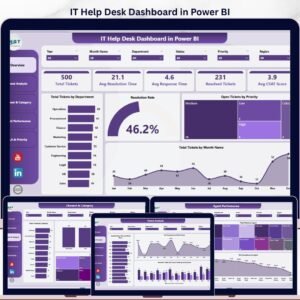
- IT Help Desk Dashboard in Power BI: help desk reporting in Power BI
- IT Support Request Tracker in Google Sheets: log support requests as they come in
- IT Manager & CISO Toolkit: 10 IT templates in one download
Browse all Power BI dashboards or the Excel IT templates.

















Reviews
There are no reviews yet.