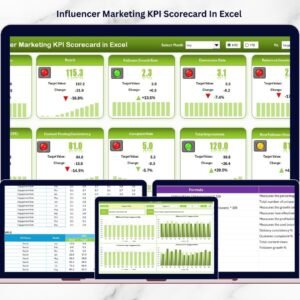
Influencer marketing is no longer just about likes and followers — it is about measurable performance and real business results. Brands invest heavily in influencer collaborations, yet many marketing teams still struggle to track campaign success clearly. Data stays scattered across platforms, reports become confusing, and decision-making turns into guesswork.What if you could monitor influencer performance, compare targets, analyze trends, and measure ROI — all inside one simple Excel dashboard?That is exactly what the Influencer Marketing KPI Scorecard in Excel delivers.This ready-to-use Excel template transforms influencer campaign data into structured insights. Instead of manually preparing reports, you can instantly evaluate KPIs, track performance trends, and make smarter marketing decisions using a centralized scorecard system.
Whether you manage influencer campaigns for a brand, agency, or e-commerce business, this tool helps you move from assumptions to data-driven marketing success.
🚀 Key Feature of Influencer Marketing KPI Scorecard In Excel
✅ Interactive KPI Scorecard dashboard for quick performance evaluation
✅ Compare Actual vs Target results instantly
✅ Month-to-Date (MTD) and Year-to-Date (YTD) analysis options
✅ Dynamic dropdown selections for flexible reporting
✅ Color-coded performance indicators for instant insights
✅ Trend analysis charts with previous year comparison
✅ Structured KPI monitoring system
✅ Beginner-friendly Excel interface
✅ Fully customizable KPIs based on campaign goals
✅ Automated updates across dashboard visuals
This powerful structure helps marketing teams understand campaign performance at a glance.

📦 What’s Inside the Influencer Marketing KPI Scorecard In Excel
The template includes four professionally designed worksheets, each serving a specific analytical purpose:
1️⃣ Scorecard Sheet – Performance Overview
Monitor up to 10 KPIs in one screen with visual indicators and performance comparison tools.
2️⃣ KPI Trend Sheet – Advanced Analysis
Analyze KPI performance trends dynamically using charts that compare Actual, Target, and Previous Year values.
3️⃣ Input Data Sheet – Easy Data Entry
Enter campaign data and targets quickly. All visuals update automatically.
4️⃣ KPI Definition Sheet – KPI Documentation
Store KPI formulas, definitions, units, and classifications for consistent understanding across teams.
Together, these sheets create a complete influencer performance monitoring system.
⚙️ How to Use the Influencer Marketing KPI Scorecard In Excel
Using the template requires no technical expertise. Simply follow these steps:
1️⃣ Define KPIs inside the KPI Definition sheet
2️⃣ Enter campaign data and targets in Input Data
3️⃣ Select MTD or YTD analysis using dropdown menus
4️⃣ Review performance status on the Scorecard dashboard
5️⃣ Analyze trends using KPI Trend charts
6️⃣ Optimize influencer strategy based on insights
Within minutes, you can convert raw campaign data into actionable intelligence.
👥 Who Can Benefit from This Influencer Marketing KPI Scorecard
This template is ideal for professionals and organizations such as:
✔ Digital Marketing Agencies
✔ Influencer Marketing Managers
✔ Brand Marketing Teams
✔ Social Media Strategists
✔ E-commerce Businesses
✔ Startups & Growing Brands
✔ Marketing Analysts & Consultants
Anyone managing influencer campaigns can use this scorecard to improve visibility and performance tracking.
Unlike complex analytics software, Excel provides flexibility, accessibility, and powerful analysis capabilities without additional costs. This scorecard combines simplicity with professional analytics so teams can focus on strategy rather than reporting.
By implementing structured KPI monitoring, organizations gain clarity, improve campaign optimization, and maximize marketing ROI.
If you want to stop guessing and start measuring influencer success professionally, this template becomes your perfect solution.
Click here to read the Detailed blog post
Watch the step-by-step video tutorial:
Visit our YouTube channel to learn step-by-step video tutorials
Compatibility and Requirements
- Works in Microsoft Excel desktop (Excel 2016 or later, or Microsoft 365).
- You switch between MTD and YTD and pick the KPI for the trend charts from dropdowns. Microsoft explains them in Create a drop-down list.
Frequently Asked Questions
How many KPIs can I track on the scorecard?
The Scorecard sheet shows up to 10 KPIs on one screen, with color-coded indicators for Actual against Target.
Can I look at month-to-date and year-to-date results?
Yes. Use the dropdown menus on the Scorecard sheet to choose MTD or YTD analysis.
Does the template compare results with last year?
Yes. The KPI Trend sheet has charts that compare Actual, Target and Previous Year values for the KPI you select.
Where do I enter my campaign data?
Enter campaign data and targets on the Input Data sheet. The scorecard and the trend charts update from it.
Is there a dashboard version for influencer marketing?
Yes. See the Influencer Marketing KPI Dashboard in Excel, the Power BI version and the Google Sheets version.
Related Marketing KPI Templates
- Influencer Marketing KPI Dashboard in Excel: a dashboard view of influencer KPIs
- Influencer Marketing Dashboard in Excel: another Excel dashboard for influencer campaigns
- Digital Marketing KPI Scorecard in Excel: a scorecard for wider digital marketing KPIs
- Marketing KPI Scorecard in Excel: a general marketing scorecard
- Marketing KPI Scorecard in Google Sheets: the scorecard format in Google Sheets
Browse all Excel KPI dashboards or see the KPI Scorecard Mega Pack.